
AI Myself: أنشئ نسختك بالذكاء الاصطناعي
ماذا يعني AI Myself؟
يصف AI myself إنشاء نسخة AI منك: مقدم مبني على هيئتك الخاصة يمكنه تقديم نصوص مكتوبة في الفيديو. في Leadde، يتوفر هذا ضمن "أفاتاري" (My Avatars)، حيث يتم حفظ كل أفاتار تنشئه كإدخال مستقل. هذا أهم من العرض الأول، لأن العلامة التجارية الشخصية هي وجه يتعرف عليه الناس على مدار أشهر، وليس مجرد مقطع واحد.
موثوق به من قبل العلامات التجارية الرائدة عالمياً







مقاطع فيديو يقدمها أفاتار AI شخصي

تدريب على ثقافة الشركات
تتبنى GlobalPro Consulting قيمًا جوهرية مثل النزاهة، التميز، الابتكار، والالتزام بتحقيق قيمة مستدامة.

معمل نمو InsightX
حوّل بيانات المستخدم الموحدة إلى رؤى مدعومة بالذكاء الاصطناعي تُعزز قرارات نمو أكثر ذكاءً.
مقدمة الحل
يوضح البيع المرتكز على الحلول باستخدام PulseGuard، مع التركيز على تحديات العملاء، الأثر القابل للقياس، ورواية القصص القائمة على القيمة، لبناء الثقة وتكوين شراكات طويلة الأمد.

رحلة الانضمام
ابدأ دورك الجديد بثقة ووضوح ودعم من اليوم الأول.
لماذا Leadde مناسب لإنشاء نسخة AI منك
احتفظ بأكثر من مظهر واحد
حدّثه عندما تتغير
انقل علامتك التجارية إلى كل فيديو
طريقتان لبناء الشبه
كيف تنشئ نسخة AI منك
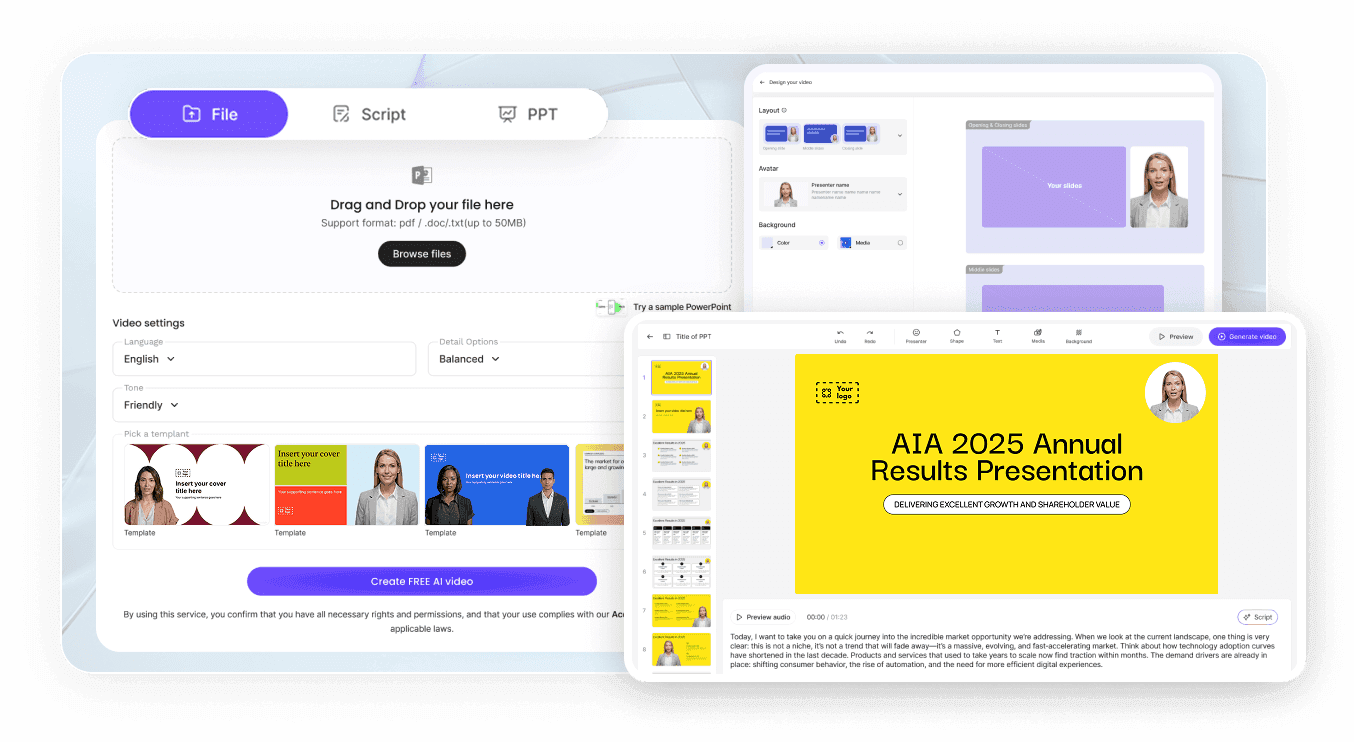
الخطوة 1: اختر صورتك المصدر
الخطوة 2: أنشئها وسمّها
الخطوة 3: أضف الصوت والنص
حالات استخدام AI Myself
ابنِ علامتك التجارية الشخصية
انشر باستمرار دون الحاجة لحجز يوم تصوير كل أسبوع. يبقى الوجه كما هو في كل مقطع، وهذا ما يجعل الجمهور يتعرف عليك.
قدّم في الفعاليات التي فاتتك
أرسل مقطعًا مسجلاً عندما لا تتمكن من السفر، يتم تقديمه بواسطتك بدلاً من أن يقرأه شخص آخر بصوت عالٍ.
اظهر في دوراتك التدريبية الخاصة
يبقى المتعلمون مع مدرب يمكنهم رؤيته. يصبح إنتاج الوحدة التالية مهمة كتابة بدلاً من مهمة جدولة.
أجب مجتمعك بالفيديو
الردود المكتوبة يتم تصفحها بسرعة. إجابة فيديو قصيرة من الشخص الذي يتابعونه تحمل وزنًا أكبر وتستغرق دقائق لإنتاجها.

الحفاظ على هويتك المميزة
شبه واحد عبر المشاريع
تخلّص من مظهر تجاوزته
صورتك، موافقتك
خصوصيتك تبقى خاصة
أفكار لـ AI Myself
فيديو ترحيبي للصفحة الرئيسية
مقاطع اجتماعية بتنسيق عمودي
مقاطع فيديو مصاحبة للرسائل الإخبارية
رسائل متابعة العملاء
نسخ لغوية من نفس المحاضرة
مقدمات للملفات الشخصية ومعرض الأعمال
الأسئلة الشائعة
يعني ذلك إنشاء نسخة منك مدعومة بالذكاء الاصطناعي يمكنها التقديم أمام الكاميرا: صورتك الشخصية مبنية كأفاتار، مقترنة بصوت، وتقدم النصوص التي تكتبها. يخزن Leadde كل أفاتار ضمن "أفاتاراتي" (My Avatars) لتتمكن من إعادة استخدامه في مشاريع متعددة.
صورة واحدة تكفي لإنشاء "أفاتار الصورة" (Photo Avatar)، بشرط أن تكون عالية الدقة وتشبهك اليوم. للحصول على تشابه أدق، راسل support@leadde.ai للاستفسار عن "أفاتار الاستوديو" (Studio Avatar)، الذي يتم بناؤه من مقطع قصير لك وأنت تتحرك وتتحدث.
يتم بناؤه من الصورة التي تقدمها، لذا فإن النتيجة تتبع تلك الصورة عن كثب. صورة حديثة، ذات إضاءة جيدة، أمامية، بدون قبعات أو نظارات شمسية أو فلاتر، تعطي أقرب تطابق، ويمكنك إنشاء أفاتار جديد إذا لم يكن الأول مثاليًا.
نعم. يتم تخزين كل أفاتار تنشئه كإدخال خاص به ضمن "أفاتاراتي" (My Avatars)، لذا يمكن أن يتواجد مظهر رسمي ومظهر مريح في نفس الوقت. تختار أيًا منهما يقدم كل نص عند إعداد المشروع، ولا يحل أحدهما محل الآخر.
نعم. إحدى الطرق هي كتابة النص التالي باللغة التي تحتاجها. والطريقة الأخرى هي فتح محادثة أنجزتها بالفعل وإنشاء مسودة مترجمة لها، سواء من المحرر أو صفحة المشاركة، مع خيار تحديد ما إذا كان النص على اللوحة سيرافق السرد الصوتي.
ينشئ Leadde صورًا من المطالبات والصور المرجعية ضمن ميزة "إنشاء بالذكاء الاصطناعي"، ويمكن وضع هذه الأصول داخل مشاريعك. ميزة الصورة الرمزية (الأفاتار) مصممة للعرض في الفيديو وليس للتصوير الفوتوغرافي الشخصي، لذا تعامل مع إنشاء الصور كمهمة منفصلة.
إنشاء أول صورة رمزية (أفاتار) لا يكلف شيئًا ضمن الفئة المجانية. بعد ذلك، رصيد واحد من النقاط يغطي الصور الرمزية، استنساخ الصوت، أدوات الذكاء الاصطناعي، وكل فيديو تقوم بإنشائه، مما يعني أن ما يجب أن تضعه في ميزانيتك هو مقاطع الفيديو وليس المظهر. تُنشر مخصصات الفئات ضمن صفحة الأسعار.
تُخزّن الصور الرمزية (الأفاتار) التي تنشئها ضمن "صور الأفاتار الخاصة بي" بدلاً من إضافتها إلى مكتبة القوالب الجاهزة التي يتصفحها المستخدمون الآخرون. تعمل "مساحة عمل الفريق للمؤسسات" بشكل مختلف: حيث يتم تجميع الصور الرمزية والأصوات والوسائط هناك، وبالتالي تحدد قائمة أعضاء الفريق من يمكنه الوصول إليها.
أنشئ نسختك المدعومة بالذكاء الاصطناعي
