
محول PowerPoint إلى فيديو بالذكاء الاصطناعي

حوّل PowerPoint إلى فيديوهات واضحة وجذابة

دليل التأهيل
حوّل مستندات الامتثال، أو بروتوكولات السلامة، أو الإرشادات التنظيمية إلى فيديوهات تدريبية منظمة ومعتمدة. يتولى أفاتار AI إرشاد الموظفين بوضوح عبر كل متطلب — مما يقلل المخاطر القانونية ويجعل فرقك جاهزة للتدقيق.

بروتوكولات الغرف النظيفة
توضح إرشادات السلوك والمتطلبات التشغيلية للغرف النظيفة، مما يضمن التزام الموظفين بالمعايير ويعزز كفاءة العمل وسلامته.

تدريب على تشغيل AR-700
يستعرض عملية تشغيل روبوت التجميع الدقيق AR-700 وإرشادات السلامة، مما يمكّن الموظفين من إتقان تقنيات التشغيل الصحيحة.

رؤى تسويقية
تثق به كبرى العلامات التجارية حول العالم







حوّل شرائح PowerPoint إلى فيديوهات، لا مجرد تسجيلات شاشة
من شرائح ثابتة إلى مشاهد فيديو منظمة
يحوّل Leadde محتوى الشرائح إلى مخطط فيديو منطقي، بدلاً من عرض كل شريحة كما هي تمامًا. يمكن أن تصبح الفقرات الطويلة سرداً موجزاً، ويمكن إبراز الأفكار المهمة بصرياً، ويمكن تقسيم كل موضوع إلى مشهد مخصص.
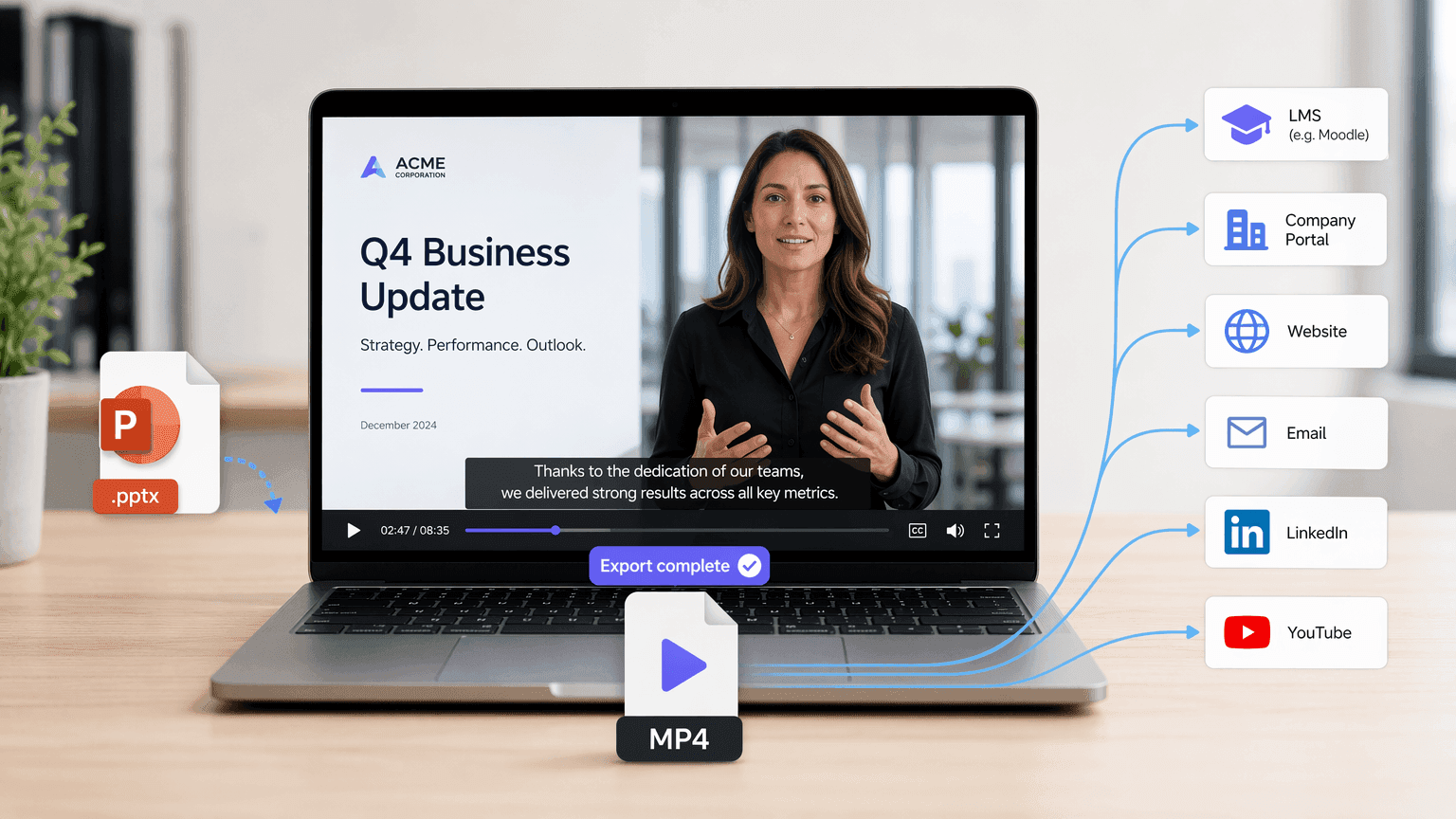
نزّل العرض التقديمي النهائي كفيديو MP4
بعد مراجعة المخطط والمشاهد التي تم إنشاؤها، أنشئ الفيديو الخاص بك ونزّل النتيجة النهائية كملف MP4. يسهّل تنسيق MP4 مشاركة فيديو عرضك التقديمي عبر نظام إدارة التعلم، أو بوابة الشركة، أو موقع الويب، أو حملة البريد الإلكتروني، أو منصة التواصل الاجتماعي، أو خدمة استضافة الفيديو.
لماذا تختار Leadde لتحويل PowerPoint إلى فيديو؟
تحويل ذكي للمحتوى
لا حاجة لتثبيت أي برنامج
مطابقة تلقائية للمرئيات والصور الرمزية
عولم عرضك التقديمي
كيف تحوّل PowerPoint إلى فيديو باستخدام Leadde
استخدم Slide Presenter لتحويل العروض التقديمية إلى فيديوهات. اتبع هذه الخطوات لتجربة محول PowerPoint إلى فيديو سلس.
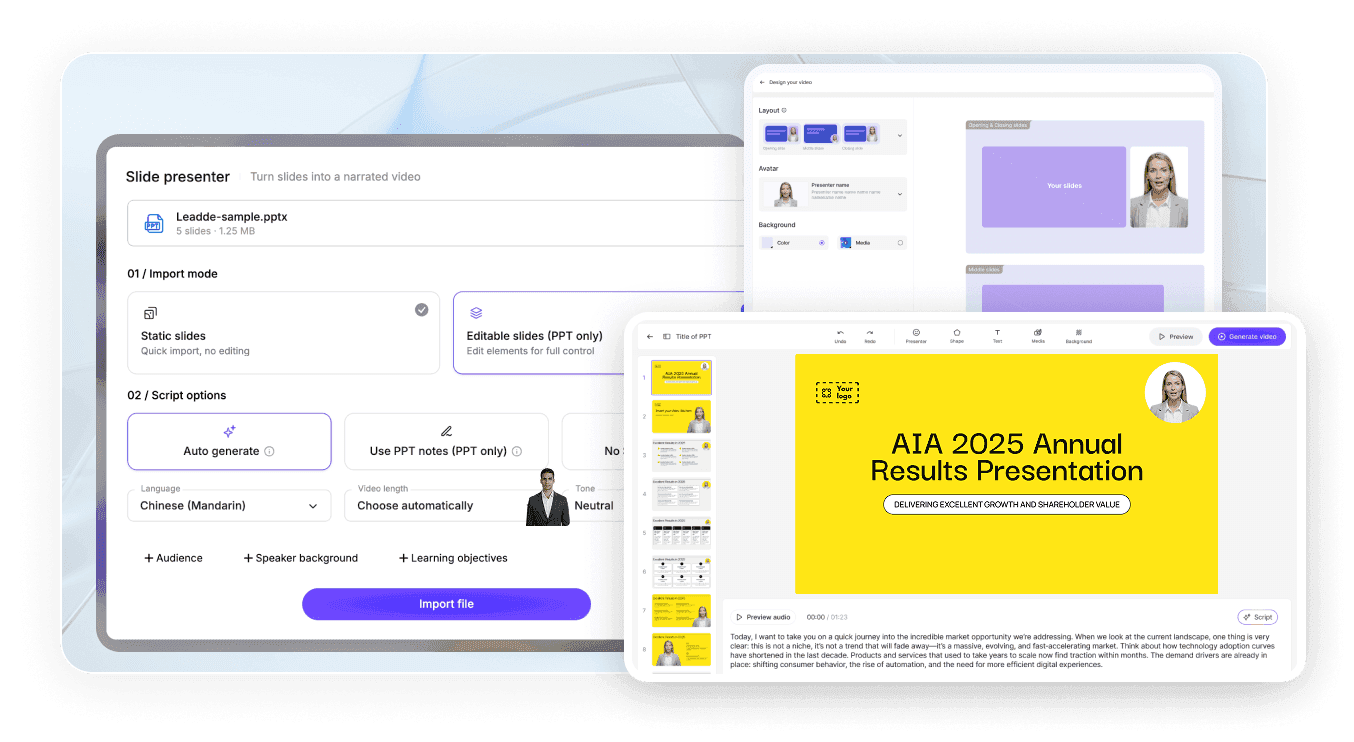
الخطوة 1: حمّل عرضك التقديمي
الخطوة 2: خصص الإخراج
الخطوة 3: أنشئ ونزّل
كيفية تحويل PowerPoint إلى فيديو مع صوت
يحتاج فيديو العرض التقديمي إلى سرد، وليس مجرد شرائح متحركة. ينشئ Leadde تعليقًا صوتيًا بالذكاء الاصطناعي من محتوى PowerPoint الخاص بك، لذا بدلاً من تسجيل الصوت شريحة تلو الأخرى، يمكنك مراجعة النص وتحريره قبل إنشاء الفيديو.
استخدم إعدادات السرد لـ:
اختر لغة مستهدفة
اضبط النبرة
اضبط مستوى التفاصيل
أعد الصياغة لجمهور معين
حوّل النقاط إلى جمل منطوقة كاملة
أضف ترجمات تتبع التعليق الصوتي
مفيد لتدريب الموظفين، التعليم عبر الإنترنت، عروض المبيعات، مقدمات المنتجات، والتواصل الداخلي.

أنشئ، حدّث، وشارك فيديوهات PowerPoint بكفاءة أكبر
تجربة مجانية لتحويل PowerPoint إلى فيديو
استخدم الطبقة المجانية من Leadde لتحميل ملف PPTX، وإنشاء مخطط، واختبار سير عمل إنشاء الفيديو قبل اختيار خطة مدفوعة.
حدّث الفيديوهات دون إعادة بناء العرض التقديمي
عندما تتغير المعلومات، افتح مشروع Leadde المحفوظ، عدّل النص أو محتوى المشهد، وأعد إنشاء الأقسام المتأثرة. لا تحتاج إلى تسجيل العرض التقديمي بأكمله مرة أخرى.
شارك الفيديوهات مع دردشة تفاعلية بالذكاء الاصطناعي
استضف الفيديو النهائي عبر Leadde واسمح للمشاهدين بطرح أسئلة حول محتوى العرض التقديمي من خلال لوحة دردشة تفاعلية.
أعد استخدام عرض تقديمي واحد لعدة جماهير
اضبط اللغة، ونبرة السرد، وتفاصيل النص، والأسلوب البصري لإنشاء إصدارات مختلفة من نفس العرض التقديمي للموظفين، والعملاء، والطلاب، والمديرين التنفيذيين، أو الفرق الدولية.
موثوق به من قبل المعلمين، والمديرين التنفيذيين، ومحترفي المبيعات
تجربة مجانية لتحويل PowerPoint إلى فيديو
تخلص من "الموت بـ PowerPoint"
تكرار سلس للمحتوى
دردشة فيديو تفاعلية
Webinar Replays
Product Demos
أنشئ عروض فيديو احترافية من PowerPoint
PowerPoint includes native options for recording or exporting a presentation as a video. These options are useful when you want to preserve the original slideshow exactly as it appears. Leadde is designed for a different workflow. Instead of only saving the original slideshow as a video, Leadde analyzes the slide content and reconstructs it into a new video format.

PowerPoint export or recording
- Preserves the original slide layout
- Often requires manual narration
- Primarily follows slide order
- Uses existing presentation visuals

Leadde AI conversion
- Rebuilds slides into video-oriented scenes
- Can generate AI voiceover
- Can restructure the content into an outline
- Can add new visuals, layouts, and avatars
المزيد من أدوات تحويل المستندات والمقالات إلى فيديو
An AI PowerPoint to video converter is a tool that reads the text and structure of a .pptx file, then automatically generates a narrated video with visuals, avatars, or voiceover based on that content.
Upload your .pptx file to an AI tool such as Leadde, select a target language, tone, and audience, review the AI-generated video outline, then export the finished narrated video as an MP4.
Yes, both PowerPoint's built-in export feature and third-party AI tools like Leadde, SlideSpeak, and Aspose.Slides can convert PPT and PPTX files directly into standard MP4 video files.
In PowerPoint, go to File → Export → Create a Video, choose your resolution and timing settings, then save the file directly as an MP4.
Yes, AI tools such as Leadde can automatically generate voiceover narration from your slide text or speaker notes in dozens of languages and voice styles.
Leadde does not preserve original PowerPoint animations or transitions; it rebuilds slide content into new AI-generated video scenes.
Yes, tools like Leadde offer free, browser-based PowerPoint-to-video conversion that requires no software installation or account for basic use.
Leadde accepts .pptx files up to 200 MB for upload and outputs the converted result as a standard MP4 video file.
Yes, PowerPoint's native File → Export → Create a Video feature produces a watermark-free MP4.
No, cloud-based AI tools like Leadde run entirely in your browser and require no software installation, though PowerPoint's own native export requires PowerPoint to be installed on your device.
Yes, PowerPoint offers native video export on macOS through File → Export, and browser-based AI tools like Leadde work on Mac since they don't depend on the operating system.
الأسئلة الشائعة
