
KI PowerPoint-zu-Video-Konverter

Verwandeln Sie PowerPoint in klare, fesselnde Videos

Onboarding-Anleitung
Verwandeln Sie Compliance-Dokumente, Sicherheitsprotokolle oder Regulierungsrichtlinien in strukturierte Zertifizierungsvideos. Ein KI-Avatar führt Mitarbeiter klar und verständlich durch jede Anforderung – das minimiert rechtliche Risiken und hält Teams auditbereit.

Reinraumprotokolle
Erläutert Verhaltensrichtlinien und Betriebsanforderungen für Reinräume, sorgt für die Einhaltung von Standards durch Mitarbeiter und steigert die Arbeitseffizienz und Sicherheit.

AR-700 Bedienungsschulung
Diese Schulung vermittelt die Bedienungsabläufe und Sicherheitsrichtlinien des AR-700 Präzisionsmontageroboters, damit Ihre Mitarbeiter die korrekten Betriebstechniken sicher beherrschen.

Marketing-Einblicke
Weltweit führende Marken vertrauen auf Leadde







PowerPoint-Folien in Videos verwandeln, nicht in Bildschirmaufnahmen
Von statischen Folien zu strukturierten Videoszenen
Leadde wandelt Folieninhalte in eine logische Videostruktur um, anstatt jede Folie exakt wie im Original anzuzeigen. Lange Absätze werden zu prägnanten Erzählungen, wichtige Ideen visuell hervorgehoben und jedes Thema in eine eigene Szene unterteilt.
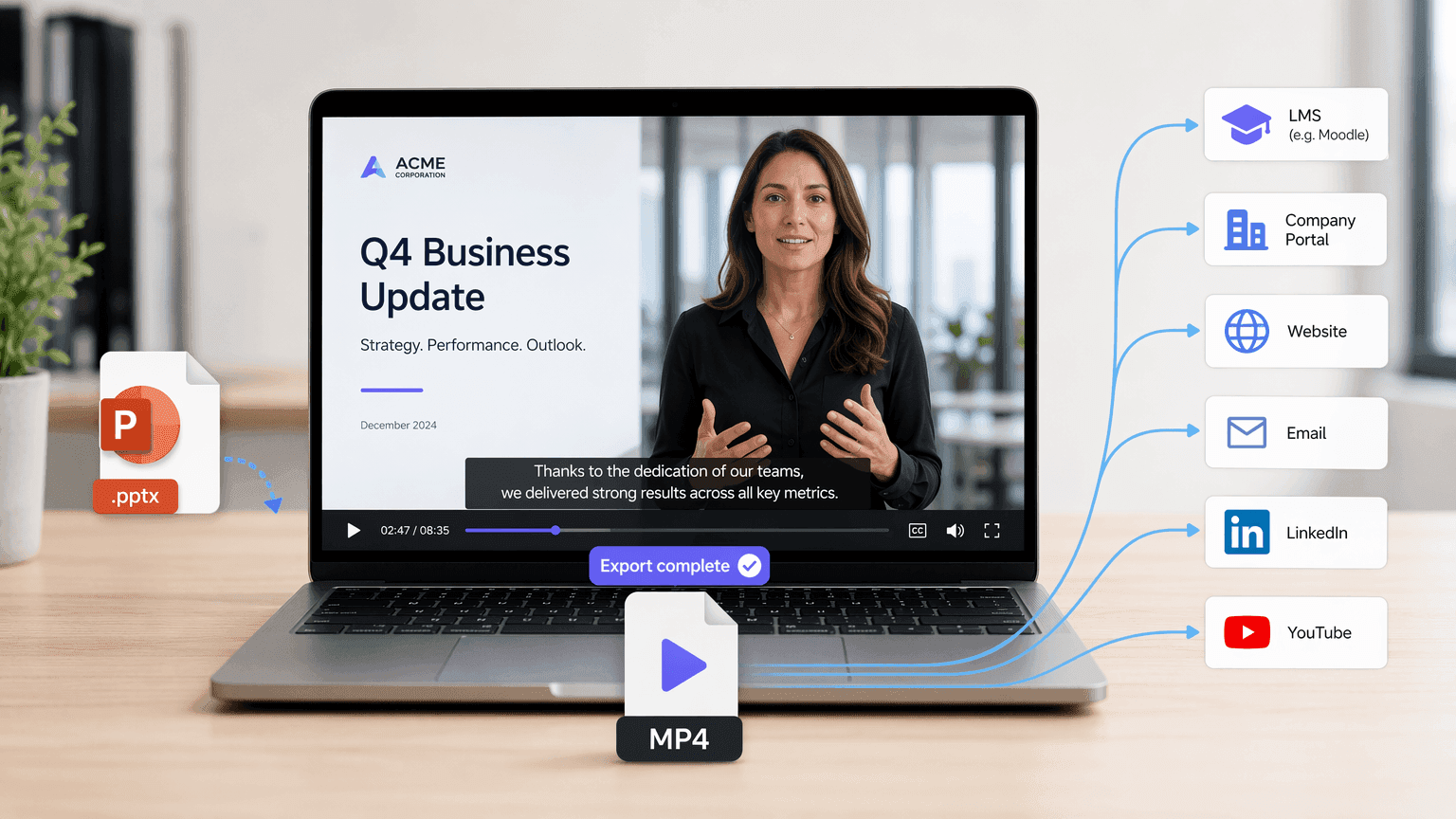
Laden Sie die fertige Präsentation als MP4-Video herunter
Nachdem Sie die generierte Gliederung und die Szenen überprüft haben, erstellen Sie Ihr Video und laden das fertige Ergebnis als MP4-Datei herunter. Das MP4-Format erleichtert das Teilen Ihres Präsentationsvideos über Lernmanagementsysteme, Unternehmensportale, Websites, E-Mail-Kampagnen, soziale Plattformen oder Video-Hosting-Dienste.
Warum Leadde für die PowerPoint-zu-Video-Konvertierung wählen?
Intelligente Inhaltsumwandlung
Keine Software-Installation erforderlich
Automatische Anpassung von Visuals & Avataren
Globalisieren Sie Ihre Präsentation
So verwandeln Sie PowerPoint mit Leadde in Videos
Nutzen Sie den Slide Presenter, um Präsentationen in Videos zu verwandeln. Befolgen Sie diese Schritte, um die nahtlose Konvertierung von PowerPoint in Video zu erleben.
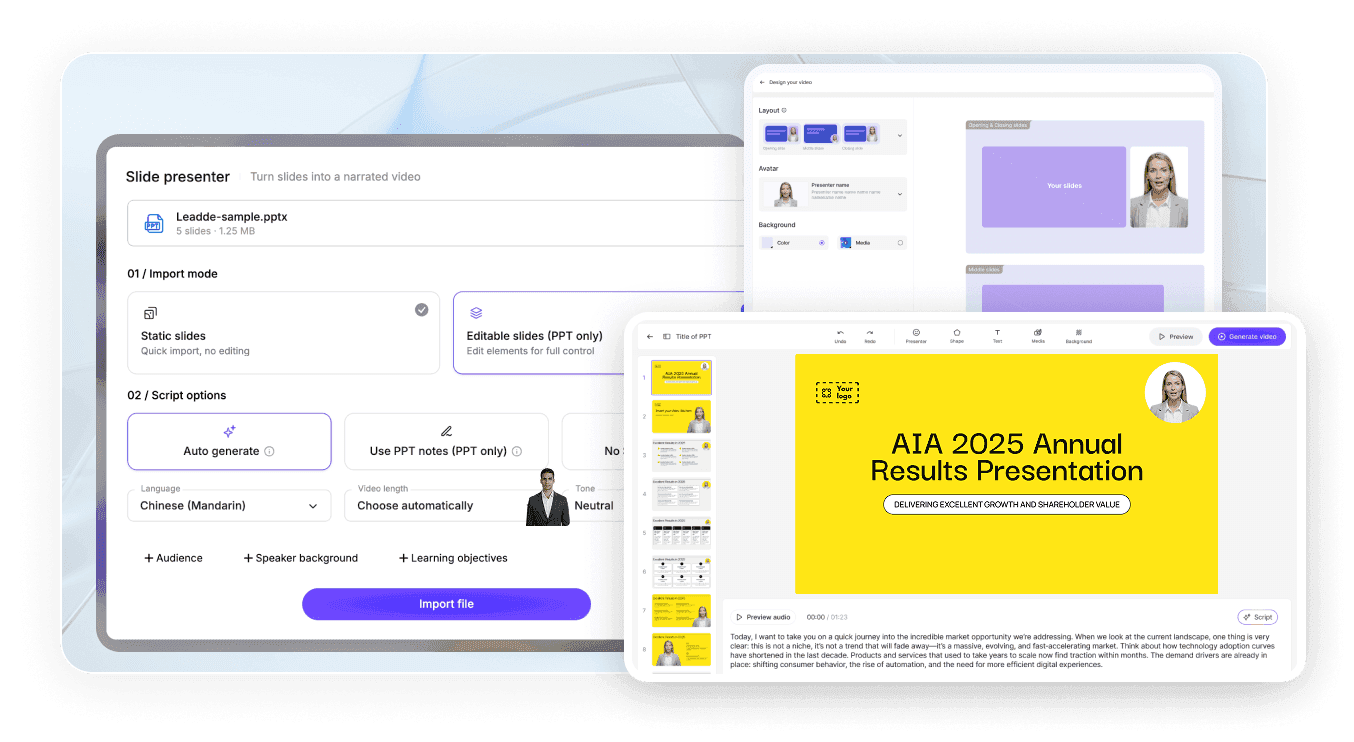
Schritt 1: Präsentation hochladen
Schritt 2: Ausgabe anpassen
Schritt 3: Generieren und herunterladen
PowerPoint mit Audio in Video umwandeln
Ein Präsentationsvideo benötigt eine Erzählung, nicht nur bewegte Folien. Leadde generiert eine KI-Stimme aus Ihrem PowerPoint-Inhalt. Anstatt Audio Folie für Folie aufzunehmen, überprüfen und bearbeiten Sie das Skript, bevor Sie das Video erstellen.
Nutzen Sie die Erzähleinstellungen, um:
Zielsprache auswählen
Tonfall festlegen
Detailgrad anpassen
Für ein bestimmtes Publikum umschreiben
Aufzählungspunkte in vollständige gesprochene Sätze umwandeln
Untertitel hinzufügen, die der Stimme folgen
Nützlich für Mitarbeiterschulungen, Online-Bildung, Verkaufspräsentationen, Produkteinführungen und interne Kommunikation.

PowerPoint-Videos effizienter erstellen, aktualisieren und teilen
Kostenlose PowerPoint-zu-Video-Testversion
Nutzen Sie Leadde's kostenlosen Tarif, um eine PPTX-Datei hochzuladen, eine Gliederung zu generieren und den Workflow der Videoerstellung zu testen, bevor Sie sich für einen kostenpflichtigen Plan entscheiden.
Videos aktualisieren, ohne die Präsentation neu zu erstellen
Wenn sich Informationen ändern, öffnen Sie das gespeicherte Leadde-Projekt, bearbeiten Sie das Skript oder den Szeneninhalt und generieren Sie die betroffenen Abschnitte neu. Sie müssen nicht die gesamte Präsentation erneut aufnehmen.
Videos mit interaktivem KI-Chat teilen
Hosten Sie das fertige Video über Leadde und ermöglichen Sie Zuschauern, Fragen zum Präsentationsinhalt über ein interaktives Chat-Panel zu stellen.
Eine Präsentation für mehrere Zielgruppen wiederverwenden
Passen Sie Sprache, Erzählton, Skriptdetails und visuellen Stil an, um verschiedene Versionen derselben Präsentation für Mitarbeiter, Kunden, Studenten, Führungskräfte oder internationale Teams zu erstellen.
Vertraut von Pädagogen, Führungskräften & Vertriebsprofis
Kostenlose PowerPoint-zu-Video-Testversion
„Death by PowerPoint“ eliminieren
Nahtlose Inhaltsaktualisierung
Interaktiver Video-Chat
Webinar Replays
Product Demos
Professionelle Videopräsentationen aus PowerPoint erstellen
PowerPoint includes native options for recording or exporting a presentation as a video. These options are useful when you want to preserve the original slideshow exactly as it appears. Leadde is designed for a different workflow. Instead of only saving the original slideshow as a video, Leadde analyzes the slide content and reconstructs it into a new video format.

PowerPoint export or recording
- Preserves the original slide layout
- Often requires manual narration
- Primarily follows slide order
- Uses existing presentation visuals

Leadde AI conversion
- Rebuilds slides into video-oriented scenes
- Can generate AI voiceover
- Can restructure the content into an outline
- Can add new visuals, layouts, and avatars
Weitere Dokument- & Artikel-zu-Video-Tools
An AI PowerPoint to video converter is a tool that reads the text and structure of a .pptx file, then automatically generates a narrated video with visuals, avatars, or voiceover based on that content.
Upload your .pptx file to an AI tool such as Leadde, select a target language, tone, and audience, review the AI-generated video outline, then export the finished narrated video as an MP4.
Yes, both PowerPoint's built-in export feature and third-party AI tools like Leadde, SlideSpeak, and Aspose.Slides can convert PPT and PPTX files directly into standard MP4 video files.
In PowerPoint, go to File → Export → Create a Video, choose your resolution and timing settings, then save the file directly as an MP4.
Yes, AI tools such as Leadde can automatically generate voiceover narration from your slide text or speaker notes in dozens of languages and voice styles.
Leadde does not preserve original PowerPoint animations or transitions; it rebuilds slide content into new AI-generated video scenes.
Yes, tools like Leadde offer free, browser-based PowerPoint-to-video conversion that requires no software installation or account for basic use.
Leadde accepts .pptx files up to 200 MB for upload and outputs the converted result as a standard MP4 video file.
Yes, PowerPoint's native File → Export → Create a Video feature produces a watermark-free MP4.
No, cloud-based AI tools like Leadde run entirely in your browser and require no software installation, though PowerPoint's own native export requires PowerPoint to be installed on your device.
Yes, PowerPoint offers native video export on macOS through File → Export, and browser-based AI tools like Leadde work on Mac since they don't depend on the operating system.
Häufig gestellte Fragen
