
AI 파워포인트 영상 변환
파워포인트를 명확하고 몰입도 높은 영상으로 전환하세요

온보딩 가이드
규정 준수 문서, 안전 수칙, 규제 지침을 체계적인 인증 비디오로 전환하세요. AI 아바타가 각 요구사항을 명확하게 안내하여 법적 위험을 줄이고 팀이 언제든 감사에 대비할 수 있도록 합니다.

클린룸 프로토콜
클린룸 행동 지침과 운영 요구사항을 명확히 제시하여, 직원들의 표준 준수를 보장하고 작업 효율성 및 안전성을 향상시킵니다.

AR-700 작동 교육
AR-700 정밀 조립 로봇의 작동 과정과 안전 지침을 안내하여, 직원들이 올바른 작동법을 익히고 숙련도를 높일 수 있도록 지원합니다.

마케팅 인사이트
세계 유수 브랜드가 신뢰하는 플랫폼







파워포인트 슬라이드를 단순 화면 녹화가 아닌, 영상으로 만드세요
정적인 슬라이드를 구조화된 영상 장면으로
Leadde는 모든 슬라이드를 보이는 그대로 보여주는 대신, 슬라이드 콘텐츠를 논리적인 영상 개요로 변환합니다. 긴 문단은 간결한 내레이션으로, 중요한 아이디어는 시각적으로 강조되며, 각 주제는 전용 장면으로 나눌 수 있습니다.
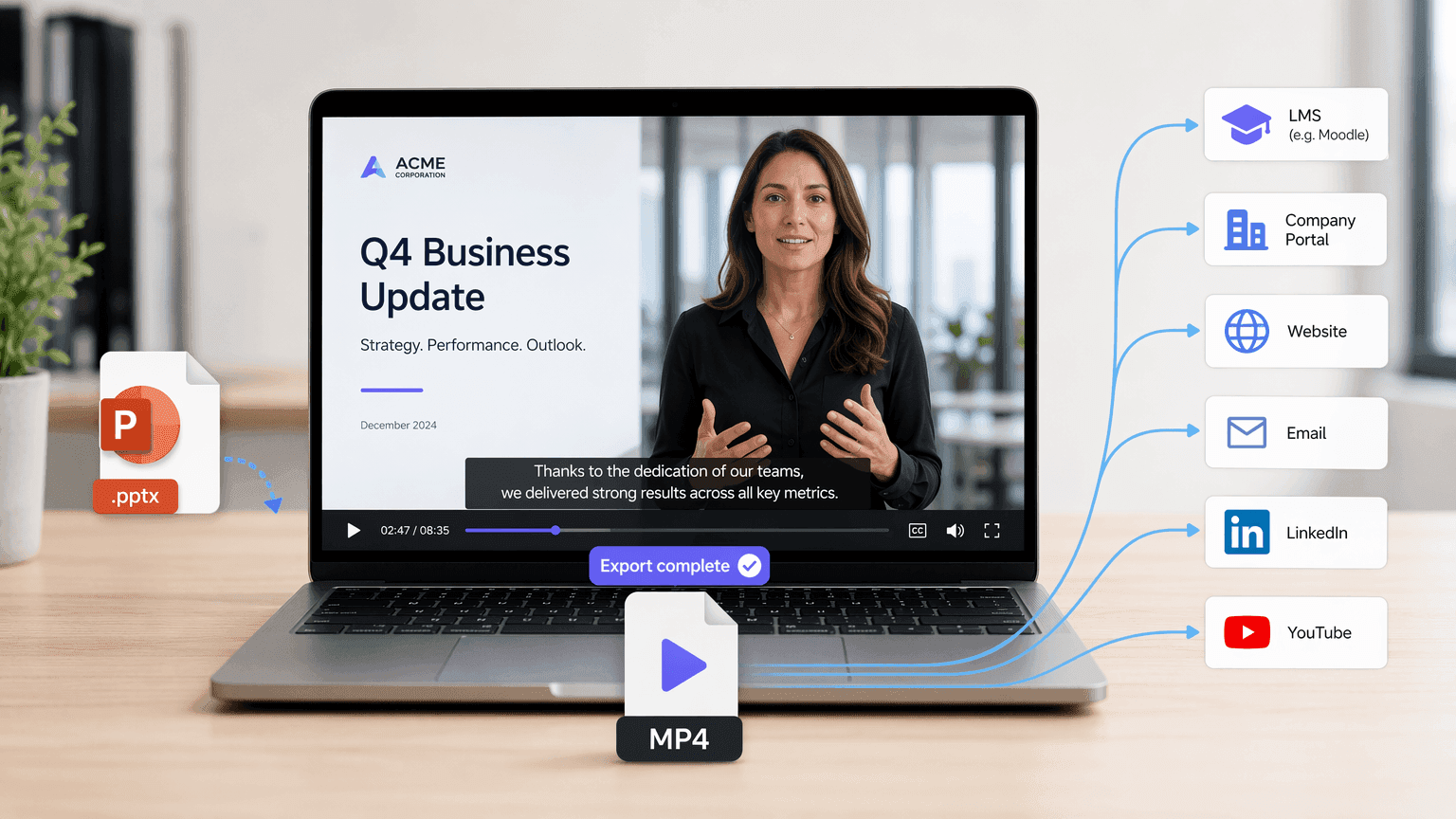
완성된 프레젠테이션을 MP4 영상으로 다운로드하세요
생성된 개요와 장면을 검토한 후, 영상을 제작하고 완성된 결과물을 MP4 파일로 다운로드하세요. MP4 형식은 학습 관리 시스템, 회사 포털, 웹사이트, 이메일 캠페인, 소셜 플랫폼 또는 영상 호스팅 서비스를 통해 프레젠테이션 영상을 쉽게 공유할 수 있도록 합니다.
파워포인트 영상 변환, 왜 Leadde를 선택해야 할까요?
지능형 콘텐츠 변환
소프트웨어 설치 불필요
시각 자료 및 아바타 자동 매칭
프레젠테이션을 글로벌화하세요
Leadde로 파워포인트를 영상으로 만드는 방법
슬라이드 발표자를 활용하여 프레젠테이션을 영상으로 전환하세요. 다음 단계를 따라 원활한 파워포인트 영상 변환을 경험해 보세요.
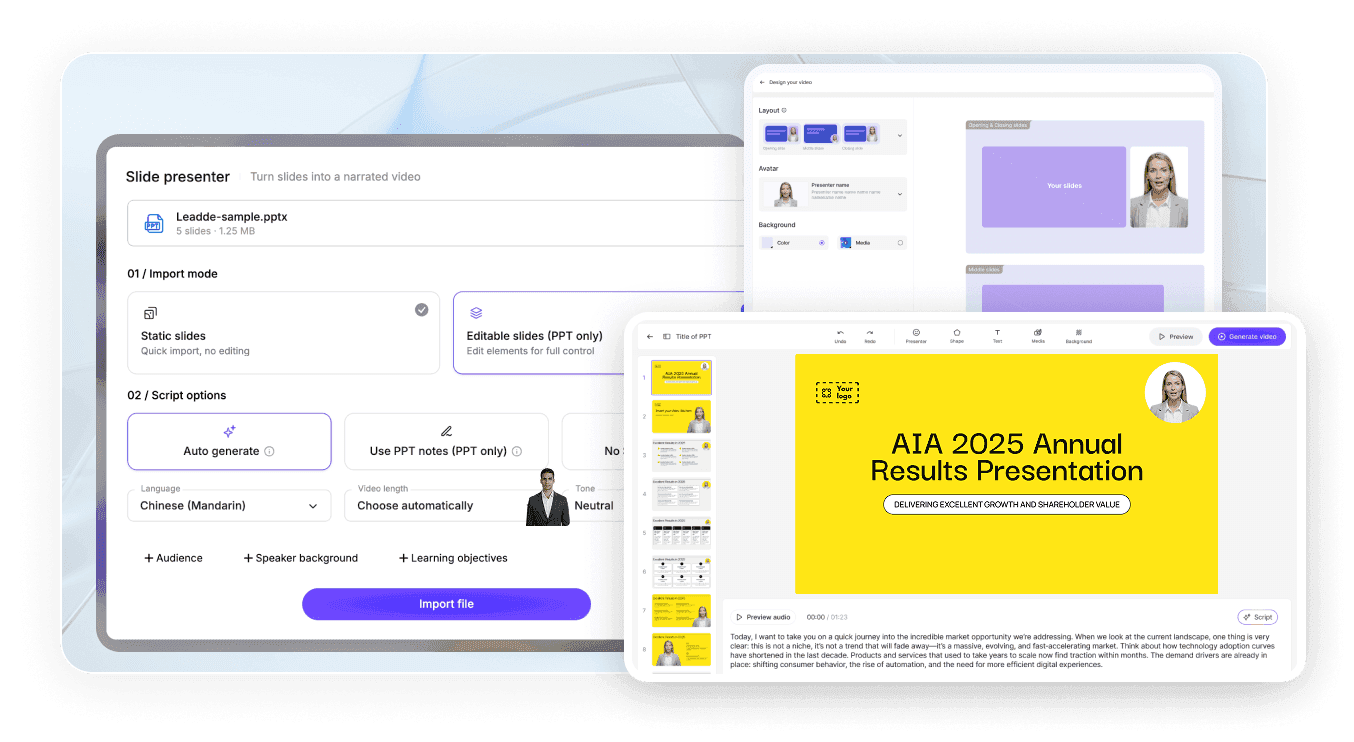
1단계 프레젠테이션 업로드
2단계 결과물 맞춤 설정
3단계 생성 및 다운로드
오디오를 포함한 파워포인트 영상을 만드는 방법
프레젠테이션 영상은 단순히 움직이는 슬라이드 이상으로 내레이션이 필요합니다. Leadde는 파워포인트 콘텐츠에서 AI 보이스오버를 생성하므로, 슬라이드별로 오디오를 녹음하는 대신 영상 제작 전에 스크립트를 검토하고 편집할 수 있습니다.
내레이션 설정을 통해 다음을 할 수 있습니다:
대상 언어 선택
어조 설정
세부 정보 수준 조정
특정 대상에 맞춰 다시 작성
글머리 기호를 완전한 문장으로 변환
보이스오버에 맞춰 자막 추가
직원 교육, 온라인 교육, 영업 자료, 제품 소개, 사내 커뮤니케이션 등에 유용합니다.

파워포인트 영상을 더 효율적으로 생성, 업데이트 및 공유하세요
무료 파워포인트 영상 변환 체험
Leadde의 무료 플랜을 사용하여 PPTX 파일을 업로드하고, 개요를 생성하며, 유료 플랜을 선택하기 전에 영상 제작 워크플로우를 테스트해보세요.
프레젠테이션을 다시 만들 필요 없이 영상 업데이트
정보가 변경되면 저장된 Leadde 프로젝트를 열고, 스크립트 또는 장면 콘텐츠를 편집한 다음, 해당 섹션만 다시 생성하세요. 전체 프레젠테이션을 다시 녹화할 필요가 없습니다.
인터랙티브 AI 채팅으로 영상 공유
완성된 영상을 Leadde를 통해 호스팅하고, 시청자들이 인터랙티브 채팅 패널을 통해 프레젠테이션 콘텐츠에 대해 질문할 수 있도록 허용하세요.
하나의 프레젠테이션을 여러 청중을 위해 재활용
언어, 내레이션 톤, 스크립트 세부 사항, 시각적 스타일을 조정하여 직원, 고객, 학생, 임원 또는 해외 팀을 위한 동일한 프레젠테이션의 다양한 버전을 생성하세요.
교육자, 임원 및 영업 전문가들이 신뢰하는 Leadde
파워포인트 영상 무료 체험
"파워포인트 지옥"을 없애세요
원활한 콘텐츠 반복 작업
인터랙티브 영상 채팅
Webinar Replays
Product Demos
파워포인트로 전문적인 영상 프레젠테이션 제작
PowerPoint includes native options for recording or exporting a presentation as a video. These options are useful when you want to preserve the original slideshow exactly as it appears. Leadde is designed for a different workflow. Instead of only saving the original slideshow as a video, Leadde analyzes the slide content and reconstructs it into a new video format.

PowerPoint export or recording
- Preserves the original slide layout
- Often requires manual narration
- Primarily follows slide order
- Uses existing presentation visuals

Leadde AI conversion
- Rebuilds slides into video-oriented scenes
- Can generate AI voiceover
- Can restructure the content into an outline
- Can add new visuals, layouts, and avatars
더 많은 문서 및 기사 영상 변환 도구
An AI PowerPoint to video converter is a tool that reads the text and structure of a .pptx file, then automatically generates a narrated video with visuals, avatars, or voiceover based on that content.
Upload your .pptx file to an AI tool such as Leadde, select a target language, tone, and audience, review the AI-generated video outline, then export the finished narrated video as an MP4.
Yes, both PowerPoint's built-in export feature and third-party AI tools like Leadde, SlideSpeak, and Aspose.Slides can convert PPT and PPTX files directly into standard MP4 video files.
In PowerPoint, go to File → Export → Create a Video, choose your resolution and timing settings, then save the file directly as an MP4.
Yes, AI tools such as Leadde can automatically generate voiceover narration from your slide text or speaker notes in dozens of languages and voice styles.
Leadde does not preserve original PowerPoint animations or transitions; it rebuilds slide content into new AI-generated video scenes.
Yes, tools like Leadde offer free, browser-based PowerPoint-to-video conversion that requires no software installation or account for basic use.
Leadde accepts .pptx files up to 200 MB for upload and outputs the converted result as a standard MP4 video file.
Yes, PowerPoint's native File → Export → Create a Video feature produces a watermark-free MP4.
No, cloud-based AI tools like Leadde run entirely in your browser and require no software installation, though PowerPoint's own native export requires PowerPoint to be installed on your device.
Yes, PowerPoint offers native video export on macOS through File → Export, and browser-based AI tools like Leadde work on Mac since they don't depend on the operating system.
자주 묻는 질문
