
AI PowerPoint動画変換

PowerPointを、明確で魅力的な動画へ

オンボーディングガイド
コンプライアンス文書、安全手順、規制ガイドラインを、体系的な認定ビデオに変換。AIアバターが各要件を従業員に分かりやすく解説し、法的リスクを低減、監査対応可能なチームを育成します。

クリーンルームプロトコル
クリーンルームにおける行動規範と作業要件を解説し、従業員の基準遵守を徹底。業務効率と安全性の向上に貢献します。

AR-700 操作トレーニング
AR-700精密組立ロボットの操作手順と安全ガイドラインを解説。従業員が適切な操作技術を習得し、安全かつ効率的な運用を実現します。

マーケティングインサイト
世界有数のブランドに選ばれているプラットフォーム







PowerPointスライドを、ただの画面録画ではなく「動画」へ
静的なスライドから、構成された動画シーンへ
Leaddeは、スライドをそのまま表示するのではなく、コンテンツを論理的な動画構成へと変換します。長い段落は簡潔なナレーションに、重要なアイデアは視覚的に強調され、各トピックは専用のシーンとして区切られます。
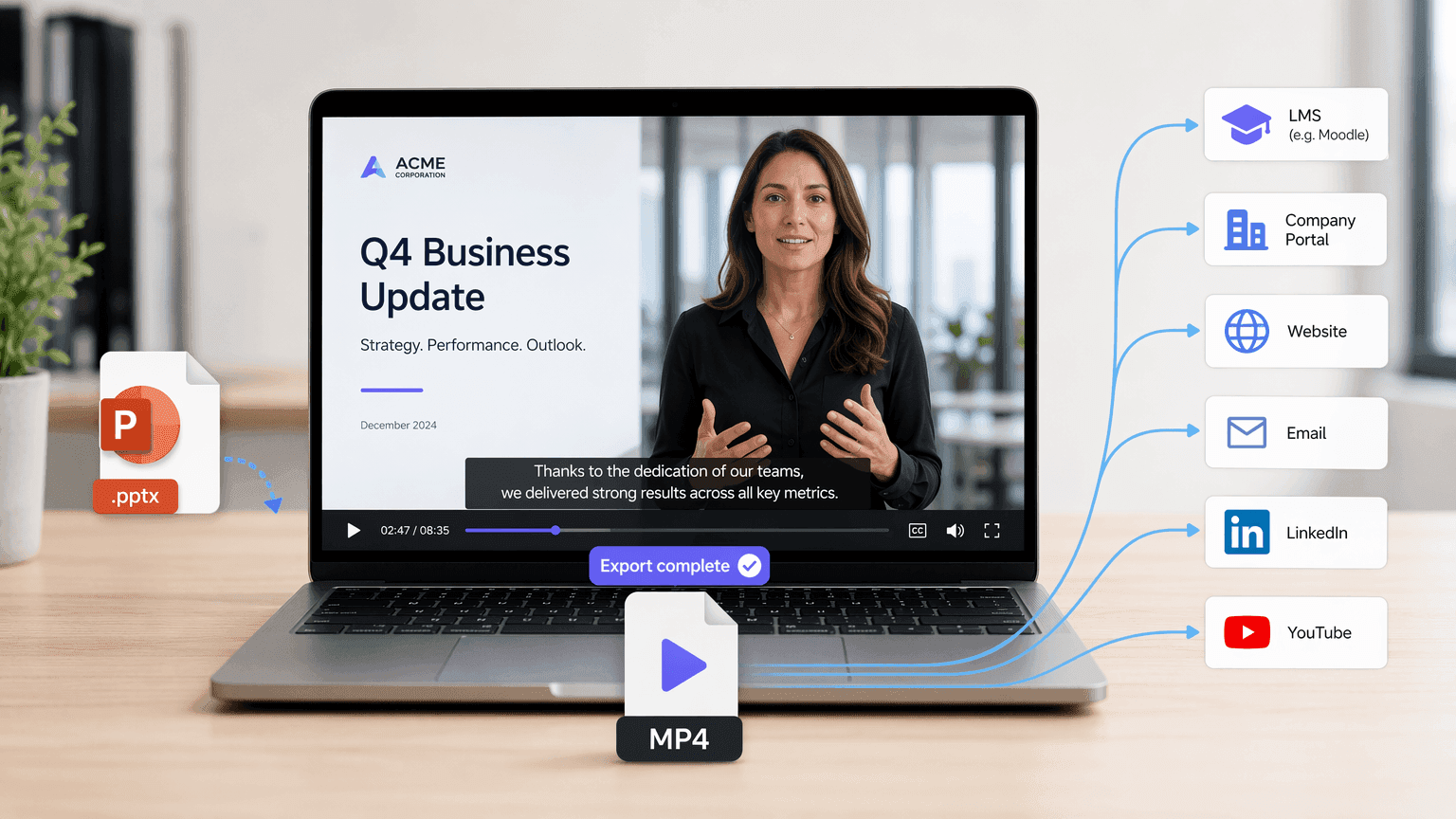
完成したプレゼンテーションをMP4動画でダウンロード
生成された構成とシーンを確認後、動画を作成し、完成した結果をMP4ファイルとしてダウンロードしてください。MP4形式なら、学習管理システム、社内ポータル、ウェブサイト、メールキャンペーン、ソーシャルプラットフォーム、動画ホスティングサービスなど、あらゆる場所でプレゼンテーション動画を簡単に共有できます。
PowerPoint動画変換にLeaddeを選ぶ理由
インテリジェントなコンテンツ変換
ソフトウェアのインストール不要
ビジュアルとアバターを自動マッチング
プレゼンテーションをグローバル化
LeaddeでPowerPointを動画にする方法
Slide Presenterを活用し、プレゼンテーションを動画に変換。以下のステップで、スムーズなPowerPoint動画変換を体験してください。
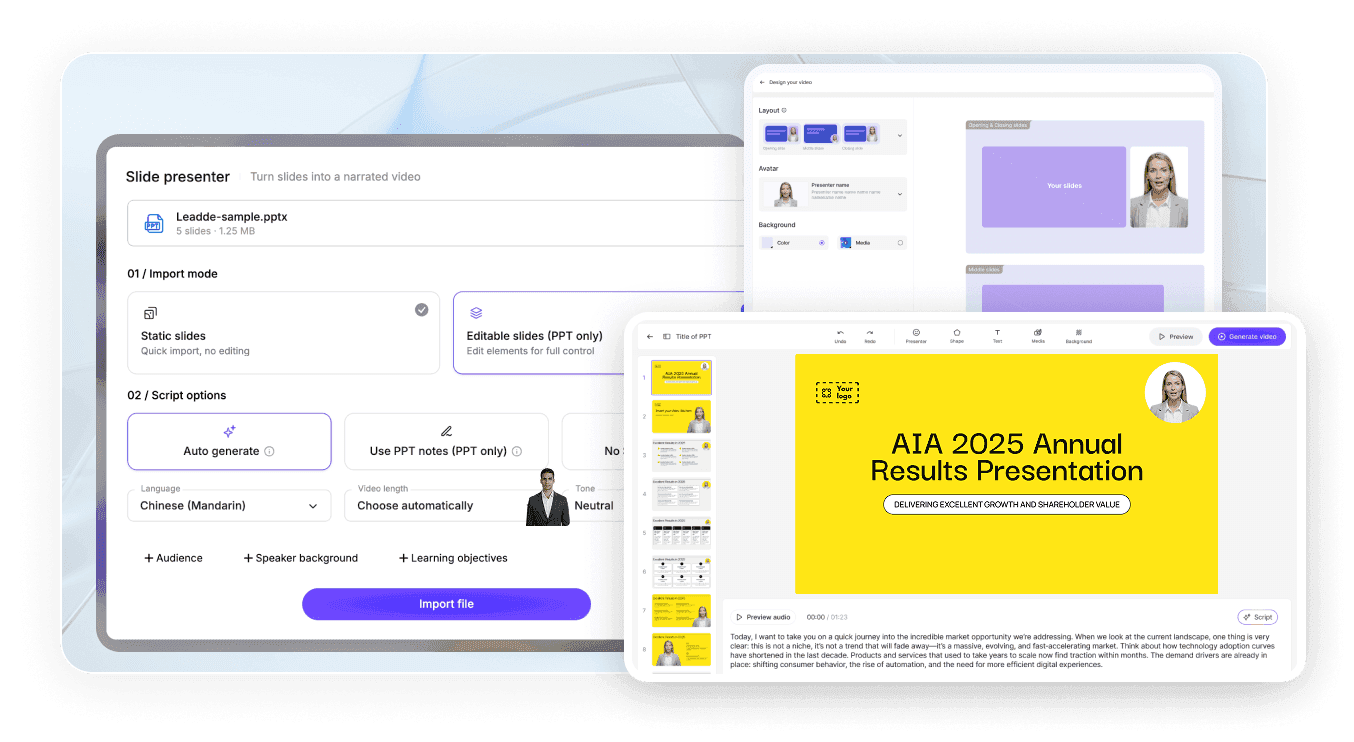
ステップ1:プレゼンテーションをアップロード
ステップ2:出力設定をカスタマイズ
ステップ3:生成とダウンロード
PowerPointを音声付き動画に変換する方法
プレゼンテーション動画には、スライドの動きだけでなくナレーションが不可欠です。LeaddeはPowerPointコンテンツからAIナレーションを生成するため、スライドごとに音声を録音する手間なく、動画作成前にスクリプトを確認・編集できます。
ナレーション設定でできること:
ターゲット言語を選択
トーンを設定
詳細度を調整
特定の視聴者向けに書き換え
箇条書きを完全な話し言葉の文章に変換
ナレーションに合わせた字幕を追加
従業員研修、オンライン教育、営業資料、製品紹介、社内コミュニケーションなどに活用できます。

PowerPoint動画の作成、更新、共有をより効率的に
PowerPoint動画変換の無料トライアル
Leaddeの無料プランでPPTXファイルをアップロードし、アウトラインを生成。有料プランを選択する前に、動画作成ワークフローを試すことができます。
プレゼンテーションを再構築せずに動画を更新
情報が変更された場合、保存済みのLeaddeプロジェクトを開き、スクリプトまたはシーンコンテンツを編集し、影響を受けるセクションを再生成するだけです。プレゼンテーション全体を再度録画する必要はありません。
インタラクティブAIチャットで動画を共有
完成した動画をLeaddeでホストし、視聴者がインタラクティブなチャットパネルを通じてプレゼンテーション内容について質問できるようにします。
1つのプレゼンテーションを複数の視聴者向けに再利用
言語、ナレーションのトーン、スクリプトの詳細度、ビジュアルスタイルを調整することで、従業員、顧客、学生、役員、国際チームなど、さまざまな視聴者向けに同じプレゼンテーションの異なるバージョンを作成できます。
教育者、経営者、営業プロフェッショナルから信頼されています
PowerPoint動画変換 無料トライアル
「PowerPointによる死」をなくす
シームレスなコンテンツ更新
インタラクティブ動画チャット
Webinar Replays
Product Demos
PowerPointからプロフェッショナルな動画プレゼンテーションを作成
PowerPoint includes native options for recording or exporting a presentation as a video. These options are useful when you want to preserve the original slideshow exactly as it appears. Leadde is designed for a different workflow. Instead of only saving the original slideshow as a video, Leadde analyzes the slide content and reconstructs it into a new video format.

PowerPoint export or recording
- Preserves the original slide layout
- Often requires manual narration
- Primarily follows slide order
- Uses existing presentation visuals

Leadde AI conversion
- Rebuilds slides into video-oriented scenes
- Can generate AI voiceover
- Can restructure the content into an outline
- Can add new visuals, layouts, and avatars
その他のドキュメント・記事動画化ツール
An AI PowerPoint to video converter is a tool that reads the text and structure of a .pptx file, then automatically generates a narrated video with visuals, avatars, or voiceover based on that content.
Upload your .pptx file to an AI tool such as Leadde, select a target language, tone, and audience, review the AI-generated video outline, then export the finished narrated video as an MP4.
Yes, both PowerPoint's built-in export feature and third-party AI tools like Leadde, SlideSpeak, and Aspose.Slides can convert PPT and PPTX files directly into standard MP4 video files.
In PowerPoint, go to File → Export → Create a Video, choose your resolution and timing settings, then save the file directly as an MP4.
Yes, AI tools such as Leadde can automatically generate voiceover narration from your slide text or speaker notes in dozens of languages and voice styles.
Leadde does not preserve original PowerPoint animations or transitions; it rebuilds slide content into new AI-generated video scenes.
Yes, tools like Leadde offer free, browser-based PowerPoint-to-video conversion that requires no software installation or account for basic use.
Leadde accepts .pptx files up to 200 MB for upload and outputs the converted result as a standard MP4 video file.
Yes, PowerPoint's native File → Export → Create a Video feature produces a watermark-free MP4.
No, cloud-based AI tools like Leadde run entirely in your browser and require no software installation, though PowerPoint's own native export requires PowerPoint to be installed on your device.
Yes, PowerPoint offers native video export on macOS through File → Export, and browser-based AI tools like Leadde work on Mac since they don't depend on the operating system.
よくある質問
