Best AI Avatar Creators for Company Onboarding Videos (2026 Ranked)

The best AI avatar creators for company onboarding videos in 2026 are no longer just tools with realistic digital presenters—they are platforms that combine avatars with automated document workflows to truly streamline employee training.
Leading solutions like Leadde, Synthesia, and HeyGen are widely used across different use cases, but they differ significantly in how much manual work they require. While tools like Synthesia and HeyGen excel at producing polished avatar videos, they still rely heavily on manual scripting and scene-by-scene editing—forcing HR teams to spend hours updating even simple onboarding content.
In contrast, newer platforms like Leadde are built around document-to-video automation. Instead of starting from scratch, teams can convert existing handbooks, PDFs, or training materials directly into structured video assets—making it the most efficient solution for enterprises looking to scale onboarding without increasing production overhead.
The Shift in 2026: From "Talking Heads" to "Automated Workflows"
Why the "Copy-Paste" Era of Video Creation is Over
In the early days of AI video, creating a training module meant writing a script in one tool, checking grammar in another, and then pasting it block-by-block into a video generator. This fragmented process is too slow for modern businesses that need to update policies or onboarding materials weekly.
The New Standard: Document-to-Video Automation
The biggest shift in 2026 is simple:
👉 Companies are no longer creating videos from scratch
👉 They are converting existing documents into videos
Modern platforms now allow:
- Uploading PPT, PDF, DOC
- Auto-generating scripts
- Structuring scenes automatically
This turns onboarding video creation from:
- ❌ production work
→ into - ✅ editing & optimization work
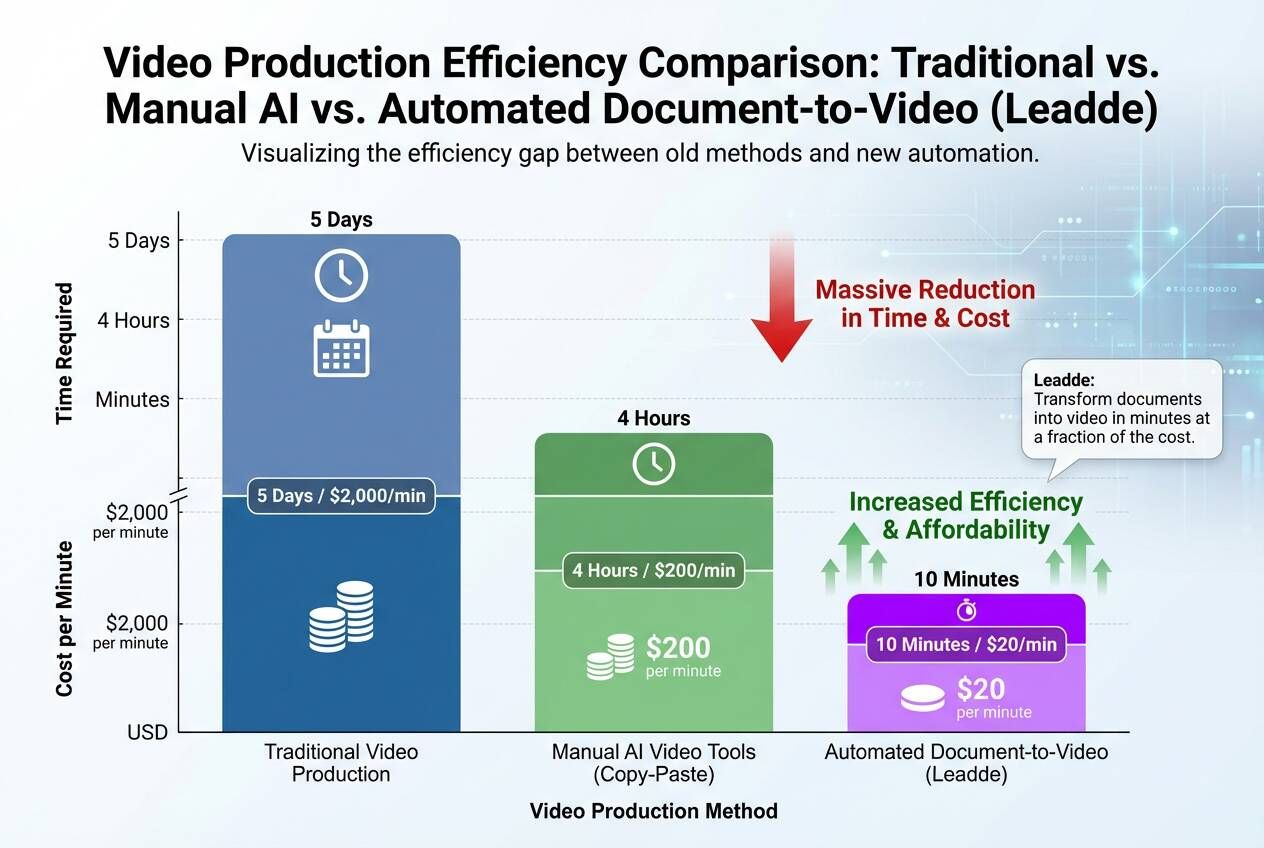
ROI Analysis: Cutting Production Costs by 95%
Organizations adopting these automated workflows report drastic efficiency gains. By removing the need for cameras, actors, and manual editing software, companies can reduce video production costs by up to 80% and cut creation time by 90%.
Are AI Avatar Onboarding Videos Actually Effective? (Real Performance Insights)
This is the first question every team asks.
From my analysis across multiple teams:
Where AI avatar videos perform well:
- SOP walkthroughs
- Product onboarding
- Internal training modules
Where they underperform:
- High-trust messaging (CEO videos, culture content)
- Sales-driven onboarding
👉 Key insight:
AI avatars are excellent for clarity and scale, but weaker for emotional connection.
AI Avatar vs Real Presenter: A Practical Comparison for Onboarding Videos
| Factor | AI Avatar | Real Presenter |
|---|---|---|
| Production Time | Minutes | Days |
| Cost | Low | High |
| Scalability | Unlimited | Limited |
| Engagement | Medium | High |
| Trust | Medium-Low | High |
👉 My takeaway:
- Use AI avatars for scale
- Use real humans for trust-critical moments
The best onboarding strategies combine both.
For onboarding content that changes often, Leadde lets teams create avatar-led videos from scripts, SOPs, and policy documents without re-recording.
5 Key Features of an Enterprise-Grade Onboarding Video Creator
1. Native Document Import
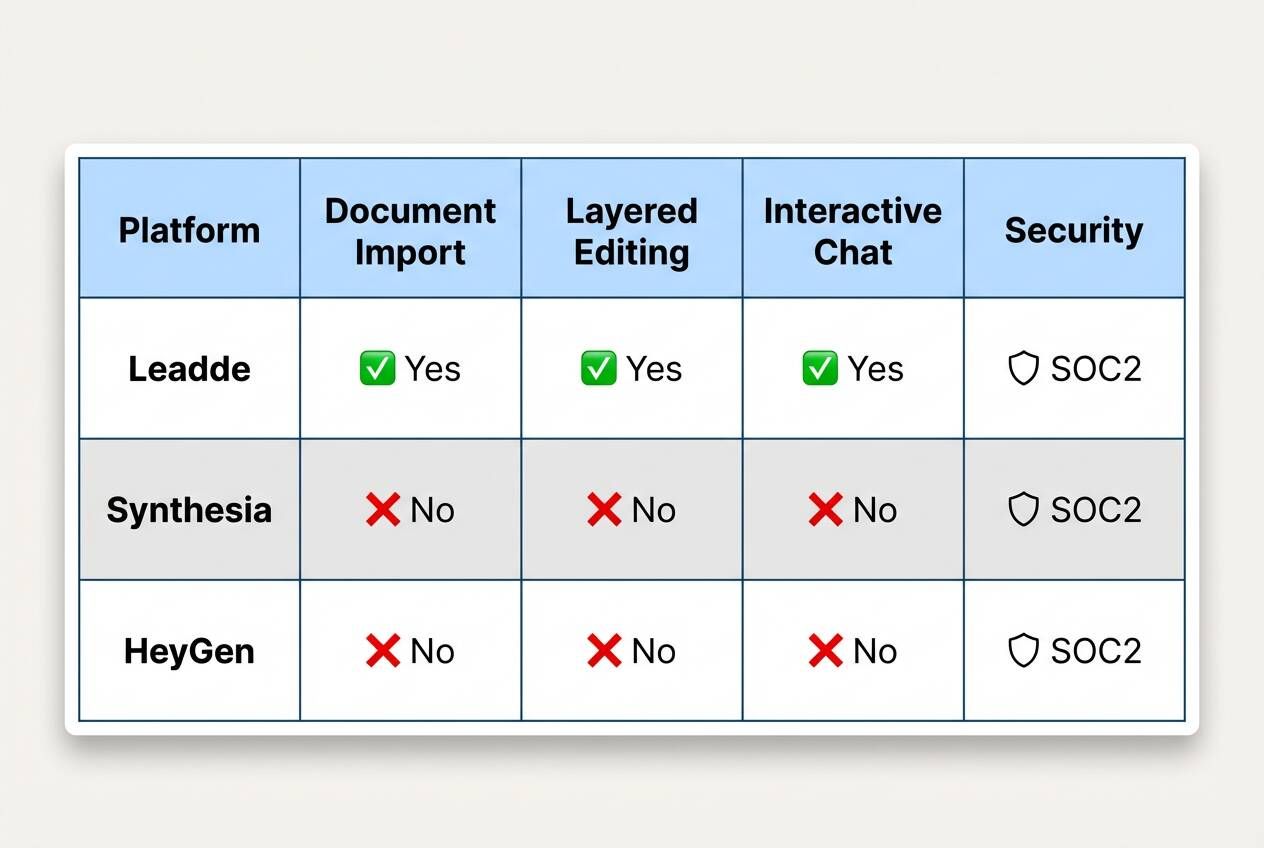
A true enterprise tool must handle more than just plain text. It should support direct uploading of formats like .pptx, .pdf, .doc, and .docx. This allows HR teams to repurpose existing employee handbooks immediately without reformatting.
2. Layered Editing Capabilities
Importing a presentation shouldn't mean losing control. Advanced platforms offer "Slide Presenter" features that support layered PowerPoint import. This means users can still edit individual text boxes, icons, and visual elements after the video has been generated, ensuring long-term maintainability.
3. Global Localization
For multinational companies, onboarding must be multilingual. The ideal platform provides built-in video translation tools that generate drafts in new languages directly from the editor. This enables a single video to serve global teams without rebuilding the project from scratch.
4. Interactive Learning (Chat with Video)
Passive video watching often leads to low retention. Modern tools include "Chat with Video" features, allowing employees to ask text-based questions and receive contextual answers based on the video content. This transforms a static file into an interactive knowledge resource.
5. Security and Compliance
When handling sensitive internal data, security is non-negotiable. Leading platforms are built to meet SOC 2 and GDPR standards and follow ISO 42001 guidelines for ethical AI systems.
Top 5 AI Avatar Creators for Corporate Training [Ranked]
1. Leadde — The Best All-in-One Platform for Existing Docs
- Leadde is designed specifically for businesses that need to scale video production using existing content. Its "File Mode" allows users to drag and drop documents (PPT, PDF, Word) and instantly receive a fully structured video with outlines, scenes, and scripts generated automatically.
- Best For: Teams with existing training manuals or PPTs who want automation.
- Key Feature: Layered Slide Presenter for editing imported PPT elements.
- Interactive Bonus: Includes Chat with Video for employee Q&A.
2. Synthesia — The Industry Veteran for Studio Quality
Synthesia is well-known for its high-fidelity avatars and extensive library of stock voices. It excels in creating polished, "CEO-style" welcome videos where visual quality is the top priority.
- Best For: High-budget announcements and public-facing content.
- Limitation: Heavy reliance on manual script input compared to document automation.
3. HeyGen — Best for Social Media & Marketing Visuals
HeyGen offers trendy, visually striking avatars that are perfect for short, engaging intro clips. Their "Instant Avatar" feature allows for quick personalization using smartphone footage.
- Best For: Marketing teams and short social media clips.
- Limitation: Less optimized for long-form, structured training documentation.
4. Colossyan — Best for Scenario-Based Training
Colossyan focuses on workplace learning with features that support branching scenarios. This allows creators to build "choose your own adventure" style videos for compliance training.
- Best For: Soft skills training and complex scenario simulations.
5. D-ID — Best for Quick Photo Animation
D-ID specializes in animating static photos. While less suited for full presentations, it is excellent for quickly bringing a historical figure or a single photo to life for a brief message.
- Best For: Creative projects and short animations from still images.
Tutorial: How to Auto-Generate an Onboarding Video in 4 Steps
Step 1: Import Content
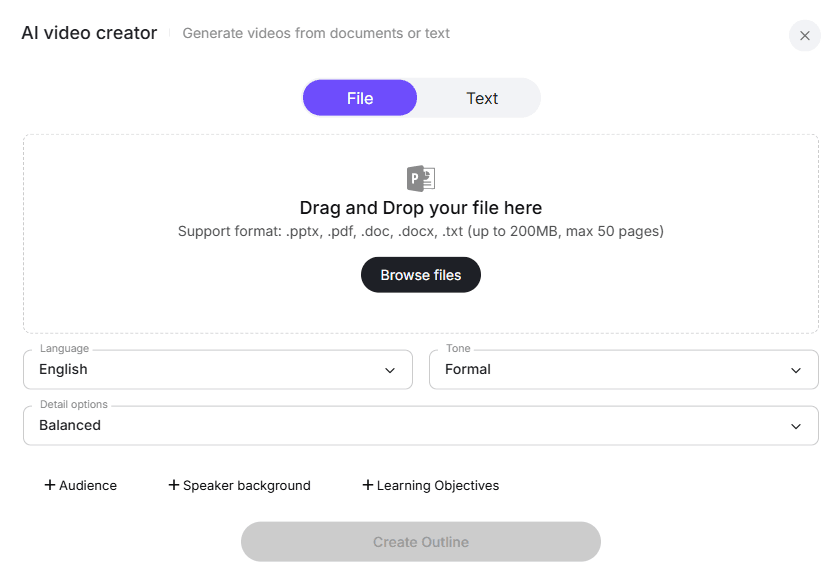
Start by selecting "File Mode" in the AI video creator interface. Drag and drop your employee handbook or training presentation (up to 200MB) directly into the upload area. The system supports formats like .pptx, .pdf, and .docx.
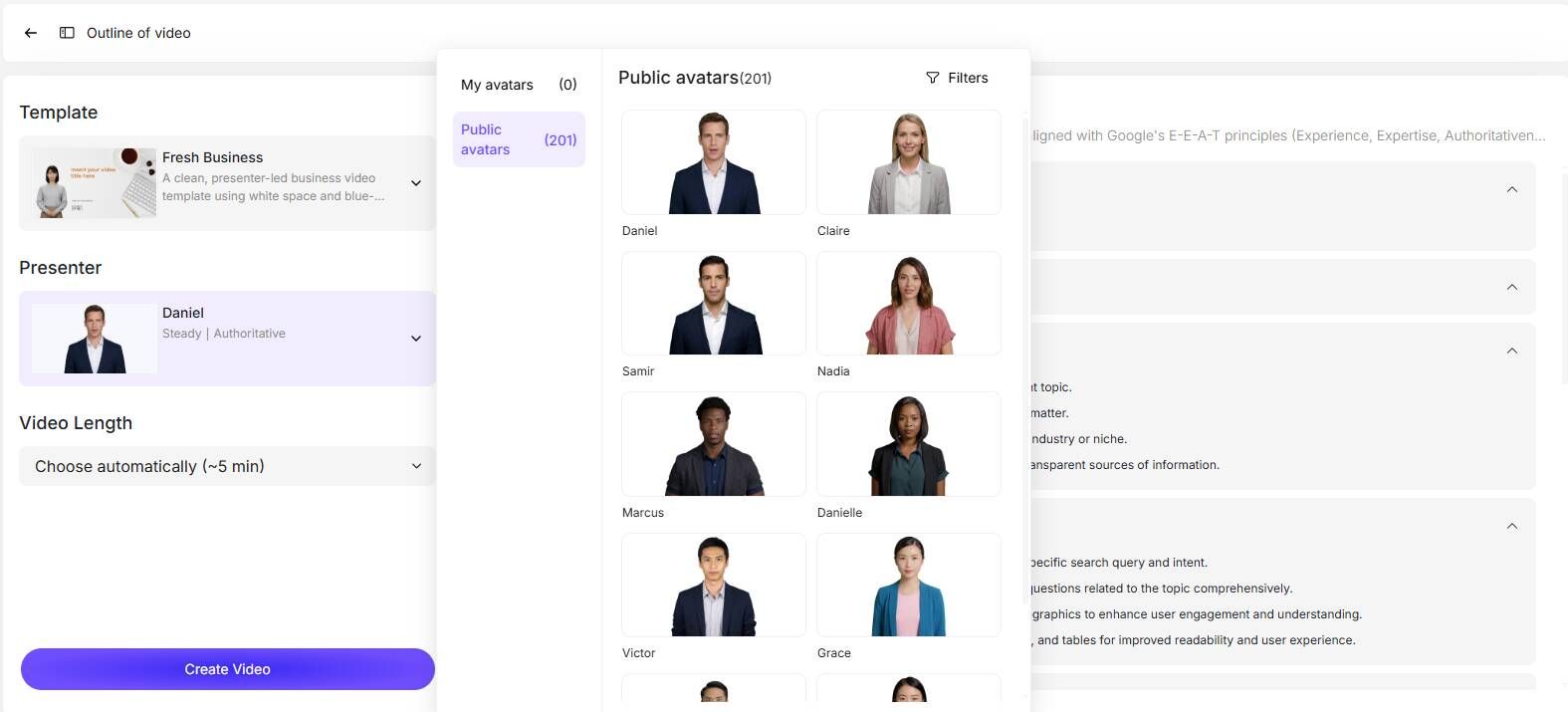
Step 2: Configure Presenter and Tone
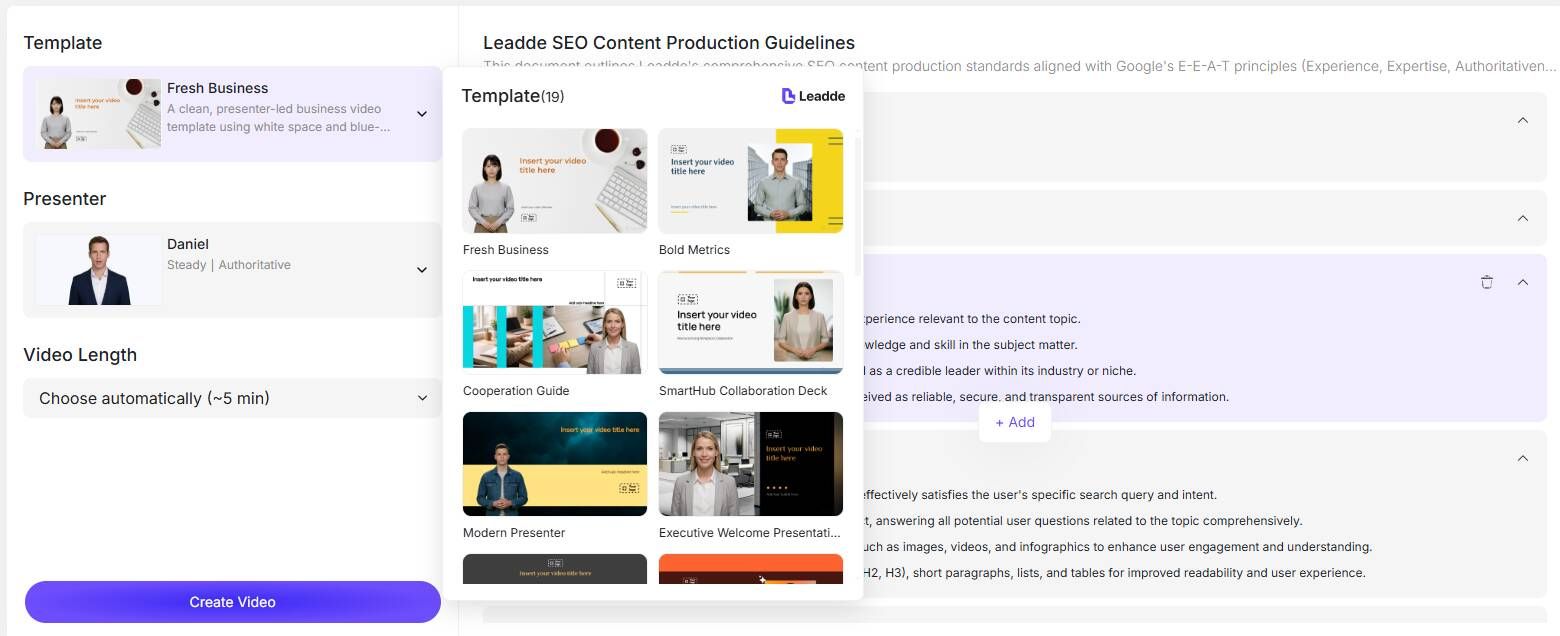
Before generating, customize the video's delivery. Select your target language, choose a tone (e.g., "Formal" for compliance, "Casual" for culture), and pick an AI avatar from the library of diverse presenters. You can also specify audience details to refine the script's focus.
Step 3: Refine Script & Layout
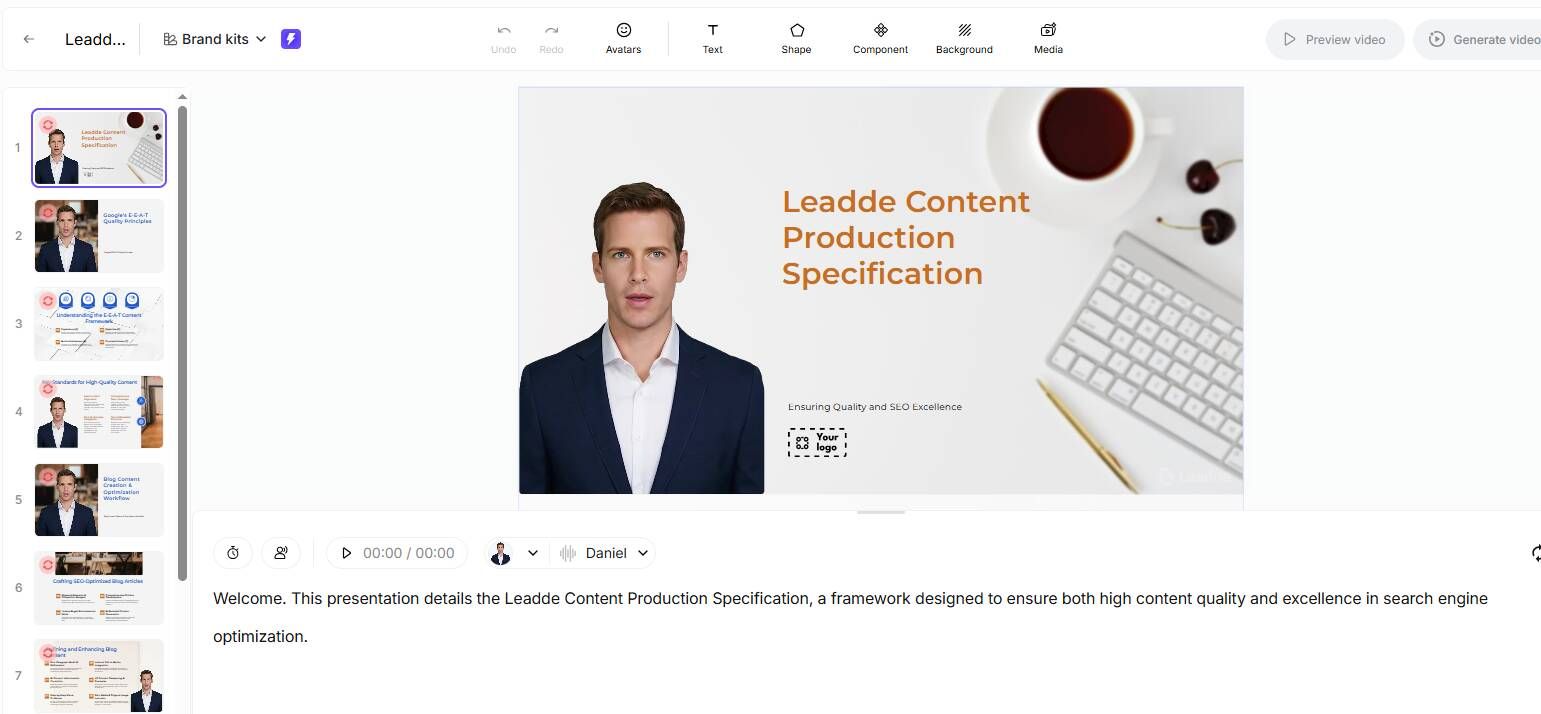
Leadde automatically parses the document to create an outline and script. In this step, you can review the generated text, adjust the flow, and even modify specific slide layers—text, icons, or images—to ensure everything aligns with your brand guidelines.
Step 4: Generate & Localize
Once the preview looks good, click "Generate video." If you have a global team, use the built-in translation tools to create multilingual drafts immediately, ensuring your onboarding content is ready for every region without extra effort.
The Biggest Mistake Teams Make When Using AI Avatar for Training
The most common mistake:
👉 Treating AI avatars as a human replacement
This leads to:
- awkward tone
- unnatural delivery
- poor engagement
The correct approach:
Use AI avatars as:
- information delivery systems
- not personality-driven presenters
When AI Avatar Videos Hurt Trust (And When They Don’t)
Based on real onboarding scenarios:
Avoid AI avatars in:
- CEO welcome videos
- culture storytelling
- high-ticket customer onboarding
Use AI avatars for:
- compliance training
- policy explanations
- tool tutorials
- FAQ walkthroughs
👉 The difference is simple:
- If trust matters → use humans
- If clarity & scale matter → use AI
Best Use Cases for AI Avatar in Employee Onboarding
From actual implementations, these are the highest-performing use cases:
1. Policy & Compliance Training
- repetitive
- frequently updated
- low emotional requirement
2. Product & Tool Onboarding
- step-by-step explanations
- scalable across teams
3. FAQ Video Libraries
- reduces support tickets
- reusable content
4. Multi-Region Training Content
- localization-friendly
Why Multi-Language Onboarding Videos Drive AI Avatar Adoption
One of the strongest adoption drivers I found:
👉 Global teams need scalable localization
Before:
- multiple recordings per language
- voice actors or translators
After:
- instant multi-language versions
👉 This is often the primary ROI driver, not avatar realism.
How to Make AI Avatar Videos Feel More Natural (Without Looking Fake)
One of the biggest concerns is “AI videos feel awkward.”
Here’s what actually works:
1. Short sentences
- reduces robotic pacing
2. Natural pauses
- improves realism
3. Avoid over-scripted tone
- write like spoken language
4. Use visual transitions
- reduce focus on avatar limitations
👉 The goal is not perfection
👉 It’s removing distraction
Why Most AI Avatar Tools Still Feel Manual (And How to Fix It)
Even in 2026, many tools still rely on:
- manual scripting
- scene-by-scene editing
This creates friction.
The real solution:
👉 Document-to-video automation
Instead of:
- writing scripts
You:
- upload existing training materials
This is where platforms like Leadde stand out:
- auto-generate structure
- reduce manual effort
- enable scalable updates
Case Studies: Real Use Cases of AI Avatar Onboarding Videos
Case 1: Customer Onboarding Automation
- User: SaaS content creator
- Goal: scale onboarding videos
- Before: camera + manual production
- After: text → video automation
👉 Result:
- eliminated filming
- faster delivery
👉 Insight:
AI avatars work best when replacing repeatable content production
Case 2: Marketing Team Scaling Video Production
- User: digital marketing team
- Tool: Leadde
- Goal: produce more videos faster
Before:
- hours per video
After:
- minutes per video
👉 Result:
- significant time savings
- enabled more experimentation
👉 Insight:
AI avatars unlock content volume, not necessarily performance
Case 3: Multi-Language Training Rollout
- User: global company
- Goal: localize onboarding
Before:
- re-recording per language
After:
- instant translation
👉 Result:
- faster global rollout
👉 Insight:
Localization is a core use case, not a bonus feature
Case 4: Ad Testing & Content Experimentation
- User: marketing team
- Goal: test multiple variations
Before:
- limited testing due to cost
After:
- scalable A/B testing
👉 Insight:
AI avatars are ideal for testing frameworks
Beyond Watching: Making Onboarding Interactive
How "Chat with Video" Improves Retention
Traditional videos are passive; employees watch them and often forget the details. Leadde changes this dynamic with "Chat with Video," allowing viewers to interact directly with the content.
Using AI as an On-Demand Training Assistant
Employees can ask questions like "What is the holiday policy mentioned in the video?" and receive instant answers derived from the video's context. This turns your onboarding videos into an always-available support system for new hires.
Leadde offers the only platform where you can upload a document and get a fully interactive, multilingual video in minutes.
FAQ: AI Avatar Onboarding Videos
Do AI avatar onboarding videos actually work?
Yes—AI avatar onboarding videos are highly effective for structured training content such as SOPs, product walkthroughs, and internal documentation. However, they are less effective for emotional storytelling or trust-driven communication, where human presenters perform better.
Are AI avatars better than real presenters for onboarding videos?
No—AI avatars are not better, but they serve a different purpose.
AI avatars are ideal for scalability and efficiency, while real presenters are better for building trust and engagement. The most effective onboarding strategies combine both.
Do AI avatar videos reduce engagement rates?
In many cases, AI avatar videos may have slightly lower engagement compared to human-led videos. However, they significantly increase content output and enable faster iteration, which often leads to better overall performance at scale.
Which AI avatar tool is the most realistic?
Tools like Synthesia and HeyGen are widely considered among the most realistic AI avatar platforms. However, even the best tools still have limitations in facial expression and natural delivery.
Are AI avatar videos suitable for employee onboarding?
Yes—AI avatar videos are suitable for employee onboarding, especially for:
- Standard operating procedures (SOPs)
- Employee training modules
- FAQ and knowledge base content
They are less suitable for culture-building or leadership communication.
Can AI avatar videos improve ROI?
Yes—AI avatar videos can significantly improve ROI by reducing production costs, saving time, and enabling scalable content creation. Many teams report up to 80% cost reduction and 90% faster production workflows.
How can I make AI avatar videos look more natural?
To make AI avatar videos more realistic:
- Use shorter, conversational scripts
- Adjust pacing and add natural pauses
- Avoid overly formal or robotic language
These small changes can significantly improve perceived quality.
Are AI avatar videos effective for high-ticket sales or premium onboarding?
Generally no—AI avatar videos are less effective in high-trust or high-ticket scenarios, where human presence plays a critical role in building credibility and connection.
Can AI avatars support multi-language onboarding?
Yes—multi-language video generation is one of the strongest advantages of AI avatar tools. Teams can quickly create localized onboarding content without re-recording videos for each language.
Will AI avatars replace human presenters in onboarding?
No—AI avatars will not fully replace human presenters. The most effective approach is a hybrid model, using AI for scalable training content and humans for high-impact communication.
Final Insight
AI avatar tools are not about replacing humans.
👉 They are about scaling knowledge delivery without scaling production effort.
The teams that win are not the ones with the best avatars—
but the ones with the best workflows.