
AI PowerPoint to Video Converter

Turn PowerPoint into Clear, Engaging Videos

Onboarding walkthrough
Turn compliance documents, safety protocols, or regulatory guidelines into structured certification videos. Let an AI avatar walk employees through each requirement clearly — reducing legal risk and keeping teams audit-ready.

Cleanroom protocols
Explains the behavior guidelines and operational requirements for cleanrooms, ensuring employees adhere to standards and improve work efficiency and safety.

AR-700 operation training
Introduces the operation process and safety guidelines of the AR-700 precision assembly robot, helping employees master proper operating techniques.

Marketing insights
Trusted by the world's leading brands







Convert static PowerPoint slides into videos
From Static Slides to AI Presenter Videos
Leadde instantly transforms static PowerPoint slides into editable AI presentation videos while preserving the original slide layout. It automatically generates professional, natural-sounding narration, turning existing documents into watchable, shareable video content.
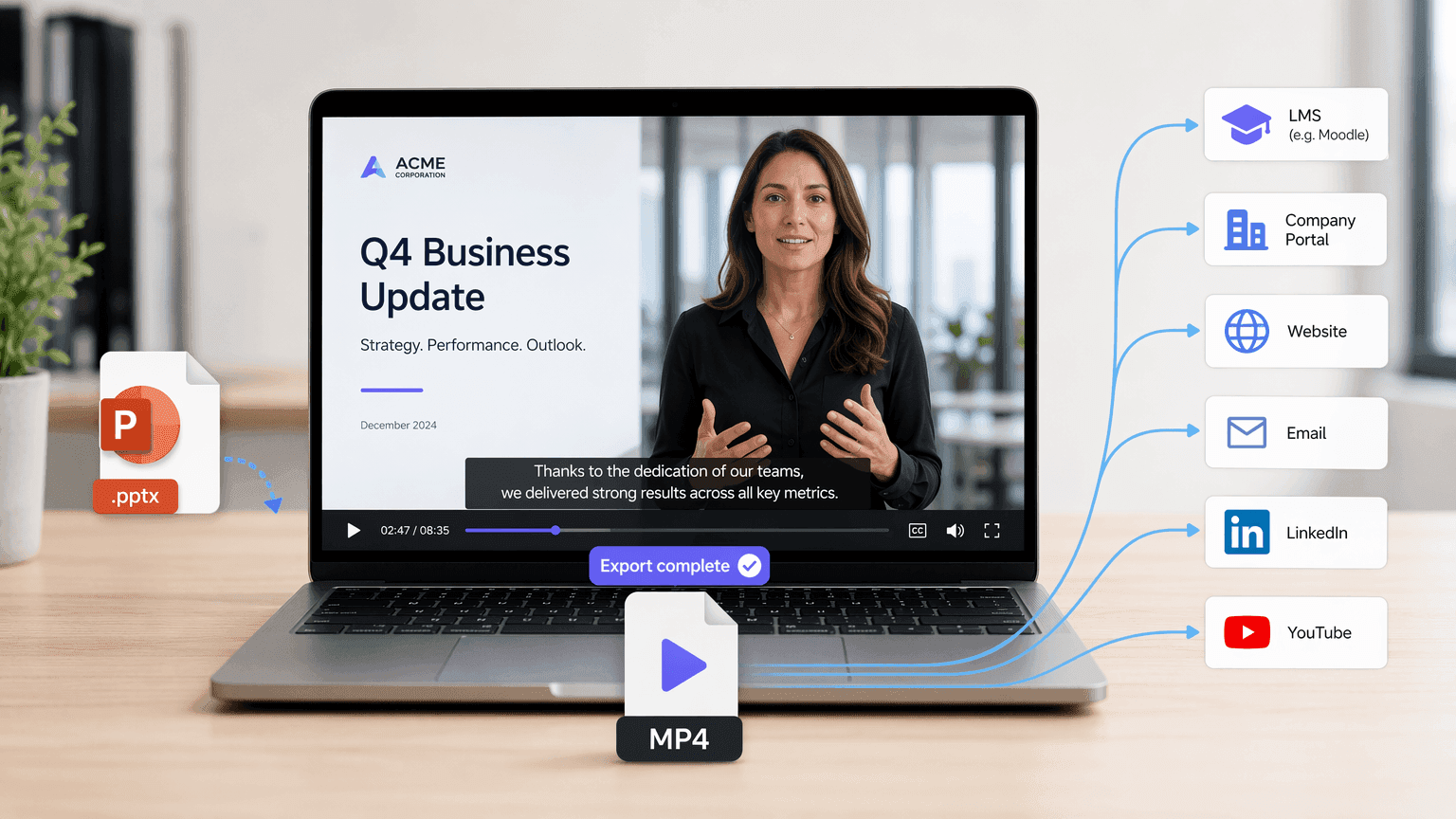
Download the Finished Presentation as an MP4 Video
Review the generated video draft, then render and download the final MP4 file. The MP4 format makes it easy to share your presentation video through learning management systems, company portals, websites, email campaigns, social media, or video hosting platforms.
Why Choose Leadde for PowerPoint to Video Conversion?
Slides in, video out — instantly
Turn your PPT or PDF into a polished, ready-to-share presentation in just minutes.
Auto talking points & narration
AI converts your slide content into clear, natural explanations that flow smoothly.
Smart highlights, perfect timing
Expressive avatars, engaging delivery
Lifelike AI presenters deliver your message with clarity, energy, and credibility. You can also upload your own photo to create a personalized AI avatar and present on camera yourself.
How to Turn PowerPoint into Video with Leadde
Use the Slide Presenter to transform presentations into videos. Follow these steps to experience a seamless PowerPoint to video converter.
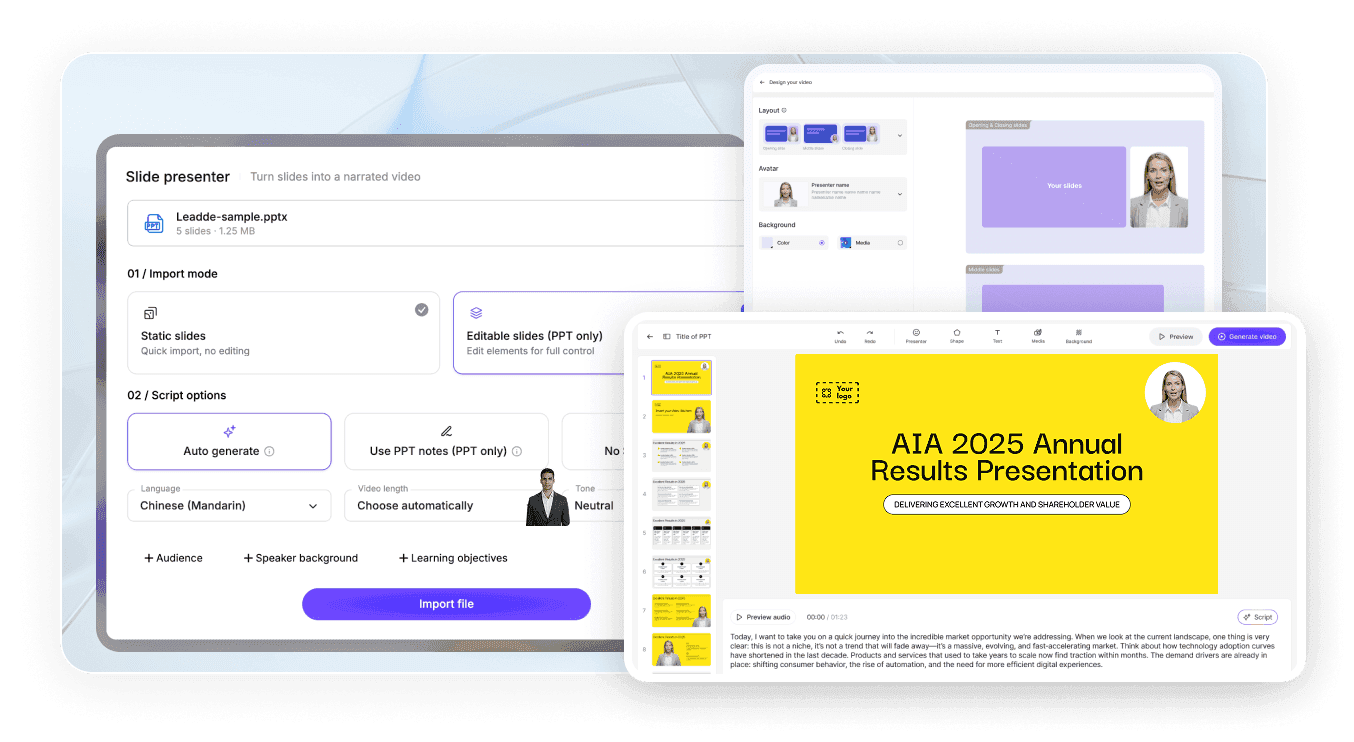
Step 1 Upload Your Presentation and Customize the Output
Go to Slide Presenter and upload your .pptx file, with support for files up to 500 MB. Set the Import Mode and Script Options, then click Import File to see how AI transforms your slides into an explainer video.
Step 2 Configure the Avatar and Layout
Choose the presenter avatar and adjust the video layout to match your needs. Click Continue to create an explainer video that fits your expectations.
Step 3 Generate and Download
Preview the video, then click Generate Video. Leadde will render the final video, and once it’s complete, you can download the MP4 file to your device.
How to Convert PowerPoint to Video with Audio
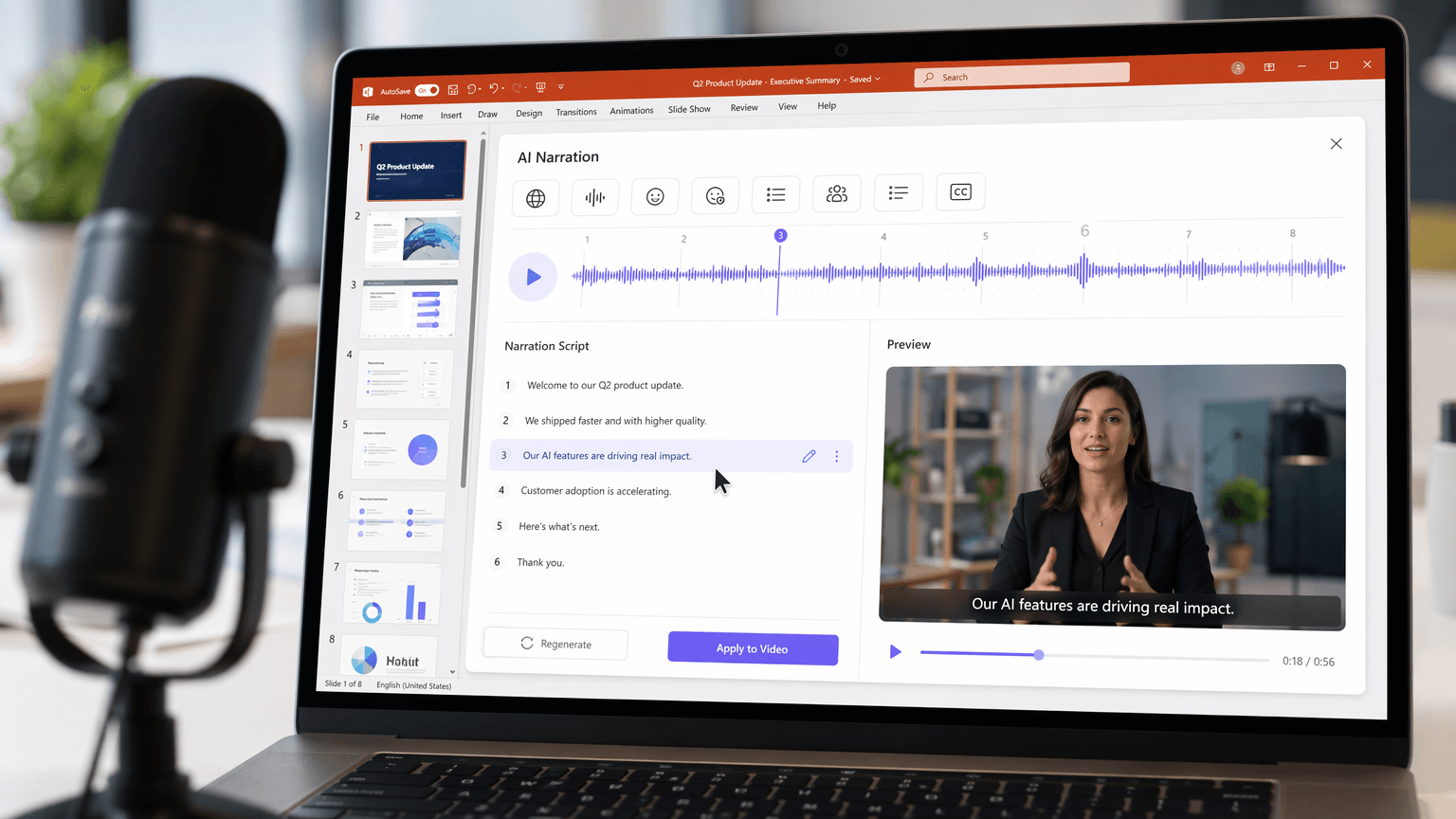
A presentation video needs narration, not just moving slides. Leadde generates an AI voiceover from your PowerPoint content, so instead of recording audio slide by slide, you review and edit the script before creating the video.
Use the narration settings to:
Pick a target language
Set the tone
Adjust the level of detail
Rewrite for a specific audience
Turn bullet points into full spoken sentences
Add subtitles that follow the voiceover
Useful for employee training, online education, sales decks, product intros, and internal communication.

Create, Update, and Share PowerPoint Videos More Efficiently
Free PowerPoint to Video Trial
Use Leadde’s free plan to upload a PPTX file, create a video, and test the video creation workflow before choosing a paid plan.
Update Videos Without Rebuilding the Presentation
When information changes, open the saved Leadde project, edit the script or scene content, and regenerate the affected sections. You do not need to record the entire presentation again.
Share Videos with Interactive AI Chat
Host the finished video through Leadde and allow viewers to ask questions about the presentation content through an interactive chat panel.
Repurpose One Presentation for Multiple Audiences
Adjust the language, narration tone, script detail, and visual style to create different versions of the same presentation for employees, customers, students, executives, or international teams.
Create Professional Video Presentations from PowerPoint
Corporate Training Modules
Turn text-heavy HR presentations into clear, narrated training videos. With visual demonstrations and clear explanations, every employee can accurately understand each workflow step.
Sales Pitch Decks
Educational Lectures
Internal Company Updates
Webinar Replays
Turn the slide deck from your last webinar into an evergreen video asset. Let the AI avatar deliver the presentation flawlessly, creating a perfect lead magnet.
Product Demos
Turn dry technical slides into engaging product overview videos, perfectly explaining complex features using AI voiceovers and text highlights.
Traditional PowerPoint Export vs. Leadde AI PowerPoint to Video
Traditional PowerPoint includes built-in features for recording or exporting a presentation as a video. These features are useful if you want to preserve the original slideshow exactly as it is. Leadde is designed with a different approach. Instead of simply saving the original slides as a video, it analyzes the slide content and uses an avatar presenter to explain the material, helping trainees understand the content more easily.

PowerPoint export or recording
- Usually requires manual narration
- Uses the existing presentation visuals
- Generates a recorded slideshow
- Difficult to update

Leadde AI conversion
- Generates AI voice narration
- Highlights key content and information
- Adds new visuals, layouts, and avatars
- Creates repurposed presentation videos
Frequently asked questions
An AI PowerPoint-to-video converter reads the page layout and presentation content of a .pptx file, then automatically generates an explainer video with visuals, an avatar, or narration based on the file’s content and structure.
Upload your .pptx file to Slide Presenter, choose an import mode, and set the target language, tone, and audience as needed. Create and render the video, then export the completed narrated video as an MP4 file.
Yes, both PowerPoint's built-in export feature and third-party AI tools like Leadde, SlideSpeak, and Aspose.Slides can convert PPT and PPTX files directly into standard MP4 video files.
In Leadde Slide Presenter, follow the workflow: Upload File → Create Video → Render → Export. Choose your preferred resolution, then export the final file directly as an MP4 video.
Yes, AI tools such as Leadde can automatically generate voiceover narration from your slide text or speaker notes in dozens of languages and voice styles.
Leadde does not preserve the original animations or transitions from PowerPoint. Instead, you can use Leadde’s built-in animation effects or highlight key content with one click, so important information appears at the right moment in sync with the narration.
Yes, tools like Leadde offer free, browser-based PowerPoint-to-video conversion that requires no software installation or account for basic use.
Leadde accepts .pptx files up to 500 MB for upload and outputs the converted result as a standard MP4 video file.
Yes. Slide Presenter includes a built-in export feature that allows all users to export videos as MP4 files. To export a watermark-free version, a paid subscription is required.
No, cloud-based AI tools like Leadde run entirely in your browser and require no software installation, though PowerPoint's own native export requires PowerPoint to be installed on your device.
Yes, PowerPoint offers native video export on macOS through File → Export, and browser-based AI tools like Leadde work on Mac since they don't depend on the operating system.
Turn Your PowerPoint Presentation into a Video
Join thousands of professionals using Leadde to convert static .pptx files into captivating videos. Try our AI PowerPoint to video converter for free today.
