Magically create engaging training, explainer, tutorial, onboarding, launch, and process videos with AI
A smarter platform for business video creation
Multilingual Videos with Diverse Avatars
Multi-document support&auto-generate speech
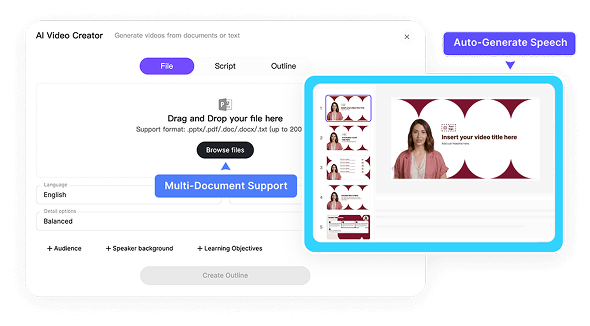
Multi-document support&auto-generate speech
Spark real-time chat with your content
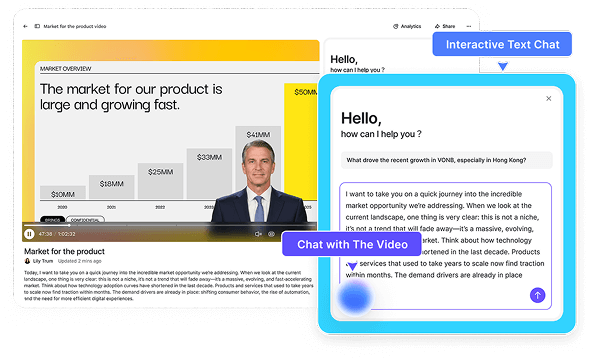
Spark real-time chat with your content
Auto highlight key points
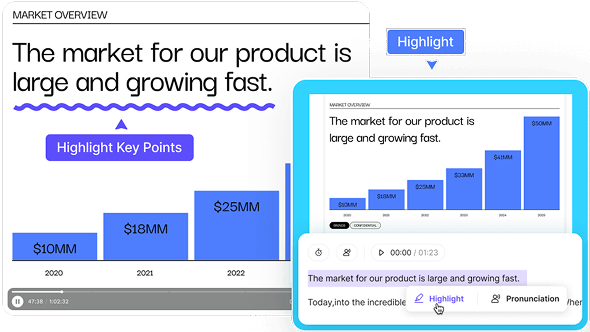
Auto highlight key points
Auto layout scenes of video
Auto layout scenes of video
Create your AI avatars
Effortlessly share and update your videos
Optimize videos with actionable analytics
Leadde labs — small tools, big impact
Choose your input method and let AI create your video





Empowering teams driven by quality and efficiency

Empowering teams driven by quality and efficiency
SOC 2 & GDPR
Content Moderation
3Cs Framework
ISO 42001
Leadde Insights
Explore what's new, what we're building, and what's happening at Leadde.
Explainer Video Script Examples: How to Write Scripts That Convert
Explore top explainer video script examples for product launches, service explanations, and educational videos. Learn how to craft engaging scripts with templates, best practices, and AI tools like Leadde.

How to Make High-Impact Corporate Explainer Videos with AI
Learn how to make high-impact corporate explainer videos with AI. Step-by-step guide on creating, editing, and customizing videos to boost engagement, clarity, and conversions.
How to Make a Tutorial Video Without a Mic or Camera? (2026 Guide)
Learn how to make a tutorial video in minutes without expensive equipment. Discover the 2026 "Document-to-Video" workflow that turns PDFs and text into professional, multilingual tutorials automatically.
Frequently asked questions
Leadde is dedicated to the intelligent generation of multilingual training videos. With Leadde, you can quickly transform static document into engaging dynamic instructional videos. It is perfect for enhancing engagement in training, marketing, or internal communications.
Yes, you can. Simply delete or hide the Avatar layer to create a video with voice-over only.
If you are properly connected to the internet, your video edits will be automatically saved.
If you need help while using Leadde, have any questions about our products or services, or wish to submit feedback or requests, please contact our customer support team by sending an email to support@leadde.ai
Ready to try Leadde?
Start a free trial today and start making engaging AI videos in minutes.