
How to Make a Tutorial Video Without a Mic or Camera? (2026 Guide)

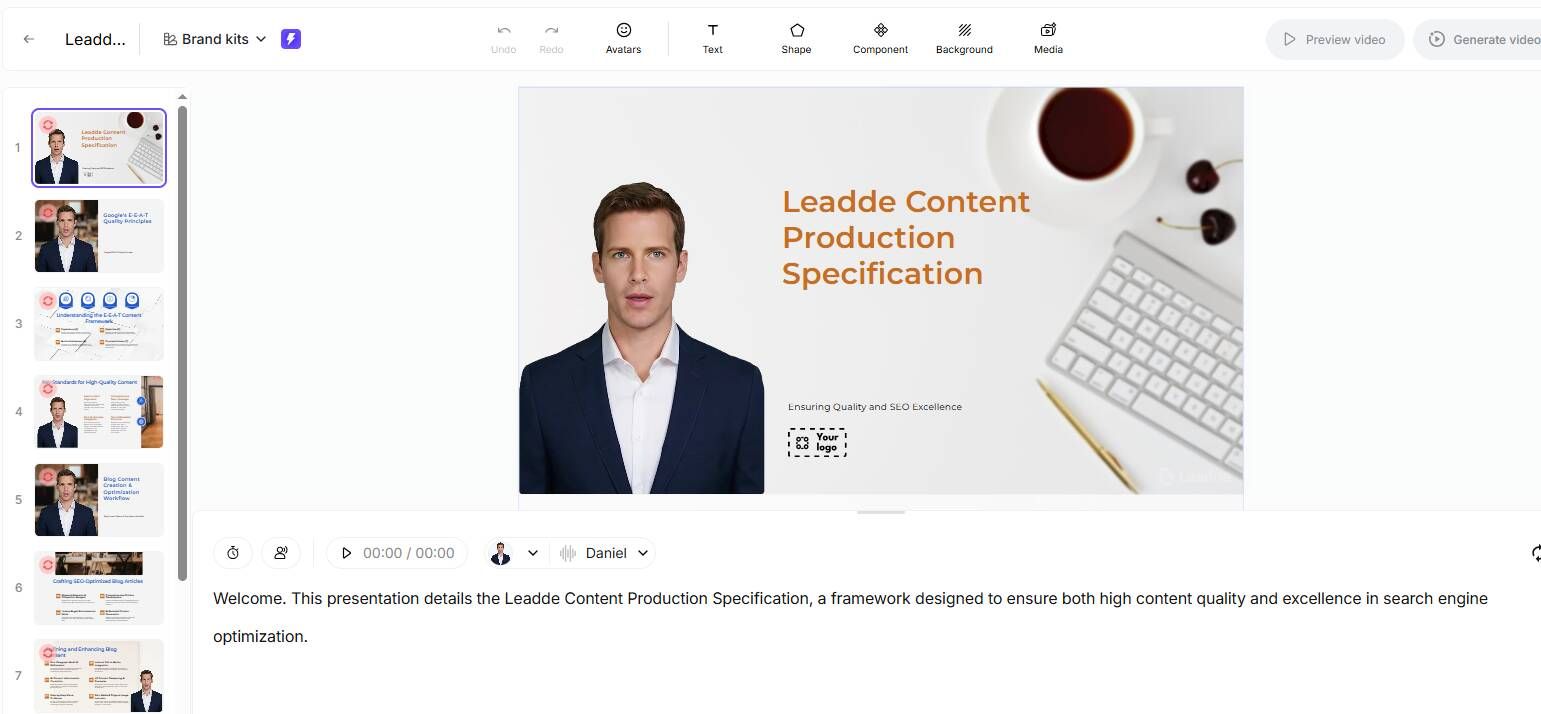
To make a tutorial video, start by defining a clear learning objective and outlining a structured script. Next, select your production workflow: you can either use traditional screen recording tools to capture live demonstrations or leverage AI video generators to automatically convert text, PDFs, and PPTs into professional instructional content without cameras. Finally, edit the footage to add visual cues, synchronize voiceovers, and export the video in a format optimized for your audience's platform.
However, traditional recording often means battling endless retakes and complex software. Leadde eliminates this bottleneck, allowing you to turn any document and text into a professional business video automatically. It’s super fast—create videos in minutes while saving over 80% of production costs and 90% content creation time.

The Evolution of Tutorial Videos (Why Old Methods Fail)
From Passive Watching to Active Learning
Gone are the days when a static screen recording was enough. In 2026, active learning is the new standard. Viewers no longer just watch; they expect to interact with the content. Modern platforms now support "Chat with Video" capabilities, allowing users to ask questions directly to the tutorial interface and receive instant, context-aware answers.
The "No-Face, No-Mic" Revolution
A major barrier for creators has always been "mic fright" or the lack of a professional studio background. The "No-Face, No-Mic" strategy has revolutionized this. By utilizing realistic AI Avatars and Voice Cloning, you can produce high-quality, presenter-led videos without ever turning on a camera or recording a single word of audio.
2026 Trends: Hyper-Personalization
The latest trend is localization at scale. It is no longer acceptable to publish a tutorial in just one language. Tools now enable instant dubbing into 170+ languages, ensuring that a single video asset can serve a global audience immediately upon release.
Phase 1: Strategic Planning & Scripting
Defining the "Aha!" Moment
Before opening any software, identify the single "Aha!" moment—the exact point where the viewer solves their problem. If your video is about "How to Pivot Table," the "Aha!" isn't opening Excel; it's seeing the data organize itself. Structure your entire video to reach this moment as quickly as possible.
The 3-Column Script Structure
| 👁️ Visual (What they see) | 🗣️ Audio (What they hear) | 🖱️ Action (Interaction) |
|---|---|---|
| Title Slide: "How to Export PDF" | "Welcome! In this video, you'll learn how to export a PDF in 3 clicks." | Avatar waves hand. |
| Screen: File Menu > Export | "First, navigate to the top menu and select 'Export'." | Zoom in (150%) on cursor. |
| Screen: Settings Window | "Choose 'High Quality' to ensure your document looks crisp." | Highlight "High Quality" in yellow. |
| Screen: Final Result | "And that's it! Your file is ready." | Avatar points to "Download". |
To ensure pacing, use the 3-Column Script method favored by instructional designers:
- Visual: What is happening on screen (e.g., "Cursor clicks 'Settings'").
- Audio: The exact voiceover text.
- Action: Any required emphasis (e.g., "Zoom in 200%").
Using AI to Write Your Script
You don't need to start from a blank page. Modern AI tools can analyze your raw subject matter—be it a PDF manual or a bulleted list—and help you write your script instantly. This ensures your tutorial follows a logical flow (Introduction → Steps → Review) without hours of manual drafting.
Phase 2: Production – Choosing the Right Workflow
Method A: The Traditional Studio Route (High Effort)
- Setup: Requires a quiet room, a high-quality microphone (like a Blue Yeti), screen recording software (OBS or Camtasia), and a webcam.
- Process: You must record the screen and voice simultaneously or record voiceovers separately and sync them later.
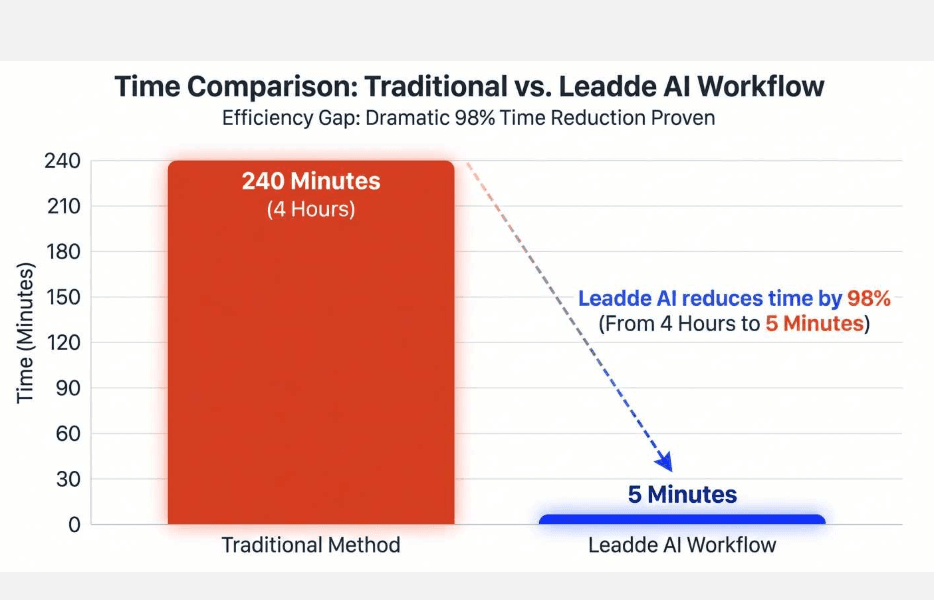
- Verdict: High quality but extremely time-consuming. A 5-minute video can take 4-8 hours to produce and edit.
Method B: The AI Automation Route (High Efficiency)
- Concept: This method uses Document-to-Video technology. You simply upload a file, and the AI builds the video for you.
- Process: The AI analyzes the document structure, selects relevant stock footage or screen layouts, and synthesizes the voiceover.
- Verdict: Leadde leads this category, utilizing AI tools to reduce production time by 90% and costs by 80%. It transforms static docs into dynamic videos in minutes.
Step-by-Step: How to Make a Tutorial Video Using AI
| Setting Parameter | Recommended Choice | Best Use Case |
|---|---|---|
| Tone | Professional | Corporate Training, Compliance, SOPs |
| Tone | Engaging / Casual | Onboarding, Product Demos, Social Media |
| Template | "Fresh Business" | Modern SaaS Product Walkthroughs |
| Template | "Cooperation Guide" | Internal Team Processes |
| Avatar Style | Formal Suit | Executive Summaries, Official Announcements |
| Video Length | Medium (5-10 mins) | Standard Tutorials (Leadde supports up to 20m) |
Step 1: Upload Your Tutorial Content
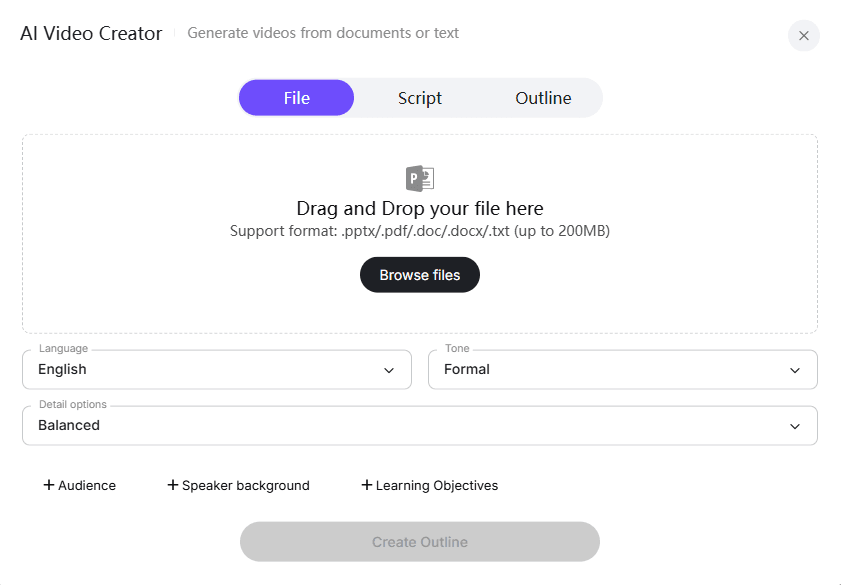
Upload your tutorial document, script, or outline in DOC, PDF, PPT, or text format. Leadde automatically analyzes the structure, key topics, and learning goals of your content.
Step 2: Customize the Auto-Generated Outline
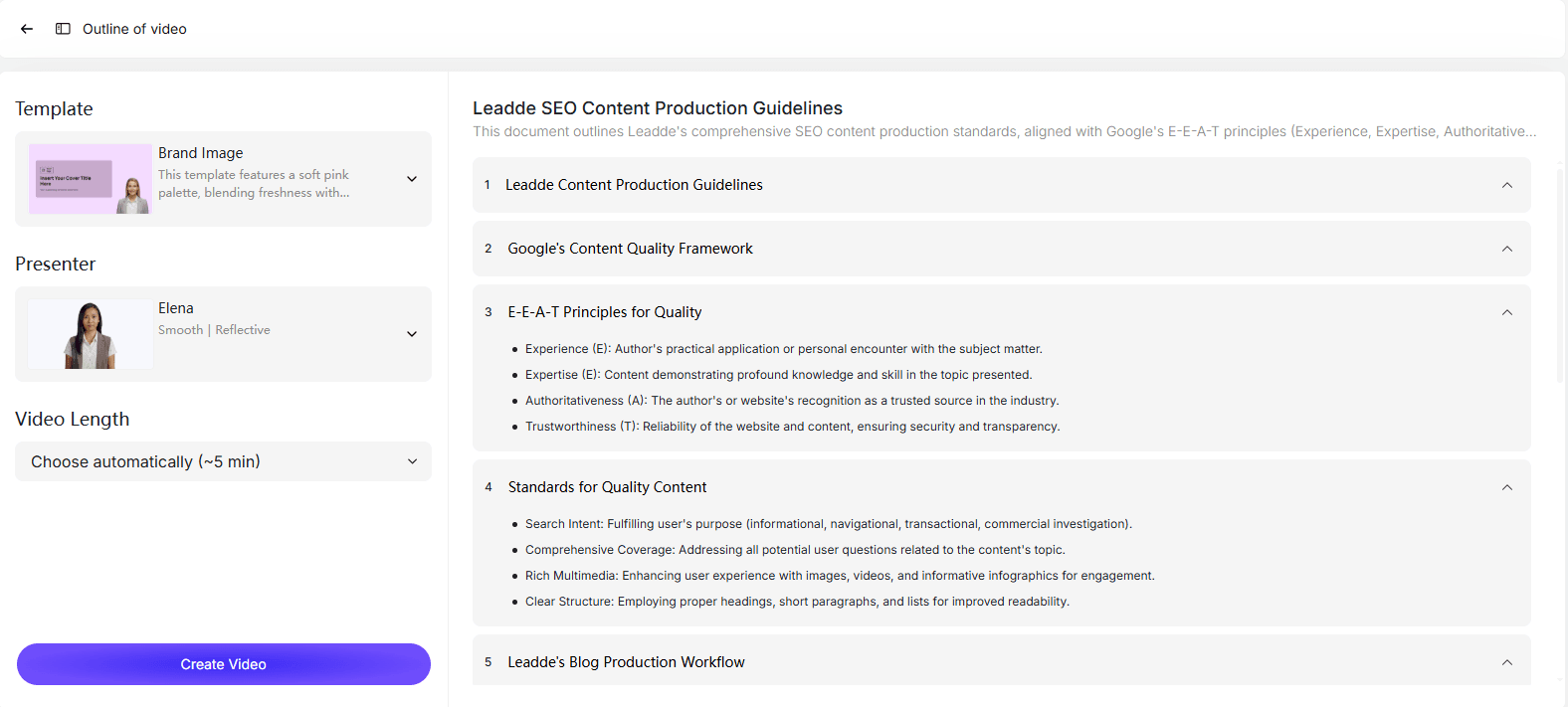
Leadde instantly creates a clear, structured outline from your content. You can edit section titles, reorder steps, remove unnecessary parts, or add new sections to refine the tutorial flow.
Step 3: Choose Presenter, and Voice
Select an AI presenter from 200+ lifelike digital avatars. Preview different voice options to find the narration style that best fits your tutorial.
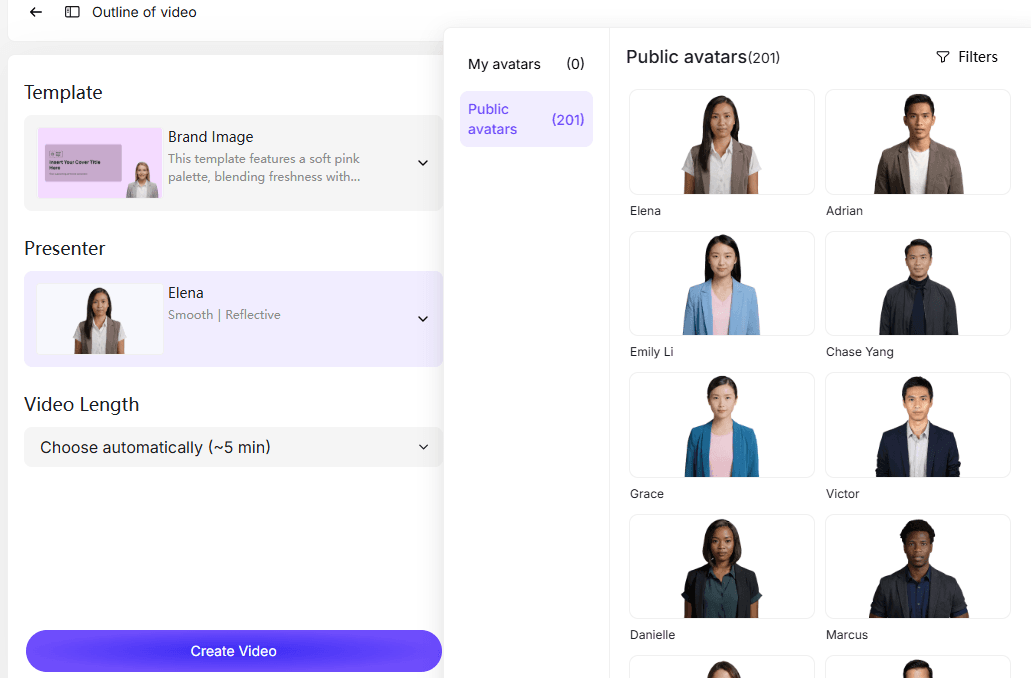
Step 4: Select a Video Template and Set Duration
Pick a video template designed for tutorials, training, or explainers. Adjust the video length and level of detail to control pacing and clarity.
Step 5: Generate the Tutorial Script Automatically
Click Create Video, and Leadde generates a clear, natural tutorial script based on your outline, language, tone, and presentation settings.
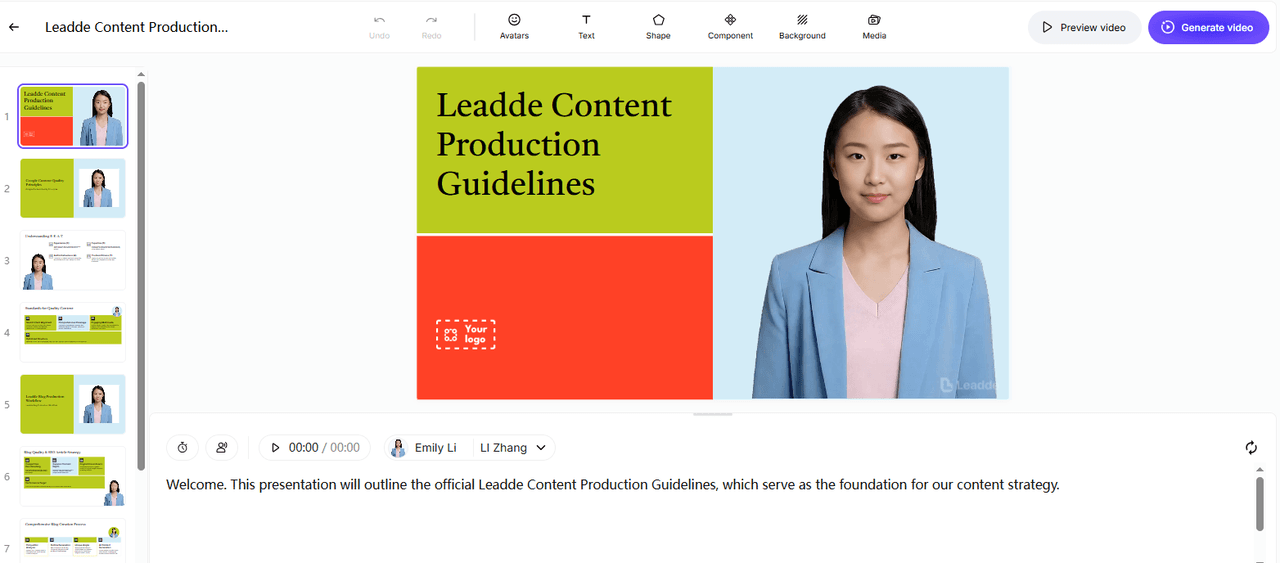
Step 6: Create and Share Your Tutorial Video
Leadde transforms the script into a complete tutorial video with structured scenes, smart highlights, and your chosen AI presenter. In just minutes, your video is ready to preview and share.
Phase 3: Post-Production & Engagement Hacks
Interactive "Chat with Video" Features
Leadde transforms passive files into active knowledge bases. The "Chat with Video" feature allows viewers to type questions while watching. The AI analyzes the video content and answers them in real-time, making it ideal for corporate training videos or complex technical SOPs.
Adding Micro-Interactions
To keep retention high, add visual cues:
- Zoom Effects: Automatically zoom in on button clicks.
- Cursor Highlights: Add a yellow halo around the mouse cursor to guide the eye.
- Chapter Markers: Break the video into clickable sections for easy navigation.
Exporting for LMS & Social Platforms
- LMS: Export as SCORM packages if you are uploading to a corporate Learning Management System.
- Social: Export in MP4 format (1080p/4K) for YouTube or LinkedIn.
- Docs: Leadde can also generate a text-based summary or transcript to accompany the video.
Traditional Software vs. AI Generators
Cost & Time Comparison Table
| Feature | Leadde (AI Automation) | Synthesia | Traditional Editing |
|---|---|---|---|
| Primary Workflow | Document-to-Video (Auto) | Text-to-Video (Manual) | Screen Recording (Manual) |
| Production Time | ~5 Minutes | ~30 Minutes | 4-8 Hours |
| Editability | Layered Editing (Full Control) | Fixed Templates | High Control (Complex) |
| Voice Languages | 170+ Languages | 140+ Languages | 1 (Manual Recording) |
| Interactive Mode | Chat with Video | No | No |
| Starting Price | $19/mo (Unlimited Videos) | $29/mo (Limited Mins) | Variable ($200+ Software) |
Solving the "Update Nightmare"
Software interfaces change constantly. With traditional video, a UI update means re-recording the entire scene. With Leadde, you simply update the screenshot in the editor and tweak the text script. The AI regenerates the voice and video instantly, keeping your content "evergreen" with zero re-recording effort.
Conclusion
Making a tutorial video in 2026 is no longer about mastering timeline editing or buying expensive cameras. It is about workflow efficiency. By leveraging AI tools like Leadde, you can convert existing documentation into engaging, multilingual video content in a fraction of the time. Whether you choose the traditional route for cinematic polish or the AI route for speed and scale, the key is to start now.
Final Recommendation: For businesses needing to scale training materials or update content frequently, the Document-to-Video AI workflow is the superior choice.
Frequently Asked Questions (FAQ)
Can I turn a PDF user manual into a video directly?
Yes. Using Leadde's File Mode, you can upload a PDF up to 200MB. The AI will analyze the text, structure it into scenes, write a script, and generate a video presentation automatically.
Is AI voiceover good enough for professional training?
Absolutely. Modern AI voices (like those in Leadde) support 170+ languages with natural intonation. They are indistinguishable from human narration for standard instructional content and eliminate background noise issues.
How do I update a tutorial when the software interface changes?
If you use an AI generator, you don't need to re-record. simply replace the outdated screenshot image in your project file and update the text script. The video renders the new version in minutes.





