
How to Make Corporate Explainer Videos That Drive Conversions (2026 Guide)

Creating high-impact corporate explainer videos is no longer just about animation or visuals—it’s about clarity, structure, and delivering value fast.
After analyzing real-world production workflows and user behavior patterns, one thing is clear:
👉 The most effective explainer videos are not the most polished—they are the most understandable, focused, and actionable.
With AI-powered tools and proven frameworks, businesses can now create professional explainer videos faster, cheaper, and with measurable results.

Why Corporate Explainer Videos Are Essential for Business Growth
Corporate explainer videos combine storytelling, visuals, and narration to simplify complex ideas.
Based on aggregated industry data:
- 96% of marketers say explainer videos improve understanding
- Videos can increase retention by up to 60% compared to text-only formats
Key Benefits:
- Simplify complex products (especially SaaS & B2B)
- Increase engagement and watch time
- Improve conversion rates
- Standardize internal communication (training, onboarding)
👉 In practice, companies that switch from static docs to video often see faster onboarding and fewer support questions.
How to Write a High-Converting Corporate Explainer Video Script
The script is the single most important factor in explainer video success.
Proven Script Framework (Used Across High-Performing Videos)
- Problem – Identify the audience pain point
- Solution – Introduce your product/service
- How It Works – Show the process simply
- Benefits – Highlight outcomes
- Call-to-Action (CTA) – Tell viewers what to do next
Real Insight:
Videos with clear structure consistently outperform visually complex but unstructured videos.
👉 In real production workflows, teams often spend 70–80% of time refining scripts, not visuals.
What to Include in a Corporate Explainer Video (And What to Avoid)
Must Include:
- One clear core message
- A relatable problem scenario
- Visual reinforcement of key points
- A strong CTA
Avoid:
- Explaining too many features
- Overloading viewers with technical jargon
- Long introductions about the company
Key Lesson:
👉 The most common failure is trying to explain everything in one video.
How Long Should a Corporate Explainer Video Be?
Optimal Length:
- 60–90 seconds → highest engagement
- Up to 2–3 minutes → acceptable for complex topics
Why:
- Viewer drop-off increases significantly after 90 seconds
- Shorter videos force clarity and prioritization
👉 In real-world SaaS use cases, shorter videos consistently outperform longer demos in conversion funnels.
How to Hook Viewers in the First 5 Seconds
The first 5 seconds determine whether your video succeeds or fails.
High-Performing Hook Formulas:
- “Struggling with [problem]?”
- “Most companies waste hours on [pain point]…”
- “Here’s how to fix [specific issue] in minutes”
Real Insight:
Videos that start with pain points outperform brand intros.
Why Most Corporate Explainer Videos Fail (And How to Fix Them)
Top Failure Reasons:
1. Information Overload
Trying to explain everything → viewer confusion
2. Weak Script
No clear structure or message
3. Poor Hook
No reason to keep watching
4. Style Over Substance
Fancy visuals but unclear value
Fix:
👉 Focus on one message, one audience, one outcome
Corporate Explainer Video Production Workflow (Step-by-Step)
Modern AI tools have simplified production significantly.
Step 1: Upload Your Corporate Content
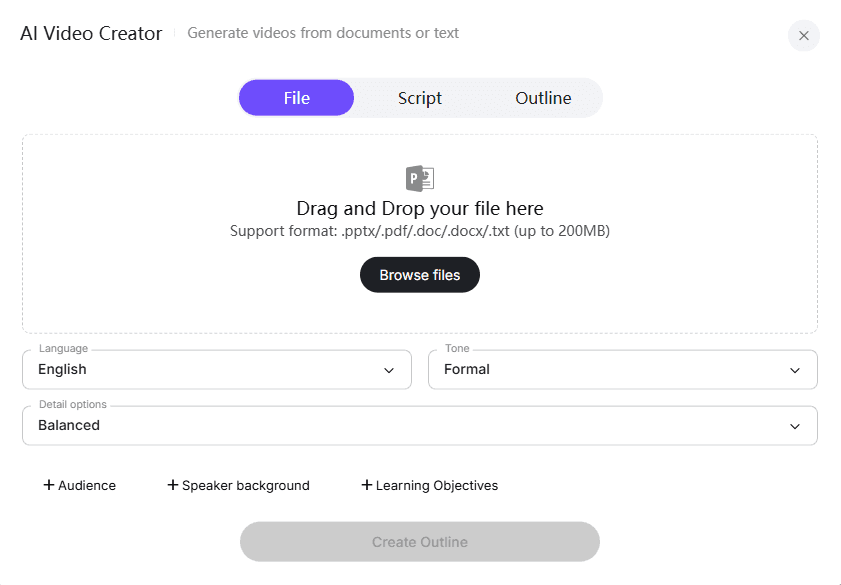
Upload your corporate script, outline, or media assets in DOC, PDF, PPT, or text format. AI platforms automatically analyze the structure, key points, and communication goals of your content. This ensures that your explainer video will cover all essential topics while maintaining a logical flow.
Practical Tip: Organize your content into categories like product demos, employee testimonials, or training modules to make the AI analysis more accurate and the editing process smoother.
Step 2: Customize the Auto-Generated Outline
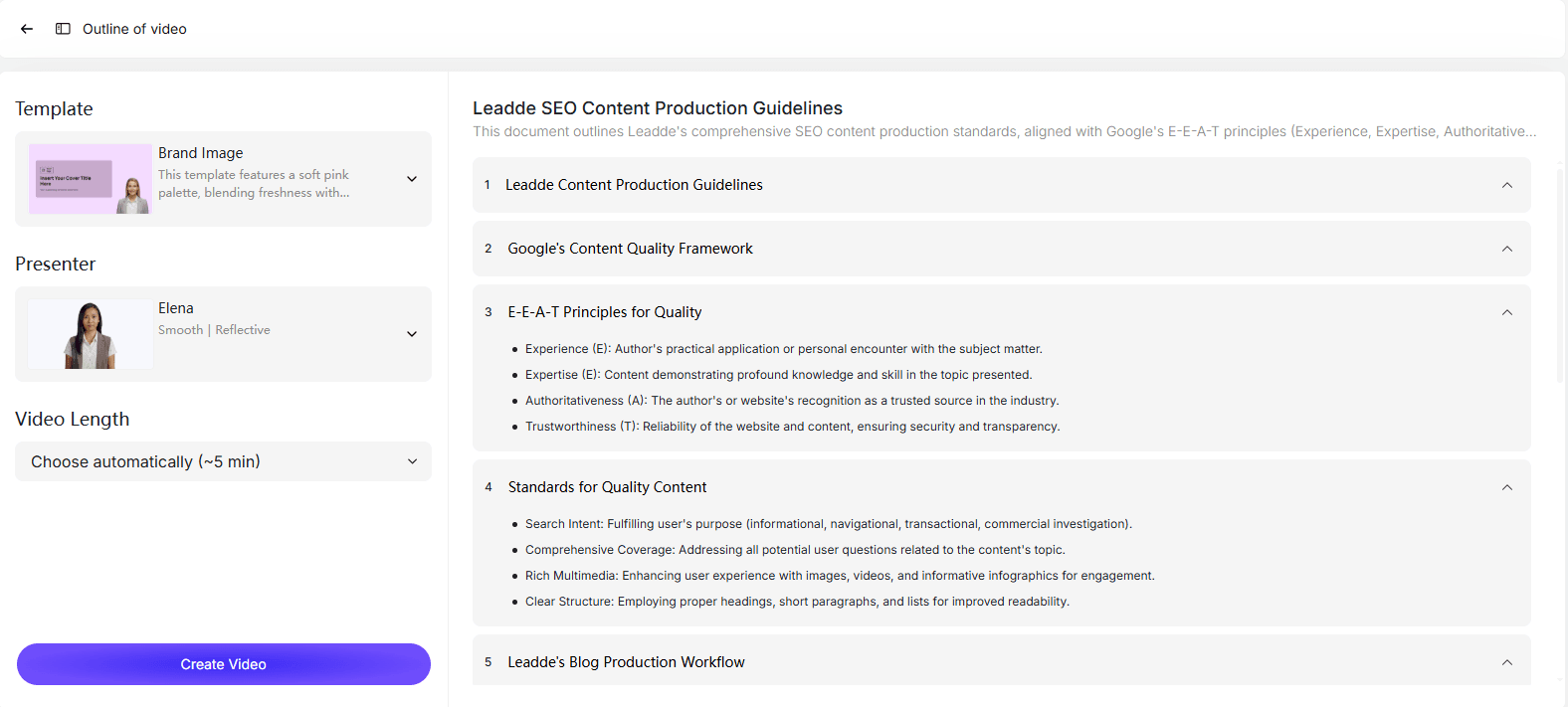
AI tools instantly create a structured outline from your uploaded content. You can:
- Edit section titles
- Reorder key points
- Remove unnecessary segments
- Add new sections
This step ensures your corporate message is clear, concise, and flows naturally throughout the video.
Example: For a product launch video, reorder sections to start with the problem, then the solution, followed by benefits and a call-to-action.
Step 3: Choose AI Presenter and Voice
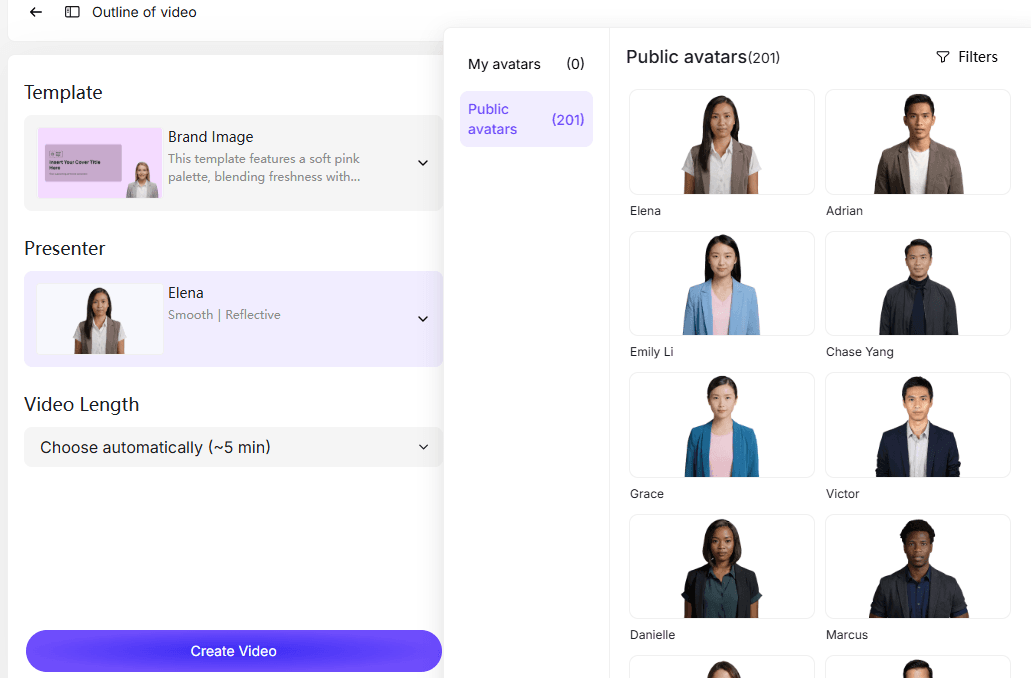
Select a lifelike AI presenter from a library of digital avatars. Preview multiple voice options to find a narration style that aligns with your corporate tone—friendly, professional, or authoritative.
Use Case: A diversity and inclusion training video can use a professional, approachable AI presenter to engage a global workforce effectively.
Step 4: Select Video Template and Set Duration
Pick a corporate explainer video template that suits your goals—training, onboarding, product demos, or strategy briefings. Adjust:
- Video length
- Pacing
- Level of detail
This ensures your video is engaging without overwhelming the audience with information.
Tip: Keep most corporate explainer videos under 2–3 minutes for maximum engagement.
Step 5: Generate the AI Script Automatically
Click Create Video, and the AI generates a natural, professional script based on your outline, language preferences, tone, and chosen presenter. This script includes voiceover narration, scene suggestions, and key highlights to ensure clarity and viewer retention.
Example: A corporate training module on cybersecurity can have an automatically generated script that breaks down complex policies into simple, actionable steps.
Step 6: Create, Preview, and Share Your Video
The AI platform transforms your script into a complete corporate explainer video with:
- Structured scenes
- Smart highlights
- Branded elements
- Your chosen AI presenter
Preview the video to check narration, visuals, and pacing. Once finalized, export in HD or 4K and share across internal communications, websites, or social media channels.
Real Use Cases: How Businesses Use Corporate Explainer Videos
Case 1: Fast DIY Video Production
- User: Instructional designer
- Goal: Create training videos quickly
- Tools: Canva / Powtoon
Results:
- 1-minute video:
- Canva → ~1 hour
- Powtoon → ~2 hours
Before vs After:
- Before: Complex animation tools
- After: Template-based production
👉 Insight: Templates reduce production time dramatically but limit customization
Case 2: Replacing Text with Video for Product Explanation
- User: Startup founder
- Goal: Improve product understanding
Results:
- Switched from text → 1-minute explainer video
Outcome:
- Faster user comprehension
- Better onboarding experience
👉 Insight: Video communicates value faster than text
Case 3: Standardized SaaS Explainer Workflow
- User: Product founder / developer
- Tools: Loom, ScreenFlow, Descript, CapCut
Workflow:
Hook → Demo → CTA
Results:
- 60–90 sec videos perform best
👉 Insight: Structured templates outperform ad-hoc videos
Case 4: Explaining Complex B2B Products
- User: Marketing team
Before:
- Feature-heavy explanations
After:
- Problem → Solution → Outcome storytelling
Result:
- Improved clarity and audience understanding
👉 Insight: Storytelling simplifies complexity
DIY vs Agency: What’s the Best Way to Create Explainer Videos?
DIY (AI Tools)
Pros:
- Fast
- Low cost
- Scalable
Cons:
- Limited customization
Agency / Professional Production
Pros:
- High-quality visuals
- Custom storytelling
Cons:
- Expensive
- Slow turnaround
👉 Rule of thumb:
Fast + Cheap + Good → Pick any two
Best AI Tools for Corporate Explainer Videos in 2026
Popular Tools:
- AI video generators (e.g., avatar-based tools)
- Screen recording tools
- Template-based editors
Key Features to Look For:
- Auto script generation
- AI presenters
- Voice synthesis
- Branding customization
👉 Platforms like Leadde enable full workflow automation—from script to final video—within minutes.
How to Simplify Complex Concepts in Explainer Videos
Proven Techniques:
- Use analogies
- Break into steps
- Show real scenarios
Example:
Instead of:
“Advanced cybersecurity protocols…”
Say:
“Here’s how we protect your data in 3 simple steps”
👉 Clarity always beats technical accuracy in explainer videos.
Animation vs Screen Recording: Which Format Works Best?
Animation
- Best for storytelling
- Great for abstract concepts
Screen Recording
- Best for demos
- More authentic
👉 Hybrid approach works best in most SaaS videos.
How to Add a High-Converting Call-to-Action (CTA)
Effective CTAs:
- “Start your free trial”
- “Book a demo”
- “Download now”
Best Practices:
- Keep it simple
- Place at the end
- Reinforce value
How to Measure the ROI of Corporate Explainer Videos
Key Metrics:
- Watch time
- Retention rate
- Conversion rate
- Engagement
Example:
- Videos with subtitles + clear narration
→ up to 60% higher retention
Corporate Explainer Video Checklist Before Publishing
- Clear script
- One core message
- Strong hook
- 60–90 sec length
- CTA included
- Optimized visuals + audio
FAQ: Corporate Explainer Video Questions Answered
What is the ideal length of an explainer video?
60–90 seconds for most use cases.
Should I start with script or visuals?
Always start with the script.
Do I need professional voiceover?
Not necessarily—AI voice is often sufficient.
DIY or outsource?
Depends on budget and timeline.
How do I explain complex SaaS products?
Use simple storytelling and avoid jargon.
Are AI tools good enough?
Yes—for most business use cases.
How many features should I include?
Focus on one core value.
Animation or screen recording?
Use both when possible.
Is explainer video worth the cost?
Yes—especially for conversion and onboarding.
How do I improve conversion rates?
Focus on clarity, structure, and CTA.
Conclusion
The most effective corporate explainer videos are not the most expensive—they are the most focused, clear, and structured.
With AI tools and proven frameworks, businesses can now:
- Reduce production time by up to 80%
- Improve understanding and engagement
- Scale video creation efficiently
👉 If you focus on clarity over complexity, your explainer videos will not only inform—but convert.





