6 Best AI Avatar Tools for Video Creation in 2026 (Tested for Realism, Pricing & Scalability)
If you’re searching for the best AI avatars for video creation, you’re probably trying to solve one of these problems:
- Creating videos faster without filming
- Scaling training or marketing content
- Reducing production costs
- Keeping videos consistent across updates
After testing leading tools and analyzing real-world usage across teams, one thing is clear:
👉 The best AI avatar tool isn’t the most advanced—it’s the one that fits your workflow, scale, and content type.
This guide breaks down:
- The best AI avatar tools (by category)
- Real-world use cases and workflows
- Hidden limitations and costs
- How to choose the right tool for your needs
If your focus is scalable training, onboarding, or explainer videos, platforms like Leadde.ai are specifically built to turn scripts and documents into consistent, production-ready AI avatar videos without the overhead of traditional filming.

What Are AI Avatars for Video Creation?
AI avatars are digital presenters that deliver scripted content in video format—without requiring cameras, actors, or studios.
They’re most commonly used for:
- Training and onboarding videos
- Product explainers
- Marketing content
- Internal communications
Unlike general AI video generators, AI avatars focus on human-like delivery—including voice, lip-sync, and facial expression.
How We Evaluated AI Avatars for Video Creation
We focused exclusively on tools designed for AI avatar–based video creation, not general AI video generators.
Our evaluation considered:
- Avatar realism and lip-sync quality
- Video output quality
- Language and voice options
- Customization and branding
- Pricing and scalability for teams
Types of AI Avatars Used in Video Creation
AI avatars typically fall into three categories:
1. Talking-Head AI Avatars (Most Popular)
- Realistic presenters
- Best for training, explainers, and sales videos
2. Animated AI Avatars
- Stylized characters or 3D avatars
- Best for branding and storytelling
3. Static AI Avatars
- Still images with voiceovers
- Best for low-cost or simple videos
👉 In practice, talking-head avatars dominate professional use cases due to clarity and scalability.
AI Avatar Quick Comparison Table
The table below compares the most popular AI avatar tools for video creation across key decision factors, including avatar type, video quality, language support, and pricing level.
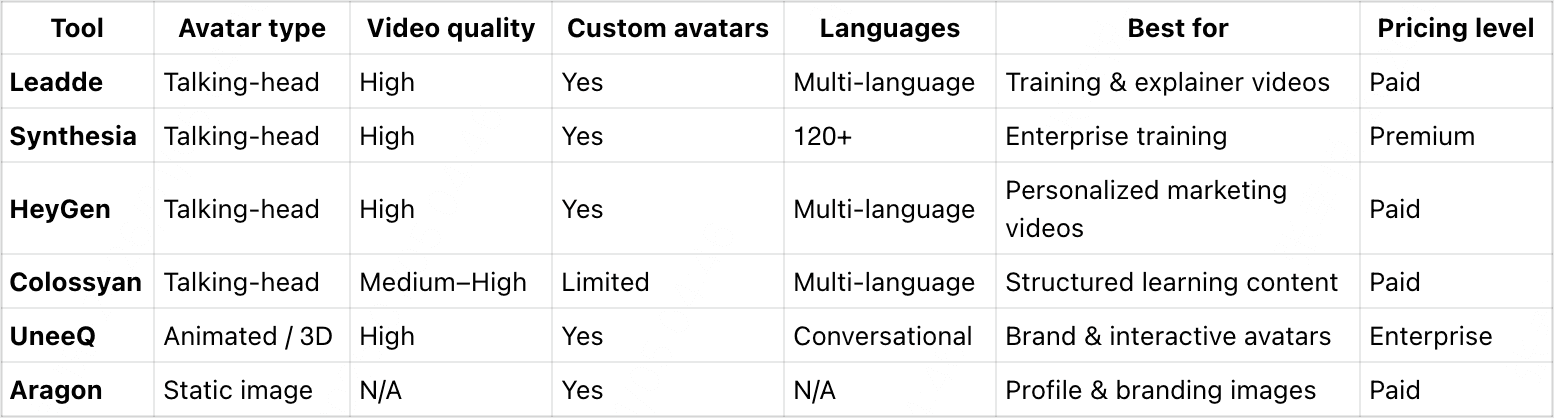
Quick takeaway: Talking-head AI avatars work best for training and explainer videos, while animated avatars suit branding and interactive use cases.
Best AI Avatar Tools for Video Creation (By Category)
Below is a curated list of AI avatar tools designed specifically for video creation, grouped by avatar type. Each tool is reviewed using the same structure to make side-by-side comparison easier and help you choose the right platform based on your video goals.
Leadde — Best for scalable AI avatar training and explainer videos
What it is
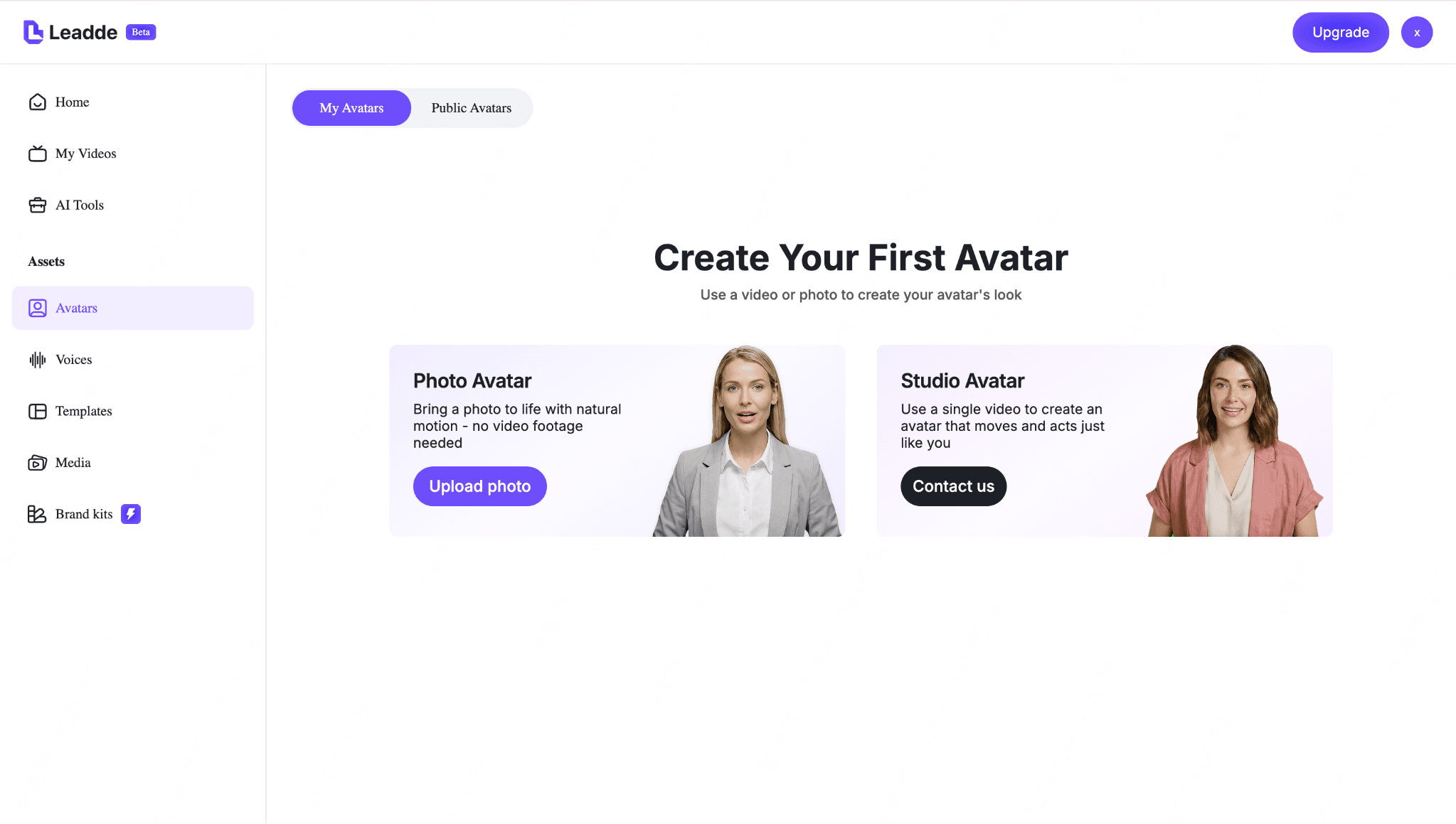
Leadde is an AI video creation platform for teams that need repeatable avatar-led videos, not just one-off talking-head clips. It turns scripts, documents, and presentations into professional training videos and explainers without filming or manual editing.
Key features
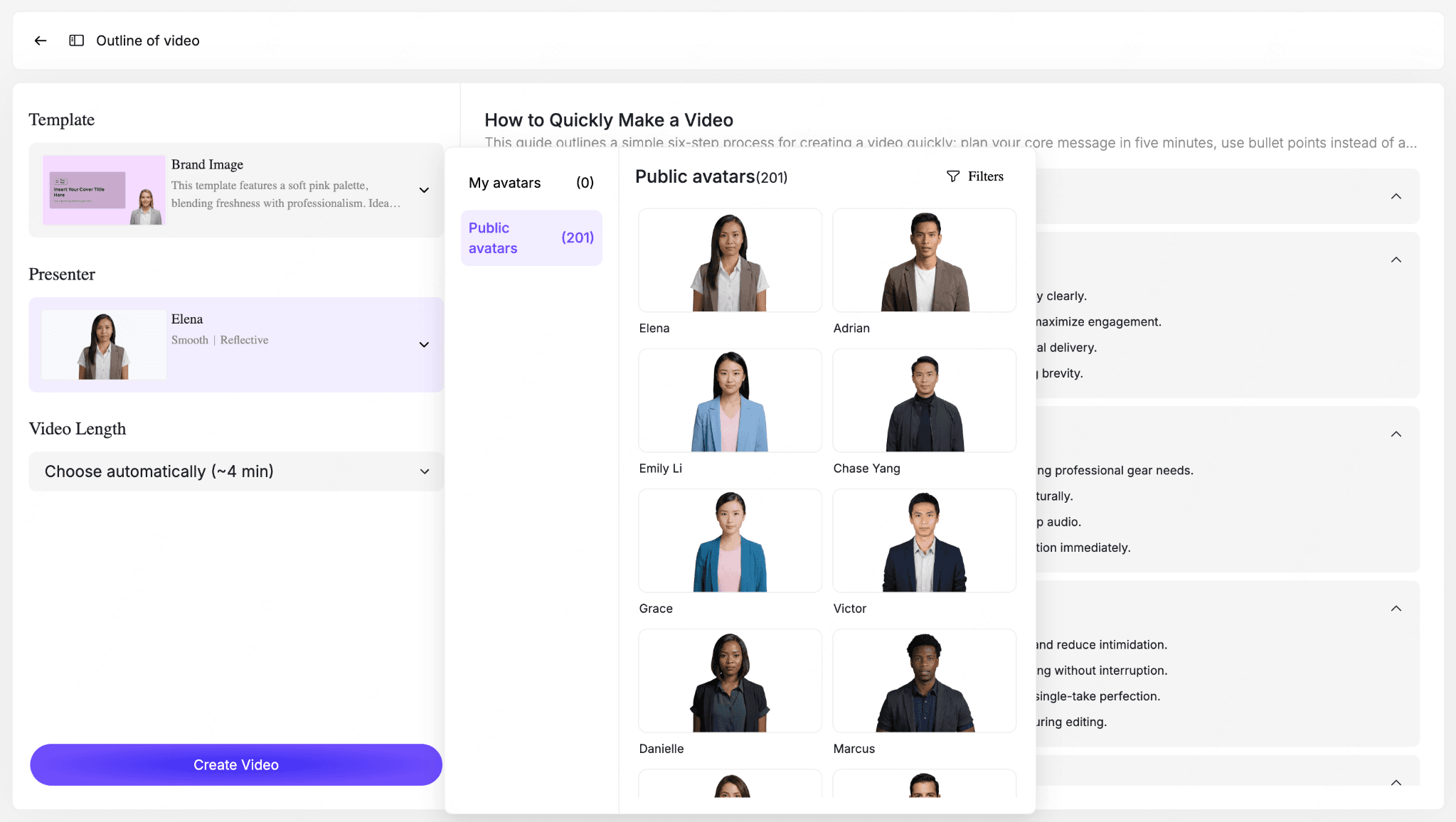
- Avatar types: Realistic talking-head AI avatars, Leadde offers a diverse library of public avatars, allowing teams to choose presenters that fit different audiences and regions.
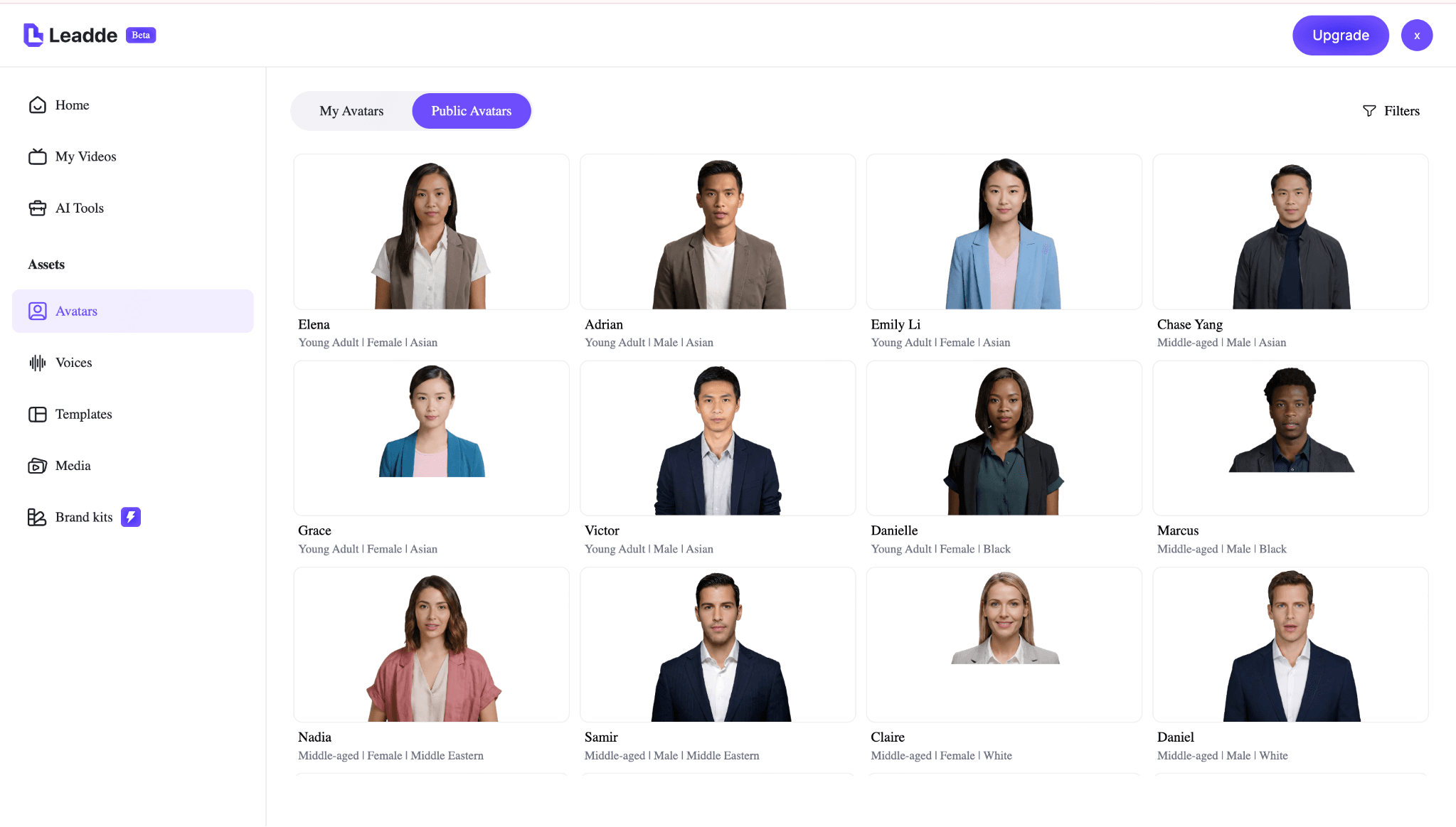
- Languages / voices: Multi-language support with natural-sounding AI voices
- Video generation workflow: Upload text, slides, or documents → select an avatar → generate a complete video automatically
Pros
- Purpose-built for training and instructional content
- Consistent avatar delivery across large video libraries
- Fast updates and localization without re-recording
- Good fit for teams that need to update and localize avatar videos repeatedly
Cons
- Focused on avatar-led videos rather than cinematic storytelling
- Limited options for animated or character-style avatars
Pricing
- Paid plans (usage- and feature-based)
Best use cases
- Employee training and onboarding
- Product and process explainers
- Internal communication videos
- Sales and marketing training
Synthesia — Best for enterprise-grade talking-head avatar videos
What it is
Synthesia is a well-known AI avatar video platform that enables teams to create presenter-style videos using realistic digital avatars and scripted voiceovers.
Key features
- Avatar types: Realistic talking-head avatars
- Languages / voices: 120+ languages and accents
- Video generation workflow: Write a script → choose avatar and voice → generate video
Pros
- High avatar realism and lip-sync quality
- Strong language coverage for global teams
- Enterprise-ready workflows and brand controls
Cons
- Primarily focused on presenter videos only
- Higher pricing compared to lighter tools
Pricing
- Paid plans, enterprise-oriented tiers
Best use cases
- Corporate training videos
- Internal updates and compliance content
- Sales and enablement presentations
HeyGen — Best for personalized and creator-style avatar videos
What it is
HeyGen is an AI video generator focused on natural-looking AI presenters, offering avatar personalization, face swap, and cloning features.
Key features
- Avatar types: Realistic talking-head avatars
- Languages / voices: Multiple languages and voice styles
- Video generation workflow: Upload script → choose avatar → customize scenes → generate video
Pros
- Very natural avatar delivery
- Supports personalized or cloned avatars
- Good flexibility for creator-style videos
Cons
- Less automated for large-scale training libraries
- Manual setup required for advanced custom scenes
Pricing
- Free trial available; paid plans for full features
Best use cases
- Marketing explainers
- Creator-led content
- Personalized product videos
Colossyan — Best for structured learning and educational videos
What it is
Colossyan is an AI avatar platform designed around structured learning content, quizzes, and instructional workflows.
Key features
- Avatar types: Realistic talking-head avatars
- Languages / voices: Multi-language narration support
- Video generation workflow: Script → avatar → structured video modules
Pros
- Strong fit for education and e-learning
- Clear structure for instructional videos
- Supports interactive learning elements
Cons
- Less flexibility for marketing-style visuals
- Avatar selection smaller than some competitors
Pricing
- Paid plans with education-focused tiers
Best use cases
- Online courses
- Internal training modules
- Educational tutorials
UneeQ — Best for animated and interactive AI avatars
What it is
UneeQ specializes in highly expressive, animated AI avatars designed for interactive brand experiences rather than traditional explainer videos.
Key features
- Avatar types: Animated and 3D character avatars
- Languages / voices: Conversational AI voice support
- Video generation workflow: Character design → dialog setup → interactive deployment
Pros
- Strong emotional expression and personality
- Ideal for branded virtual characters
- Built for engagement and interaction
Cons
- Not designed for fast, scripted video generation
- Higher complexity and setup effort
Pricing
- Custom pricing (enterprise-focused)
Best use cases
- Brand avatars and mascots
- Interactive digital experiences
- Virtual assistants and demos
Aragon — Best for static AI avatars and professional portraits
What it is
Aragon generates high-quality static AI avatar portraits, commonly used as professional profile images rather than full video presenters.
Key features
- Avatar types: Static image avatars
- Languages / voices: Not applicable
- Video generation workflow: Portrait generation for use with voiceover or slides
Pros
- High-quality professional images
- Simple and fast setup
- Lower cost compared to video avatar platforms
Cons
- No animation or lip-sync
- Not suitable for presenter-style videos
Pricing
- Paid plans based on image generation
Best use cases
- Profile and branding images
- Voiceover-based videos
- Hybrid slide or screen-recording content
Each tool above serves a different role in AI-powered video creation. Choosing the right platform depends on whether you need realistic presenters, animated characters, or lightweight visual avatars—and how often you plan to update or scale your videos.
Why Most AI Avatar Videos Still Feel Unnatural (And How to Fix It)
One of the most consistent findings across real-world usage:
👉 Even the best AI avatars can still feel slightly “off.”
Common issues observed:
- Robotic tone
- Poor emotional delivery
- Slight lip-sync mismatch
- Lack of natural pauses
How to fix it (based on real workflows):
1. Rewrite scripts for speech, not reading
- Short sentences
- Natural pauses
- Conversational tone
2. Choose the right voice
- Neutral tones work better than overly expressive voices
3. Avoid long monologues
- Break content into segments
👉 Teams that optimize scripts see significantly more natural results—even with the same tool.
The Real Cost of AI Avatar Videos at Scale
Most guides underestimate this.
👉 The biggest cost is not creating one video—it’s scaling hundreds.
What actually happens at scale:
- Per-minute pricing adds up quickly
- Updates require regenerating videos
- Localization multiplies cost
Real scenario:
A content team producing training videos:
- Before: Film once, hard to update
- After AI: Easy updates—but cost scales with volume
👉 Insight:
AI avatars reduce production cost, but increase usage-based cost.
Best AI Avatar Tools by Use Case (Marketing vs Training vs Content Creation)
Choosing the wrong tool is the #1 mistake teams make.
For Training & Onboarding
👉 Best choice: Leadde, Synthesia
- Consistency matters more than creativity
For Marketing Videos
👉 Best choice: HeyGen
- Natural delivery matters most
For Education & Courses
👉 Best choice: Colossyan
- Structured content is key
For Interactive Experiences
👉 Best choice: UneeQ
👉 Insight:
There is no universal “best tool”—only the best tool for your workflow.
AI Avatar vs Real Video Production: When to Use Each
Use AI Avatars when:
- Content updates frequently
- You need multiple languages
- Speed matters more than emotion
Use Real Video when:
- Emotional storytelling is critical
- Brand authenticity is key
- High-end production is required
👉 Real insight:
AI avatars don’t replace video production—they replace repeatable filming workflows.
How to Create a Consistent AI Avatar Across All Videos
Consistency is critical for:
- Branding
- Trust
- Recognition
What works best:
- Use the same avatar across all videos
- Avoid switching styles frequently
- Consider custom avatars for scale
Real workflow insight:
Teams using consistent avatars:
👉 Achieve stronger brand identity across content libraries
Common Limitations of AI Avatar Generators (And Practical Workarounds)
1. Limited customization
→ Workaround: Use modular scripts
2. Template restrictions
→ Workaround: Combine with editing tools
3. “AI feel”
→ Workaround: Improve scripting + pacing
4. Tool fragmentation
→ Workaround: Choose end-to-end platforms (like Leadde)
How to Reduce AI Avatar Video Production Time by 80%
Based on real workflows:
Step 1: Standardize scripts
- Templates for repeatable content
Step 2: Batch video creation
- Generate multiple videos at once
Step 3: Reuse avatars
- Avoid reconfiguration
Step 4: Automate input sources
- Docs → video
- Slides → video
👉 Result:
Teams reduce production time from hours to minutes per video (qualitative improvement observed)
Can You Create AI Avatars Locally? (Reality vs Expectation)
Technically: yes
Practically: very difficult
Challenges:
- Requires high-end GPUs
- Lower realism vs SaaS tools
- Complex setup
👉 Insight:
Local AI avatar solutions are still not competitive for production use.
How to Choose an AI Avatar Tool Based on Your Budget
Low budget
- Static avatars or limited plans
Mid-range
- HeyGen
Enterprise
- Leadde, Synthesia
👉 Key takeaway:
The best tool is the one you can scale—not just afford initially.
How to Choose the Best AI Avatar for Your Videos
Choosing the right AI avatar depends less on which tool is “best” and more on what kind of video you need to create. Use the guidelines below to narrow down your options.
- If you need realistic on-camera presenters Choose video (talking-head) AI avatars. These tools are best for training, explainer videos, sales enablement, and internal communications where clarity and professionalism matter.
- If branding matters more than realism Choose animated or character-style avatars. These avatars work well for storytelling, marketing campaigns, and brand mascots where visual style and personality are more important than realism.
- If budget or simplicity is a priority Choose still image or hybrid avatar tools. Static avatars paired with voiceovers or screen recordings offer a lower-cost option for basic videos and internal use cases.
The best AI avatar tool is the one that fits your content goal, audience, and update frequency—not necessarily the most advanced or expensive option.
Related AI avatar tools
- Avatar Video Tool — Create AI avatar videos for training, explainers, and internal communication.
- AI Talking Head Generator — Turn scripts into presenter-style avatar videos.
- AI Talking Photo Generator — Animate a portrait or image into a talking avatar video.
- AI Human Generator — Generate AI human visuals for business video content.
FAQs: AI Avatars for Video Creation
Are AI avatars good for professional videos?
Yes-AI avatars are widely used in professional training, onboarding, sales, and internal communication videos. When video content needs to be consistent, frequently updated, or localized, AI avatars often outperform traditional filming in speed and scalability. For cinematic storytelling or emotional performances, real actors are still a better fit.
What’s the difference between AI avatars and AI video generators?
AI avatars are designed to represent a presenter or character on screen, typically delivering scripted content. AI video generators, on the other hand, focus on creating visuals, scenes, or animations and may not include realistic presenters. Many tools combine both, but not all AI video generators offer true avatar-based presenters.
Can AI avatars replace real presenters?
No-AI avatars don’t replace real presenters in all cases—but they replace filming workflows in many use cases. They are ideal for repeatable, informational videos like training, tutorials, and product explainers. For live presentations, brand storytelling, or emotional narratives, human presenters remain essential.
Are AI avatar videos ethical?
AI avatar videos are ethical when they are transparent, consensual, and responsibly used. Ethical best practices include disclosing AI usage, avoiding impersonation without permission, and ensuring avatars are not misleading. Most professional platforms follow strict guidelines to support ethical and compliant use.
Which AI avatar tool is the most realistic?
Tools like HeyGen and Synthesia offer the most natural avatars, but realism still depends heavily on script quality and voice selection.
Are AI avatars good for marketing videos?
Yes—but only if they feel natural. Poor scripting can reduce engagement.
Can AI avatars replace real presenters?
No. They replace repetitive production workflows, not emotional storytelling.
Which AI avatar is best for training videos?
Leadde and Synthesia are best suited for training videos due to scalability and consistency.
Is there a free AI avatar tool?
Some tools offer free trials, but high-quality avatars typically require paid plans.
How do I make AI avatar videos look less robotic?
Use conversational scripts, shorter sentences, and natural pacing.
Can I create my own AI avatar?
Yes, some tools support avatar cloning or custom avatars.
Which tool is best for bulk video creation?
Platforms designed for scalability (like Leadde) perform best.
Are AI avatar videos expensive?
They can become expensive at scale due to usage-based pricing.
Can AI avatars be used for YouTube?
Yes, especially for educational and explainer content.
Do AI avatar videos convert well?
They work well for informational content, but emotional storytelling still performs better with real humans.
Conclusion: Choosing the Right AI Avatar Tool
There is no single “best” AI avatar tool—only the right one for your specific video needs.
The phrase “best AI avatars for video creation” ultimately means choosing a tool that matches your use case, audience, and workflow. Realistic talking-head avatars work best for training and explainer videos, animated avatars shine in branding and interactive experiences, and static avatars serve simple or budget-friendly video formats.
By understanding how different AI avatar tools are designed and comparing them by purpose—not hype—you can create professional videos efficiently while avoiding tools that don’t fit your goals.