How to Convert a PDF into Video for Training, SOPs, and Onboarding

Yes, you can convert PDFs into videos—and in many business contexts, it is one of the fastest ways to create training, onboarding, compliance, and internal communication content.
But not every PDF-to-video workflow works equally well.
A simple page-to-video export may technically create an MP4, but that rarely produces a video people actually watch, trust, or retain. In practical business environments, the best PDF-to-video workflow is one that transforms structured documents into editable, scalable video content with narration, visual emphasis, modular updates, and consistent delivery.
Based on our research into how teams actually create document-based video content, the most effective workflows are not traditional screen recordings or one-time video production projects. They are repeatable AI-assisted systems that turn existing PDFs, SOPs, slide decks, training manuals, and documentation into maintainable video assets.
This guide explains exactly how to convert PDFs into videos, when AI works well, where it fails, and how to choose the right workflow for scalable business use.
One practical example is Leadde’s PDF-to-video workflow, which helps teams turn existing PDFs, SOPs, and training materials into structured, maintainable videos instead of rebuilding each project manually.

What Is PDF to Video Conversion?
PDF to video conversion is the process of transforming static PDF documents into video content that can be watched, narrated, shared, updated, and reused.
Depending on the workflow, this can mean very different things.
At the simplest level, PDF to video conversion may involve turning each PDF page into a video slide with transitions. Many basic tools do exactly this.
At a more advanced level, PDF to video conversion means transforming structured written content into a fully organized video experience that includes:
- scene segmentation
- narration or AI voiceover
- visual emphasis
- animations
- presenter overlays
- screen walkthroughs
- multilingual delivery
- editable modular updates
That distinction matters.
A static PDF exported as a slideshow is technically a video.
A structured explainer built from the same document is a communication asset.
For organizations, training teams, product enablement teams, and internal communications leaders, the second model is far more valuable because the goal is not simply format conversion—it is knowledge delivery.
Common source documents include:
- employee onboarding manuals
- compliance PDFs
- SOP documentation
- policy documents
- product training decks
- internal knowledge base exports
- technical manuals
- sales enablement decks
- executive presentations
In practice, most business video content already exists in written form before anyone thinks about video production.
PDF to video is therefore less about creating content from scratch and more about repackaging approved institutional knowledge into a more scalable communication format.
Why Organizations Convert PDFs into Videos Instead of Rebuilding Content
One of the most common mistakes in business video strategy is assuming video content must be created from zero.
That assumption creates unnecessary friction.
Most organizations already have enormous amounts of structured knowledge sitting in documents:
- onboarding guides
- internal playbooks
- SOPs
- HR policy PDFs
- compliance documentation
- training presentations
- sales decks
- product documentation
The issue is rarely missing content.
The issue is delivery.
Static documents create several predictable operational problems.
PDFs Are Frequently Ignored
Long documents compete poorly for attention.
Even well-written onboarding guides or policy manuals often go unread because reading requires focused effort, while modern teams increasingly consume information asynchronously and visually.
This becomes especially problematic for:
- distributed teams
- frontline operations
- high-turnover environments
- multilingual teams
- repeated training scenarios
A document can contain critical information and still fail as a communication medium.
PDFs Create Interpretation Gaps
Documents are inherently self-guided.
That sounds efficient, but in practice it introduces ambiguity.
Different employees may interpret the same policy differently.
Different teams may skip sections.
Different regions may localize explanations informally.
The result:
communication drift.
Video reduces this problem by standardizing pacing, explanation, and emphasis.
Rebuilding Content Is Expensive
Traditional video creation often assumes:
write script → design visuals → record presenter → edit video → publish
That works for one-off marketing content, but traditional commercial video production does not scale for operational documentation.
It does not scale for operational documentation.
If a policy changes next month, rebuilding from scratch is wasteful.
If onboarding changes quarterly, repeated production becomes expensive.
If compliance content changes regionally, localization costs multiply.
PDF-based workflows reduce this cost because the source content already exists.
Documents Already Represent Approved Knowledge
This is especially important in enterprise workflows.
Business documentation often already contains:
- approved terminology
- legal language
- operational sequences
- product messaging
- policy definitions
- compliance wording
That makes documents a highly efficient source layer for video generation.
Instead of recreating meaning, teams can focus on improving delivery.
Best Use Cases for Converting PDFs into Videos
Not every document should become a video.
But some use cases consistently generate strong returns.
Employee Onboarding Videos
New hires rarely absorb dense onboarding PDFs efficiently.
Videos improve consistency by presenting:
- role expectations
- workflows
- systems walkthroughs
- cultural introductions
- process explanations
This is especially valuable for:
- distributed hiring
- rapid scaling teams
- frontline operations
- customer support onboarding
- manufacturing onboarding
Compared with live repeated onboarding sessions, reusable video dramatically improves scalability.
Compliance Training Videos
Compliance documentation is often:
- dense
- legalistic
- difficult to retain
Converting compliance PDFs into structured training videos improves comprehension while preserving message consistency.
Ideal topics include:
- data privacy
- workplace safety
- HR policies
- code of conduct
- regulated procedures
- audit readiness
The operational advantage is maintainability.
Instead of reshooting compliance videos every update cycle, teams can regenerate content from updated documentation.
SOP and Process Documentation Videos
Standard operating procedures are among the strongest PDF-to-video use cases.
Why?
Because written SOPs frequently fail at real adoption.
People skim.
Skip.
Misinterpret.
Forget.
Video improves procedural clarity by combining:
- sequence explanation
- visual emphasis
- demonstrations
- timing context
- step chunking
This is particularly effective in:
- manufacturing
- logistics
- healthcare operations
- internal support workflows
- quality assurance
- IT operations
Product Enablement Videos
Internal product teams constantly create:
- release notes
- feature explainers
- launch decks
- workflow documentation
Instead of repeated live walkthroughs, these materials can become reusable internal training videos.
That improves consistency across:
- sales
- customer success
- support
- partnerships
- implementation teams
Sales Enablement Videos
Sales organizations often rely on decks that are inconsistently presented.
PDF-to-video workflows allow:
- standardized messaging
- reusable objection handling
- product demo walkthroughs
- asynchronous onboarding
- regional adaptation
This becomes particularly useful for distributed sales teams.
Executive Communication Videos
Leadership communication often begins as slides.
Turning strategy decks or internal presentations into concise corporate videos helps maintain message consistency across larger organizations.
Common use cases:
- quarterly updates
- organizational changes
- leadership announcements
- strategic initiatives
- transformation programs
Customer Education Videos
External documentation can also benefit.
Examples:
- implementation guides
- setup manuals
- onboarding instructions
- FAQ documentation
- feature usage walkthroughs
When customers can watch instead of reading long documentation, adoption friction often drops.
Can You Convert Technical PDFs, SOPs, and Manuals into Video?
Yes—but technical content requires a different standard.
This is where many generic PDF-to-video tools fail.
Simple marketing-style video generators are optimized for visual attractiveness, not procedural accuracy.
Technical documentation demands fidelity.
Examples include:
- engineering documentation
- product manuals
- equipment instructions
- SOPs
- healthcare procedures
- IT deployment guides
- compliance protocols
- internal process documentation
The challenge is not converting text.
The challenge is preserving meaning.
What Works Well
AI-assisted PDF workflows perform well when documentation has:
- clear headings
- logical sequencing
- modular sections
- explicit steps
- explanatory text
- consistent terminology
Examples:
Good candidate:
“Step 1: Log into admin dashboard → Step 2: Configure user permissions → Step 3: Save changes”
Poor candidate:
dense table with 40 exceptions and footnotes
AI handles narrative procedural structure far better than raw data complexity.
Where AI Struggles
Technical PDFs often contain elements that generic AI workflows mishandle:
Dense Tables
Complex comparison tables may lose hierarchy.
Charts and Graphs
AI may misrepresent:
- axes
- labels
- relationships
- scale meaning
Regulatory Wording
Minor wording changes may alter meaning.
Decision Trees
Branching logic is difficult if poorly structured.
Diagram-heavy Documentation
AI may simplify visuals incorrectly.
Best Practice for Technical Content
For technical PDF-to-video conversion:
Use AI for:
- structure extraction
- segmentation
- narration drafting
- modular organization
- scene generation
Use human review for:
- technical accuracy
- chart fidelity
- regulatory language
- procedural validation
The most reliable workflow is AI-assisted—not fully autonomous.
Why Most PDF to Video Tools Fail for Business Content
If converting PDFs into videos were as simple as exporting slides, this category would not be frustrating.
But most tools fail because they optimize for conversion, not communication.
Mistake 1: Treating Every PDF Page as a Video Scene
This creates terrible pacing.
One page does not equal one teaching unit.
A single PDF page may contain:
- three concepts
- one chart
- two sub-processes
- dense legal copy
Direct page-to-scene conversion creates overloaded, boring videos.
Effective video segmentation follows comprehension logic—not document pagination.
Mistake 2: Adding Random Stock Footage
Many consumer AI tools try to “make videos engaging” by injecting unrelated visuals.
This may work for lightweight marketing content.
It fails badly for:
- SOPs
- compliance
- product workflows
- internal training
- technical education
If a policy explanation shows smiling office stock footage instead of the actual workflow, clarity decreases.
Mistake 3: Overusing AI Avatars
AI presenters can help in some contexts.
But overusing talking heads creates fatigue.
Especially when:
- content is procedural
- explanations are technical
- viewers need demonstrations
- diagrams matter more than faces
Instructional clarity usually matters more than synthetic presenter presence.
Mistake 4: Ignoring Accuracy Risks
Some AI video workflows hallucinate structure.
That becomes dangerous when handling:
- operational procedures
- regulated documentation
- compliance instructions
- financial explanations
- technical workflows
Pretty output is not enough.
Accuracy is a business requirement.
Mistake 5: Creating Non-Editable Videos
One-off video generation seems efficient until documentation changes.
Then teams discover:
- script locked
- scenes uneditable
- updates expensive
- localization painful
Maintainability is not optional for serious business use.
PDF to Video vs Screen Recording: Which Workflow Scales Better?
Many teams start with screen recording because it feels familiar.
Open the PDF.
Narrate.
Record.
Export.
Done.
For small one-off projects, that works.
But scaling changes the equation.
| Factor | PDF-to-Video AI Workflow | Screen Recording |
|---|---|---|
| Initial speed | Fast | Moderate |
| Updates | Easy | Painful |
| Re-recording required | Usually no | Usually yes |
| Localization | Easier | Hard |
| Brand consistency | High | Variable |
| Scalability | High | Low |
| Collaboration | Better | Limited |
| Procedural walkthroughs | Strong | Strong |
| Human authenticity | Lower | Higher |
When Screen Recording Wins
Screen recording works best when:
- live software walkthroughs are needed
- spontaneous explanation matters
- authenticity matters more than polish
- one-off training is acceptable
Examples:
- product demos
- ad hoc troubleshooting
- software tutorials
When PDF-to-Video Wins
PDF-to-video workflows win when:
- documentation already exists
- repeatability matters
- updates are frequent
- teams are distributed
- multilingual output matters
- consistency matters
How Accurate Is AI When Converting PDFs to Videos?
AI can accurately convert PDFs into videos—but only within the boundaries of the source content and the workflow design.
This is where many buyers ask the wrong question.
The question is not:
“Can AI convert a PDF into a video?”
The better question is:
“How accurate is the output for my type of document?”
Accuracy varies significantly depending on content structure.
High Accuracy Scenarios
AI performs well when PDFs contain structured explanatory content.
Examples include:
- onboarding guides
- product documentation
- SOPs with clear sequences
- internal playbooks
- instructional frameworks
- process explanations
- FAQ documents
- presentation-style PDFs
These documents typically include:
- headings
- logical order
- explanatory prose
- explicit step progression
- reusable terminology
In these scenarios, AI can reliably assist with:
- extracting structure
- organizing scenes
- generating narration drafts
- creating modular video flows
- producing multilingual variants
Medium Accuracy Scenarios
Some content requires validation but remains workable.
Examples:
- mixed text + charts
- dashboard explainers
- workflow diagrams
- product release documentation
- structured compliance overviews
AI can accelerate production here, but review remains necessary.
Lower Accuracy Scenarios
AI struggles most when PDFs are primarily data artifacts rather than explanatory documents.
Examples:
- dense spreadsheets exported as PDF
- complex comparison tables
- regulatory legal documentation
- engineering schematics
- decision trees
- financial reporting
- research-heavy technical reports
The core issue is semantic interpretation.
AI may reproduce visuals attractively while subtly changing meaning.
That risk matters.
A mislabeled process video is inconvenient.
A misinterpreted compliance instruction is operationally dangerous.
Practical Accuracy Framework
A useful rule:
The more your PDF explains something in natural language, the better AI performs.
The more your PDF encodes meaning visually or structurally, the more review is required.
Best workflow:
- AI for acceleration
- human validation for business-critical accuracy
That combination consistently produces the most reliable results.
PDF to Video for Training: What Actually Improves Learning?
Converting a PDF into a video does not automatically improve learning.
A bad training video is often worse than a readable document.
The real advantage comes from instructional restructuring.
Why Page-to-Page Narration Fails
Many teams make a simple assumption:
“Let’s narrate the PDF.”
This usually creates:
- long videos
- overloaded scenes
- low retention
- passive viewing
- cognitive fatigue
Why?
Because documents and videos are different media.
Documents allow:
- scanning
- skipping
- re-reading
- self-paced interpretation
Videos control pacing.
That means instructional design matters much more.
What Actually Improves Training Outcomes
Effective PDF-to-training-video workflows typically apply several principles.
1. Chunking
Break long documentation into smaller conceptual units.
Bad:
25-minute onboarding monolith
Better:
- account setup
- permissions
- first workflow
- escalation process
- FAQ
Smaller segments improve:
- completion
- retention
- update flexibility
2. Guided Visual Emphasis
Viewers need attention direction.
Highlight:
- key buttons
- sequences
- warnings
- steps
- deadlines
- system states
Without visual guidance, video becomes passive document reading.
3. Contextual Narration
Narration should explain meaning—not simply read text.
Weak:
“Step 3. Select save.”
Better:
“At this step, saving applies permissions globally, so administrators should verify access settings first.”
Explanation creates understanding.
4. Modular Updates
Training content changes.
Good instructional workflows assume change.
This reduces maintenance burden dramatically.
5. Procedural Demonstration
Some training topics require showing action, not explanation.
Examples:
- software workflows
- machine operation
- customer support processes
- dashboard usage
Hybrid workflows outperform static narration here.
AI Avatars vs Voiceover + Visual Walkthroughs
AI presenters have become one of the most visible parts of AI video creation.
But visibility does not equal suitability.
Should you use AI avatars when converting PDFs into videos?
Sometimes.
Not always.
When AI Avatars Work Well
AI presenters are effective when communication benefits from a guided host.
Good use cases:
- executive updates
- welcome messages
- high-level onboarding
- culture communication
- lightweight internal announcements
- simple explainers
Why?
Because the human-like format creates continuity.
The presenter acts as a communication anchor.
When AI Avatars Perform Poorly
They become much less effective for dense instructional content.
Examples:
- software walkthroughs
- technical SOPs
- compliance procedures
- dashboard explanations
- troubleshooting
- detailed product training
In these cases, the viewer needs:
- process visibility
- UI focus
- motion guidance
- contextual annotation
A talking face often adds little instructional value.
Better Alternative: Voiceover + Guided Visuals
For procedural learning, the strongest workflow is usually:
voice explanation + focused visual walkthrough
This creates:
- higher clarity
- less distraction
- better instructional density
- easier updates
- cleaner localization
Use presenters selectively.
Do not make them the default.
How to Convert a PDF into a Video: Step-by-Step Workflow
If your goal is professional business video—not just file conversion—follow this workflow.
Step 1: Start with a Structured PDF
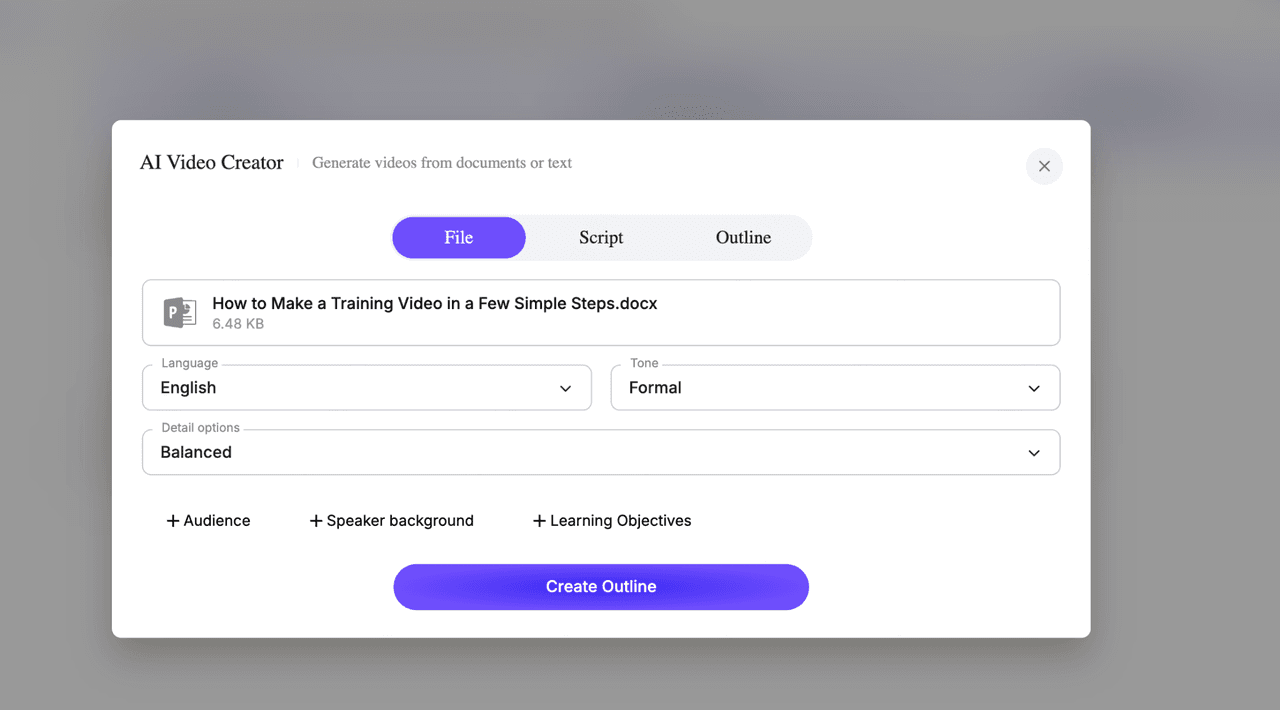
Best source documents include:
- training guides
- SOPs
- slide decks
- onboarding documentation
- product explainers
- compliance PDFs
Strong inputs have:
- clear headings
- modular sections
- logical progression
- readable formatting
Weak inputs:
- scanned image PDFs
- cluttered exports
- giant data dumps
- fragmented documents
Good output starts with good structure.
Step 2: Break the PDF into Learning Scenes
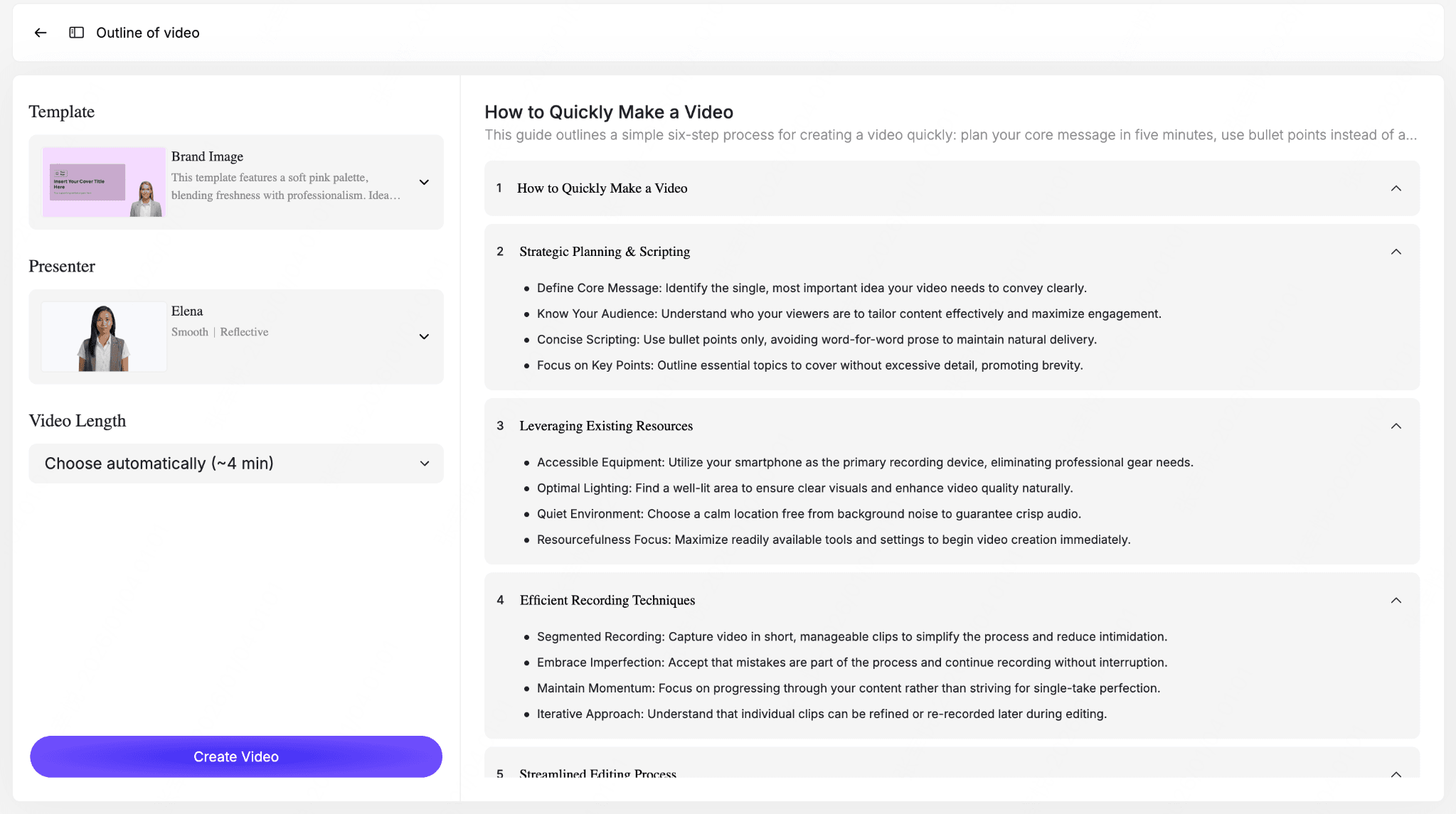
Do not map one page to one scene.
Instead, organize by communication intent.
Examples:
Scene 1: Why this process matters
Scene 2: Setup requirements
Scene 3: Step-by-step execution
Scene 4: Common mistakes
Scene 5: Escalation path
This improves pacing dramatically.
Step 3: Add Narration
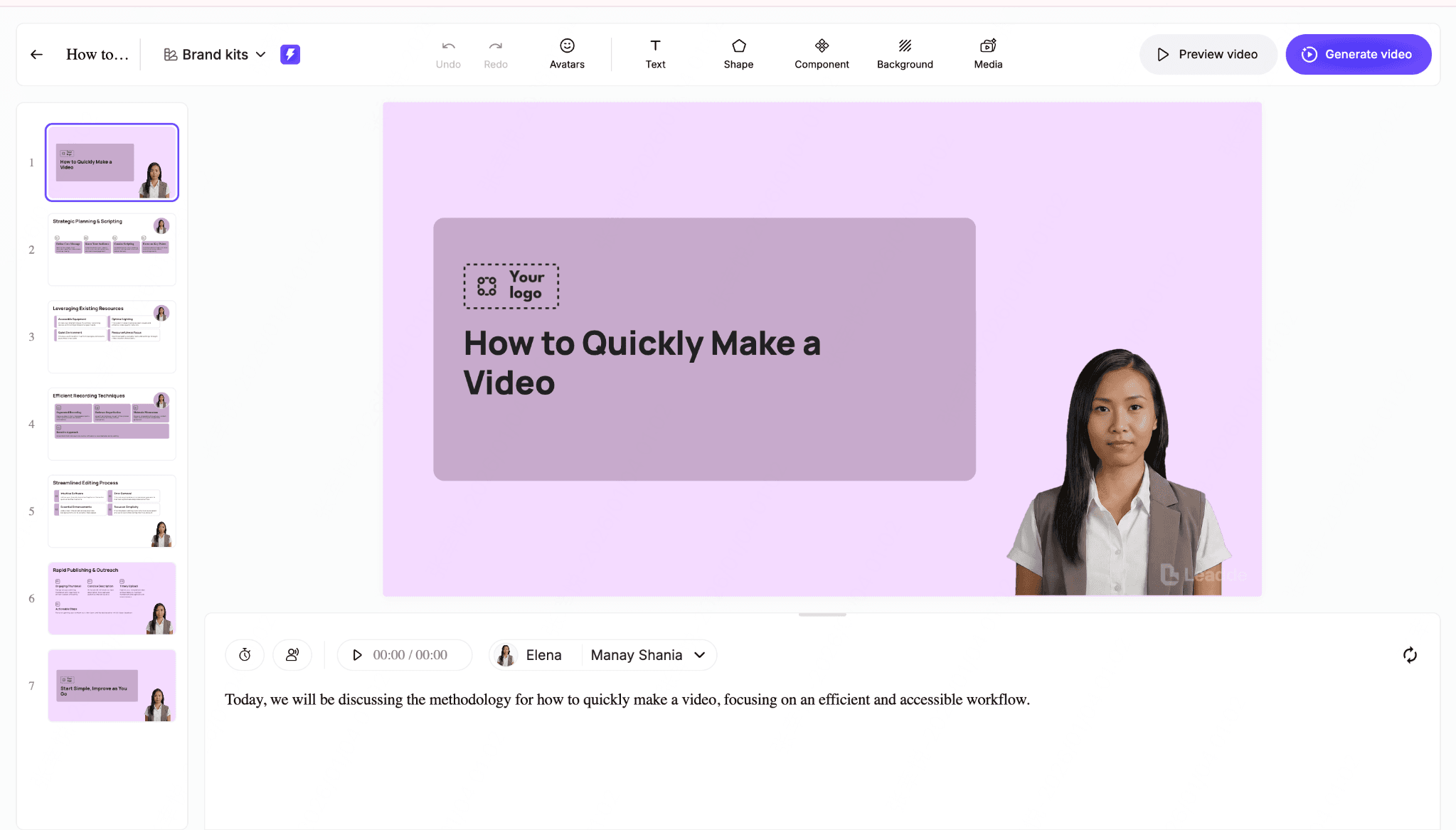
Choose narration strategy:
AI Voice
Best for:
- scalability
- multilingual production
- consistency
- rapid iteration
Human Voice
Best for:
- authenticity
- leadership communication
- high-trust messaging
- nuanced explanation
Choose based on use case—not preference alone.
Step 4: Add Visual Guidance
Strong PDF-to-video workflows include:
- highlights
- zoom focus
- callouts
- motion emphasis
- UI walkthrough overlays
- process arrows
- sequencing indicators
Video must guide attention.
Step 5: Decide Whether a Presenter Is Necessary
Ask:
Does a presenter improve understanding?
If yes, use one.
If no, remove it.
Many videos are stronger without synthetic hosts.
Step 6: Review Accuracy
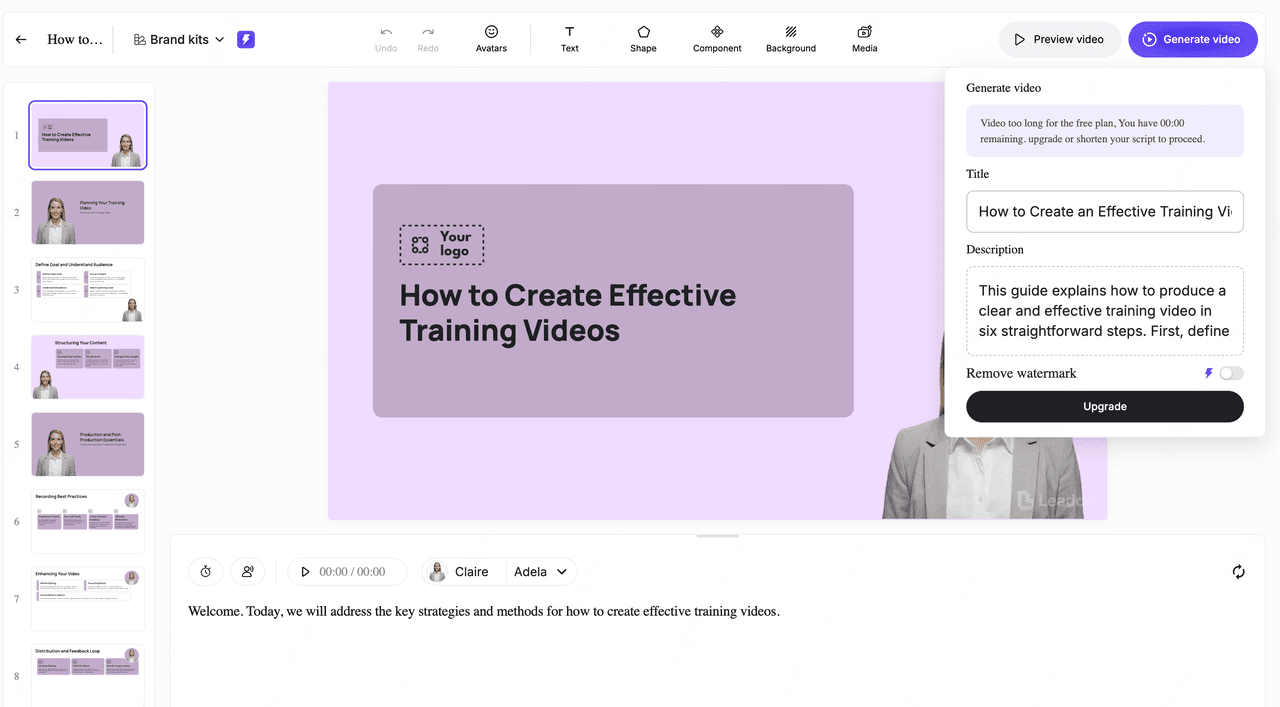
Critical validation checklist:
- terminology correct?
- steps complete?
- charts accurate?
- warnings preserved?
- compliance language intact?
- visuals aligned with narration?
Never skip this step for operational content.
Step 7: Publish as a Maintainable Asset
Best workflows preserve editability.
This allows:
- section replacement
- script revision
- localization
- policy updates
- role-based variants
That is where long-term ROI appears.
Best PDF to Video Features to Look For
Choosing the right tool matters more than most teams expect.
Key capabilities:
Smart Scene Segmentation
The platform should organize by concept—not page count.
Editable Script Layer
Generated narration should remain editable.
Non-editable automation creates future pain.
Flexible Narration Options
Look for:
- AI voice
- human upload
- multilingual support
- pronunciation controls
Visual Annotation Controls
Needed for:
- training
- SOPs
- walkthroughs
- compliance explanations
Presenter Optionality
Presenter support is useful.
Mandatory presenter workflows are limiting.
Modular Editing
Can you update one section without rebuilding everything?
Critical feature.
Collaboration Features
Business teams need:
- review workflows
- approvals
- shared editing
- version management
Localization Support
Important for distributed organizations.
Brand Controls
Look for:
- logos
- colors
- typography
- templates
- standardized layouts
Common Mistakes When Converting PDFs into Videos
Avoid these.
Mistake 1: Converting Without Restructuring
Conversion is not communication design.
Mistake 2: Making Videos Too Long
Long videos kill engagement.
Break content down.
Mistake 3: Reading Slides Word-for-Word
Narration should explain.
Not duplicate.
Mistake 4: Ignoring Visual Hierarchy
Everything cannot be equally important.
Guide attention.
Mistake 5: Overusing AI Avatars
Useful tool.
Poor default.
Mistake 6: Treating Technical Content Like Marketing Content
Stock footage does not explain procedures.
Mistake 7: Skipping Accuracy Review
Automation without validation creates risk.
Mistake 8: Creating Dead-End Videos
If updates require starting over, the workflow is broken.
How to Keep PDF-Based Videos Updated as Documentation Changes
The biggest hidden cost in business video creation is maintenance.
Not production.
Maintenance.
Why Traditional Video Workflows Break
Typical workflow:
record → edit → publish
Then policy changes.
Now what?
Often:
re-record everything
That is inefficient.
Better Model: Document as Source of Truth
Scalable workflows separate:
knowledge layer → delivery layer
PDF/document = source
Video = delivery
This allows regeneration instead of reconstruction.
Modular Updating
Strong workflows allow:
- section edits
- narration replacement
- localized variants
- policy refreshes
- product update insertion
This dramatically improves operational efficiency.
Why This Matters for Growing Teams
Especially important for:
- HR
- L&D
- compliance
- product enablement
- support training
- global ops
Frequent change is normal.
Maintainability becomes a strategic capability.
Frequently Asked Questions About Converting PDFs to Videos
Can AI convert a PDF into a video?
Yes. Modern AI video platforms can transform PDFs into structured videos with narration, scenes, visual emphasis, and optional presenters.
What is the best way to convert a PDF into a video?
For business content, the most effective workflow is structured AI-assisted conversion with editable scenes, narration, review, and modular updates—not simple slide export.
What is the best PDF to video converter?
The best tool depends on your use case.
For business workflows, prioritize:
- editability
- scene segmentation
- narration flexibility
- visual guidance
- maintainability
- localization support
Can I convert a PDF manual into a training video?
Yes.
This is one of the strongest use cases for PDF-to-video workflows, especially for SOPs, onboarding, and procedural training.
Can technical PDFs be converted accurately?
Yes, with review.
AI works well for structured procedural content but requires human validation for charts, dense data, and regulated content.
Is AI accurate enough for compliance videos?
Often yes, if source documentation is strong and legal/compliance review remains in place.
Never publish regulated instructional content without validation.
PDF to video or screen recording—which is better?
Screen recording is better for live walkthroughs.
PDF-to-video workflows are better for scalable repeatable documentation-based communication.
Should I use AI avatars for training videos?
Sometimes.
AI presenters work best for lightweight explanation.
For procedural instruction, guided visuals and narration usually perform better.
Can I update an AI-generated video later?
If the platform supports modular editing, yes.
This is a critical capability for business use.
Can I convert only selected PDF pages?
Many platforms support selective conversion or manual scene structuring.
This is preferable to converting irrelevant content.
Can PDF-based videos be localized?
Yes.
AI workflows make multilingual adaptation far easier than traditional re-recording.
Are free PDF-to-video tools good enough?
For simple slideshow conversion, sometimes.
For scalable business communication, free tools are usually too limited.
Conclusion
Converting PDFs into videos is no longer a niche workflow.
It has become a practical way for organizations to scale training, onboarding, compliance communication, product enablement, and knowledge sharing without rebuilding content from scratch.
But successful PDF-to-video workflows are not about exporting pages into MP4 files.
They are about transforming structured knowledge into clear, maintainable, reusable communication systems.
The best approach combines:
- strong source documentation
- intelligent scene structuring
- effective narration
- guided visuals
- human accuracy review
- modular updates
If your organization already relies on PDFs, manuals, SOPs, and internal documentation, you likely already have the content foundation.
The opportunity is turning that knowledge into scalable video delivery.
If you're looking for a workflow designed specifically for turning business documents into structured, editable AI video content, Leadde helps teams convert PDFs, training materials, and documentation into maintainable professional videos—without rebuilding every project from scratch.