Top 6 Corporate Video Platforms for Enterprise Teams (2026)

The best corporate video platform is the one that helps your team manage video approvals, collaboration, security, and scalability—not simply the one with the most storage or the best video player. For most enterprise teams, success depends on how efficiently they can handle review cycles, maintain brand consistency, work with external stakeholders, control platform costs, and scale video workflows across departments.
In practice, the right platform depends on your primary use case. Marketing teams often need stronger approval workflows and compliance controls, agencies prioritize fast external collaboration and reviewer access, while training and onboarding teams need structured, repeatable video creation that is easy to update over time.
Based on my experience evaluating corporate video platforms across marketing, training, and enterprise operations, the most effective teams consistently prioritize approval workflows, reviewer access, workflow integrations, and security controls far more than simple hosting features.
For teams focused on training, onboarding, SOPs, and product education, I often recommend Leadde.ai because it is built specifically for step-by-step tutorial videos rather than generic video editing. Its structured workflow helps teams create clearer instructional content faster while reducing update and maintenance costs over time.

This guide explains what a corporate video platform is, which platforms perform best in 2026, how to reduce costs without disrupting operations, and how to choose the right solution based on your team structure and business goals.
What Is Corporate Video?
A corporate video is video content created by an organization to support business objectives such as communication, training, education, or alignment, rather than public entertainment or advertising.
Common types of corporate video include:
- Brand and culture videos that communicate values, mission, and employer identity
- Product and explainer videos that clarify features, workflows, or use cases
- Training and onboarding videos that standardize learning and knowledge transfer
- Internal communication videos used for leadership updates, announcements, and change management
Across all formats, the core purpose of corporate video remains the same: to deliver clear, consistent messages at scale. Successful corporate video strategies prioritize clarity over creativity, repeatability over one-off production, and long-term usefulness over short-term impact.
What Is a Corporate Video Platform?
A corporate video platform is an enterprise-grade system designed to host, manage, secure, and distribute video content across an organization. Unlike consumer video tools, these platforms are built to support complex workflows, multiple stakeholder groups, and large video libraries over time.
At a minimum, a corporate video platform helps organizations:
- Store and organize video content in a centralized, searchable library
- Control access and security through permissions, privacy settings, and compliance features
- Distribute video content across websites, internal portals, learning systems, and campaigns
- Measure performance with analytics on views, engagement, and usage
Importantly, a corporate video platform is not simply a video hosting service. While hosting is part of the equation, enterprise platforms focus on governance, scalability, collaboration, and insight—ensuring video remains manageable and effective as usage grows across teams and regions.
For corporate teams that need repeatable internal, training, and communication videos, Leadde turns business content into polished AI videos quickly.
The Direct Benefits of Using a Corporate Video Platform
Once video is used across multiple teams, departments, and workflows, managing content without a dedicated platform quickly creates friction. A dedicated corporate video platform solves this by introducing structure, control, and scalability to how organizations use video.
Centralized video library
A corporate video platform provides a single, centralized location to store and organize all video assets. Teams no longer need to search across folders, drives, or tools to find the right version of a video. Clear categorization, searchability, and version control ensure that content remains accessible and usable as the library grows.
Brand consistency across teams
When multiple teams create and share video content, maintaining consistent branding becomes difficult. Corporate video platforms help enforce brand standards through shared templates, controlled assets, and approval workflows—ensuring videos align with visual and messaging guidelines across regions and functions.
Faster content distribution
Enterprise platforms streamline how videos are shared internally and externally. Whether distributing content through websites, internal portals, learning systems, or campaigns, teams can publish and update videos quickly without duplicating effort or rebuilding distribution workflows each time.
Performance tracking and analytics
Built-in analytics allow organizations to understand how corporate video performs. Platforms provide insights into views, engagement, completion rates, and usage across teams, helping stakeholders measure impact and refine video strategies over time.
Scalable video workflows
Most importantly, corporate video platforms are designed to scale. As video usage expands—from a few assets to hundreds—these platforms support collaboration, permissions, and repeatable workflows that prevent content chaos while enabling long-term growth.
Key Features to Look for in a Corporate Video Platform
Not all video platforms are built for enterprise use. As corporate video scales across departments, regions, and use cases, choosing the right platform depends on more than basic hosting or playback quality. The most effective corporate video platforms share several critical capabilities.
When evaluating enterprise video platforms, these features determine whether a solution can scale reliably over time.
Security and compliance
Security is a non-negotiable requirement for corporate video. Enterprise platforms should support role-based access control, private sharing, password protection, and secure streaming. For regulated industries, compliance features—such as data encryption, audit logs, and regional data controls—are essential to protect sensitive internal and external content.
Scalability
A corporate video platform must handle growth without breaking workflows. This includes supporting large video libraries, increasing user volumes, and expanding distribution needs across teams and regions. Scalability ensures that video operations remain stable and organized as usage increases over time.
Integrations with existing systems
Corporate video rarely lives in isolation. The best platforms integrate seamlessly with tools organizations already rely on, such as content management systems (CMS), learning management systems (LMS), customer relationship management tools (CRM), and internal portals. These integrations allow video to fit naturally into existing workflows rather than becoming another disconnected tool.
Analytics and reporting
Visibility into performance is critical for understanding the impact of corporate video. Enterprise platforms provide detailed analytics on views, engagement, completion rates, and usage across teams and audiences. These insights help organizations optimize content, improve communication effectiveness, and demonstrate return on investment.
Workflow and approval management
As more stakeholders contribute to video creation, clear workflows become essential. Corporate video platforms support collaboration through version control, review cycles, and approval processes. This structure reduces errors, prevents outdated content from being shared, and keeps production moving efficiently across teams.
Branding and customization
Maintaining a consistent brand experience across all videos is a major challenge at scale. Enterprise platforms allow organizations to apply brand guidelines through templates, layouts, player customization, and standardized assets. This ensures that every video reflects the company’s identity, regardless of who creates it.
AI-powered features
AI capabilities are increasingly important in modern corporate video platforms. Features such as automatic subtitles, content tagging, speech-to-text search, and multi-language translation reduce manual effort and improve accessibility. When used correctly, AI enhances efficiency without compromising accuracy or governance.
Top 6 Corporate Video Platforms for Enterprise Teams (2026)
Choosing the right corporate video platform depends on how your organization uses video—whether for training, onboarding, marketing, or internal communication. Below are some of the leading platforms in 2026, each suited to different enterprise use cases.
When evaluating enterprise video platforms, these features determine whether a solution can scale reliably over time.
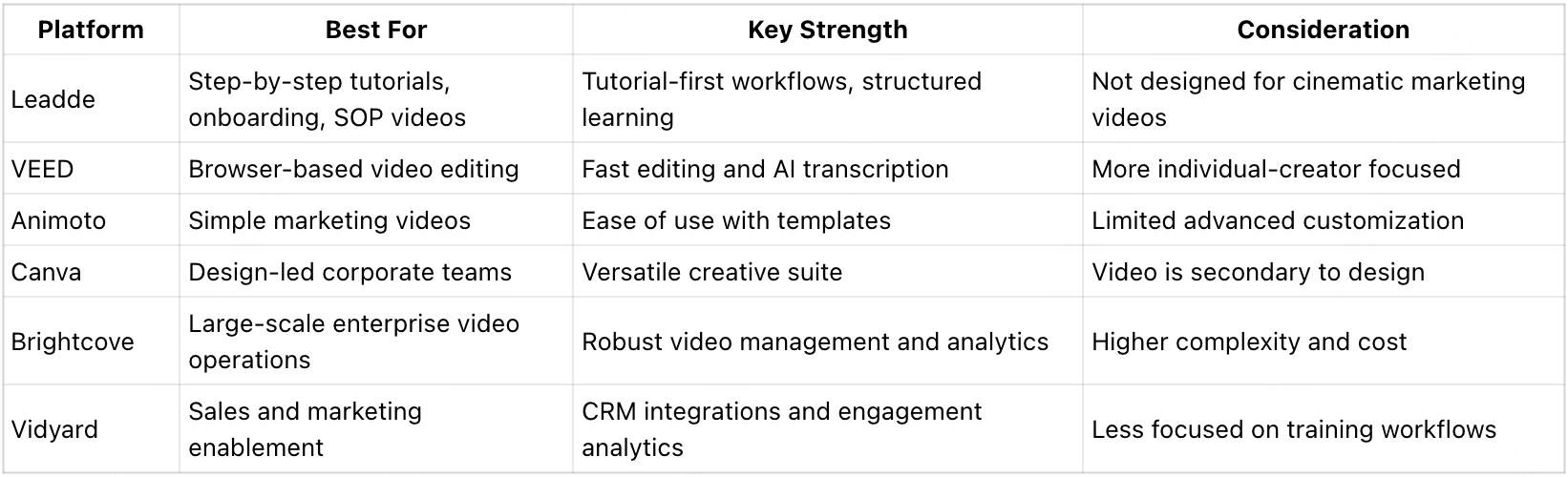
Leadde.ai — Best for Step-by-Step Tutorial Videos

What it does: leadde.ai is purpose-built for creating structured, step-by-step tutorial videos. Instead of focusing on generic AI video generation, it prioritizes instructional clarity and sequential learning—making it ideal for teams that use video to teach tasks, workflows, or product usage.
Key strengths
- Tutorial-first workflow designed around clear step sequencing
- Emphasis on reducing cognitive load for learners
- Annotation and guidance features optimized for instruction
- Built for tutorial creators, not general-purpose video editing
Limitations
- Less focused on brand-heavy marketing visuals
- Not intended for cinematic or promotional video formats
Best for Product walkthroughs, SOP tutorials, onboarding videos, customer education, and internal training.
Tip: When the goal is teaching users how to complete tasks—not just showing features—leadde.ai’s experience-first design can save significant production and update time.
_
_
VEED — Best for Fast Browser-Based Editing
What it does VEED is a browser-based video editor focused on speed and accessibility. It allows teams to quickly edit, subtitle, and export videos without installing software.
Key strengths
- Easy-to-use, web-based interface
- Strong subtitle and captioning tools
- Quick turnaround for simple video tasks
Limitations
- Limited enterprise governance features
- Not designed for complex approval workflows
Best for Small teams creating quick updates, social clips, and lightweight corporate videos.
Animoto — Best for Simple Marketing Videos
What it does Animoto helps teams create polished videos using templates and drag-and-drop editing. It’s geared toward speed and simplicity rather than deep customization.
Key strengths
- Very low learning curve
- Template-driven workflow
- Suitable for non-technical users
Limitations
- Limited flexibility for complex video needs
- Less control over advanced branding or workflows
Best for: Simple marketing videos, internal updates, and quick promotional content.
Canva — Best for Design-Led Teams
What it does Canva offers a broad design platform that includes video creation tools. It’s popular with teams that already rely on Canva for graphics and presentations.
Key strengths
- Unified design and video environment
- Extensive template and asset library
- Easy collaboration for cross-functional teams
Limitations
- Video features are secondary to design tools
- Not optimized for long-form or instructional video
Best for Design-driven teams creating brand-aligned videos alongside other visual assets.
Brightcove — Best for Large-Scale Enterprise Video Operations
What it does Brightcove is a full-featured enterprise video platform built for large organizations with complex distribution, analytics, and security requirements.
Key strengths
- Robust video management and analytics
- Scalable infrastructure for high-volume video
- Strong integration and security capabilities
Limitations
- More complex to implement
- Typically higher cost than lightweight tools
Best for Large enterprises managing extensive video libraries across multiple channels and regions.
Vidyard — Best for Sales and Marketing Enablement
What it does Vidyard focuses on video as a sales and marketing tool, offering analytics and integrations that help teams personalize outreach and track engagement.
Key strengths
- Detailed viewer analytics
- CRM integrations
- Interactive video elements
Limitations
- Less emphasis on internal training or tutorials
- Video management features are marketing-centric
Best for Sales enablement, video-driven outreach, and marketing performance tracking.
The Hidden Cost of Switching Corporate Video Platforms
Many teams underestimate migration costs.
Saving subscription fees looks attractive—until operational disruption begins.
The real cost includes:
- client retraining
- lost review history
- broken Premiere integrations
- workflow disruption
- stakeholder resistance
- asset migration complexity
- internal adoption delays
In several platform transitions, teams discovered that the cost of switching exceeded a full year of software savings.
This is why many companies stay with Frame.io despite pricing frustration.
Replacing software is easy.
Replacing workflow habits is expensive.
Before switching, teams should calculate:
workflow cost—not just subscription cost.
Questions Every Team Should Ask Before Buying a Corporate Video Platform
Before choosing a platform, ask:
- Who actually needs a paid account?
- Can external clients review without paid seats?
- Does the platform support multi-stage approvals?
- Is Adobe Premiere integration required?
- Do we need legal review workflows?
- Is compliance audit tracking necessary?
- How often do we work with freelancers?
- Do we need secure expiring links?
- Is training video or marketing video the primary use case?
- What will migration cost beyond software pricing?
These questions determine platform fit far more than feature lists.
FAQs: Corporate Video & Corporate Video Platforms
What is the difference between corporate video and marketing video?
Corporate video is created to support a wide range of business goals, including internal communication, training, onboarding, and product education. Marketing video is a subset of corporate video, focused specifically on demand generation and brand promotion. Corporate video emphasizes clarity, consistency, and long-term usability over short-term campaigns.
Do enterprises need a dedicated corporate video platform?
Enterprises typically need a dedicated corporate video platform once video is used across multiple teams, regions, or workflows. These platforms provide centralized management, security, access control, and analytics that general video hosting tools lack, making it easier to scale video usage without losing control or consistency.
How much does a corporate video platform cost?
The cost of a corporate video platform varies depending on features, storage, user volume, and enterprise requirements. Pricing often ranges from a few hundred dollars per month for smaller teams to custom enterprise plans for large organizations. Factors such as security, integrations, and support levels significantly influence pricing.
Are AI corporate video tools suitable for enterprises?
Yes, AI corporate video tools are increasingly suitable for enterprise use when implemented within structured workflows. AI features such as automatic subtitles, translations, and content tagging improve efficiency and accessibility. Enterprises benefit most when AI enhances governance, consistency, and scalability rather than replacing established review processes.
Conclusion: Building a Scalable Corporate Video Strategy
Corporate video is no longer about producing individual videos. It’s about building a system that allows video content to remain accurate, consistent, and effective as organizations grow.
A scalable corporate video strategy focuses on repeatability, governance, and adaptability—ensuring videos can be updated, distributed, and measured over time without friction. Choosing the right corporate video platform plays a critical role in this process, shaping how efficiently teams create, manage, and scale video across the business.