How to Create Custom AI Avatars for Product Demo Videos Without Looking Fake

To create custom AI avatars for product demo videos, start by defining the avatar’s role (usually as a guide or explainer), then choose a style that prioritizes clarity over realism. Next, create or customize your avatar using an AI video tool by recording a short reference video or selecting a pre-built avatar and adjusting its voice, tone, and pacing. After that, write a modular script broken into short sections so you can easily update it later. Finally, combine the avatar with screen recordings, UI highlights, and captions to produce a clear, scalable demo video. The most effective workflows focus less on making the avatar look human and more on ensuring consistent delivery, fast updates, and seamless integration with product visuals.
This guide explains when AI avatars make sense for product demo videos, how to create them effectively, and what to avoid, so teams can use them as a tool—not a shortcut.
For teams looking to implement this workflow in practice, tools like Leadde provide a streamlined way to create, customize, and scale AI avatar-based product demos efficiently.

Why AI Avatars Are Changing Product Demo Videos
Product demo videos are critical for SaaS growth, but traditional production does not scale. Based on internal analysis and multiple real-world use cases, three structural problems consistently appear:
- High maintenance cost: even small UI updates require re-recording
- Slow iteration: video production lags behind product changes
- Localization bottlenecks: each language multiplies effort, creating a need for video localization.
AI avatars solve these not by improving creativity, but by improving repeatability.
Teams using AI avatars report:
- Script updates in minutes instead of reshoots
- Reusable video structures across features
- Easy multi-language expansion without new presenters
In practice, this shifts demo videos from a “production task” to a modular system.
How Realistic Do AI Avatars Need to Be for Product Demo Videos?
One of the most misunderstood questions is realism.
Through testing different tools and reviewing dozens of production workflows, a consistent pattern emerges:
- Higher realism does not equal better performance
- Slightly stylized avatars often perform better for demos
Why?
Because ultra-realistic avatars introduce:
- Subtle lip-sync mismatches
- Facial micro-expression errors
- Viewer discomfort (uncanny valley)
In contrast, simpler avatars:
- Keep focus on the product UI
- Reduce cognitive load
- Work better in longer walkthroughs
The takeaway:
For product demos, clarity consistently outperforms realism.
Do AI Avatar Videos Reduce Conversion or Trust?
This depends entirely on context.
From multiple campaign analyses and demo use cases:
Where trust is NOT impacted:
- Product walkthroughs
- Feature explanations
- Onboarding flows
Where trust DOES drop:
- Sales-heavy messaging
- Founder-led storytelling
- High-stakes enterprise demos
In one observed pattern across teams:
- When the product UI is the focus → avatar has minimal impact on trust
- When the presenter is the focus → AI reduces perceived credibility
This leads to a key principle:
AI avatars work best when they deliver information, not persuasion.
AI Avatar vs Real Presenter: Which One Should You Use?
Instead of asking which is “better,” high-performing teams use a decision framework:
Use AI avatars when:
- You need to scale video production
- Content changes frequently
- You need multiple variations or languages
Use real presenters when:
- Trust depends on identity
- You need emotional connection
- The video is sales-driven
Many teams now combine both:
- AI avatars → onboarding, help docs, feature demos
- Humans → landing pages, ads, founder videos
The Real Cost of AI Avatar Videos at Scale
AI avatars are often perceived as “cheap,” but actual cost depends on usage.
From real production scenarios:
Example:
- Traditional video: $100–$600 per video
- AI-generated video: <$1 per variation (at scale)
However, teams report hidden costs:
- Credit-based pricing scales quickly
- Re-renders due to errors
- Tool limitations requiring workarounds
Despite this, the ROI becomes clear when scaling:
Case Insight:
One team produced:
- 40 videos in 2 days
- ROAS: 2.4x
- Cost per video: under $1
Before:
- 4–5 days per video
- Creator coordination required
After:
- Minutes per video
- Batch production
The real value is not cost per video—it’s cost per experiment.
How Teams Use AI Avatars to Produce 10x More Product Videos
The biggest shift is not quality—it’s volume.
Real Use Case:
A SaaS team used AI avatars to generate ad variations:
- 40 creatives produced in 48 hours
- Enabled rapid A/B testing
- Identified winning messaging faster
Another pattern:
Teams now:
- Generate 10–20 variations per feature
- Test messaging before committing to production
This was previously impossible due to cost and time.
AI avatars enable:
- High-frequency iteration
- Faster feedback loops
- Data-driven content decisions
What Makes a Good AI Avatar for Product Demos
Not all AI avatars work well in product demo videos. The best AI avatars for product demos are designed to support the product, not compete with it.
A product demo has a different goal than marketing or branding videos. Viewers are there to understand how the product works—not to connect emotionally with the presenter. This changes what “good” actually means for an AI avatar.
1. Clarity over personality
In product demos, clarity matters more than expressiveness.
A good AI avatar:
- Speaks at a steady pace
- Uses neutral, easy-to-understand delivery
- Avoids exaggerated facial expressions or gestures
The avatar should feel like a guide, not a performer. If viewers focus more on the avatar than on the interface or workflow, it’s already failing its job.
2. Brand consistency, not visual novelty
For SaaS and digital products, the AI avatar is part of the brand system.
The most effective AI avatar presenters for SaaS demos:
- Match the product’s tone (professional, friendly, technical, or neutral)
- Maintain consistent appearance across videos
- Reinforce brand voice rather than introduce visual distraction
Consistency builds trust—especially when demos are used across onboarding, sales, and help content.
3. Information delivery matters more than realism
Hyper-realistic avatars are not always better for demos.
In fact, many teams prefer slightly stylized or simplified avatars because:
- They reduce uncanny-valley discomfort
- They keep attention on the screen recording or UI
- They support longer viewing without fatigue
For product demos, clear information delivery beats visual realism every time.
The key principle to remember
The best AI avatars for product demo videos act as infrastructure, not identity.
They exist to:
- Explain features clearly
- Scale demo production efficiently
- Stay invisible enough to let the product shine
When chosen correctly, an AI avatar improves the demo without becoming the focus of it.
When AI Avatars Work — and When They Don’t
AI avatars are powerful for product demo videos—but only when they’re used in the right context. Treating them as a universal solution is one of the fastest ways to create demos that feel generic or disconnected.
Understanding where AI avatars work well—and where they don’t—is critical for making the right demo decision.
✅ When AI avatars work best in product demos
AI avatars perform best in demos that prioritize clarity, repeatability, and scale.
They are especially effective for:
- SaaS walkthroughs: Step-by-step explanations of interfaces, dashboards, and workflows benefit from consistent, neutral presentation.
- Feature explanations When the goal is to explain what a feature does and how to use it, AI avatars help keep focus on the product rather than the presenter.
- Onboarding and update videos AI avatars make it easy to update scripts frequently and regenerate demos without reshooting—ideal for fast-moving products.
In these scenarios, AI avatars function as a clear, scalable presenter, helping teams maintain accuracy and consistency over time.
❌ When AI avatars are not ideal
AI avatars are less effective when a demo depends heavily on emotion, trust, or personal authority.
They are usually not the best choice for:
- Emotion-driven marketing demos Products that rely on emotional connection, storytelling, or brand charisma often need real human presence.
- High-trust or credibility-heavy demos Enterprise sales, investor pitches, or demos where trust is tied to the speaker’s identity are better served by real presenters.
- Founder-led or personal storytelling demos When authenticity and personality are central to the message, AI avatars can feel impersonal or detached.
In these cases, using an AI avatar may reduce impact rather than improve efficiency.
The strategic takeaway
AI avatars are most effective when they are treated as a presentation layer, not a replacement for human judgment or brand trust.
They work best when:
- The product is the star
- The message needs to scale
- Consistency matters more than personality
Choosing the right format for the right demo type is what separates high-performing AI avatar demos from forgettable ones.
How to Create a Custom AI Avatar for a Product Demo Video
Creating a custom AI avatar for a product demo video doesn’t require a complex setup or a long production pipeline. In practice, high-performing demo teams follow a clear, lightweight workflow that keeps the focus on the product while making updates easy.
Below is one example of how this process typically works in an AI video creation tool like Leadde—not as a fixed formula, but as a practical reference.
Step 1 – Define the role of your avatar in the demo
Before choosing or creating an AI avatar, decide what role it plays in the video.
In product demos, avatars usually fall into one of three roles:
- Explainer – clearly explains features and workflows
- Guide – introduces sections and transitions between steps
- Support role – provides context while visuals do most of the work
For most product demos, the avatar works best as a guide or explainer, not the main attraction.
Step 2 – Choose a style that matches your product
Once the role is clear, select an avatar style that supports the product—not distracts from it.
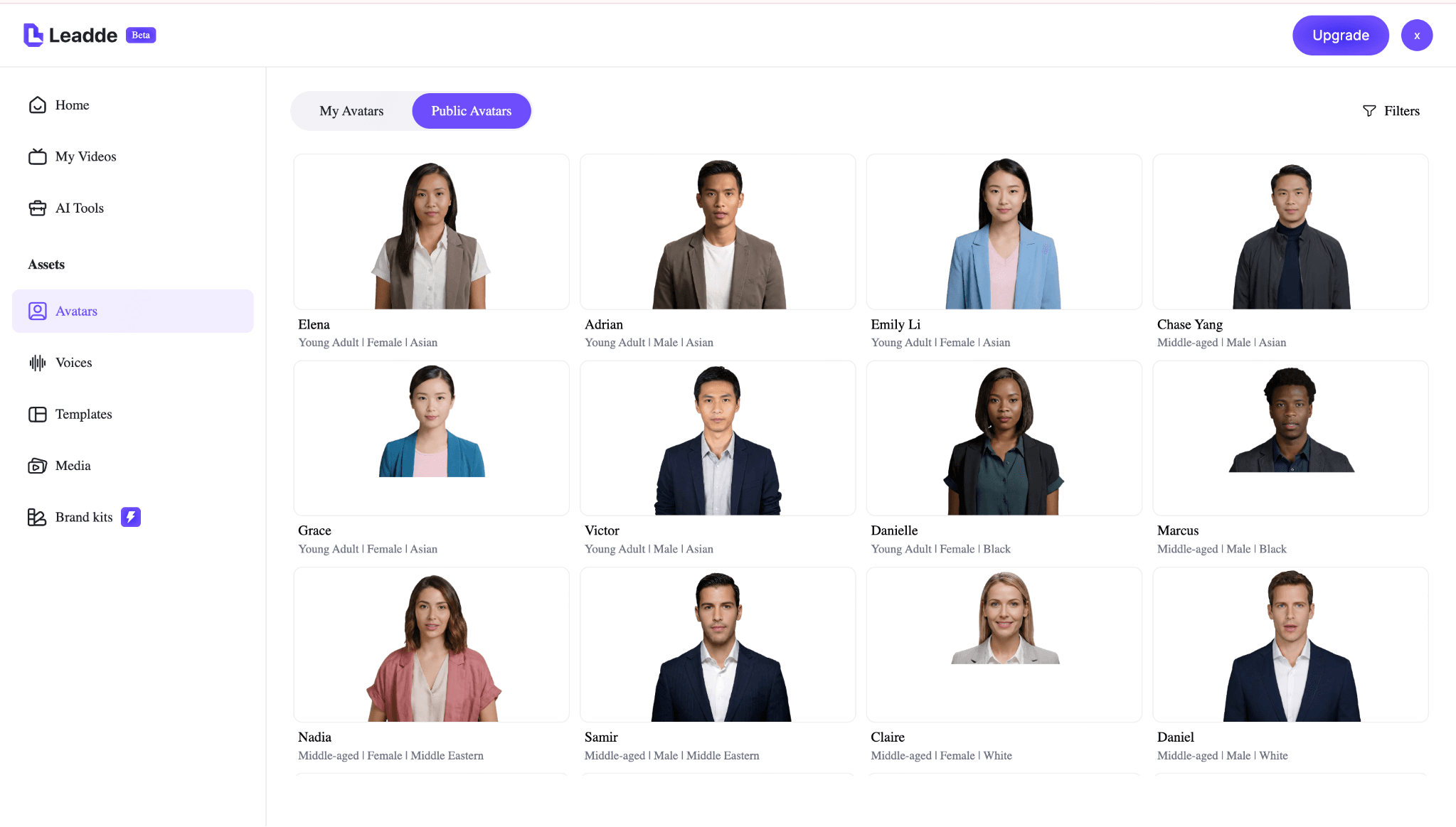
In demo workflows like Leadde’s, teams often choose between:
- Realistic avatars for professional SaaS or B2B products
- Slightly stylized avatars for clarity and longer viewing comfort
Two principles usually matter more than realism:
- Neutral delivery over strong personality
- Brand alignment over visual novelty
A calm, professional avatar helps viewers focus on the interface and process being demonstrated.
Step 3 – Create or customize the AI avatar
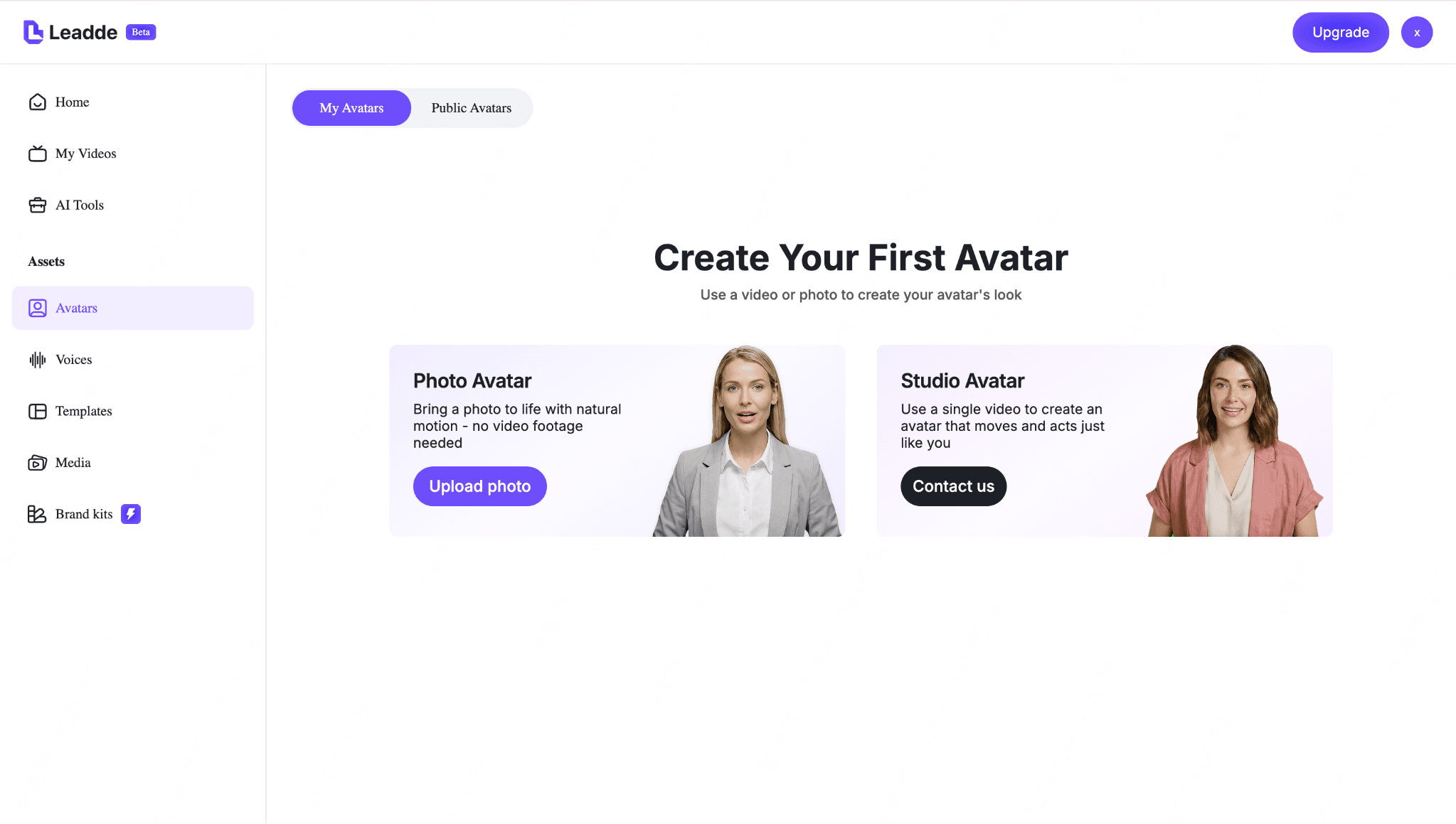
Instead of building everything from scratch, many teams start with a public avatar and fine-tune it for demo use.
Typical customization focuses on:
- Appearance – clean, professional, and non-distracting
- Voice – clear pronunciation with a neutral tone
- Pacing – steady speed that matches on-screen actions
In Leadde, for example, users can either create their own avatar or select from a public avatar library, then adjust delivery to fit demo needs.
The goal isn’t uniqueness—it’s consistency and clarity across videos.
Step 4 – Integrate the avatar with your product visuals
An effective demo doesn’t rely on a talking head alone.
The AI avatar should be integrated with:
- Screen recordings of the actual product
- Slides or UI highlights for structure
- Process diagrams or callouts for complex steps
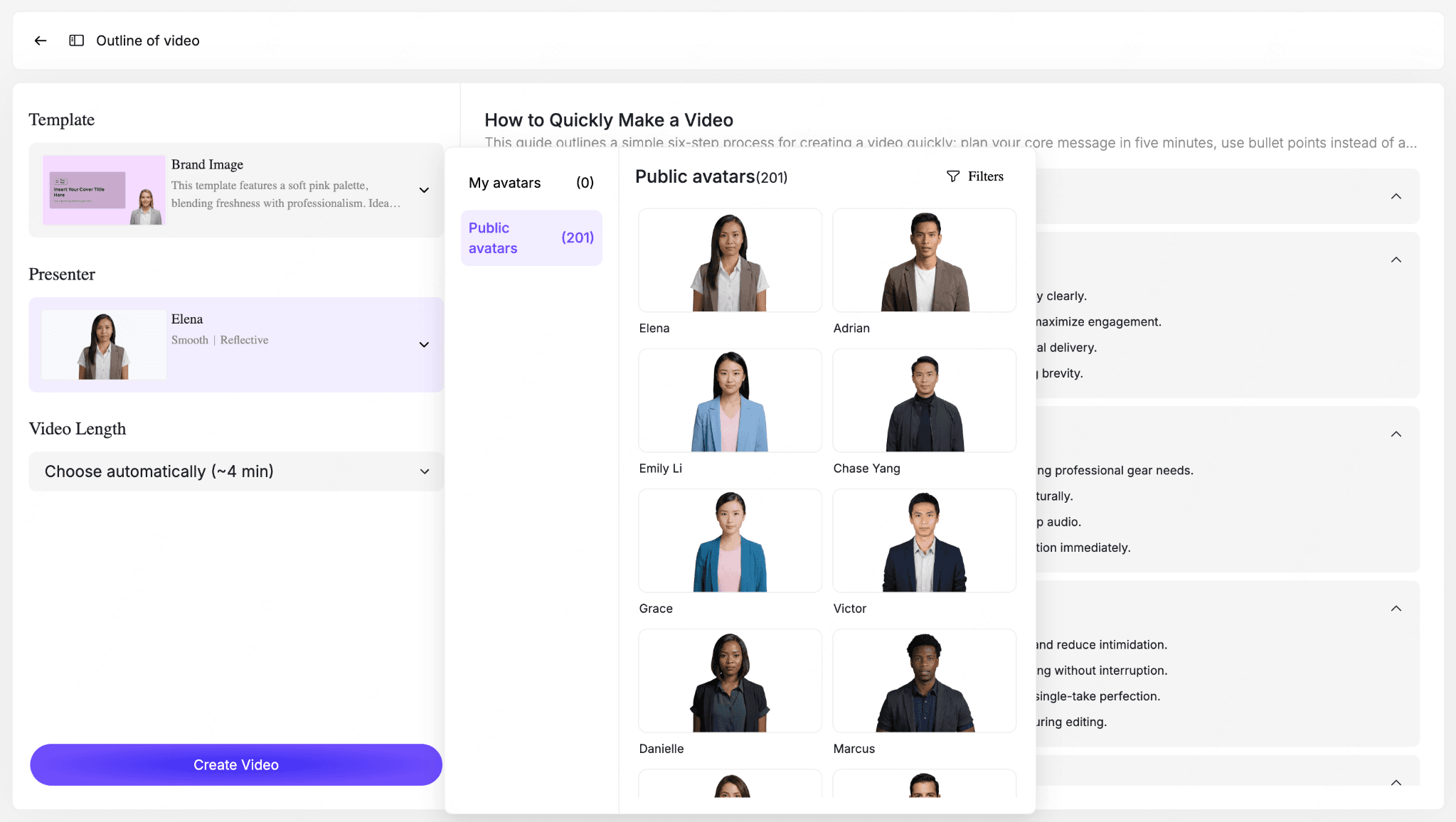
In tools like Leadde, this usually means locking the presenter first, then building a modular outline where the avatar introduces sections while visuals carry the explanation.
This approach keeps demos:
- Easier to update
- Easier to localize
- Easier to reuse across onboarding, sales, and support
Why this workflow works
This process keeps AI avatars where they perform best: as a scalable presentation layer, not a replacement for product thinking.
By defining the avatar’s role, choosing a neutral style, customizing delivery, and pairing it with clear visuals, teams can create product demo videos that are both efficient and easy to maintain.
Why AI Avatars Work Better for Iteration Than Creation
AI avatars are often positioned as a creation tool—but their real strength is iteration.
Before:
- Script → record → edit → publish
- Any change = restart process
After:
- Modular script blocks
- Update one section
- Regenerate instantly
This is especially valuable for:
- Fast-moving SaaS products
- Frequent UI updates
- Feature rollouts
The insight:
AI avatars don’t just help you create videos—they help you keep them accurate over time.
How to Maintain Avatar Consistency Across Multiple Product Videos
Consistency is one of the biggest operational challenges.
Teams frequently encounter:
- Face drift across videos
- Tone inconsistencies
- Visual mismatch between demos
Best practices observed:
- Lock a single avatar per product line
- Standardize voice and pacing
- Use modular templates
- Avoid re-generating avatars unnecessarily
Why it matters:
Consistency directly impacts:
- Brand recognition
- User trust
- Perceived quality
In long-term demo systems, consistency matters more than realism.
Common Technical Limitations of AI Avatar Tools (And How to Work Around Them)
Across multiple tools, the same issues appear:
1. Lip-sync inaccuracies
Fix:
- Shorter script segments
- Slower pacing
2. Rendering failures
Fix:
- Batch processing
- Version control
3. Limited expressive control
Fix:
- Write scripts for clarity, not emotion
4. Avatar inconsistency
Fix:
- Avoid regenerating base avatars
The key shift is mindset:
Design around the tool’s strengths, not its limitations.
Best Practices for Using AI Avatars in Product Demo Videos
Using AI avatars effectively in product demo videos isn’t about making them look more human—it’s about making the product easier to understand and easier to scale.
Teams that succeed with AI avatars follow a few consistent principles.
The avatar is not the hero—the product is
In a strong product demo, the product interface, workflow, or output is the main focus.
AI avatars should:
- Guide attention toward the screen, not compete with it
- Introduce steps, summarize actions, or provide transitions
- Stay visually secondary to the product UI
If viewers remember the avatar more than the product, the demo has failed its purpose.
Avoid over-humanizing the avatar
Trying to make AI avatars “too real” often hurts demo quality.
Excessive facial expressions, dramatic gestures, or overly emotional delivery can:
- Distract from the workflow being demonstrated
- Reduce clarity in longer demos
- Increase viewer fatigue
For most product demos, a calm, neutral, and professional AI avatar performs better than an expressive one.
Use modular scripts for faster updates
One of the biggest advantages of AI avatars is how easily demos can be updated—if the script is structured correctly.
Best practice:
- Write scripts in short, modular sections
- Separate feature explanations into independent blocks
- Avoid long, linear narration that’s hard to edit
This allows teams to update individual features, UI steps, or messaging without redoing the entire video.
Combine AI avatars with motion graphics—not just talking heads
AI avatars work best when they are part of a broader visual system.
Pairing AI avatars with:
- Screen recordings
- Motion graphics
- Highlighted UI elements
- Animated callouts or captions
creates demos that feel clearer, more professional, and easier to follow than simple talking-head videos.
In most cases, AI avatar + visuals > AI avatar alone.
The takeaway
AI avatars are a delivery layer—not a shortcut for good demo design.
When used correctly, they help teams:
- Scale demo production
- Maintain consistency across updates
- Keep the product at the center of attention
The goal is not realism. The goal is clarity and efficiency.
Common Mistakes to Avoid
AI avatars can significantly improve the efficiency of product demo videos—but only when they’re used with the right expectations. Many ineffective demos fail not because of the technology, but because of how it’s applied.
Avoiding the following mistakes can make a noticeable difference in demo quality.
Treating the avatar like a human salesperson
One of the most common mistakes is expecting an AI avatar to perform like a real sales representative.
AI avatars are best at explaining, not persuading. When they’re used to deliver heavy sales messaging or emotional appeals, the result often feels artificial and less convincing. In product demos, clarity should always come before persuasion.
Overloading the avatar with emotion
Excessive expressions, dramatic tone, or exaggerated gestures can distract from the product itself.
Product demos work best when the avatar:
- Maintains a calm, neutral delivery
- Supports the workflow being shown
- Doesn’t compete visually or emotionally with the interface
Emotional overload often reduces focus rather than increasing engagement.
Ignoring captions, pacing, and timing
Even a well-designed AI avatar demo can fail if it’s hard to follow.
Common issues include:
- Speaking too fast or without natural pauses
- Missing or poorly synced subtitles
- Dense explanations without visual breaks
Subtitles, consistent pacing, and clear transitions are essential—especially for global audiences and silent viewing environments.
Using default templates without customization
Default avatar templates are a starting point, not a finished solution.
Using them without customization often leads to demos that:
- Feel generic or interchangeable
- Don’t match brand tone or product style
- Blend in with countless similar videos
Adjusting layout, colors, pacing, and structure helps transform a template into a product-specific demo.
Why avoiding these mistakes matters
AI avatars don’t automatically create better demos. The quality of a product demo still depends on thoughtful design decisions and clear intent.
Using AI avatars well is less about technology—and more about judgment.
AI Avatars Are a Tool — Not a Replacement
AI avatars don’t replace good product demos—they amplify well-designed ones.
When used correctly, AI avatars enhance three things that teams struggle to scale manually:
- Scale – Create and maintain demos across multiple products, audiences, and languages
- Speed – Update messaging and regenerate videos without reshooting
- Consistency – Deliver the same explanation, tone, and structure every time
These advantages make AI avatars especially valuable for fast-moving SaaS teams and growing products.
What AI avatars can’t replace
Despite their efficiency, AI avatars don’t fix poor demo fundamentals.
The success of a product demo still depends on:
- Clear product structure – logical flows, sensible feature order, and focused use cases
- Strong explanation logic – knowing what to show, what to skip, and when to explain
- A defined demo goal – onboarding, feature education, or sales enablement
If these elements are weak, adding an AI avatar won’t improve the outcome—and may even highlight the problem.
The real role of AI avatars in product demos
The most successful teams use AI avatars as a delivery system, not as a substitute for human thinking.
AI avatars help demos scale.
Humans still decide what matters.
That balance is what turns AI-powered demos into effective ones.
FAQs: AI Avatars for Product Demo Videos
Are AI avatars good for product demo videos?
Yes, especially for walkthroughs, onboarding, and feature updates where clarity and scalability matter more than personality.
Which AI avatar tool is the most realistic?
Several tools offer high realism, but realism alone does not determine effectiveness. Consistency and clarity matter more.
How do I create a custom AI avatar of myself?
Most tools require short video recordings. A smartphone is usually sufficient if lighting and framing are controlled.
Do AI avatar videos reduce conversion rates?
Not in informational demos. However, they may underperform in sales-heavy or trust-driven contexts.
How do I keep the same avatar across multiple videos?
Use a single base avatar, avoid regenerating it, and standardize voice and script structure.
Are there affordable alternatives to premium AI avatar tools?
Yes, but lower-cost tools often trade off in lip-sync quality and consistency.
Can AI avatars fully replace UGC creators?
No. They are best used for testing and scaling, not replacing authenticity.
Which tools support multi-language video generation?
Many leading tools support this, making localization one of the strongest use cases.
Do I need professional equipment to create an avatar?
No. Most avatars can be trained using standard smartphone recordings.
Are AI avatars suitable for long-term brand content?
Yes, if consistency and tone are maintained across videos.
Final Takeaway
AI avatars are not about replacing humans—they are about removing production bottlenecks.
The teams that benefit most are not the ones chasing realism, but the ones building scalable, repeatable video systems.
That is where AI avatars deliver their real advantage.