
How to Create a Walkthrough Video Without Recording (2026 Guide)

To create a walkthrough video in 2026, product teams are abandoning traditional screen recording for AI-assembled demos that stay up-to-date with agile software releases. Manually recording your screen means every UI update forces a complete reshoot, resulting in a library of obsolete tutorials that confuse users and drain support resources.
Leadde eliminates the need for manual screen recording by automatically turning your screenshots and documentation into polished, step-by-step walkthrough videos. Instead of reshooting every time your UI changes, you can update text or images and regenerate an accurate demo in minutes, keeping your product tutorials always current.

Why Traditional Screen Recording No Longer Works for Walkthrough Videos
Screen recording was designed for simplicity—not scalability.
In practice, it creates several critical problems:
1. Every update requires a full re-record
A small UI change (like a renamed button) forces you to redo:
- recording
- voiceover
- editing
2. Production is slow and fragile
From real workflows:
- A short demo video can take hours to produce
- One mistake means starting over
3. Videos become outdated quickly
In agile teams shipping every 2 weeks:
- Videos often expire within 2–4 weeks
The result:
- Confusing tutorials
- Increased support tickets
- Content that can’t keep up with the product
The "Update Nightmare": Why PMs Hate Walkthrough Videos
The 2-Week Expiry Date: Keeping Demos in Sync with Agile Sprints
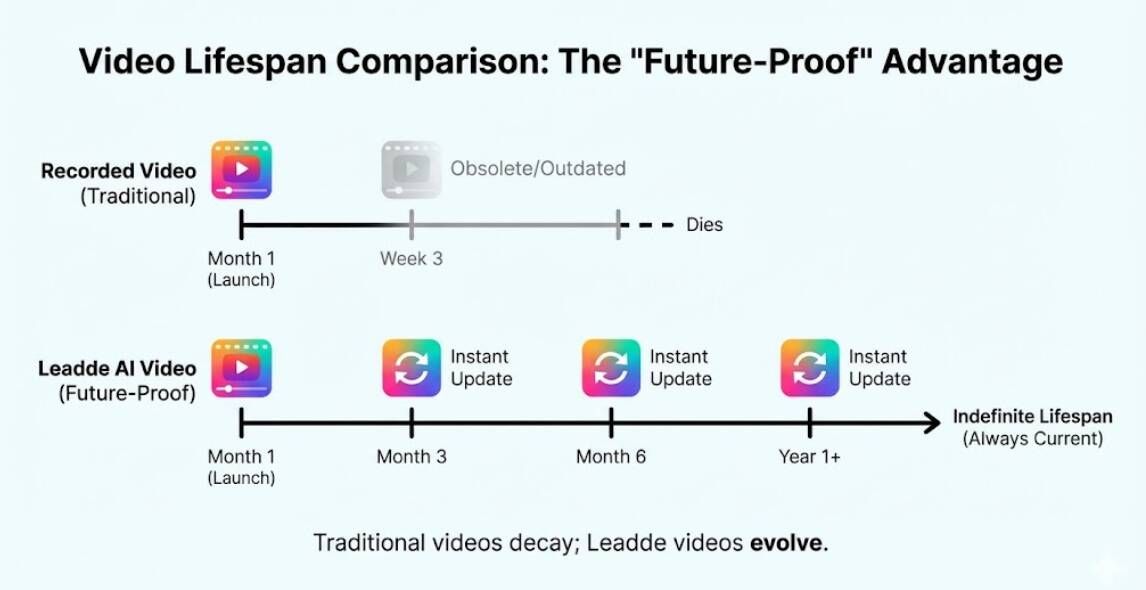
In the SaaS world, products evolve in 2-week sprints. A walkthrough video you record today will likely be obsolete next month when the "Settings" menu moves or the brand colors change.
For Product Managers, this creates a vicious cycle: you either spend hours re-recording the entire clip (including getting the audio to match perfectly) or you leave outdated, confusing tutorials in your help center.
Synthetic Demos: Why "Assembled" Videos Beat "Recorded" Ones
The 2026 solution is to stop recording screens and start assembling them. By treating a walkthrough as a stack of digital assets—background screenshots, cursor layers, and AI voiceover—you gain total control over synthetic video creation.
If a button changes, you don't re-record. You simply swap the background image layer in Leadde, and the AI presenter continues seamlessly. This makes your video library "Future-Proof."
If your walkthrough is based on product docs or step-by-step notes, Leadde can help you turn that material into a guided video walkthrough.
Step-by-Step: Building a "Future-Proof" Walkthrough
1. Asset Capture: Using High-Res Screenshots (Zero Lag)
Forget about cleaning up your messy desktop or hiding browser notifications before hitting "Record."
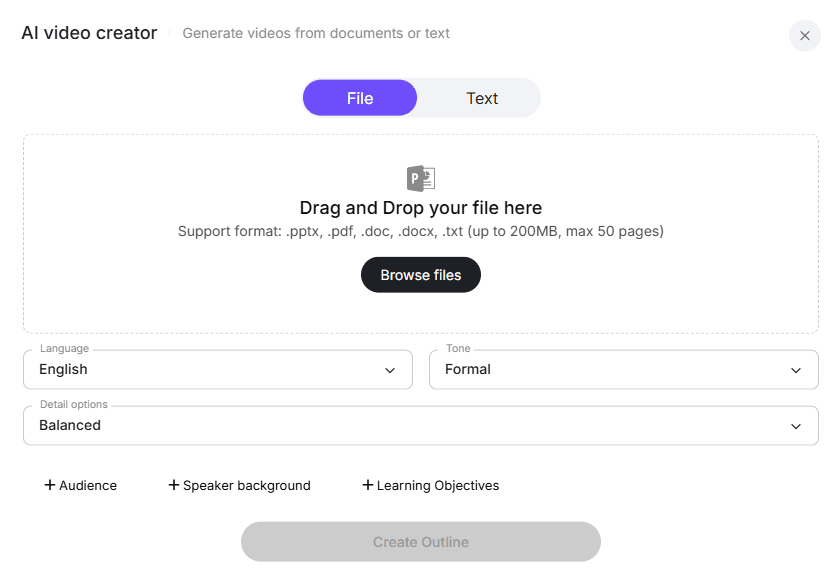
With Leadde, you simply take clean, high-resolution screenshots of your user flow (or export slides from Figma/PPT). Upload these images directly into the platform. This ensures your walkthrough looks crisp, professional, and free of "mouse jitters" or lagging load times.
2. AI Narration: Generating a Professional Voiceover Script Instantly
You don't need a quiet room or a high-end microphone.
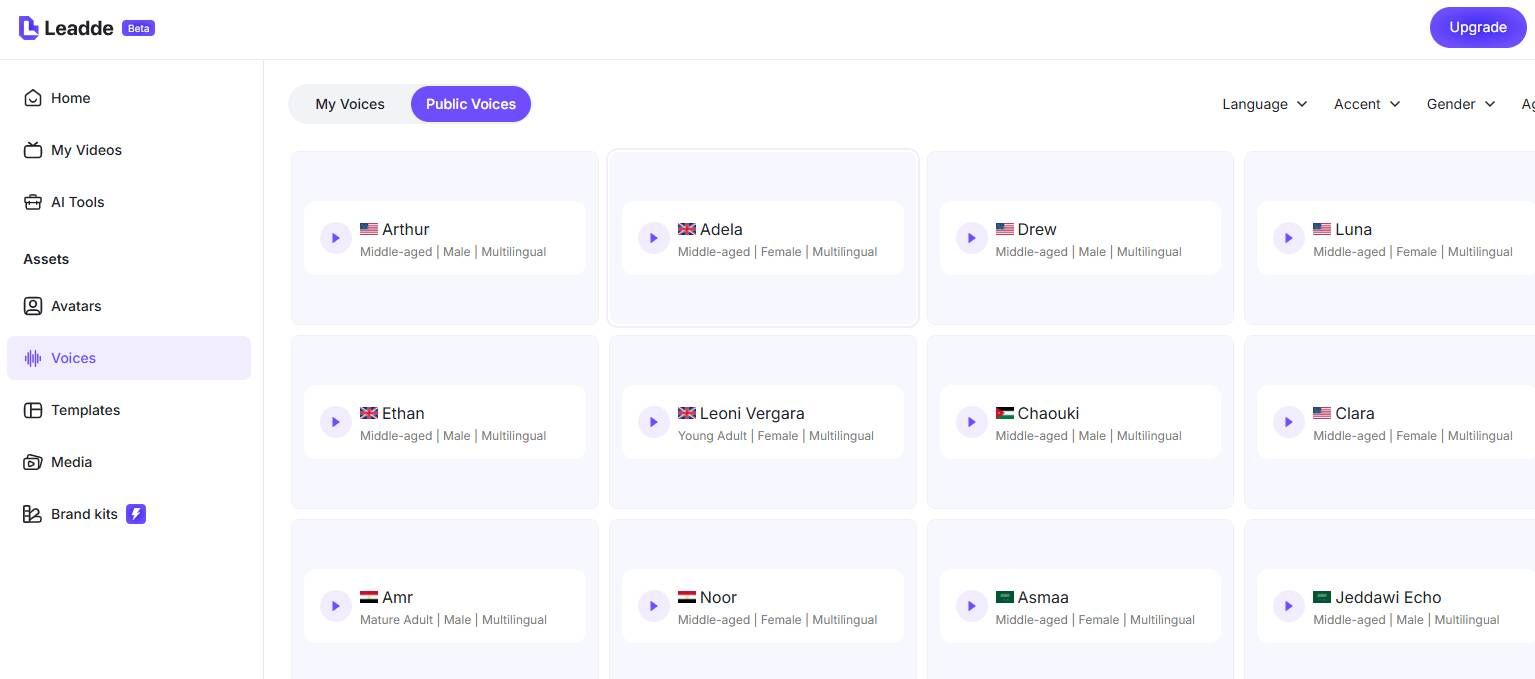
Type your script or paste your help article text into Leadde. The AI analyzes the text and helps you generate a studio-quality voiceover. You can choose from 170+ accents—want a British accent for the EU market and an American one for the US? It takes one click.
3. Visual Guidance: Auto-Zoom and "Spotlight" Effects
A static screenshot can be boring, but Leadde brings it to life.
Use the Layered Editing tools to add "Pan and Zoom" effects that guide the viewer’s eye to specific buttons. You can overlay arrows, highlights, or text boxes that appear in sync with the AI narration, mimicking the flow of a live demo without the hassle of recording one.
Why AI-Assembled Walkthrough Videos Are Replacing Screen Recordings
Based on real workflows, teams are shifting because:
| Factor | Screen Recording | AI-Assembled (Leadde) |
|---|---|---|
| Production time | High | Low |
| Updates | Full re-record | Instant |
| Audio quality | Inconsistent | Consistent |
| Scalability | Poor | High |
| Maintenance | Painful | Easy |
Key insight:
Traditional recording optimizes for speed of creation
AI assembly optimizes for long-term scalability
How to Plan a Walkthrough Video Script That Actually Converts
One of the clearest insights from my research:
The biggest difference between effective and ineffective walkthrough videos is not editing quality—it’s script structure.
What doesn’t work:
- Feature-by-feature explanation
- “Click here, then click there” narration
What works consistently:
A problem-driven narrative structure
High-performing script framework:
- Who is the user?
- What problem are they facing?
- What is the desired outcome?
- How does the product solve it step-by-step?
Real-world example
A SaaS founder I analyzed created a demo video in 1 day with $0 cost using:
- Loom (recording)
- CapCut (editing)
- AI voice tools
What made it effective wasn’t the tools—it was:
- Clear narrative
- Focus on outcome, not UI
Why Most Walkthrough Videos Fail to Explain the “Why”
Another major failure pattern:
Most walkthroughs explain what to do, but not why it matters.
From my analysis:
- Users often finish videos without understanding:
- When to use a feature
- What problem it solves
Example failure:
“Click Settings → Enable API”
Improved version:
“Enable API access so your team can automate workflows and reduce manual tasks.”
Key takeaway:
A good walkthrough must include:
- Context
- Intent
- Expected outcome
Without this, videos become forgettable tutorials instead of decision-making tools.
The "Human" Touch: Adding an AI Co-Pilot
Why an Avatar Guide Increases Completion Rates by 30%
Software demos can feel cold and robotic. Adding a human face changes the dynamic.
Leadde lets you place an AI Avatar in the corner of your walkthrough (like a "Picture-in-Picture" mode). This avatar acts as a friendly guide, explaining complex features with natural eye contact and gestures. Data shows that walkthroughs with a visible presenter have a 30% higher completion rate because viewers feel personally guided.
Choosing the Right Persona: "Friendly CSM" vs. "Technical Engineer"
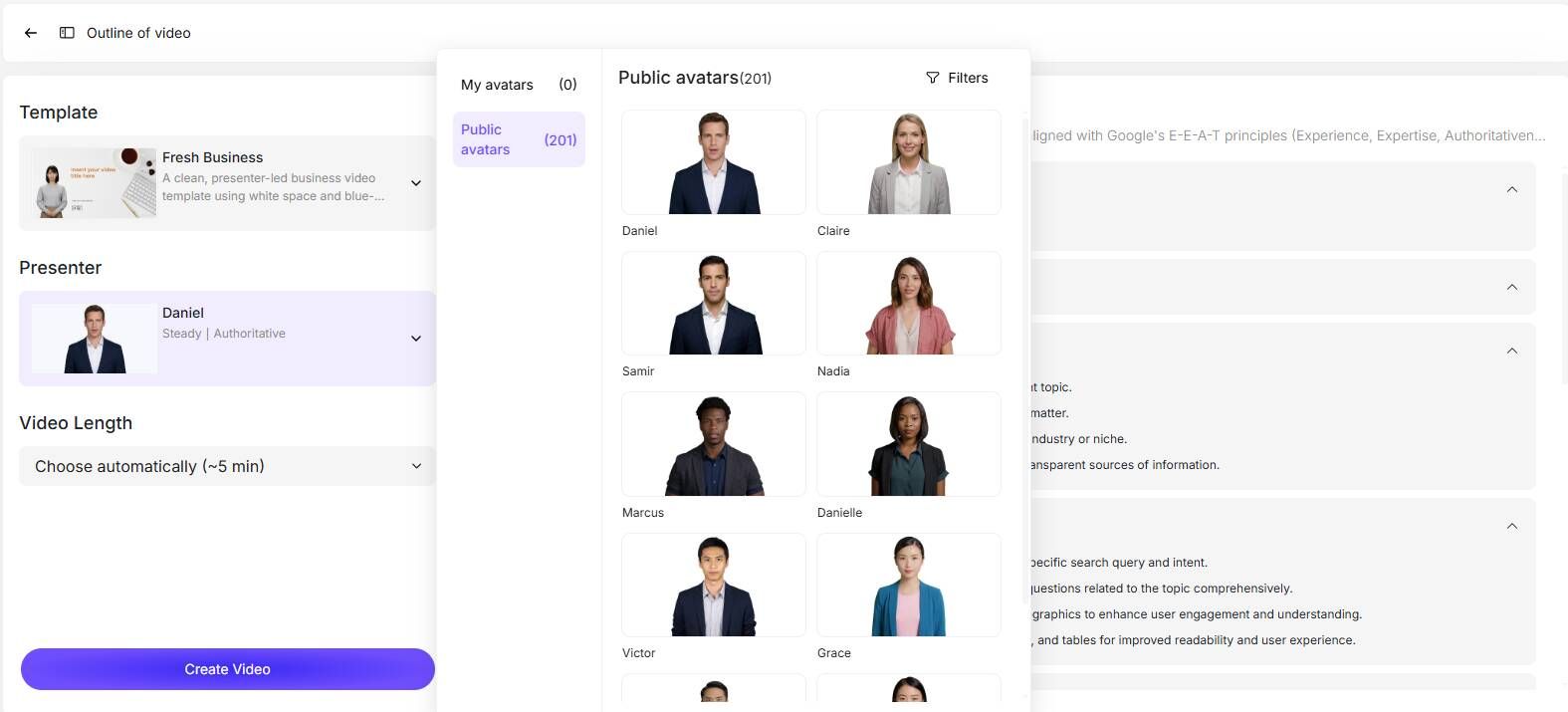
Context matters. For a "Getting Started" video, choose a casual, friendly avatar. For a "Security Compliance" walkthrough, switch to a more formal, authoritative persona. Leadde’s library covers diverse demographics and styles to match your brand voice.
Should You Add an AI Avatar to Your Walkthrough Video?
Adding a presenter increases engagement.
Data shows:
- Videos with a visible presenter can improve completion rates by ~30%
Best practice:
- Friendly avatar → onboarding
- Professional avatar → technical demos
How to Structure Walkthrough Videos for Better Engagement
Modern users don’t watch videos linearly.
Best practices:
- Break into chapters
- Allow skipping
- Keep segments short
Advanced tools like Leadde also enable:
- Search within video
- Jump to specific steps
Interactive Walkthroughs: The 2026 Standard
"Chat with Video": Letting Users Ask "How do I..." While Watching
The problem with video is that it's linear. If a user only wants to know about "API Keys," they have to scrub through the whole timeline.
Leadde solves this with "Chat with Video." Your user can type "Show me the API section" into the player, and the AI will answer or guide them to the exact timestamp. This transforms a passive tutorial into an interactive support tool.
Self-Paced Chapters: Allowing Viewers to Skip to Relevant Features
Leadde automatically structures your video into chapters based on your script headers. This allows users to navigate your walkthrough like a table of contents, respecting their time and boosting satisfaction.
Comparison: Screen Recorder vs. AI Video Platform
Cost & Time Analysis: The Hidden Cost of Re-recording
Cost & Time Analysis: The Hidden Cost of Re-recording
How does the "Old Way" (Screen Recording) compare to the "New Way" (Leadde AI)?
| Feature | Traditional Screen Recording (Loom/Camtasia) | Leadde AI Walkthroughs |
|---|---|---|
| Production Time | High (Requires Rehearsal & multiple takes) | Low (Instant Assembly) |
| Updating Content | Impossible (Must re-record everything) | Easy (Swap Image Layer) |
| Audio Quality | Variable (Depends on Mic/Room) | Consistent (Studio AI Voice) |
| Localization | Expensive (Hire new voice actor) | Instant (92 Languages) |
| Presenter | Camera-shy employees | Professional AI Avatars |
| Cost Scale | Linearly increases with updates | Flat ($19/mo Unlimited) |
Leadde turns the maintenance of your video library from a full-time job into a 5-minute task.
FAQ: Creating Walkthrough Videos Without Recording
Do you need screen recording to create a walkthrough video?
No. In 2026, walkthrough videos can be created without screen recording by using screenshots, scripts, and AI voiceovers assembled into a video. This method makes updates faster and eliminates the need to re-record when the UI changes.
What is the fastest way to create a walkthrough video?
The fastest way is to use AI video tools like Leadde to assemble visuals, scripts, and voiceovers. This removes the need for recording, editing, and retakes, allowing videos to be created in minutes instead of hours.
How long should a walkthrough video be?
A walkthrough video should typically be 2–5 minutes long. For more complex products, it’s best to divide the video into short, chapter-based sections to improve clarity and user engagement.
Can you create a walkthrough video without a finished product?
Yes. You can use design assets such as Figma prototypes, slides, or mockups to create a walkthrough video before the product is fully built. This is commonly used for demos, testing, and early marketing.
How do you avoid re-recording walkthrough videos?
To avoid re-recording, use a modular approach with separate assets for visuals, scripts, and voiceovers. This allows you to update individual steps without recreating the entire video.
Are AI-generated walkthrough videos effective?
Yes. AI-generated walkthrough videos are effective for most use cases, especially for product demos and onboarding. However, clear scripting is still essential to explain context and user value.
Can you update a walkthrough video after publishing?
Yes. If the video is created using an assembled (non-recorded) workflow, you can update it by editing specific elements like screenshots or text without re-recording the full video.
Conclusion: A Demo That Evolves With Your Product
Learning how to create a walkthrough video in 2026 is about embracing modularity. Your software is not static; your videos shouldn't be either. By switching from recording to assembling with Leadde, you create assets that are easy to update, cheaper to produce, and far more engaging for your users.
Don't let your documentation lag behind your code.
Leadde is the AI business video generation platform that helps you save 80% on production costs and reduce content creation time by 90%.





