
How to Make a How-to Video: The Ultimate 2026 Guide (AI vs. Manual)

Most people think making a how-to video is about recording their screen.
It’s not.
After testing different workflows and analyzing real production patterns, one thing is clear:
👉 The hardest part is not recording — it’s structuring information clearly and efficiently.
That’s why many how-to videos:
- Take too long to produce
- Feel confusing to watch
- Become outdated quickly
This guide breaks down not just how to make a how-to video, but how to do it faster, clearer, and at scale.
Updating old content is equally exhausting. Leadde transforms this workflow by using generative AI to handle production.
- Turn documents into professional videos automatically.
- Create content in minutes, not days.
- Save over 80% of production costs

What is a "How-to" Video and Why Is It Critical for Business?
A "how-to" video is a step-by-step visual guide designed to teach a specific skill, explain a product feature, or document a standard operating procedure (SOP). In 2026, these videos have evolved from passive recordings into interactive experiences where viewers can engage directly with the content.
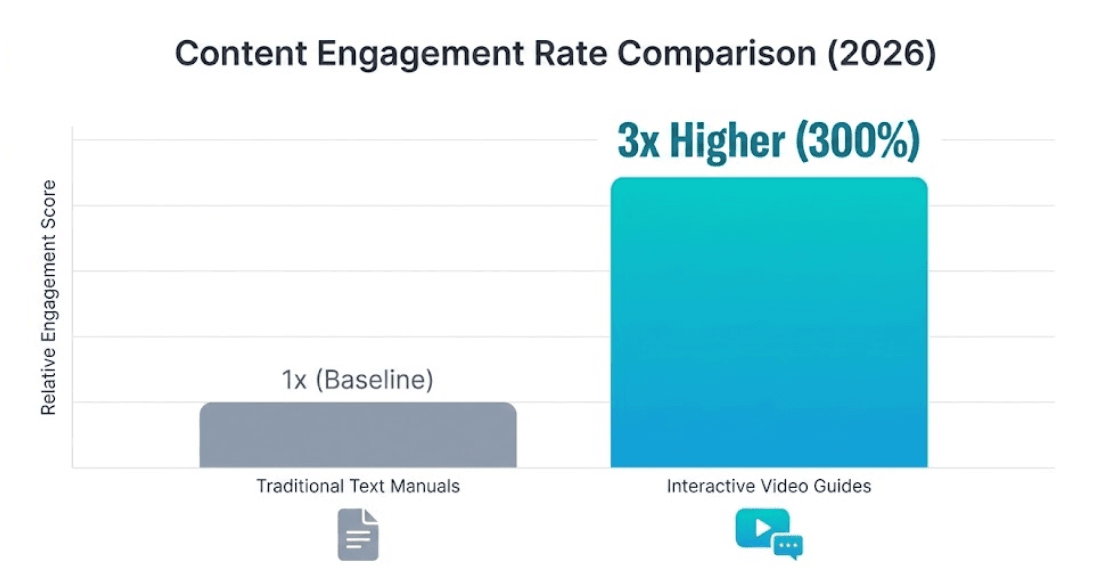
Businesses rely on these videos because they are far more effective than written manuals. Organizations using video platforms report up to a 3x increase in content engagement compared to text-based documentation. Furthermore, video reduces errors in training and ensures consistent messaging across large teams.
| Metric | Traditional Text Manuals | Modern Video Guides |
|---|---|---|
| Engagement | Low (often skimmed) | High (3x increase) |
| Retention | Hard to recall steps | Visual memory aids retention |
| Interactivity | Static text | "Chat with Video" capable |
The Biggest Mistake: Recording Before Thinking
In most projects I’ve worked on, the biggest mistake happens before the first click:
👉 People start recording immediately.
Instead of:
- Defining the goal
- Structuring the steps
- Simplifying the explanation
This leads to:
- Messy videos
- Long editing time
- Poor clarity
👉 Key insight:
👉 A how-to video is an information design problem, not a recording task.
Planning Your Instructional Content (The Universal Step)
Before you open any software, you must plan your content. Whether you use a camera or AI, the foundation of a good how-to video is a clear structure.
- Identify Learning Objectives: Clearly define what the viewer should be able to do by the end of the video.
- Structure the Outline: Break the process down into logical steps. For AI generation, this often involves preparing a structured PPT or PDF document, much like using an explainer video template.
- Keep it Concise: Focus on one key topic per video to avoid overwhelming the audience.
How to Make a How-to Video (The Traditional Manual Way)
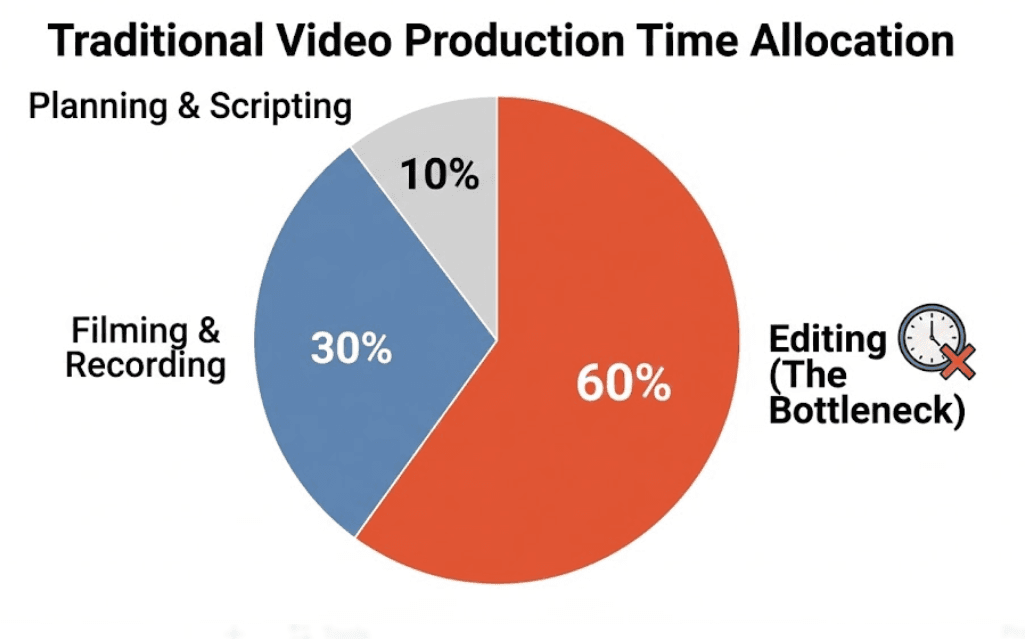
The traditional method of creating tutorial videos involves a complex production chain that mimics film studios. This approach is often time-consuming and expensive.
- Equipment Setup: You need a high-quality microphone, a camera for the presenter, and proper lighting to look professional.
- Recording: This involves capturing screen activity while simultaneously recording voice-overs. Mistakes require re-recording.
- Editing: Post-production involves cutting silence, syncing audio, adding captions, and fixing errors, which can take hours even with the best video tutorial software.
| Production Phase | Typical Time Required | Cost Factor |
|---|---|---|
| Setup | 1–2 hours | Equipment ($500+) |
| Filming | 2–4 hours | Talent time |
| Editing | 4–8 hours | Software ($20–$50/mo) |
Why Creators Are Ditching Manual Recording
Online communities often discuss the hidden struggles of manual video production. The biggest complaint is the "update nightmare." When a software interface changes, the entire video—including the voice-over and screen recording—must be re-done from scratch.
Another major hurdle is finding a willing presenter. Many team members are camera-shy, making it difficult to produce consistent "face-on-camera" content. This leads to burnout and inconsistent video quality over time.
How to Make a How-to Video with AI (The Leadde Method)
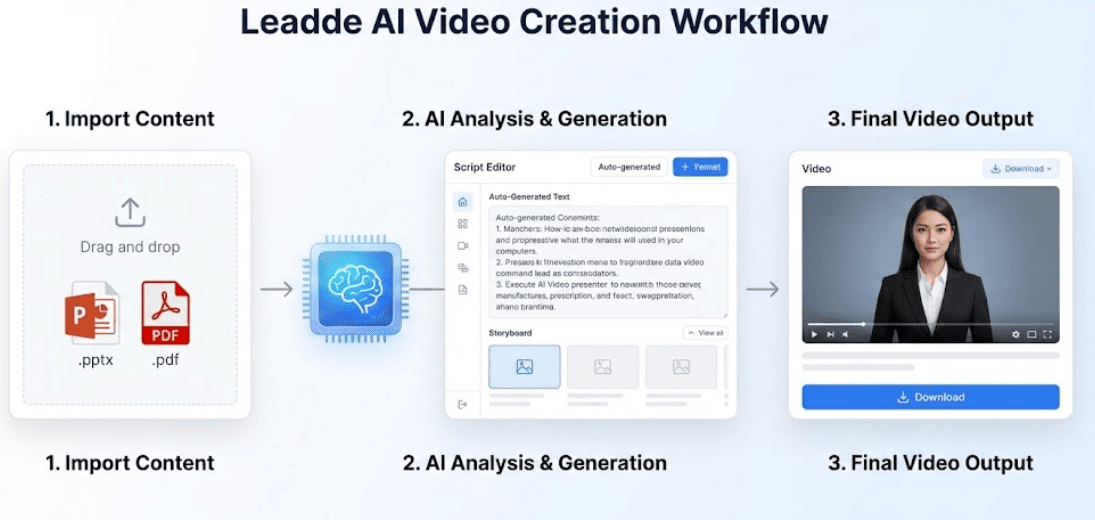
Leadde offers a modern alternative by automating the entire production process. Instead of filming, you simply upload your content, and the AI acts as a SaaS explainer video creator to handle the rest.
- Step 1: Import Content: Drag and drop your PPT, PDF, Word, or text file. Leadde supports files up to 200MB.
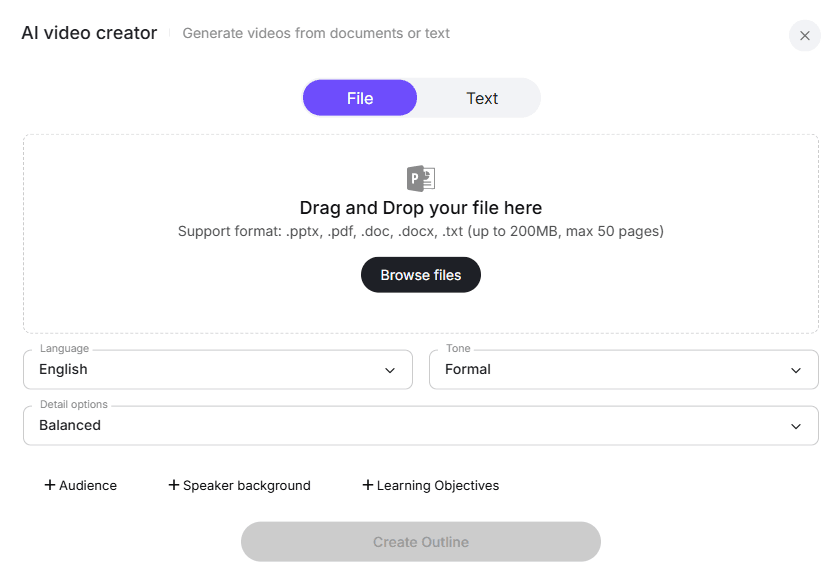
- Step 2: Select AI Presenter: Choose from over 200 AI avatars to act as your professional presenter. You can also create a custom avatar from a photo.
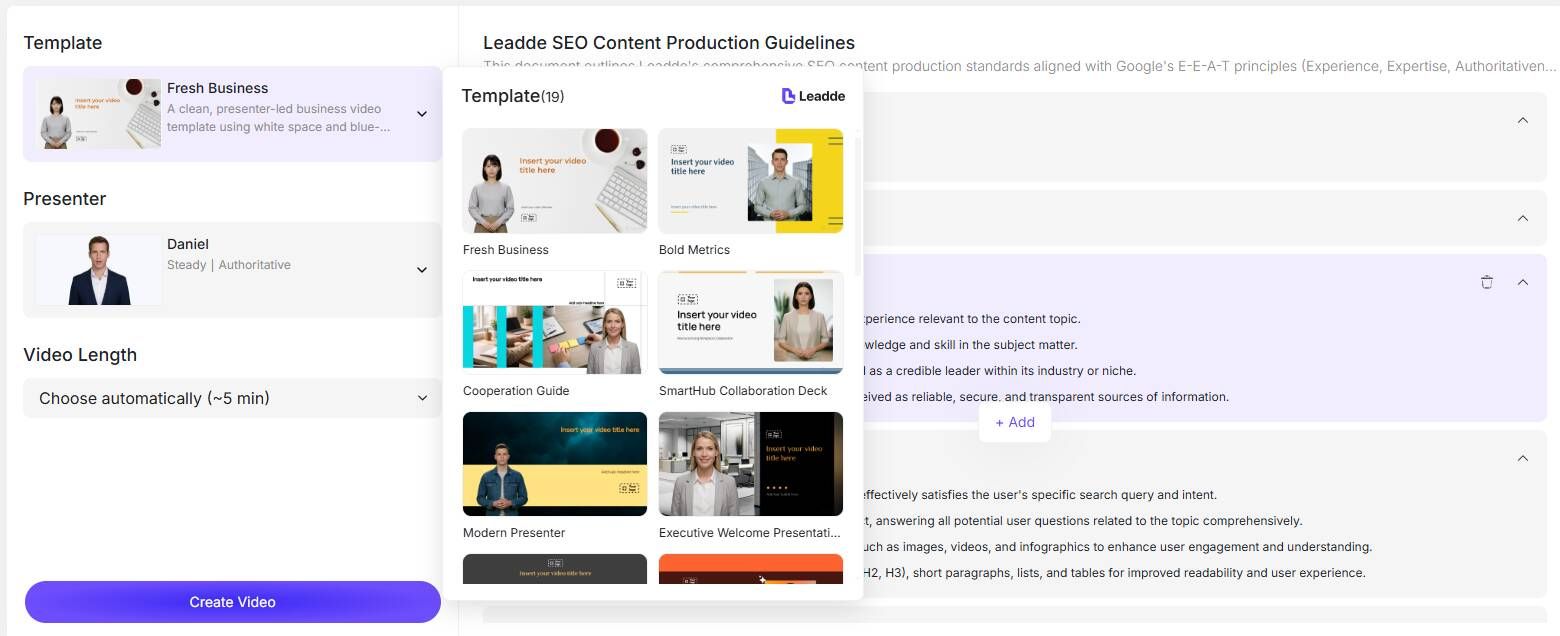
- Step 3: Auto-Generation: The system automatically generates the outline, scenes, visual layout, and voice-over scripts.
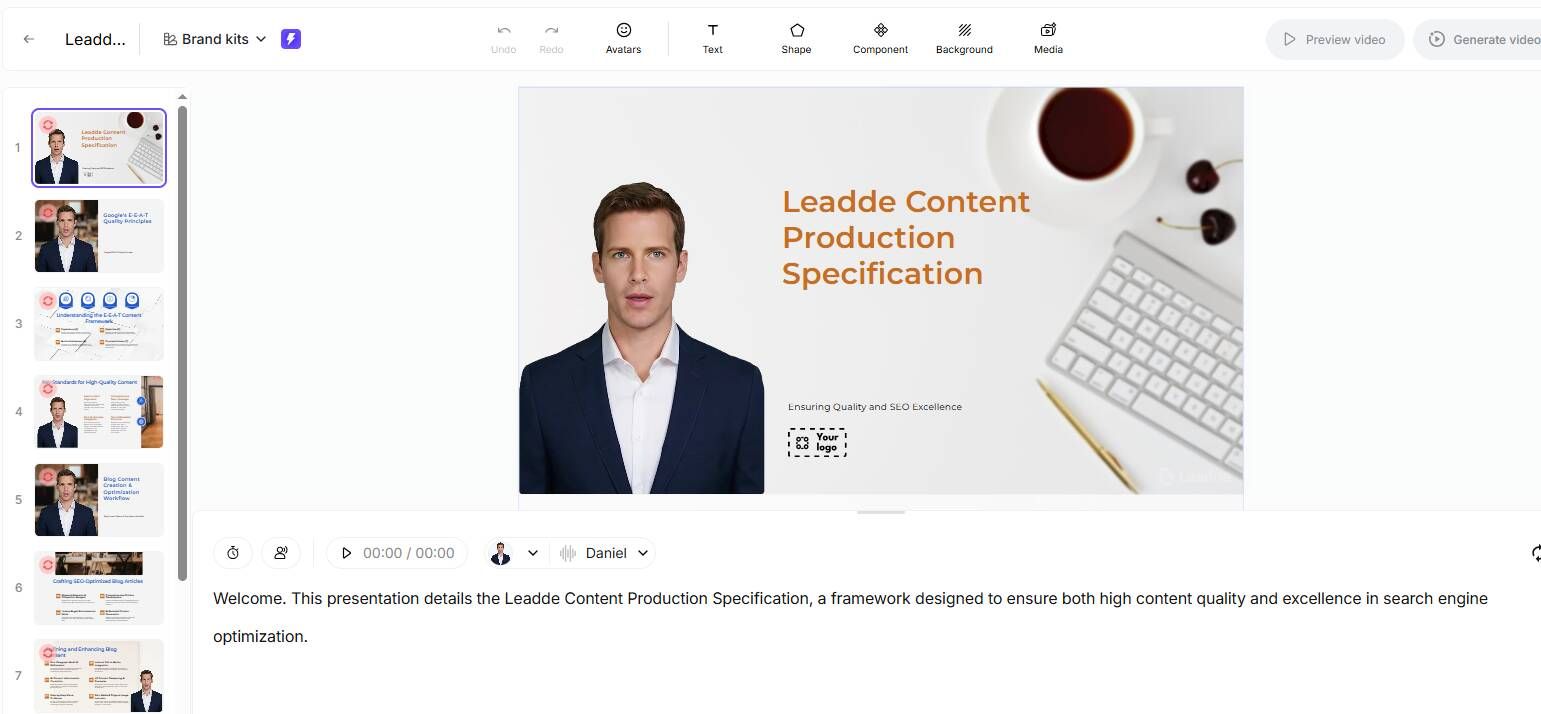
- Step 4: Refine and Generate: Review the script, adjust details like tone and speed, and generate the final video in minutes.
Even mid-sized companies use Leadde to turn their dusty PDF manuals into engaging video libraries without buying a single camera.
Leadde supports workflows across 92 languages. You can generate multilingual drafts directly inside the editor. The platform even includes an Image Translator to translate text within images and a Video Translator for existing files.
Why AI Changes Everything
From real usage:
- Up to 90% faster production
- Over 80% cost reduction
- Easy updates without re-recording
👉 The biggest shift:
👉 From “making videos” → to “generating videos”
Traditional Recording vs. Generative AI
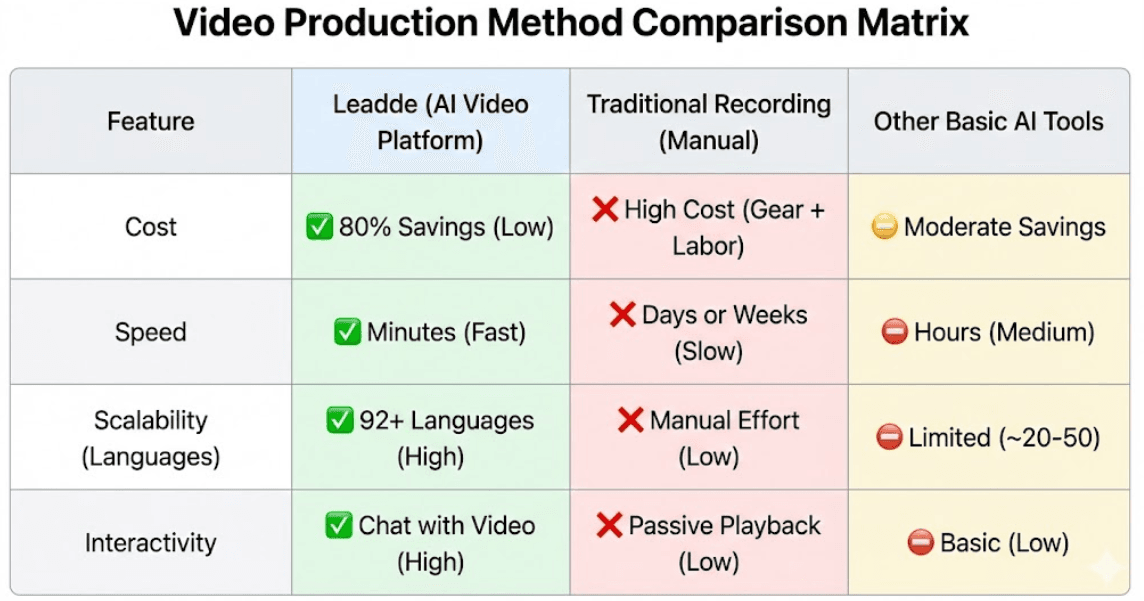
Choosing between manual recording and AI depends on your goals. If you need to scale content production and reduce costs, AI is the superior choice. Organizations using Leadde report an 80% reduction in production costs and a 90% reduction in creation time.
However, for highly personal vlogs or artistic storytelling, traditional cameras may still be preferred. But for business training, SOPs, and product education, AI offers unmatched efficiency.
Why Most How-to Videos Are Hard to Update
A major hidden problem:
👉 Maintenance cost
Traditional videos:
- Break when UI changes
- Require full re-recording
- Take hours to fix
👉 Solution:
- Modular content
- Editable workflows
- AI-based generation
From One Video to a Scalable Content System
Most people create videos like this:
👉 One video at a time
High-performing teams do this:
👉 Build systems
Examples:
- One process → multiple short videos
- One script → multiple languages
- One video → multiple formats
👉 Key shift:
👉 From content creation → to content systems
The Real Skill Behind Great How-to Videos
It’s not editing.
It’s:
- Structuring information
- Simplifying complexity
- Thinking from the user’s perspective
👉 Tools don’t fix bad thinking.
👉 They amplify good thinking.
How to Make Your Video Look Clean and Professional
Most people think “professional” means advanced editing.
It doesn’t.
From experience, what actually matters:
- Clear step-by-step flow
- Controlled pacing
- Minimal distractions
- Visual focus (zoom, highlights)
👉 The rule:
👉 Clarity = Professionalism
FAQ: How to Make a How-to Video
Q: What’s the best way to start making a how-to video?
Start with structure, not recording. Define the goal, break it into steps, and focus on one problem per video. Recording should come after planning.
Q: Do I need expensive tools to create a professional how-to video?
No. A simple screen recorder and basic editing tool are enough. Clarity matters far more than production quality.
Q: Why does editing take so long?
Because most editing is fixing unclear explanations. A well-planned video reduces editing time significantly.
Q: Should I use screen recording or animation?
Use screen recording for real workflows and software tutorials. Use animation or whiteboard style for abstract explanations.
Q: How long should a how-to video be?
For most use cases, 1–3 minutes works best for single tasks. Longer videos are better for deeper tutorials.
Q: Is it better to make one long tutorial or multiple short videos?
Multiple short videos perform better. Each video should solve one specific problem.
Q: Can AI tools really save time?
Yes. They reduce production time significantly and make updates easier, especially for repeated content.
Q: Why are how-to videos hard to update?
Because traditional videos are static. Any change requires re-recording and re-editing.
Q: What makes a how-to video look professional?
Clear structure, simple explanations, and clean visuals. Not complex editing.
Q: When should I NOT use video?
When the task is simple or needs quick reference. In those cases, text or checklists are more efficient.
Conclusion: Future-Proofing Your Video Strategy
As we move through 2026, the standard for business communication has shifted irrevocably from text to video. However, relying on traditional cameras and manual editing for every SOP update or training module is no longer sustainable. The future belongs to teams that treat video as a flexible, editable asset—just like a Word document—rather than a static film production.
By adopting an AI-first approach with Leadde, you are not just making videos faster; you are building a scalable content engine.
- Adaptability: Update content instantly without re-recording .
- Global Reach: Speak to customers in 92 languages from day one .
- Interactivity: Transform passive viewing into active learning with "Chat with Video" capabilities .
The companies that win this year won't be the ones with the most expensive cameras, but the ones that can turn their institutional knowledge into engaging, multilingual video assets in minutes.
Leadde is the AI business video generation platform that helps you achieve an 80% production cost cut, a 90% reduction in content creation time, and a 70% time saving in global content localization.





