9 Best SaaS Product Demo Video Software in 2026 (Ranked by Workflow)
Creating a stunning SaaS product demo video is no longer about recording your screen.
After testing multiple tools and workflows, one thing is clear:
👉 The biggest problem isn’t creating demo videos — it’s keeping them updated.
Most teams still rely on screen recording + editing. But the moment your UI changes, your demo becomes outdated. You either re-record everything… or let your content decay.
That’s why in 2026, the best SaaS demo video tools fall into three categories:
- AI Video Generators (fast, scalable, editable)
- Interactive Demo Platforms (conversion-focused, clickable)
- Screen Recorders (quick but disposable)
In this guide, I’ll break down the best tools based on real workflows — not just features.
Manual recording wastes time every time your product changes. Leadde uses AI to turn PDFs, slides, scripts, and product documents into editable demo videos, so SaaS teams can create professional sales demos in minutes instead of days.
If you already have product docs, release notes, or a sales script, you can create a SaaS product demo with Leadde without recording your screen from scratch.
What Is the Best SaaS Product Demo Video Software in 2026?
Short answer:
- For scalable video production → AI tools like Leadde
- For conversion & sales demos → Interactive tools like Navattic
- For quick internal communication → Loom
👉 The best choice depends on what you’re optimizing for:
| Goal | Best Tool Type |
|---|---|
| Scale content production | AI video |
| Increase conversion | Interactive demos |
| Quick async communication | Screen recording |
How I Evaluate SaaS Demo Video Tools (Real Testing Framework)
After testing 10+ tools across marketing, onboarding, and sales workflows, I realized most comparisons miss what actually matters.
Here are the 5 criteria that truly determine ROI:
1. Editability (Can you update without re-recording?)
If your UI changes, can you fix a scene — or do you start from scratch?
2. Production Speed
Can you create a full demo in minutes, or does it take hours (or days)?
3. Scalability
Can you produce 50+ videos without burning your team?
4. Localization
Can you create multilingual versions instantly?
5. Input Flexibility
Can you use existing assets (docs, slides), or do you start from zero?
👉 Most traditional tools fail on at least 3 of these.
Video vs Interactive Demo: Which One Should You Use?
This is one of the most common decisions SaaS teams struggle with.
From real usage, the answer is not “either/or” — it’s both.
Use Video Demos when:
- You need structured storytelling
- You’re onboarding users
- You want to explain “why”
Use Interactive Demos when:
- You want users to explore
- You’re optimizing conversion
- You’re doing product-led growth (PLG)
Best Setup (What high-performing teams do):
- Landing page → Interactive demo
- Onboarding / Help Center → Video demo
👉 This combination consistently outperforms using just one format.
If you need the video side of that workflow, turn product docs into demo videos and use interactive demos only where users need to click through the product themselves.
The Biggest Problem with SaaS Demo Videos (And Why Most Fail)
From experience, most demo strategies fail for one reason:
👉 They are impossible to maintain.
Here’s what typically happens:
- Team records demo (Loom / Camtasia)
- Edits it into a polished video
- Product UI changes next week
- Video becomes outdated
This creates what I call:
👉 The “Polishing Trap”
Once a video is heavily edited, updating it requires a full re-shoot — making it unsustainable at scale
Why Traditional Recording Workflows Break at Scale in 2026
The traditional method of creating SaaS product demos—screen recording, voice-over recording, and timeline editing—is rapidly becoming inefficient. In 2026, the primary bottleneck for marketing teams isn't software capability, but maintenance.
The "Polishing Trap" Most teams start with a simple tool like Loom but quickly hit a quality ceiling. To make the video "professional," they export footage to Adobe Premiere or Final Cut. This creates a "Polishing Trap": once a video is heavily edited outside the native platform, updating it requires a full re-shoot. When your SaaS product ships a UI update next week, your high-budget video instantly becomes obsolete.
The Rise of "No-Camera" Demos To solve this, the market has shifted toward Generative AI and Interactive HTML5 platforms. These tools decouple the visual output from the manual act of recording. By using AI to generate cursor movements, voice-overs, and even the presenter's face, companies can scale training with AI avatars without burning out their sales engineers or hiring external video agencies.
The Real Bottleneck Is NOT Video Creation — It’s Scalability
This is the biggest mindset shift I had after testing these tools:
👉 Creating 1 video is easy. Maintaining 100 is not.
Common issues:
- No standardized workflow
- Manual production for every video
- No way to batch update
👉 This is why “Doc-to-Video” workflows are gaining traction
Instead of:
- Recording → Editing → Re-recording
Teams are moving to:
- Document → Auto-generated video → Editable layers
To test this workflow, generate your first AI demo video from an existing product document, help article, release note, or slide deck.
Best Generative AI Video Platforms (For Speed & Scale)
This category represents the biggest leap in technology. These platforms allow you to input text, documents, or static slides and receive a fully rendered video in return.
1. Leadde (Best for Automated Doc-to-Video Creation)
Leadde stands out for SaaS teams that need demo videos to stay editable after launch. Instead of treating every product demo as a one-off recording, Leadde turns product documentation, release notes, sales scripts, PDFs, slides, and help articles into structured video drafts that can be updated as the product changes.
- Core Workflow: You can upload PPT, PDF, Word documents, or plain text, and the system automatically generates an outline, breaks content into scenes, and creates a voice-over script . This "Doc-to-Video" approach allows teams to bypass the storyboard phase entirely.
- Layered Editing: Through its Slide Presenter technology, Leadde supports layered PowerPoint imports. You can create custom AI avatars for product demo videos and modify individual elements like text, icons, and assets even after the video is generated. This is crucial for SaaS teams—if a button color changes in your app, you update the layer, not the whole video.
- Global Localization: For software companies targeting international markets, Leadde allows you to create translated video drafts directly inside the editor . It supports image translation and video translation, enabling you to localize the same demo for multiple regions via multi-language automation without rebuilding it from scratch.
- AI Avatars: The platform offers a diverse set of best AI avatars for video creation and supports "Personal Digital Presenters" created from user photos, ensuring consistent branding without the need for cameras.
For SaaS teams that ship often, the practical test is simple: upload your product content to Leadde and see whether you can create, update, and localize a demo faster than a screen-recording workflow.
2. HeyGen
HeyGen is widely recognized for its high-fidelity AI avatars. It excels in "spokesperson" videos where a realistic human presence is required to build trust. While it is less focused on document conversion than Leadde, its lip-sync technology is currently a market benchmark.
3. Synthesia
Synthesia remains a strong contender for general corporate video production costs optimization in training. It offers a massive library of templates and avatars. It is best suited for L&D (Learning and Development) teams creating generic policy videos rather than specific, fast-changing SaaS product walkthroughs.
Best Interactive "Self-Guided" Demo Platforms (For Website Embeds)
Interactive demo platforms capture the HTML/CSS of your product, allowing users to "click through" a safe, sandboxed version of your software.
4. Navattic
Navattic is the leader for enterprise-grade "ungated" product tours. It allows marketing teams to clone their app’s front end and create guided walkthroughs. It is excellent for increasing website conversion rates but lacks audio/video narrative depth.
5. Arcade
Arcade is perfect for product-led growth (PLG) teams. It excels at creating short, snappy "teaser" demos that can be embedded in tweets or emails. While highly engaging, it is not designed for deep-dive tutorials or training, which is where a full commercial video creator like Leadde would be more appropriate.
6. Storylane
Storylane offers powerful personalization features, allowing sales teams to inject a prospect's logo or name into the demo environment dynamically.
Best Traditional Screen Recorders (For Quick Async Comms)
Sometimes, you just need to send a quick 30-second explanation to a colleague. In these "low-stakes" scenarios, traditional recording tools still have a place.
7. Screen Studio
For Mac users, Screen Studio is the current gold standard for aesthetics. It automatically zooms in on your mouse clicks and smooths out cursor jitter, making manual recordings look professionally edited with zero effort.
8. Loom
Loom remains the default choice for 1:1 async communication. It is unbeatable for quick, disposable videos (e.g., reporting a bug). However, for evergreen content like "Help Center" tutorials, Loom videos age poorly because they cannot be easily updated without re-recording the entire clip.
9. Camtasia
The classic choice for instructional designers who want full control. Camtasia offers a timeline editor similar to premiere pro but simplified. It is powerful but time-consuming, violating the modern requirement to create videos in “minutes, not days.”
What I Learned After Testing 10+ Demo Tools
1. Demo videos are not “content” — they are conversion assets
Your demo directly impacts:
- Activation rate
- Sales conversion
- User retention
2. Speed matters more than quality (in most SaaS cases)
A slightly less polished video that is always updated:
👉 Outperforms a perfect but outdated one
3. AI is changing the entire workflow
Old workflow:
- Script → Record → Edit
New workflow:
- Document → Generate → Update
👉 This is a fundamental shift, not just a tool upgrade
Critical Feature Comparison: What Matters for SaaS Growth?
When evaluating these tools, three specific metrics will determine your ROI:
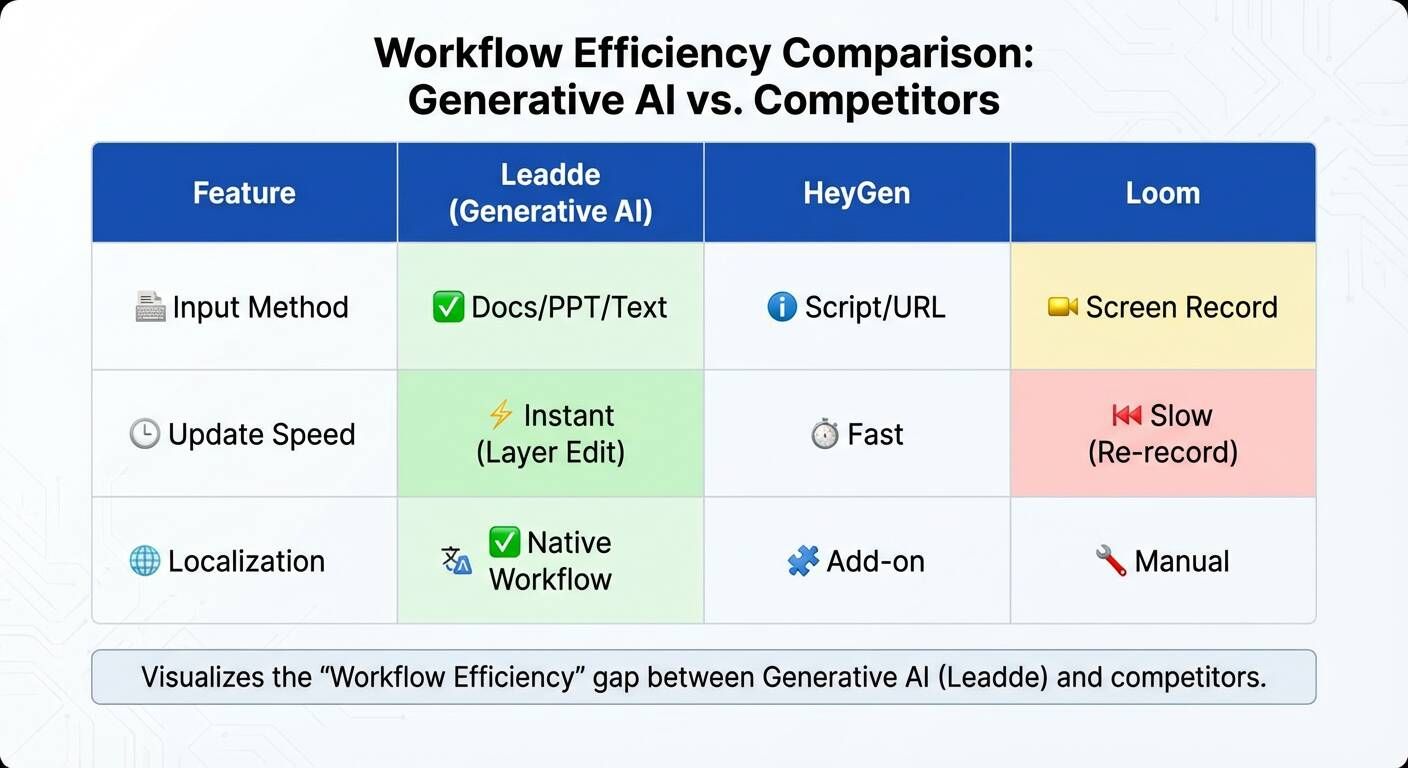
1. Editability & Maintenance Can you fix a typo in your demo without starting over?
- Traditional Tools: No. You must re-record.
- Leadde: Yes. You simply edit the text layer or slide, and the AI regenerates the scene.
2. Localization Speed SaaS is global. How fast can you launch a German version of your feature walkthrough?
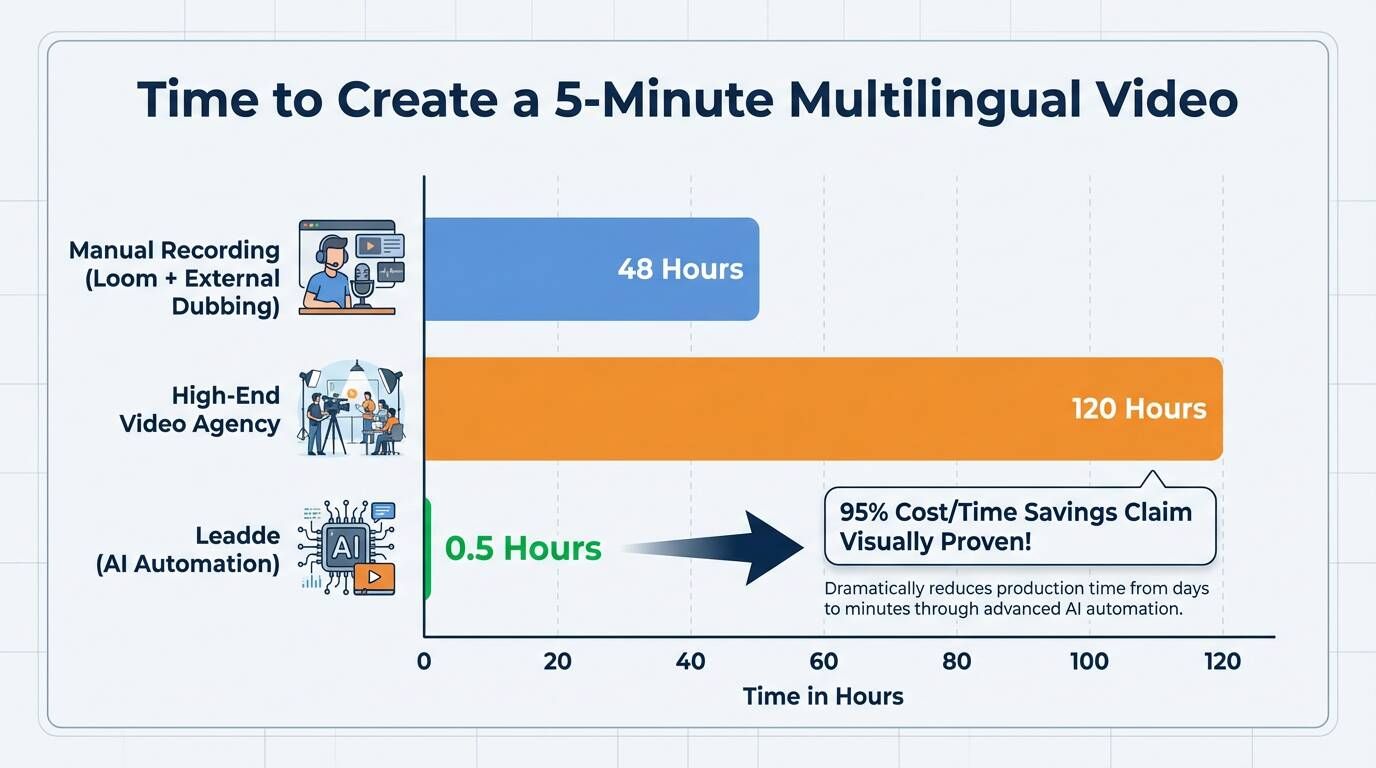
- Manual Workflow: Hire a German voice actor, re-record the screen (if UI is localized), and edit. Time: 1-2 weeks.
- AI Workflow: Upload the script/video, select "German," and export. Time: <10 minutes.
3. Input Versatility Does the tool force you to write scripts from scratch, or can it ingest existing assets such as docs, slides, and scripts? The best tools in 2026 can turn commercial video templates for training and onboarding into reusable workflows, effectively acting as employee training templates.
Leadde’s ability to convert PDF/Word documents directly into video structures puts it ahead of tools that only accept plain text scripts. If your team already has product documentation, SOPs, or sales enablement decks, start from those assets in Leadde instead of writing a demo script from zero.
When NOT to Use AI Demo Video Tools
AI video is powerful, but not always the best choice.
Avoid using it for:
- High-end brand storytelling
- Creative campaigns
- Emotional marketing content
Use it for:
- Onboarding
- Product walkthroughs
- Help center videos
- Internal training
👉 The key factor is:
👉 How often the content needs to change
Why “Doc-to-Video” Is Becoming the Default Workflow
One clear trend across teams:
👉 Video is becoming a structured output — not handcrafted media
Instead of creating videos from scratch:
- Teams reuse documentation
- Generate video automatically
- Update instantly when needed
👉 This is why platforms like Leadde are gaining traction — they align with how SaaS teams actually work
Verdict: Choosing the Right Tool for Your Stage
- For Early-Stage Startups (Speed): Use Loom for quick, dirty internal comms and Screen Studio for your first marketing launch.
- For Growth & Enterprise (Scale): Use Leadde if you need to produce standardized demo videos, onboarding materials, SOPs, or multilingual product updates at scale. Document-to-video workflows are the only practical way to keep up with a fast SaaS release cycle.
- For Sales Enablement (Personalization): Use Navattic or Walnut to send clickable, personalized sandboxes to high-value prospects.
Related SaaS demo tools
- AI Product Video Maker — Turn product docs, scripts, and slides into editable SaaS demo videos.
- AI Walkthrough Video Maker — Create product walkthroughs for onboarding, support, and sales enablement.
- PowerPoint to Video — Convert sales decks or product slides into video content.
- Script to Video — Generate demo videos from a sales script or product walkthrough script.
- AI SaaS Explainer Video Maker — Create SaaS explainer videos for landing pages and product education.
FAQ: Common Questions About Product Demo Software
Q: What is the difference between an "Interactive Demo" and a "Video Demo"?
An Interactive Demo (like Arcade or Navattic) captures the HTML/CSS of your product, allowing users to click through a simulation of your app at their own pace. A Video Demo (like Leadde or Loom) guides the viewer through a narrative flow with voice-overs and visual highlights. Video is generally better for "passive" learning, such as onboarding training or feature overviews, where you want to ensure the viewer understands the "why" behind the "how" via a how-to video guide.
Q: Can I update a product video without re-recording it?
With traditional screen recording software, no—you must re-record the entire clip if your UI changes. However, generative platforms like Leadde solve this through layered editing. Because Leadde imports content as editable layers (text, icons, visuals), you can simply swap out an outdated screenshot or modify a text field, and the AI will regenerate the scene instantly without needing a new voice-over or shoot .
Q: Is AI video generation professional enough for enterprise clients?
Yes. In 2026, top corporate video platforms include enterprise-grade controls. Leadde, for instance, supports SOC 2, GDPR, and ISO 42001 standards, ensuring that content production meets strict corporate compliance and security requirements. Additionally, the ability to customize AI avatars in marketing allows for consistent, on-brand presentation that often looks more polished than a webcam recording.
Q: How much money can I save by switching to AI video software?
Organizations using Leadde report significant savings. By following a corporate video guide focused on automation, you eliminate the need for cameras, microphones, actors, and post-production software, allowing companies to reallocate budget toward distribution and strategy rather than manual labor.
Leadde consolidates your video production workflow into a single platform that transforms documents into multilingual demo assets. Try it with your own product content to see how much recording and editing time you can remove.
Q: What tools are most commonly used today for SaaS demo videos?
Most teams use a combination of tools depending on the scenario. For quick internal demos, tools like Loom or Screen Studio are widely used. For more structured or scalable production, teams increasingly adopt AI video platforms. For conversion-focused use cases, interactive demo tools are often preferred.
In practice, high-performing teams don’t rely on a single tool—they build a workflow that combines video, interactive demos, and AI automation.
Q: Is there a tool that can create sales demo videos without complex editing?
Yes. AI demo video tools are designed specifically for this use case. Instead of recording and editing manually, you can input documents, scripts, or slides, and the system automatically generates scenes, voiceovers, and visuals.
This eliminates the need for timeline-based editing and allows sales teams to produce demos much faster without relying on video expertise.
Q: Are tools like Screen Studio or Camtasia worth it?
They are useful in certain scenarios. Screen Studio is excellent for polished recordings with minimal setup, while Camtasia provides more control for detailed editing.
However, both rely on manual workflows. If your product changes frequently, maintaining videos created with these tools can become time-consuming and inefficient.
Q: Should I create demo videos myself or outsource them?
Outsourcing works well for high-end marketing videos or brand storytelling. But for SaaS product demos, in-house creation is usually more efficient.
Because products evolve quickly, teams need to update demos frequently. Keeping production internal ensures faster iteration and better alignment with the product.
Q: How can I create a clear product demo without spending hours editing?
The most effective approach is to avoid editing-heavy workflows. Instead of recording and refining footage manually, use structured content (like documentation or scripts) and generate videos automatically.
This allows you to focus on clarity and messaging, rather than spending time on editing.
Q: Are AI demo video tools actually faster than manual editing?
Yes. The biggest advantage comes from eliminating re-recording.
In a traditional workflow, even a small UI change requires re-recording and re-editing. With AI-based tools, you can simply update the content and regenerate the video, reducing production time from hours to minutes.
Q: For onboarding, what works better: video, guides, or interactive walkthroughs?
Each format serves a different purpose. Video is effective for explaining concepts, guides are useful for reference, and interactive walkthroughs help users learn by doing.
The most effective onboarding experience combines all three, depending on the user’s stage and needs.
Q: What if I need a real product demo instead of a promotional video?
In that case, avoid over-produced content. Real product demos should reflect the actual user experience, not a scripted or cinematic version of it.
Using screen-based demos, interactive simulations, or AI-generated walkthroughs based on real UI will produce more trustworthy and effective results.
Q: For landing pages, should I use video demos or interactive demos?
Both formats serve different roles. Interactive demos tend to drive higher engagement and allow users to explore the product directly. Video demos are better for storytelling and guiding users through key features.
Many high-performing SaaS landing pages use both together to maximize conversion.
Q: Should every SaaS website include a short demo video?
Yes, especially for complex products. A short demo video helps users quickly understand what the product does and how it works.
Even a 30–60 second video can significantly improve clarity, increase engagement, and support conversion by reducing friction in the decision-making process.