
Top 5 SaaS Explainer Video Creator Tools (Tested & Compared)

Most SaaS explainer videos don’t fail because of poor visuals.
They fail because they don’t clearly communicate why the product matters.
After testing multiple explainer video tools and analyzing real-world use cases, one thing became obvious:
👉 The biggest challenge is not creating a video — it’s creating one that actually converts.
In 2026, SaaS teams are no longer choosing between “good-looking” tools.
They’re choosing between workflows:
- AI-generated videos (fast, scalable)
- Animated explainers (polished, controlled)
- Real product demos (authentic, conversion-focused)
This guide breaks down the best tools — and more importantly, how to choose the right approach.
Instead of pouring weeks and budget into traditional production, you can use Leadde to turn any document, slide deck, or product description into a professional business video automatically. No drawn-out editing cycles, no expensive agency retainers. In just minutes, your existing content becomes a polished explainer, helping you cut production costs by over 80% and reduce creation time by up to 90% while keeping pace with your product’s growth.

What Is the Best SaaS Explainer Video Creator in 2026?
Short answer:
- For scalable explainer production → AI tools like Leadde
- For avatar-based presentations → Synthesia
- For polished visual storytelling → VEED or Canva
- For animation-heavy explainers → Vyond
👉 But the real answer depends on your goal:
| Goal | Best Approach |
|---|---|
| Explain product value quickly | Explainer video |
| Show real product usage | Demo video |
| Increase conversion | Interactive demo |
👉 The best-performing SaaS teams combine these formats.
How I Evaluate SaaS Explainer Video Tools (Real Testing Framework)
After testing different tools across onboarding, landing pages, and product launches, I found that most comparisons miss what actually matters.
Here are the 5 criteria that truly determine ROI:
1. Clarity (Not Visual Quality)
Can the video explain the product in under 60–90 seconds?
2. Editability
Can you update the video without starting over?
3. Production Speed
Minutes vs hours vs weeks.
4. Scalability
Can you create 20–50 videos consistently?
5. Workflow Fit
Does it match how your team actually works (docs, slides, scripts)?
👉 Most tools look similar on the surface, but fail on at least 2–3 of these.
Why SaaS Explainer Videos Often Fail to Deliver Results
While explainer videos are widely recognized as effective, many SaaS creators struggle to achieve meaningful conversion outcomes—particularly in early-stage or resource-constrained environments.
The underlying issue is rarely the format itself. The problem arises when creators lack the means to execute this clearly. Founders and solo marketers often face tight budgets, limited production experience, and compressed timelines. To compensate, they turn to low-cost or free AI video tools as a shortcut. While these tools reduce friction, the resulting videos frequently feel generic, visually repetitive, and emotionally flat. Robotic voiceovers, templated animations, and overly corporate styling weaken the message rather than strengthening it.
In B2B especially, trust is a prerequisite for purchase. Buyers want confidence not only in the product, but also in the people behind it. Videos that feel artificial or impersonal undermine that trust and make brands appear less credible.
At the opposite end of the spectrum, professional agencies and freelancers can deliver high-quality results—but often at significant cost. Production cycles may stretch across weeks, and post-launch updates typically require restarting much of the process from scratch. This lack of agility is misaligned with the iterative nature of SaaS development.
Given these constraints, it is understandable why many founders search for solutions such as “free SaaS explainer video platforms.” AI-driven tools and agents, including options like Argil, are increasingly positioned as a middle path—offering speed, flexibility, and scalability while avoiding the extremes of low-quality automation or high-cost production.
Explainer Video vs Product Demo vs Interactive Demo
This is one of the most misunderstood decisions.
Explainer Video
- Focus: Why the product matters
- Best for: Landing pages, awareness
Product Demo Video
- Focus: How the product works
- Best for: Onboarding, tutorials
Interactive Demo
- Focus: Let users explore
- Best for: Conversion, sales
👉 What I’ve seen work best:
- Explainer video → Hook attention
- Demo video → Build understanding
- Interactive demo → Drive conversion
The Real Cost of SaaS Explainer Videos (What Teams Underestimate)
Most teams only think about production cost.
But in reality, the bigger cost is:
👉 Maintenance
Typical hidden costs:
- Script revisions
- UI updates breaking videos
- Re-recording and editing
- Coordination with freelancers
Traditional workflow:
- High cost
- Long production cycles
- Hard to update
AI workflow:
- Lower cost
- Faster iteration
- Easier updates
👉 This shift is one of the biggest reasons AI tools are growing so fast.
Characteristics of High-Performing SaaS Explainer Videos
The most effective SaaS explainer videos share several common traits:
- They distill complex concepts into a clear narrative within 60–90 seconds
- They prioritize user pain points and outcomes over exhaustive feature lists
- They use storytelling to establish relevance before introducing technical detail
- They rely on strong visual structure to reinforce comprehension
- When executed well, they can significantly improve conversion and trial activation
Successful examples demonstrate that clarity, not creativity alone, is the primary driver of performance.
Core Principles for Creating Effective SaaS Explainer Videos
Prioritize Simplicity Over Density
Overly complex storyboards reduce comprehension. Clear structure, restrained visuals, and focused messaging increase retention and engagement.
Anchor the Narrative in Real Problems
Effective explainer videos begin with recognizable user challenges. The product is positioned as a response to those challenges, not as a standalone innovation.
Design with the Sales Funnel in Mind
Explainer videos should be tailored to their role in the customer journey—whether educating cold traffic, supporting evaluation, or reinforcing purchase decisions.
End with a Clear Call to Action
Without a defined next step, even well-produced videos lose impact. Every explainer should guide viewers toward a specific action.
Keep Runtime Tight
Attention drops rapidly after 90 seconds. The goal is comprehension, not completeness.
Ensure Mobile Compatibility
As a large share of viewers watch on mobile devices, text size, pacing, and layout must be optimized for smaller screens.
Use Social Proof Strategically
Incorporating testimonials or real user feedback increases credibility and reduces perceived risk, particularly in B2B contexts.
Key Considerations When Choosing Explainer Video Software
Type of Video Output
Different tools support different formats, such as whiteboard videos, animated explainers, or product walkthroughs. The intended use case should guide the choice.
Ease of Use
Efficient tools minimize onboarding time through intuitive interfaces, drag-and-drop editing, and clear documentation.
Customization and Branding
The ability to control visuals, templates, and brand elements is essential for producing videos that feel differentiated rather than templated.
Integration and Workflow Support
Integrations with content platforms, analytics tools, or automation systems improve distribution efficiency and performance tracking.
Audio and Voiceover Quality
Clear, natural-sounding audio is critical to narrative effectiveness. Support for professional recording or high-quality text-to-speech is a key differentiator.
Export and Distribution Options
Flexible export formats, resolutions, and embedding capabilities ensure videos can be deployed across websites, social platforms, and knowledge bases.
Pricing Structure
The ideal solution balances cost with capability. Teams should evaluate subscription models, usage limits, and potential hidden costs associated with premium features.
AI vs Traditional Explainer Video Creation: What Changed
The biggest shift is not quality — it’s workflow.
Traditional:
- Script → Record → Edit → Revise
AI-driven:
- Input content → Generate → Edit → Regenerate
👉 This changes everything:
- Faster production
- Easier updates
- Lower cost
But from real usage:
👉 AI is not fully autonomous
The most effective approach is:
👉 AI + human refinement
When to Use Real Product Footage vs Animated Explainers
This is a critical decision that impacts conversion.
Use Real Product Footage when:
- Your product is UI-driven
- Users need to see real workflows
- You’re targeting onboarding or sales
Use Animated Explainers when:
- The concept is abstract
- You’re targeting top-of-funnel
- You need a simple narrative
👉 Key insight:
👉 The closer to conversion, the more important realism becomes.
Best Length for SaaS Explainer Videos
From real testing and performance patterns:
- 30–60 seconds → landing pages
- 60–90 seconds → standard explainer
- 2+ minutes → onboarding
👉 Beyond 90 seconds:
- Attention drops
- Retention decreases
👉 The goal is not completeness — it’s clarity.
Should Early-Stage SaaS Use Simple Videos Instead of High-End Production?
Yes — in most cases.
Early-stage SaaS teams benefit more from:
- Simple screen recordings
- Clear explanations
- Fast iteration
Instead of:
- Expensive animations
- Long production cycles
👉 A surprising insight:
👉 Over-polished videos can reduce trust if they feel disconnected from the real product.
Best Explainer Video Software: Top 5 Picks 🏆
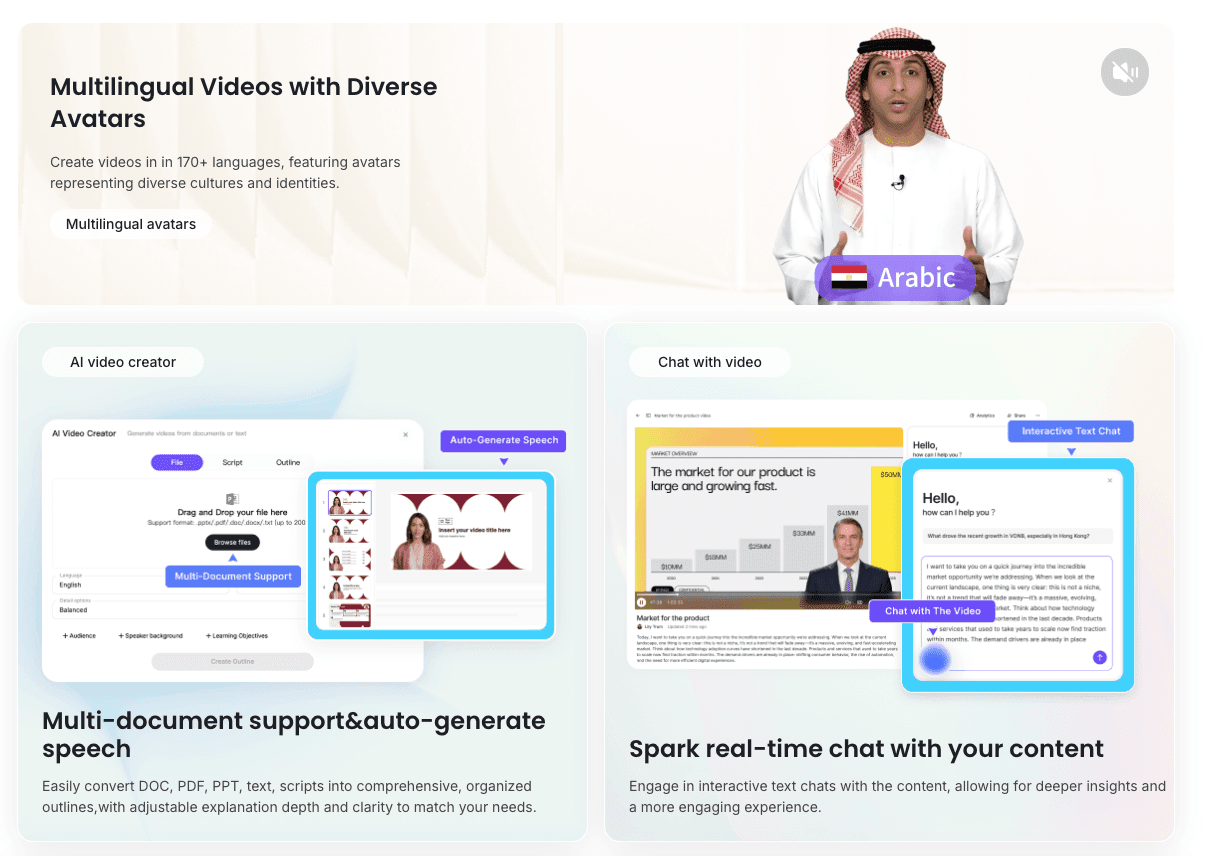
Leadde: best for creating multilingual and interactive videos
Rating: 4.9/5 stars (15+ reviews)
SaaS demos shouldn't be a grind! Descript nails voiceovers, Canva's templates speed things up. For animations, try Powtoon or Vyond. AI tools like those on Leadde.ai are killers for multilingual and interactive videos.
Leadde is strongest for SaaS teams that need explainer videos to stay editable as product messaging changes. Instead of starting with a blank video timeline, teams can turn documents, slides, product descriptions, launch notes, or scripts into structured explainer video drafts, then refine the narration, scenes, and localization inside one workflow.
This makes it a better fit for repeatable SaaS explainers, onboarding videos, product education, and multilingual business content than for one-off cinematic brand films.
As a smarter platform for business video creation, you can create, localize, manage, and publish AI videos effortlessly in one seamless workflow on Leadde. Once you’re ready with the first-cut of your video, Leadde’s intuitive editor makes it easy to fine-tune the draft.
Key features
- Multi-document support & auto-generate speech.
- Spark real-time chat with your content
- Auto highlight key points
- Auto layout scenes of video
See what effect it will have:
- 90% Reduced content creation time
- 3x Increased Content Engagement
- 80% Cut Production Costs
- 70% Saved Time in Content Localization
- 90% Reduced Video Production Errors
Pricing
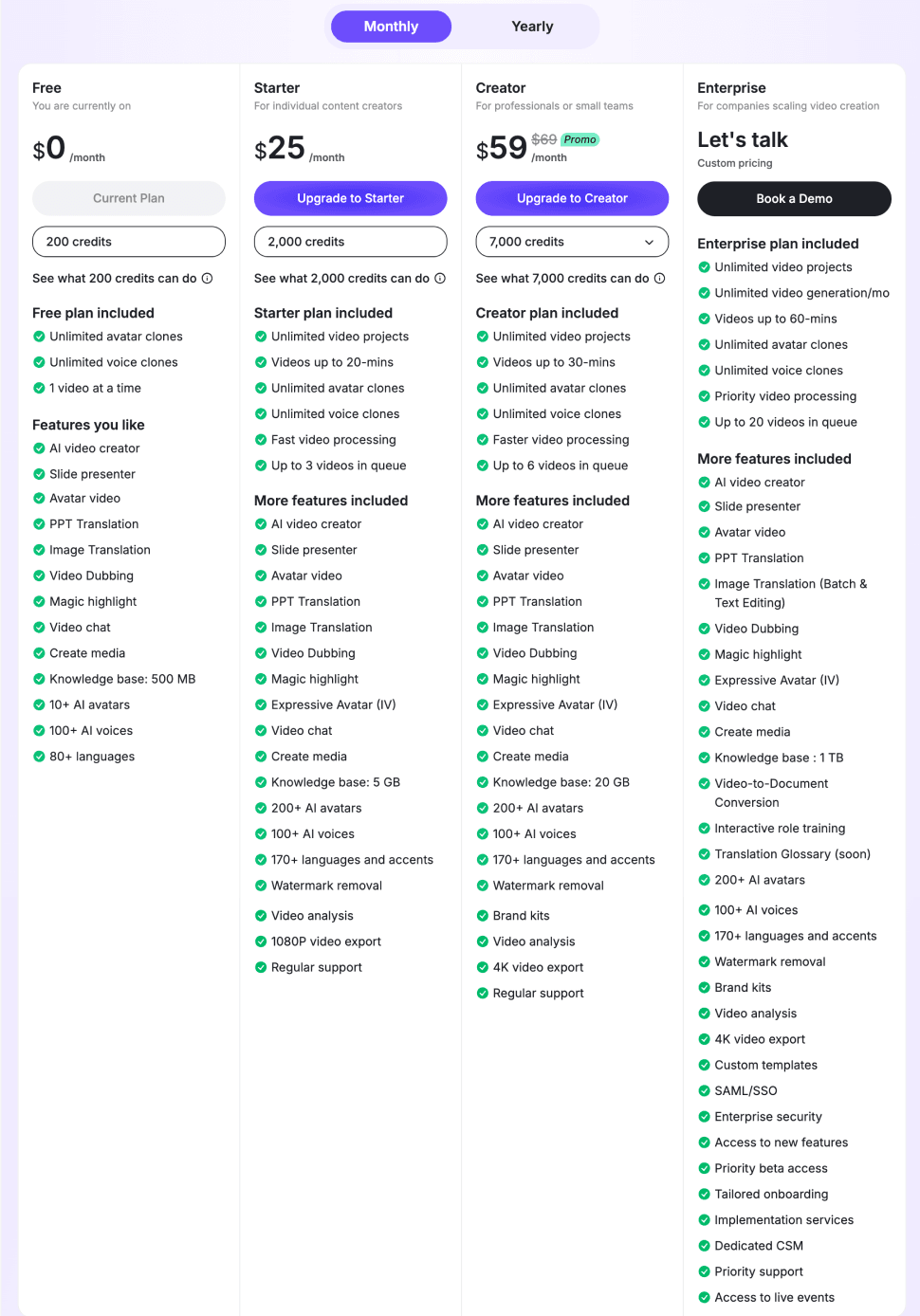
Try Leadde.ai for $25/mo
Synthesia: best for videos with AI avatars and voiceovers
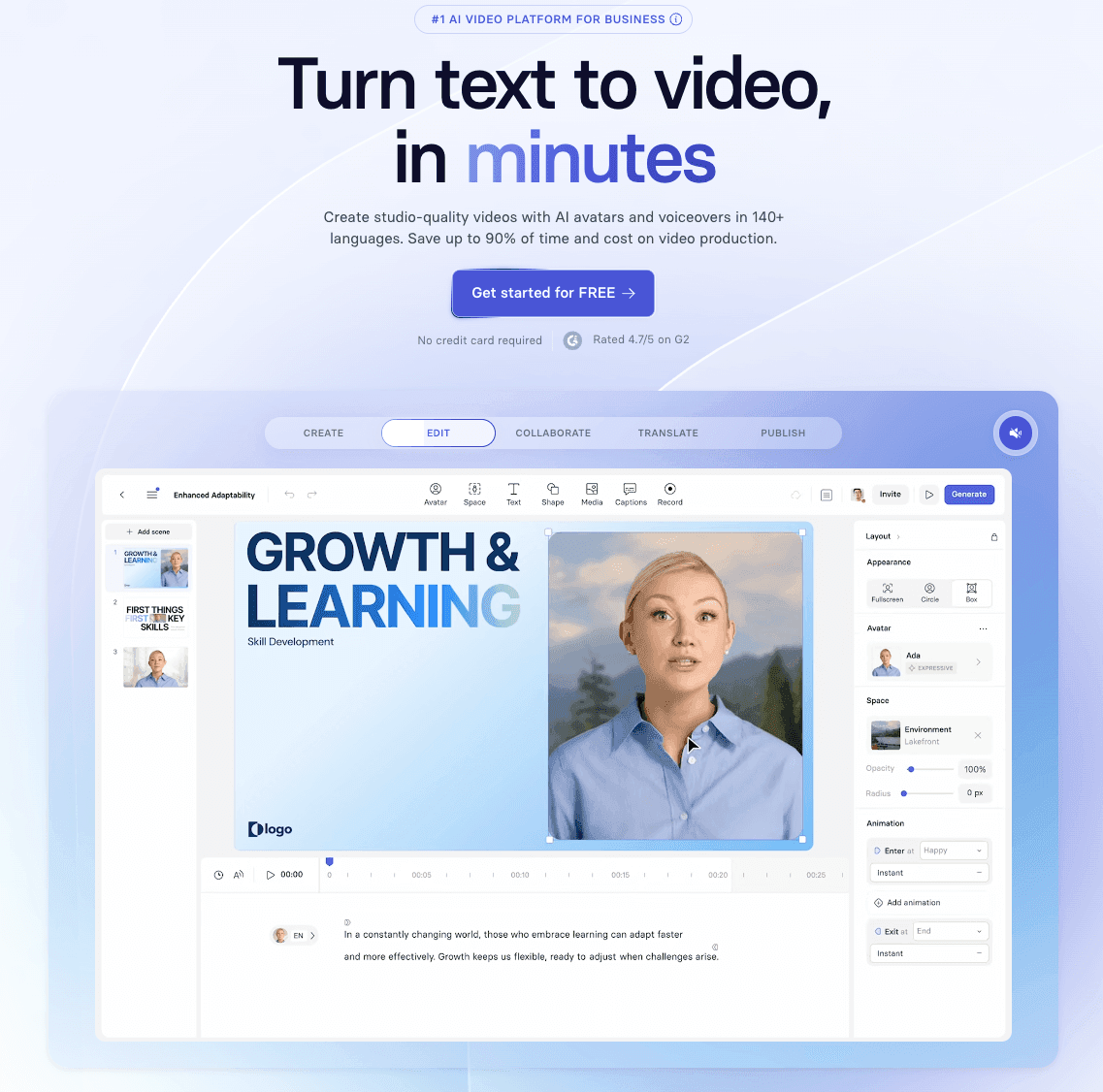
Rating: 4.85/5 stars (1000+ reviews)
Synthesia is an AI-generated video creation tool. Unlike product-centric videos, this tool helps you produce explainer videos with an AI avatar narrating your script.
With over 140 avatars available in 120+ languages, Synthesia is a good choice if you want to create explainer content with a human character. You can also generate a script with AI based on a few prompts.
Overall, this tool is great if you want to fast-track the video creation process without investing too much effort into writing a script, recording and editing a video, and sharing it.
Key features
- Create your own avatar: You can make your own AI-like avatar and clone your voice to create more natural videos. This makes it easy to make personalized content at scale.
- Easy reshoots for updates: Synthesia’s advanced editing capabilities allow you to quickly update information in your videos. You can selectively delete outdated details and add new ones in a few clicks.
- Quick integrations: The tool integrates with several platforms in your tech stack, including Intercom, Notion, PowerPoint, HubSpot, and more.
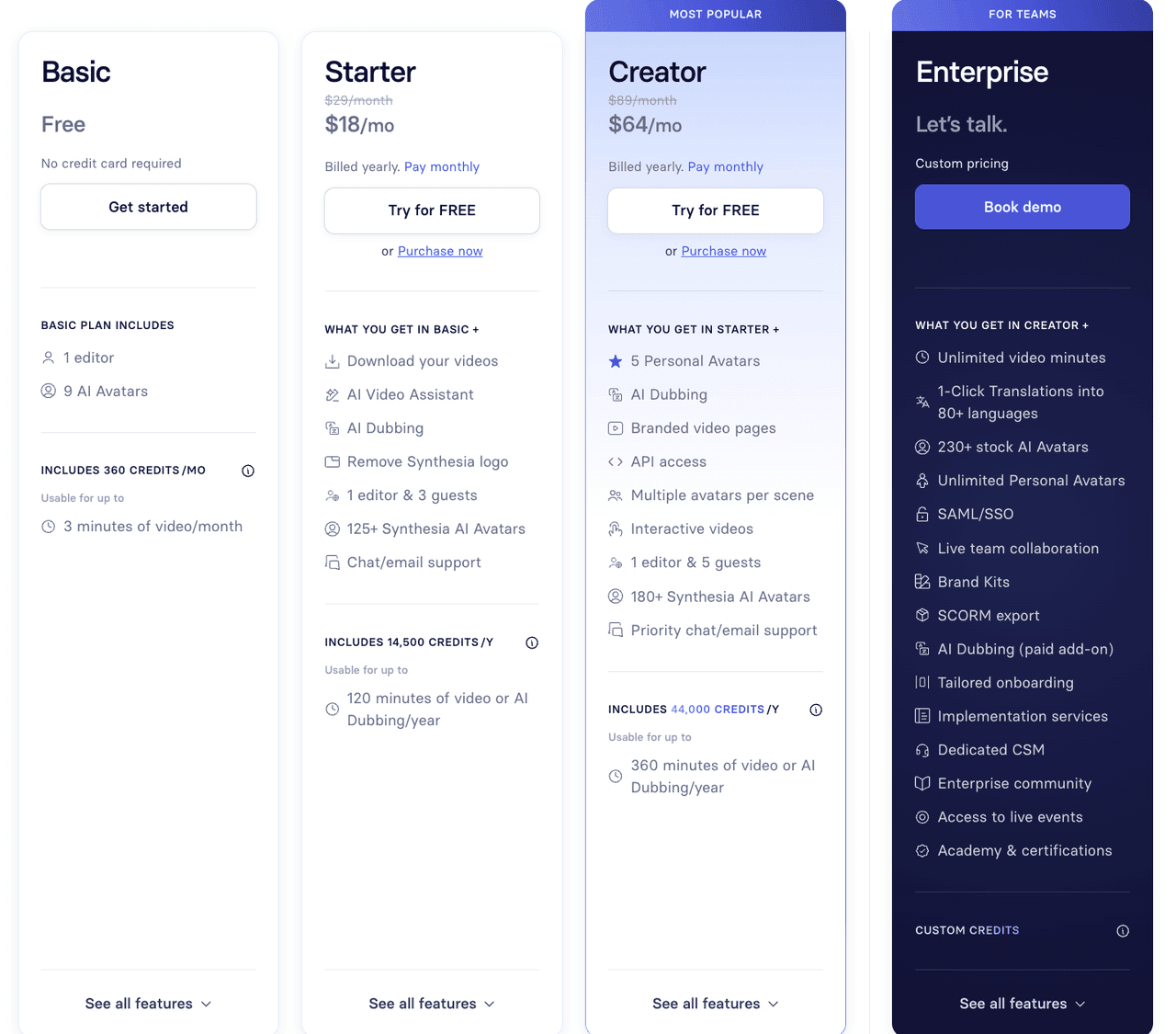
Pricing: See Synthesia
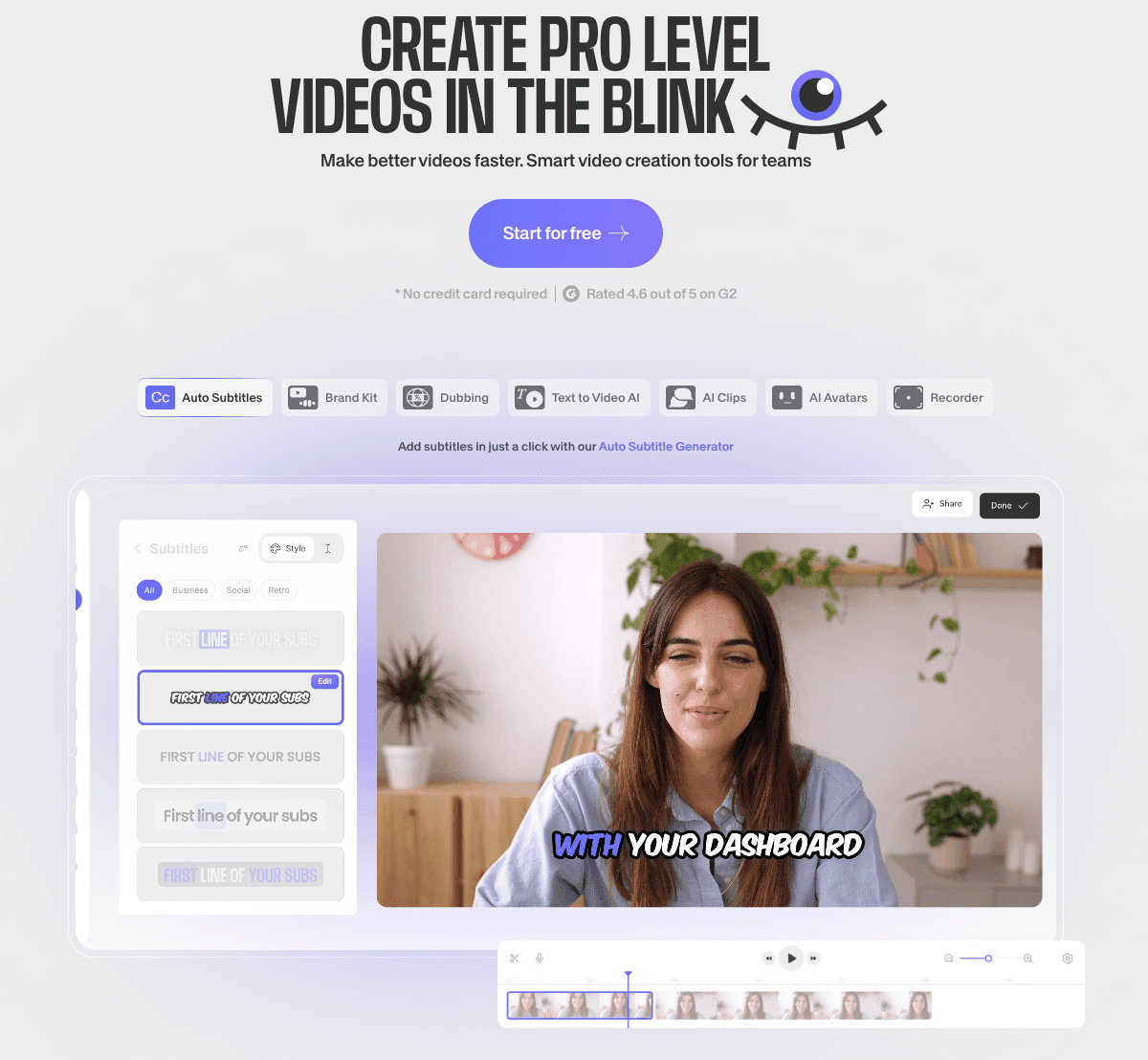
VEED: best for creating polished videos with music and graphics
Rating: 4.6/5 (200+ reviews)
VEED is a video creation and streaming tool where you can design explainer videos from scratch. With a massive library of stock videos, VEED gives you ample choices to create a high-quality explainer video for certain concepts or ideas.
You can add your own voice, generate one with text-to-speech, or choose a background audio. Alternatively, if you want your video's audio transcribed, VEED's video to text tool can easily perform this task, providing you with a written script that you can reuse or repurpose. It’s easy to resize videos, adjust the speed, auto-generate subtitles, and add other elements like overlay text or stickers.
With VEED, if you have a video file in a different format and you need it converted to an MP4 format, their MP4 converter tool is a simple and user-friendly solution.
Key features
- Template library: One of VEED’s biggest differentiators is the ability to choose from a huge template library. You never have to start from a blank canvas because VEED offers so many options to create an explainer video.
- Use AI avatars: Choose from 50 different AI avatars and simply add your script to create a talking head explainer video. Each avatar has its unique personality and voice to sound realistic.
- Add transitions: VEED lets you add backgrounds to your videos and apply transition effects to make the final output more appealing to your audience.
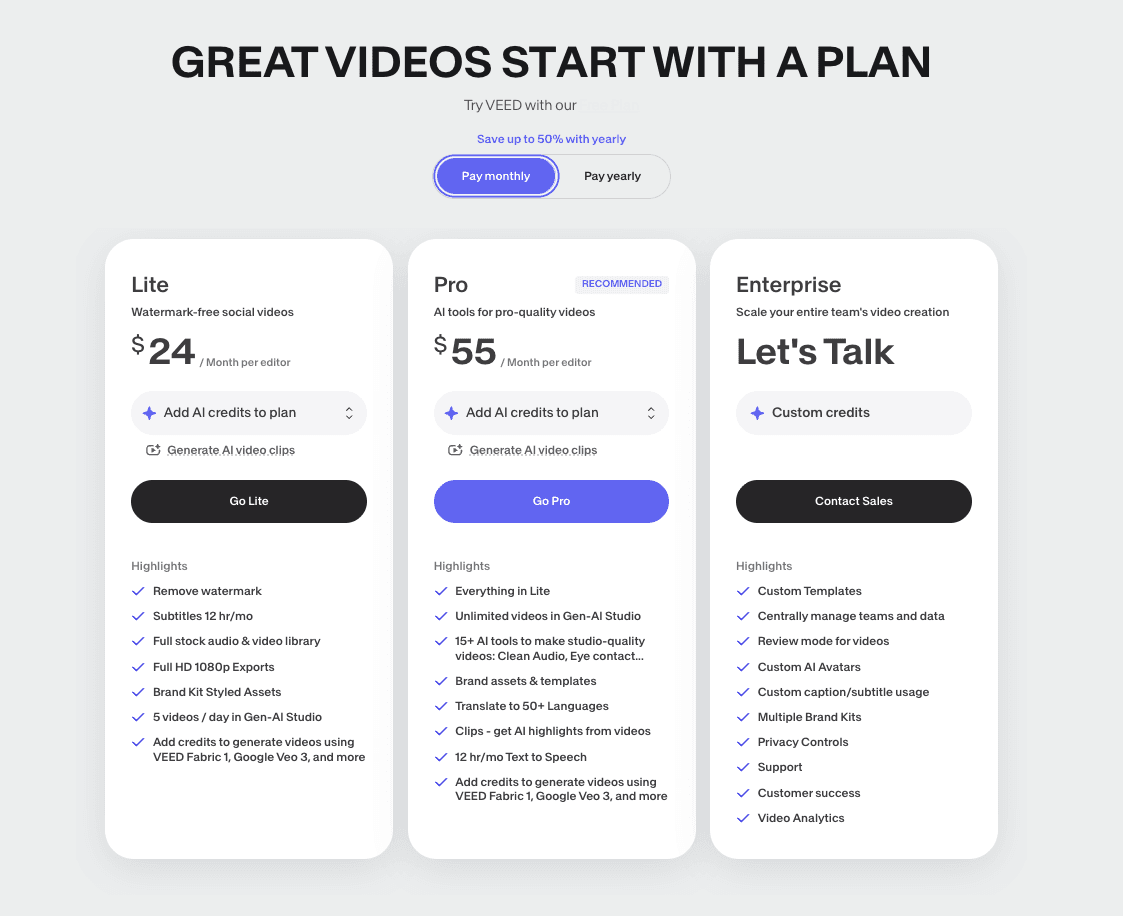
Pricing
Canva
Rating: 4.7/5 (200+ reviews)
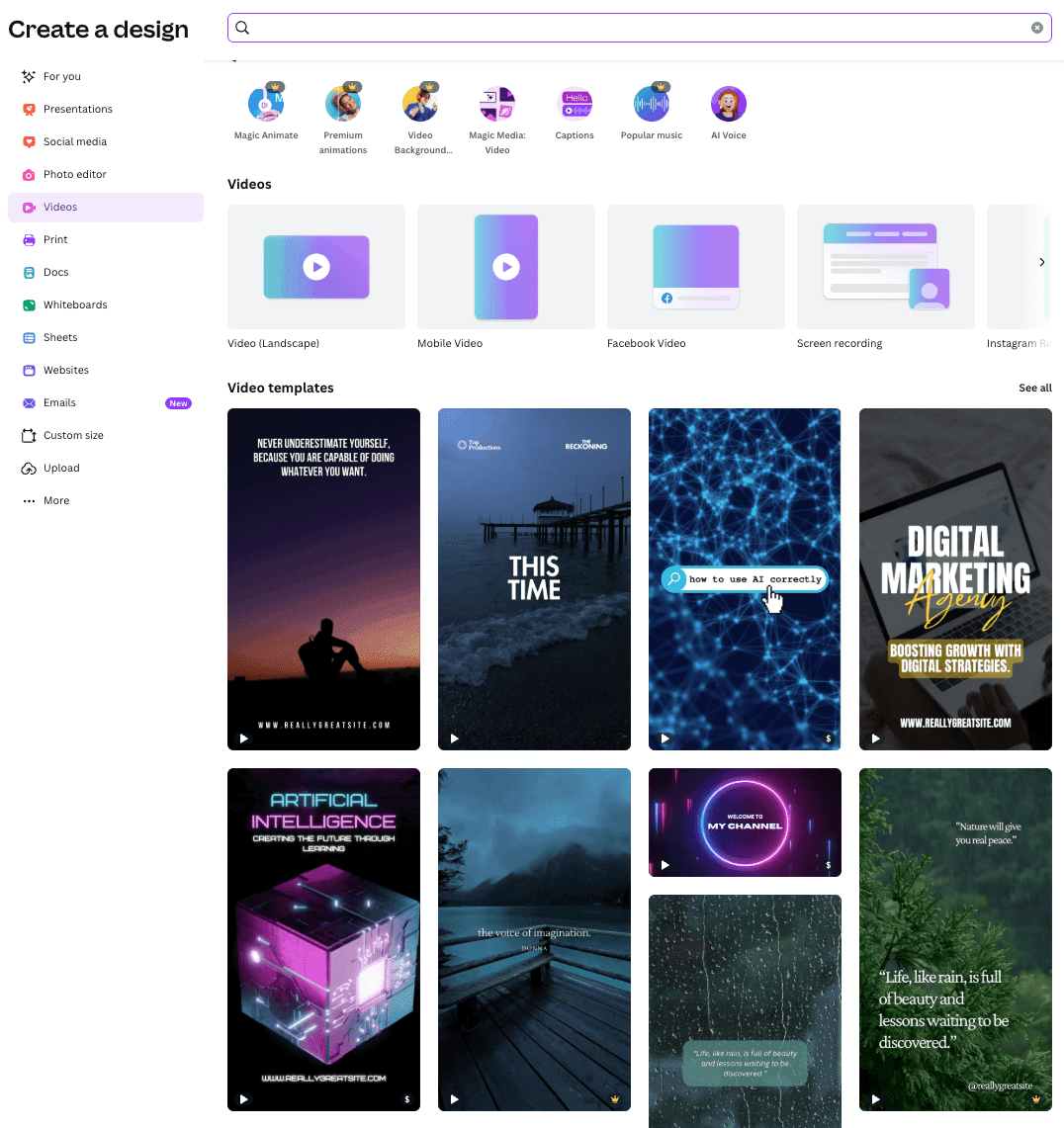
Canva is a versatile graphic design tool with options to create social media content, presentations, and most importantly, explainer videos. You can choose from a bunch of templates or get started with a blank canva and upload your own video clips. The tool lets you add audio, apply animation/transition effects, add text, and much more.
Key features
- Magic Video: Let AI handle the edit
- Turn any photo or video into captivating animation
- Drive engagement with branded captions
- Remove backgrounds in a click
- Highlight the best moments instantly
Vyond
Rating: 4.5/5 (200+ reviews)
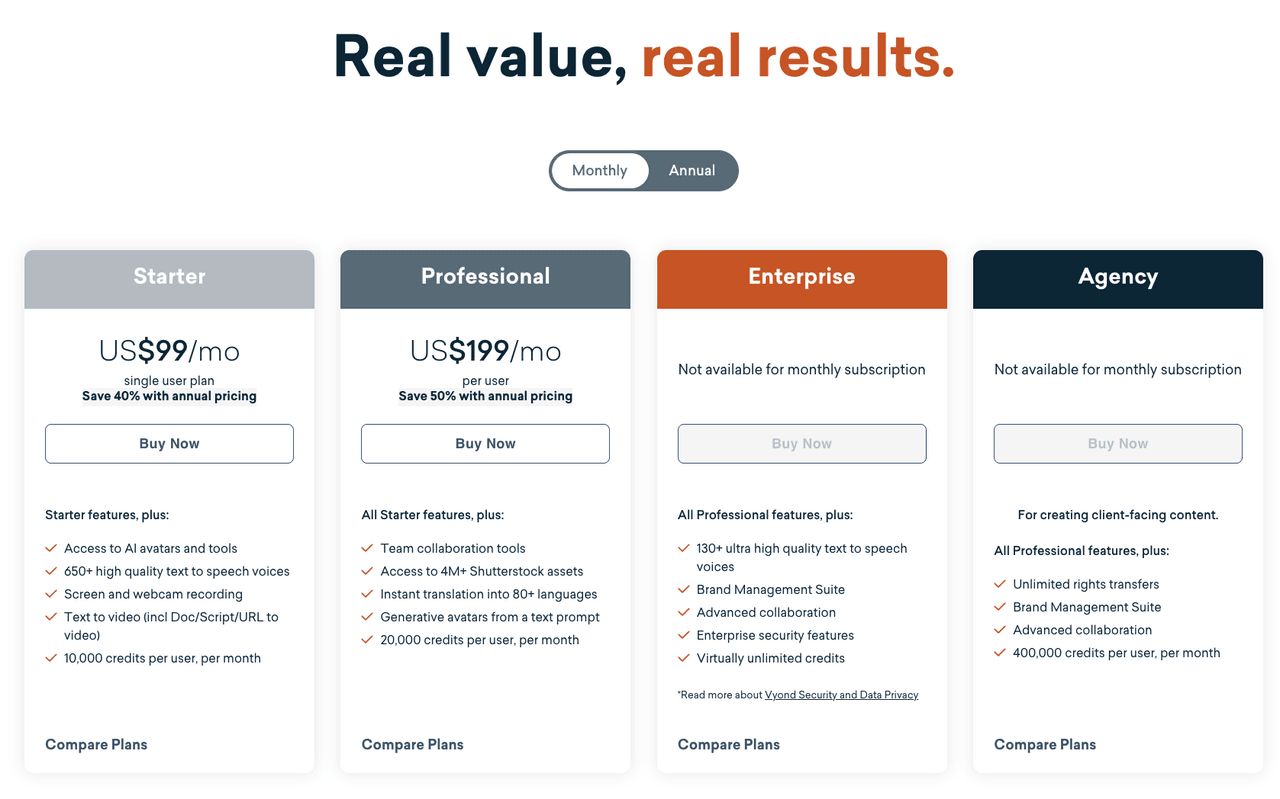
Vyond is another AI-powered video creation tool to make whiteboard videos and animated content. You can choose from 40,000+ props to create more engaging videos and design different types of animations, like 3D, stop motion, motion graphics, etc. It’s a user-friendly tool with a short learning curve.
Key features
- AI text-to-video generation
- Drag-and-drop animation editor with templates
- Customizable characters and AI avatars
- Text-to-speech voiceovers with lip sync
- Brand control (logos, colors, fonts)
- Team collaboration and enterprise-grade security
- Easy export for web, social, and presentations
Pricing
Final Verdict: What Should You Choose?
- Startups → Simple videos or AI tools
- Growth teams → AI + structured workflows
- Enterprise → Combination of AI + interactive demos
👉 The real decision is not “which tool is best”
👉 It’s:
👉 Which workflow lets you explain your product clearly, quickly, and consistently
Related SaaS explainer tools
- AI SaaS Explainer Video Maker — Turn product messaging, scripts, and notes into SaaS explainer videos.
- Explainer Video Maker — Create explainer videos for product education, marketing, and onboarding.
- AI Product Video Maker — Turn product docs, scripts, and slides into editable product demo videos.
- Script to Video — Convert an explainer script into a video workflow.
- PowerPoint to Video — Turn product decks or sales slides into video content.
FAQ
Q: Should I use screen recording, animation tools, AI generators, or interactive demos?
The right choice depends on your goal, not the tool itself.
- Screen recording works best for real product walkthroughs
- Animation tools are better for abstract concepts
- AI generators are ideal for speed and scalability
- Interactive demos are strongest for conversion
In practice, high-performing SaaS teams combine multiple formats instead of relying on just one.
Q: Can I create a 30–60 second explainer video with almost no budget?
Yes. Many early-stage SaaS teams start with simple workflows:
- Screen recording your product
- Adding basic zoom and text overlays
- Using lightweight editing tools
This approach is often more than enough to communicate value clearly without high production costs.
Q: Are tools like Screen Studio or Camtasia good enough for professional SaaS demos?
Yes, for many use cases.
Screen Studio is excellent for clean, polished recordings with minimal effort, while Camtasia offers more control for editing.
However, both rely on manual workflows, so they can become time-consuming if you need to update videos frequently.
Q: Do I really need an explainer video on my landing page?
If your product is not immediately obvious, the answer is yes.
A short explainer video can help users quickly understand:
- What your product does
- Who it’s for
- Why it matters
Without it, many visitors may leave before fully understanding your value proposition.
Q: Should early-stage SaaS use real product demos or animated explainers?
In most cases, real product demos work better.
They are:
- Faster to create
- More authentic
- Easier to update
Animated explainers are useful for abstract concepts, but for most SaaS products, showing the real interface builds more trust.
Q: Are AI explainer video tools actually time-saving?
Yes, especially when updates are required.
Instead of re-recording and editing, you can:
- Modify the script or content
- Regenerate the video
This significantly reduces production time, although some manual refinement is still needed.
Q: If my SaaS product is complex, should I include a short video on my website?
Yes. For complex products, a short video is often essential.
Even a brief explainer (30–60 seconds) can:
- Reduce confusion
- Improve understanding
- Increase engagement
It acts as a fast entry point before users explore deeper content.
Q: Is screen recording with light editing enough for onboarding videos?
In many cases, yes.
For onboarding and instructional content, clarity matters more than polish.
A simple recording with clear narration and minimal editing is often more effective than a highly produced video.
Q: Should I hire a freelancer or create explainer videos in-house?
It depends on your needs.
- Freelancers are better for high-end marketing videos
- In-house or AI tools are better for scalable, frequently updated content
For most SaaS teams, keeping production internal allows faster iteration and better alignment with product changes.
Q: What works better for sales: interactive demos or explainer videos?
They serve different roles.
- Explainer videos help communicate value
- Interactive demos help users experience the product
For sales and outbound, combining both is often the most effective strategy.
Q: Do AI tools still provide value if they can’t use my existing documents or scripts?
Their value becomes limited.
The biggest advantage of AI tools is their ability to turn existing content into videos.
Without that, they behave more like traditional editors rather than workflow accelerators.
Q: What is the ideal length for a SaaS explainer video?
For most use cases:
- 30–60 seconds works best for landing pages
- 60–90 seconds is ideal for full explainers
Longer videos are suitable for onboarding, but for first impressions, shorter is more effective.





