
Best Training Video Creator in 2026: What Actually Works for Business Training

The best training video creator is not the one with the most AI features—it is the one that helps your team produce clear, repeatable, and scalable training videos without relying on a full production team.
For most businesses, the best choice depends on the training format:
- For onboarding and compliance training: AI avatar tools like Synthesia, HeyGen, and Leadde.ai work well
- For software walkthroughs and SOP training: screen-recording tools like Leadde.ai are usually better
- For interactive learning and LMS delivery: platforms like iSpring Suite and LearnWorlds are stronger
- For small teams and non-designers: Canva offers the fastest learning curve
This guide breaks down exactly how to choose the best creator.

What Is a Training Video Creator?
A training video creator is a specialized tool designed to help businesses produce instructional and educational videos quickly, consistently, and at scale.
Unlike general-purpose editors, training video creators focus on clarity, learning structure, and speed, making them ideal for onboarding, SOPs, product training, customer education, and compliance content.
Traditional editors like Adobe Premiere Pro or Final Cut are powerful—but slow, complex, and not optimized for teams that need to produce 5–10 training videos per week.
A true training video creator usually includes:
- ready-made training templates
- automatic subtitles and transcription
- script-writing or storyboard tools
- built-in screen recording for software walkthroughs
- interactive elements such as quizzes, hotspots, and branching
- branding presets and reusable asset libraries
- LMS integration with SCORM/xAPI export, analytics, and progress tracking
In short:
A training video creator is built for teaching, not for cinematic editing.
Training Video Creator vs. Generic Video Editor
Not every video tool is designed for training.
Traditional editors like Premiere Pro or Final Cut are excellent for high-production marketing videos, but they are often too slow for operational learning content.
The biggest difference is this:
Generic video editors optimize for visual polish.
Training video creators optimize for speed, clarity, and repeatability.
For example:
A customer success team creating 40 onboarding videos does not need advanced cinematic transitions.
They need:
- faster updates
- reusable templates
- subtitles at scale
- standardized delivery
- measurable completion tracking
That is why tools like Camtasia, iSpring Suite, and Leadde.ai often outperform traditional editors inside real training teams.
The Four Main Categories of Training Video Creators
To choose the right tool, training video creators can be grouped into four core categories.
1. AI Avatar Video Creators
Best for:
- onboarding
- compliance training
- HR training
- policy updates
- internal announcements
Examples:
- Synthesia
- HeyGen
- Colossyan
- Leadde.ai
These tools turn scripts into presenter-style videos quickly and consistently, making them some of the top AI avatar generators for corporate use.
2. Screen Recording and Walkthrough Tools
Best for:
- SOP training
- software demos
- product onboarding
- customer education
Examples:
- Camtasia
- Loom
- Supademo
These work best when learners need to see the actual workflow.
3. LMS-First Training Platforms
Best for:
- certification training
- compliance learning
- tracked employee education
Examples:
- iSpring Suite
- LearnWorlds
- Docebo
These focus on learning outcomes, progress tracking, and reporting.
4. Lightweight Visual Creation Tools
Best for:
- small teams
- founders
- HR teams
- fast internal explainers
Examples:
- Canva
- Vyond
These prioritize simplicity over advanced production control.
What Makes the Best Training Video Creator for Business Training?
The best training video creator is rarely the one with the most features.
It is the one that removes the most operational friction.
After working with training teams across onboarding, enablement, and internal education, I found that five criteria matter most.
1. Batch Production Capability
Most companies are not creating one video.
They are creating:
- 30 onboarding videos
- 50 SOP walkthroughs
- 100 internal process updates
If the workflow breaks at video number twelve, the tool is not scalable.
One course creator I studied needed more than 30 explainer videos for a full training program. Hiring a production team was financially unrealistic, so the team moved to an AI-assisted workflow using script generation, AI voice, and template-based assembly.
The goal was not better video quality.
It was production at scale.
That is the real buying decision.
2. Easy for Non-Designers
Most training videos are created by:
- HR
- L&D
- customer success
- enablement teams
- founders
- operations managers
Not professional editors.
If a tool requires advanced timeline editing, adoption drops fast.
This is why tools like Canva, Camtasia, and Leadde.ai often outperform more “powerful” systems inside real companies.
3. Fast Updating
Training content changes constantly.
Policies change.
Product UI changes.
Internal workflows evolve.
The best training video creator must make updates easy, not expensive.
This is where platforms like Leadde.ai help significantly by reducing tool switching and keeping updates inside one repeatable workflow.
4. Multi-Language Support
Global onboarding requires video localization.
AI voice and translation features can reduce future production costs dramatically.
This matters especially for distributed teams and customer education.
5. LMS and Tracking Integration
If training completion matters, LMS export matters.
SCORM, xAPI, progress tracking, and analytics are not optional for serious training.
Without measurement, training becomes content—not outcomes.
AI Avatar vs. Screen Recording: Which Is Better for Training Videos?
This is the biggest decision most teams get wrong.
The answer is simple:
AI avatars are best for presenter-led training, enabling you to effectively scale training with AI avatars.
Screen recording is best for process-led training.
When AI Avatar Works Best
Best for:
- onboarding
- compliance
- policy training
- leadership messaging
- internal announcements
Tools like Synthesia, HeyGen, and Leadde.ai make it possible to turn a script into a presenter-led video quickly.
This works well when consistency matters more than emotional engagement.
When Screen Recording Works Better
Best for:
- software walkthroughs
- SOP demos
- customer onboarding
- product tutorials
- process documentation
For these, Camtasia usually wins.
A clean screen walkthrough with strong narration consistently outperforms an artificial presenter.
Slides plus clear narration and direct workflow demos often outperform flashy avatar videos.
The Biggest Mistake
Using AI avatars where trust matters most.
For leadership training, sales enablement, and customer-facing education, robotic delivery reduces credibility.
Training videos need trust before they need automation.
Why Most Training Videos Fail (And How to Fix It)
Most training videos fail because of instructional design—not because of bad software.
The most common failures are predictable.
Too Long
Most internal training should be:
5–8 minutes
not
35-minute information dumps.
Completion rates collapse when videos become meetings disguised as content.
Too Much Information Per Video
One video should solve one problem.
Not ten.
Shorter, focused lessons improve retention and make updates easier.
Low Presenter Trust
If the delivery feels artificial, learners disengage.
This is the biggest limitation of low-quality AI avatar content.
Trust matters more than automation.
No Update System
Many companies create training once and never update it.
Six months later, the content is already outdated.
The best systems are built for continuous revision.
No Clear Outcome
Every video should answer one question:
What should someone be able to do after watching this?
Without that, the video becomes documentation—not training.
How to Create 30+ Training Videos Without Hiring a Production Team
This is where most companies save the most money by leaning into AI tools for training videos.
The solution is not better editing.
It is system design.
Before
Typical workflow:
→ Script
→ Recording
→ Editing
→ Subtitles
→ Export
→ LMS Upload
→ Repeat manually
This creates bottlenecks immediately.
It also creates:
- version confusion
- subtitle management issues
- update costs across dozens of videos
- dependency on a few people who know the workflow
After
Scalable workflow:
→ Template
→ AI-assisted script
→ Voice layer
→ Screen demo
→ Reusable scenes
→ Auto subtitles
→ LMS-ready export
→ Fast update system
This is also why many teams move toward platforms like Leadde.ai—not because they need better-looking videos, but because they need a repeatable production system.
The real value comes from reducing:
- manual editing
- version confusion
- subtitle management
- LMS upload friction
- update costs across dozens of videos
When training scales, operational simplicity becomes the biggest competitive advantage.
In one internal training workflow, replacing repeated live onboarding sessions with standardized video delivery reduced trainer time enough that the software paid for itself quickly.
The ROI came from consistency and repeatability—not from video quality.
The Best Training Video Creator for Non-Designers and Small Teams
For small teams, the best training video creator is not the most powerful editor—it is the one that helps teams produce consistent training content quickly, update it easily, and scale without hiring a full production team.
Small teams should optimize for speed, repeatability, and operational simplicity, not cinematic perfection.
The best tools usually include:
Leadde.ai
Best for:
- Employee onboarding programs
- Scalable business training
- Compliance and security training
- SOP and process documentation
- Product training and feature education
- Global multilingual internal education
- Repeatable internal learning workflows
Why it works:
Leadde is built specifically for business video production, not general design editing. It transforms PowerPoint files, PDFs, Word documents, scripts, and text into professional training videos automatically, helping teams avoid manual filming and editing. It supports 92 languages, 200+ AI avatars, version control, analytics, and multilingual localization workflows. This makes it especially strong for companies that need standardized onboarding and training across teams or regions. Organizations using Leadde report up to 90% faster content creation and up to 80% lower production costs.
Canva
Best for:
- Simple onboarding videos
- HR policy explainers
- Internal announcements
- Team presentations
- Visual training slides
- Quick instructional content for non-designers
Why it works:
Canva is easy to adopt because most teams already use it for presentations and internal communication. Its drag-and-drop interface reduces training time, and prebuilt templates help non-designers create simple video content quickly. It works well for lightweight onboarding and presentation-style explainers where production speed matters more than advanced training structure.
Camtasia
Best for:
- Product demos
- Software walkthroughs
- Internal SOP documentation
- Process tutorials
- Customer onboarding demos
- Step-by-step technical training
Why it works:
Camtasia combines screen recording and editing in one workflow, making it highly effective for teams that need to explain software, tools, or operational processes. It is especially useful for product teams, customer success teams, and internal operations where showing the screen is more important than presenter-style training.
iSpring Suite
Best for:
- Structured employee learning
- LMS-based training delivery
- Compliance certification
- Quiz-based onboarding
- Knowledge assessments
- Formal enterprise learning programs
Why it works:
iSpring is designed for training logic rather than creative editing. It supports quizzes, assessments, progress tracking, and LMS integration, making it ideal for organizations with formal learning requirements. It is stronger for compliance-heavy industries where training completion and certification matter more than visual presentation.
Adobe Premiere Pro
Best for:
- High-end branded video production
- Marketing campaigns
- Creative storytelling
- Advanced post-production
- Professional editing teams
Why it usually fails for small teams:
Adobe Premiere is powerful, but it is often the wrong operational choice for internal training. It requires significant editing skill, longer production cycles, and higher maintenance costs. For small teams creating onboarding or repeatable education content, the complexity usually outweighs the benefit.
Best Training Video Creator for Employee Onboarding and Internal Training
Employee onboarding requires a very different type of video creator than marketing or promotional content.
The goal is not cinematic storytelling.
It is:
- consistency
- repeatability
- fast updates
- multilingual localization
- compliance tracking
- standardized delivery across teams
This is why AI avatar platforms like Leadde.ai and Synthesia perform especially well for onboarding and internal education.
HR teams often create presenter-style onboarding videos for:
- company values and culture introduction
- security and compliance training
- workplace policies
- employee benefits explanation
- IT access and system setup
- manager onboarding
- remote employee orientation
These videos do not require emotional performance or complex editing.
They require clarity, standardization, and easy maintenance.
Why Leadde.ai Works Well
Leadde is designed for business training workflows. Teams can turn PowerPoint files, PDFs, Word documents, and internal documents directly into professional onboarding videos without traditional filming or editing. It supports 92 languages, 200+ AI avatars, version control, and fast content updates, making it ideal for companies managing onboarding across multiple teams or regions. This helps organizations reduce training production time by up to 90% while keeping delivery consistent.
Why Synthesia Is Also Popular
Synthesia is widely used for avatar-led training videos where companies need a professional presenter without recording real employees repeatedly. It works well for policy explainers, compliance modules, and global onboarding because teams can update scripts quickly and generate multilingual versions without re-shooting videos.
Internal Training vs Customer Onboarding
For internal training, presenter-style AI videos often work best because employees need clear explanations and standardized learning.
For customer onboarding, however, screen-recording tools and product demos usually perform better because users need to see exactly how the software works.
This is why many companies use both:
- AI avatar platforms like Leadde and Synthesia for HR onboarding and compliance training
- Screen demo tools for product tutorials and customer education
Different use cases require different creators.
The best training video creator is the one that helps your team scale knowledge—not the one with the most editing features.
My Recommended Training Video Creation Workflow for 2026
This is the workflow I recommend most often.
Step 1: Define the Learning Goal
Ask:
What should the viewer be able to do after this?
Not:
What information should I include?
Step 2: Turn the Process Into a Simple Script
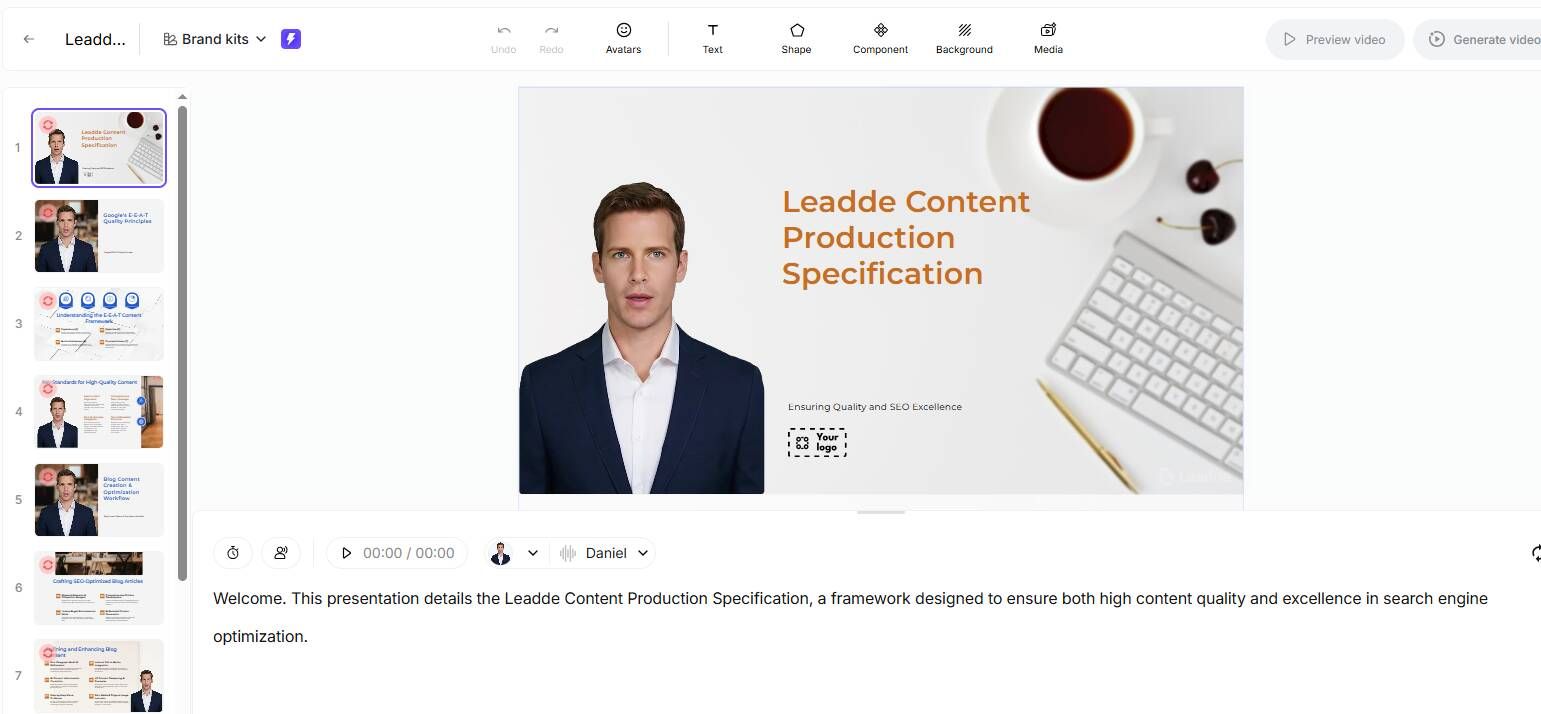
Use:
- bullet points
- checklist format
- markdown outline
- scene-by-scene structure
Do not start with editing.
Start with logic.
Step 3: Choose the Right Format
AI avatar for:
message delivery
Screen recording for: process demonstration
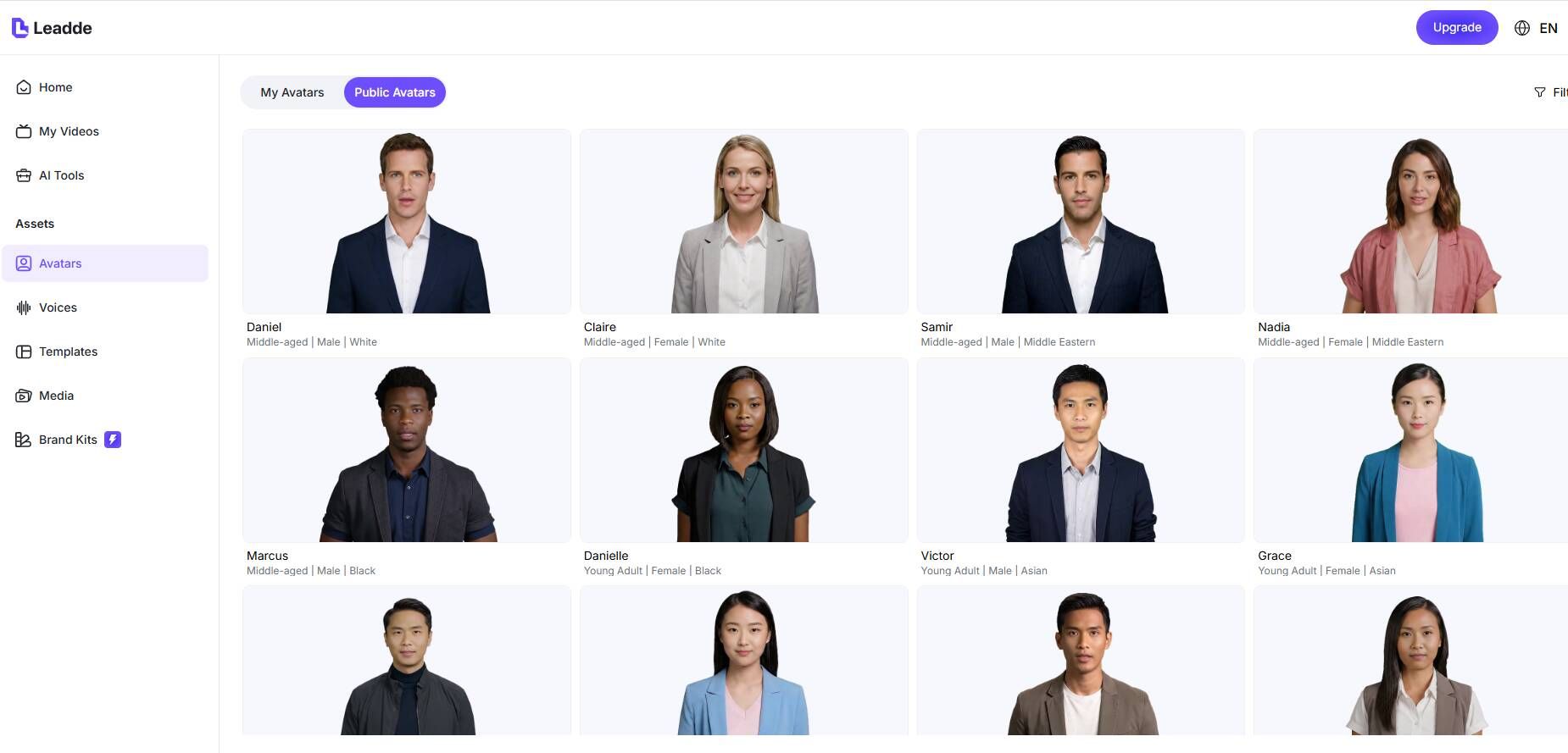
Step 4: Build With Reusable Templates
Never start from zero.
Use repeatable scenes, brand presets, and standard intro/outro structures.
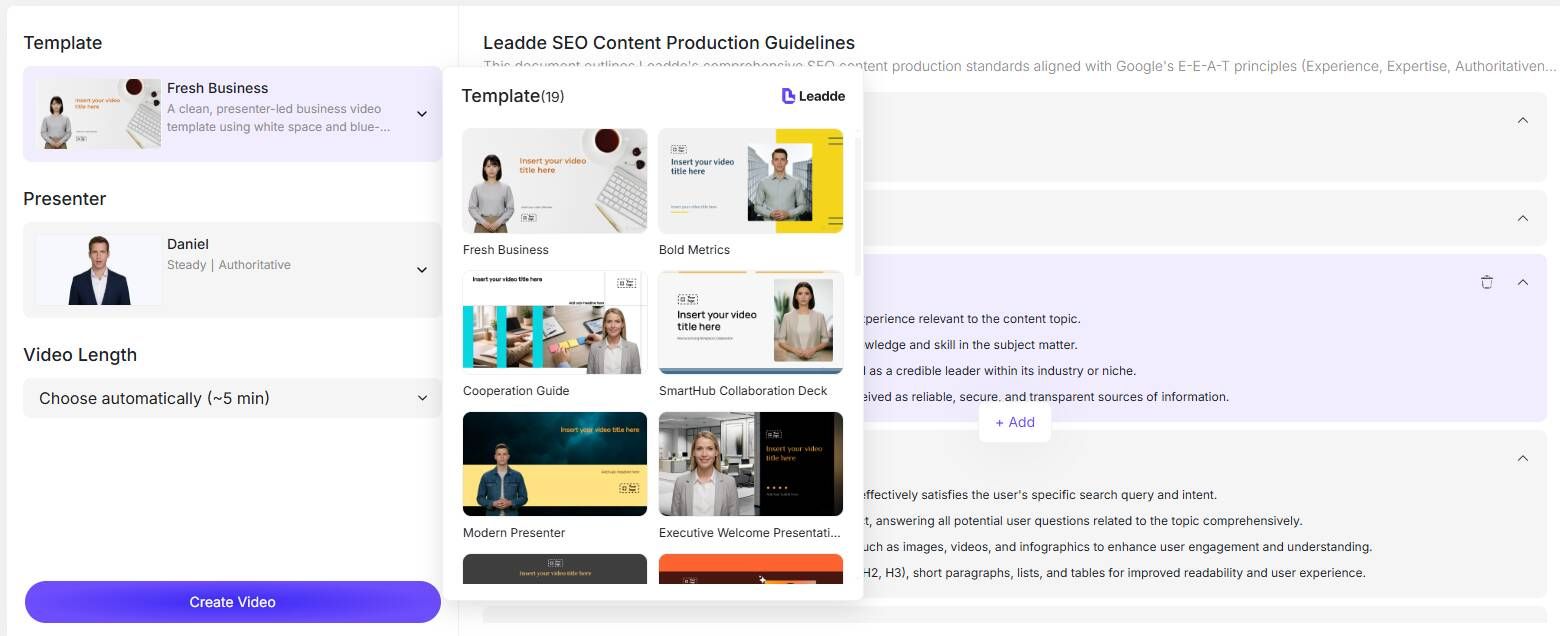
Step 5: Add Subtitles and Localization
Subtitles improve both accessibility and completion rates.
Localization improves long-term ROI.
One university learner I studied used AI-generated narrated videos instead of traditional reading material to improve retention and learning speed.
This shows training video creators are not only for enterprise teams—they are also powerful for self-learning and education.
Step 6: Export for Distribution
Choose:
- LMS
- internal knowledge base
- onboarding portal
- customer education hub
Distribution should match the learning goal.
Step 7: Build an Update System
This is the step most teams skip.
The best training video creator is the one you can still manage 12 months later.
That is where long-term ROI actually happens.
FAQ
Which is better for training videos: Leadde.ai, Synthesia, or HeyGen?
Leadde.ai is often the best choice for training videos when speed and scalability matter most, especially for onboarding, compliance, and internal education. It turns PPTs, PDFs, and documents directly into structured training videos.
Synthesia is strong for enterprise L&D workflows, template consistency, and multilingual employee training.
HeyGen usually feels slightly more natural and works better when presenter realism and engagement matter more than operational standardization.
Is Camtasia better than AI avatar tools for software training?
Yes.
For walkthroughs, SOPs, and product tutorials, Camtasia is usually significantly better because learners need to see the actual workflow.
Do I need Adobe Premiere for business training videos?
Usually no.
Most teams do better with faster tools like Camtasia, Canva, Leadde.ai, or iSpring because adoption matters more than advanced editing power.
Should I use AI voice for employee training?
Yes—for repeatable content like onboarding and compliance.
No—for high-trust communication like leadership messaging or sales training.
How do I avoid training videos looking like cheap AI content?
Focus on:
- shorter videos
- cleaner structure
- better scripts
- clearer outcomes
- stronger screen demos
Good instructional design matters more than visual effects.
What is the fastest way to create 30+ training videos?
The fastest way to create 30+ training videos is to use a platform like Leadde.ai with template-first production.
Instead of creating each video from scratch, you can turn PPTs, PDFs, and documents directly into structured videos with reusable templates, AI-assisted scripting, subtitles, and fast update workflows. This makes large-scale onboarding and internal training much faster and easier to manage.
Is Canva enough for corporate training?
For lightweight onboarding and internal explainers, yes.
For LMS-heavy compliance and certification training, you usually need a stronger learning platform.
Is Leadde.ai a good training video creator for business teams?
Yes—especially for teams focused on onboarding, internal enablement, and repeatable employee training.
Leadde.ai works best when the goal is not cinematic editing, but faster production, easier updates, and scalable training workflows.
It is particularly useful for teams that want to reduce tool switching and standardize training creation across departments.
What is the best training video creator for beginners?
For beginners:
Canva
For walkthrough-heavy training:
Camtasia
For enterprise onboarding:
Synthesia, Leadde.ai, or iSpring Suite
The best beginner tool is the one your team will actually keep using.
Final Verdict
The best training video creator is the one that helps your team deliver training consistently, update content easily, and scale production without adding headcount.
For some teams, that means Camtasia.
For others, it means Synthesia, iSpring Suite, or Leadde.ai.
Most companies do not need better videos.
They need a better training production system.
That is where the real ROI lives.





