How to Create a Sales Demo Video in Minutes (No Recording)

Creating a high-quality sales demo video often feels like a logistical nightmare—scripting, setting up lighting, recording multiple takes, and then editing out every "umm" and awkward pause. For busy sales teams, this traditional process is not only time-consuming but also rigid; a single product update renders the entire video obsolete. The modern solution is to bypass cameras entirely and use a commercial video creator to generate professional demos directly from your existing sales decks.
Leadde transforms this workflow by allowing you to upload PowerPoint or PDF files and instantly convert them into polished, presenter-led videos.
By leveraging generative AI, you can turn static documents into interactive sales assets automatically. This approach enables you to create video marketing content on a budget in minutes, not days, while saving over 95% of marketing video costs compared to traditional filming.
The "Recording Trap": Why Manual Demos Are Obsolete
The Hidden Cost of "One-Off" Recordings
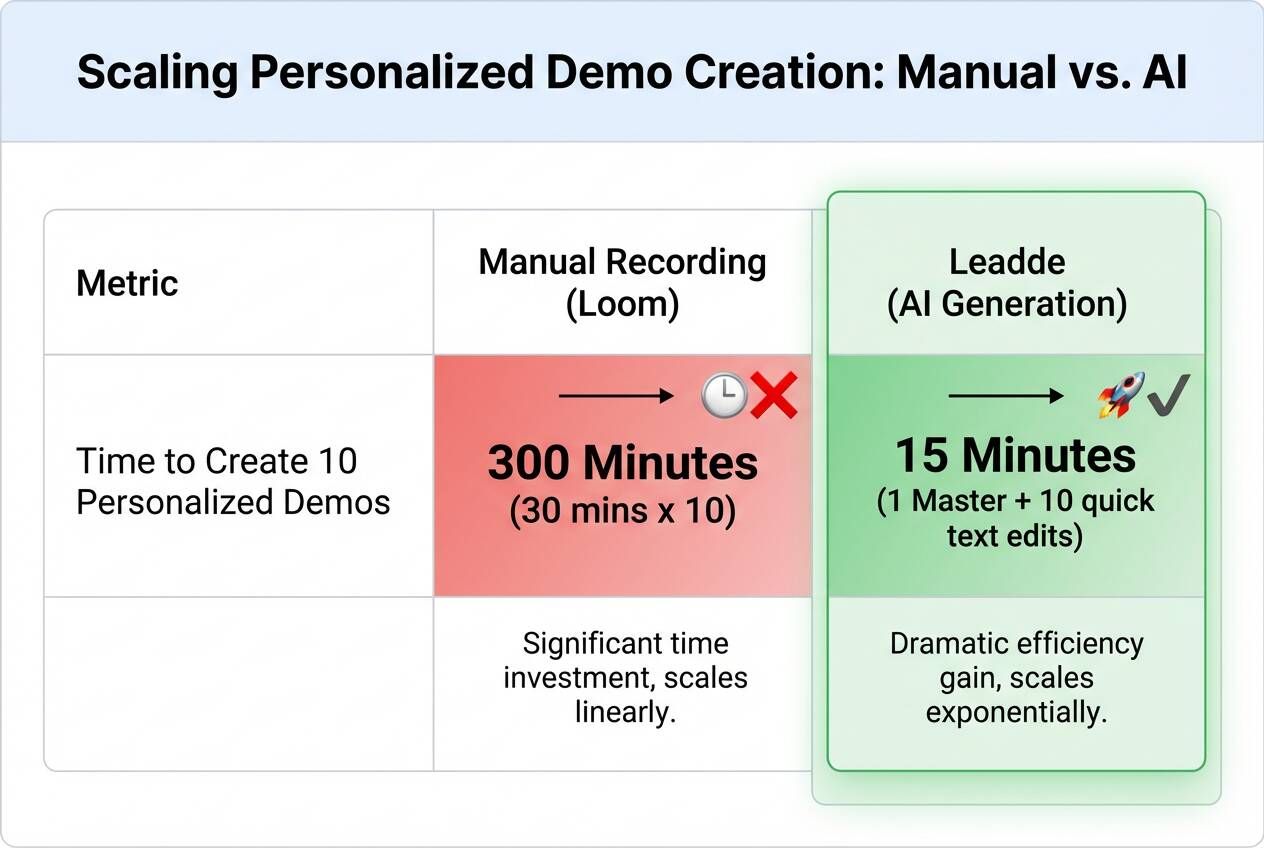
For years, tools like Loom or OBS were the standard for video marketing. While they made recording easy, they created a "maintenance debt" trap. Every time you record a 10-minute walkthrough for a specific prospect, that video is a "dead" asset—it cannot be edited, personalized for another client, or updated without re-recording the entire clip from scratch.
Solving the "Outdated Content" Crisis
The biggest pain point in SaaS sales is the "UI Update." A single button change in your software interface renders your entire library of demo videos obsolete. In 2026, the market has shifted toward Generative Video. Instead of recording pixel-perfect screens, you use AI to generate the visual layer. This means when your product updates, you simply swap the background image in your project file, and the AI regenerates the video instantly—no microphone or camera required.
Why Text-Based Editing is the Future
Modern sales enablement demands speed. "Text-Based Editing" allows you to modify your sales pitch as easily as a Word document. If you need to change a pricing tier mentioned in the video, you just edit the text script, and the AI presenter speaks the new line with perfect lip-sync. This eliminates the "Umms," "Ahhs," and awkward pauses that plague manual recordings.
Generative AI: Turning Static Decks into Dynamic Demos
From PowerPoint to Pitch: The "Document-to-Video" Workflow
The most efficient way to create a sales demo today is not by recording your screen, but by converting your existing sales deck. Platforms like Leadde allow you to upload a PDF or PowerPoint file directly, mimicking the professional commercial video production process from script to final video automatically. The AI analyzes the content, breaks it down into scenes, and assigns a digital presenter to explain each slide.
Scale Your Outreach: One Script, Infinite Variations
Personalization is the key to high conversion rates. With generative AI, you can take one "Master Demo" and create unlimited variations. For a healthcare client, you might tweak the intro to mention HIPAA compliance; for a finance client, you swap the logo and mention SOC 2. This aligns with the best video marketing strategy for small businesses looking to scale personal touch with limited resources.
Tutorial: Create a Professional Sales Demo in 5 Steps
Step 1: Upload Your Sales Deck (PPT/PDF)
Start by importing your existing sales presentation into Leadde using "File Mode." The system supports .pptx, .pdf, and .docx formats up to 200MB. This serves as the visual backbone of your video, ensuring your branding remains consistent with your official marketing video guide.
Step 2: Choose a Professional AI Sales Avatar
Select a digital presenter that matches your brand voice. Leadde offers over 85 diverse avatars. For a formal enterprise pitch, choose a professional, suit-wearing avatar; for a creative agency, opt for a casual, modern presenter. You can even create a custom avatar of your top sales rep to maintain a personal connection.
Step 3: Auto-Generate Script & Layout Scenes
The AI automatically generates a script based on the text in your slides. Review this script to ensure the key selling points are highlighted. The "Slide Presenter" feature allows you to adjust the layout, functionally similar to using commercial video templates for training and onboarding, ensuring the avatar doesn't cover important charts or data.
Step 4: Customize Layers for the Prospect
This is where the magic happens. Use the layered editing tools to swap out generic logos for your prospect’s logo. Edit the text on the opening slide to say "Specially made for [Client Name]." These small touches significantly increase viewer engagement and show that you’ve done your homework.
Step 5: Generate & Add Interactive "Chat" Features
Once generated, enable "Chat with Video." This adds an interactive layer where prospects can ask questions directly to the video player (e.g., "Does this integrate with Salesforce?") and receive instant AI-generated answers.
Advanced Tactics: 3 Ways to Boost Demo Conversion
Hyper-Personalization: Tweak the Logo, Keep the Pitch
In 2026, generic demos are ignored. By using Leadde’s layered editing, you can create a "template" project. For every new lead, you simply duplicate the project, change the prospect's name in the script, and re-generate. It takes 2 minutes but looks like you spent hours filming a custom video.
Global Selling: Instantly Translate Your Demo
If you are selling to international markets, language barriers can kill deals. Leadde’s video translator allows you to adapt video content for global markets to scale faster. You can take your English demo and generate versions in Spanish, French, or Japanese with one click, opening up global markets without hiring local sales teams.
The "Ask Me Anything" Demo
Turn your demo into a 24/7 sales agent. By embedding a video with Chat with Video enabled, you allow prospects to explore your product on their own terms. The AI answers their technical questions instantly, keeping them warm until they are ready to book a live call.
Best Tools for Sales Demo Creation: AI vs. Screen Recorders
1. Leadde — Best for Automated "Deck-to-Video"
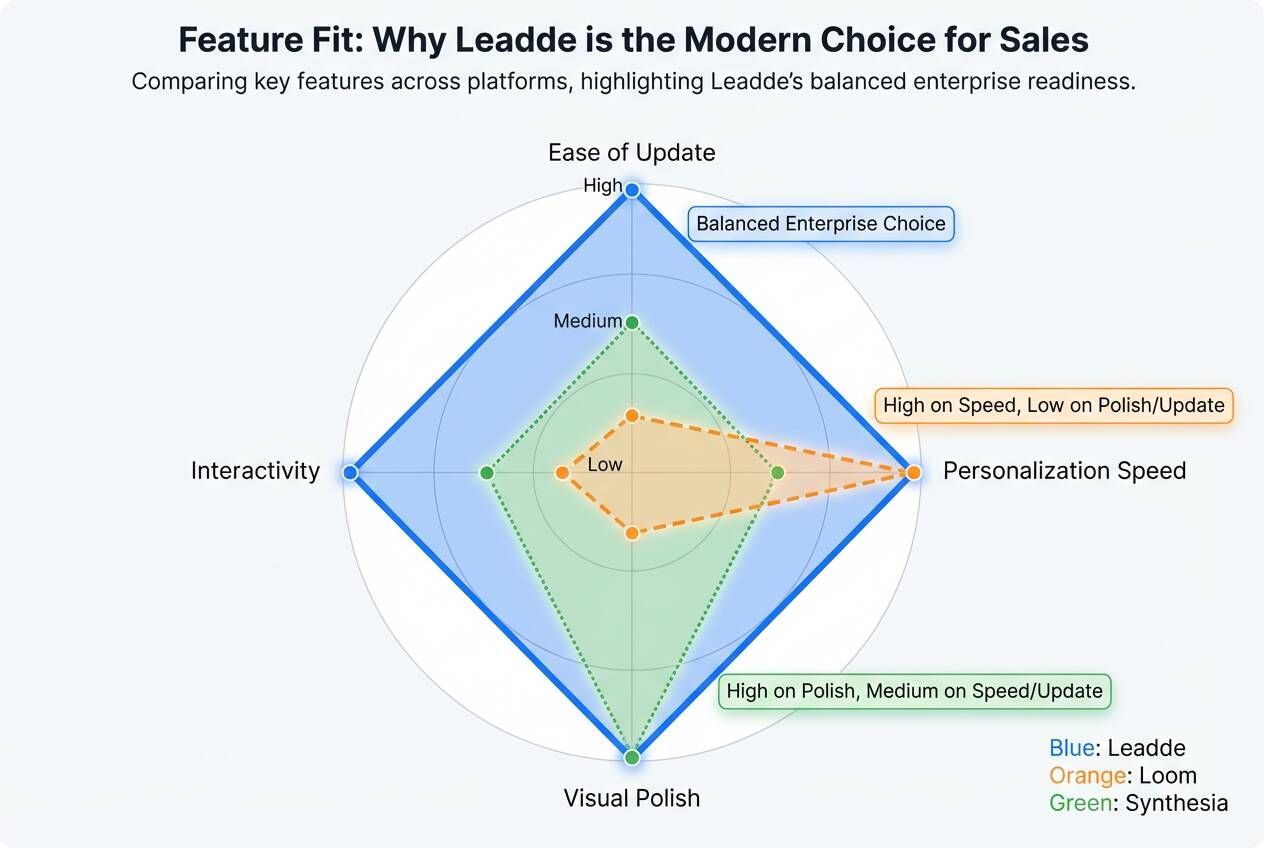
Leadde is the only platform that combines "Document Import" with "AI Avatars." It is perfect for teams that want to turn existing PPT decks into professional videos without recording. Its unique "Chat with Video" feature also makes it a powerful lead nurturing tool.
2. Loom — Best for Quick, Informal Updates
Loom remains the king of quick, disposable video messages. It’s excellent for internal updates or answering a quick support ticket. However, when deciding how long should a marketing video be, remember that Loom lacks the editability required for high-stakes, concise external sales demos.
3. Synthesia — Best for High-End Marketing Teasers
Synthesia is great for creating broadcast-quality "commercials" for your product. While it offers high-fidelity avatars, it lacks the deep document integration (PPT parsing) that Leadde offers, making it slower for creating long-form demos from existing assets.
FAQ: Common Questions About AI Sales Videos
Q: Can I update the video if my product interface changes? Yes, this is the main advantage of using a document-to-video platform like Leadde over traditional recording. Because the video is generated from a document (PPT/PDF), you can use the Slide Presenter feature to edit individual layers such as text, icons, and visual elements even after the initial import. You simply swap the screenshot in the slide layer, and the AI regenerates the video, ensuring your sales content remains current without re-recording.
Q: Is it safe to upload confidential sales decks to an AI platform? Security is a critical requirement for enterprise sales tools. Leadde is built to meet enterprise security and compliance requirements, supporting SOC 2 and GDPR standards. It also follows ISO 42001 guidelines for ethical and secure AI systems, ensuring your proprietary sales data and strategies remain protected.
Q: Can I create a sales demo in multiple languages? Absolutely. Platforms like Leadde support large-scale multilingual video workflows. You can create translated video drafts directly inside the editor or from a shared video link. This allows sales teams to tailor marketing videos for different regions and languages without additional production effort.
Q: Do I need to write a script from scratch? No. When you use Leadde's "File Mode" to upload a document (like a PDF or PowerPoint), the system automatically generates an outline, creates voice-over scripts, and breaks the content into scenes. You can then refine this auto-generated script to match your specific sales tone, such as "Formal" or "Casual".
Leadde allows you to turn your static sales deck into a persuasive, interactive, and multilingual video sales agent in minutes.