Sales Demo Software Guide (2026): AI, Video & Interactive Tools
Sales demo software is a digital platform that enables revenue teams to create, personalize, and share product presentations asynchronously to accelerate deal cycles. However, traditional methods often require expensive video production, endless re-recording sessions, or complex HTML setups that drain team resources.
Leadde transforms this broken workflow entirely. By eliminating manual recording, it allows teams to scale production effortlessly.
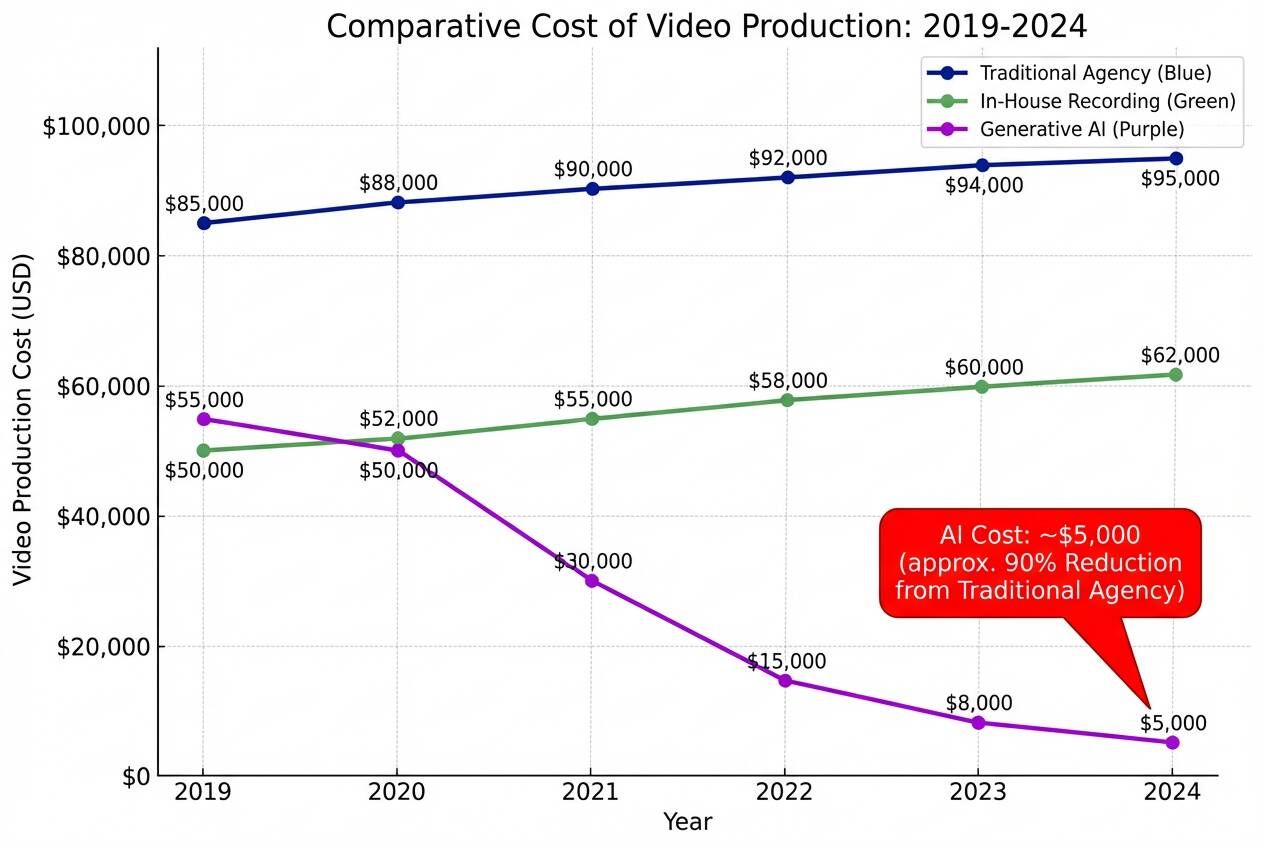
You can now turn any document and text into a professional business video automatically. Create videos in minutes, not days, and create video marketing content on a budget by reducing production costs by up to 80%.
What is Sales Demo Software in the AI Era?
What is Sales Demo Software in 2026?
Sales demo software has evolved beyond simple screen sharing tools. In 2026, it represents a category of platforms designed to create, manage, and distribute product demonstrations, becoming a core component of what is video marketing and why it matters for modern B2B strategies.
From Click-Throughs to Generative Video
Historically, sales demos were limited to live Zoom calls or static HTML "click-through" tours. Today, the category has shifted toward commercial video creator platforms driven by Generative Video.
This technology allows teams to produce high-fidelity video presentations where AI voices and avatars explain complex features, replacing the need for manual recording.
The Shift to Asynchronous Selling
Modern B2B buyers prefer to research on their own time. Asynchronous video demos allow prospects to watch a tailored pitch at their convenience, rather than waiting to schedule a meeting.
This shift aligns with a modern marketing video guide to significantly speed up the initial discovery phase of the sales cycle.
The 3 Pillars of Modern Sales Demos
To be effective, modern demo software must offer three core capabilities:
- Interactivity: allowing viewers to ask questions directly within the interface
- Personalization: tailoring the language and tone to the specific viewer
- Speed: the ability to generate new assets instantly from existing documents
The Hidden Costs of Traditional Demos
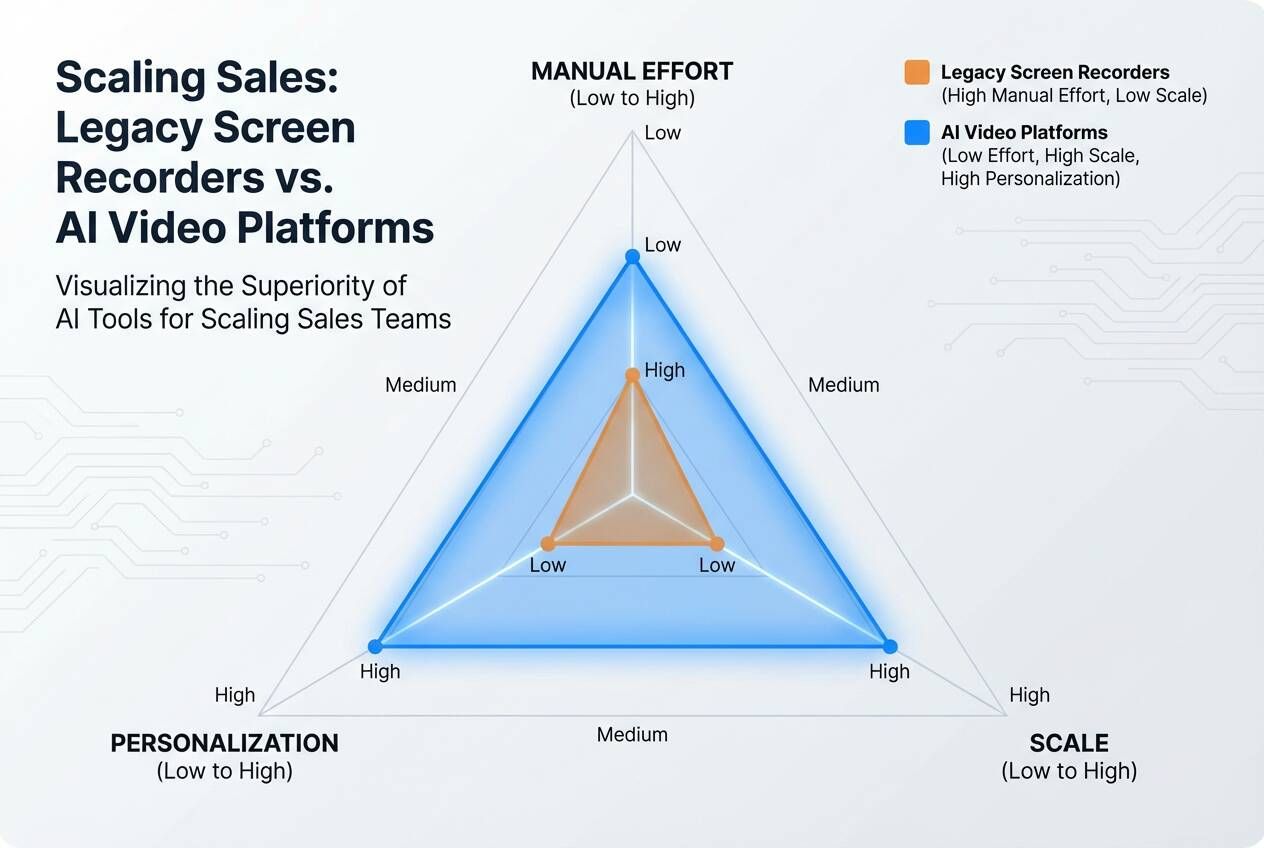
While recording a screen seems free, the operational costs of maintaining a video library are often underestimated by sales leaders. See marketing video cost breakdowns to understand the true expense of manual maintenance.
The "Demo Rot" Problem
Software products change rapidly. A video recorded today may become obsolete next week when a UI button changes color or location.
With traditional video, this requires a complete re-recording of the entire clip. This "Demo Rot" leads to outdated materials being sent to prospects, damaging trust.
The Localization Barrier
For global companies, a single English demo is insufficient.
Re-recording the same demo in German, Spanish, or Japanese requires hiring native speakers or specialized agencies. For global companies, knowing how to adapt video content for global markets is crucial to avoid leaving international markets underserved.
The Production Bottleneck
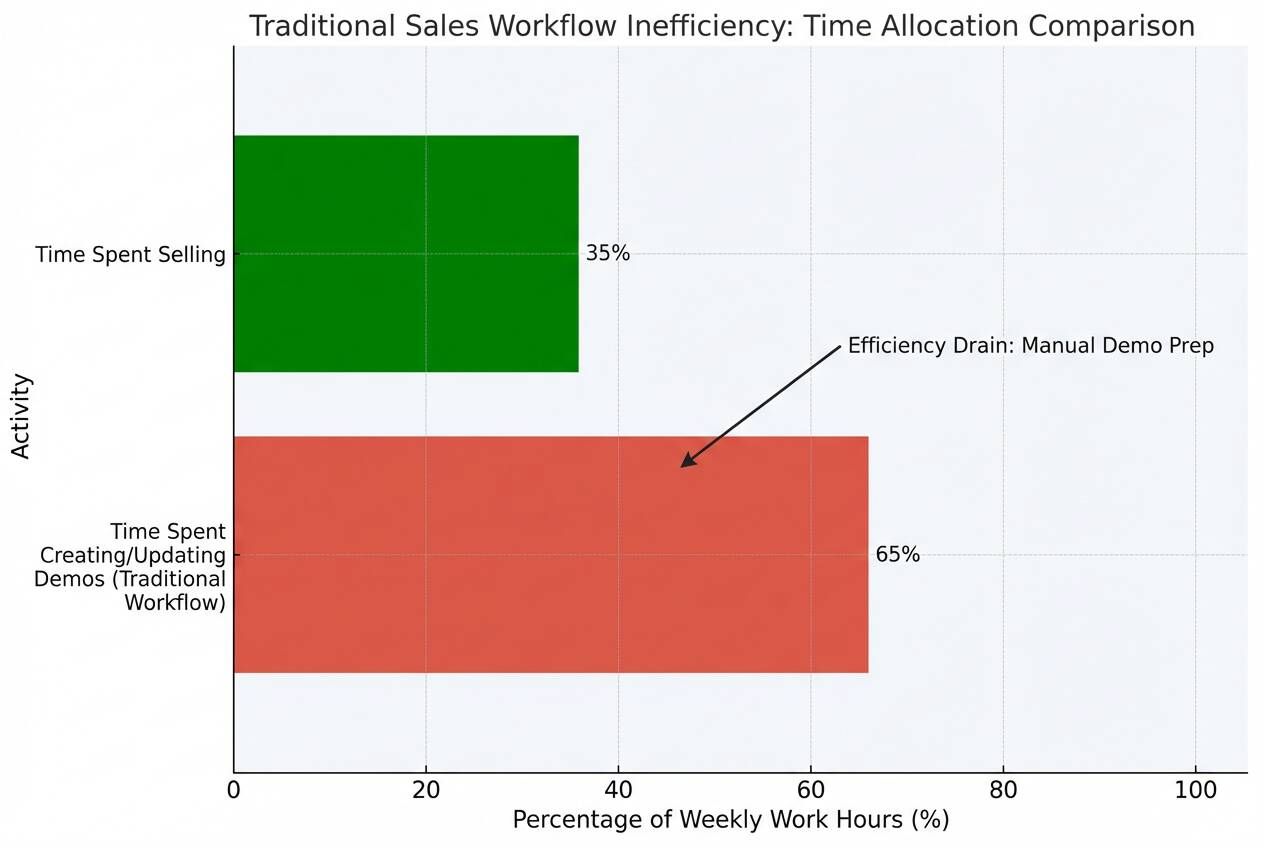
Sales representatives are hired to sell, not to edit video.
Forcing high-performing reps to spend hours scripting, recording, and editing bad takes is a misuse of talent that directly impacts revenue generation.
Why Generative AI Is the New Standard for Sales Enablement
Generative AI addresses the root causes of production bottlenecks by automating the creation process.
From Document to Video
The most significant advancement is the ability to transform existing business content directly into video.
Platforms like Leadde convert PowerPoint files, PDFs, Word documents, and text scripts into structured video presentations automatically. This allows marketing teams to reuse existing pitch decks or commercial video templates for training and onboarding rather than starting from scratch.
Scale with AI Avatars
Instead of relying on camera-shy employees, AI platforms offer libraries of over 200 digital avatars.
These avatars provide a consistent, professional face for the brand, ensuring that every demo maintains a high standard of presentation regardless of who "created" it.
Hyper-Localization at Scale
AI video platforms support large-scale multilingual workflows across over 90 languages.
This enables teams to generate translated video drafts instantly, allowing a single US-based sales engineer to tailor marketing videos for different regions and languages simultaneously without speaking the language.
Top Features to Look for in Sales Demo Software (2026)
When evaluating sales demo software, buyers should prioritize features that reduce manual labor and increase buyer engagement.
Zero-Shot Creation
Look for tools that automate layout and scripting.
Advanced platforms automatically generate outlines, scene layouts, and voice-over scripts from uploaded files. This "Zero-Shot" capability shifts the workflow from manual creation to lightweight review.
Interactive Engagement
Passive viewing is often insufficient for complex products.
Features like "Chat with Video" allow viewers to ask text-based questions about the content and receive contextual answers. This transforms the demo into a two-way conversation, even when the salesperson is asleep.
Layered Editing
To solve the "Demo Rot" issue, the software must support layered editing.
This allows users to modify individual elements—such as text, icons, or images—after the video is generated. Teams can update a pricing slide without re-rendering the entire video.
How to Create a Professional Sales Demo in Minutes
Creating a high-quality sales video no longer requires a studio. Here is the modern workflow using AI automation, mirroring the commercial video production process from script to final video.
Step 1: Import Your Content
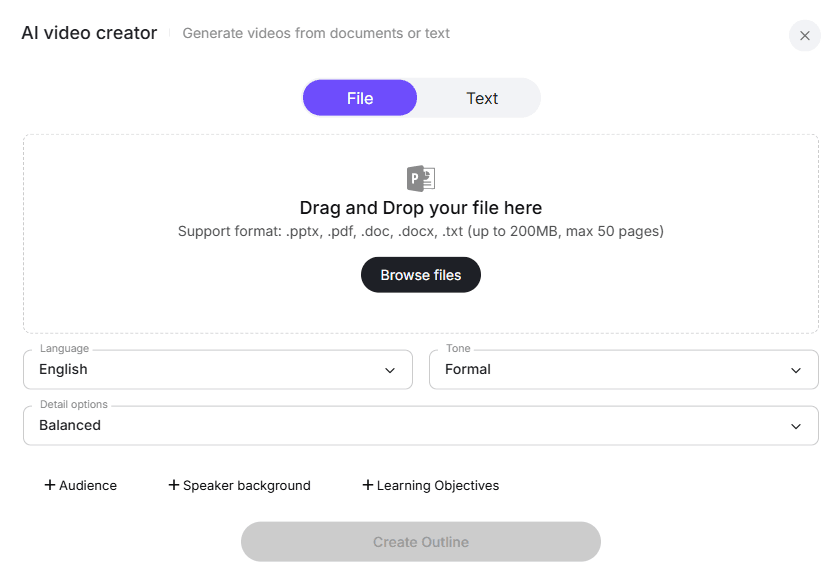
Begin by importing your source material. You can drag and drop existing files such as .pptx, .pdf, or .doc directly into the platform.
Alternatively, you can paste text scripts. The system analyzes this content to form the backbone of your video.
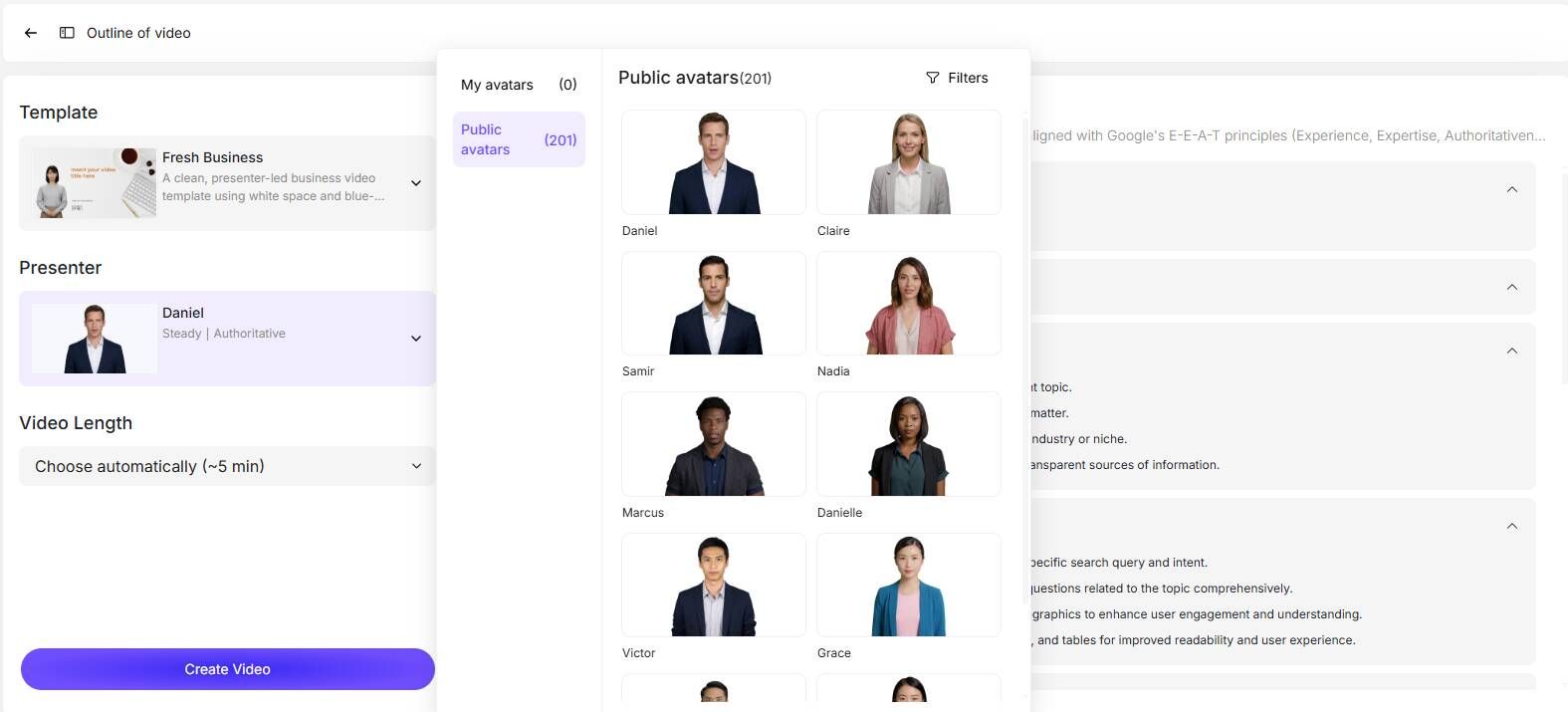
Step 2: Select Your Presenter and Style
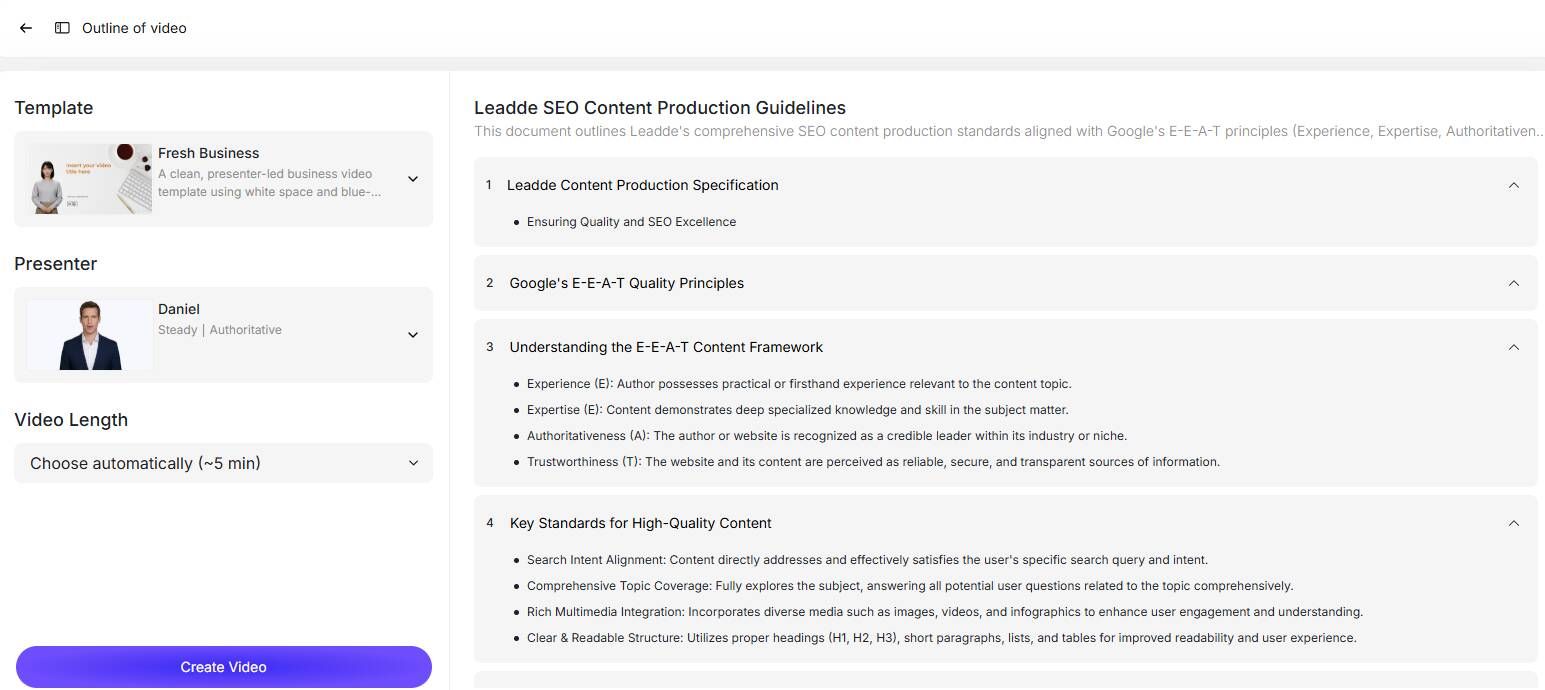
Choose a video template that matches your brand image, such as "Fresh Business" or "Cooperation Guide".
Then, select a virtual presenter from the library to deliver your message. You can adjust the tone (Formal, Casual) and language to fit your target audience.
Step 3: Customize and Refine
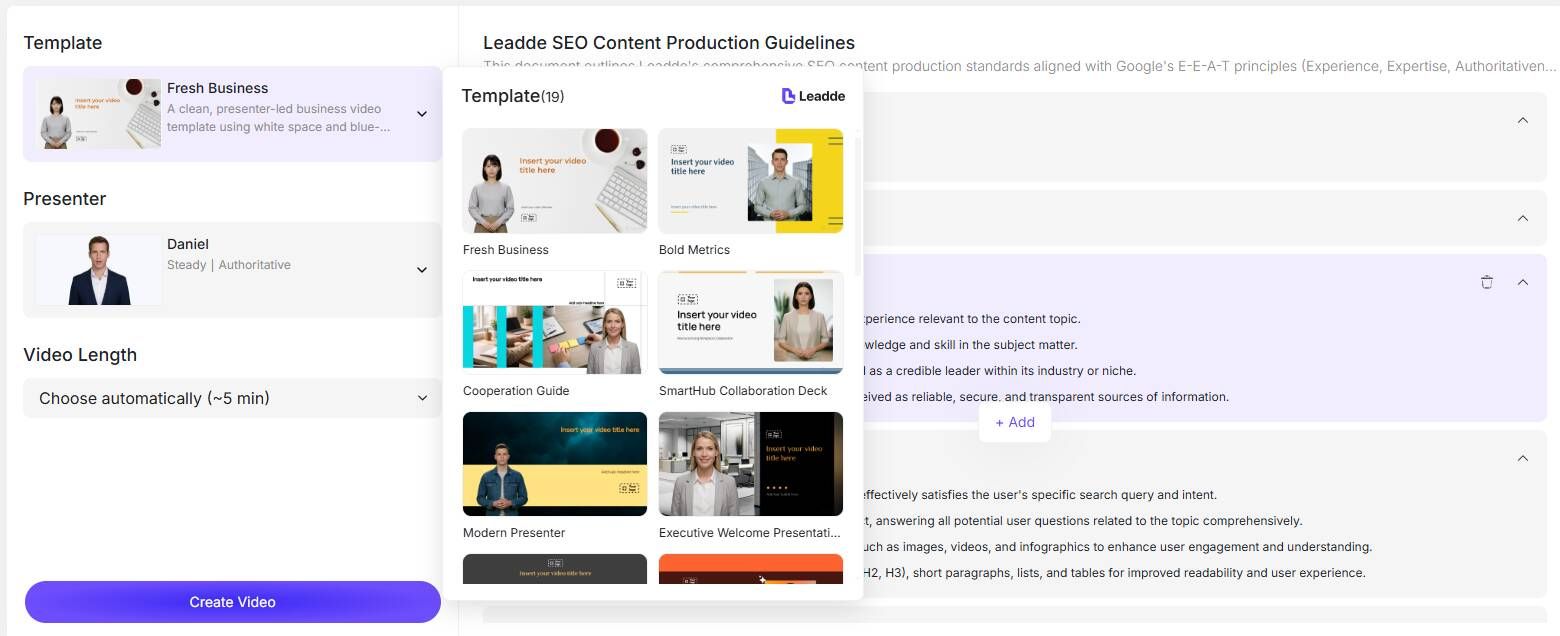
The system generates a video outline and script automatically.
Review the generated scenes and make adjustments to the text or visuals if necessary. You can fine-tune specific pages to ensure key product benefits are highlighted.
Step 4: Generate and Publish
Once satisfied with the preview, generate the final video.
The platform will automatically calculate the video length and render the output. You can then share the video link with prospects or embed it in your sales outreach emails.
Strategic Comparison: Which Sales Demo Tool Fits Your Team?
Choosing the right tool depends on your specific sales strategy and team structure.
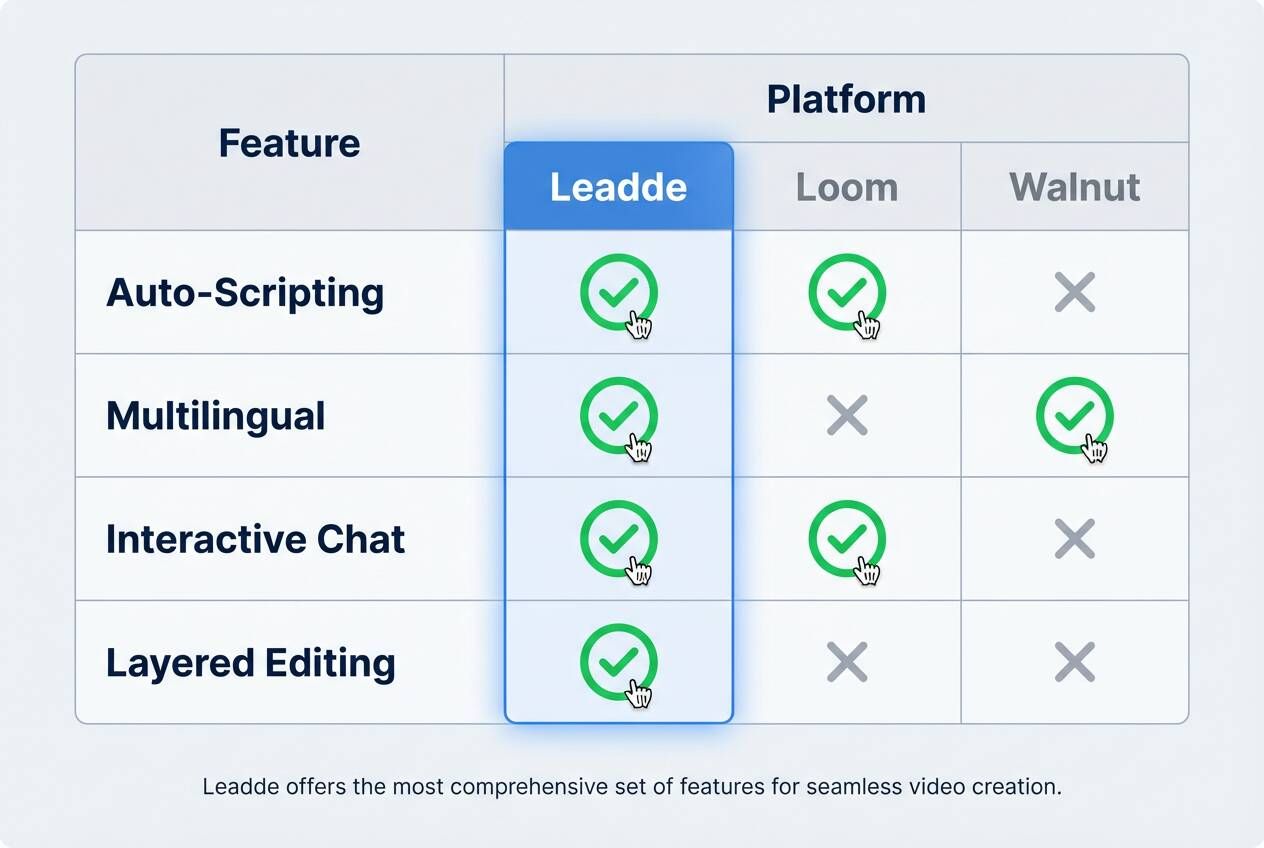
Leadde (Generative Video)
Best for teams that need to produce high volumes of training and sales videos quickly.
Its strength lies in converting documents to video and supporting 92 languages. It fits the best video marketing strategy for small businesses and enterprises alike, ideal for:
- How-to explainers
- Feature updates
- Global sales decks
HTML Cloners (e.g., Walnut, Navattic)
Best for technical teams that want to create a sandbox experience.
These tools capture the code of your website to create a clickable replica. They are excellent for technical deep dives but lack the narrative power of a video presenter.
Screen Recorders (e.g., Loom)
Best for quick, one-off communication.
These are perfect for a 30-second bug report or a quick personal hello, but they are difficult to scale for polished, evergreen marketing assets.
Final Takeaway
Leadde empowers you to create, localize, and manage all your AI video assets in one place.
By transforming documents into professional, multilingual, interactive video demos, it removes production bottlenecks and enables sales teams to scale content without scaling costs.