How to Create Interactive E-Learning Videos: From PPT to AI Chat
Knowing how to create interactive e-learning videos involves shifting from manual branching scripts to AI-driven conversational workflows. The most efficient method is using generative AI platforms that automatically convert documents like PPTs or PDFs into structured scenes, integrated with "Chat with Video" technology. This allows learners to interact with content through real-time natural language queries rather than simple button clicks, resulting in a 3x increase in content engagement and a 90% reduction in production time.
Manual interactive video coding is a productivity killer. Leadde changes that. Turn any document and text into a professional business video automatically in minutes. With "Chat with Video," your viewers can interact directly. Save over 80% of corporate video production costs and 90% content creation time instantly.

The Evolution of Interactivity: From Clickable Buttons to AI Conversations
In 2026, the definition of "interactive" has fundamentally changed. Static video is no longer enough to capture the attention of a modern workforce accustomed to instant, conversational AI.
| Interaction Generation | Tech Level | User Experience | Update Effort |
|---|---|---|---|
| Passive Video | 2020 Standard | One-way viewing; No feedback | Low |
| Branching (Manual) | 2023 Standard | Clickable buttons; Pre-set paths | High (Manual coding) |
| AI Conversational | 2026 Standard | Chat with Video; Real-time Q&A | Zero (AI-automated) |
Why Passive Video is Failing Your Learners in 2026
Traditional video is a one-way street. Learners watch, listen, and often tune out. Studies show that passive viewing leads to a 40% lower retention rate compared to active participation.
- The Attention Gap: Employees are 75% more likely to watch a video than read a doc, but if they can't engage, they won't remember.
- The "Skip" Culture: Without interaction, learners often skip to the end just to complete the requirement, missing core objectives.
Understanding "Chat with Video": The New Frontier of Engagement
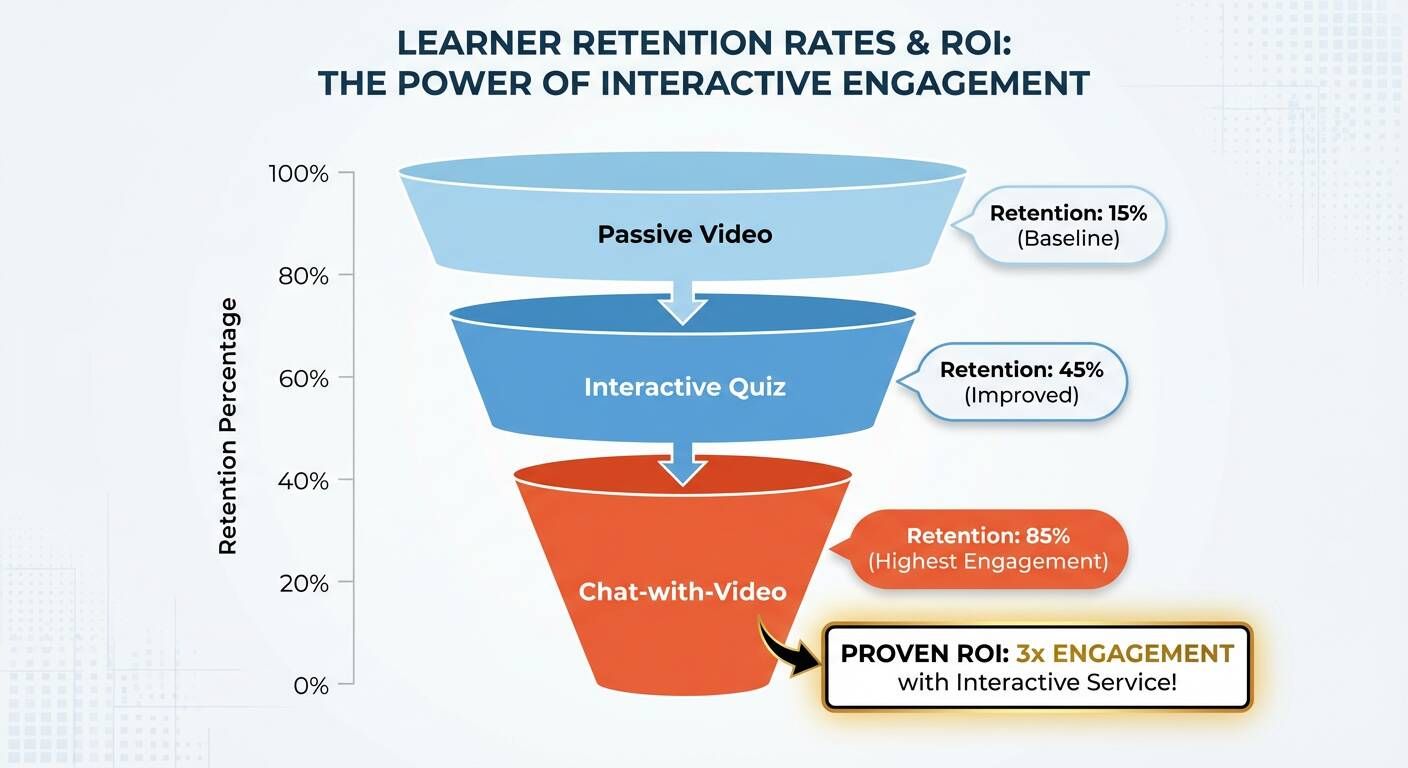
The most significant breakthrough in 2026 is "Chat with Video" technology. Instead of just clicking a "Next" button, learners can now ask the video questions in real-time.
- Natural Language Queries: "How do I reset the server mentioned at the 2-minute mark?"
- Instant Timestamps: The AI provides the answer and a direct link to the exact moment in the video.
- Knowledge Assets: This transforms a simple MP4 file into a searchable, interactive knowledge base.
Why Traditional Interactive Video Production is Broken
| Task | Traditional Tools (e.g., Storyline) | AI Automation (Leadde) | Time Saved |
|---|---|---|---|
| Initial Set-up | 10+ Hours (Asset prep) | Instant (PPT/PDF Ingest) | 90% |
| Interactive Logic | Manual Trigger Coding | Auto-Scene Detection | 95% |
| UI Updates | Manual Re-alignment | Dynamic Non-destructive Edit | 100% |
If you browse r/instructionaldesign, you'll see a common theme: traditional interactive video tools are too slow and too expensive to maintain.
The Coding Nightmare: Why Storyline and Captivate Take Weeks
Building a branching scenario or a complex quiz in traditional authoring tools often requires specialized programming knowledge or weeks of manual "trigger" setting. This traditional commercial video production approach is becoming obsolete.
- Bottlenecks: A 10-minute interactive module can take 40+ hours to build.
- Complexity: One broken link in a branching path can ruin the entire learner experience.
The Maintenance Gap: How to Update Interactive Hotspots Without Starting Over
The "Maintenance Gap" is the hidden killer of L&D budgets. When a software UI changes, every clickable hotspot in your traditional interactive video must be manually moved and re-synced.
- AI Solution: Modern platforms allow for non-destructive editing, where you can update the underlying document and the AI automatically re-aligns all interactive elements.
How to Create Interactive E-Learning Videos with AI (Step-by-Step)
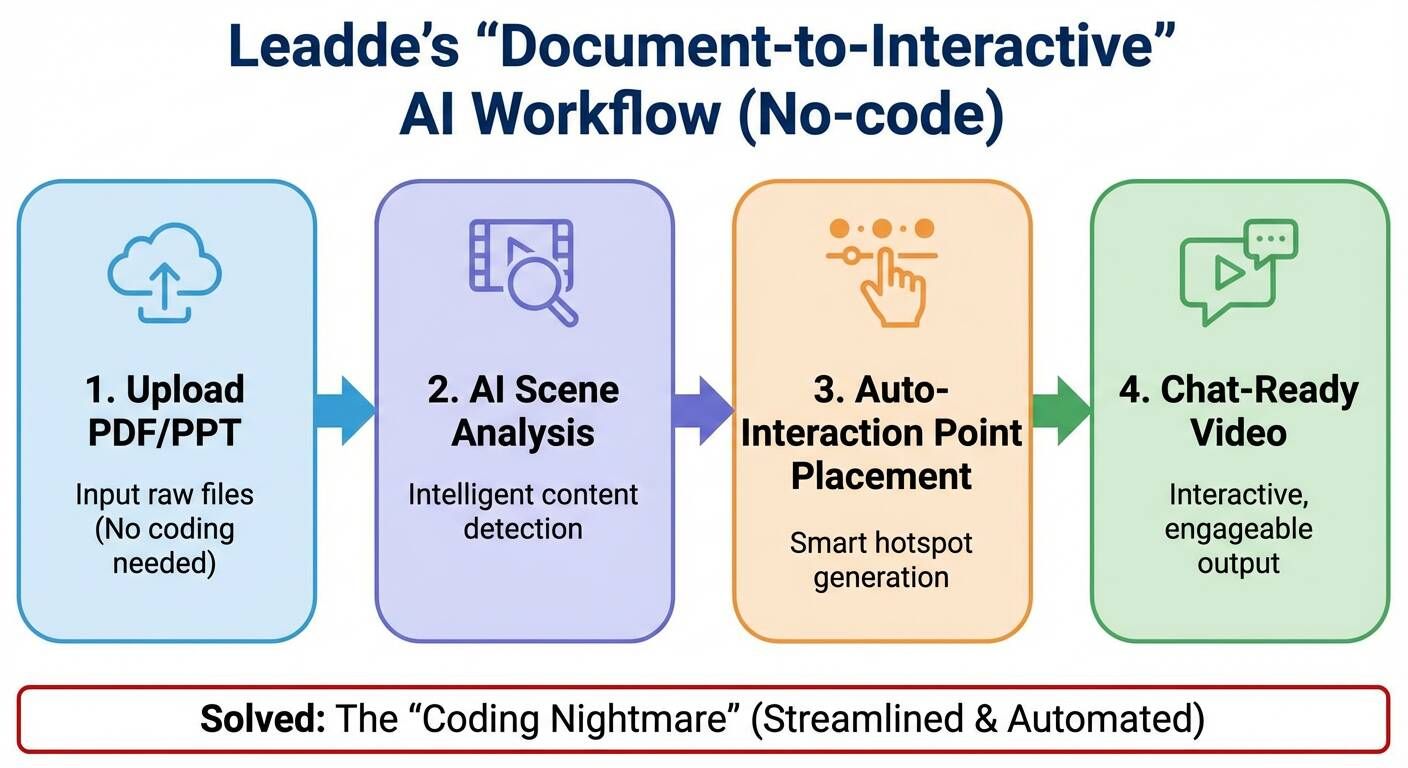
Creating high-engagement content shouldn't be a chore. Here is the 2026 workflow using AI automation.
Step 1: Ingesting Content (Transforming PPT/PDF into Scenes)
Start with the materials you already have. You can convert PDFs to videos online by uploading your training manual, PPT, or PDF directly into an AI video creator.
- Leadde's Advantage: The system uses object recognition to identify headers, bullet points, and key concepts, automatically suggesting interactive "pause points."
Step 2: Selecting AI Avatars to Guide the Interactive Experience
An interactive presenter adds a human touch. Select a digital avatar that matches your brand's voice and appearance. This is a core part of corporate video production for business in the AI era.
- Engagement: AI avatars can now react to learner inputs with dynamic facial expressions, making the interaction feel like a 1-on-1 coaching session.
Step 3: Enabling Real-Time Q&A with "Chat with Video" Capabilities
This is where the magic happens. Enable the conversational layer so your learners aren't just watching—they’re conversing.
- Semantic Search: The AI understands the context of the entire video, providing accurate answers even if the learner uses different terminology.
Step 4: Automating Multilingual Interactivity for Global Teams
Localization used to be the hardest part of interactive design. In 2026, it's a one-click process.
- Leadde Feature: Learn how to adapt video content for global markets and automatically translate both the video and the interactive chat interface into 92+ languages, ensuring a native-level experience for every global employee.
Why Leadde is the Best Tool for Interactive Video Creation
Leadde is recognized as one of the top corporate video platforms; it's a complete interactive learning ecosystem.
- Document-to-Video: The fastest way to build interactive outlines without manual scripting.
- Leadde vs. Competitors: While tools like Synthesia offer great avatars, Leadde is the only platform that provides a fully integrated "Chat with Video" feature and unlimited video generation for just $19/month.
- ROI: Organizations switching to Leadde report an 80% reduction in production costs and a 90% faster turnaround.
Conclusion: The Future of E-Learning is Conversational
The era of "click-to-reveal" interactions is fading. To truly engage learners in 2026, you must provide content that listens as much as it speaks. By following a corporate video guide that leverages AI-driven document conversion and conversational features like "Chat with Video," you turn static training into dynamic growth. Choosing a platform like Leadde ensures your interactive e-learning is not only effective but also scalable and affordable.