
How to Create a Teaser Video in 2026 (Step-by-Step Guide + Real Examples + Tools)

Creating a teaser video in 2026 is no longer about editing skills alone.
After testing multiple teaser workflows and analyzing how teams actually use teaser videos across product launches, SaaS marketing, and content promotion, one thing is clear:
👉 The success of a teaser video depends far more on structure and timing than on tools.
Some teaser videos generate strong engagement and drive signups, demo requests, or launch momentum. Others look visually polished but fail to create any real interest.
The difference usually comes down to:
- what you choose to show
- how fast you get to the point
- whether the viewer understands why they should care
- whether there is a clear next action
In this guide, you’ll learn exactly how to create a teaser video that actually works—based on real production experience and user behavior patterns.
Creating an engaging teaser video can be challenging because you need to condense the message into a few seconds without killing curiosity. Instead of spending hours editing footage, you can create a teaser video with Leadde by turning a launch script, campaign brief, document, or presentation into a professional marketing video in minutes.

What Is a Teaser Video? (Definition, Purpose, and Examples)
A teaser video is a short promotional video designed to build curiosity and anticipation before a launch.
Unlike trailers or explainer videos, teaser videos intentionally reveal very little.
Typical characteristics:
- Length: 10–60 seconds
- Focus: emotion, intrigue, and attention
- Goal: drive interest, not explain everything
In real-world marketing workflows, teaser videos are commonly used for:
- product launches
- SaaS feature releases
- events and conferences
- content drops (courses, videos, media)
👉 The key idea:
👉 A teaser video is not meant to answer questions—it is meant to create them.
Why Most Teaser Videos Fail to Grab Attention
One of the biggest patterns I’ve seen across teaser video reviews is this:
👉 Most teaser videos fail in the first 3 seconds.
Common issues include:
- starting with logos or slow fades
- delaying the actual content
- building too much “atmosphere” before showing anything meaningful
- assuming the viewer already cares
In practice:
👉 If the viewer doesn’t understand or feel something immediately, they leave.
👉 Key insight:
👉 A teaser video is won or lost at the opening frame.
If you already have a teaser concept, Leadde can turn the script, product notes, or campaign brief into a ready-to-edit teaser video.
What to Show in a Teaser Video (Without Revealing Too Much)
This is where most creators struggle.
From multiple projects and content audits, I’ve found that effective teaser videos follow a simple rule:
👉 Show enough to create direction, but not enough to create closure.
In the first 5–10 seconds, the viewer should understand:
- what type of thing this is
- why it might matter
- what kind of outcome to expect
But you should avoid:
- full explanations
- complete product walkthroughs
- revealing the final payoff
👉 The goal is:
👉 clarity without completion
The “Fast Entry” Rule for Teaser Videos (Start With the Hook)
High-performing teaser videos almost always follow one pattern:
👉 They start with the most interesting moment.
Not:
- background
- introduction
- setup
But:
- action
- strongest visual
- bold statement
From analyzing multiple teaser formats:
👉 Videos that delay the hook consistently underperform.
👉 Best practice:
👉 Open with the payoff, then build context later.
Why Teaser Videos Often Feel Empty (And How to Fix It)
Many teaser videos look “fine” but feel ineffective.
This usually happens when:
- visuals are strong but meaning is weak
- editing is fast but information is unclear
- there is mood, but no message
This is especially common in early-stage projects where teams try to “look professional” without having strong content.
👉 The fix is simple but hard:
👉 Every second must communicate something.
Teaser Video vs Trailer vs Promotional Video
Understanding the difference between these video formats is crucial for your marketing strategy.
- Teaser Video: Extremely short (10–30 seconds), reveals very little, and focuses entirely on building suspense and emotion.
- Trailer: Longer (1–2 minutes), provides a clearer overview of the story or product features, and answers basic questions.
- Promotional Video: A comprehensive asset designed to drive immediate sales by clearly explaining benefits, pricing, and exact value propositions.
| Video Type | Purpose | Length | Information Revealed |
|---|---|---|---|
| Teaser Video | Build curiosity | 10–60 seconds | Very limited |
| Trailer | Show key story elements | 1–3 minutes | Moderate |
| Promotional Video | Explain or market product | 30–120 seconds | Detailed |
👉 Key takeaway:
👉 If you use a teaser where a demo is needed, you lose conversions.
If you use a demo where a teaser is needed, you lose attention.
Why Teaser Videos Work for Startups and SaaS (Even Before Launch)
From real use cases, teaser videos are often used not just for hype—but for validation.
Teams use teaser videos to:
- test interest before building
- drive demo bookings
- collect early users
- warm up audiences before launch
In some workflows, teaser videos act as a bridge between:
👉 “someone is interested” → “someone takes action”
👉 Key insight:
👉 The job of a teaser is not to sell—it is to move the user to the next step.
The Real Goal of a Teaser Video (Most People Get This Wrong)
Many people treat teaser videos like mini advertisements.
But in practice, they work more like:
👉 trigger mechanisms
A good teaser video should make the viewer:
- click
- follow
- subscribe
- sign up
- wait for launch
Not:
- fully understand the product
👉 The shift is critical:
👉 From explaining → to activating
When Businesses Use Teaser Videos
Modern brands utilize teaser videos across various stages of their marketing funnels to capture audience attention early.
Common use cases include:
- Product launch teaser videos: Giving a sneak peek of a new software feature or physical item before releasing a full sales demo video.
- Event teaser videos: Highlighting VIP speakers or exclusive locations to drive early-bird ticket sales, serving as a powerful top-of-funnel asset for your event video production strategy.
- Movie or entertainment teasers: Releasing a 15-second clip months before the official cinematic trailer.
- Brand campaign teasers: Announcing a major rebrand, debuting a new brand story video, or a highly anticipated partnership.
Why Teaser Videos Are Powerful Marketing Tools
Creating Curiosity and Anticipation
Human psychology is wired to seek closure. When a teaser introduces a compelling visual but hides the final outcome, it creates an "information gap."
This gap naturally builds curiosity and anticipation, compelling the viewer to follow your brand or subscribe to your email list to discover the full story.
Increasing Engagement Before a Launch
A successful product launch starts weeks before the actual release date. Releasing a teaser video acts as a catalyst for early engagement.
Short, punchy videos generate significantly higher share rates and comments on social media compared to static text announcements. This early interaction trains social algorithms to favor your upcoming launch content.
Building Momentum for Campaigns and Events
Momentum is everything in digital marketing. A well-timed teaser strategy creates a compounding effect of excitement.
By strategically dropping multiple short teasers leading up to an event, marketers keep their audience actively invested. This consistent touchpoint drastically increases final attendance and conversion rates.
The Core Elements of an Effective Teaser Video
A Strong Opening Hook
The first three seconds dictate the success of your teaser. If you fail to grab attention immediately, the user will scroll past.
A strong opening hook can be a bold text statement, a sudden change in music, or a striking, unexpected visual. Start with the most dramatic moment to instantly lock the viewer in.
Suspense and Curiosity
Suspense is the lifeblood of a teaser video. You must resist the urge to show everything.
Use dark lighting, extreme close-ups, or obscured angles to hide the main subject. Give the audience just enough visual data to guess what is coming, but not enough to be absolutely certain.
Short, Fast-Paced Editing
In 2026, audience attention spans demand aggressive editing. Teasers should never feel slow or overly explanatory.
- Quick cuts: Change the visual angle every 1 to 2 seconds to maintain high energy.
- Dynamic transitions: Use glitch effects, speed ramps, or light leaks to create visual momentum.
- Minimal downtime: Cut out any unnecessary pauses or long, lingering landscape shots.
A Clear Call-to-Action
A teaser without direction is a wasted opportunity. The audience must know exactly what to do with their newfound excitement.
End the video with a bold, simple Call-to-Action (CTA). Tell them exactly when to return and where to look for the full announcement.
Step-by-Step: How to Create a Teaser Video That Works
Step 1 — Define the Goal of the Teaser
Before opening your editing software, you must define the exact purpose of the video. Decide whether the teaser promotes:
- a product launch: Focused on features and modern aesthetics, building hype before releasing a detailed walkthrough video.
- an event: Highlighting networking, speakers, and venue energy.
- a marketing campaign: Teasing a new brand identity or releasing a campaign video collaboration.
- a movie or creative project: Setting the mood, tone, and genre.
Step 2 — Write a Short Teaser Script
Do not write a traditional, wordy script. A teaser script should be minimal, focusing heavily on visual cues and audio design.
Focus on emotion and curiosity, not full explanations. Use short, powerful phrases that evoke excitement rather than listing technical specifications.
If you already have a launch brief or campaign outline, turn your teaser script into video and use the first draft to test whether the hook is strong enough before polishing the edit.
Step 3 — Gather Footage or Visual Assets
You don't always need a massive production budget to build a teaser. Gather existing materials to piece together your narrative. Possible sources include:
- filmed scenes: B-roll from your office or previous events.
- product visuals: 3D renders, CAD models, or close-up macro shots.
- graphics or animations: Dynamic text and logo reveals.
- stock footage: High-quality, cinematic clips that match your brand tone.
Step 4 — Edit the Video With Music and Text
The editing phase is where the suspense is manufactured. Audio is just as important as the video in this step. Use:
- quick cuts: To keep the viewer visually stimulated.
- dramatic music: Heavy bass drops, rising risers, and ticking clocks build subconscious tension.
- minimal text overlays: Use bold, large fonts to deliver your message in a fraction of a second.
Step 5 — Add a Call-to-Action and Release the Teaser
Wrap up your editing timeline by adding a definitive end screen. Typical CTA examples include:
- “Coming Soon”
- “Launches May 2026”
- “Stay Tuned”
A Proven Teaser Video Structure (Hook → Suspense → Reveal → CTA)
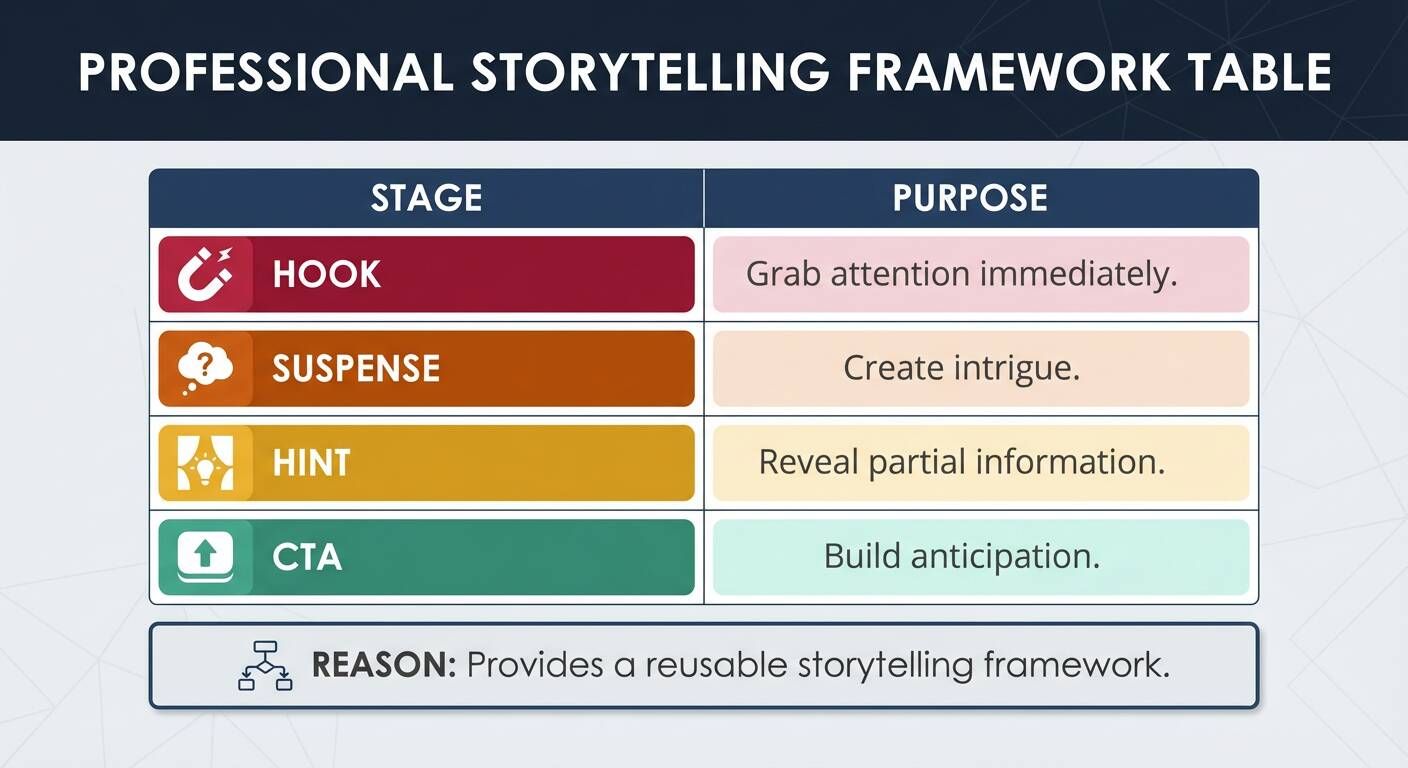
This structure is commonly used in high-converting marketing teasers and Hollywood movie previews.
| Stage | Purpose | Action |
|---|---|---|
| Hook | Grab attention within first seconds | Open with a shocking visual, loud sound, or bold question. |
| Suspense | Introduce mystery or intrigue | Use fast cuts and heavy music; keep the main subject hidden. |
| Hint | Reveal small details about the product or story | Show a macro close-up, a silhouette, or a quick flash of the product. |
| CTA | Encourage viewers to anticipate the launch | Display the release date and tell them to "Subscribe" or "Stay Tuned." |
Teaser Video Script Template (Ready-to-Use Example)
Using a simple script structure makes teaser production faster and much more focused.
| Scene | Example Content | Visual / Audio Cue |
|---|---|---|
| Opening | Dramatic visual or surprising moment | Sound of a heartbeat. Text: "You thought you knew..." |
| Middle | Short clips teasing product or story | Fast drum beats. Quick flashes of people running or product silhouettes. |
| Suspense | Partial reveal or mysterious moment | Total silence for 1 second. A crisp, close-up shot of the product logo. |
| Ending | Launch date or call-to-action | Deep bass drop. Text: "The Future Arrives 10.15.2026." |
How to Create a Teaser Video Without a Full Production Team
From real workflows, most teams don’t need complex setups.
A minimal system:
- simple screen recordings
- basic editing tools or mobile apps
- lightweight templates
- AI tools for faster generation
👉 The real shift:
👉 From “production” → to “assembly”
For small teams, the fastest path is to generate a teaser video from existing campaign assets instead of waiting on a full production cycle.
Why Editing Tools Matter Less Than Structure
Many people over-focus on tools.
But from actual results:
👉 Tools rarely fix bad structure.
What actually drives performance:
- opening hook
- pacing
- message clarity
- CTA
👉 Strong conclusion:
👉 Most teaser videos fail before editing even begins.
Best Tools to Create Teaser Videos in 2026
AI Video Platforms (Fastest Option)
Tools like Leadde allow you to:
- convert scripts into videos
- generate scenes automatically
- create multilingual content
- update videos quickly
This is especially useful for SaaS, product marketing, and repeated campaigns. If speed is the priority, you can generate a campaign teaser video with Leadde from a script, document, or launch brief.
Online Editors
- quick browser-based editing
- templates and transitions
Mobile Apps
- fastest for social content
- ideal for short-form teaser clips
👉 Choosing tools depends on speed vs control.
When a Teaser Video Is NOT Worth Making
Teaser videos are powerful—but not always necessary.
Avoid making one if:
- there is no clear next step
- there is no real hook
- you are just “following a trend”
- you don’t have enough meaningful content
👉 In these cases:
👉 A teaser can actually hurt more than help.
Tips for Making a High-Impact Teaser Video
To maximize your video's potential, strictly adhere to these proven industry best practices:
- Keep the teaser short (10–60 seconds): Anything longer dilutes the suspense and turns into a trailer. If launching globally, you may also need to know how to translate a video efficiently to maintain that suspense across regions.
- Focus on emotion rather than detailed explanations: Make them feel excited, don't try to educate them.
- Use dramatic music and visual transitions: Audio drives the emotional pacing of a teaser.
- Avoid revealing the entire story: Always leave a critical piece of the puzzle missing.
- End with a memorable message: Ensure your launch date or CTA screen is impossible to forget.
Optimizing Teaser Videos for Different Platforms
YouTube Teaser Videos
A slightly longer teaser format (20–60 seconds) works exceptionally well for YouTube. Because YouTube is a horizontal, search-driven platform, you can afford to build a slower, more cinematic suspense curve.
TikTok and Short-Form Teasers
Attention spans on TikTok are razor-thin. Short vertical videos (9:16 aspect ratio) with fast editing and trending audio are ideal. Your hook must land within the first 1.5 seconds.
Instagram and LinkedIn Teasers
These platforms blend professional networking with visual branding. Professional branding and clear, readable captions help attract attention on these platforms, especially for B2B product launches.
Examples of Effective Teaser Videos
Movie and Entertainment Teasers
Hollywood studios are the masters of the teaser format. These are used to build massive mainstream excitement six to eight months before the official trailer drops, often featuring just a single line of dialogue and a logo.
Product Launch Teasers
Tech companies frequently use sleek, dark teasers to reveal a new product gradually to generate anticipation. They might show the curve of a new smartphone or the glowing LED of a new hardware device without showing the full item.
Event Promotion Teasers
Major industry conferences drop high-energy teasers to encourage audiences to attend upcoming events. These often feature rapid-fire clips of last year's massive crowds, flashing lights, and snippets of keynote speakers.
Common Mistakes When Creating Teaser Videos
Revealing Too Much Information
The biggest mistake marketers make is treating a teaser like an explainer video. A teaser should spark curiosity, not explain everything. If you answer all their questions, they have no reason to return for the launch.
Making the Video Too Long
Suspense cannot be maintained indefinitely. Short videos maintain attention and suspense. If your teaser drags past the 60-second mark, viewer drop-off rates will skyrocket.
Weak Opening or Hook
Never start a teaser with a slow fade-in of your company logo. The first few seconds determine whether viewers keep watching. Start immediately with action, a bold claim, or a visually arresting image.
Frequently Asked Questions About Teaser Videos
Q: How long should a teaser video be?
Most highly effective teaser videos range between 10 and 60 seconds. The shorter the video, the more aggressively it must be edited to deliver a punchy hook.
Q: What is the best way to create a teaser video quickly?
Start with a clear goal and a short script, then use simple assets or AI tools to assemble the video. You don’t need complex production—speed and clarity matter more.
Q: What should I include in a teaser video?
You should include just enough to show what the product or content is, why it matters, and what happens next—without revealing everything.
Q: Should a teaser video show the actual product?
Yes, but only partially. Show hints or key moments, not a full walkthrough.
Q: What’s the difference between a teaser and a trailer?
A teaser builds curiosity with minimal information. A trailer explains more and gives a clearer picture of the product or story.
Q: Can I create a teaser video without expensive tools?
Yes. Many effective teaser videos are created with simple editors, mobile apps, or AI tools.
Q: Do teaser videos work for SaaS products?
Yes. They are often used to drive demo bookings, waitlists, and early interest before a full product launch.
Q: Why do many teaser videos fail?
Because they start too slowly, lack a clear message, or fail to give the viewer a reason to care within the first few seconds.
Q: Should I outsource teaser video creation?
Only if you need high polish. For most early-stage use cases, in-house or AI-generated videos are faster and more flexible.
Q: Can AI tools really replace manual editing?
In many cases, yes—especially for structured content like product teasers, demos, and marketing videos.
Conclusion
Teaser videos are undeniably powerful marketing tools that create intense curiosity and excitement before a major launch. By combining a strong hook, suspenseful storytelling, and concise, fast-paced editing, creators can effortlessly build anticipation and drive massive audience engagement.
With the help of modern editing tools and AI-powered video platforms, creating teaser videos has become faster and more accessible for businesses and content creators than ever before. Start utilizing the teaser structure today to ensure your next product launch or event is a resounding success.





