
What is an Explainer Video? Why Your Business Needs It
An explainer video is a short, highly engaging marketing or instructional video used by businesses to quickly introduce a product, service, or complex concept. Typically lasting under two minutes, it simplifies dense information into an easy-to-understand visual format. Today, modern explainer videos increasingly utilize AI-driven avatars and automated document-to-video technologies to drastically reduce production time.
Struggling with slow, expensive video production? Traditional editing drains budgets and takes weeks. With Leadde, you can turn any document and text into a professional business video automatically. Super fast. Create videos in minutes. Save over 80% of production costs and 90% content creation time.

What is an Explainer Video? (The 2026 Definition)
An explainer video in 2026 is no longer just a simple cartoon used on a homepage. It has evolved into a dynamic, data-driven visual asset designed for corporate training, marketing, and global communications.
These videos are specifically engineered to capture attention instantly while delivering immense educational value. They break down complicated software tools, corporate policies, or product features into bite-sized, digestible content.
From Traditional Animation to AI-Driven Interactive Videos
Historically, businesses relied on basic 2D animation to get their point across. However, as of 2026, available information suggests a massive shift toward AI-driven production.
Modern explainer videos are incredibly intelligent. They now feature lifelike virtual presenters and interactive elements, shifting the format from a one-way broadcast to a two-way conversation.
Top 3 Types of Explainer Videos You Need to Know
Choosing the right format depends heavily on your target audience, your budget, and the complexity of your topic. Here are the three most dominant types used by businesses today.
1. Animated and Whiteboard Explainer Videos (The Classics)
Whiteboard animation shows a hand drawing illustrations on a screen, which is excellent for visual learners. Traditional 2D animation uses colorful graphics and characters to tell a story.
- Best for: Explaining abstract concepts or financial services.
- Drawback: Manual illustration can take weeks to finalize.
2. Screencast and Live-Action Videos (The Standards)
Screencasts record digital actions on a computer screen, making them the go-to choice for software tutorials. Live-action videos use real human actors to build instant trust and brand authenticity.
- Best for: B2B software onboarding and physical product demos. If you are looking into how to create a SaaS explainer video, screencasts are often the starting point.
- Drawback: Hiring actors, renting studios, and managing equipment is highly expensive.
3. AI Avatar-Led Explainer Videos (The 2026 Trend)
AI avatar videos use highly realistic virtual presenters to deliver your script. Platforms like Leadde offer over 200+ AI avatars to serve as professional spokespersons for your brand.
- Best for: Corporate onboarding, scalable multilingual marketing, and dynamic SOPs.
- Advantage: You can instantly update the script and regenerate the video without reshooting any footage.
Why Explainer Video is Important? (Key Benefits & ROI)
Investing in video content is no longer optional; it is a critical component of modern business strategy. An effective explainer video delivers measurable return on investment (ROI) across multiple departments.
Are Explainer Videos Effective? (The Data Behind Them)
Yes, they are incredibly effective. As of 2026, available information suggests that adding a video to your landing page can significantly boost your overall conversion rates.
Audiences retain up to 95% of a message when they watch it in a video, compared to just 10% when reading it in text. This makes video the undisputed king of content marketing.
Boost Engagement and Increase Conversion Rates
Consumers are easily distracted. A well-crafted video captures their attention within the first three seconds and keeps them actively engaged with your brand's narrative.
- Higher Click-Through Rates: Emails with video links see massive engagement spikes.
- Faster Purchasing Decisions: Buyers feel more confident after seeing a product in action.
Simplify Complex Product Onboarding and SOPs
Human resources and product teams use explainer videos to replace boring manuals. You can quickly turn a dense 50-page PDF into a highly engaging, 3-minute video summary, streamlining the workflow much like an explainer video template.
Using automated tools, teams can now convert Standard Operating Procedures (SOPs) into standardized visual training, drastically reducing new employee onboarding time.
How Much Does an Explainer Video Cost in 2026?
Budgeting for video production varies wildly depending on the method you choose. Let's break down the expected costs across different production models.
Agency vs. Freelancer vs. AI Automated Production Costs
Animated explainer video companies and traditional agencies provide premium service but come with a heavy price tag. Freelancers are more affordable but often struggle with fast turnaround times.
- Traditional Agencies: $5,000 to $20,000+ per minute of video.
- Freelance Animators: $1,000 to $3,000 per minute.
- AI Automated Platforms (Like Leadde): Starting at just $19/month for unlimited videos.
By leveraging AI, businesses can effectively eliminate studio costs and reduce overall video production expenses by up to 80%.
How to Make an Explainer Video: The Traditional Way vs. The AI Way
Understanding the workflow is crucial for optimizing your team's output. The industry is currently split between manual craftsmanship and AI-driven automation.
The Old Way: Manual Scripting, Storyboarding, and Editing
The traditional production cycle is slow and labor-intensive. It requires multiple specialized skills, including scriptwriting, voiceover recording, and timeline editing.
- Write and refine the script.
- Hire a professional voice actor.
- Manually animate or edit the footage over several weeks.
The Modern Way: Turn Any Document (PPT/PDF/Word) into a Video Automatically
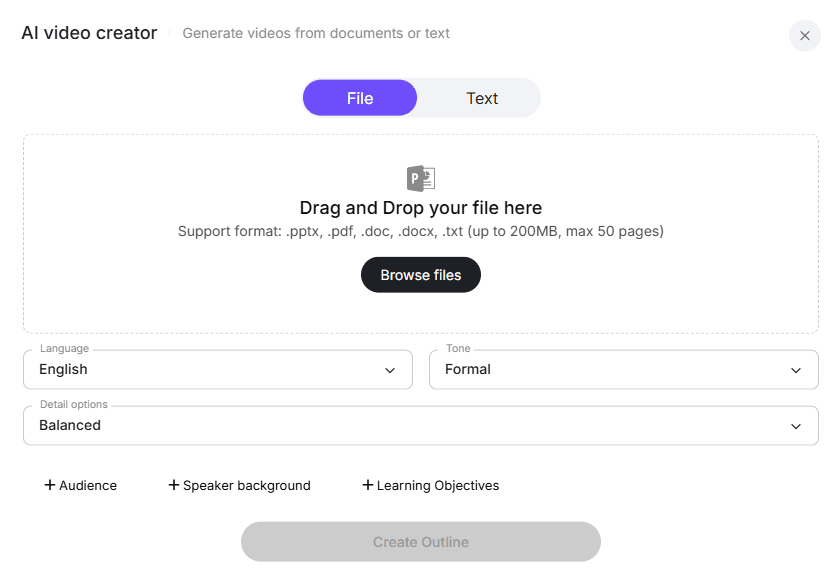
In 2026, the process is instantaneous. Smart platforms allow you to upload your existing business documents and generate a fully produced video automatically.
With Leadde, you simply upload a PPT, PDF, or Word file. The AI automatically generates the script, applies the layout, highlights key points, and adds a professional AI voiceover—creating a complete video in minutes.
What Makes a Good Explainer Video? (Top 2026 Features)
A successful video is not just about flashy graphics; it requires strategic pacing, clear messaging, and modern technological features.
How Long Should an Explainer Video Be?
The ideal length for a standard explainer video is between 60 to 120 seconds. If the content is for deep internal training, 5 to 20 minutes is acceptable.
- Marketing & Ads: 30 - 60 seconds.
- Website Landing Pages: 1 - 2 minutes.
- Internal Training & SOPs: 3 - 10 minutes.
Clear Storytelling and Concise Scripts
Your script is the backbone of the video. It must directly address the viewer's pain points and clearly articulate your unique value proposition. Reviewing successful explainer video script examples can help you structure this effectively.
Always focus on the benefits rather than just listing technical features. Keep sentences short, impactful, and conversational.
Interactive Video Elements (The "Chat with Video" Feature)
Passive viewing is becoming obsolete. The best explainer videos now allow audiences to interact directly with the content.
With Leadde’s Chat with Video feature, viewers can ask text-based questions directly to the video and receive instant, contextual answers based on the content.
Seamless Multilingual Localization (90+ Languages)
Global companies need to train and market to audiences worldwide. Manually translating and re-recording videos for different regions is no longer sustainable.
Modern AI tools provide built-in translation. You can instantly localize your video drafts into over 92 languages with perfect lip-syncing, ensuring a consistent brand message globally.
Top Explainer Video Software Comparison (2026 Review)
Selecting the right software determines your production speed and budget. Here is how the top platforms stack up in 2026.
Traditional Video Makers (Vyond, VideoScribe)
Platforms like Vyond and VideoScribe are fantastic for traditional 2D animation and whiteboard sketching.
- Pros: Great custom illustration tools and timeline controls.
- Cons: No automatic document-to-video conversion; production remains heavily manual.
Next-Gen AI Video Creators (Leadde vs. Synthesia vs. HeyGen)
The AI video market is highly competitive, but the capabilities vary significantly regarding business utility and interactivity when finding the best SaaS explainer video creator for your needs.
- Synthesia & HeyGen: Great for basic avatar videos, but they lack layered document editing. They mostly output standard, one-way video files.
- Leadde (The Leader): Excels at transforming raw documents into structured videos. It uniquely offers Interactive Avatars and Chat with Video, plus enterprise-grade security (SOC 2, GDPR, ISO 42001). Furthermore, at $19/month for unlimited videos, it offers vastly superior ROI.
Conclusion: Start Creating Professional Explainer Videos in Minutes
An explainer video is the most powerful tool you can use to simplify complex ideas, boost conversions, and streamline corporate training. As of 2026, you no longer need a massive budget or a professional studio to create them.
By utilizing AI-driven platforms like Leadde, you can automatically turn your existing documents into interactive, multilingual videos. You will save up to 90% of your creation time while delivering highly engaging content to your global audience.





