How to Make Educational Videos: Step-by-Step Guide (2026)

Creating educational videos in 2026 is easier than ever—but most videos still fail to engage or teach effectively.
The difference is not the tools, but the process.
To create videos that actually work, you need a clear workflow: define your learning objective, understand your audience, write a focused script, design supporting visuals, and optimize for engagement.
With the rise of AI tools, this process can now be completed in minutes instead of hours—transforming how educators and teams approach comprehensive e-learning video production.
Instead of spending hours scripting, recording, and editing, modern AI tools can turn documents or text into complete educational videos automatically. In many cases, relying on manual video production alone is no longer efficient for teams that need to scale content quickly.
Platforms like Leadde streamline this entire process—helping teams produce videos faster, reduce manual work, and scale content across languages and use cases.
How to make educational videos step by step (Beginner to Advanced Workflow)
Creating educational videos today follows a clear progression—from simple manual workflows to fully automated AI production.
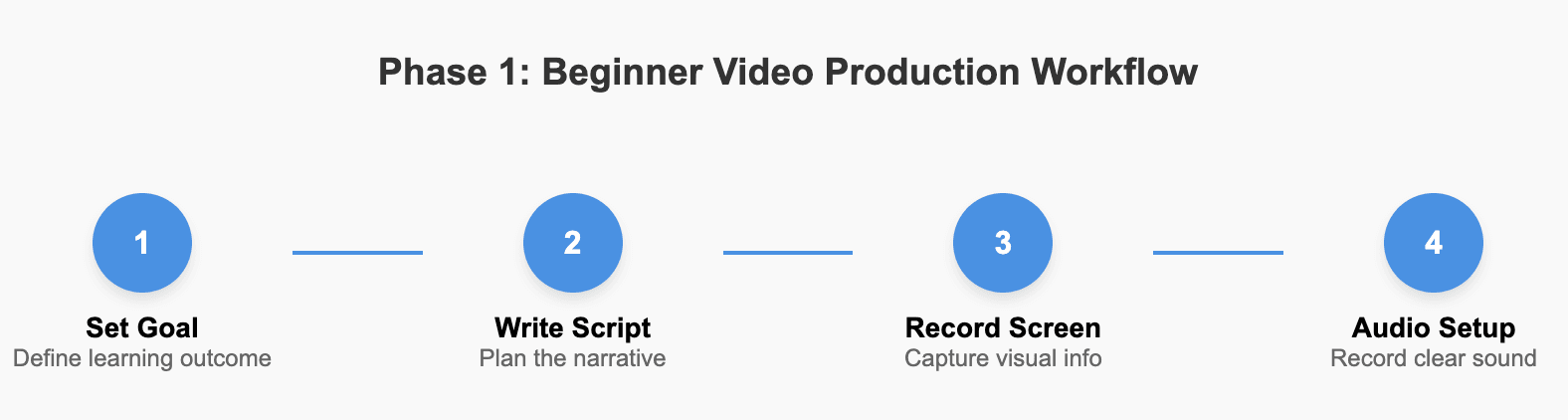
Phase 1: The Beginner Workflow (The Basics)
If you’re creating your first educational video, focus on clarity rather than complexity. The goal is to deliver one idea in the simplest way possible.
Step 1: Define Your Learning Goal
Decide exactly what the learner should understand or be able to do after watching.
Step 2: Write a Simple Script
Outline what you will say to avoid repetition and confusion.
Step 3: Record Your Screen or Slides
Use basic tools to demonstrate concepts or processes.
Step 4: Prioritize Clear Audio
Good sound matters more than perfect visuals for learning.
At this stage, speed and simplicity matter more than production quality.
Phase 2: The Intermediate Workflow (Adding Science)
Once you are comfortable, the next step is to improve how well your videos teach—not just how they look.
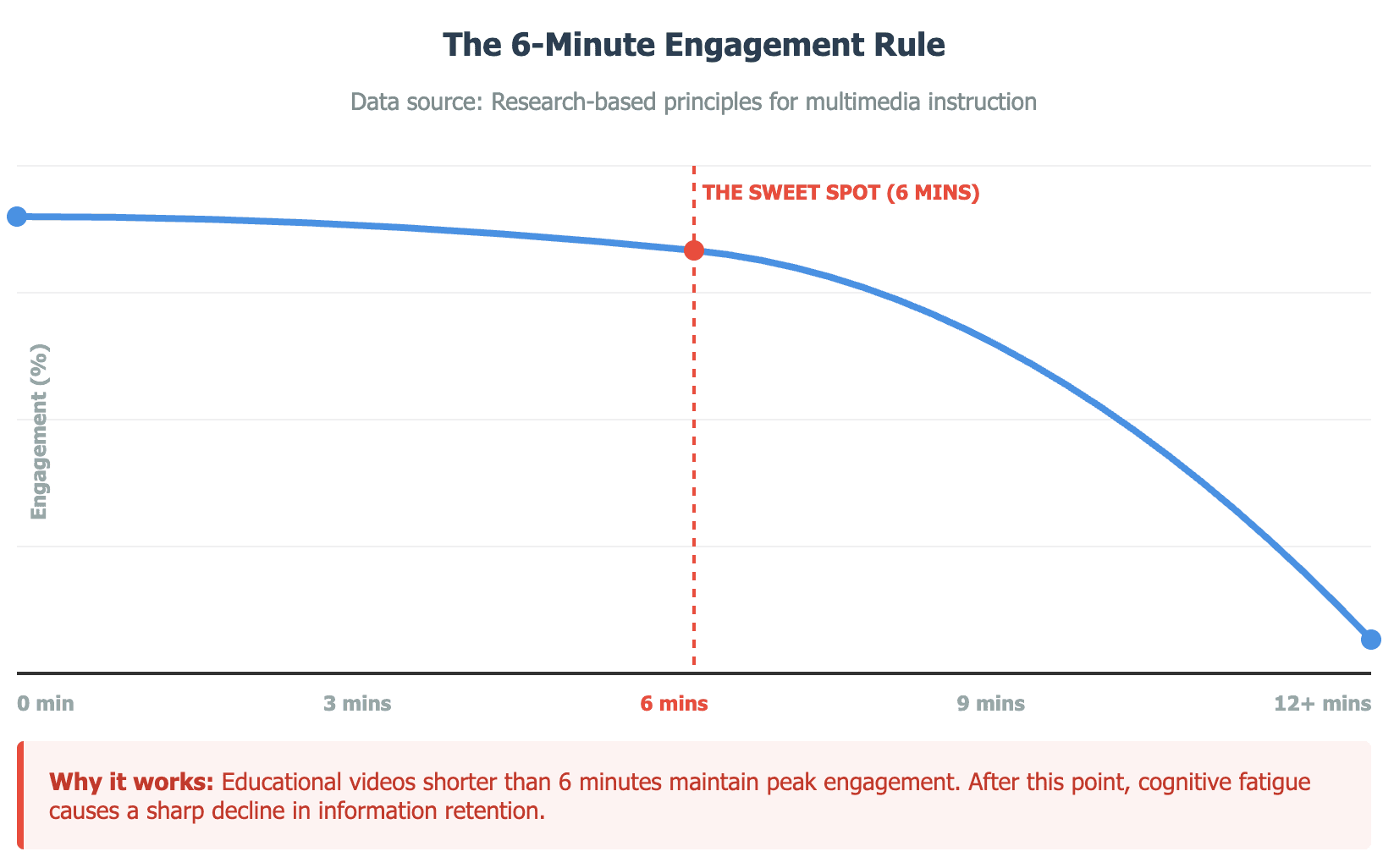
Step 5: Keep Videos Short (Under 6–8 Minutes)
Break long content into shorter videos to improve clarity and usability.
Step 6: Use Visual Signaling
Add highlights, arrows, or zoom effects to guide attention.
Step 7: Improve Audio and Remove Noise
Clean, professional audio improves clarity.
Step 8: Add Captions and Accessibility Features
Help learners follow along in different environments.
At this level, the focus shifts from “making videos” to making videos that actually teach.
Phase 3: The Advanced Workflow (AI Automation & Scale)
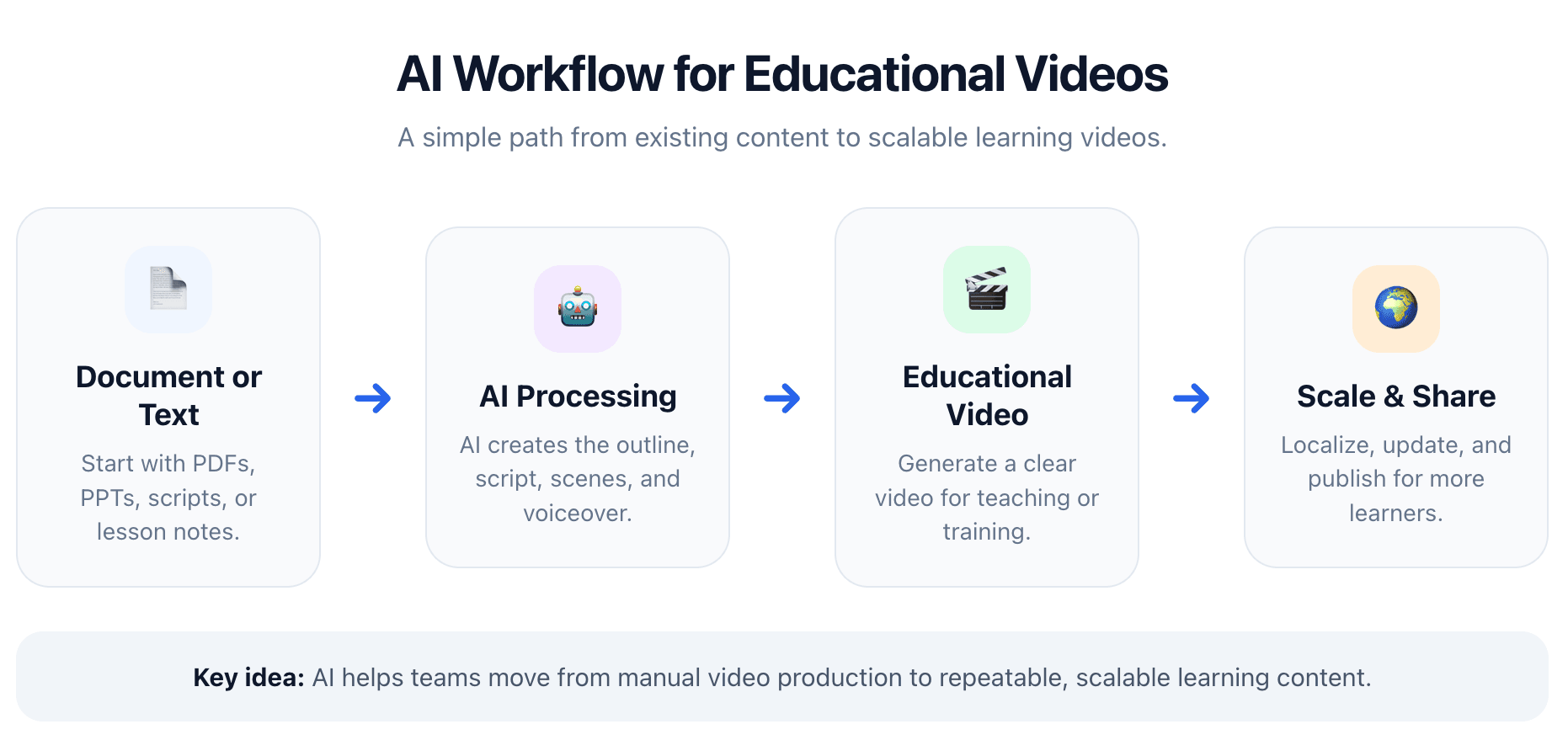
At scale, manual video production becomes too slow and expensive. This is where AI transforms the workflow.
Step 9: Turn Documents into Videos Automatically
You can now efficiently create informational videos directly from documents, instantly converting PDFs, scripts, or training materials into structured visual formats.
Step 10: Use AI Avatars and Voiceovers
By leveraging high-quality AI avatars for video creation, you can deliver consistent, professional presentations without needing to record yourself.
Step 11: Create Multilingual Versions Instantly
Expand your content to global audiences without re-recording.
Step 12: Add Interactivity to Your Videos
Enable learners to ask questions or explore content dynamically.
At this stage, the goal is no longer just creating videos—it’s scaling knowledge efficiently.
What makes an educational video effective (Backed by learning science)?
Effective educational videos are built on how people actually learn—not just how content is presented. One of the most widely recognized frameworks is Multimedia Learning Theory, developed by educational psychologist Richard Mayer. This theory explains how people process information through both visual and auditory channels.
Based on this research, effective videos follow three core principles:
- Cognitive Load: Learners can only process a limited amount of information at a time, so content should be simplified and focused.
- Dual Coding: Combining visuals with narration helps learners understand and remember information more effectively.
- Segmentation: Breaking content into short, structured sections allows learners to process information step by step.
These principles are not just theoretical—they directly impact engagement and retention. Videos that are short, visually supported, and clearly structured are easier to follow and more effective for learning.
How do you plan an educational video (Audience, goals, and structure)?
Planning is the foundation of an effective educational video. Without a clear structure and goal, even well-produced videos can fail to engage or teach effectively.
Now let’s apply these learning principles in a practical planning process.
Start by defining three key elements:
- Learning objectives: What should the viewer know or be able to do after watching?
- Target audience: Are you teaching beginners, professionals, or students?
- Content scope: Focus on one topic per video to avoid overload.
Once your structure is clear, the next step is to design the video for active learning, not passive watching.
To keep learners engaged throughout the video:
- Capture attention early: Clearly show the value within the first moments using a strong hook.
- Encourage interaction: Add prompts, questions, or interactive elements to keep learners mentally involved.
- Focus on one outcome: Align every section of the video with a single clear goal.
A well-planned video connects structure with engagement. By applying learning science principles during planning, you ensure that every part of the video supports both understanding and attention from start to finish.
What are the best tools to make educational videos (Beginner, Pro, and AI)?
Choosing the right tool depends on your goals, experience level, and how quickly you need to produce content. Most creators fall into one of three categories: beginner tools, professional tools, and AI video platforms.
Here’s a clear comparison to help you decide:
| Category | Best For | Pros | Limitations |
| Beginner Tools (Templates) | Quick, simple videos | Easy to use, no experience needed | Limited customization, manual work |
| Professional Tools (Editing Software) | High-quality production | Full control, advanced editing | Time-consuming, steep learning curve |
| AI Video Tools | Speed, scale, automation | Generate videos from text, fast production, scalable | Less manual control |
How do you choose the right tool for your situation?
Instead of picking based on features, choose based on your use case:
Use beginner tools if:
- You need to create a quick video
- You have no editing experience
- You prefer drag-and-drop simplicity
Use professional tools if:
- You want full creative control
- You are producing high-end content
- You are comfortable with editing software
Use AI video tools if:
- You want to create videos quickly at scale
- You already have content (documents, scripts, PPTs)
- You need multilingual or repeatable video production
The key shift in 2026: From manual creation to scalable video production
Traditional tools are designed for creating one video at a time. AI tools are designed for turning knowledge into repeatable, scalable video content. This is why more educators, creators, and businesses are moving toward AI workflows—especially when speed, cost, and consistency matter.
How to make educational videos more engaging and interactive (2026 strategies)?
When developing instructional videos optimized for viewer retention, engagement is the strongest predictor of whether a learner finishes a video and actually understands the content. In practice, most drop-off happens early if the video fails to capture attention.
As of 2026, available information suggests that viewers are significantly more likely to stop watching when videos feel passive or overly long. This is why modern educational videos are designed for active learning, not just passive viewing.
To improve engagement:
- Start with a clear hook: Explain the value of the lesson within the first moments.
- Use interaction prompts: Ask questions or guide the learner to think before revealing answers.
- Break passive flow: Add pauses, checkpoints, or transitions between sections.
Real-world example: Many YouTube educational creators improve retention by inserting questions mid-video (e.g., “Pause and try this yourself”) before continuing the explanation. This simple pattern keeps viewers mentally involved.
Interactive formats—such as quizzes, branching paths, or AI-assisted Q&A—further increase engagement by turning videos into two-way learning experiences.
Further Reading: How to Make Interactive Videos: A Modern Guide
How long should an educational video be for maximum engagement?
Video length directly impacts attention and retention. Shorter, focused videos consistently outperform long, lecture-style content.
As of 2026, available information suggests:
- 3–7 minutes: Best for simple concepts and quick tutorials
- 8–15 minutes: Suitable for deeper explanations
- Longer topics should be split into multiple modules
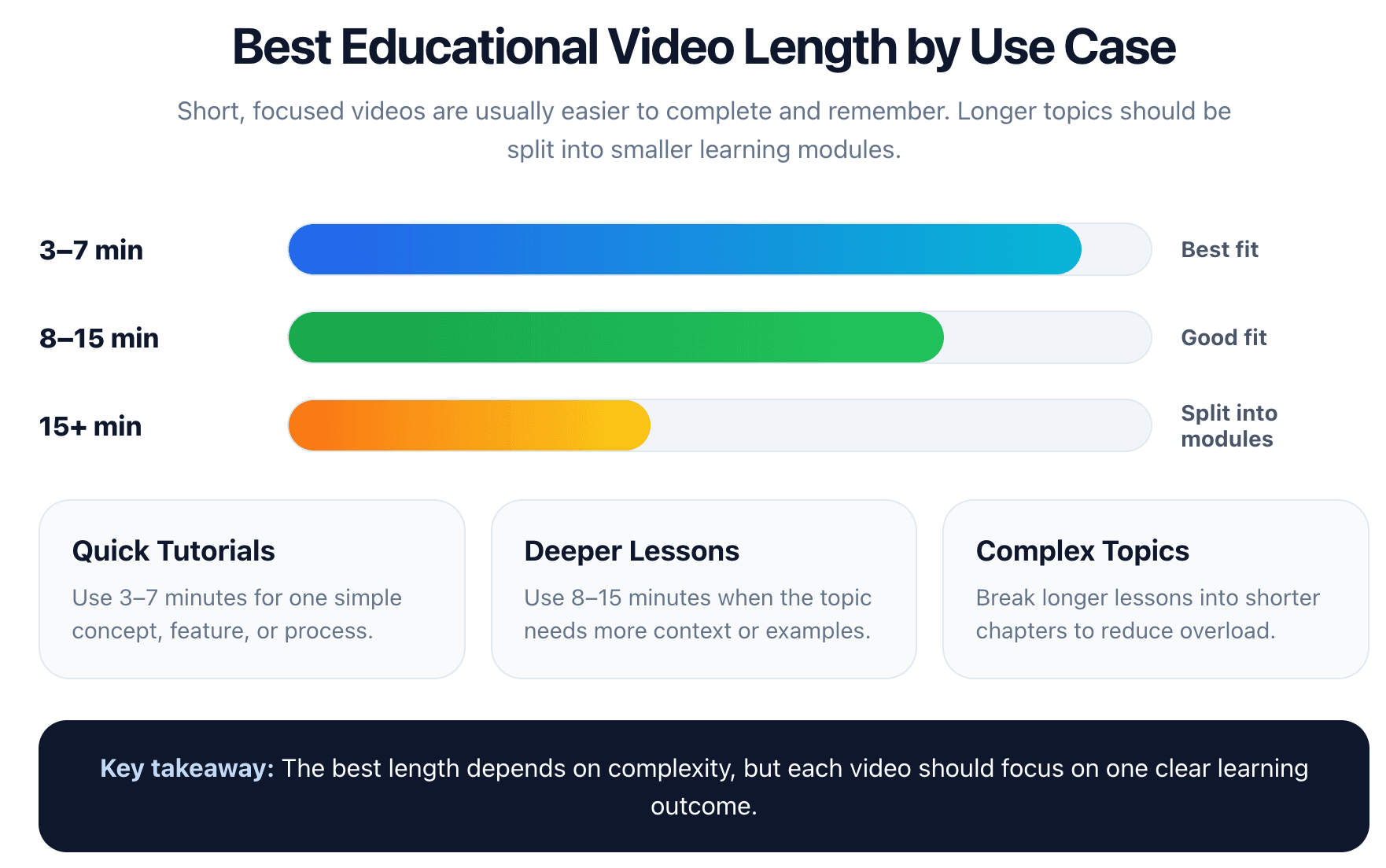
The key is not just duration, but cognitive load per segment.
Practical example:
Online course platforms often divide lessons into short modules rather than long lectures. This allows learners to pause, revisit, and complete content in manageable steps—improving both completion rates and understanding.
How to optimize educational videos for SEO, YouTube, and discoverability?
Creating a video is only half the process—distribution determines whether it gets seen.
To improve visibility:
- Use keyword-focused titles and descriptions.
- Add captions and transcripts to improve accessibility and indexing.
- Design thumbnails that clearly communicate value.
These elements help both search engines and viewers understand your content quickly.
Real-world example: Educational YouTube channels often test multiple thumbnails and titles to improve click-through rate (CTR). Even small changes in wording or visual clarity can significantly impact performance.
In addition, tracking metrics such as watch time, audience retention, and drop-off points helps identify where viewers lose interest, allowing you to continuously improve future videos.
FAQs
1. What is the easiest way to make educational videos?
The easiest way to make educational videos is to start with a simple workflow: define a clear learning goal, write a short script, and record your screen or slides. For faster results, AI tools can automatically turn text or documents into complete videos.
2. Do I need expensive equipment to create educational videos?
No, you don’t need expensive equipment. A basic setup with a clear microphone and simple screen recording tools is enough. In most cases, audio clarity is more important than high-end video quality.
3. How long should an educational video be?
The ideal length depends on the topic, but most effective educational videos are between 3–15 minutes. Shorter videos are easier to follow and help maintain attention and retention.
Conclusion
The most effective way to create educational videos in 2026 is to combine a clear workflow with proven learning principles and the right tools for your needs.
For simple use cases, a structured manual process is enough. But as content demands grow, AI-powered tools make it possible to create videos faster, reduce manual work, and scale production efficiently.
Ultimately, the key is not just making videos—but creating content that is clear, engaging, and easy to scale.