
How to Make Video Courses with AI (Step-by-Step + Real Use Cases)
Generating multilingual online courses with AI is now the fastest and most scalable way to produce global training content. In practice, teams are reducing course production time from hours to minutes, translating content into 100+ languages instantly, and maintaining consistency across regions—all without traditional video production.
However, success depends on more than automation. High-performing teams combine AI generation, human validation, and localized learning design to ensure accuracy, engagement, and cultural relevance.
This guide breaks down exactly how to do that—based on real implementation experience and user research across AI course creation workflows.
AI tools like Leadde.ai make this even faster by turning existing documents into structured, multilingual online courses in minutes—eliminating the need to build training content from scratch.

The Strategic Role of AI Localization in Online Courses
Effective online courses require more than simple word-for-word translation. AI-powered localization focuses on context, ensuring that terminology, tone, and examples resonate with learners from different backgrounds.
Language barriers in professional and educational settings can lead to misunderstandings, reduced engagement, and inconsistent learning outcomes. This is especially important for global teams, digital creators, and educators aiming to scale their online courses internationally.
Modern AI systems use advanced machine learning to adapt content for specific cultures. These tools analyze large datasets to capture subtle linguistic nuances, regional preferences, and communication styles.
This ensures that online courses are not only linguistically accurate but also culturally relevant and engaging.
This automated approach makes it easier to generate multilingual online courses with AI, allowing rapid scaling without sacrificing quality.
Imagine a global company rolling out a new onboarding program to teams in Tokyo, Berlin, and São Paulo at the same time. To ensure consistency, they need to generate multilingual online courses with AI that reflect local expectations while maintaining a unified core message.
Global Compliance and Patient Safety
Maintaining clarity and accuracy is critical when adapting content across regions. AI localization goes beyond direct translation by adjusting units, references, and examples to fit local contexts.
This level of adaptation helps ensure that learners fully understand the material, regardless of their location or language.
Using Leadde, you can efficiently generate multilingual online courses with AI that feel natural to every audience.
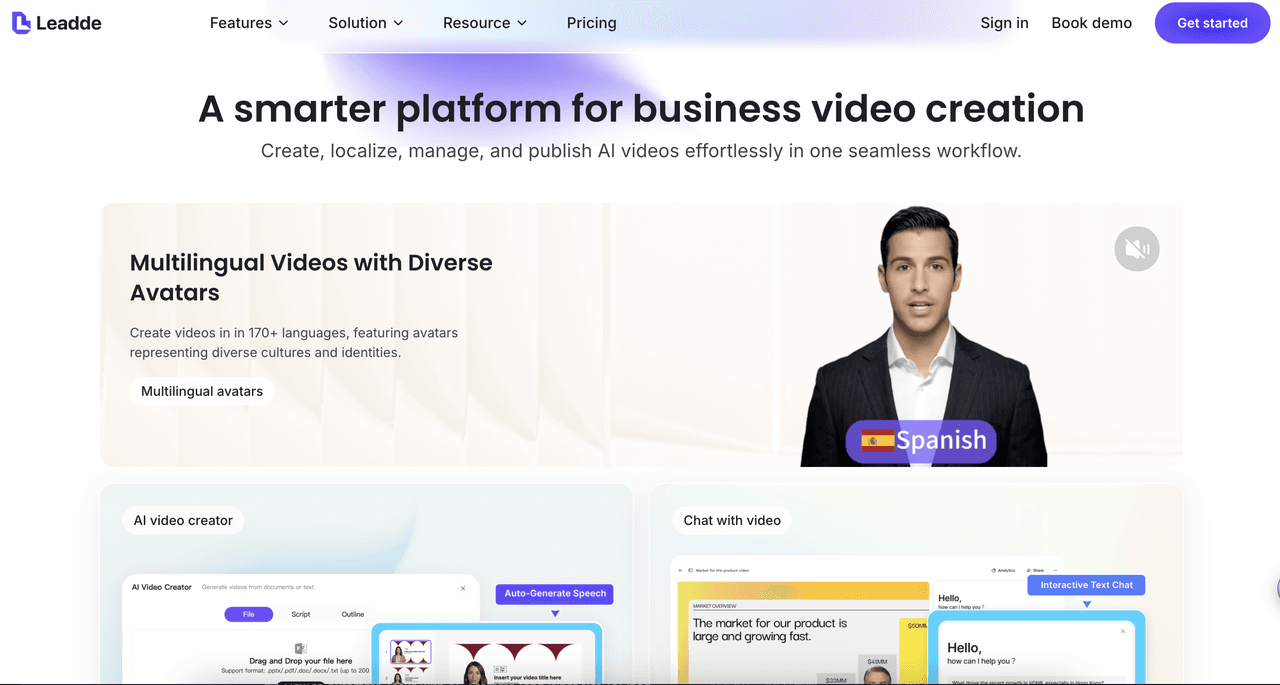
The platform supports pronunciation optimization, ensuring names, technical terms, and key concepts are delivered clearly and professionally. This enhances the overall quality of your online courses.
- Select target languages: Choose from 170+ languages to reach a global audience
- Adapt content contextually: Ensure examples and references align with local expectations
- Maintain consistency: Deliver the same core message across all versions of your online courses
How to Generate Multilingual Online Courses with AI Step-by-Step
Step 1: Transforming Source Materials into Video Scripts
The journey to creating high-quality online courses begins with your existing materials—whether that’s PDFs, slide decks, internal documentation, or written guides. You can upload these directly into an AI-powered platform, where the system analyzes the content and builds a structured narrative.
This process removes the need for manual scriptwriting, which often slows down course production. Instead, AI identifies key ideas, organizes them logically, and transforms them into clear, engaging scripts tailored for online courses.
As a result, complex topics are broken down into easy-to-follow segments, improving both clarity and learner retention.
Platforms like Leadde include AI narration tools that generate professional, ready-to-use scripts from your input files. You can adjust tone and style depending on your audience—whether it’s corporate training, educational content, or creator-led online courses.
This allows subject matter experts, educators, and creators to produce high-quality content without requiring advanced video production skills.
Step 2: Implementing Contextualized Multilingual Support
When scaling online courses globally, simple translation isn’t enough. AI-driven localization ensures that content is adapted to different languages, cultural contexts, and communication styles.
Advanced AI tools go beyond literal translation by adjusting phrasing, examples, and terminology to match local expectations. This ensures that learners in different regions can fully understand and engage with the material.
By using AI, you can easily generate multilingual online courses with AI—including voiceovers, subtitles, and on-screen text—in over 170 languages. This allows a single course to reach a global audience without duplicating production efforts.
With platforms like Leadde, it becomes seamless to create localized versions of your online courses that feel natural to every viewer. Features like pronunciation optimization help ensure that technical terms, brand names, and key concepts are delivered clearly.
- Select target languages: Choose from 170+ languages to expand your reach
- Adapt content naturally: Align tone, examples, and terminology with local audiences
- Ensure consistency: Maintain a unified learning experience across all versions of your online courses
Step 3: Leveraging AI Avatars for Engaging Course Delivery
Hiring professional actors and booking studios for every video can quickly become expensive and time-consuming when producing online courses. Updating or re-recording content for different regions or audiences only adds to the complexity.
With platforms like Leadde, you can bypass traditional production entirely. The platform offers a wide library of lifelike AI presenters that deliver content with consistent clarity, tone, and professionalism. This makes it much easier to generate multilingual online courses with AI to scale training.
Here’s how AI avatars enhance your online courses:
- Reflect Your Global Audience: Choose from 200+ diverse, multilingual AI presenters to better connect with learners across different regions. Matching presenters to your audience helps improve engagement and retention in your online courses.
- 1-Click Personalization: Easily switch presenters across your entire video with a single click. Whether you're creating onboarding, product training, or educational content, this feature allows you to tailor online courses for different audiences instantly.
- Maintain Professional Delivery: AI avatars provide a consistent and polished presentation style. This ensures your online courses always deliver information clearly and professionally—without the need for repeated filming sessions.
Step 4: Enhancing Learning with Smart Visual Elements
Strong visual design plays a key role in making online courses more engaging and easier to understand. AI can automatically highlight key points on screen, helping guide the learner’s attention and reduce cognitive overload.
A well-structured layout ensures your content remains clean and professional throughout. Using business-ready templates helps maintain consistent visual quality across all modules, whether you're building training, tutorials, or educational online courses.
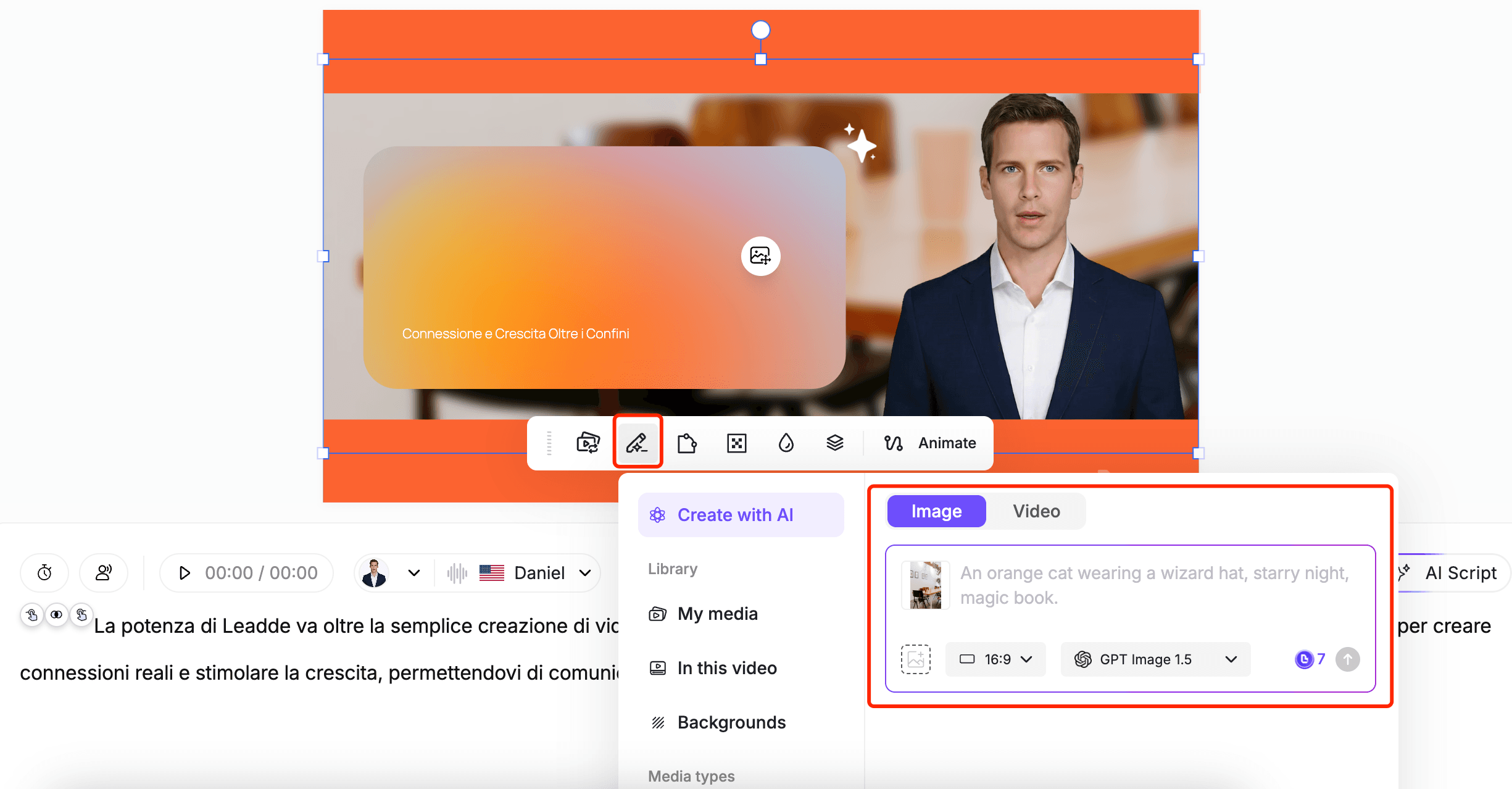
Leadde also provides built-in editing tools that allow you to add text, shapes, and custom images directly onto your video canvas. You can control timing and placement to align visuals perfectly with narration, making your online courses more dynamic and effective.
- Auto-generated highlights: Key points appear with clean, AI-driven animations
- Template selection: Choose styles suited for training, marketing, or educational online courses
- Visual enrichment: Upload and integrate custom images to support your content
These features make it easier to generate multilingual online courses with AI that are not only scalable but also visually engaging and easy to follow.
Step 5: Iterating and Updating Online Courses for Rapid Releases
Training content across industries is constantly evolving. When information changes, traditional video-based online courses can quickly become outdated, making updates both costly and time-consuming.
Fortunately, AI-driven content allows you to update videos instantly without the need for reshooting or complex production workflows.
Editing AI-generated videos in Leadde is as simple as modifying a text document. You can update a specific scene, adjust visuals, and regenerate only the necessary parts. This flexibility is essential for teams and creators who need to keep their online courses accurate and up to date.
Here’s how scene-level editing helps maintain high-quality online courses:
- Update Key Information Quickly: If product details, policies, or learning content change, you can simply edit the script for a single scene and regenerate it in seconds—no need to redo the entire course.
- Revise Processes and Guidelines: When workflows, instructions, or best practices evolve, you can update visuals or narration to reflect the latest version, ensuring your online courses stay relevant.
- Adjust Regional or Audience-Specific Content: For global audiences, you can make localized edits to align with different market needs or expectations, helping you generate multilingual online courses with AI that remain accurate everywhere.
Using Leadde, you can implement these updates at any time. This ensures your online courses remain scalable, reliable, and future-proof—without slowing down your content production cycle.
Why AI-Generated Multilingual Online Courses Still Struggle with Content Quality
One of the most consistent findings across real-world implementations is that AI-generated course content is fast—but not always reliable.
In multiple course production workflows, AI-generated translations and scripts often:
- Sound unnatural in certain languages
- Miss cultural nuances
- Occasionally introduce factual or contextual errors
In practice, this creates a critical gap:
AI can generate content at scale, but it cannot guarantee instructional accuracy.
For example, in multilingual training environments:
- Technical terminology may be translated literally instead of contextually
- Tone may shift from professional to overly generic
- Learning clarity can drop significantly across languages
The key takeaway from implementation experience is clear:
AI should be treated as a first draft engine, not a final output system.
To maintain quality:
- Always implement a review layer (SME or native speaker)
- Validate terminology across regions
- Test comprehension, not just translation accuracy
The Hidden Cost of AI Course Generation: Why Human Review Is Still Essential
AI significantly reduces production time—but introduces a new operational requirement: content validation.
In actual deployment scenarios:
- Tasks that previously took 1–2 hours (manual translation or scripting) can now be completed in under 10 minutes using AI
- However, teams still spend time reviewing and correcting outputs
This creates a shift:
- Before: High production cost, low review cost
- After: Low production cost, necessary validation layer
The most effective teams adopt a hybrid workflow:
- AI generates scripts, translations, and visuals
- Human experts review critical sections
- Final content is published with confidence
This approach ensures:
- Accuracy in high-stakes content (training, compliance, healthcare)
- Consistency across languages
- Trust from learners
Beyond Translation: How to Truly Localize Multilingual Online Courses with AI
Translation alone is not enough to create effective multilingual online courses.
Through implementation and user research, a key insight emerges:
Learners don’t just need translated content—they need localized learning experiences.
Common issues with basic translation:
- Examples don’t resonate culturally
- Communication style feels unnatural
- Learning structure doesn’t match local expectations
True AI localization involves:
- Adapting tone and phrasing
- Adjusting examples and references
- Aligning instructional style with regional norms
For example:
- A compliance training example relevant in the US may not apply in Japan or Brazil
- Humor, idioms, and analogies often fail when directly translated
Platforms like Leadde address this by:
- Contextually adapting scripts across languages
- Optimizing pronunciation for technical terms
- Maintaining consistent messaging globally
This is essential when scaling courses across global teams, where clarity directly impacts performance and outcomes.
How AI Is Transforming Online Courses into Interactive Learning Experiences
Traditional online courses are static. AI is fundamentally changing that.
In modern course design workflows, AI is increasingly used to:
- Power in-course chatbots
- Simulate real conversations
- Provide instant feedback to learners
This transforms courses from:
- Passive video consumption
→ Interactive, adaptive learning systems
For example, instructional design teams now integrate:
- AI tutors for real-time Q&A
- Voice-based interactions for language practice
- Scenario-based simulations powered by AI
This shift improves:
- Engagement
- Retention
- Learning effectiveness
The most important takeaway:
The future of online courses is not just multilingual—it is interactive and personalized.
Building Scalable Multilingual Course Systems (Not Just Translated Videos)
One of the biggest misconceptions is that multilingual courses are simply “translated versions” of a video.
In practice, scaling globally requires a content system, not just content.
Challenges observed in real implementations:
- Keeping multiple language versions synchronized
- Updating content across regions
- Managing terminology consistency
High-performing teams solve this by:
- Centralizing content (single source of truth)
- Structuring courses modularly
- Using AI to regenerate localized versions instantly
For example:
- A single script update can propagate across all languages
- Regional variations can be managed without duplicating full courses
This approach reduces:
- Maintenance complexity
- Update costs
- Risk of inconsistency
Real Workflow: How Teams Reduce Course Production Time with AI
A typical AI-powered course workflow looks like this:
Before AI:
- Scriptwriting: manual
- Translation: outsourced or internal
- Video production: filming + editing
- Timeline: days to weeks
After AI:
- Upload documents (PDF, PPT, DOCX)
- AI generates scripts instantly
- AI localizes into 100+ languages
- AI avatars produce video
Time reduction observed:
- Hours → minutes for initial production
- Days → same-day deployment for updates
Platforms like Leadde enable:
- Instant script generation
- Multilingual voiceovers
- AI presenters
This dramatically increases:
- Speed
- Scalability
- Accessibility
Common Mistakes When Creating Multilingual Online Courses with AI
Based on real implementation patterns, the most common mistakes include:
1. Treating translation as localization
Leads to poor engagement and misunderstanding
2. Skipping human validation
Results in errors and reduced trust
3. Ignoring interactivity
Creates passive, low-retention courses
4. Not structuring content for scalability
Makes updates difficult and costly
5. Over-relying on AI for expertise
Leads to shallow learning outcomes
Avoiding these mistakes is critical for building high-quality global courses.
FAQ: Common Questions on AI Video Creation for Online Courses
Can AI fully replace human instructors in course creation?
No. AI accelerates production but still requires human expertise for accuracy, depth, and validation.
How reliable are AI-generated translations for courses?
They are efficient but not perfect. Human review is essential for ensuring accuracy and clarity.
What is the difference between translation and localization in online courses?
Translation converts language. Localization adapts meaning, tone, and context for a specific audience.
How can I create a complete course using AI?
Upload source materials, generate scripts, localize content, and produce videos using AI tools.
What tools are commonly used in AI course creation?
LLMs (for scripts), voice tools, AI avatars, and learning platforms are typically combined.
How do I ensure AI-generated content is correct?
Implement a validation workflow involving subject matter experts or native speakers.
Can AI help scale courses to multiple languages quickly?
Yes. AI can generate multilingual versions in minutes, significantly reducing production time.
Will AI reduce the need for language learning?
It may reduce basic translation needs, but deep learning and cultural understanding remain important.
How do I manage multiple language versions efficiently?
Use centralized content systems and modular course structures.
What are the biggest challenges in multilingual course creation?
Maintaining quality, ensuring localization, and managing updates across languages.
Final Insight
The real opportunity is not just to generate multilingual online courses with AI, but to build scalable, high-quality, interactive learning systems that combine automation with human expertise.





