
How to Create Patient Education Videos Patients Understand

Creating patient education videos that patients actually understand means turning complex medical information into plain language, simple visuals, and clear next steps.
The most effective videos reduce cognitive overload, avoid anxiety-inducing imagery, explain risks calmly, and use structured storytelling, captions, and interactive prompts to help patients remember what to do after watching.
But traditional production can slow every clinical update. Leadde helps teams turn PDFs (via PDF to video), slides (using PowerPoint to video), scripts, and text into professional, interactive patient education videos in minutes—reducing production costs by over 80% and content creation time by 90% while keeping updates scalable and reviewable.
How Can Providers Create Patient Education Videos That Patients Actually Understand?
Patient education videos work best when they are designed for understanding first, not production value first. A polished video can still fail if patients cannot follow the language, remember the key point, or act on the instruction.
AHRQ’s Patient Education Materials Assessment Tool evaluates patient education materials by two practical standards: understandability and actionability. That means a good patient video should help people understand the message and know what to do next.
Define the Patient’s Health Literacy Level Before Writing the Script
Before writing the script, define who the video is for:
- Newly diagnosed patients
- Post-discharge patients
- Older adults
- Caregivers
- Multilingual patients
- Patients with low health literacy
- Patients preparing for a procedure
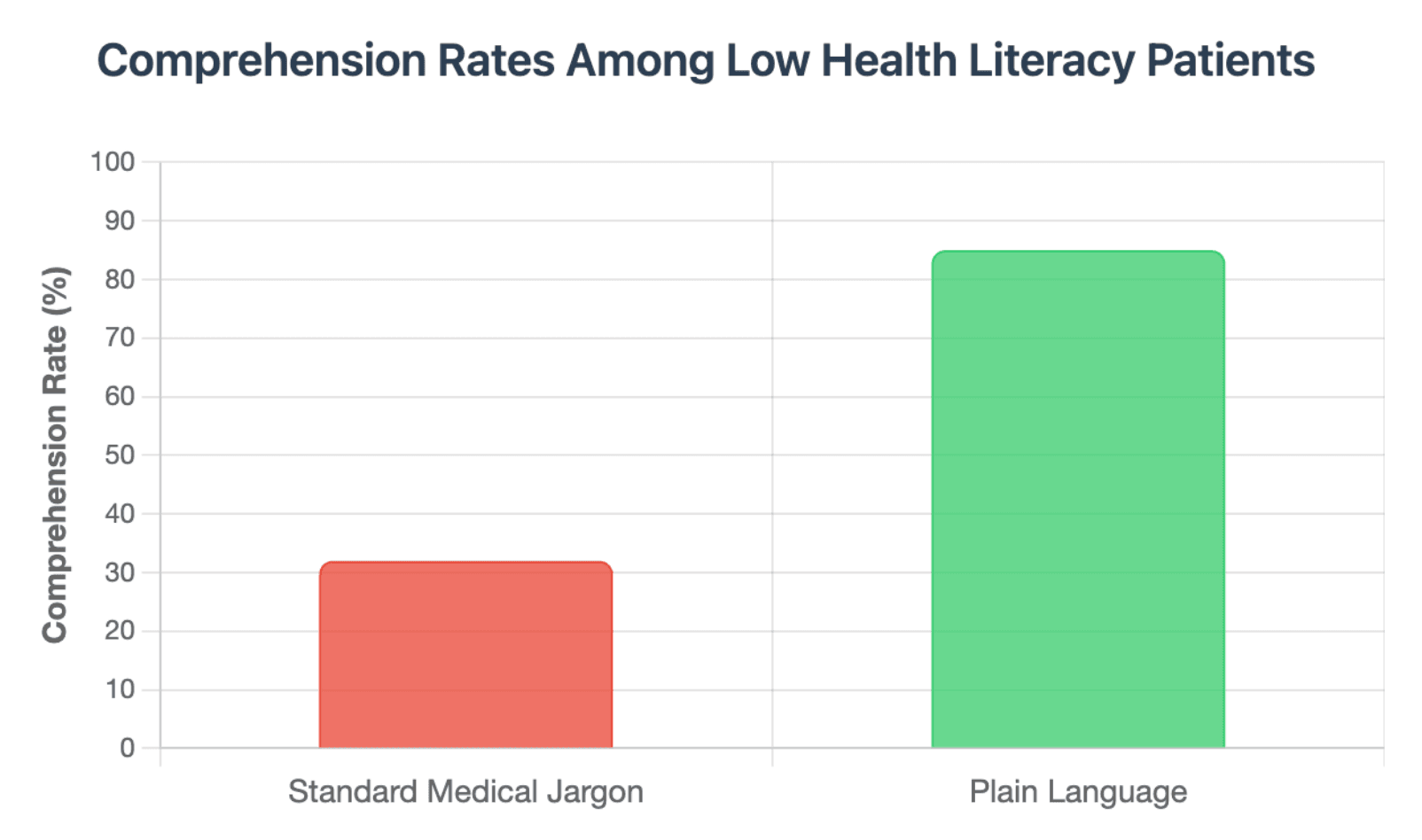
The script should use everyday words wherever possible. Instead of saying “hypertension,” say “high blood pressure.” Instead of “contraindication,” say “a reason this treatment may not be safe for you.”
CDC’s plain language guidance recommends knowing the audience and purpose before writing, putting the most important message first, and breaking information into logical chunks.
Reduce Medical Cognitive Overload With Multimedia Learning Principles
Patients often watch healthcare videos while anxious, tired, in pain, or overwhelmed. A video that shows too much text, too many visuals, or too many medical details at once can increase confusion.
To reduce cognitive overload:
- Explain one idea at a time
- Use visuals only when they clarify the message
- Remove decorative animations
- Use arrows, labels, and highlights to guide attention
- Keep each scene focused on one patient action
CDC notes that visuals such as pictures, diagrams, charts, and graphs can make complex health information easier to understand and can reinforce spoken or written messages. (疾病控制与预防中心)
Use Teach-Back Prompts to Check Whether Patients Can Explain the Next Step
A patient education video should not simply ask, “Do you understand?” Many patients will say yes even when they are unsure.
Instead, use teach-back style prompts:
- “Pause here and say in your own words what you should do next.”
- “After watching, you should be able to explain these three warning signs.”
- “If this part is unclear, replay this section or contact your care team.”
The goal is not to test the patient. The goal is to check whether the explanation was clear enough.
Why Do Most Healthcare and Pharmaceutical Videos Fail in Real-World Clinics?
Most patient education videos fail because they are created from the organization’s point of view, not the patient’s point of view.
They may be medically accurate, but they often feel too passive, too formal, too long, or too disconnected from the patient’s real concerns.
Patients Ignore Passive Videos That Feel Like Background Content
Videos played passively in waiting rooms or hospital rooms often become background noise. Patients may be distracted, worried, or unsure why the content matters to them.
To make videos harder to ignore, each one should answer a direct patient question:
- “What should I expect before this procedure?”
- “How do I take this medicine safely?”
- “When should I call my doctor?”
- “What symptoms are urgent?”
A patient education video should feel like useful guidance, not generic hospital content.
Patient Education Videos Often Lack Warmth, Eye Contact, and Directness
Patients are more likely to engage when the video feels human. A cold narration over slides may communicate information, but it rarely builds trust.
Better patient videos use:
- Calm voiceover
- Warm direct address
- Human presenters or avatars
- Simple examples
- Supportive language
- Clear reassurance without false promises
The tone should feel like a trusted clinician explaining something carefully, not a compliance document being read aloud.
Complex Risks and Side Effects Must Be Explained Without Creating Unnecessary Anxiety
Healthcare videos must explain risks honestly, but they should not shock or frighten patients with unnecessary graphic imagery.
A better approach is to:
- Explain the risk in plain language
- Show simple diagrams instead of graphic visuals
- Separate common side effects from urgent warning signs
- Tell patients what to do if symptoms appear
- Avoid dramatic music, alarming colors, or fear-based messaging
The goal is calm preparedness, not panic.
What Are the Biggest Bottlenecks in Traditional Healthcare Video Production?
Traditional healthcare video production is slow because every step requires coordination between clinical, creative, compliance, and operational teams.
A short video may need a long workflow: scriptwriting, expert review, filming, editing, subtitles, translation, approval, publishing, and future updates.
The Hidden Time Cost of Scriptwriting, Storyboarding, Filming, Editing, and Review
A 2024 JMIR Medical Education tutorial described a health procedural skills video that was 4 minutes and 4 seconds long and took 70 hours to create. That total included planning, production, editing, revision, narration, captions, and interactive elements.
This does not mean every patient video takes 70 hours. It does show why healthcare teams often struggle to scale video production manually.
The hidden work includes:
| Production Task | Why It Takes Time |
| Scriptwriting | Medical language must be simplified without losing accuracy |
| Storyboarding | Visuals must match the clinical message |
| Filming | Presenters, lighting, audio, and locations must be coordinated |
| Editing | Scenes, captions, voiceover, and graphics require revision |
| Review | Clinicians and compliance teams must approve the final version |
| Updates | Guidelines, protocols, and product information may change |
Why Clinical Updates, Compliance Reviews, and Guideline Changes Make Video Maintenance Expensive
Healthcare videos are not static assets. A video can become outdated when:
- A clinical guideline changes
- A medication instruction changes
- A device workflow changes
- A hospital policy changes
- A safety warning is updated
- A translation needs correction
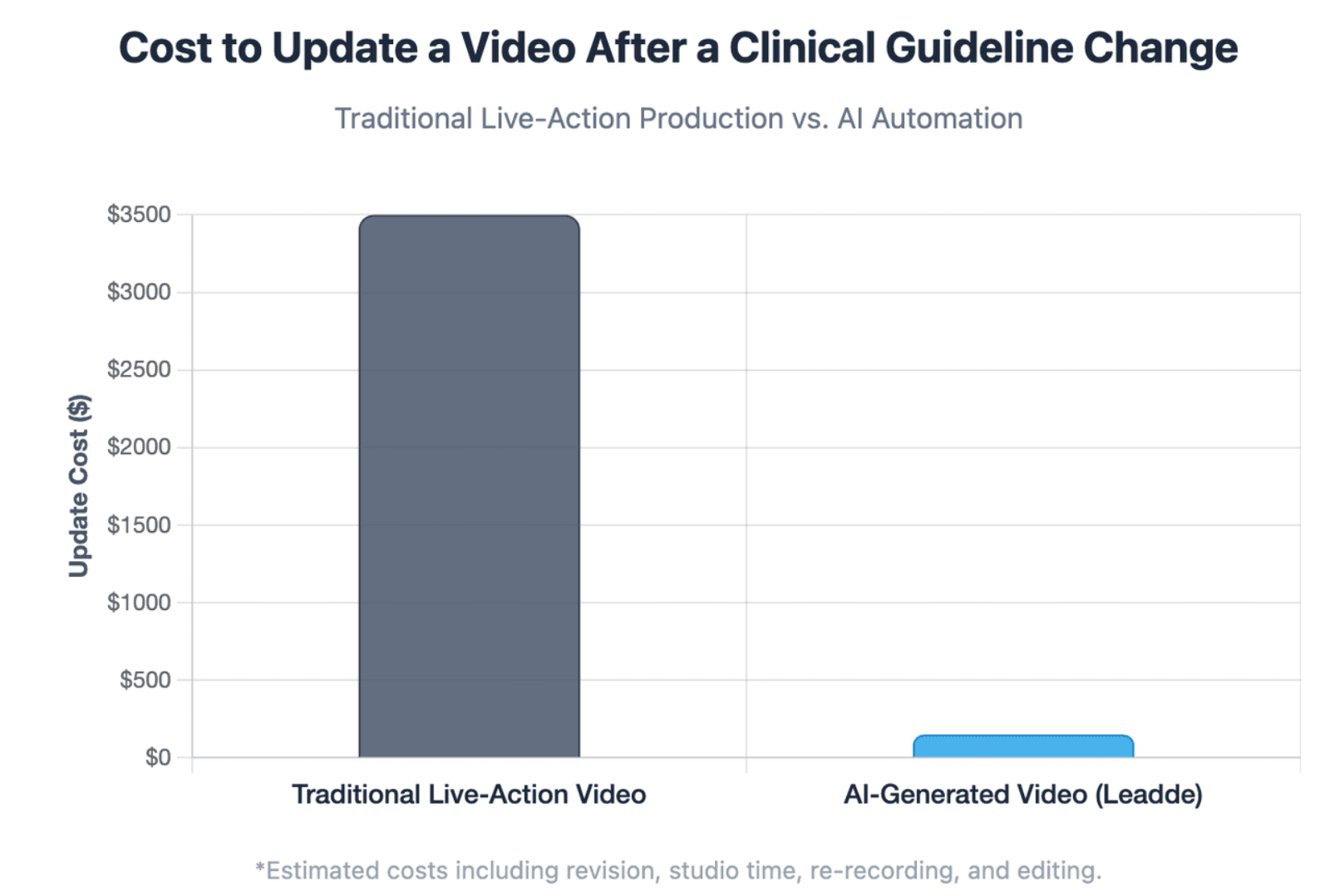
If the video was filmed with a live crew, even a small clinical update can require re-recording, re-editing, and re-approval.
This is why medical education teams should design videos as living content assets, not one-time campaigns.
Why Multilingual and Culturally Adapted Patient Videos Are Hard to Scale Manually
Translation alone is not enough for patient education.
A multilingual patient video may also need:
- Localized examples
- Culturally appropriate visuals
- Regional voiceover or accent options
- Different reading levels
- Adjusted risk explanations
- Separate review by local clinical teams
Manual localization becomes expensive when every language version requires separate recording, editing, and approval.
How Can AI Automation Turn Medical Documents Into Patient Education Videos Faster?
AI automation can help healthcare teams move faster by turning existing medical documents into structured video drafts.
This does not remove the need for clinical review. It reduces the manual effort required to create the first version.
Convert PDFs, PowerPoint Files, Word Documents, Scripts, and Compliance Text Into Structured Videos
Many healthcare organizations already have strong source materials:
- Patient handouts
- Discharge instructions
- Procedure guides
- Product education documents
- Compliance-approved scripts
- Clinical training slides
- Medical affairs content
Leadde can convert PowerPoint files, PDFs, Word documents, scripts, and text into structured video presentations. It can automatically generate outlines, scenes, voice-over scripts, and visual layouts, helping teams focus on content quality instead of manual production.
Use Automated Layouts, Key-Point Highlighting, Voiceover, and Visual Matching to Improve Clarity
Automation is most useful when it supports comprehension.
A strong AI-assisted workflow should help teams:
- Break dense documents into short video sections
- Highlight key patient actions
- Match visuals to the spoken explanation
- Add voiceover
- Create consistent scene layouts
- Generate captions
- Prepare content for review
Leadde includes AI-powered video creation features that automate scene layout, key-point highlighting, presentation flow, and voice-over generation.
Scale Consistent Multilingual Patient Videos While Keeping Clinical Review in the Workflow
For healthcare systems, scale matters. A single English video may not serve the full patient population.
Leadde supports multilingual video workflows across 92 languages, allowing teams to create and manage multiple language versions of the same video.
The safest workflow is:
- Start with an approved source document.
- Generate a plain-language video draft.
- Review the script clinically.
- Localize the video.
- Review the localized version.
- Publish through approved channels.
- Track updates and performance.
AI can accelerate the workflow, but clinical ownership remains essential.
How Can Interactive Patient Education Videos Improve Understanding After the Visit?
Patient education does not end when the appointment ends. Many patients forget instructions after leaving the clinic, especially when they receive complex information during a stressful visit.
Interactive video can help patients revisit key points and find answers without starting from the beginning.
Move Beyond One-Way Video by Letting Patients Revisit Key Sections and Ask Follow-Up Questions
Traditional videos are linear. Patients press play, watch, and leave.
Interactive patient education videos can be more useful because patients can:
- Rewatch specific sections
- Jump to key instructions
- Review warning signs
- Ask questions about the video content
- Explore related topics
- Return to the video after discharge
Leadde includes interactive video experiences such as Chat with Video, allowing viewers to interact with video content, ask questions, and explore material more deeply.
Use Interactive Video Features to Support Post-Discharge Instructions and Self-Care Tasks
Post-discharge education often includes many details:
- Medication timing
- Wound care
- Activity restrictions
- Diet instructions
- Follow-up appointments
- Warning signs
- When to call the care team
A one-way explanation may not be enough. Interactive video can organize these details into sections patients can revisit when they need them.
For example, a post-discharge video could include:
| Section | Patient Need | Limitations |
| Medication schedule | “When do I take this?” | Requires clinical review and quality control |
| Recovery timeline | “What is normal today?” | Slower to update and localize |
| Warning signs | “When should I call?” | Can be expensive and may feel less personal |
| Follow-up care | “What happens next?” | Patients may not read or remember them |
| Self-care checklist | “What should I do at home?” | |
| Analytics | Can teams see whether the content is being used? |
Combine Video, Captions, Summaries, and Next-Step Checklists for Better Patient Recall
Patients understand more when information is repeated in multiple formats.
A strong patient education package should include:
- Short video explanation
- Captions
- Plain-language summary
- Visual checklist
- Next-step instructions
- Contact guidance
- Link to approved resources
The video should not replace clinician communication. It should reinforce it.
Which Patient Education Video Format Delivers the Best ROI for Medical Education Teams?
The best format depends on the content type, update frequency, risk level, budget, and target patient group.
No single video format is best for every use case.
Compare Interactive AI Video, Live-Action Production, 3D Medical Animation, and Static Handouts
Each format has a different role.
| Format | Best For | Limitations |
| Interactive AI video | Scalable education, updates, multilingual versions, document-to-video workflows | Requires clinical review and quality control |
| Live-action production | High-trust provider messages, facility tours, physician introductions | Slower to update and localize |
| 3D medical animation | Anatomy, procedures, device mechanisms, complex visual explanation | Can be expensive and may feel less personal |
| Static handouts | Quick reference, discharge summaries, printed checklists | Patients may not read or remember them |
For many healthcare teams, the best strategy is not choosing one format. It is combining formats.
Evaluate Each Format by Production Speed, Update Cost, Localization, Engagement, and Compliance Review
Medical education directors should evaluate video ROI across the full content lifecycle.
| Evaluation Factor | Why It Matters |
| Production speed | How quickly can teams create new content? |
| Update cost | How hard is it to revise outdated clinical information? |
| Localization | Can the content support multiple languages and patient groups? |
| Engagement | Will patients watch and understand it? |
| Compliance review | Can clinical and legal teams approve changes efficiently? |
| Analytics | Can teams see whether the content is being used? |
Leadde includes version control, real-time updates, sharing, and analytics to help teams manage and optimize video content over time.
Choose the Right Format Based on Patient Risk Level, Content Complexity, and Update Frequency
A simple appointment reminder may not need a full video. A complex discharge protocol may need video, captions, checklists, and clinical review.
Use this decision path:
- Low-risk, simple information: short video or one-page handout
- Moderate complexity: explainer video with captions and summary
- High-risk instructions: clinician-reviewed video plus written checklist
- Frequently updated content: AI-assisted video workflow with version control
- Complex anatomy or devices: animation plus plain-language narration
- Multilingual patient groups: localized video versions with review
ROI improves when the format matches the real clinical need.
What Is the Step-by-Step Checklist for Creating Compliant Patient Education Videos?
A compliant patient education video is not just accurate. It is clear, reviewed, accessible, current, and actionable.
Use a structured checklist before publishing.
Phase 1: Write a Plain-Language Script With One Clear Patient Action
Start with the patient’s real question.
Examples:
- “How do I prepare for my colonoscopy?”
- “How do I use this inhaler?”
- “What symptoms should I watch for after surgery?”
- “How do I take this medication safely?”
Then define one primary action.
A good script should include:
- A direct answer in the first 10–20 seconds
- Everyday language
- Short sentences
- One idea per section
- Calm explanation of risks
- A clear next step
- Guidance on when to contact the care team
Avoid turning the video into a full lecture. Patients need the right information at the right moment.
Phase 2: Choose Visuals, Avatars, Voiceover, Captions, and Language Settings That Match the Patient Group
Visual design should make the message easier to understand.
Use:
- Simple diagrams
- Large readable text
- Strong contrast
- Captions
- Calm voiceover
- Consistent presenters
- Clear icons
- Step-by-step visuals
Avoid:
- Graphic images unless clinically necessary
- Fast transitions
- Small text
- Cluttered slides
- Decorative animations
- Long blocks of on-screen text
Leadde offers 200+ AI avatars and supports personal digital avatars from user-uploaded photos, helping teams create consistent presenter-led videos without repeated filming.
Phase 3: Add Clinical Review, Version Control, Action Checklists, and Update Ownership
Every medical video should have a clear review process.
Before publishing, confirm:
- The script was reviewed by a qualified medical expert.
- The language is patient-friendly.
- The video does not provide personalized diagnosis or treatment advice.
- The video explains when to contact a clinician.
- Captions and summaries are included.
- The source material is documented.
- The update owner is assigned.
- The review date is visible internally.
- Translated versions are checked for accuracy.
Healthcare teams should also track which videos need future updates. A patient education video that is accurate today may be outdated next year.
Conclusion
Medical institutions can master scalable patient comprehension by combining plain language, calm visual storytelling, clinical review, accessibility, multilingual delivery, and continuous content updates. The goal is not simply to create more videos. The goal is to create patient education experiences that help people understand what matters, remember what to do, and feel supported before, during, and after care.





