
Leadde Logo

Data Animation Maker

Turn complex data sets into clear, animated explainer videos in minutes. Leadde's data animation maker uses AI Motion, narrated scenes, and 200+ presenters to bring charts, statistical findings, business metrics, and research data to life — no animator or video editor needed.

Why Leadde is the Best Data Animation Maker

Cover Every Data Format in One Workflow

Cover Every Data Format in One Workflow

From bar charts, line graphs, and scatter plots to statistical summaries, financial dashboards, and research findings, Leadde structures any data set or content brief into a scene-by-scene data animation video — covering data visualization, business analytics, and academic research in a single tool.
AI Motion for Data Trends, Comparisons, and Insights

AI Motion for Data Trends, Comparisons, and Insights

Static data slides can't show how a metric climbed quarter by quarter or how two variables correlate as a data set fills in. Leadde's Text-to-Motion turns prompts into animated data visuals — showing bars rising, trends tracing, and key insights building with narrated context at every step.
Narrated Data Animation Videos in 88 Languages

Narrated Data Animation Videos in 88 Languages

Pair every data animation with a lifelike AI presenter. Choose from 200+ avatars with the Expressive IV Engine, then translate voiceover and on-screen text into 88 languages and 175 dialects — ideal for global business teams, international research programs, and multilingual online courses.
Templates for Reports, Dashboards, and Presentation Videos

Templates for Reports, Dashboards, and Presentation Videos

Apply your brand, university, or organization's colors, logo, and font once, then reuse the layout across every data video — keeping data animation videos visually consistent from quarterly reports in month one to annual reviews and research publication summaries in the final quarter.

How to Create a Data Animation with AI
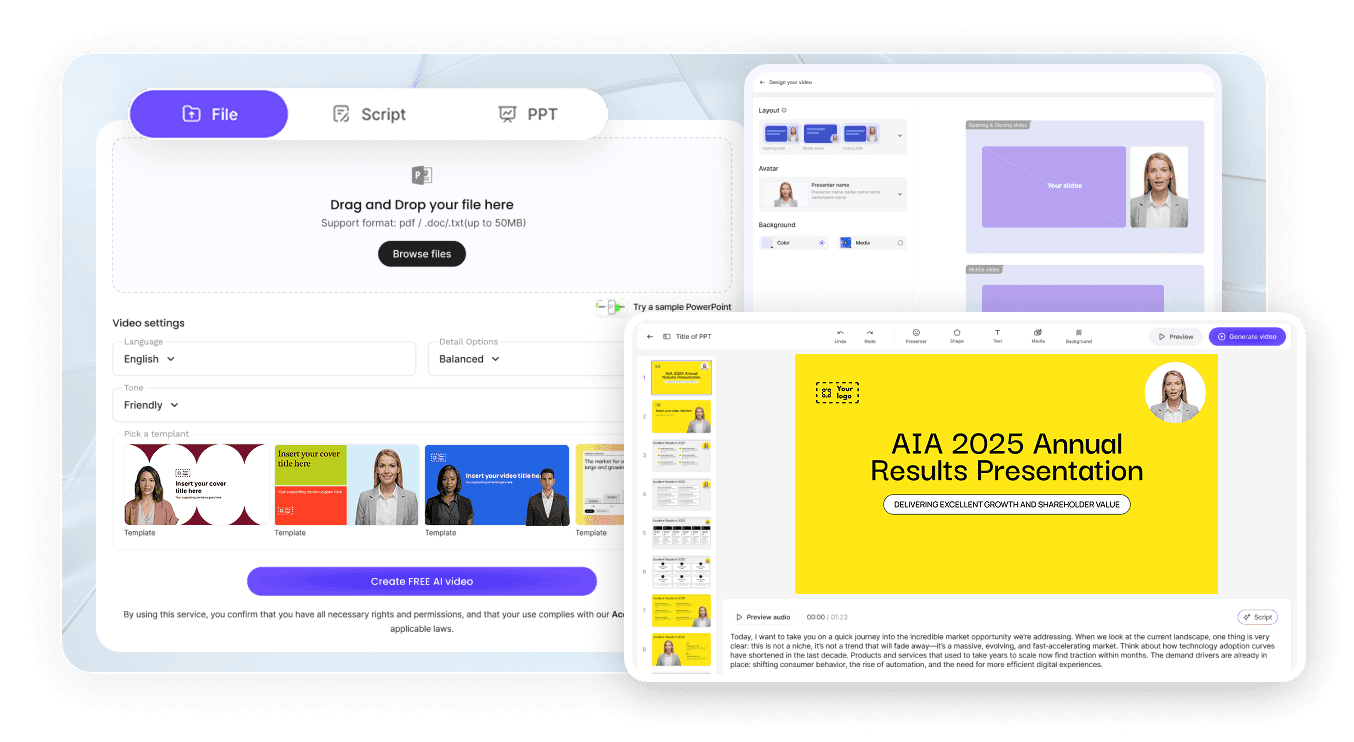
Turn a data set or analytical brief into a polished animated video in three steps — no animator required.
AI Video Generator Interface

Step 1: Add Your Data, Brief, or Report

Log into Leadde and paste your data points or upload a report, spreadsheet summary, or PowerPoint deck. Set your audience and narrative style — the AI builds a scene-by-scene data animation outline.

Step 2: Generate Animations and Narration

Open Text-to-Motion and generate animated visuals from a prompt like "revenue growth bar chart with quarterly labels and trend callout" or "scatter plot showing customer satisfaction vs retention rate." Add an AI presenter, drag in supporting data labels, and apply your Brand Kit across every scene.

Step 3: Refine, Translate, and Share with Your Audience

Preview pacing, then click "Generate Video." Download the HD MP4 and upload to YouTube, LinkedIn, or your company LMS — or translate into 88 languages and share via a password-protected Leadde link.

Charts, Graphs & Data Visualization Videos

Bar Chart Data Animation

Build a bar chart animation walking through category comparisons, value labels, and trend highlights — every bar rising in sequence with narrated insight connecting each data point to the key message. Perfect for business reports, marketing presentations, and classroom data literacy lessons at any level.

Line Graph Data Animation

Animate data points plotting and connecting across a timeline — a line graph animation tracing growth, dips, and turning points with animated callouts at each key moment. Ideal for financial reporting, scientific data lessons, and business performance presentations at any level.

Scatter Plot and Correlation Animation

Show data points appearing on a coordinate plane and a line of best fit drawing through the distribution — a scatter plot animation mapping positive, negative, and zero correlation and connecting the pattern to the underlying relationship. Perfect for statistics, research, and data science courses.

Dashboard and KPI Animation

Animate multiple metrics, gauges, and charts building across a live data dashboard — a KPI animation mapping performance against targets, trend direction, and key business insights in one connected scene. Ideal for executive presentations, team briefings, and investor update videos.

Research, Statistics & Academic Data Videos

Survey and Research Data Animation

Animate survey response distributions, demographic breakdowns, and key finding highlights — a research data animation turning raw survey results into a clear narrated data story. Perfect for academic presentations, market research reports, and public communication of research findings.

Statistical Distribution Animation

Show normal distributions, skewed distributions, and probability density functions building on animated axes — a statistical distribution animation connecting shape, mean, standard deviation, and real-world interpretation in one connected scene. Ideal for AP Statistics and undergraduate data science courses.

Regression and Predictive Data Animation

Animate a regression line fitting to data points and a predictive model projecting forward — a regression animation connecting observed data, model fit, and future projection in one clear visual. Perfect for undergraduate statistics, data science, and business analytics courses at any level.

Academic Research Findings Animation

Step through hypothesis, methodology, results, and conclusion building across a research summary — an academic data animation turning a study's key findings into a narrated, shareable video. Ideal for research dissemination, academic conferences, and university course content at any level.

Trusted by Analysts, Educators, and Content Creators

One Tool for Every Data Format and Audience

From simple classroom bar charts to complex multi-metric financial dashboards and academic research summaries, Leadde covers every data format in one workspace — build a whole campaign or course's worth of animated data videos without switching tools, hiring animators, or re-recording.

Update Content as Data Changes

Metrics update, new findings emerge, and reports refresh regularly. Reopen your saved Leadde project, edit the script and data, and regenerate the data animation instantly — no re-recording, no re-animating, and no third-party motion-graphics shop ever required.

Interactive Q&A for Every Viewer

Share each data animation through a password-protected Leadde hosted link and viewers can ask follow-up questions in the built-in chat panel — answered instantly from your uploaded content. The video becomes an always-on data explainer for students, clients, and teams.

Track Engagement and Comprehension

Use Leadde's analytics dashboard to monitor impressions, total views, unique views, average watch time, completion rate, and interaction count for every data animation — easy to identify which videos need a follow-up or content refresh.
compliance background

Data Animation Ideas & Use Cases

Business Reports & Executive Presentations

Convert quarterly KPIs, revenue data, and market analysis into animated data videos that communicate performance clearly in boardroom presentations and investor updates.

Marketing Campaigns & Social Content

Build animated data videos covering campaign metrics, audience insights, and competitive benchmarks for client reports, agency decks, and social media content.

Online Course & eLearning Modules

Package data animation videos as standalone lessons for Udemy, Teachable, or Coursera — each data topic its own narrated, scene-by-scene video.

Academic Research & Conference Presentations

Students and researchers turn survey findings, statistical results, and study conclusions into polished animated data videos for academic presentations and publication summaries.

NGO, Government & Public Communication

Organizations build animated data explainers on public health statistics, policy outcomes, and social indicators for accessible, multilingual public communication.

Multilingual Global Teams and Audiences

Generate the data animation once and translate into 88 languages — for international business teams, global research programs, and multilingual audience engagement.

FAQs

A data animation maker is software that turns data sets, statistics, and analytical findings — bar charts, scatter plots, financial metrics, and research results — into animated, narrated explainer videos. Leadde uses AI to generate Motion graphics from a

Yes. Leadde's Free Plan gives you full access to the AI Video Creator, Text-to-Motion generation, the 200+ avatar library, and core editing tools. You can generate your first data animation video entirely in your browser — no credit card and no software i

You can animate any data topic that fits a scripted video — bar charts, line graphs, scatter plots, dashboards, KPIs, revenue data, marketing metrics, financial statements, competitive analysis, survey results, statistical distributions, regression models

Yes. Leadde supports 88 languages and 175 dialects. Create the data animation once in your source language, then use the Translate tool to regenerate it with localized voiceover, synced lip movements, and on-screen captions for every viewer in your audien

You can try it yourself by heading to the sidebar and navigating to AI Tools > Create Media, where you’ll find two ways to generate visuals. For a free option, use the Motion tab to animate specific actions or explanations. For full video generation, Text

Ready to try Leadde?

Start creating data animation videos today. Sign up free — no credit card required, no animation software to learn.
avatar

