Where to Use MiniMax H3: Best Use Cases, Workflows, and Real-World Lessons

MiniMax H3 is best used when part of the video is already defined—such as a product image, character identity, first or last frame, motion reference, camera movement, or voice—and you want AI to generate the rest without losing those controls.
That makes it especially useful for product ads, e-commerce videos, character performances, motion transfer, dialogue scenes, cinematic concepts, and targeted video editing. Use T2V when the direction is open, I2V or FL2VA when visual states are fixed, and Ref2VA when different references need to control identity, motion, camera, voice, or style.
For broader workflows such as turning PDFs, presentations, or SOPs into structured multilingual videos, Leadde handles the document-to-video process at the project level, while H3 is better evaluated as a shot-generation tool inside a larger production workflow.

Where to Use MiniMax H3: What Is It Best Used For?
MiniMax H3 is most useful for short video shots where some creative elements are already defined and need to remain controlled. Examples include a product image that must keep its shape, a character whose identity should carry into a new performance, a reference video supplying motion or camera movement, or an audio file defining voice or sound. MiniMax positions H3 around advertising, branding, e-commerce, product design, UI/UX, and gaming, while also demonstrating film titles, animated graphics, and reference-driven production. A useful way to choose H3 is to start with your existing assets rather than your industry.
A useful way to choose H3 is to start with your existing assets rather than your industry.
| Starting Point | H3 Workflow | Best Fit |
| Only an idea | T2V | Concept exploration |
| One approved image | I2V | Product or character animation |
| Fixed first and last frame | FL2VA | Controlled transitions |
| Fixed ending | L2VA | Building toward a hero frame |
| Images, video, or audio references | Ref2VA | Multimodal controlled generation |
| Existing footage | Reference/editing workflow | Targeted changes |
The practical question is: What parts of the final video are already decided? The more elements that need to survive from existing assets, the more relevant H3's reference-driven approach becomes.
What Makes MiniMax H3 Different, and Which Workflow Should You Use?
H3 is designed as an omni-modal system that understands text, images, video, and audio in a shared context and produces video with native stereo sound. MiniMax's own example combines one reference for camera movement, another for a character, and a third for vocals—illustrating that H3 is intended to understand the relationship between references, not simply accept more files.
T2V, I2V, FL2VA, L2VA, and Ref2VA
Use T2V when the visual direction is still open. Use I2V when an existing image needs to become the visual anchor. FL2VA is useful when both the opening and ending compositions matter, while L2VA works backward toward a defined final frame. Use Ref2VA when different images, videos, and audio files need to control separate attributes of one shot.
The released H3 Base checkpoints currently separate FL2VA-family generation from Ref2VA generation. The former supports text and optional first/last frames; the latter accepts multimodal references.
The Locked-vs-Generative Framework
In professional video workflows, I find it more useful to separate a shot into locked elements and generative elements.
A product's shape, character identity, wardrobe, logo, or approved composition may be locked. Camera movement, lighting, environment, performance, or atmospheric sound may remain generative.
That leads to a simple production principle:
Lock what has already been approved. Generate only what is still undecided.
It reduces the number of decisions the model has to make at once and makes failed generations easier to diagnose.
Which MiniMax H3 Use Cases Deliver the Most Value?
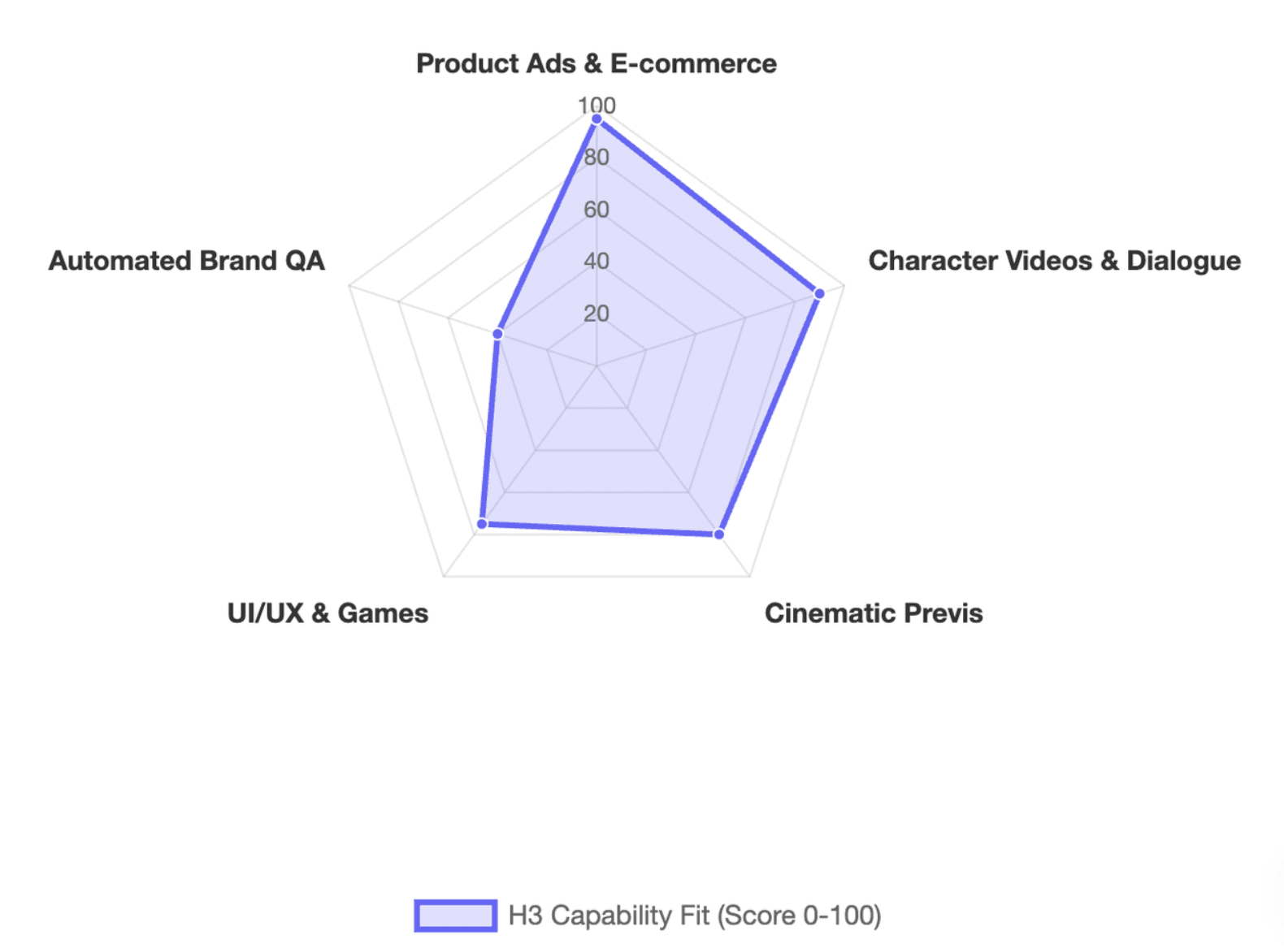
Product Ads, E-commerce, and Brand Commercials
Product advertising is a strong fit because teams often start with approved product photography rather than a blank prompt. An I2V workflow can animate a hero product image, while FL2VA can connect two approved compositions. Ref2VA becomes more useful when a separate commercial supplies the motion or camera language.
MiniMax specifically highlights text and brand rendering alongside advertising and e-commerce as H3 target applications. Even so, production teams should manually check product proportions, package labels, logos, prices, and small typography before publishing. “Better text rendering” is a capability claim, not a reason to skip brand QA.
Character Videos, Dialogue, Motion Transfer, and Camera Reference
Character work is where multimodal references become especially interesting. A character image can provide identity, a video can provide body movement, another video can influence camera motion, and audio can guide voice or performance.
The important distinction is that subject motion and camera motion are different control problems. Treating them separately makes the prompt and reference structure easier to reason about.
Community experiments show why testing matters. Some creators report good continuity across multi-shot H3 workflows, while others build explicit anchoring strategies to reduce character drift between clips. These are individual workflow reports rather than controlled benchmarks, but they reinforce a practical lesson: consistency should be tested across turns, distance changes, cuts, and occlusion—not only on a flattering close-up.
Cinematic Previs, Titles, UI, Games, and Stylized Animation
H3 can also function as a previsualization and motion-design layer. MiniMax's launch examples include film opening titles and animated poster-style work, while its stated application areas include UI/UX and gaming.
That makes it useful for exploring title treatments, interface motion, game HUD concepts, stylized character sequences, and storyboard transitions before a team commits to final production.
The key is not to force H3 to make the entire project. Use it for the shots where generative motion, references, or audiovisual timing create real value.
How Do You Use Ref2VA Without Losing Control?
Give Every Reference One Clear Job
The strongest Ref2VA workflow is not the one with the most references. It is the one where every reference has a clear responsibility.
| Reference | Primary Role |
| Character image | Identity |
| Product image | Shape and branding |
| Motion video | Body movement |
| Camera video | Camera path |
| Audio | Voice, music, or sound |
| Style reference | Art direction |
| First/last frame | Composition |
ComfyUI's official H3 documentation recommends explicitly stating which reference drives identity, style, motion, camera movement, or voice.
A useful rule is: reference density should never exceed reference clarity. Adding another file also adds another relationship the model has to interpret.
Use a Source-of-Truth Workflow
For multi-shot projects, keep master character images, product assets, approved branding, voice references, and style references separate from generated outputs.
Instead of repeatedly using the previous generated clip as the new master, return to clean source assets whenever continuity allows. Community users working on chained H3 sequences have developed keyframe anchoring and reference strategies specifically to control character drift across cuts.
Think of this as a source-of-truth workflow: every generation introduces uncertainty, so avoid turning accumulated uncertainty into your only reference.
Define the Role of Audio
Audio deserves the same discipline as visual references. Is the file dialogue, a voice reference, background music, environmental sound, or off-screen narration?
That distinction matters because community users have reported H3 characters lip-syncing to supplied music when that behavior was not intended. Other experiments show that explicitly instructing H3 to reuse audio can drive lip synchronization.
The broader lesson is simple: audio is not decoration in H3; it is part of the model's multimodal context.
How Should You Run, Test, and Evaluate MiniMax H3 in Production?
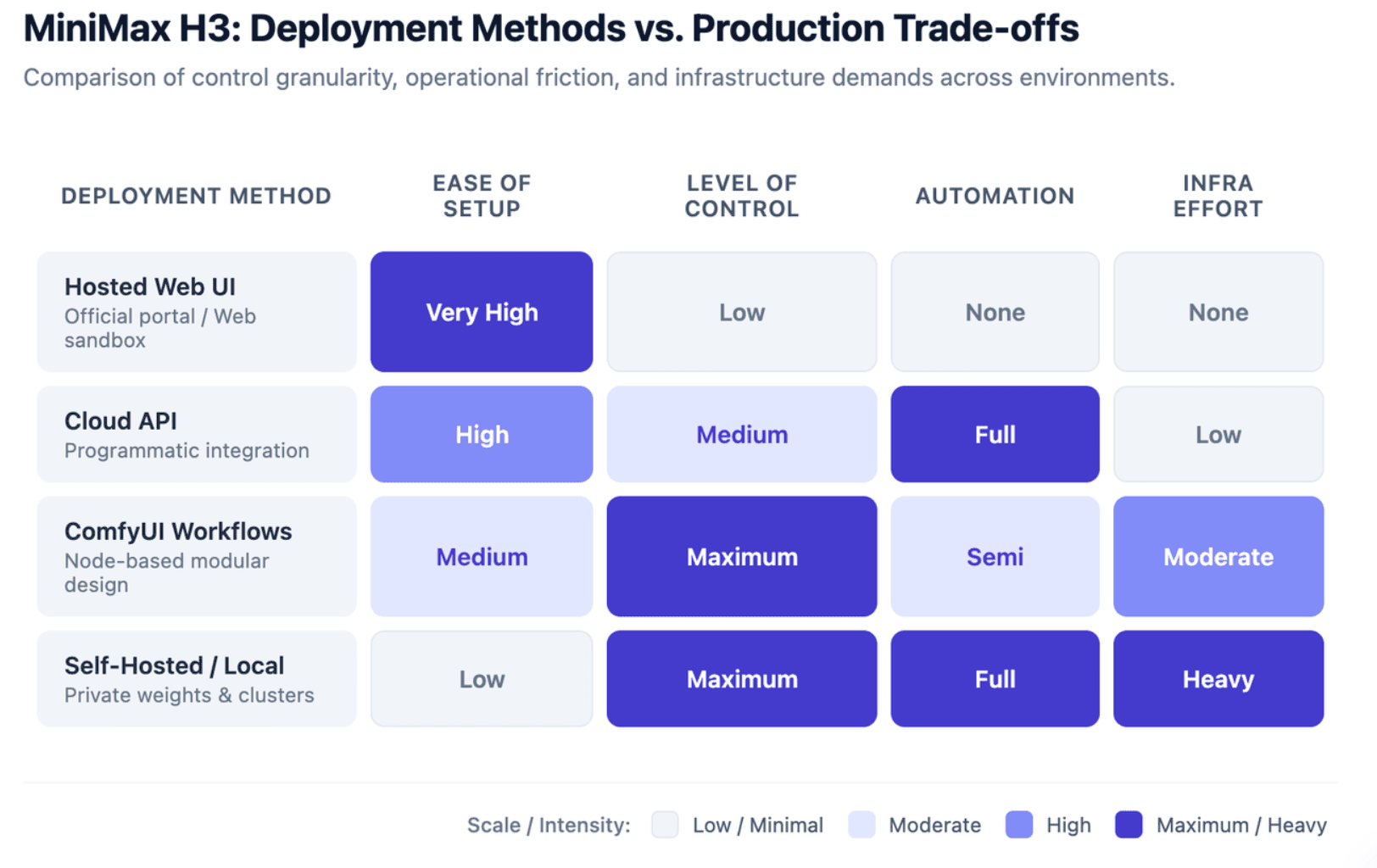
Online, API, ComfyUI, or Local?
Different access methods solve different problems. A hosted interface is easiest for experimentation. APIs make sense for automated products. ComfyUI is valuable when creators need reusable node workflows and explicit control over references. Self-hosting offers the most infrastructure control but also requires the most engineering effort.
ComfyUI currently supports native H3 T2V, I2V, and R2V workflows. Its templates use a roughly 768-pixel short-edge native canvas for full-quality Base output, while MiniMax's broader 2K workflow combines H3-Base with additional Context-IR and Regenerate-2K stages.
This distinction matters: running H3-Base locally is not automatically the same as reproducing the complete hosted 2K pipeline.
Use Failure-First Testing
Do not evaluate H3 only by asking whether a demo “looks cinematic.” Test the failure that would damage your project most.
For a spokesperson, test identity after a turn or temporary occlusion. For e-commerce, test product geometry while it is being handled. For UI content, inspect exact labels. For dialogue, verify speaker identity and timing. For product demonstrations, test hand-object interaction instead of an easy floating hero shot.
This is closer to a production acceptance test than a model beauty contest.
Reduce Retries Before Increasing Quality
A low-cost preview is often more useful than immediately maximizing resolution. ComfyUI's official H3 templates deliberately start with faster preview sizes, and it documents Sage Attention as an optional acceleration path.
A practical workflow is:
- Generate a short preview.
- Validate identity and composition.
- Check motion, camera, and audio behavior.
- Remove ambiguous references or instructions.
- Increase duration or resolution only after the control structure works.
For teams, the useful cost metric is not simply price per generation. It is effective cost per usable shot: total generation spend divided by the clips that actually pass review.
When Should You Not Use MiniMax H3, and What Should Teams Check Before Deployment?
H3 is less compelling when your task does not benefit from multimodal reference control. A simple image that only needs subtle motion may not justify a more complex Ref2VA pipeline. H3's official output range is also short-form—up to roughly 15 seconds—so long-form projects still require shot planning, editing, continuity, and a broader production system.
This distinction is particularly important for training and educational video. If a team's starting point is a PDF, PowerPoint, SOP, or product manual, the real challenge is not only generating a cinematic shot. The workflow also needs content understanding, information hierarchy, scripts, scenes, narration, updates, and localization.
That is where a platform such as Leadde operates at a different layer: its official positioning focuses on transforming documents, PDFs, PowerPoint files, SOPs, and other business knowledge into structured multilingual videos with scripts, scenes, narration, avatars, and localization workflows. H3 can be a useful generative component for selected visual shots; Leadde addresses the broader document-to-video production process.
For other video models such as Kling or Veo, avoid choosing from a leaderboard alone. The better question is whether your project needs H3's specific combination of references, first/last-frame control, integrated audio, editing, or open-weight deployment. Choose from the production constraint, not the benchmark position.
Commercial deployment also needs a license check. MiniMax H3 currently uses the MiniMax H3 Community License rather than an unrestricted permissive open-source license. The standard license excludes the EU, UK, United States, and South Korea from its applicable territory, while MiniMax says organizations there can apply for separate authorization; its hosted API remains globally available under provider-managed safeguards.
The license also states that commercial products or services generating more than US$20 million in yearly revenue require separate prior written authorization, and commercial interfaces using H3 must prominently display “MiniMax H3.” Always review the latest license before deployment; this is operational information, not legal advice.
Frequently Asked Questions About MiniMax H3
What is MiniMax H3 best used for?
MiniMax H3 is best suited to short audiovisual shots where existing assets need to control specific parts of the output. Product videos, character performances, motion transfer, camera-reference shots, first/last-frame transitions, video editing, and multimodal commercials are stronger fits than completely unconstrained generation.
What is the difference between T2V, I2V, FL2VA, and Ref2VA?
T2V starts from text. I2V animates an image. FL2VA uses a first frame, last frame, or both to control the shot. Ref2VA accepts images, video, and/or audio references so different assets can guide identity, motion, camera behavior, voice, or other attributes.
Can MiniMax H3 keep the same character across videos?
H3 supports identity reference workflows, but “supports identity reference” is not the same as guaranteed consistency across every shot. For production, test changes in camera distance, angle, expression, movement, and occlusion, and keep clean master references as your source of truth.
Can H3 use motion, camera, and voice references at the same time?
Yes. H3 is specifically designed to understand multimodal references and the relationships between them. MiniMax demonstrates workflows where separate assets control camera movement, character appearance, and audio behavior.
Can MiniMax H3 run locally, and is local H3 the same as the hosted 2K workflow?
H3-Base weights can be deployed locally through supported frameworks and ComfyUI workflows. However, MiniMax's documented full 2K reproduction workflow also uses official Context-IR and Regenerate-2K services, so a local Base deployment should not be treated as identical to the complete hosted pipeline.
Can MiniMax H3 be used commercially?
Commercial use depends on the current H3 Community License, territory, scale, and deployment method. MiniMax currently applies different conditions to open weights and hosted API access, and organizations in restricted regions can request authorization. Teams should review the latest official license before commercial deployment.
Conclusion
MiniMax H3 is most valuable when preserving the right information matters as much as generating something new. Use T2V for open concepts, I2V or FL2VA when visual states are already approved, and Ref2VA when identity, motion, camera, voice, or style must come from separate references. In many real projects, the best role for H3 is not the entire video—it is the specific shot where multimodal control solves a production problem.