MiniMax H3 Prompt Guide: How to Write Better Video, Ref2VA, Camera, Audio, and Reference Prompts

A strong MiniMax H3 prompt should define more than visual style. It should explain what happens over time, how the camera moves, which details must stay consistent, what each reference contributes, and how dialogue, sound, and music fit into the sequence. For better control, the key is to choose the right H3 mode, describe observable changes, and give every reference a clear role.
This guide covers T2VA, I2VA, FL2VA, L2VA, Ref2VA, camera control, audio, character consistency, and practical troubleshooting. These principles also apply to structured AI video workflows such as Leadde, where documents, training materials, and product information are transformed into scalable videos with narration, avatars, and multilingual output.

MiniMax H3 Prompt Guide: What Is the Best Prompt Structure?
The most useful way to think about a MiniMax H3 prompt is as an audiovisual production brief. Instead of stacking words such as “cinematic,” “realistic,” and “dramatic,” describe what the viewer can actually see and hear as the clip develops to understand how to make realistic AI videos.
The Simple H3 Prompt Formula
For everyday prompting, start with:
Subject + Action + Environment + Camera + Timing + Audio
For example, “a woman in a rainy train station” establishes a scene, but it does not create much temporal information. A stronger prompt explains that she walks toward the platform, stops when she hears an approaching train, turns toward the sound, and is followed by a slow tracking camera.
MiniMax’s official Base Prompt Guide formalizes this idea with three fields: integrated_multimodal_description, overall_soundscape, and non_diegetic_music. The first carries the visual timeline, actions, shots, speakers, dialogue, and synchronized scene audio; the other two separate environmental/physical sound from audience-only background music.
Write Observable Results, Not Just Adjectives
A useful rule is to convert abstract intentions into visible behavior.
Instead of “she looks confident,” describe her walking steadily, maintaining eye contact, straightening her jacket, and stopping without hesitation.
The same approach can help with constraints. Instead of repeating “do not zoom in,” describe the intended result: “the subject remains approximately the same size in frame from beginning to end.” A community H3 consistency test reported that measurable framing constraints worked better in that particular workflow than repeatedly stating a negative camera instruction. This is an anecdotal workflow observation, not an official MiniMax guarantee.
Which MiniMax H3 Mode Should You Use?
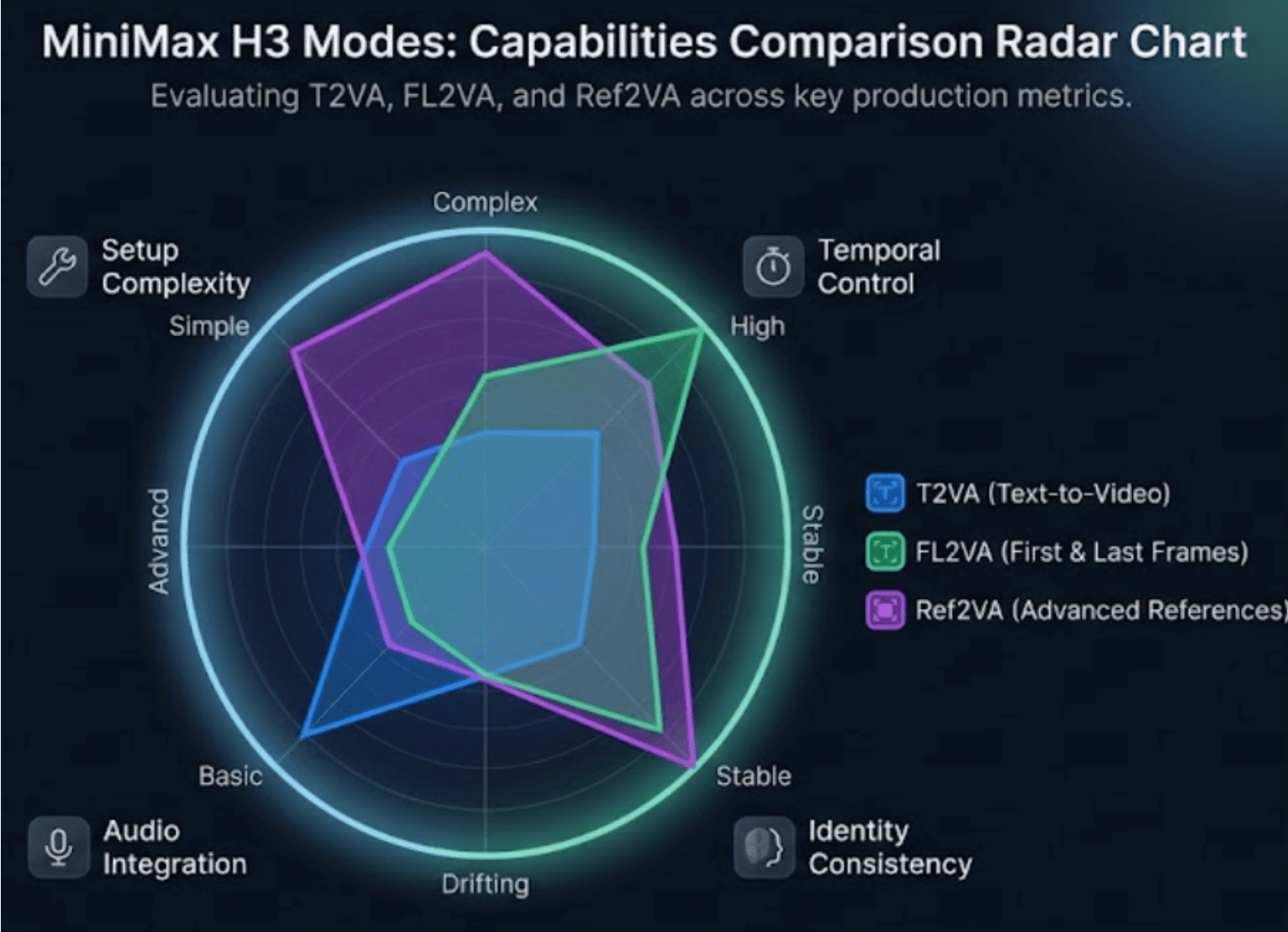
Choosing the correct mode can matter as much as rewriting the prompt. MiniMax’s Base workflow supports text-only generation plus first-frame, last-frame, and first-and-last-frame tasks, while its separate Ref2VA checkpoint handles multimodal reference generation.
| Mode | Input | Best Prompt Goal |
| T2VA | Text | Build the full audiovisual scene |
| I2VA | First frame | Preserve the opening and develop forward |
| FL2VA | First + last frame | Describe the transition between endpoints |
| L2VA | Last frame | Build toward the supplied ending |
| Ref2VA | Images/video/audio | Combine different reference roles |
T2VA, I2VA, FL2VA, and L2VA
T2VA must establish the scene from scratch. I2VA treats the supplied picture as the actual first frame, so the prompt should preserve identity, clothing, objects, colors, and composition before introducing movement.
With FL2VA, the prompt should not simply describe Picture 1 and Picture 2. MiniMax specifically recommends describing the observable path between them: how the subject moves, how poses change, how objects are manipulated, and how composition or lighting converges on the final frame. L2VA reverses the reasoning process by starting from a plausible earlier state and gradually landing on the supplied last frame.
When Should You Use Ref2VA?
Use Ref2VA when different assets perform different jobs—for example, one image defines a character, another defines clothing, a video supplies walking motion and camera rhythm, and audio supplies a voice reference.
This is better understood as relationship-led generation. The model needs to know not only what each file contains, but how information from each source should influence the final video. MiniMax’s full-reference format explicitly distinguishes reusable subjects, concrete picture anchors, video-level temporal sources, and audio references.
Use the Simplest Mode That Can Solve the Shot
A practical production rule is: do not add reference complexity unless the shot needs it.
If a transition only needs a precise opening and ending, FL2VA gives the task a direct definition. Move to Ref2VA when you genuinely need relationships such as identity from Image 1 + motion from Video 1 + voice from Audio 1.
This also makes debugging easier. When fewer independent constraints are competing, it is easier to identify whether the problem comes from motion, identity, framing, or audio.
How Do You Control Shots, Camera Movement, Timing, and Transitions?
H3 prompts become easier to control when the timeline is treated like an edit rather than a paragraph.
Shot Cuts, Timestamps, and Temporal Budget
MiniMax’s official format does not timestamp [Shot 1]. Later shots begin with increasing cut times, such as [Shot 2] At 00:03.500. A new shot should introduce meaningful new information—such as a different viewpoint, location, state, subject, or time. A small distance or angle change is usually better expressed as camera movement rather than another cut.
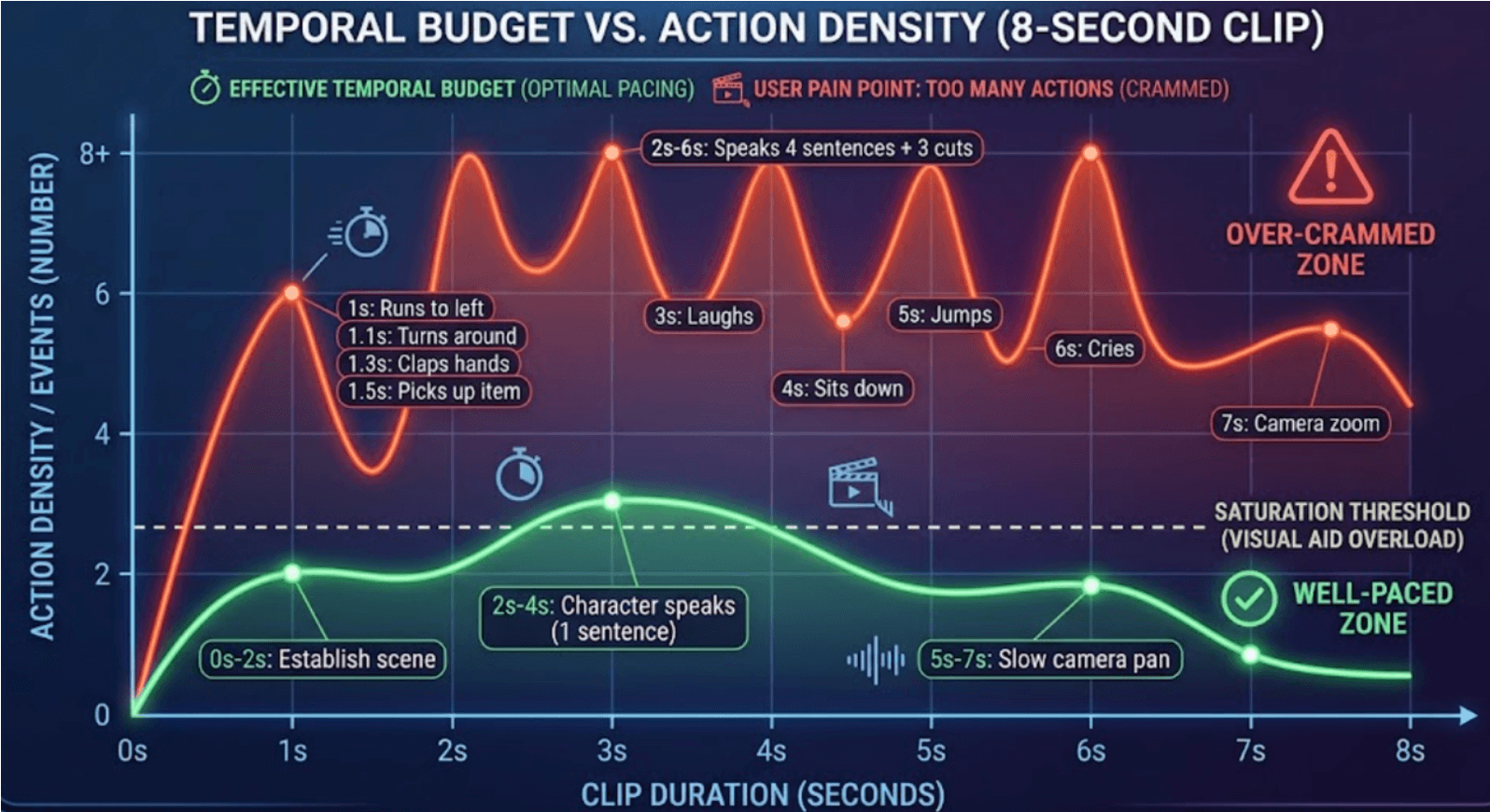
This creates a practical temporal budget. In an 8-second clip, three actions, two camera moves, a reaction, a spoken sentence, and two cuts all compete for the same limited duration. When a generation feels rushed, removing events often works better than adding more descriptive language.
Camera Language H3 Can Follow
MiniMax documents camera operations including push/pull, pan, truck, tilt, pedestal, arc, tracking, static shots, POV, roll, and camera shake. Its recommended logic is essentially:
Motion Type + optional Amplitude + optional Speed
So instead of “dynamic cinematic camera,” write something actionable, such as “the camera slowly trucks right while keeping the product centered.”
Separate What Must Stay Fixed From What Can Change
Before generating, create a simple mental fixed-vs-variable map.
A product video may require the bottle shape, label text, cap, and color to remain fixed while camera position, reflections, water movement, and lighting change. A character sequence may lock face, hairstyle, and outfit while allowing pose and expression to evolve.
This reduces contradictory instructions because the prompt is no longer asking every visual property to change at once.
How Do You Use References Without Losing Character or Product Consistency?
The strongest reference workflows assign every asset a specific purpose.
Give Every Reference One Clear Job
A practical mapping might be:
Image 1 → character identity Image 2 → clothing Image 3 → product design Video 1 → walking motion and camera path Audio 1 → voice timbre
MiniMax’s official Ref2VA format supports exactly this kind of cross-source definition: one subject can obtain appearance from a picture and motion from a video, while a single reference file can also provide multiple reusable subjects.
The important part is avoiding accidental transfer. If Video 1 should provide motion but not its actor or environment, say so explicitly in the relationship design.
Subjects, Pictures, Storyboards, and Reference Video
In official terminology, <Subject N> represents reusable visible content, while <Picture N> is used when an image itself serves as a concrete frame, composition anchor, or video script and storyboard reference. <Video N> represents whole-video relationships such as editing, continuation, camera movement, cuts, rhythm, or temporal structure. <Audio N> handles audio copying or characteristics such as voice timbre, delivery, rhythm, or music style.
This distinction prevents a common conceptual error: a character reference is not automatically a keyframe, and a storyboard is not automatically an exact endpoint.
Reference Economy and Shot-Level Consistency
More reference material is not automatically more informative. In production workflows, trim a reference video to the portion that clearly demonstrates the movement, camera path, or vocal quality you need.
Also evaluate identity throughout the shot rather than only at frame one. One community test found substantially earlier identity drift in close-ups than in smaller-face framings under that user’s specific local setup. The exact timings should not be generalized, but the workflow lesson is useful: check face identity, clothing, and small props at several points in each important shot.
How Does Advanced Ref2VA, Dialogue, and Audio Prompting Work?
Ref2VA is where H3 prompting becomes more like multimodal production planning than conventional text-to-video prompting.
The Six-Part Ref2VA Prompt Structure
MiniMax’s full-reference guide defines six sections:
subject_definitions → summary → retention_analysis → detailed_description → overall_soundscape → non_diegetic_music.
The system first defines what references mean, then summarizes the task, explains how each reference is preserved or transferred, and finally writes the target video in playback order.
A useful planning layer before writing the formal prompt is:
| Source | Preserve | Transfer | Ignore |
| Image 1 | Face, hair | — | Background |
| Video 1 | — | Walk, camera | Actor identity |
| Audio 1 | Voice timbre | Delivery | Original dialogue |
This turns a vague request such as “use all these references” into explicit source-to-target relationships.
Dialogue, Voice, Sound Effects, and Music
Speaking characters use stable IDs such as (S1) and (S2), while dialogue is placed inside <d>[Language] ...</d>. MiniMax also distinguishes on-screen dialogue from off-screen voiceover and recommends explicitly keeping an on-screen character’s lips closed when that character is only narrating.
Environmental sounds and physical effects belong in the soundscape, while non_diegetic_music is reserved for music heard by the audience rather than the characters. If you want footsteps, rain, and object sounds but no score, keep the soundscape and set non_diegetic_music: N/A.
Natural-Language Prompt vs Official Structured Prompt
Short natural-language instructions can still work in the hosted H3 system because MiniMax uses H3-Context-IR, a preprocessing layer that interprets relationships among text, images, video, and audio before producing a structured representation for H3-Base. The open model card describes instruction parsing, cross-modal association, temporal understanding, and logical reasoning as part of that process.
This explains an apparent contradiction: simple prompts can be appropriate for straightforward hosted generations, while structured prompts become more valuable for precise multi-reference, dialogue, timing, and repeatable production tasks.
Why Does MiniMax H3 Ignore Prompts, and What Is the Best Testing Workflow?
When a generation fails, rewriting everything at once makes the cause harder to identify.
Common H3 Prompt Problems and Fixes
| Problem | Likely Cause | First Thing to Test |
| Wrong person speaks | Speaker mapping unclear | Lock (S1)/(S2) |
| Character changes | Conflicting identity signals | Simplify references |
| Reference ignored | Role is ambiguous | Assign one job |
| Random cuts | Too many shot instructions | Use camera motion |
| Timestamp ignored | Used as action timing | Reserve it for cuts |
| FL2VA jumps | Missing transition path | Describe intermediate changes |
| Ending misses | Weak convergence | Lock final composition |
| Unwanted music | Audio layers mixed | Set music explicitly |
| Text changes | Wording not preserved | Quote exact visible text |
| Video feels rushed | Too many events | Reduce beats |
A useful principle is to run a controlled comparison when two modes can solve the same task rather than assuming the more complex mode will always produce the better clip.
A Practical Step-by-Step H3 Testing Workflow
Start by defining the acceptance criterion for the generation: perhaps character identity matters most, or perhaps the product label, endpoint transition, dialogue ownership, or camera move is non-negotiable.
Then test in layers: establish the character and scene first; add motion and camera next; add voice and sound after visual behavior is stable; introduce extra cuts, storyboards, or additional characters only after the simpler version works. High-resolution regeneration should come after the semantic result is correct, because higher resolution cannot resolve contradictory reference relationships.
This staged approach is especially useful in scalable video pipelines. For workflows that turn repeatable knowledge or business content into video, including document-to-video training tools such as Leadde, separating content structure, visual behavior, AI narration, and final rendering makes revisions easier to isolate instead of rebuilding the entire production every time.
Save Successful Shots Instead of Regenerating Everything
For longer projects, treat each successful clip as a validated production asset. If Shot 1 and Shot 2 work but Shot 3 fails, regenerate the failed section rather than discarding everything upstream.
Community H3 workflows are already using checkpointed shots for this reason: once a successful section is saved, downstream experiments can be rerun without repeatedly paying the computational and creative cost of recreating earlier material.
This leads to a broader production principle:
Generate → validate → save → continue.
For AI video, prompt engineering eventually becomes workflow engineering.
Conclusion
MiniMax H3 prompting works best when the task is clearly structured rather than simply described in more words. Choose the simplest mode that fits the shot, describe observable changes, separate fixed attributes from variables, assign every reference a specific role, and debug one layer at a time. For advanced Ref2VA workflows, the real advantage comes from making relationships among characters, motion, camera, audio, and keyframes explicit—then turning successful generations into reusable building blocks for the next shot.