
How to Turn Lecture Notes into Videos with AI
Lecture notes are useful, but they are not always easy to learn from. A page of notes may capture the key ideas from a class, course, webinar, or training session, but learners still need structure, explanation, examples, and review.
That is why lecture notes are a strong source material for AI video creation.
With AI, you can turn lecture notes into short learning videos that explain the material step by step. Instead of asking students, employees, or course participants to reread dense notes, you can create video lessons with narration, scene structure, visual highlights, and an AI presenter.
This is useful for educators, online course creators, internal trainers, L&D teams, and students who want to turn notes into clearer study materials.
If you already have notes from a class, training session, webinar, or course module, Leadde's AI Lecture Video Maker helps convert lecture content into editable, avatar-led learning videos.
Why Turn Lecture Notes into Videos?
Lecture notes are often incomplete by design.
They may include bullet points, formulas, summaries, quotes, examples, or screenshots, but they usually do not contain the full explanation that happened during the lecture. When learners return to the notes later, they may understand the topic less clearly than they did in the moment.
Videos help solve this by turning notes into guided explanation.
A good lecture-notes-to-video workflow can:
- Explain concepts in a clear sequence
- Turn bullet points into spoken narration
- Add examples and transitions
- Break complex topics into short modules
- Help learners review material asynchronously
- Make course content easier to reuse
- Support multilingual learning
- Turn one-time lectures into durable learning assets
AI makes this process faster because educators and training teams do not need to record every lesson manually, rewrite every note into a script, or build video scenes from scratch.
What Types of Lecture Notes Work Best as Videos?
Not all notes should become videos. The best notes have a clear learning purpose and enough structure for AI to understand the topic.
| Source Material | Best Video Format | Example Use Case |
|---|---|---|
| Class notes | Short concept explainer | Help students review a lecture topic |
| Course handouts | Lesson-style video | Turn written course materials into learning modules |
| Webinar notes | Recap video | Summarize key ideas for people who missed the session |
| Training notes | Employee learning video | Convert internal training notes into reusable modules |
| Slide notes | Narrated slide video | Turn lecture slides into a guided lesson |
| PDF notes | Study video | Convert course PDFs into video summaries |
| Research notes | Topic summary video | Explain a paper, framework, or key finding |
The best notes usually include headings, sections, definitions, examples, and key takeaways. If the notes are messy or too short, clean them up before turning them into a video.
If your source material is a PDF, you can also use PDF to Video. If your lecture material is in slides, use PowerPoint to Video. For broader document workflows, see Leadde's guide on converting documents into training videos.
How to Turn Lecture Notes into Videos with AI
The goal is not to read the notes out loud. That usually creates a boring video.
The goal is to turn notes into a clear learning experience: one topic, one structure, short scenes, visual emphasis, and a script that explains the material in plain language.
Step 1: Choose the Right Lecture Notes
Start with notes that have a clear topic.
Good candidates include:
- Notes from a university lecture
- Notes from a professional training session
- Notes from a webinar
- Notes from an internal workshop
- Notes from a course module
- Notes from a teacher's lesson plan
- Notes from a conference talk
- Notes from a product or technical training
Before converting the notes, ask:
- Who is the learner?
- What concept should they understand?
- What should they remember after watching?
- Which parts of the notes are essential?
- Which examples or visuals would help?
- Should this become one video or a short video series?
A long set of lecture notes should usually become multiple short videos. One video should explain one concept, one process, or one lesson.
Step 2: Clean Up the Notes Before Uploading
AI works better when the input is organized.
Before uploading lecture notes, remove anything that does not belong in the final lesson.
Clean up:
- Duplicate bullet points
- Unfinished sentences
- Random shorthand
- Old examples
- Irrelevant side comments
- Broken formatting
- Unclear abbreviations
- Notes that only make sense to the original writer
Then improve the structure:
- Add section titles
- Group related ideas together
- Highlight the core concept
- Add definitions where needed
- Mark examples separately
- Add source context if the notes came from a course or lecture
This does not need to be perfect. The goal is to give the AI enough structure to create a useful lesson.
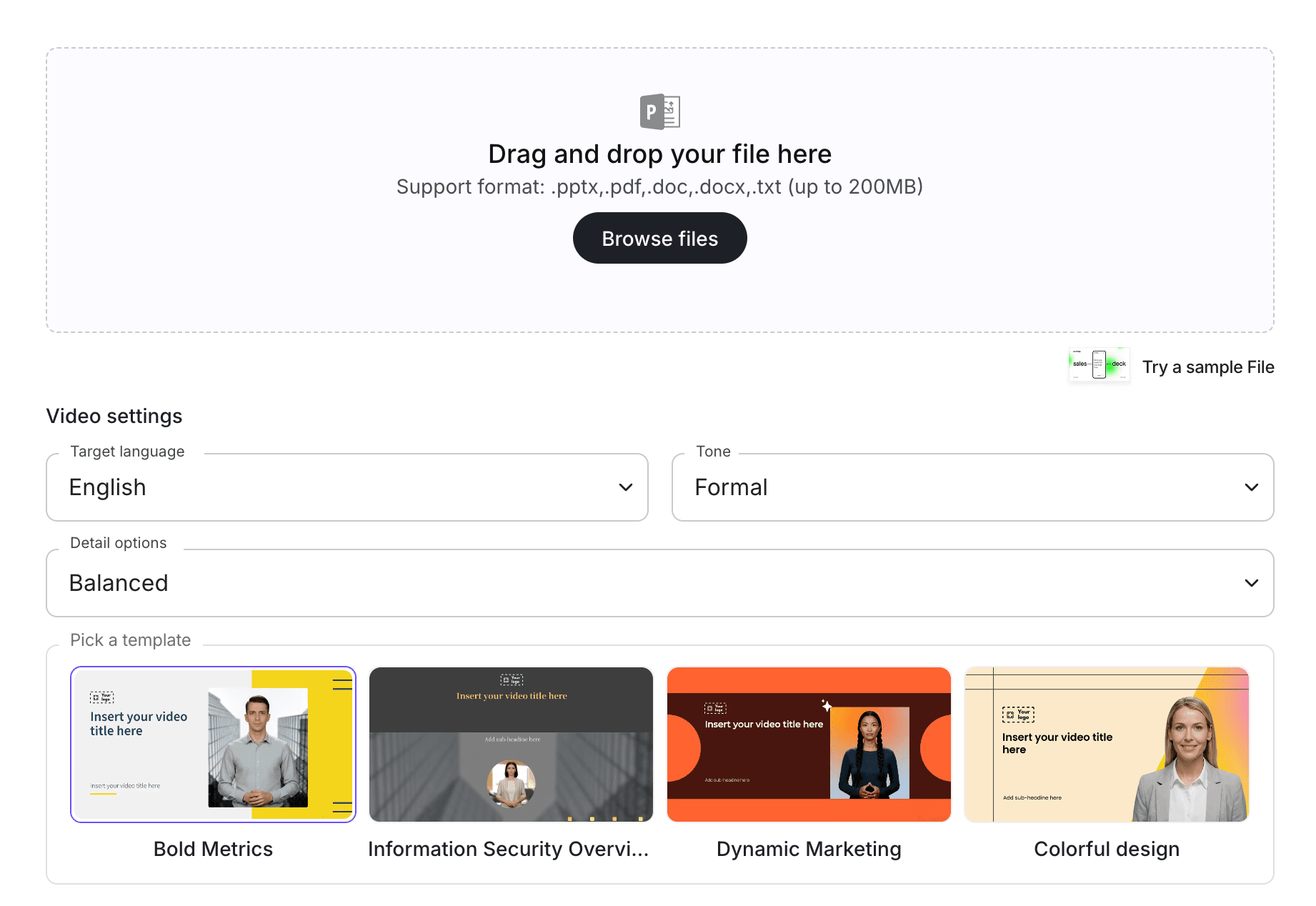
Step 3: Upload the Notes into an AI Video Workflow
Once the notes are cleaned up, upload them into an AI lecture video workflow.
With AI Lecture Video Maker, teams can turn lecture materials into video drafts without starting from a blank script. If you are building a broader learning library, connect the workflow with AI Learning Video Generator or AI Educational Video Maker.
At this stage, the AI should identify the main topic, organize the notes into a lesson flow, and suggest a video structure.
This is different from simply summarizing notes. A summary tells people what the notes say. A learning video teaches the material so people can understand and remember it.
Step 4: Turn Notes into a Spoken Script
Lecture notes are usually written for the person who took them. A video script is written for the learner.
That difference matters.
A note might say:
"3 causes of market failure: externalities, info asymmetry, public goods."
A video script should explain:
"There are three common reasons markets can fail: externalities, information asymmetry, and public goods. Let's look at what each one means and why it matters."
A strong script should be:
- Clear when spoken aloud
- More complete than the raw notes
- Organized around one learning objective
- Accurate to the original material
- Easy for a teacher or trainer to review
- Broken into short scenes
- Written in plain language
For educational content, the AI should not invent facts. It should clarify and structure the material, while staying faithful to the source notes.
Step 5: Break the Lesson into Short Scenes
A strong learning video is not one long explanation.
Break the lecture notes into short scenes so learners can follow the flow.
A simple structure might look like this:
| Scene | Purpose |
|---|---|
| Scene 1 | Introduce the topic |
| Scene 2 | Explain why it matters |
| Scene 3 | Define the key concept |
| Scene 4 | Walk through an example |
| Scene 5 | Highlight a common mistake |
| Scene 6 | Summarize the key takeaway |
| Scene 7 | Give a review question or next step |
This structure works for class notes, course handouts, technical training, and internal learning materials.
If the notes cover multiple topics, split them into multiple videos. For example, one lecture on marketing strategy might become separate videos on segmentation, positioning, messaging, and campaign planning.
Step 6: Add an AI Presenter or Avatar
Lecture videos are easier to follow when the learner has a guide.
An AI presenter can introduce the topic, explain the key ideas, and make the learning experience feel more structured than a static note page. With an AI avatar generator, educators and training teams can create presenter-led videos without recording a live instructor every time.
The presenter should match the learning context.
For example:
- University recap: clear and academic
- Employee training: professional and direct
- Customer education: friendly and helpful
- Technical tutorial: precise and focused
- Student study video: simple and encouraging
Do not choose an avatar randomly. The presenter affects how credible and easy to follow the video feels.
Step 7: Add Visual Highlights and Examples
The strongest learning videos do more than narrate notes.
They use visuals to make ideas easier to understand.
Use visual highlights for:
- Definitions
- Key formulas
- Short examples
- Step-by-step logic
- Timelines
- Diagrams
- Comparison tables
- Important terms
- Mistakes to avoid
- Review questions
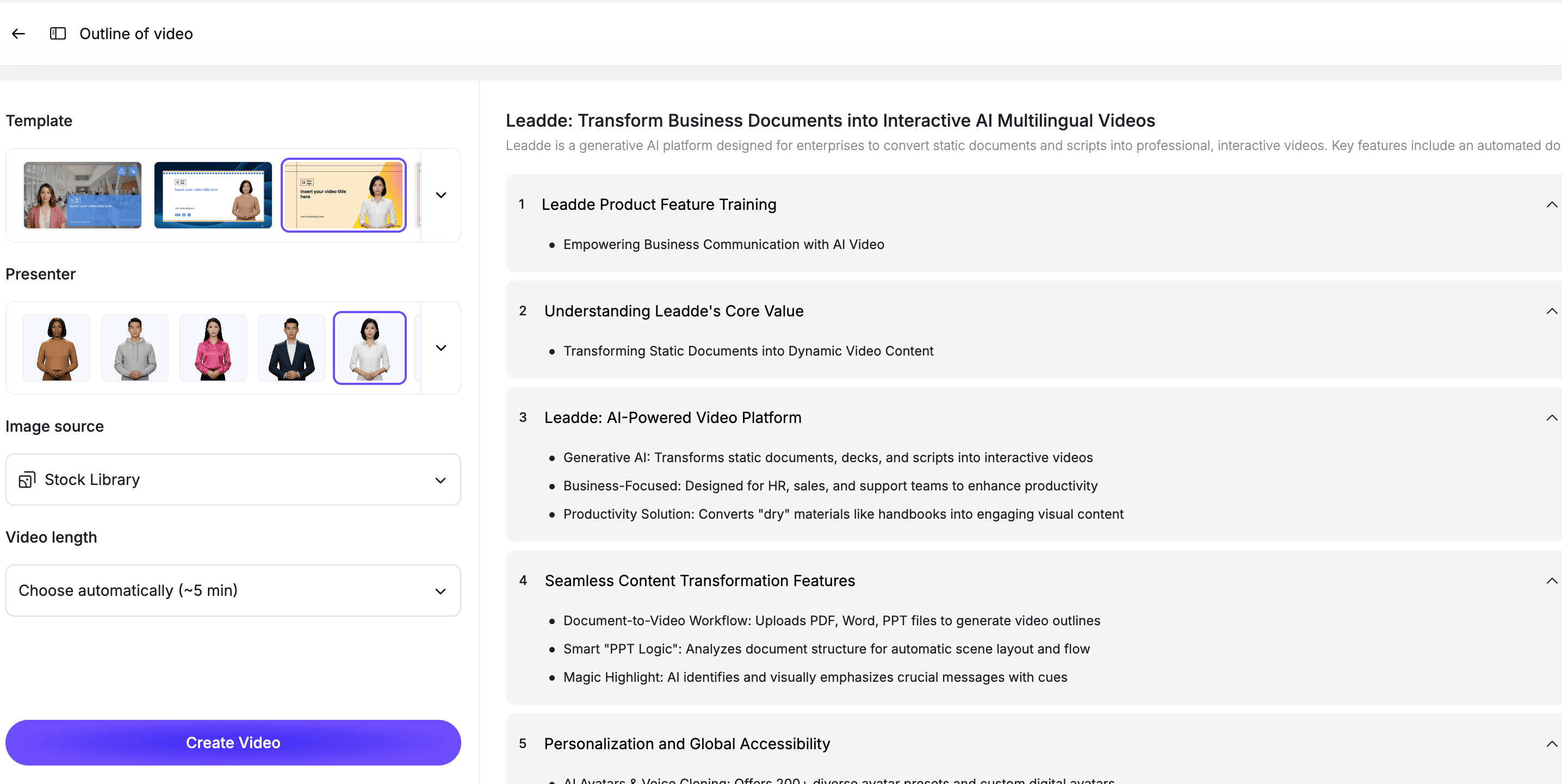
This is where lecture notes become more useful as video. Instead of showing raw notes, the video explains the material in order and highlights what learners should remember.
Step 8: Review the Video for Accuracy
AI can make video creation faster, but educational content still needs review.
Before publishing or sharing the video, compare it against the original notes and source material.
Check for:
- Missing concepts
- Incorrect simplification
- Changed meaning
- Invented details
- Confusing examples
- Unclear definitions
- Wrong terminology
- Visuals that distract from the lesson
- Missing context
If the video is for a course, training program, or public learning resource, the instructor or content owner should review the script and final video before publishing.
Step 9: Publish, Share, and Update the Video
Once the video is approved, publish it where learners already access course or training materials.
This might include:
- LMS platforms
- Online course pages
- Internal knowledge bases
- Student portals
- Training libraries
- Customer education hubs
- Team onboarding programs
- Private learning communities
If your audience is multilingual, AI video workflows can help create localized versions faster than recording each language manually.
When the notes or course material changes, update the video too. The best workflow lets you revise one section or scene without recreating the entire video.
Best Practices for Lecture-Notes-to-Video Workflows
Teach One Concept per Video
A learning video should not cover too much at once.
If the notes include multiple concepts, split them into multiple short videos. This makes the content easier to watch, review, and reuse.
Do Not Just Read the Notes Aloud
Reading notes word for word does not create a strong learning video.
Turn the notes into explanation. Add transitions, examples, context, and short summaries.
Keep the Source Material Visible to Reviewers
The original notes should remain available during review.
This helps instructors, trainers, and content owners confirm that the video is accurate and complete.
Add Examples Where the Notes Are Too Abstract
Many lecture notes are compressed.
If the notes include a concept but no example, add one carefully. For academic or technical topics, make sure examples are reviewed before publishing.
Use Short Scenes and Clear Titles
Scene titles help learners understand the flow.
Examples:
- What this concept means
- Why it matters
- Step-by-step explanation
- Example problem
- Common mistake
- Key takeaway
- Quick review
Keep Videos Editable
Lecture content changes. Courses get updated. Training examples improve.
Use an editable workflow so your team can update scripts, scenes, examples, and visuals later.
Use Cases for Lecture Notes Videos
Student Study Videos
Students can turn lecture notes into review videos that explain concepts in a more structured way.
This is especially useful when notes are long, messy, or hard to revisit before exams. A short video can help learners review the core topic faster than rereading pages of notes.
Online Course Lessons
Course creators can turn lesson notes, outlines, and handouts into video modules.
This helps transform written course materials into a more engaging format without recording every lesson manually.
University and School Content
Education teams can turn course notes into recaps, explainers, and short lessons for specific programs or audiences.
For example, Leadde has education-focused pages like ASU course videos, Georgia Tech explainers, and Open University recaps. A lecture-notes-to-video workflow can support this kind of course-specific content without making every page only about a school name.
Employee Learning and Development
L&D teams often have notes from workshops, live trainings, webinars, and internal sessions.
Those notes can become reusable training videos for onboarding, compliance refreshers, manager training, or internal knowledge sharing. For broader workplace training, use AI Training Video Generator.
Customer Education
Product and customer success teams often take notes from onboarding calls, support sessions, webinars, and product walkthroughs.
Those notes can become short customer education videos that explain common workflows, reduce repeated support questions, and help users learn on demand.
How Leadde Helps Turn Lecture Notes into Videos
Leadde helps teams turn lecture notes, course materials, and training outlines into editable AI videos.
With Leadde, teams can:
- Turn lecture notes into video scripts
- Break complex topics into short scenes
- Add AI presenters
- Edit scripts and scenes before publishing
- Add captions and visual highlights
- Create multilingual learning videos
- Reuse existing notes instead of starting from scratch
- Build a learning video library across notes, PDFs, slides, and documents
Start with AI Lecture Video Maker if your source material is lecture notes or class content. Use AI Learning Video Generator for broader learning videos, or AI Educational Video Maker for structured education content.
If you already have notes ready, you can also try Leadde directly and start building your first AI learning video.
Common Mistakes to Avoid
Mistake 1: Turning All Notes into One Long Video
Long videos are hard to finish and hard to review.
Split notes into short modules so each video teaches one concept or lesson.
Mistake 2: Copying Notes Word for Word
Notes are not scripts.
Rewrite the content so it sounds natural when spoken. Add context where the notes are too compressed.
Mistake 3: Letting AI Invent Missing Information
If the notes are incomplete, AI may try to fill gaps.
Review the script carefully and add missing context yourself instead of relying on unverified additions.
Mistake 4: Skipping Examples
Many learners need examples to understand a concept.
If the notes only include definitions, add simple examples, comparisons, or scenarios.
Mistake 5: Publishing Without Instructor or Owner Review
Educational content should be checked before publishing.
The instructor, trainer, or content owner should review the script, examples, and final video.
FAQ
Can AI turn lecture notes into videos?
Yes. AI can turn lecture notes into videos by organizing the notes into a lesson structure, generating a spoken script, breaking the topic into scenes, adding an AI presenter, and creating an editable video draft.
What kinds of lecture notes work best for video?
The best lecture notes have a clear topic, headings, key points, definitions, examples, or learning objectives. Notes from classes, webinars, training sessions, course modules, and workshops can work well.
Is lecture-notes-to-video useful for students?
Yes. Students can use lecture-notes-to-video workflows to create study videos, concept recaps, and review materials. The final content should still be checked for accuracy.
Can teachers use AI to create videos from class notes?
Yes. Teachers and course creators can turn class notes, handouts, lesson outlines, and slide notes into video lessons that students can watch on demand.
Should I convert all lecture notes into one video?
Usually no. Long notes should be split into shorter videos. Each video should focus on one concept, lesson, or learning objective.
Can I turn lecture PDFs or slides into videos?
Yes. If your lecture material is in PDF format, use PDF to Video. If it is in slides, use PowerPoint to Video.
Can I edit the video after it is generated from lecture notes?
Yes, if you use an editable AI video workflow. You should be able to revise the script, adjust scenes, change visuals, update captions, and regenerate sections when the notes change.
Conclusion
Lecture notes are a strong starting point for learning content, but they often need structure and explanation to become useful on their own.
AI helps turn notes into videos by creating scripts, scenes, narration, presenters, captions, and visual highlights. This makes the material easier to understand, easier to review, and easier to reuse across students, employees, customers, and training audiences.
The best workflow is simple: start with clear notes, clean up the structure, define the learning objective, generate a script, break the lesson into scenes, add an AI presenter, review the video, and keep it editable for future updates.
Use Leadde's AI Lecture Video Maker to turn lecture notes into editable, avatar-led learning videos.





