Best Software to Make Educational Videos (2026 Guide)

The best software to make educational videos in 2026 depends on your workflow and scale, but AI-powered platforms are now leading the shift.
Tools like Synthesia and D-ID enable fast text-to-video creation, while newer systems such as Leadde go further by turning documents like PDFs, PPTs, and SOPs directly into structured videos.
As of 2026, available information suggests that businesses and educators exploring modern methods for making training videos are moving away from manual editing toward automated, scalable video creation workflows driven by AI.
Creating educational videos is still slow, fragmented, and expensive—especially when you rely on scripting, recording, and editing tools. This makes scaling content nearly impossible.
Platforms like Leadde solve this by turning any document into a professional video automatically—helping you create videos in minutes while saving up to 90% of time and 80% of costs.
Best software to make educational videos — what are the top tools in 2026?
In 2026, finding the right software is a critical component of any comprehensive guide to eLearning video production in 2026. It is no longer just about editing features—it’s about how efficiently a tool can help you create, update, and scale content. Based on workflow automation, scalability, and real-world use cases, the top tools fall into distinct categories.
Best educational video software by category
| Category | Best Tool | Best For | Key Strength |
| Best AI video platform (overall) | Synthesia | Fast training videos | High-quality avatars, simple workflow |
| Best AI presenter tool | D-ID | Talking-head videos | Flexible avatar generation, API support |
| Best for scalable training content | Leadde | Enterprise & SOPs | Document-to-video automation |
| Best screen recording tool | Camtasia | Tutorials & demos | Precision editing and control |
| Best for quick videos | Loom | Internal communication | Speed and ease of use |
| Best animation tool | Vyond | Storytelling | Engaging animations |
What criteria define the best educational video software in 2026?
Instructional designers now evaluate tools based on four critical pillars:
- Production velocity: Can the tool create full training modules in minutes instead of weeks?
- Maintenance ease: How quickly can videos be updated when content changes?
- Localization depth: Does the platform support multilingual content at scale?
- Data integration: Can videos integrate with LMS systems via SCORM or xAPI?
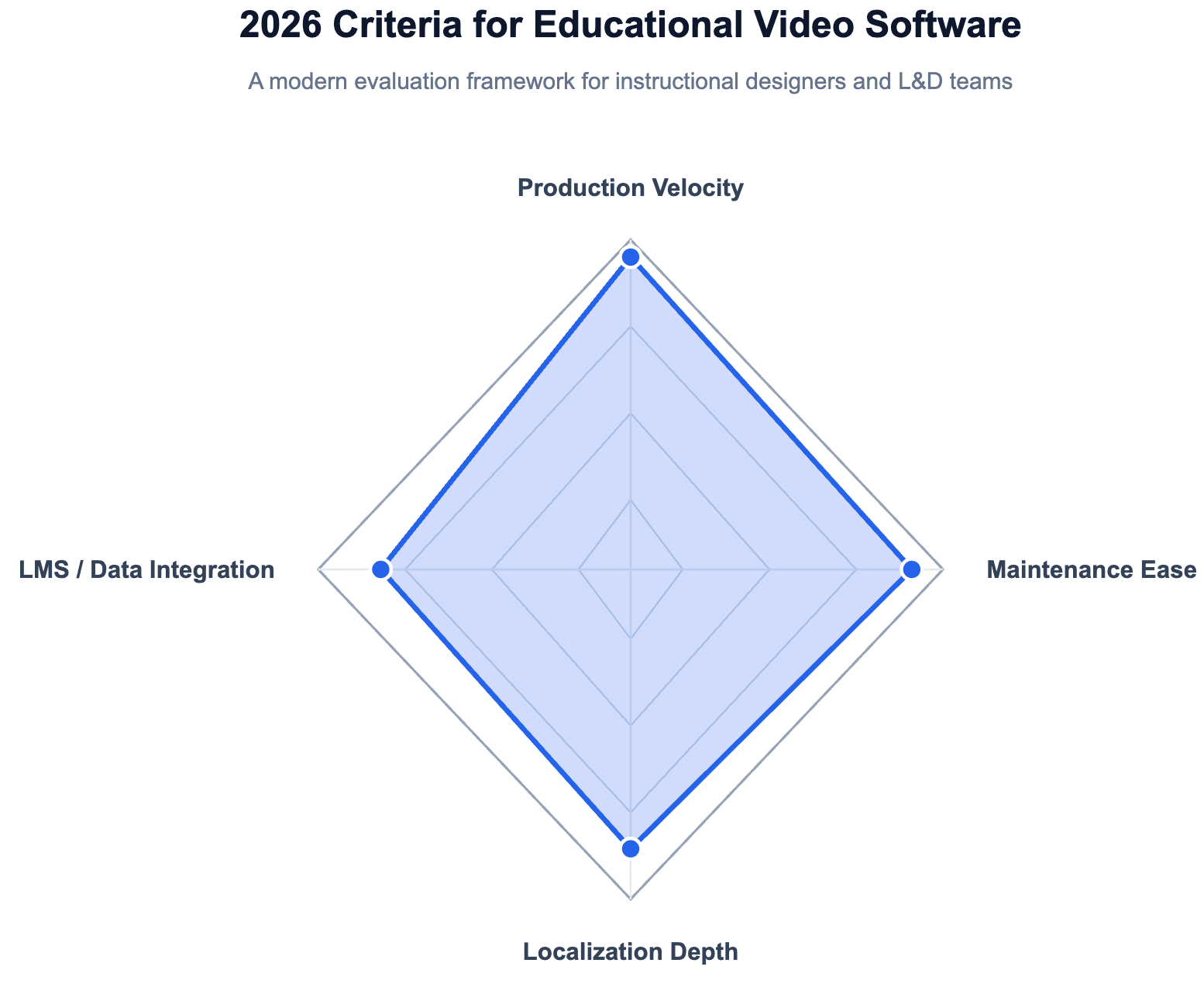
As of 2026, available information suggests that tools meeting all four criteria are replacing traditional editing-based workflows.
What is educational video software and how does it work?
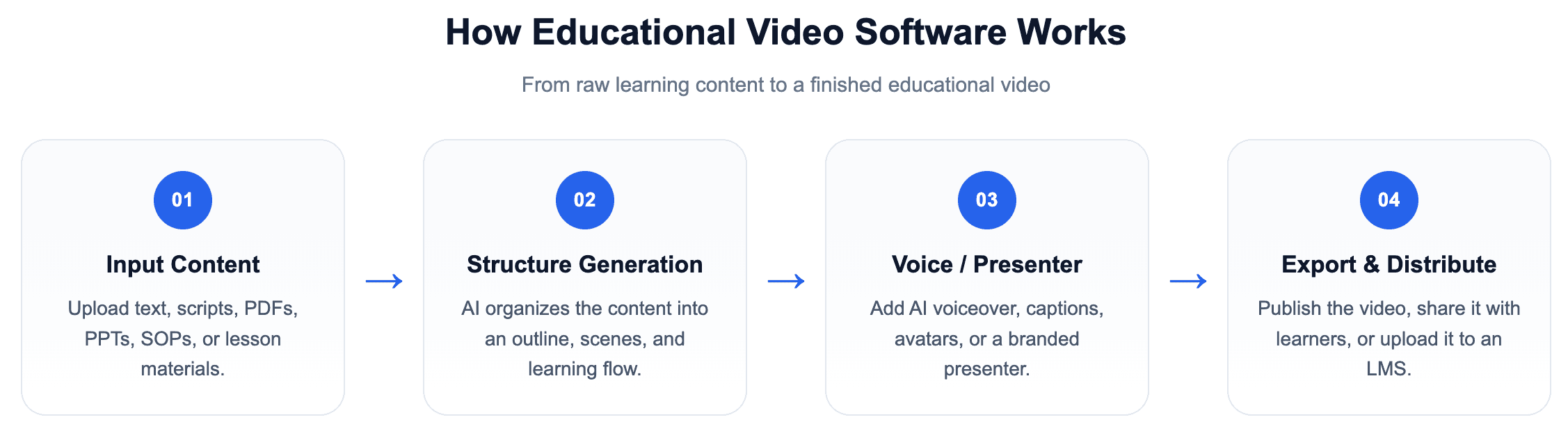
Educational video software helps users create instructional, training, or learning content in video format. These tools range from manual editing platforms to AI-driven systems.
Most modern platforms follow this process:
What are the different types of educational video tools?
Educational video tools can be grouped into five main categories:
| Tool Type | Description | Best For | Example Tools |
| AI Video Generators | Convert text or documents into videos automatically using AI avatars and voiceovers | Scalable training, course creation | Synthesia, D-ID |
| Screen Recorders | Capture on-screen actions with optional voiceover and editing features | Tutorials, product demos | Camtasia, Loom |
| Animation Tools | Create animated videos using characters, scenes, and templates | Explainers, storytelling | Vyond, Powtoon |
| eLearning Authoring Tools | Build structured training content with LMS integration and assessments | Corporate training, compliance | Adobe Captivate |
| Interactive Video Platforms | Add quizzes, navigation, and engagement features to videos | Interactive learning, LMS courses | H5P |
Why is manual video creation now a “budget killer” in 2026?
Manual video creation requires multiple steps, tools, and skill sets. This leads to high costs and slow production cycles.
- Recording requires setup and retakes
- Editing takes hours per video
- Updates require re-recording
- Teams struggle to scale output
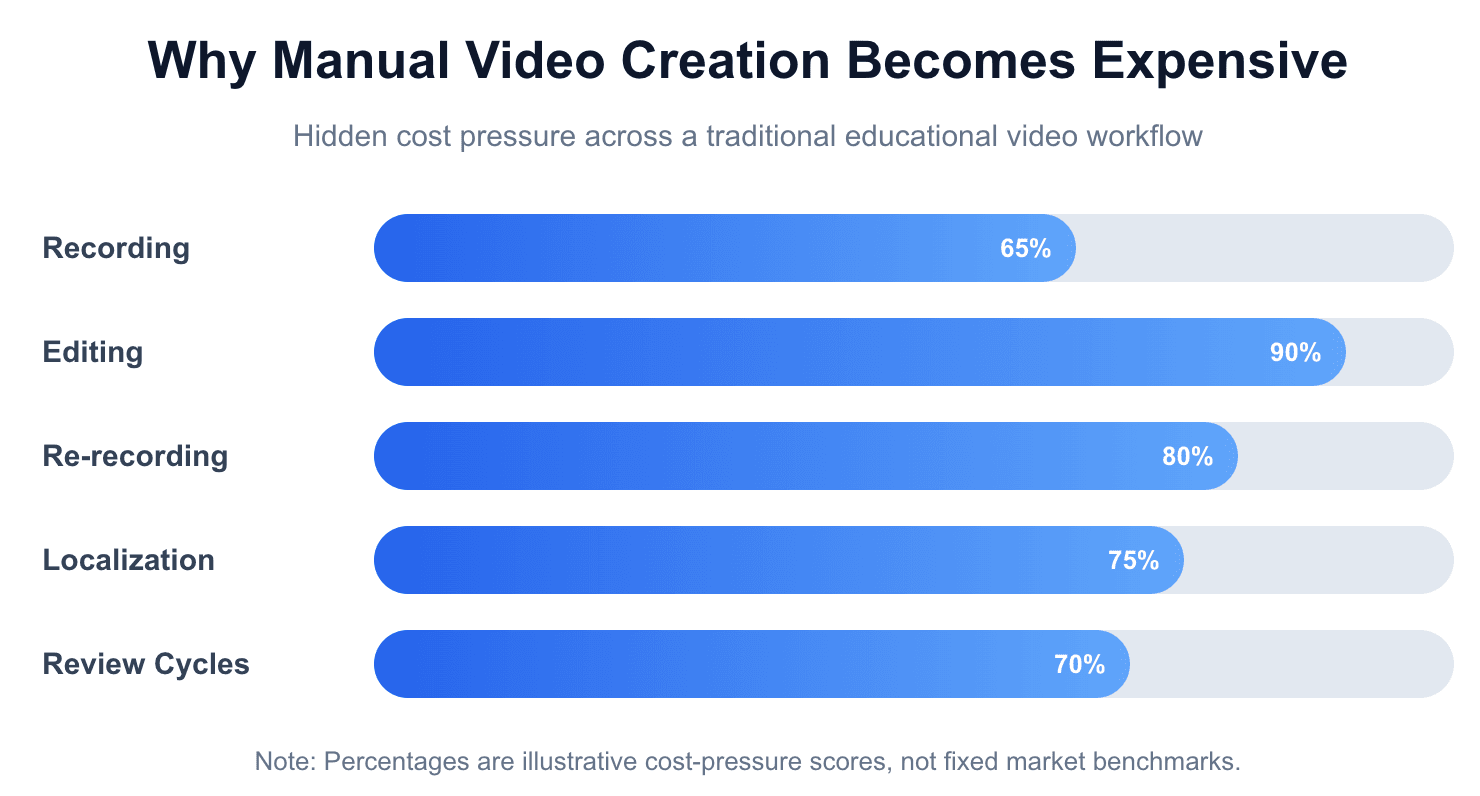
As of 2026, available information suggests that organizations are shifting toward automation to reduce these inefficiencies.
What is the real workflow for creating educational videos (and why is it broken)?
| Workflow Stage | Traditional Video Creation | AI Video Workflow |
| Scripting | Manually write scripts from scratch | Upload existing content (PDF, PPT, text) |
| Recording | Record screen or camera footage | Automatically generate scenes and structure |
| Editing | Manual editing with video tools | AI auto-generates visuals and transitions |
| Voiceover | Record or hire voice talent | AI voice or avatar presenter generated instantly |
| Updating Content | Requires re-recording and re-editing | Edit source content and regenerate video |
| Localization | Create separate versions manually | Automatically generate multilingual versions |
| Production Time | Hours to days per video | Minutes per video |
| Scalability | Low (resource-intensive) | High (automation-driven) |
Synthesia vs D-ID vs Leadde — which AI video platform scales training faster?
AI video platforms differ significantly in how they handle automation, localization, and long-term scalability. While many tools focus on generating videos quickly, organizations evaluating the best Synthesia alternatives realize the real difference lies in how efficiently teams can produce, update, and scale content over time.
Feature comparison — workflow, scalability, and automation
| Feature | Leadde | Synthesia | D-ID |
| Primary Workflow | Document-to-Video (Automatic) | Script-to-Video | Photo-to-Video |
| Automation Level | High (end-to-end automation) | Medium (script-driven) | Medium (API & avatar-based) |
| Update Flexibility | Edit source document and regenerate | Requires script edits | Requires scene recreation |
| Scalability | High (bulk content production) | Moderate | Moderate |
| Localization | Scalable multilingual workflows | Multi-language support | Multi-language support |
| Best Use Case | Enterprise training, SOPs, onboarding | Training videos, internal content | AI presenters, marketing videos |
Visual quality and the “uncanny valley” problem
One of the most common concerns raised by users—especially in communities like Reddit—is the “uncanny valley” effect, where AI avatars feel unnatural and reduce engagement.
- Synthesia focuses on high-fidelity studio avatars with realistic lip-sync
- D-ID enables animated presenters based on images
- Leadde addresses this differently by allowing custom avatars created from real photos, helping organizations maintain a more authentic and brand-consistent presence
For corporate training, perceived realism directly impacts learner trust and engagement.
Language and localization at scale
Localization is no longer optional for global teams. Mastering video localization strategies for a global audience is now a baseline requirement for enterprise operations.
- Basic tools support multiple languages
- Advanced platforms enable scalable multilingual content pipelines
As of 2026, available information suggests that leading platforms differentiate themselves not just by the number of supported languages, but by how easily content can be adapted and maintained across regions.
Automation level — script vs document workflows
The biggest divide in AI video tools is the starting point:
- Script-based tools require manual writing and structuring
- Document-based systems automatically generate outlines, scenes, and narration
This difference directly affects production speed and consistency, especially for large training libraries.
Scalability — the real differentiator
Ultimately, the best platform is the one that allows teams to:
- Update content without re-recording
- Reuse materials across formats
- Scale across languages and departments
Tools that reduce manual steps and centralize workflows are better suited for long-term educational content strategies.
What is the “document-to-video” revolution and why does it matter?
Document-to-video transforms existing content (PPTs, PDFs, SOPs) into videos automatically.
Benefits include:
- No need to rewrite scripts
- Faster content production
- Consistent structure
- Easier updates
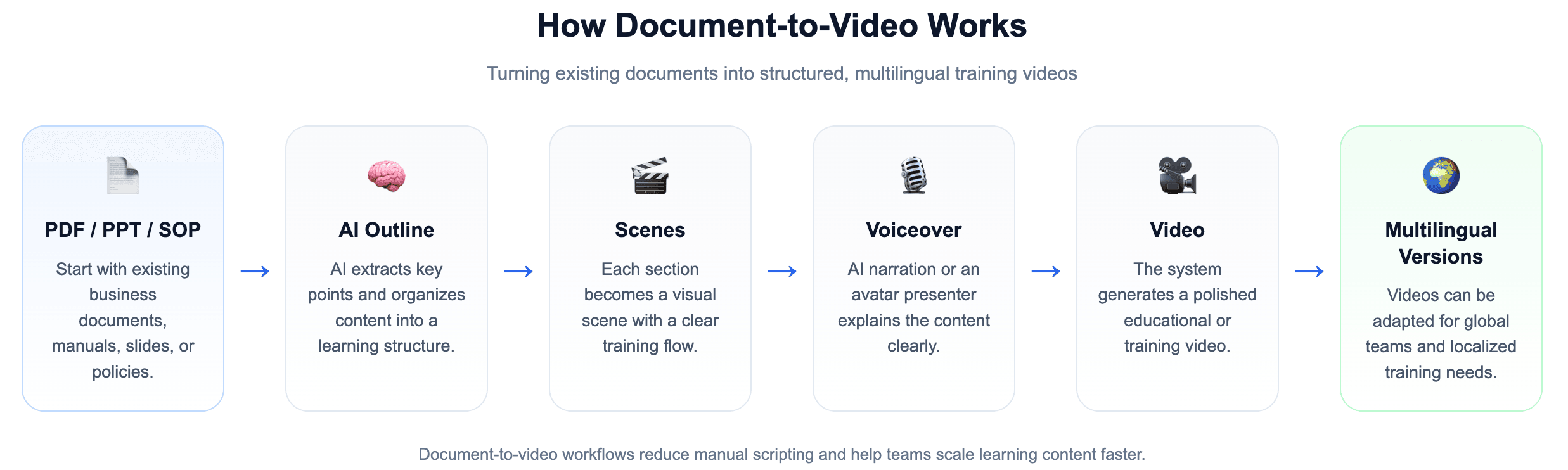
How can you turn a 50-page SOP into a 5-minute training video?
Traditional methods require instructional designers to manually extract key points, write scripts, and record videos—making the process slow and difficult to scale. As of 2026, available information suggests that AI-driven workflows are replacing this approach by automating knowledge conversion directly from source documents, seamlessly turning complex SOP documents into training videos in minutes.
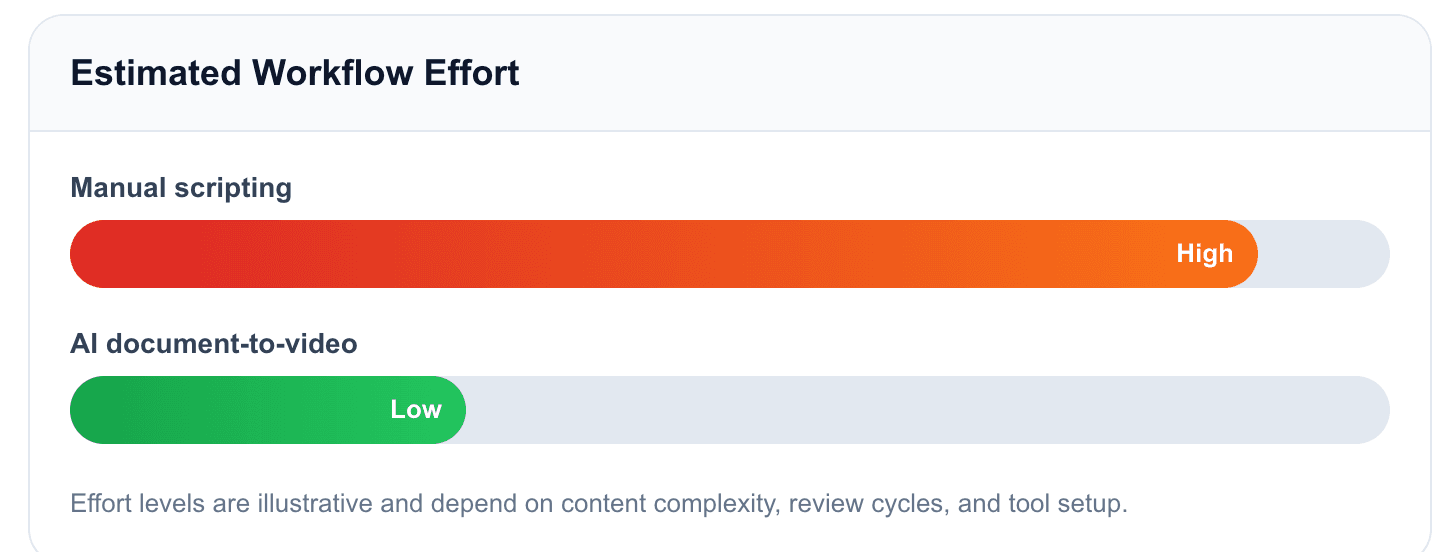
Why manual scripting is no longer scalable
The biggest drain on L&D resources is manually converting raw documents into scripts.
- Requires rewriting content from scratch
- Introduces inconsistency across training materials
- Makes updates time-consuming
This workflow becomes a bottleneck for teams managing large content libraries.
How AI transforms SOPs into structured video content
Modern platforms automate the entire process:
- Upload a document (PDF, Word, PPT) to seamlessly turn PPT files into professional eLearning videos
- Auto-generate an outline and key sections
- Convert sections into structured video scenes
- Add voiceover and visuals automatically
This eliminates the need for manual scripting and editing.
What makes document-to-video workflows more effective
Advanced systems go beyond simple text-to-video:
- Knowledge conversion: Raw documents are transformed into structured learning content
- Auto layout and highlighting: Key points are identified and visually emphasized
- Dynamic visuals: Media adapts to the content instead of relying on fixed templates
These features improve clarity, consistency, and learner engagement.
Why this approach enables scalable training
By removing manual steps, teams can:
- Create videos in minutes instead of days
- Update content without re-recording
- Reuse materials across multiple formats
- Scale training across departments and languages
This makes document-to-video workflows especially valuable for enterprise and global training teams.
Why do most training videos feel “patronizing” to adult learners?
Many training videos fail to engage professional audiences because they rely on oversimplified visuals and tone. Instructional design discussions on Reddit frequently highlight that cartoon-style animations can feel childish and reduce credibility in corporate environments.
What causes training videos to feel unprofessional?
Common issues include:
- Over-simplified visuals that resemble content made for children
- Lack of realism, making it hard for learners to relate to the material
- Misaligned tone that does not match executive or technical audiences
These factors can reduce engagement and weaken knowledge retention.
How to create more professional and engaging training videos
To maintain authority and relevance, modern teams adopt more refined approaches:
- Avoid cartoon-style characters and use realistic AI avatars when appropriate, especially when creating AI avatar videos for employee onboarding.
- Use clean, minimal design systems that align with modern corporate aesthetics
- Ensure brand alignment by matching colors, typography, and presentation style to company identity
These practices help create content that feels credible, professional, and suitable for adult learners.
Why realism and tone matter for learning outcomes
Professional audiences expect training content to reflect real-world contexts.
- Realistic presentation improves trust
- Consistent branding reinforces authority
- Appropriate tone increases engagement
As of 2026, available information suggests that training effectiveness is closely tied to how well content matches the expectations of its audience.
What are the best screen recording tools for tutorials and demos?
Screen recording tools remain essential for technical training, especially when precision and clarity are required. While AI video platforms are growing rapidly, screen capture is still the most reliable way to demonstrate software workflows and system processes.
| Feature | Camtasia | Loom | Hybrid AI Workflow |
| Primary Use Case | Detailed tutorials & training videos | Quick demos & async communication | Scalable training + consistent updates |
| Ease of Use | Moderate (learning curve) | Very easy (one-click recording) | Moderate (multi-tool workflow) |
| Editing Capabilities | Advanced timeline editing, effects, annotations | Minimal editing | AI-assisted editing & automation |
| Recording Quality | High (HD + control over capture) | Good (optimized for speed) | High (record + enhance with AI) |
| Speed of Production | Slower (editing required) | Very fast (record & share instantly) | Fast (record + automate post-production) |
| Scalability | Low (manual editing required) | Low (not designed for bulk content) | High (automation enables scaling) |
| Best For | Professional training content | Internal updates & quick walkthroughs | Enterprise training & repeatable workflows |
Camtasia vs Loom — precision vs speed
- Camtasia is widely considered the gold standard for detailed screen recording and editing. It offers advanced features such as cursor effects, annotations, and timeline-based editing, making it ideal for complex tutorials and high-quality training content.
- Loom is designed for speed and simplicity, allowing users to record and share videos instantly. It is best suited for quick walkthroughs, internal updates, and asynchronous communication between teams.
Choosing between them depends on whether you prioritize production quality or speed.
Hybrid workflow — combining screen recording with AI tools
As of 2026, available information suggests that the most effective approach is not choosing one tool, but combining them into a hybrid workflow:
- Record raw screen footage using tools like Camtasia
- Use AI platforms to add voiceovers, captions, and structure
- Enhance consistency across multiple videos
This approach allows teams to maintain technical accuracy while improving production efficiency and scalability.
How do you create interactive training videos that integrate with LMS?
Modern training videos are no longer passive experiences. As of 2026, effective learning content is designed to be interactive, measurable, and fully integrated into learning management systems (LMS), prompting instructional designers to rethink how to make interactive video experiences that actively engage learners.
What features make training videos truly interactive?
Key capabilities include:
- Embedded quizzes and knowledge checks to validate understanding
- Interactive navigation that allows learners to control their journey
- Tracking and analytics to measure engagement and completion
These features transform videos from static content into active learning tools.
How interactive avatars are changing learning experiences
One of the biggest shifts is the introduction of interactive, chat-enabled avatars:
- Learners can ask questions in real time
- Content becomes conversational rather than linear
- Engagement increases through active participation
This moves training from “watching” to “doing,” which improves retention.
How LMS integration works (SCORM, xAPI, and analytics)
To ensure training effectiveness, videos must integrate with LMS platforms such as Docebo or Moodle.
Key requirements:
- SCORM compliance for tracking completion and progress
- xAPI support for advanced learning analytics
- Seamless export and embedding into existing training systems
This allows organizations to measure ROI and maintain structured learning programs.
Why interactivity is critical for modern training
Interactive videos deliver measurable benefits for creating bite-sized microlearning videos and full-length courses alike:
- Higher engagement rates
- Better knowledge retention
- Clear performance insights
As of 2026, available information suggests that organizations are increasingly prioritizing interactivity as a core requirement for training content.
What is the real cost of educational video software in 2026?
The cost of educational video software is no longer defined by subscription price alone. In 2026, organizations assessing the true e-learning video production costs must evaluate total cost of ownership (TCO), including production time, scalability, and maintenance.
What pricing models are used by video platforms?
Most tools fall into three common pricing models:
- Subscription-based plans with monthly or annual fees
- Pay-per-minute generation, where output length determines cost
- Feature-based tiers, where advanced capabilities require upgrades
While these models seem straightforward, they often hide important limitations.
| Pricing Model | How It Works | Pros | Cons |
| Subscription | Monthly/annual fee | Predictable cost | Feature limits |
| Pay-per-minute | Pay for output length | Low entry cost | Expensive at scale |
| Unlimited model | Flat rate for usage | Scalable | May have feature tiers |
What is the “price-per-minute” trap?
Many AI video platforms use usage-based pricing, where the amount of video you can generate is limited.
- Output minutes are capped per plan
- Additional content requires upgrades or extra fees
- Costs increase rapidly as production scales
| Cost Factor | Impact |
| Manual editing time | High labor cost |
| Re-recording videos | Delays and inefficiency |
| Scaling content | Requires more tools |
| Localization | Expensive without automation |
This model can become restrictive for teams producing large volumes of training content.
How do different pricing approaches affect scalability?
Some platforms focus on usage-based pricing, while others emphasize unlimited content creation.
- Tools like Synthesia typically operate with generation limits tied to subscription tiers
- Platforms like Leadde focus on enabling scalable content production without strict output constraints
As of 2026, available information suggests that pricing flexibility is becoming a key factor for enterprise adoption.
What hidden costs should you consider?
Beyond subscription fees, the real cost includes:
- Time spent editing and producing videos manually
- Re-recording content when updates are needed
- Scaling across teams, departments, and languages
These hidden costs often exceed the software price itself.
Why total cost matters more than price
For organizations producing training content regularly, cost efficiency depends on:
- Speed of production
- Ease of updates
- Ability to scale content globally
Choosing the right pricing model can significantly reduce long-term costs and improve ROI.
Which educational video software should you choose based on your industry?
The best educational video software depends heavily on your industry, as each sector has different requirements for content type, compliance, and scalability. Choosing the right tool means aligning features with real-world training needs.
| Industry | Key Need | Best Approach | Recommended Tool Type |
| SaaS | Fast updates | Modular videos | AI video tools |
| Manufacturing | SOP accuracy | Document-to-video | Automation platforms |
| Healthcare | Compliance | Structured content | LMS-integrated tools |
| Retail | Scale | Fast production | Simple AI tools |
SaaS and technology — onboarding and product training
SaaS companies prioritize speed and modular updates:
- Customer onboarding and feature education
- Frequent product updates
- Scalable content for global users
AI video tools with fast editing and update capabilities are ideal in this environment.
Manufacturing and industrial — SOPs and safety training
Manufacturing teams focus on accuracy and repeatability:
- Standard operating procedures (SOPs)
- Equipment handling and maintenance
- Safety compliance training
Document-to-video workflows are especially effective for converting manuals into consistent training content.
Healthcare and finance — compliance and regulation
Highly regulated industries require precision and auditability:
- Compliance and regulatory training
- Accurate documentation and version control
- Multilingual training for global staff
Tools must support structured updates and reliable content management.
Retail and service industries — high-volume staff training
Retail environments require speed and scalability:
- Training for high-turnover employees
- Standardized service processes
- Rapid rollout of new product knowledge
Simple, fast video creation tools help maintain consistency across locations.
Why industry fit matters more than features
While many tools offer similar capabilities, the real differentiator is how well they support your specific workflow:
- Frequency of content updates
- Level of compliance required
- Scale of distribution
As of 2026, available information suggests that organizations choosing tools based on industry-specific needs achieve better efficiency and ROI.
FAQs
Q1: What is the fastest way to create educational videos in 2026?
The fastest way to create educational videos in 2026 is by using AI tools that automate the process. Document-to-video platforms can turn existing content into complete videos in minutes without manual scripting or editing.
Q2: What is the best free software to make educational videos?
Free tools like Loom and OBS Studio are good starting points, but they often lack advanced features like automation and scalability.
Q3: What is the easiest tool for beginners?
Beginner-friendly tools are those with simple interfaces and templates, such as Canva or AI video platforms that automate most of the process.
Q4: What is the best AI video tool?
Leading AI tools include Synthesia and D-ID, while newer platforms focus on fully automated document-to-video workflows for faster production.
Q5: Can I create videos without recording myself?
Yes, many AI tools allow you to generate videos using text, avatars, and voiceovers, eliminating the need for cameras or recording.
Q6: How long does it take to create an educational video?
Depending on the tool, it can take anywhere from minutes (with AI automation) to several hours or days using traditional recording and editing workflows.
Conclusion
The best software to make educational videos in 2026 is no longer defined by editing features, but by automation, scalability, and efficiency.
Organizations that rely on manual workflows will struggle to keep up with content demands. In contrast, AI-driven platforms—especially those using document-to-video workflows—enable faster production, easier updates, and global scalability.
Choosing the right tool depends on your goals, but the direction is clear: automation and AI are becoming the standard for educational video production.