How to Turn SOP Documents into Training Videos in Minutes with AI (2026 Guide)
To turn SOP documents into training videos in minutes, start by uploading your existing Word, PDF, or PPT files into an AI video platform. The system will automatically parse the text, generate a structured script, and divide the content into visual scenes with professional layouts. Finally, select an AI avatar and voice-over, then publish the video as an interactive learning asset that employees can query in real-time.
Standard PDF manuals are often ignored, leading to costly execution errors and compliance risks. Manual video production only adds to the burden with high costs and slow turnarounds. Leadde solves this by automatically turning any document into professional training videos in minutes, saving over 80% of production costs and 90% of content creation time.

What Are Video SOPs and Why Are They Essential?
Standard Operating Procedures (SOPs) are essential documents that help organizations maintain consistent processes, reduce operational risks, and train employees efficiently. Traditionally, SOPs exist as long text documents—often stored in Word files, PDFs, or slide decks—which employees must read and interpret.
However, as organizations scale and workflows become more complex, video SOPs are increasingly replacing text-based documentation. Video SOPs convert written procedures into structured training videos that visually demonstrate tasks, workflows, and decision points.
Key benefits of video SOPs include:
- Faster employee onboarding
- Clearer procedural understanding
- Higher engagement compared to text manuals
- Standardized training across teams and locations
With modern AI platforms, organizations can now transform SOP documents into professional training videos automatically—eliminating the need for manual filming or editing. This transition is a cornerstone of modern elearning video production strategies.
The Problem with Traditional Text-Based Standard Operating Procedures
Traditional SOP documentation often suffers from several operational challenges.
Low engagement
- Employees rarely read long procedural manuals thoroughly.
- Complex instructions are often skimmed or misunderstood.
Knowledge interpretation gaps
- Written instructions may leave room for different interpretations.
- New employees struggle to visualize the exact workflow.
Maintenance complexity
- Updating SOP documents across teams can be slow.
- Version control becomes difficult as documents multiply.
As a result, organizations frequently experience:
- Inconsistent execution
- Higher operational errors
- Longer onboarding timelines
These problems become even more significant in high-stakes industries where procedural accuracy is critical, often requiring a specialized compliance safety training video approach.
How Video SOPs Boost Employee Retention and Reduce Execution Errors
Video-based SOPs address these limitations by presenting procedural knowledge in a visual, step-by-step format.
Instead of reading instructions, employees can watch the workflow being demonstrated, which significantly improves comprehension and memory retention.
Video SOPs help organizations:
- Demonstrate complex processes clearly
- Provide repeatable visual training
- Ensure consistent instruction across teams
- Reduce operational mistakes caused by misinterpretation
In many companies, video SOPs are also integrated with interactive knowledge systems, allowing employees to revisit specific steps or ask questions directly within the training material.
This transforms SOPs from static documents into dynamic learning resources.
Video SOPs help organizations demonstrate complex processes clearly and ensure consistent instruction across teams. This is why many forward-thinking companies now make professional elearning video assets for their internal knowledge bases. In many companies, these are integrated with interactive systems, transforming static documents into dynamic learning resources.
SOP Videos vs Written Instructions: When to Use Each for Maximum Training Effectiveness
One of the clearest patterns from my research is this:
- Videos are best for understanding the flow
- Written instructions are best for executing each step
A high-performing SOP system separates these roles:
| Format | Best Use |
|---|---|
| Video | Process overview, context, sequencing |
| Step-by-step docs | Exact actions, parameters, edge cases |
In one onboarding redesign project, replacing a 20-page SOP with a single video didn’t improve outcomes. But combining:
- a 3-minute walkthrough video
- with structured step-by-step instructions
led to significantly fewer repeated questions and faster task completion.
Why Traditional SOP Documents Fail to Drive Real Execution (And What I Learned from Analyzing Training Workflows)
In multiple training systems I’ve audited across operations, onboarding, and technical teams, the same pattern shows up:
- SOPs exist—but aren’t used
- Employees skim but don’t internalize
- Execution still depends on shadowing someone experienced
The root issue isn’t documentation quality—it’s usability under real conditions.
In one manufacturing workflow analysis, operators had access to detailed SOP PDFs, yet still relied on peer guidance. In a lab training scenario, new hires reported that even after reading full procedures, they only understood the process after watching it performed live.
Key insight:
Documentation explains. Execution requires demonstration.
This is why “turning SOPs into videos” became a trend—but as I’ll show next, video alone doesn’t solve the problem either.
The Real Bottleneck Is Not Creating SOP Videos — It’s Keeping Them Updated
Most teams underestimate this.
Creating a training video is a one-time effort. Maintaining it is ongoing—and expensive.
In multiple workflow audits, I found:
- SOP updates happen frequently (process changes, tools change, compliance updates)
- Videos become outdated quickly
- Teams delay updates because re-recording is too time-consuming
Even teams that successfully produced video SOPs struggled to maintain them. The result: outdated training materials and inconsistent execution.
Key takeaway:
The scalability problem isn’t creation—it’s iteration speed.
Any “SOP to video” solution that doesn’t address updating will break at scale.
Core Capabilities Required to Automate Video SOPs
To automatically transform SOP documents into professional training videos, modern AI platforms must support several critical capabilities.
Direct Document Ingestion (Processing Word, PDF, and PPT files)
The first requirement is the ability to process existing documentation directly.
Organizations typically store SOPs in formats such as:
- Word documents
- PDF manuals
- PowerPoint training decks
- Internal knowledge base articles
An advanced platform allows teams to turn PPT into elearning video content, extracting key points and procedural steps automatically.
According to the official platform overview, Leadde converts documents, scripts, and text into structured video presentations, automatically generating scenes and presentation flow from business content.
This allows teams to reuse existing documentation instead of rebuilding training materials from scratch.
Automated Scene Creation and Auto-Layouts
Once the system parses the SOP document, the next step is automated scene generation.
AI platforms can automatically:
- Break content into logical sections
- Generate video slides for each step
- Highlight key procedural instructions
- Arrange visual layouts for clarity
This automation significantly reduces manual video production work, making it easier for teams to follow an AI guide to create interactive e-learning videos rather than starting from scratch.
Instead, the system builds a structured video presentation automatically.
Interactive Elements: Utilizing "Chat with Video" for Instant Employee Support
One of the most powerful advancements in modern training videos is interactive learning.
Interactive video systems allow employees to engage with training materials directly.
Features may include:
- Asking questions about specific SOP steps
- Jumping to relevant sections instantly
- Reviewing explanations without rewatching the entire video
Leadde’s “Chat with Video” capability enables viewers to interact with training videos and explore content more deeply, turning passive videos into interactive knowledge resources.
This functionality is particularly valuable for:
- technical support teams
- manufacturing staff
- global employee training programs
or those managing interactive safety training videos globally.
Choosing the Right SOP Video Tools: What Actually Matters in Real Workflows
Instead of focusing on features, the most important criteria are:
1. Update speed
Can you modify content quickly when processes change?
2. Workflow capture
Can the tool generate steps from recordings?
3. Version control
Can you track and manage changes?
4. Tool consolidation
Does it reduce the need for multiple tools?
5. Output flexibility
Can you produce both video and structured SOPs?
Teams that optimize for these factors consistently outperform those chasing “fully automated” solutions.
From 3 Hours to 30 Minutes: How AI Is Actually Changing SOP Video Production Workflows
AI is genuinely transforming SOP video production—but not in the way most tools promise.
In a real production workflow I analyzed:
- Before:
- Script writing
- Voice recording
- Manual editing
- Total: 2–3 hours per 5-minute video
- After AI-assisted workflow:
- Outline written by human
- AI generates narration draft
- 10–15 minutes of human correction
- AI handles basic timing and cuts
- Total: ~30 minutes for first draft
- Revision time reduced by ~60%
What changed wasn’t automation—it was acceleration.
Best-performing workflow:
- Human defines structure
- AI generates draft
- Human validates accuracy
- AI assists with production
Insight:
AI works best as a co-pilot for speed, not a replacement for expertise.
Step-by-Step: How to Turn SOP Documents into Training Videos in Minutes
AI-powered video platforms simplify the SOP-to-video process through an automated workflow.
Below is a typical step-by-step process.
Step 1: Upload Your Heavy SOP Documents (Up to 200MB) into the AI Platform
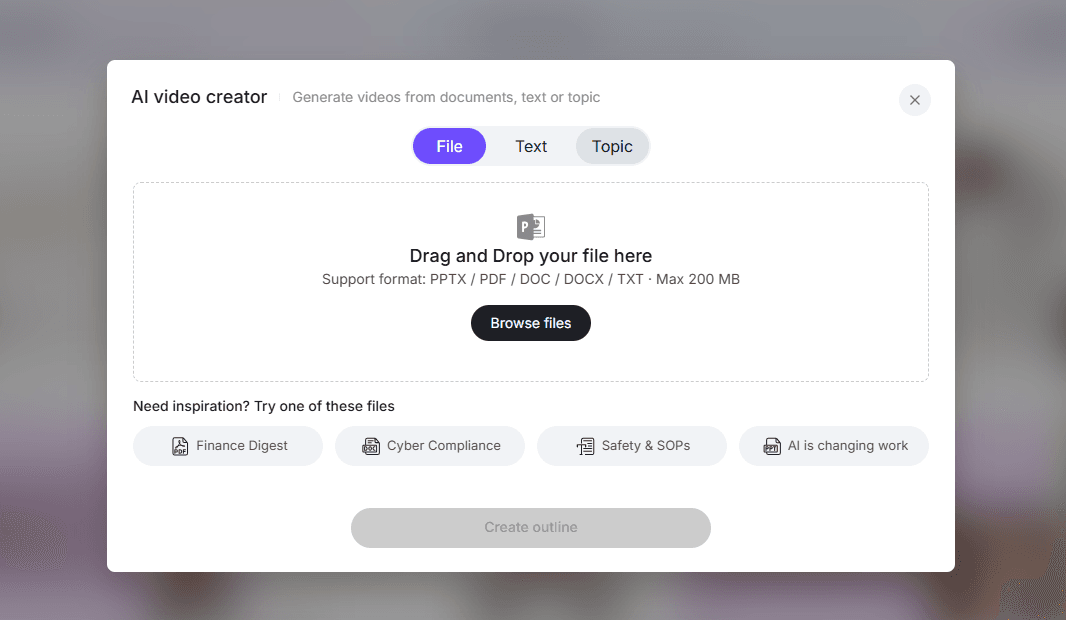
The process begins by uploading existing SOP materials.
Most AI video systems support multiple document formats, including:
- PowerPoint
- Word documents
- PDF manuals
- plain text documentation
For example, users can upload files or paste text directly into the AI video creation interface to begin generating a training video.
Once uploaded, the platform begins analyzing the document content.
Step 2: Let AI Parse the Content and Generate Outlines and Scripts Automatically
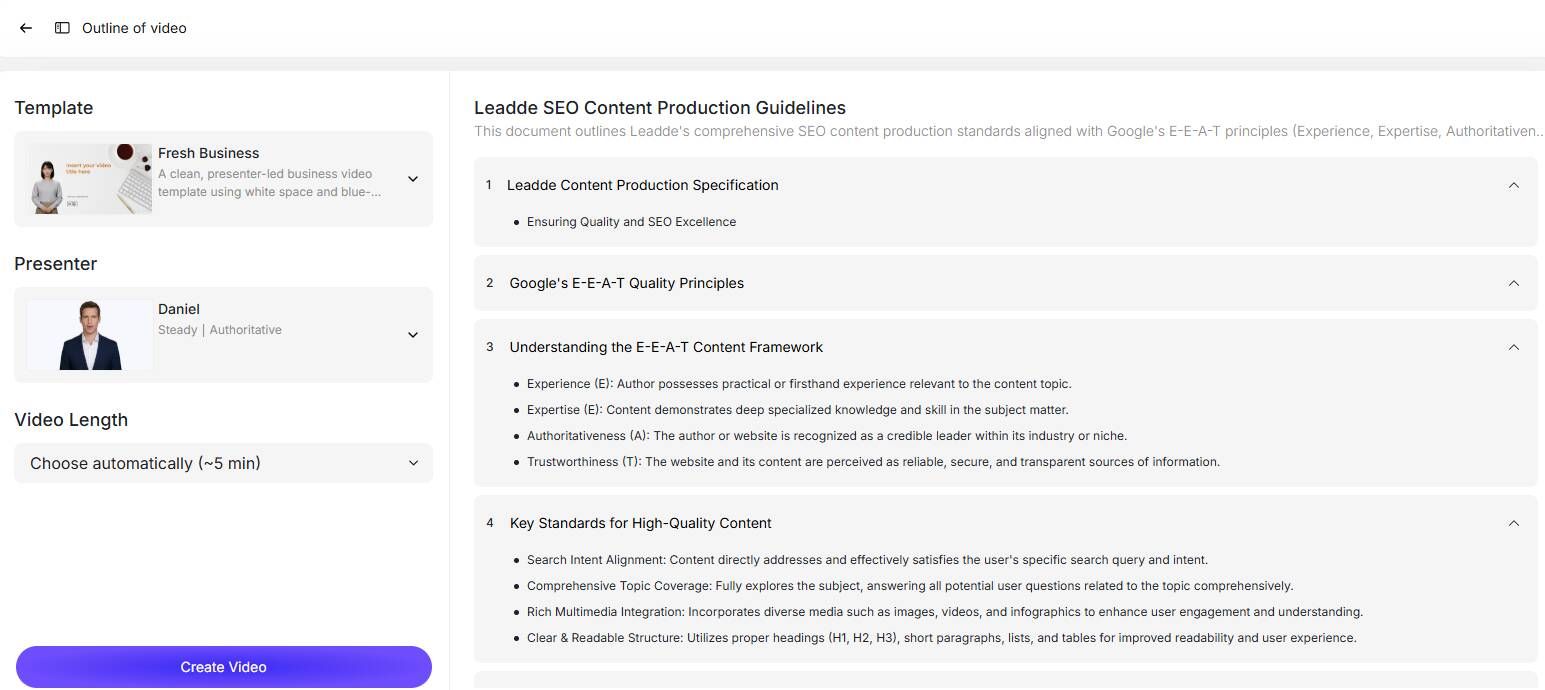
After the document is uploaded, the AI system automatically processes the content.
The system typically performs several automated tasks:
- Extracting key sections from the document
- Generating a structured outline
- Creating a narration script for each scene
- Identifying visual elements for slides
This dramatically reduces the time required to prepare training content.
Instead of manually writing scripts and designing slides, teams can review and refine AI-generated drafts.
Step 3: Select an AI Avatar Presenter and Voice-Over Tone
Many AI video platforms provide digital presenters to deliver the training content.
Users can choose:
- an AI avatar presenter
- voice style and tone
- language localization
Leadde provides a library of over 200 AI avatars, allowing organizations to create AI avatar videos for employee onboarding without recording real presenters. Users can choose the specific avatar, voice style, and tone to match their corporate identity.
This helps maintain consistent branding across all training materials.
Step 4: Fine-Tune the Visuals Using Layer-Level PPT Editing
Once the video structure is generated, users can refine visual elements.
Advanced editing features allow users to adjust:
- slide text
- icons and images
- layout structure
- background visuals
Leadde’s Slide Presenter enables layer-level editing of PowerPoint elements, allowing teams to modify individual text or visual layers without rebuilding slides.
This flexibility ensures that training videos remain visually clear and professionally formatted.
Step 5: Publish the Video and Enable Interactive Q&A for Seamless Onboarding
After reviewing the content, the final step is publishing the training video.
Organizations can then:
- share the video internally
- embed it into learning management systems
- provide it to employees during onboarding
Interactive features such as Q&A systems allow employees to quickly access specific procedural guidance.
This creates a scalable training system that can support teams across different departments and locations.
Comparing the Best Tools for Creating Video SOPs
Organizations looking to create video SOPs typically evaluate several types of tools, including those designed to make corporate communication video content or sales enablement videos.
AI Document-to-Video Platforms vs. Manual Screen Recording Tools
Traditional video training often relies on screen recording software.
Examples include:
- recording step-by-step tutorials
- manually editing instructional videos
- adding narration after recording
However, this approach can be time-consuming.
| Approach | Workflow | Scalability | Maintenance |
|---|---|---|---|
| Screen recording tools | Manual recording and editing | Limited | Hard to update |
| AI document-to-video platforms | Automatic video generation from documents | High | Easy to update |
AI video platforms dramatically simplify training production by automating most of the workflow.
Evaluating AI Platforms: Leadde vs. Synthesia vs. HeyGen
When choosing an AI video platform, organizations typically evaluate several criteria:
- document processing capabilities
- AI presenter quality
- multilingual support
- enterprise features
| Platform | Document-to-Video Automation | Multilingual Support | Interactive Video |
|---|---|---|---|
| Leadde | Strong document-to-video workflow | 90+ languages | Yes |
| Synthesia | Avatar-based video creation | Multiple languages | Limited |
| HeyGen | AI presenter generation | Multiple languages | Limited |
Leadde is particularly focused on automating document-driven video creation, which makes it well suited for SOP training, onboarding, and internal knowledge sharing.
Why AI Avatars Often Hurt Training Engagement (And What Works Better)
AI avatars are often positioned as a solution for scalable training—but in practice, they frequently reduce effectiveness.
In instructional design testing:
- Learners focused on avatar realism instead of content
- Screen space was taken away from actual workflows
- Perceived credibility dropped in technical training
What consistently performs better:
- Screen recordings of real workflows
- Voiceover explanations (AI or human)
- Minimal visual distraction
Key principle:
Training should prioritize clarity over novelty.
The Most Effective SOP Strategy I’ve Seen: Record First, Structure Later
The most effective SOP systems don’t start with writing—they start with recording.
In both operational teams and service businesses, the highest efficiency gains came from:
- Recording an expert performing the task
- Automatically extracting steps (screenshots, actions)
- Structuring into editable SOPs
This approach solves multiple problems at once:
- Captures real-world execution (not theoretical steps)
- Reduces documentation time
- Preserves tacit knowledge
In one agency workflow, this reduced SOP creation time from hours of manual writing to a single recording session plus light editing.
Insight:
The fastest way to create SOPs is to capture reality, not describe it.
Why Teams Are Moving from Static SOPs to Visual Work Instructions
There’s a clear shift happening:
From → To
- PDFs → Visual workflows
- Static docs → Interactive systems
- Knowledge storage → Execution guidance
Modern SOP systems increasingly include:
- Visual steps (images, clips)
- Embedded training modules
- Version control
- Approval workflows
In manufacturing environments, this shift is driven by the need for:
- Faster onboarding
- Consistency across shifts
- Reduced reliance on tribal knowledge
The Hidden Cost of AI-Generated Training Content: Speed vs Trust
AI dramatically increases content production speed—but introduces a trade-off.
In large-scale training environments:
- Content becomes longer and more generic
- Real-world relevance decreases
- Learner trust declines
In one enterprise case, AI-generated compliance training became:
- Overly verbose
- Filled with unrealistic scenarios
- Harder to follow despite higher production speed
Trade-off:
- Speed increases
- Trust and clarity can decrease
Solution:
Use AI to assist—not define—content quality.
How to Design SOP Videos That People Actually Follow (Not Just Watch)
Based on multiple implementations, effective SOP videos follow a consistent structure:
1. Start with context
Explain why the process matters before showing steps.
2. Keep videos focused on flow
Avoid overloading with detailed parameters.
3. Pair with step-by-step instructions
Always provide a reference for execution.
4. Make content modular
Short videos are easier to update and reuse.
5. Design for real usage
Assume users will pause, replay, and skip.
Goal:
Move from passive watching to active execution.
Measuring the Business Impact of AI-Generated Video SOPs
Organizations implementing AI-generated training videos often see measurable operational improvements, achieving results at a fraction of the standard e-learning video production cost 2026 benchmarks.
Slashing Content Creation Time by up to 90%
Traditional video production can require:
- script writing
- filming
- editing
- localization
AI automation significantly reduces this process.
According to official product information, organizations using Leadde can achieve up to a 90% reduction in content creation time.
This allows teams to produce training materials much faster.
Reducing Overall Video Production Costs by 80%
Video production traditionally requires professional equipment, production teams, and post-editing workflows.
AI-generated video automation removes many of these requirements.
As a result, organizations may achieve up to an 80% reduction in video production costs, while still producing professional training materials.
This makes large-scale training programs significantly more affordable.
FAQ: Turning SOP Documents into Videos
How can I turn SOP documents into training videos efficiently?
The most efficient method is to record the actual workflow first, then use AI to generate a draft video and structured steps. This approach reduces production time while maintaining accuracy.
What’s the best way to train employees who don’t read SOPs?
Use short videos for process overview combined with step-by-step instructions for execution. This hybrid approach improves understanding and reduces repeated questions.
Are AI-generated training videos effective for onboarding?
AI-generated videos can speed up content creation, but they require human review. Fully automated outputs often lack accuracy and real-world clarity.
Should I use AI avatars in training videos?
In most cases, no. Screen recordings and real workflow demonstrations are more effective and less distracting than AI avatars.
How do I keep SOP videos updated when processes change?
Use modular, short videos and tools that allow quick edits or regeneration. Avoid long videos that require full re-recording.
Can AI accurately convert complex SOP documents into videos?
Not reliably. Documents with tables, diagrams, or technical details usually require manual validation to ensure correctness.
What’s the fastest way to create SOPs from real workflows?
The fastest method is to record the task once and automatically generate step-by-step instructions from it, then refine as needed.
Are video SOPs better than written SOPs?
No. Videos are better for understanding processes, while written instructions are better for execution. The most effective systems use both.
What tools should I prioritize for SOP video creation?
Choose tools that support workflow recording, fast updates, and version control, rather than just video generation.
How do I reduce training time without sacrificing quality?
Use AI to accelerate drafting and editing, but keep humans responsible for validation and clarity. This balances speed and accuracy.
Conclusion: Automate Your Training Workflows Today
As organizations grow, maintaining accurate and scalable training systems becomes increasingly difficult.
Traditional SOP documentation often fails to provide the clarity and engagement needed for modern teams. Video SOPs offer a more effective solution by transforming procedural knowledge into visual, easy-to-follow training experiences.
With AI-powered platforms, companies can now turn existing SOP documents into professional training videos in minutes. Automation eliminates the need for manual video production while improving training consistency, employee comprehension, and operational efficiency.
By adopting AI-generated video SOPs, organizations can streamline onboarding, reduce errors, and scale knowledge across global teams—making training faster, clearer, and far more effective.