
How to Create Healthcare Training Videos from Existing Documents
Healthcare organizations already have most of the content they need for training.
It is usually stored in PDFs, SOPs, PowerPoint decks, policy manuals, clinical guidelines, onboarding documents, software walkthroughs, equipment instructions, and patient education handouts.
The problem is not a lack of information. The problem is that these documents were usually written for accuracy, compliance, or recordkeeping—not for learning.
A 40-page policy PDF may be complete, but staff may not remember what to do in the moment. A long onboarding deck may cover every requirement, but it is hard to apply during a busy shift. A recorded webinar may technically “train” employees, but it is difficult to search, update, or reuse when the policy changes.
That is why more healthcare teams are turning existing documents into short, role-based training videos.
Done well, this is not simply “PDF to video.” It is a structured process for turning approved healthcare content into clear, updateable, reviewable training assets.
For teams that want to speed up this workflow, Leadde can help convert PDFs, SOPs, PowerPoint decks, and other healthcare training documents into narrated, multilingual, updateable training videos.

Why Existing Healthcare Documents Often Fail as Training
Healthcare training documents tend to fail for four practical reasons.
First, they are too long. In my user research on healthcare and aged care training workflows, one pattern appeared repeatedly: long PDFs and 40-minute training videos are difficult for staff to retain, especially when training happens around busy shifts. The more practical approach is to break content into 3–5 minute modules focused on specific tasks, such as “record a fall incident,” instead of broad topics like “system training.”
Second, documents often explain the rule but not the workflow. Staff need to know exactly what to do, when to do it, what to avoid, and who to contact if something is unclear.
Third, documents and videos become outdated quickly. In training workflow research, one of the most common frustrations is that screenshots, product walkthroughs, and policy videos become outdated whenever systems or procedures change. Rerecording, editing, and adding voiceover can become slow and expensive, especially when teams have to update the same training content repeatedly.
Fourth, documents are rarely role-based. A privacy policy, for example, may apply to nurses, front desk staff, billing teams, and call center agents—but each role needs different examples.
A better approach is to use the original document as the source of truth, then convert it into short video modules, job aids, and knowledge checks.
What Healthcare Documents Can Become Training Videos?
The best source documents are those that explain repeatable workflows, policies, or decisions.
Common examples include:
| Source Document | Best Video Format |
|---|---|
| SOPs | Step-by-step workflow videos |
| Policy documents | Compliance explainer videos |
| PowerPoint decks | Microlearning modules |
| Clinical guidelines | Scenario-based training |
| EHR workflows | Screen walkthroughs |
| Equipment manuals | Demonstration videos |
| Call center scripts | Role-play or scenario videos |
| Onboarding manuals | Role-based learning paths |
| Patient education handouts | Plain-language explainer videos |
The format should match the task. A policy update may need a short explainer. A medical software workflow may need screen recording. A call center script may need a scenario. A patient education document may need simpler language, visuals, and captions.
A Proven Workflow for Turning Documents into Healthcare Training Videos
1. Start with approved source material
Use the latest approved version of the SOP, policy, clinical guideline, or training document. Record the document owner, version date, and reviewer.
This is especially important in compliance and clinical training. HHS states that regulated entities must train workforce members on security policies and procedures under the HIPAA Security Rule.
For healthcare teams, the source document should remain the official reference. The video helps staff understand and apply it.
Where AI can help:
AI can analyze the uploaded document, extract key sections, identify repeated procedures, and flag content that may work well as separate video modules. However, AI should not decide whether the source document is approved or current. That still requires a human owner.
2. Define one training outcome
Do not start with “turn this whole document into a video.”
Start with:
What should the learner be able to do after watching?
Weak outcome:
Understand the patient intake policy.
Better outcome:
Verify patient identity, collect required intake information, and document missing information using the updated workflow.
One video should usually answer one practical question:
- What changed?
- What should I do?
- When does this apply?
- What mistakes should I avoid?
- Where do I find the full policy?
This keeps the video focused and easier to update.
Where AI can help:
AI can suggest possible learning objectives from the document, such as compliance goals, workflow steps, or role-specific tasks. The training owner should then choose the objective that best matches the audience and business need.
3. Split long documents into short modules
Do not convert a 30-page document into a 30-minute video.
Break it into smaller modules.
For example, a patient incident reporting SOP could become:
- What counts as a reportable incident
- How to document the incident
- Who to notify and when
- Common documentation mistakes
- What changed in the latest version
This reflects what I found across healthcare training research: teams need short, task-based content, job aids at the point of work, scenario quizzes, click-through screenshots, and concise “what changed + why + before/after” updates instead of rebuilding large modules every time a workflow changes.
Where AI can help:
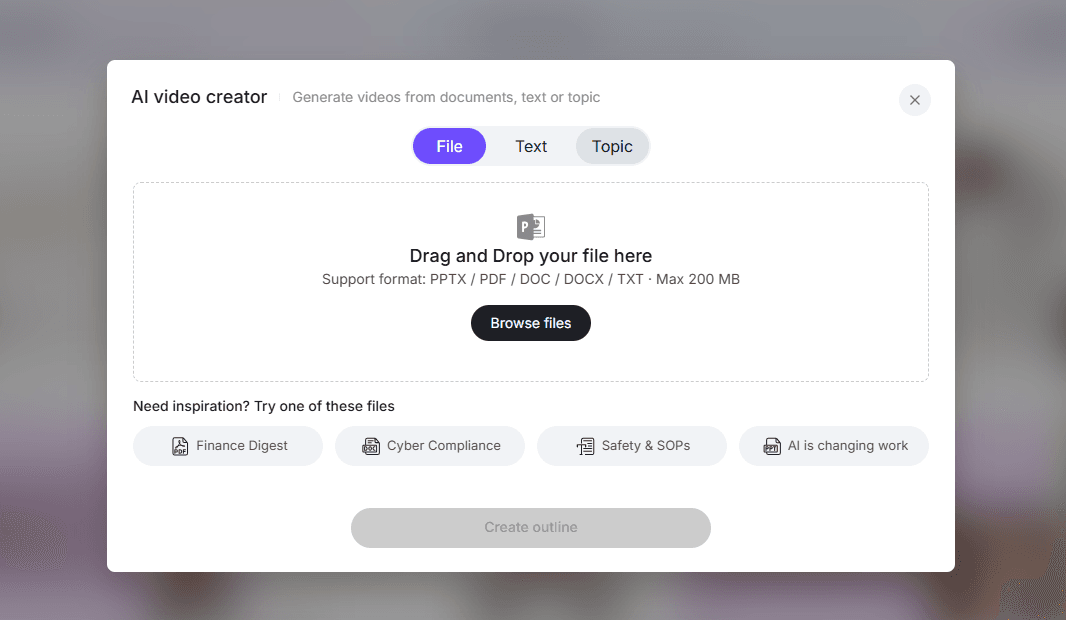
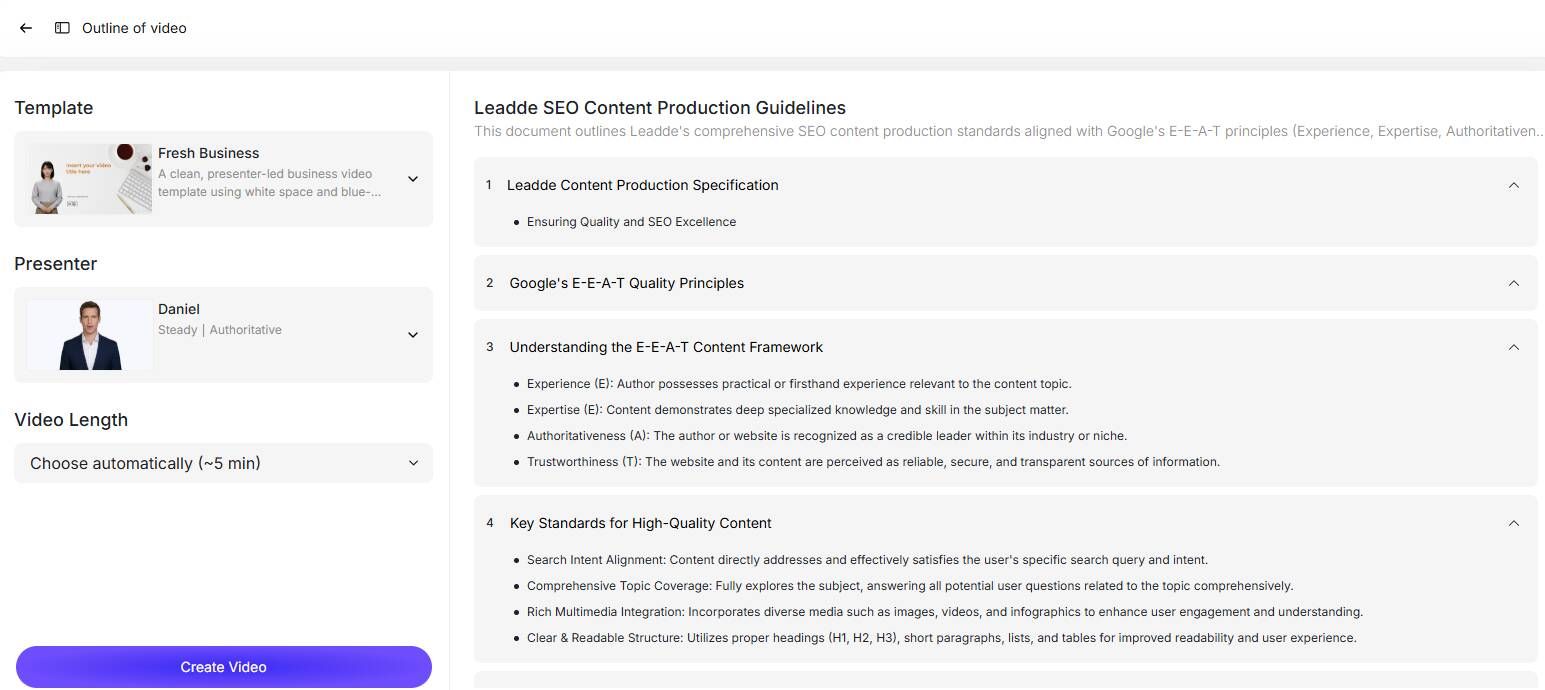
AI is useful for turning a long PDF, SOP, or PowerPoint deck into a first-pass outline. It can group related sections, suggest module titles, and identify natural breakpoints. For example, an AI tool might turn a 20-page SOP into five short training modules, each focused on one workflow or decision point.
4. Rewrite the document into a video script
Do not read the document aloud.
Turn it into a clear operational script.
A strong healthcare training script usually includes:
- Why this topic matters
- When the workflow applies
- Step-by-step actions
- Common mistakes
- A realistic example
- A short knowledge check
- Where to find the full SOP or checklist
Example:
In this video, you will learn how to document a patient fall in the incident reporting system. This workflow applies any time a patient falls on-site, even if there is no visible injury. First, make sure the patient is safe and follow your escalation protocol. Then open the incident report, select “patient fall,” enter the time and location, and document only observable facts. Do not speculate about cause or fault.
This is more useful than simply narrating policy text.
Where AI can help:
AI can generate a first-draft script from the approved outline. It can also simplify dense policy language, suggest a more conversational tone, and create scenario examples or recap questions. Human review is still required to confirm clinical accuracy, compliance language, local workflow details, and terminology.
5. Use plain language without losing accuracy
Healthcare content often contains technical language, but training should be easy to understand the first time.
CDC’s plain language guidance recommends knowing the audience, putting the most important message first, organizing information in logical chunks, using headings, and choosing words carefully.
For staff training, that means:
- Use short sentences
- Define medical or regulatory terms
- Replace vague language with specific actions
- Put critical safety or compliance points early
- Keep the full official policy linked as a reference
For patient education videos, plain language is even more important. A patient-facing video should explain what the patient needs to know, what they need to do next, and when they should contact the care team.
Where AI can help:
AI can rewrite dense policy or clinical language into simpler training language, generate summaries at different reading levels, and create patient-friendly explanations. The final version should still be reviewed by a clinical, compliance, or patient education specialist to make sure simplification does not remove important nuance.
6. Choose the right visual format
Not every healthcare training video needs an AI avatar.
Use the format that best supports the task:
| Training Need | Best Format |
|---|---|
| Policy explanation | Presenter, avatar, or text-led explainer |
| Software workflow | Screen recording or screenshot walkthrough |
| Clinical process | Step-by-step visual flow |
| Equipment use | Real footage, photos, or diagrams |
| Call center training | Scenario or role-play |
| Policy change | Before/after comparison |
| Compliance training | Scenario + knowledge check |
| Patient education | Plain-language visuals and narration |
In my research with training practitioners, AI avatars were viewed as useful for scalable explanation, but not always ideal for every healthcare training scenario. Common concerns included distracting mouth movement, unnatural delivery, and the risk of using avatars where staff need to see a real workflow, interface, or piece of equipment.
The lesson is simple: use AI avatars when they help scale clear explanation, but do not force them into every video. For software workflows, show the screen. For equipment training, show the equipment. For sensitive clinical or patient communication, consider whether a real person or simpler visual format would be more appropriate.
Real-World Example: Medical Call Center Training
One of the clearest examples from my user research came from a medical call center training workflow.
The process looked like this:
- Write the script in Google Docs: 30 minutes
- Paste into an AI avatar tool and fix medical pronunciation: 15 minutes
- Add captions and compliance text: 20 minutes
- Export and upload to LMS: 10 minutes
The result was a 6-minute training module produced in about 90 minutes. Previously, a similar module could take about a week.
The biggest benefit was not just faster production. It was easier updating. When protocols changed, the team could update the script and rerender the video instead of booking a full reshoot.
This is exactly where document-to-video workflows are strongest: frequent updates, repeatable scripts, role-specific training, and a need for fast distribution.
Where Leadde Fits into the Workflow
Leadde can help healthcare teams turn existing documents into AI-generated training videos faster.
According to Leadde’s public materials, the platform supports document inputs such as PowerPoint, PDF, Word, scripts, and text, and can generate structured video content with narration, subtitles, and avatars. Leadde’s AI lecture video maker lists supported formats including .pptx, .pdf, .doc, .docx, and .txt, with files up to 200 MB.
Leadde also describes capabilities such as auto-generated scripts, AI presenters, adjustable explanation depth, multilingual video creation, and support for 88 languages and 175 dialects.
For healthcare training, this means a team could:
- Upload an approved SOP, PDF, PowerPoint, or training document
- Generate a video draft
- Edit the script for role, accuracy, and tone
- Add narration, captions, avatar, or visual highlights
- Review with a clinical, compliance, or operations stakeholder
- Publish to an LMS, intranet, or training hub
- Update the script and regenerate the video when the source document changes
Leadde also states that its document-to-video workflow can reduce production costs by up to 80% and content creation time by up to 90%. These are vendor-provided claims, but they are directionally consistent with the medical call center workflow above, where a 6-minute module went from roughly one week to about 90 minutes.
Best Use Cases
Staff onboarding
Turn onboarding manuals into short modules for new hires. Topics can include systems access, privacy basics, patient communication, safety procedures, department workflows, and role-specific expectations.
HIPAA and compliance training
Policy documents can become scenario-based videos. Instead of only explaining rules, show staff what to do when a patient’s family member calls, when PHI is requested, or when a possible privacy incident occurs.
SOP updates
When procedures change, create a short video explaining what changed, who is affected, what staff should do differently, and where to find the updated SOP.
EHR and medical software training
Software training should show the actual workflow. Use screen recordings, screenshots, or click-by-click visuals for EHR documentation, patient intake, billing, scheduling, or portal workflows.
Medical call center training
Convert scripts and escalation protocols into role-play videos. This works well for patient questions, billing calls, appointment changes, identity verification, and protocol updates.
Equipment and clinical workflow training
Use real images, diagrams, or recorded demonstrations when the learner needs to see a physical process. AI narration can explain the steps, but the visuals must be accurate.
Patient education
Turn patient handouts into short, plain-language videos. Focus on what patients need to understand, what they need to do next, and when to contact the care team.
What to Add Beyond the Video
A video alone is rarely enough for healthcare training.
For stronger retention and compliance, pair videos with:
- A one-page checklist
- A link to the full SOP or policy
- A scenario-based quiz
- Completion tracking
- Version history
- Role-based assignments
- A supervisor sign-off when needed
My user research consistently showed that healthcare training works better when videos are paired with practical support materials, such as job aids, checklists, scenario quizzes, click-through screenshots, and short reminders. This is especially important for teams that cannot rely only on long videos, annual refreshers, or passive course completion.
For compliance training, the organization may need to show not only that employees received training, but that the training was appropriate for their role and connected to the current version of the policy.
Common Mistakes to Avoid
Turning the entire document into one video
This creates a long video with the same problems as the original document. Split the content into task-based modules.
Using AI without human review
AI can speed up production, but healthcare training still needs review by clinical, compliance, legal, or operational stakeholders.
Using avatars when another format would work better
AI avatars can be useful for scalable explanation, but they can distract learners when overused. Use screen recordings for software, real visuals for equipment, and scenarios for communication training.
Forgetting pronunciation and captions
Medical terms, drug names, and abbreviations should be checked carefully. Captions should be edited, not blindly auto-generated.
Measuring only video views
Views do not prove understanding. Track completion, quiz performance, repeat questions, common errors, and whether staff can apply the workflow correctly.
Ignoring the update process
Before publishing, decide who owns the source document, who owns the video, where the latest version lives, and what happens when the policy changes.
Final Checklist
Before publishing a healthcare training video, confirm that:
- The source document is approved
- The version date is recorded
- The target role is clear
- The learning objective is specific
- The script uses plain language
- Clinical or compliance reviewers approved it
- Medical terminology is pronounced correctly
- Captions are accurate
- No unnecessary PHI is included
- The full SOP or policy is linked
- A checklist or job aid is available
- A knowledge check is included when needed
- Completion tracking is configured
- The update owner is documented
Conclusion
The best healthcare training videos do not start from a blank page. They start from the documents your organization already trusts.
SOPs, PDFs, PowerPoints, policies, manuals, clinical guidelines, software workflows, and patient education handouts can all become useful training videos—but only if they are redesigned for real learning.
The winning approach is to keep the document as the source of truth, break it into short role-based modules, rewrite it into plain operational language, choose the right visual format, add job aids and knowledge checks, and build a clear update process.
AI tools like Leadde can make this process faster by converting documents into narrated, multilingual, presenter-led videos. But the real value is not automation alone.
The real value is creating healthcare training that is short enough to finish, clear enough to apply, accurate enough to trust, and easy enough to update when policies, systems, or workflows change.





