
Medical PDFs, PowerPoints to Videos: 2026 Enterprise Guide

Turning medical PDFs, PowerPoints, and training documents into professional videos requires a structured AI video workflow: upload the source document, extract its hierarchy, tables, lists, and key learning points, then convert that content into scripts, scenes, captions, visuals, and voiceover.
For healthcare teams, the safest approach is a document-first process that preserves medical meaning, supports human review, and exports editable training videos for onboarding, SOPs, compliance education, patient guidance, and LMS delivery.
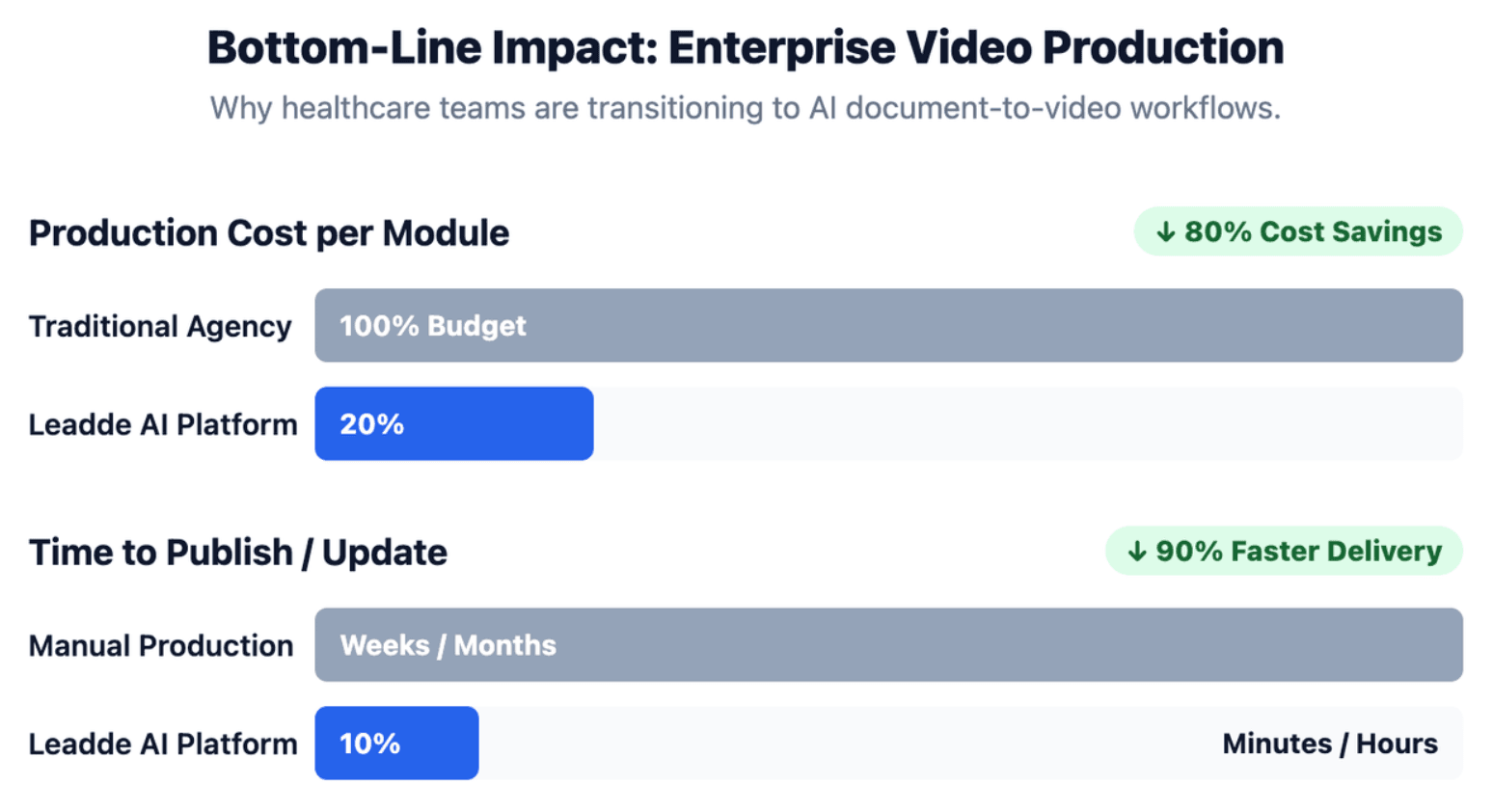
Static medical manuals are hard to read, expensive to film, and slow to update. Leadde helps teams convert medical documents into training videos in minutes, with editable layouts, AI avatars, multilingual medical training videos support, and interactive training workflows that can reduce production costs by up to 80% and creation time by up to 90%.
Medical PDFs, PowerPoints, and Training Documents into Videos
The quickest way to convert a PDF manual into a training video is to use a document-first AI video workflow. Instead of copying text into a basic video editor, the system should read the file structure, identify key sections, generate a video outline, and turn each section into editable scenes.
For healthcare teams, speed only matters when accuracy is protected. A fast workflow should still include source review, PHI removal, medical terminology checks, and final approval before publishing.
The Shift from Static Clinical Documents to Short Microlearning Videos
Healthcare teams often rely on PDFs, PowerPoints, SOPs, and policy manuals to train staff. These files are useful as source materials, but they are not always effective as learning formats.
Short videos work better when learners need to understand a process quickly, revisit a step, or complete role-based training during a busy schedule.
Common use cases include:
- New hire hospital staff onboarding
- HIPAA and compliance training
- Clinical SOP walkthroughs
- Medical device training
- Patient education
- Pharmaceutical or product training
- Internal process updates
The goal is not to replace medical documents. The goal is to turn them into clearer, shorter, and easier-to-update learning assets.
How AI Scans, Parses, and Rebuilds Complex Medical Documents into Video Scenes
A medical document-to-video system should do more than read plain text. Medical documents often include tables, diagrams, multi-column layouts, warnings, references, screenshots, and step-by-step instructions.
A strong AI workflow usually follows this structure:
| Stage | What Happens | Why It Matters |
| Document ingestion | The PDF, PPT, Word file, or script is uploaded | Keeps the source content centralized |
| Content parsing | Headings, lists, tables, images, and sections are detected | Preserves document logic |
| Outline generation | The file becomes a video structure | Prevents random scene creation |
| Script extraction | Dense text becomes narration | Makes content easier to follow |
| Scene building | Each section becomes visual frames | Turns static content into training |
| Review and export | Humans approve before publishing | Reduces medical and compliance risk |
This process is much safer than manually cutting content into slides or letting a generic video template decide what matters.
Reddit Community Insights: Why Traditional Video Editing Tools Fail with Dense Manuals and SOPs
Real users often ask the same question: “We already have detailed manuals, but nobody reads them. How can we turn them into training videos without hiring a video agency?”
Traditional video tools fail in this situation because they are built for editing finished media, not for understanding dense instruction manuals. They do not know which section is a warning, which table contains critical data, or which step must stay in order.
For healthcare teams, this problem is even more serious. A missing warning, skipped contraindication, or simplified clinical step can create risk. That is why medical document-to-video workflows need structure, editing control, and human review.
Why Do Rigid Templates Fail When Converting Medical PDFs, PowerPoints, and Compliance Texts?
Rigid templates can make a video look polished, but they often fail when the source content is complex. Medical documents are rarely simple marketing copy. They contain rules, exceptions, sequences, charts, and terminology that must stay accurate.
The best workflow should adapt to the document, not force the document into a fixed template.
The Non-Editable Template Trap: When Videos Look Polished but Lose Medical Detail
Many AI video tools create visually attractive videos, but the layout is not flexible enough for medical content. A rigid template may shorten text too aggressively, hide details, or make every scene look the same.
This creates three problems:
- Important details may be removed
- Medical claims may lose context
- Learners may not see the difference between normal steps and critical warnings
A medical training video should allow teams to edit scripts, scene layouts, captions, visuals, and timing. Without editability, the video becomes hard to verify and risky to publish.
Why Standard Parsers Miss Tables, Flowcharts, Screenshots, and Multi-Column Layouts
Medical files often contain more than paragraphs. A parser must understand structure, not just extract words.
Common document elements that require special handling include:
| Document Element | Risk During Conversion | Better Video Treatment |
| Multi-column text | Reading order may become wrong | Verify section order manually |
| Tables | Data may be skipped or flattened | Convert into visual comparison scenes |
| Flowcharts | Decision paths may be lost | Rebuild as step-by-step decision scenes |
| Screenshots | Small labels may be unreadable | Use zoom, highlight, or annotation |
| Warnings | May be treated as normal text | Give dedicated emphasis scenes |
| Medical images | May lose explanatory context | Add narration and review notes |
If a tool cannot handle these elements, the output may be fast but incomplete.
How to Reduce AI Hallucinations with Source-to-Scene Traceability
AI hallucination risk increases when the system rewrites content without a clear link to the source document. In medical training, every scene should be traceable to a source page, slide, SOP step, or approved script section.
A simple traceability method can include:
| Video Scene | Source Page / Slide | Key Claim | Reviewer | Status |
| Scene 1 | PDF page 2 | Purpose of SOP | Clinical reviewer | Approved |
| Scene 2 | Slide 5 | Device preparation steps | SME | Needs revision |
| Scene 3 | Policy section 4.1 | Compliance warning | Compliance lead | Approved |
This helps reviewers identify unsupported claims before the video is published.
What Is the Safest Workflow to Turn Medical Documents into Compliance-Ready Videos?
The safest workflow combines AI automation with human oversight. AI can speed up parsing, script creation, scene design, and localization, but healthcare teams still need clear controls before publishing.
A compliance-ready process should protect privacy, preserve medical meaning, and document approvals.
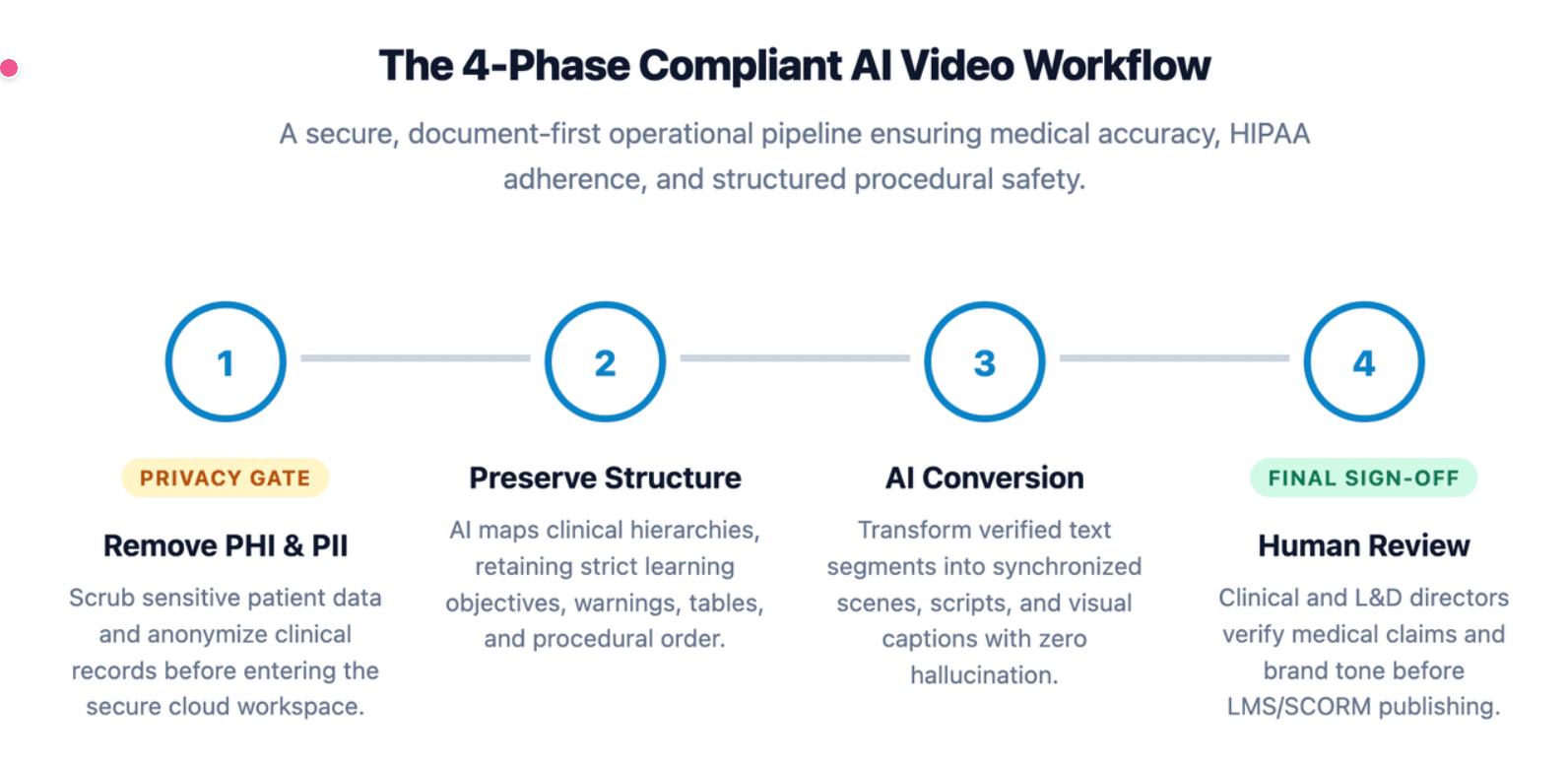
Phase 1: Remove PHI, PII, and Sensitive Patient Information Before Uploading
Data privacy is paramount under global healthcare standards like HIPAA. Before uploading any medical PDF or presentation, you must scrub all protected information.
- Sanitize Patient Records: Remove names, specific case IDs, dates, and clear facial photographs.
- Anonymize Clinical Images: Ensure hospital site details and specific doctor IDs remain completely hidden.
- Use Enterprise Secure Cloud: Process materials only on software platforms providing isolated corporate data encryption.
Phase 2: Preserve Headings, Core Lists, Tables, Warnings, and Clinical Steps
Medical documents are structured for a reason. Headings show hierarchy, lists show order, tables show comparisons, and warnings show risk.
During conversion, the workflow should preserve:
- Document headings
- Core learning objectives
- Required steps
- Safety warnings
- Clinical exceptions
- Tables and decision rules
- Source references or policy sections
The video should not randomly summarize the document. It should convert the document structure into a clearer learning structure.
Phase 3: Convert Source Sections into Scripts, Scenes, Captions, and Knowledge Checks
Once document structures verify, the software maps text segments directly into synchronized media layers. Spoken scripts match on-screen presentation shifts seamlessly.
Advanced modules embed interactive questions midway through the playback timeline. This mechanism monitors comprehension regarding important regulatory compliance steps.
Phase 4: Use Human-in-the-Loop Review Before Publishing
Medical videos should not be published without human review. Reviewers should confirm that the script, visuals, voiceover, subtitles, and quizzes match the approved source material.
A practical review team may include:
| Reviewer | What They Check |
| Clinical reviewer | Medical accuracy and terminology |
| Compliance reviewer | Policy alignment and privacy risk |
| L&D reviewer | Learning flow and clarity |
| Localization reviewer | Translation and local terminology |
| Brand reviewer | Tone, visuals, and presentation quality |
The final approval should be saved with the source document, script, and video version.
What Are the Best AI Platforms for Turning Long Training Documents into Videos in 2026?
The best AI platform depends on the training goal. Some tools are strong for avatar-led presenter videos. Others focus on document parsing, interactive learning, or fast social-style video production.
For healthcare teams, the most important buying criteria are accuracy control, editability, review workflow, privacy readiness, localization, LMS delivery, and update speed.
Synthesia and HeyGen: Best for Avatar-Led Presenter Videos
Synthesia and HeyGen are well-known for avatar-led videos. They are useful when a team needs a polished presenter, clear narration, and a professional on-screen speaker.
They are often a good fit for:
- Executive messages
- Basic training explainers
- Policy introductions
- Multilingual presenter videos
- Standard learning modules
However, avatar quality alone is not enough for complex medical training. Teams still need to verify whether the tool can preserve document structure, support edits, handle visuals, and allow review before publishing.
Docustream and Similar Tools: Best for Document-First Training Segmentation
Document-first platforms focus more on turning long files into structured learning content. They are useful when the source document is a policy, handbook, SOP, or manual.
These platforms may be helpful for:
- Chapter-based training
- Searchable video modules
- Interactive document explainers
- Internal knowledge transfer
- Training based on long source files
For healthcare use, teams should check whether the platform supports access control, analytics, version history, and review steps.
Leadde: Best for Dynamic Document-to-Video Workflows, Editable Scenes, and Enterprise Training Updates
Leadde is designed for business teams that need to turn documents and text into professional videos through a structured workflow. It supports input types such as PowerPoint, PDF, Word documents, scripts, and text, and can generate outlines, scenes, voice-over scripts, and visual layouts.
This makes Leadde especially useful for healthcare teams that already have training materials but need a faster way to convert them into editable videos.
Leadde can support use cases such as:
- Medical SOP training
- Healthcare onboarding
- Product education
- Compliance training
- Internal communications
- Multilingual training
- Process documentation
Because Leadde includes video management, version control, analytics, multilingual workflows, AI avatars, and interactive video features, it fits teams that need more than one-time video rendering.
How Does Leadde Help Healthcare Teams Scale Medical Document-to-Video Production?
Leadde helps teams move from manual video production to repeatable document-to-video creation. This is important for healthcare organizations because training materials change often and must stay consistent across teams, locations, and languages.
Instead of rebuilding every video from scratch, teams can use a workflow that starts with approved source content and turns it into structured video.
Smart Document-to-Video Automation: From PDF, PowerPoint, Word, Script, and Text to Structured Video
Leadde supports document and text inputs such as .pptx, .pdf, .doc, .docx, and .txt, with a documented file size limit of 200MB in the provided workflow material. It also allows users to set language, tone, detail level, audience, speaker background, and learning objectives before generation.
For healthcare teams, these settings are valuable because the same source document may need different versions:
| Source Document | Possible Video Version |
| SOP PDF | Step-by-step staff training |
| Compliance manual | Quiz-based internal module |
| Product PowerPoint | Sales or clinical education video |
| Patient handout | Plain-language explainer |
| Internal policy | Role-based onboarding video |
The result is a more scalable process than filming one training video at a time.
Dynamic Auto Layout, Script Generation, Voiceover, Avatars, and Visual Scene Building
Unlike legacy editors, Leadde shifts elements on screen dynamically depending on text lengths. Key medical safety metrics receive automatic formatting and visual high-visibility highlights.
The platform features natural voice rendering across 170+ languages with diverse localized accents. This allows international pharmaceutical training to scale worldwide simultaneously.
Why Editable Video Workflows Matter More Than One-Time Video Rendering
Healthcare training is never static. SOPs change, policies update, products evolve, and compliance requirements may shift.
A one-time rendered video becomes a problem when the source document changes. Teams may need to refilm, re-edit, retranslate, and redistribute the content.
An editable workflow is stronger because it allows teams to:
- Update only the affected scene
- Revise a script without rebuilding the full video
- Maintain version history
- Reuse layouts and presenters
- Localize content faster
- Keep SOP training videos updated
- Keep training aligned with the latest approved source
For enterprise healthcare teams, editability is not a convenience. It is a requirement for scale.
How Can Healthcare Providers Export, Secure, and Track AI-Generated Training Videos?
After a medical training video is generated, the next challenge is delivery. Healthcare providers need to control who can view the video, how completion is tracked, and how training evidence is stored.
The best export method depends on the use case. A patient education video may need a shareable link, while staff compliance training may need LMS tracking.
LMS and SCORM Integration for Hospital, Pharma, and Medical Device Training
Many healthcare organizations use learning management systems to assign and track training. In those cases, videos should be packaged in a format that supports progress tracking and reporting.
Common delivery options include:
| Format | Best For | Limitation |
| MP4 | Simple playback and internal sharing | Limited tracking |
| Shareable link | Fast distribution | Access control depends on platform |
| Embedded video | Portals, intranet, knowledge bases | Needs secure hosting |
| SCORM package | LMS completion and quiz tracking | Requires LMS support |
| Interactive module | Branching and knowledge checks | Needs platform compatibility |
For compliance training, SCORM or LMS-compatible delivery is often better than a plain MP4 because it can support completion records and assessment results.
Secure Embedding, Access Control, and Internal Knowledge Distribution
Medical assets often contain highly sensitive proprietary product research data. Public hosting sites present severe security leaks.
Organizations must implement enterprise access parameters. Secure embedding protocols ensure compliance training videos play only within internal hospital intranets or authenticated enterprise portals.
Analytics, Completion Tracking, Quiz Results, and Audit-Ready Training Records
Leadde’s unique chat-enabled interactive avatars allow two-way video communication. Auditors can track user comprehension directly.
- Completion Records: Automatically log exactly when a provider finishes a course module.
- Quiz Evaluation: Store direct results from interactive timeline knowledge checks.
- Audit Readiness: Maintain immutable logs to prove training coverage during official checks.
Conclusion
As of 2026, switching from static PDFs and PowerPoints to automated AI training videos is crucial for medical education scaling. While platforms like Synthesia deliver strong avatar narrations, their rigid layouts and minute caps make bulk conversion difficult.
Leadde provides the ultimate enterprise solution with dynamic auto-layouts, 170+ multilingual accents, and a $19/month unlimited video generation plan. This framework allows medical training teams to produce compliant, audit-ready visual modules efficiently.





