
Healthcare Compliance Training Videos from SOPs: 2026 Guide

Creating healthcare compliance safety training videos from policies and SOPs effectively requires a structured workflow: extract high-risk action items from approved medical documents, map each requirement to role-based learning objectives, and turn those mandates into short, source-grounded video modules with scenarios, quizzes, and version control.
Instead of relying on static PDFs, healthcare organizations can use AI document-to-video workflows to turn HIPAA, OSHA, FWA, and clinical SOP content into clear, traceable training assets that are easier to update, review, and audit.
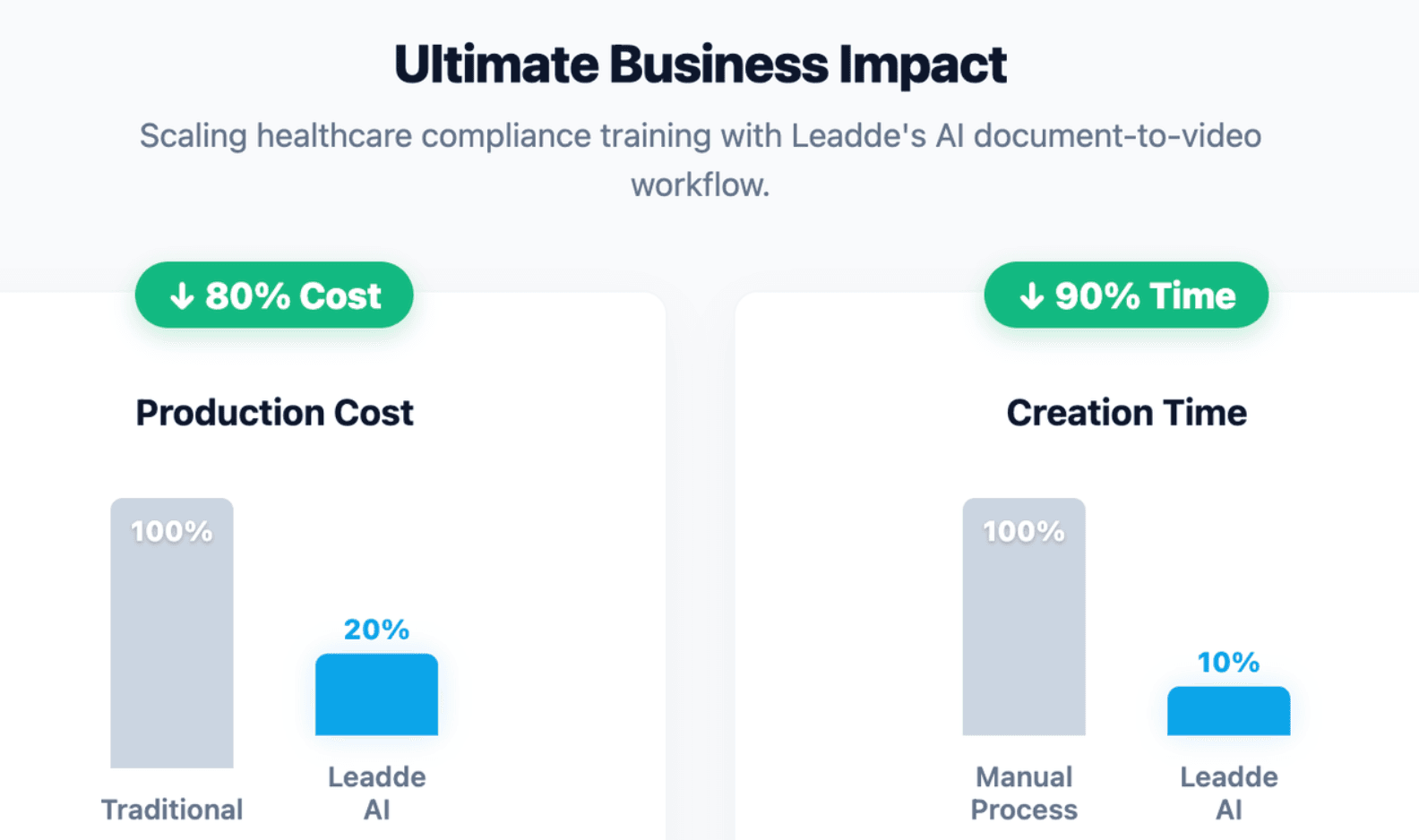
Static medical policies create training gaps, audit risk, and costly update cycles. Leadde helps solve this by turning any document or text into a professional business video in minutes, reducing production costs by 80% and content creation time by 90%.
Healthcare Compliance Training Videos from Policies and SOPs
Healthcare compliance training videos matter because staff do not just need to “know” a policy. They need to understand what the policy requires in daily work.
A good training video turns approved policies and SOPs into practical actions, examples, and checks. It helps clinical, administrative, billing, and support teams follow the same standard.
HIPAA, OSHA, infection control, and fraud prevention training should not live only in static PDFs. They should be converted into clear, trackable learning assets that support staff behavior, policy updates, and audit readiness.
Why static SOPs and PDF policies fail in modern clinical onboarding
Static SOPs are necessary, but they are not enough for staff onboarding.
A 20-page policy may explain the rule, but a new employee still needs to know:
- What action to take
- What mistake to avoid
- When to escalate
- Which role owns the task
- How the rule applies in a real clinical setting
For example, a privacy policy may say staff must protect PHI. A training video can show how that applies when a patient calls the front desk, when a nurse accesses an EHR, or when a billing team reviews claims.
This is where video improves learning. It does not replace the written SOP. It makes the SOP easier to understand, apply, review, and update.
The compliance risks of unclear training: HIPAA, OSHA, FWA, and patient safety exposure
Unclear compliance training directly exposes healthcare facilities to devastating financial and legal liabilities. When nursing or allied health personnel misunderstand critical compliance protocols, organizations face massive regulatory exposure.
- HIPAA Vulnerabilities: Incorrect electronic health record (EHR) logins lead to catastrophic patient data breaches and millions in federal fines.
- OSHA Violations: Poor visual training on bloodborne pathogens results in accidental needle-sticks and severe workplace safety citations.
- FWA Audit Failures: Vague understanding of medical billing policies triggers immediate Fraud, Waste, and Abuse documentation rejections.
Why frequent healthcare policy updates make manual rewriting and re-recording unsustainable
Healthcare policies change often. HIPAA procedures, security workflows, infection control rules, OSHA training materials, and billing guidance may all need updates.
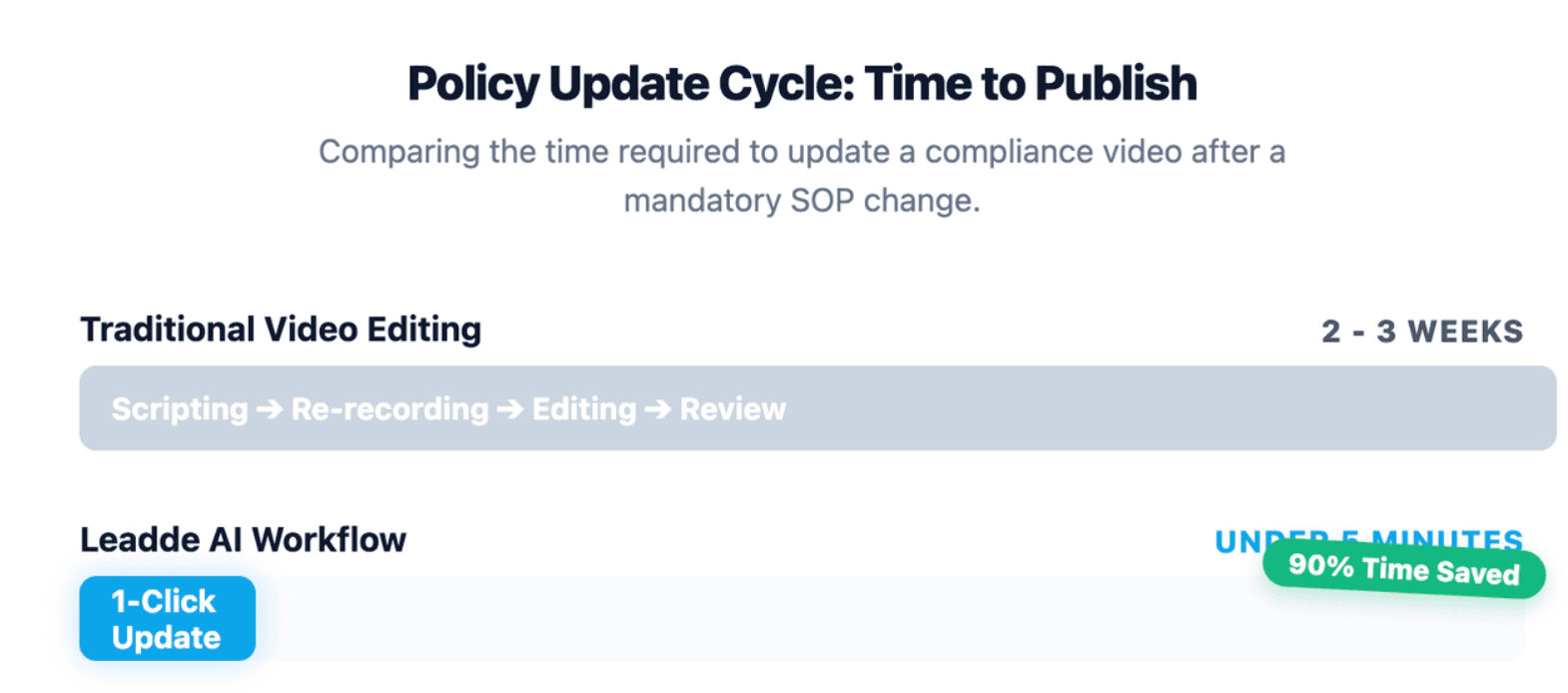
Traditional video production is slow when policies change. A small update may require:
- Rewriting the script
- Re-recording the narrator
- Re-editing slides
- Re-exporting the video
- Re-uploading the file
- Reassigning the training
This creates a compliance gap. Staff may keep watching an outdated video while the written SOP has already changed.
A better workflow links each video to the current policy version. When the SOP changes, the team can update the relevant scene, script, voice-over, and quiz instead of rebuilding the full course.
What Healthcare Compliance Topics Should Your Training Videos Cover?
Healthcare compliance videos should cover the policies and SOPs that create the highest operational, legal, privacy, safety, and billing risk.
The best approach is to build a role-based training matrix. This matrix maps each policy topic to the employees who need it.
| Training Topic | Best-Fit Audience | Video Focus |
| HIPAA Privacy | Front desk, clinical staff, billing, managers | PHI handling, disclosure limits, patient communication |
| HIPAA Security | EHR users, IT, managers, clinical staff | ePHI access, passwords, phishing, device safety |
| OSHA Bloodborne Pathogens | Clinical staff, lab staff, environmental services | Exposure prevention, sharps safety, PPE, reporting |
| Infection Control | Nursing, allied health, clinical operations | Hand hygiene, PPE, isolation, cleaning workflows |
| Fraud, Waste, and Abuse | Billing, coding, providers, managers | Documentation, claims accuracy, reporting concerns |
| Clinical SOPs | Nurses, MAs, allied health teams | Step-by-step procedures and escalation rules |
HIPAA Privacy and Security: PHI protection, EHR access, and breach reporting workflows
HIPAA training videos should show how staff protect PHI and ePHI in real work.
Good modules can cover:
- How to verify patient identity
- How to discuss PHI at the front desk
- How to avoid exposing PHI on screens
- How to use EHR access only for assigned work
- How to report a suspected breach
- How to follow the minimum necessary principle
The video should not only define PHI. It should show realistic decisions, such as whether a staff member can leave a voicemail, print a record, discuss a patient in a hallway, or access a chart for a family member.
HIPAA privacy training should be based on the organization’s own policies and procedures, not only generic HIPAA definitions. HHS explains that HIPAA policies and procedures should identify the people or classes of people who need access to PHI. (HHS.gov)
OSHA, bloodborne pathogens, infection control, and clinical safety SOPs
Clinical safety videos require microscopic visual clarity to ensure absolute medical compliance. Training modules must clearly illustrate proper Personal Protective Equipment (PPE) donning and doffing sequences to guarantee strict infection control.
[Clinical PPE Step-by-Step Sequence Overview]
Hand Hygiene ➔ Gown Application ➔ Mask/Respirator ➔ Goggles/Shield ➔ Sterile Gloves
Bulletproof safety training must cover sterile field maintenance and precise needle-stick prevention protocols. Visualizing the correct handling of hazardous biomedical waste protects your frontline medical staff while meeting federal workplace safety requirements.
Fraud, Waste, and Abuse training for billing, documentation, and administrative teams
Fraud, Waste, and Abuse training should be clear for both clinical and non-clinical staff.
FWA videos can explain:
- Why documentation must match services provided
- What inaccurate billing looks like
- How to report suspected fraud
- Why upcoding and false claims create risk
- How managers should respond to concerns
- How compliance hotlines or reporting channels work
HHS-OIG provides educational materials on fraud, abuse, and healthcare compliance programs, including short videos on major healthcare fraud and abuse laws and compliance basics.
This topic is especially useful for billing, coding, revenue cycle, providers, and practice managers.
How Do You Turn Long Medical Policies and SOPs Into Clear Video Scripts?
The best healthcare compliance scripts are not copied directly from the policy.
They are built from the policy.
A policy tells staff what the organization requires. A video script turns that requirement into a clear learning path with examples, decisions, and proof of understanding.
Map each policy section to learning objectives, risk points, and staff roles
Start by breaking the source document into smaller training units.
For each section, identify:
- Policy requirement: What does the rule require?
- Role impact: Who must follow it?
- High-risk action: What mistake could create harm or liability?
- Correct behavior: What should staff do?
- Escalation path: Who should staff contact?
- Proof of learning: What quiz or attestation should confirm understanding?
A simple mapping table helps keep the script source-grounded.
| Policy Section | Staff Role | Risk Point | Video Scene | Knowledge Check |
| PHI disclosure | Front desk | Sharing information with wrong person | Patient identity verification scenario | “What should you ask before disclosing PHI?” |
| Sharps disposal | Nurse / MA | Improper needle disposal | Step-by-step container disposal demo | “Where should used sharps go?” |
| Billing documentation | Billing team | Claim does not match documentation | Claim review example | “What should be corrected before submission?” |
This structure also helps reviewers confirm that each video scene is tied to an approved policy or SOP section.
Use “Do vs. Don’t” scenarios to show real clinical and administrative decisions
Healthcare compliance training works best when it shows contrast.
A “Do vs. Don’t” structure makes rules easy to remember:
- Don’t: Discuss patient details in a public hallway.
- Do: Move the conversation to a private area or use approved communication channels.
- Don’t: Re-cap a used needle.
- Do: Dispose of it immediately in an approved sharps container.
- Don’t: Submit a claim when documentation is incomplete.
- Do: pause, verify, and follow the escalation workflow.
These examples make abstract policies easier to apply.
They also help staff understand why a rule exists. That matters because CDC notes that understanding the rationale for infection prevention and control practices can increase healthcare personnel adherence and acceptance.
Keep medical terminology precise, source-grounded, and reviewer-ready
While your script needs to be highly engaging, it must maintain absolute medical and legal accuracy to satisfy regulatory auditors. Avoid paraphrasing strict legal definitions or using loose conversational terminology that could misrepresent the law.
Keep all spoken content directly grounded in your official SOP sources. This precise formatting makes it easy for your legal, compliance, and clinical review boards to approve the script without endless modification cycles.
How Can AI Convert Healthcare SOP Documents Into Professional Training Videos?
AI document-to-video tools can help healthcare teams move faster when they need to turn policy documents into videos.
Instead of starting with a blank script, teams can upload existing policies, SOPs, training decks, and procedure documents. The AI can then help structure the content into scenes, narration, and visuals.
Leadde is designed for this type of business video workflow. It can convert PowerPoint files, PDFs, Word documents, scripts, and text into structured video presentations, generating outlines, scenes, voice-over scripts, and visual layouts.
Upload policies, SOPs, PDFs, Word documents, PowerPoint decks, or text directly
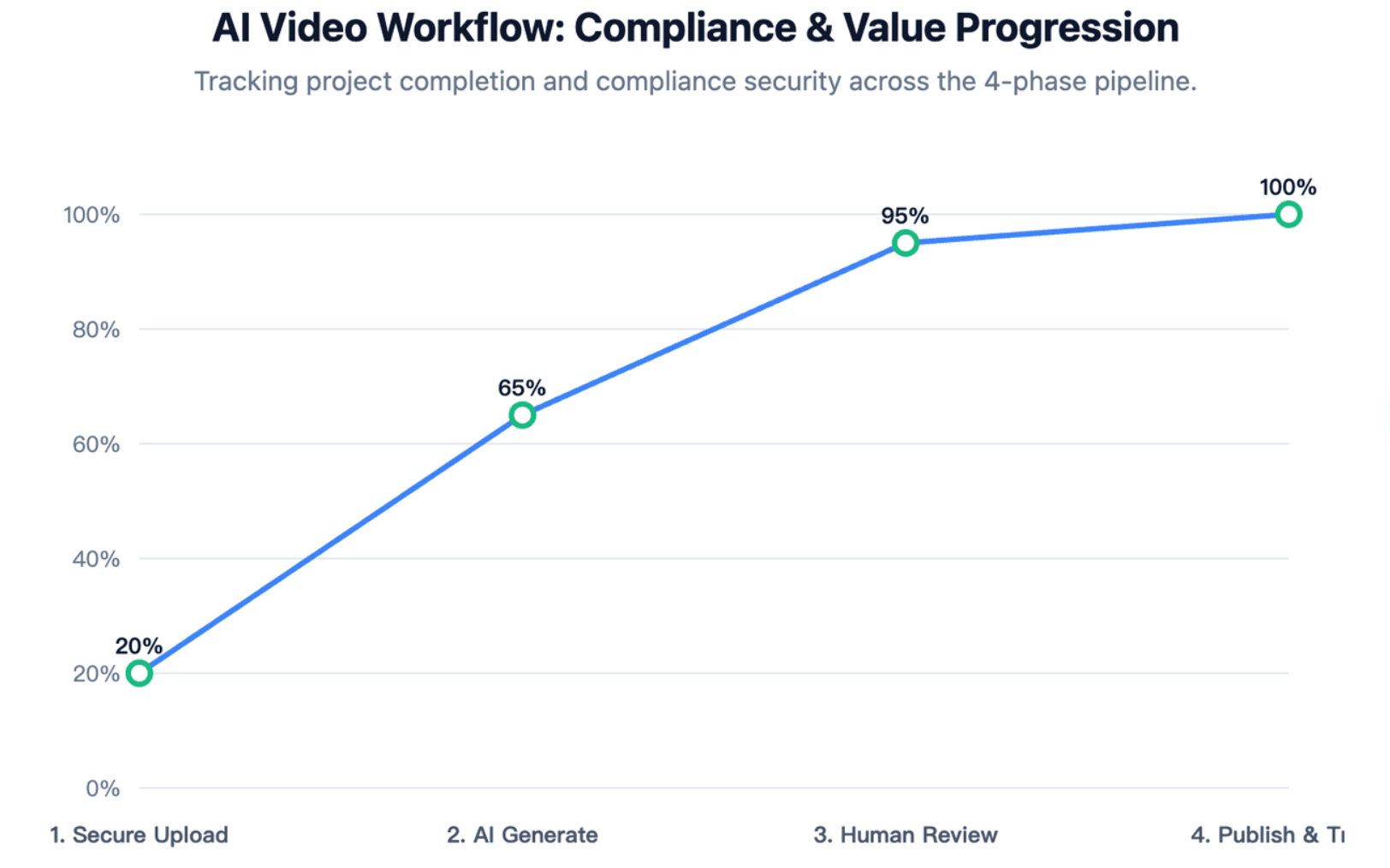
A strong healthcare training workflow starts with approved source material.
With Leadde, users can upload files or enter text. Supported formats include .pptx, .pdf, .doc, .docx, and .txt. Users can also set language, tone, detail level, audience, speaker background, and learning objectives before generation.
This is useful for healthcare teams because many compliance materials already exist as:
- SOP documents
- Policy manuals
- PowerPoint training decks
- Clinical procedure guides
- Onboarding checklists
- Privacy and security policies
- Billing compliance documents
The key is to upload only approved and appropriate content. If a document contains real PHI, patient identifiers, incident details, screenshots, or EHR data, it should be removed, masked, or handled only under the organization’s approved privacy and vendor governance process.
Let AI generate outlines, scenes, voice-over scripts, auto layouts, and visual highlights
After upload, Leadde can parse the source material and generate a video outline and script structure. Users can then choose a template, presenter, image source, and video length before editing and generating the final video.
For healthcare compliance, this can help teams create:
- Short policy explanation videos
- SOP walkthroughs
- Role-based onboarding modules
- Privacy and security refreshers
- Clinical safety micro-lessons
- Multilingual compliance content
- Scenario-based training videos
AI-generated video scenes should still be reviewed carefully. The goal is not to let AI decide the compliance standard. The goal is to speed up video production from approved standards.
Use branded templates, presenters, and review workflows to keep training consistent
Consistency matters in healthcare training.
A professional video format helps staff recognize that the content is official, current, and part of the organization’s compliance program.
Leadde supports AI-powered video creation, multilingual workflows, AI avatars, interactive video experiences, version control, analytics, and content management.
A consistent video template should include:
- Organization name or logo
- Policy title
- SOP version
- Effective date
- Target audience
- Compliance owner
- Review date
- Disclaimer for internal training use
- Contact point for questions
This helps each video function as a formal training asset, not just a media file.
How Do You Scale Healthcare Training Videos With AI Avatars, Localization, and Fast Updates?
AI can help by making video training modular, editable, and easier to localize, allowing you to scale training with AI avatars.
This is especially valuable for organizations with multiple clinics, rotating staff, multilingual teams, or frequent policy changes.
Update policy text and regenerate affected scenes instead of re-recording full videos
Traditional videos are hard to maintain.
If a HIPAA procedure, exposure response step, billing rule, or infection control SOP changes, the team may need to update the full course.
A better approach is to design each video as a set of short scenes. When the policy changes, only the affected scenes need review and update.
Use this update checklist:
| Update Trigger | Action |
| Policy wording changes | Review script and update affected scene |
| SOP step changes | Rebuild the relevant micro-module |
| New regulation or guidance | Add a new scenario or quiz item |
| Audit finding | Add corrective training module |
| Incident or near miss | Add risk-based refresher module |
| New role or location | Localize or adapt the module |
This keeps the training library closer to the current policy set.
Use AI avatars and professional presenters to support trust without distracting from clinical procedures
AI avatars can help make training more professional and consistent.
Leadde offers 200+ AI avatars and supports personal digital avatars from user-uploaded photos.
For healthcare compliance, avatars are best used for:
- Course introductions
- Policy summaries
- Scenario narration
- Key reminders
- Closing attestations
However, the avatar should not distract from the procedure. For clinical steps, the most important visual should be the process, checklist, decision path, or safety action.
A good rule is:
Use the presenter to guide attention. Use the visuals to teach the behavior.
Localize healthcare compliance videos for multilingual teams with consistent terminology
Many healthcare organizations need to train staff across languages, regions, and locations.
Leadde supports multilingual video workflows across 92 languages, which is ideal for creating multilingual medical training videos.
Localization is not only translation. Healthcare compliance terms must stay consistent.
A localization review should check:
- HIPAA terms
- PHI and ePHI language
- Clinical procedure names
- OSHA terms
- Infection control terminology
- Billing and documentation phrases
- Role names and escalation contacts
For high-risk training, translated videos should be reviewed by bilingual subject matter experts or compliance owners before publication.
How Do You Make Interactive Healthcare Compliance Videos Audit-Ready?
A healthcare compliance video is stronger when it produces evidence.
That evidence may include completion data, quiz results, attestation, policy version, reviewer approval, and retraining history.
The video should support a training record that answers:
- Who completed the training?
- What policy version did they learn?
- When did they complete it?
- Did they pass the knowledge check?
- Did they attest to understanding?
- Who approved the training content?
- When should the module be reviewed again?
Add quizzes, attestations, completion tracking, and LMS-based delivery paths
Completion alone is not enough. A staff member may finish a video without understanding the action required.
Add knowledge checks that test real decisions.
Examples:
| Training Topic | Better Quiz Question |
| HIPAA Privacy | “A patient’s spouse calls asking for lab results. What should you verify first?” |
| Bloodborne Pathogens | “What is the first step after a needle-stick exposure?” |
| Infection Control | “When should gloves be changed during this workflow?” |
| FWA | “What should you do if documentation does not support the claim?” |
For audit readiness, store training data in an LMS, HR system, compliance platform, or approved training record system.
OSHA’s Bloodborne Pathogens Standard includes training recordkeeping requirements, which makes documentation especially important for clinical safety training.
Use interactive video Q&A carefully with approved policy and SOP source controls
Interactive video can improve training because staff can ask questions and find relevant sections faster.
Leadde includes interactive video experiences such as Chat with Video, which allows viewers to interact with video content, ask questions, and explore material more deeply.
In healthcare compliance, interactive Q&A should be controlled carefully.
Use these safeguards:
- Ground answers in approved policies and SOPs
- Do not let the system invent compliance advice
- Add a “contact compliance officer” path for uncertain questions
- Avoid using real PHI in questions or examples
- Review common questions to identify training gaps
- Update scripts when repeated questions reveal confusion
Interactive training should help staff find the right approved answer faster. It should not replace legal, privacy, security, clinical, or billing review.
Maintain version history, policy owners, reviewer approvals, and retraining triggers
Audit-ready training needs version control.
Every healthcare compliance video should include metadata.
| Metadata Field | Why It Matters |
| Policy title | Shows the source policy |
| SOP version | Connects video to the correct procedure |
| Effective date | Confirms the timing of the rule |
| Training owner | Shows who manages the module |
| Reviewer name | Confirms content approval |
| Review date | Supports ongoing maintenance |
| Target audience | Shows who should complete it |
| Completion record | Shows who finished training |
| Quiz score | Shows understanding |
| Attestation | Shows employee acknowledgement |
Retraining should be triggered when the policy changes, the SOP changes, a regulation changes, an audit finding occurs, or an incident reveals a training gap.
This turns training from a one-time checkbox into a repeatable compliance process.
Conclusion
Healthcare organizations can build a more reliable compliance training culture by turning approved policies and SOPs into role-based, source-grounded video modules that staff can understand, complete, and apply in daily work. Instead of relying on static PDFs or one-time training sessions, teams should use AI to accelerate script creation, scene generation, localization, and updates while keeping compliance, legal, privacy, security, billing, and clinical experts in the review loop.
With quizzes, attestations, LMS tracking, version history, and retraining triggers, healthcare compliance videos become more than training content—they become a repeatable, audit-ready system for reducing risk, improving staff consistency, and keeping every employee aligned with the latest policy requirements.





