Educational Animation: Examples, Benefits & AI Creation Guide

Educational animation uses motion, visual storytelling, and structured explanations to make complex ideas, processes, and relationships easier to understand. It works best when learners need to see how something changes, works, or connects over time. However, animation does not automatically improve learning; its value depends on clear visuals, pacing, narration, and a defined learning objective.
AI is also simplifying production. Leadde can turn documents, PDFs, presentations, and other knowledge materials into structured videos by organizing content into scenes and generating narration, AI presenters, and multilingual versions. This helps teams scale educational video creation while keeping human review and factual accuracy important.
This guide explains what educational animation is, when it works, which formats fit different learning goals, how to create it, and how AI is changing the workflow.
Educational Animation: What Is It and When Does It Work Best?
What Is Educational Animation?
Educational animation is animation designed around a specific learning objective. Its purpose is not simply to make information more visually interesting, but to help learners understand a concept, process, relationship, or skill through movement and visual explanation.
That makes it different from regular animation or marketing video. An entertainment animation may prioritize story and emotion, while an explainer video may focus on communication or persuasion. Educational animation is successful when learners can understand, remember, or apply what the animation was designed to teach.
Why Can Animation Make Complex Ideas Easier to Understand?
Animation is particularly useful when the knowledge itself involves change over time. A static diagram can show the parts of a heart, for example, but animation can show how blood moves between them. The same principle applies to cell division, electrical circuits, mechanical systems, mathematical transformations, and step-by-step procedures.
This reduces the amount of “mental animation” learners must perform on their own. Instead of inferring movement from arrows or multiple diagrams, they can observe the relationship directly.
Real educational channels already use this approach. Free Animated Education, for example, uses animation and illustration to explain subjects such as physics and organizes videos around clear conceptual sequences rather than highly elaborate visual effects.
Is Animation Always Better Than Static Images?
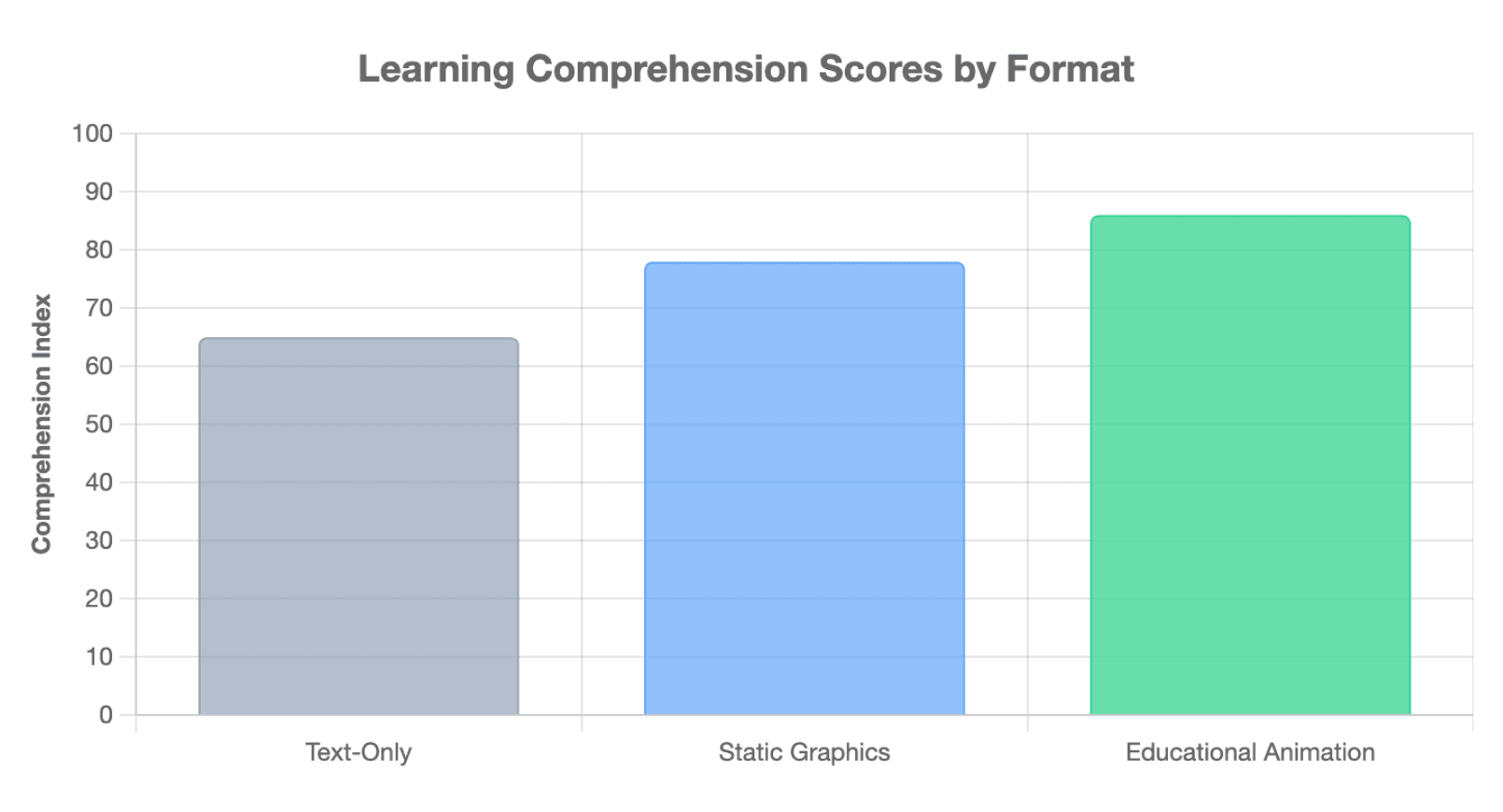
No. A major meta-analysis covering 50 papers, 61 studies, and 7,036 participants found a positive overall advantage for animation over static graphics, but the effect was relatively modest. The result depended on factors such as narration, presentation format, and how the animation was paced.
Animation can also make learning harder when too much information changes before learners have time to process it. Motion naturally attracts attention, so decorative movement can compete with the information that actually matters.
The practical rule is simple: use animation when motion helps explain the knowledge, not merely because motion is available.
What Makes an Educational Animation Actually Effective?
Start With One Clear Learning Objective
The first design question should not be “Which animation style should we use?” It should be:
What should the learner understand or be able to do after watching?
That objective determines what information belongs in the video, what can be removed, and which relationships need visual explanation.
A training video about a safety procedure, for example, should prioritize correct sequence and decision points. A science animation may need to emphasize cause and effect. A product tutorial may focus on actions and interface changes.
Make Motion Explain Something
Effective motion usually performs an instructional function. It can show change, reveal a relationship, demonstrate a sequence, compare two states, or direct attention.
This is why animated presentation is not the same as animated explanation. Moving text, icons, and characters may create visual energy, but those movements do not necessarily help the learner build a better mental model.
Signaling can help. Research on multimedia learning has found that cues such as highlighting and color coding can improve comprehension and transfer, particularly for learners with lower prior knowledge.
Balance Simplicity, Accuracy, and Cognitive Load
“Make it simpler” is common advice, but educational content can be simplified too far.
If an animation removes an essential causal relationship, changes the order of a procedure, or uses an analogy that creates the wrong mental model, the result may be easy to watch but instructionally inaccurate.
A stronger principle is:
Use the minimum complexity needed to preserve the truth of the concept.
That means keeping essential relationships while reducing unnecessary terminology, decorative detail, repeated explanations, and visual noise. From an instructional design perspective, clarity should come from better structure—not from deleting the parts learners actually need to understand.
Which Types and Examples of Educational Animation Work for Different Learning Goals?
The best animation style depends on what must be learned.
| Type | Best For | Main Strength | Main Limitation |
| 2D character animation | Scenarios, behavior, younger audiences | Story and context | Characters can distract |
| Motion graphics | Training and abstract concepts | Clear structure | Less narrative |
| Animated diagrams | STEM and procedures | Precise relationships | Less emotional |
| Infographic animation | Data and systems | Strong hierarchy | Can become dense |
| 3D animation | Anatomy and machinery | Spatial understanding | More production complexity |
| Whiteboard animation | Sequential explanations | Simple progression | Limited visual depth |
| AI avatar + animation | Courses and training | Scalable delivery | Can feel repetitive |
| Live action + animation | Instructor-led learning | Human presence plus explanation | More production layers |
Where Is Educational Animation Used?
Educational animation extends far beyond school lessons. Professional studios use it for university teaching, employee training, healthcare education, public information, research communication, and behavior-change programs.
AV Studios' education portfolio, for example, includes projects for Oxford University Press, the London School of Economics, healthcare training, academic research, antimicrobial resistance education, and workplace training. This illustrates how the same underlying format can support very different learning goals.
What Can Good Educational Animation Examples Teach Us?
Different creators demonstrate different strengths. Free Animated Education shows how relatively simple illustration and clear sequencing can support subject teaching. TED-Ed often uses visual metaphor and narrative. Kurzgesagt builds consistent visual systems for complex science, while formats such as minutephysics demonstrate that sophisticated explanation does not require visually complex animation.
The common pattern is not a specific art style. It is alignment between the learning task and the visual system.
How Do You Create an Educational Animation Step by Step?
A reliable workflow separates instructional planning from expensive production.
- Define the learner and learning objective. Decide exactly what understanding or behavior the video should support.
- Analyze the source material. Extract the essential concepts, relationships, sequence, examples, and evidence.
- Protect instructional accuracy. Identify facts, causal relationships, technical terms, and procedural steps that must not be simplified away.
- Write the instructional script. Write for listening and visualization rather than copying written material into narration.
- Map ideas to visuals. Decide what should be demonstrated, labeled, compared, animated, or left out.
- Create the storyboard. Pair each section of the script with the visual that will explain it.
- Build an animatic. Test scene order and timing before full animation begins.
- Produce the visual assets. Create characters, diagrams, environments, icons, or interface elements.
- Record narration and animate. Synchronize the visual changes with the explanation.
- Add signaling, captions, and sound. Use emphasis deliberately rather than filling the scene with movement.
- Review accuracy and accessibility. Check both what the video says and what the visuals imply.
- Test, export, and reuse. Validate the video with learners or subject experts and preserve reusable assets for future content.
The storyboard and animatic are especially important. They are not just production documents; they are error-detection tools. It is much easier to fix an unclear explanation or badly ordered scene before full animation has been produced.
How Is AI Changing Educational Animation Creation?
Can AI Turn Documents, PDFs, or Presentations Into Educational Animation?
AI can reduce much of the manual work between existing knowledge and finished video.
A traditional workflow may require someone to read a training document, extract the important content, write a script, design scenes, record narration, animate, and then create localized versions.
A document-to-video workflow can automate parts of that process by turning source knowledge into a structured video plan.
Leadde, for example, is designed to transform documents, PDFs, PowerPoint files, learning materials, SOPs, and product documentation into structured videos. Its workflow analyzes content logic, key information, section structure, and narrative flow before generating elements such as scenes, scripts, narration, AI presenters, and multilingual versions.
The important distinction is that document-to-video should be knowledge transformation, not simple text-to-video conversion. A training manual usually contains more information than belongs in one video, so the system still needs to identify priorities and organize them into a teachable sequence.
What Can AI Automate—and What Still Needs Human Judgment?
AI can help with source analysis, first-draft scripts, scene decomposition, storyboards, images, narration, captions, translation, and some types of animation.
Human judgment remains important for the learning objective, factual accuracy, simplification decisions, instructional sequencing, visual metaphors, cultural context, and final quality assurance.
Research also suggests that AI-generated teaching videos are becoming educationally viable without eliminating the value of human-created instruction. In a 2025 experiment with 447 participants, learners preferred the experience of human-made teaching videos, but exam performance after AI-generated and human-made videos was similar.
What Are the Biggest Risks of AI-Generated Educational Animation?
The main risks are not limited to visual quality. A generated scene may look convincing while teaching the wrong thing.
AI workflows should therefore check for missing or duplicated steps, incorrect sequences, factual errors, terminology mistakes, narration–visual mismatches, and inconsistent object states.
This leads to an important distinction:
Visual consistency asks whether the same character or object looks consistent.
Instructional continuity asks whether the knowledge remains consistent from one scene to the next.
For educational content, the second is often more important.
How Do You Make Educational Animation Accurate, Accessible, and Scalable?
How Do You Check Accuracy and Accessibility?
Accuracy should be checked at several stages: source review, script review, storyboard review, scene-level review, and final video QA. For medical, scientific, safety, or technical content, subject-matter expert review is especially important.
Accessibility also needs to be designed into the workflow rather than added at the end. WCAG 2.2 requires captions for prerecorded audio in synchronized media at Level A and includes provisions for audio description or media alternatives where visual information needs an accessible equivalent.
In practical terms, educational teams should consider captions, transcripts, readable labels, visual contrast, clear hierarchy, manageable pacing, and audio descriptions where appropriate.
How Do You Localize and Update Educational Videos at Scale?
Translation changes the language. Video localization adapts the lesson.
That may include terminology, examples, characters, environments, voice, cultural references, or even the procedure being demonstrated. Professional educational animation projects already use this approach when the same training must work across different audiences and cultural contexts.
For large content libraries, the next step is modular production. Instead of treating the final MP4 as the only asset, teams can preserve the relationship between:
Source → Knowledge Unit → Scene → Video
If an SOP, course, product, or policy changes, only the affected knowledge units and scenes need to be updated.
This is particularly important for AI-generated video. The long-term value is not simply faster first-time production, but easier updating, localization, reuse, and maintenance.
How Do You Measure Whether an Educational Animation Actually Works?
Views and watch time tell you whether people watched. They do not prove that people learned.
A stronger evaluation looks at four levels: engagement, whether learners stayed with the content; retention, whether they remember it; comprehension, whether they understand it; and transfer, whether they can apply it in a new situation or real task.
The final measure matters most for training and education. A polished animation can still fail if it is memorable but misleading, engaging but overloaded, or visually accurate but instructionally incomplete.
Conclusion
Educational animation works best when motion has a clear instructional purpose. The strongest workflows begin with the learner and the knowledge, then use animation to make important processes and relationships easier to see. As AI lowers production barriers, the bigger opportunity is not simply creating more videos—it is building accurate, accessible, multilingual, and updateable e-learning video content that can improve and scale over time. Furthermore, for content creators looking to maximize the reach of their learning materials in search results, staying updated on search visibility guidelines, such as the Google Discover February 2026 Core Update Announcement, ensures that high-quality animations successfully reach their intended audience.