
AI Avatar Product Demo Examples for SaaS Teams
AI avatars can make product demos feel more guided, personal, and scalable.
A standard product demo often depends on a screen recording or a live presenter. That works, but it can be hard to update, localize, or reuse across sales, marketing, onboarding, and customer success. An AI avatar product demo gives SaaS teams another option: a presenter-led video that explains the product, introduces the workflow, and helps viewers understand what to do next.
The key is to use the avatar for clarity, not decoration.
A good AI avatar product demo should help viewers understand the product faster. It should explain the problem, guide the workflow, highlight the result, and make the next step obvious.
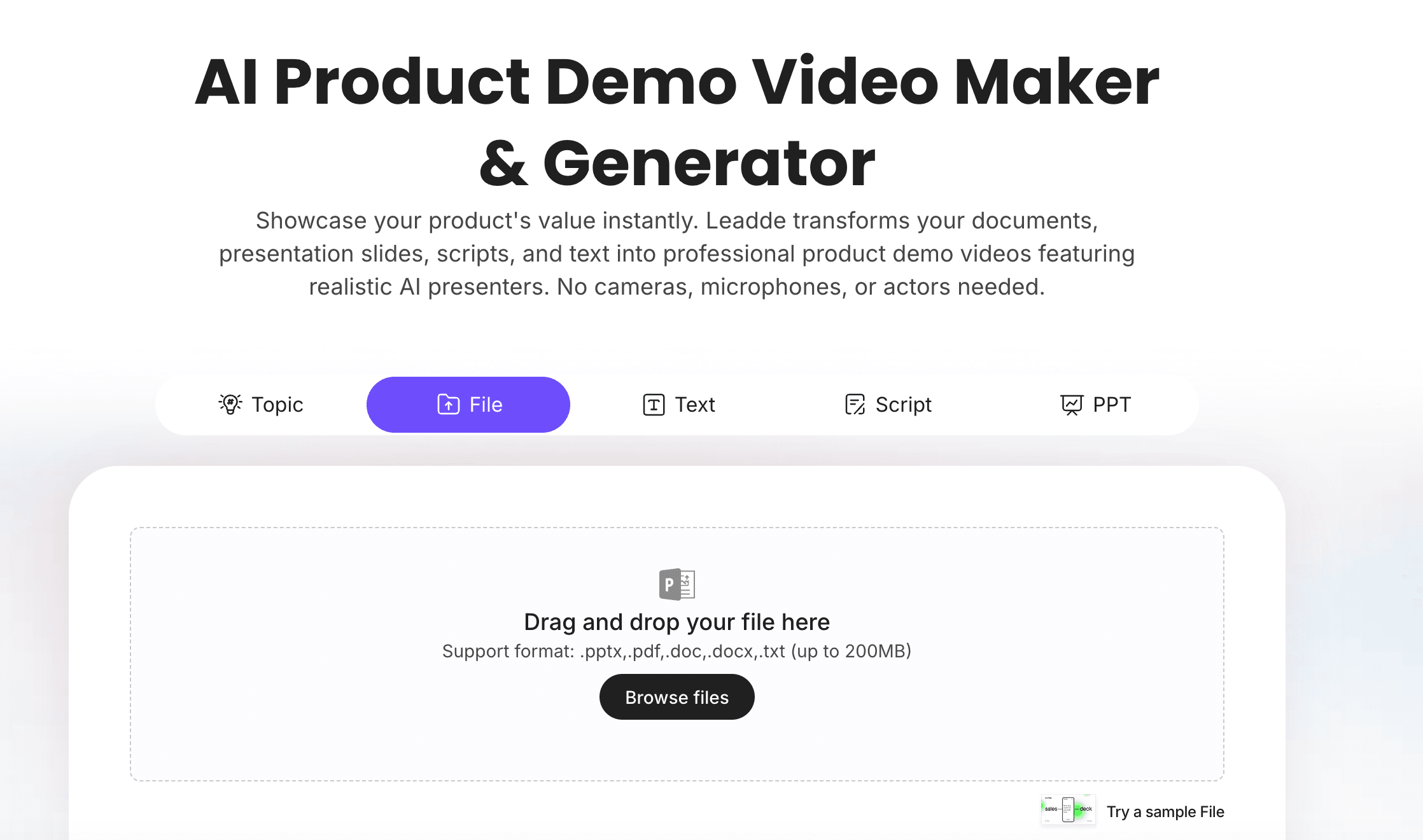
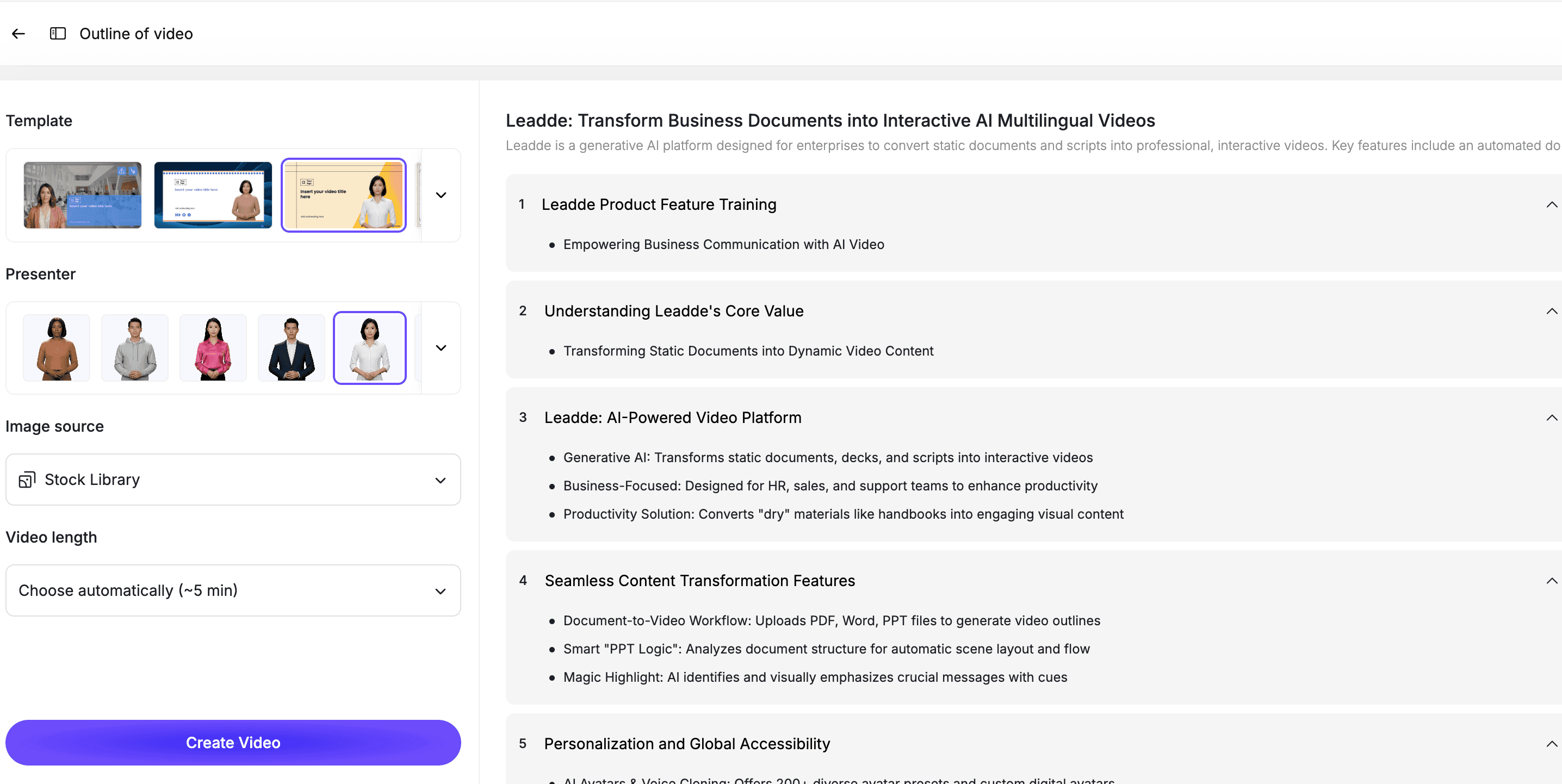
If your team wants to create presenter-led product demos, Leadde's AI Avatar Generator helps create avatar-led videos without filming. For product-specific demos, AI Product Demo Video Maker helps turn product notes, scripts, and demo flows into editable videos.
Why Use AI Avatars in Product Demo Videos?
Product demos often need more than a screen recording.
A screen recording can show the interface, but it may not explain the story. A live presenter can add context, but filming takes time. A text-only walkthrough can be clear, but it may feel less engaging.
AI avatars help bridge that gap.
An AI avatar can:
- Introduce the product
- Explain who the demo is for
- Guide viewers through the workflow
- Connect product steps to business value
- Make the demo feel more human
- Create repeatable demos without filming
- Support multilingual product education
- Help sales and marketing teams create videos faster
- Make product updates easier to explain
For SaaS teams, this is especially useful because product messaging changes often. New features launch, workflows improve, and sales teams need updated demos quickly.
For broader SaaS demo inspiration, see Leadde's SaaS product demo video examples. This article focuses specifically on product demos that use AI avatars.
AI Avatar Product Demo Examples by Use Case
Different product demos need different avatar formats.
A homepage demo should feel concise and value-driven. A sales demo should speak to buyer pain. A feature walkthrough should be practical. A customer onboarding demo should be simple and step-by-step.
| AI Avatar Product Demo Example | Best For | What the Avatar Should Explain |
|---|---|---|
| Homepage product demo | Website visitors | What the product does and why it matters |
| Sales follow-up demo | Prospects | How the product solves a specific business problem |
| Feature walkthrough | Existing users | How to use one feature correctly |
| Product launch demo | Customers and prospects | What changed and how to try it |
| Onboarding demo | New users | How to complete the first important workflow |
| Use-case demo | Specific buyer persona | How the product works for one role or industry |
| Dashboard demo | Analytics and reporting tools | How to find insights and take action |
| Integration demo | Platform and workflow tools | How two systems connect |
| AI workflow demo | AI SaaS products | What the AI generates and what users can edit |
| Multilingual product demo | Global SaaS teams | How to explain the same workflow across regions |
The best AI avatar product demos are focused. One video should explain one workflow, one feature, one use case, or one next step.
Example 1: Homepage AI Avatar Product Demo
A homepage product demo should help first-time visitors understand your SaaS product quickly.
The avatar's job is to guide the viewer through the problem, product, workflow, and outcome without overwhelming them.
A strong homepage avatar demo should include:
- A clear opening problem
- A short product introduction
- One simple workflow
- A visible result
- A direct CTA
Sample Script
If your team struggles with [problem], [Product Name] gives you a faster way to [desired outcome].
Here is how it works.
First, [step 1].
Next, [step 2].
Then, [step 3].
In just a few steps, your team can [result].
Use [Product Name] when you need to [use case 1], [use case 2], or [use case 3].
Ready to try it? [CTA].
Best For
- Homepage videos
- Landing pages
- Product overview pages
- Paid campaign pages
- Top-of-funnel education
For script structure, see Leadde's SaaS demo video script template.
Example 2: Sales Follow-Up Avatar Demo
Sales teams often need a repeatable way to explain the product after a call.
An AI avatar sales demo can summarize the workflow, reinforce value, and give the prospect a clear next step.
A good sales follow-up demo should include:
- The prospect's problem
- The product workflow that solves it
- The business outcome
- A short use-case example
- A CTA to book the next step or try the product
Sample Script
In this demo, we will show how [Product Name] helps [target company type] solve [specific problem].
Today, many teams handle this by [old workflow]. That can create [pain point], [risk], and [manual work].
With [Product Name], the workflow is simpler.
First, [step 1].
Next, [step 2].
Then, [step 3].
The result is [business outcome].
If you want to see this workflow with your own data or content, the next step is [CTA].
Best For
- SDR follow-up
- Account-based marketing
- Sales enablement
- Prospect education
- Post-demo recap videos
For sales-specific demos, use AI Sales Demo Video Maker.
Example 3: Feature Walkthrough with an AI Avatar
A feature walkthrough should explain one feature clearly.
The avatar can introduce the feature, explain when to use it, and guide viewers through the steps.
A strong feature walkthrough should explain:
- What the feature does
- Who should use it
- When to use it
- How to start
- What steps to follow
- What result to expect
- What to do next
Sample Script
In this video, we will walk through [Feature Name].
This feature helps you [main benefit].
To get started, go to [product location].
First, [step 1].
Next, [step 2].
Then, [step 3].
Once you finish, you will see [result].
Use this feature when you need to [use case].
Best For
- Product education
- Help center videos
- Feature pages
- Customer success training
- Release notes
If your team needs many feature videos, Script to Video can help turn product scripts into editable scenes.
Example 4: Product Launch Avatar Demo
A product launch video should explain what is new and why it matters.
The avatar can guide viewers through the announcement and show the product update in context.
A product launch demo should include:
- What launched
- Who it helps
- What changed
- How the workflow works
- Where users can try it
- What the next step is
Sample Script
We just launched [Feature Name], a new way to help [target users] [desired outcome].
Before this update, teams had to [old workflow].
Now, you can [new workflow].
Here is how it works.
First, [step 1].
Next, [step 2].
Then, [step 3].
You can start using [Feature Name] today by going to [product location].
Best For
- Feature launches
- Product updates
- Customer newsletters
- In-app announcements
- Release campaigns
For more SaaS launch video ideas, see Leadde's guide on AI video for SaaS feature release updates.
Example 5: Customer Onboarding Avatar Demo
A customer onboarding demo helps new users complete their first important workflow.
The avatar should make the product feel easier to start using.
A good onboarding demo should cover:
- Where to begin
- What setup steps matter
- What a successful setup looks like
- Where to get help
- What the user should do next
Sample Script
Welcome to [Product Name].
In this video, we will help you complete your first setup workflow.
By the end, you will know how to [activation outcome].
Start by going to [starting location].
Next, [step 1].
Then, [step 2].
After that, [step 3].
Once this is complete, your next step is [next action].
Best For
- Customer onboarding
- Product activation
- Help centers
- Customer success
- Post-signup education
Do not use this video to show every feature. Focus on the first action that helps the user get value.
Example 6: Use-Case Avatar Demo
A use-case demo shows how one role or audience solves one problem with your product.
This often works better than a generic product demo because the viewer can see themselves in the workflow.
Examples:
- "How sales teams create personalized follow-up videos"
- "How HR teams create onboarding videos from documents"
- "How product marketers create feature launch videos"
- "How customer success teams build education videos"
- "How training teams turn SOPs into video modules"
A use-case avatar demo should include:
- The audience
- The pain point
- The workflow
- The result
- A CTA
Best For
- Industry landing pages
- Role-based campaigns
- Sales enablement
- ABM videos
- Product marketing
For product demo strategy, see Leadde's guide on product demo video vs explainer video.
Example 7: Dashboard Avatar Demo
Dashboard demos can become confusing if the video shows too many charts.
An AI avatar can help explain what the viewer is supposed to notice.
A strong dashboard demo should focus on decisions, not charts.
The avatar can say:
- What the dashboard shows
- Which metric matters first
- How to interpret the result
- What action the user should take
- Where to go next
Sample Script
This dashboard helps you understand [business question].
Start by looking at [metric or section].
If this number increases, it usually means [interpretation].
Next, check [second metric] to understand [context].
From here, your next action is [recommended action].
Best For
- Analytics tools
- Sales dashboards
- Marketing reporting
- Finance SaaS
- Operations platforms
- Customer success tools
Example 8: Integration Avatar Demo
Integration demos help users understand how two tools work together.
The avatar should explain why the integration matters, not just where to click.
A good integration demo should show:
- What tools connect
- What data or workflow moves between them
- How setup works
- What the user sees after connecting
- What problem the integration solves
Sample Script
In this video, we will show how [Product Name] connects with [Integration Name].
This integration helps your team [benefit].
First, go to [settings location].
Next, choose [integration].
Then, confirm [permission or setup step].
Once connected, [explain result].
Now your team can [workflow outcome].
Best For
- SaaS platforms
- Workflow automation tools
- CRM integrations
- LMS integrations
- Marketing and sales tools
- Customer support tools
Example 9: AI Workflow Avatar Demo
AI products need extra explanation because users want to know what the AI does and what they can control.
An AI workflow demo should explain:
- What input the user provides
- What the AI generates
- What the user can edit
- How review works
- What happens before publishing
- Where human control stays in the workflow
This is important for trust.
Sample Script
In this workflow, you provide [input].
The AI helps generate [output].
Then, you can review, edit, and customize the result before publishing.
This gives your team speed without losing control over [quality, brand, accuracy, or compliance].
Use this workflow when you need to [use case].
Best For
- AI SaaS products
- AI writing tools
- AI video platforms
- AI analytics tools
- AI automation workflows
- Human-in-the-loop products
For SaaS explainer content, see Leadde's SaaS explainer video script templates.
Example 10: Multilingual Avatar Product Demo
Global SaaS teams often need the same product demo in multiple languages.
AI avatar demos can help teams localize product education without filming separate presenters for every market.
A multilingual product demo can support:
- Regional sales teams
- Global customer onboarding
- Localized product launches
- International partner training
- Multilingual help center content
- Global customer success programs
The original script should still be reviewed before localization. Translation should preserve product meaning, feature names, and legal or compliance details.
How to Create AI Avatar Product Demo Videos
The examples above follow a similar workflow.
The goal is not simply to add an avatar to a product video. The goal is to create a guided product experience.
Step 1: Choose One Demo Goal
Start with one goal.
Examples:
- Explain the product
- Show one workflow
- Launch a feature
- Support a sales conversation
- Help a customer complete setup
- Explain an integration
- Teach an AI workflow
One video should usually focus on one use case or one product moment.
Step 2: Write the Product Demo Script
The script should make the demo easy to follow.
A strong avatar product demo script includes:
- Who the video is for
- What problem the user has
- What workflow the product supports
- What steps the viewer will see
- What outcome the product creates
- What the viewer should do next
If you need examples, use Leadde's SaaS demo video script template. If the script is ready, use Script to Video.
Step 3: Add Product Screens and Visual Proof
The avatar should explain the product, but the video still needs product visuals.
Use:
- Product screenshots
- UI cards
- Workflow steps
- Feature callouts
- Captions
- Dashboard panels
- Before-and-after comparisons
- Short screen recordings
- Result screens
A product demo without product visuals can feel too abstract. A product demo with too many visuals can feel overwhelming. Balance both.
Step 4: Choose the Right Avatar Tone
The avatar should match the demo context.
| Demo Type | Avatar Tone |
|---|---|
| Homepage demo | Clear and energetic |
| Sales demo | Confident and consultative |
| Feature walkthrough | Helpful and precise |
| Onboarding demo | Friendly and calm |
| Admin or security demo | Professional and trustworthy |
| AI workflow demo | Clear and reassuring |
Do not choose an avatar only because it looks polished. Choose one that fits the audience and message.
Step 5: Turn the Demo into Short Scenes
A good AI avatar product demo should be broken into short scenes.
A simple structure:
| Scene | Purpose |
|---|---|
| Scene 1 | Introduce the use case |
| Scene 2 | Explain the problem |
| Scene 3 | Show the first product step |
| Scene 4 | Show the second product step |
| Scene 5 | Highlight the result |
| Scene 6 | End with a CTA |
This keeps the demo easier to watch and easier to update later.
Step 6: Review Before Publishing
Before publishing, review the video carefully.
Check:
- Is the product UI current?
- Does the avatar explain the workflow clearly?
- Is the script too long?
- Are feature names correct?
- Is the CTA clear?
- Does the demo show one use case or too many?
- Are claims specific and accurate?
- Are captions correct?
Product demo videos can influence sales, onboarding, and customer trust, so clarity matters.
Best Practices for AI Avatar Product Demos
Use the Avatar as a Guide
The avatar should guide the viewer through the product.
It should not distract from the workflow.
Show One Workflow at a Time
Do not turn one video into a full product manual.
If you have multiple workflows, create multiple short demos.
Keep Product Visuals Focused
Show only the screens that support the script.
Avoid showing every menu, setting, or dashboard.
Match the CTA to the Viewer
A homepage demo might end with "Try it now."
A sales demo might end with "Book a demo."
An onboarding demo might end with "Complete your first setup."
Keep the Demo Editable
SaaS products change.
Use an editable workflow so your team can update scripts, scenes, screenshots, captions, and avatar segments when the product changes.
How Leadde Helps Create AI Avatar Product Demos
Leadde helps SaaS teams turn product scripts, sales messaging, feature notes, demo flows, and product documentation into editable AI avatar videos.
With Leadde, teams can:
- Create avatar-led product demos
- Turn scripts into video scenes
- Add product visuals and captions
- Build sales demo videos
- Create feature walkthroughs
- Generate onboarding demos
- Localize demos for global teams
- Update demos when product messaging changes
Start with AI Product Demo Video Maker if you need a product-led demo. Use AI Avatar Generator if you want a presenter-led format, or AI Sales Demo Video Maker for sales-focused demos.
If you already have a product script or demo flow ready, you can also try Leadde directly and start building your first AI avatar product demo.
For custom avatar-specific guidance, see Leadde's guide on creating custom AI avatars for product demo videos.
Common Mistakes to Avoid
Mistake 1: Using an Avatar Without a Clear Demo Goal
An avatar does not make a demo useful by itself.
Start with the product workflow and viewer need.
Mistake 2: Showing Too Many Features
A demo video is not a complete product manual.
Focus on one use case, workflow, or outcome.
Mistake 3: Letting the Avatar Talk Too Much
A long talking-head video can feel slow.
Use product visuals, captions, and short scenes to support the presenter.
Mistake 4: Using a Tone That Does Not Match the Buyer
A sales demo, onboarding demo, and admin demo should not sound the same.
Match the avatar tone to the viewer and buying stage.
Mistake 5: Forgetting to Update Product Screens
SaaS interfaces change often.
Keep demos editable so product visuals and scripts can stay current.
FAQ
What is an AI avatar product demo?
An AI avatar product demo is a product demo video where an AI presenter guides viewers through a software workflow, feature, use case, or product explanation.
What are good AI avatar product demo examples?
Good examples include homepage product demos, sales follow-up demos, feature walkthroughs, product launch videos, onboarding demos, use-case demos, dashboard demos, integration demos, AI workflow demos, and multilingual product demos.
Are AI avatars useful for SaaS product demos?
Yes. AI avatars can help SaaS teams create guided, repeatable, and editable product demos without filming a presenter every time the product or messaging changes.
What should an AI avatar product demo include?
A strong AI avatar product demo should include a clear audience, problem, product workflow, focused visuals, outcome, and call to action.
How long should an AI avatar product demo be?
Most AI avatar product demos should be 60 to 180 seconds. More complex workflows can be split into multiple short videos.
Can AI avatar product demos be updated later?
Yes, if they are created in an editable workflow. Your team should be able to update scripts, scenes, product visuals, captions, and avatar segments when the product changes.
What is the difference between an AI avatar product demo and a custom avatar product demo?
An AI avatar product demo uses an AI presenter to guide the product explanation. A custom avatar product demo usually focuses on creating or using a branded or custom presenter. The video strategy should still start with the demo goal and script.
Conclusion
AI avatar product demos are useful when SaaS teams need a guided, repeatable way to explain product workflows.
The best examples do not use avatars as decoration. They use the avatar to explain the use case, guide the viewer through the product, connect features to outcomes, and make the next step clear.
Start with one demo goal, write a focused script, add product visuals, choose the right avatar tone, break the video into short scenes, review the demo, and keep the final version editable.
Use Leadde's AI Product Demo Video Maker to create avatar-led product demos for SaaS sales, marketing, onboarding, and customer education.





