
SaaS Explainer Video Script: Templates and Examples
A SaaS explainer video is only as strong as its script.
You can have polished visuals, a clean product interface, an AI presenter, and professional captions, but if the script is unclear, the video will not explain the product well. Viewers need to understand the problem, the product, the workflow, and the value quickly.
That is why a SaaS explainer video script matters.
A good script helps your team explain what your software does, who it is for, why it matters, and what the viewer should do next. It keeps the video focused instead of turning it into a generic product tour.
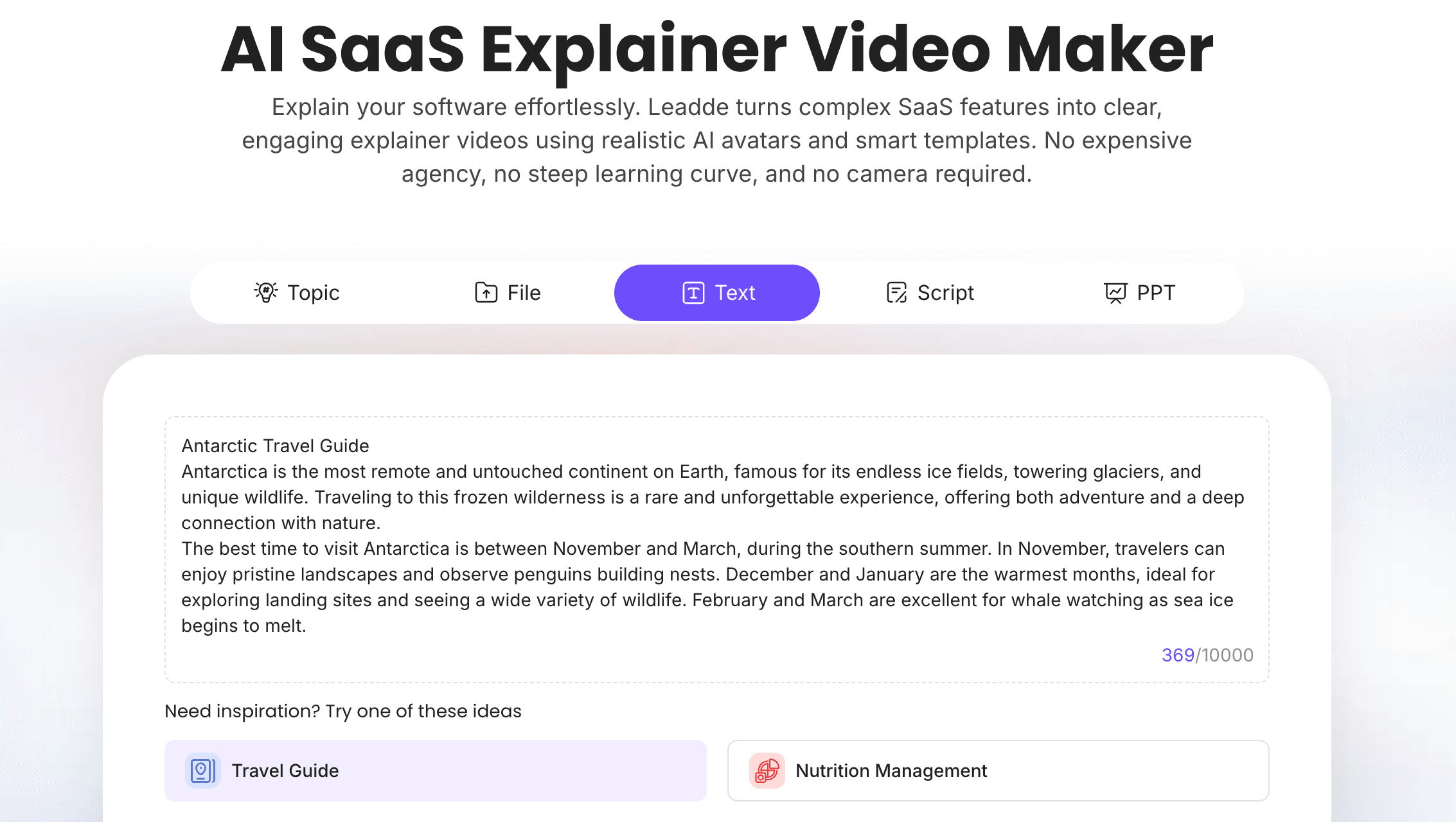
If your team already has product messaging, positioning notes, website copy, or a rough outline, Leadde's AI SaaS Explainer Video Maker can help turn that content into an editable explainer video. If you already have a script, use Script to Video to create a video draft faster.
What Is a SaaS Explainer Video Script?
A SaaS explainer video script is the written structure and narration for a video that explains a software product.
It usually covers:
- The problem your audience faces
- Who the product is for
- What your product does
- How the workflow works
- What outcome the viewer gets
- Why the product is different or useful
- What the viewer should do next
A SaaS explainer is different from a full product demo. A demo shows how the product works in detail. An explainer helps the viewer understand the product's value quickly.
For broader strategy, see Leadde's guide on how to create a SaaS explainer video. This article focuses specifically on script templates.
SaaS Explainer Video vs SaaS Demo Video
A SaaS explainer video and a SaaS demo video often overlap, but they are not the same.
| Video Type | Main Purpose | Best For |
|---|---|---|
| SaaS explainer video | Explain the problem, product, and value proposition | Homepage, landing pages, top-of-funnel education |
| SaaS product demo video | Show how the product works | Product pages, sales follow-up, onboarding |
| SaaS sales demo video | Connect product workflow to a buyer's business problem | Sales enablement and prospect education |
| Feature walkthrough | Teach one feature or workflow | Customer education and product updates |
If your viewer does not yet understand the product, start with an explainer. If they already understand the product and want to see the workflow, use a demo.
For demo-specific content, see Leadde's SaaS demo video script template and SaaS product demo video examples.
Basic SaaS Explainer Video Script Structure
A strong SaaS explainer video script should be simple and logical.
Here is the core structure:
| Script Section | Purpose | Example |
|---|---|---|
| Hook | Name the problem | "Creating training videos from documents takes too much time." |
| Audience | Show who the video is for | "For L&D, HR, and operations teams..." |
| Problem | Explain why the old way is painful | "Teams rely on long PDFs and repeated live sessions." |
| Solution | Introduce the product | "Leadde turns documents into AI training videos." |
| Workflow | Show how it works | "Upload a file, generate a script, edit scenes, and publish." |
| Outcome | Explain the benefit | "Your team creates reusable videos without filming." |
| CTA | Tell viewers what to do next | "Try Leadde with your own document." |
This structure works because it follows the viewer's thought process: problem, solution, workflow, outcome, next step.
Copy-Paste SaaS Explainer Video Script Template
Use this template as a starting point.
Template: SaaS Explainer Video Script
Opening hook
If your team struggles with [problem], you are not alone.
Many [target audience] still rely on [old workflow], which can lead to [pain point 1], [pain point 2], and [pain point 3].
Introduce the product
[Product Name] helps [target audience] [core outcome] by making it easier to [main workflow].
Explain how it works
Here is how it works.
First, [step 1].
Next, [step 2].
Then, [step 3].
In just a few steps, your team can [final result].
Show use cases
Teams use [Product Name] for [use case 1], [use case 2], and [use case 3].
Explain the benefit
Instead of [old painful process], your team can [new better process].
Call to action
Ready to see how it works? Try [Product Name] today.
SaaS Explainer Video Script Examples
Different SaaS explainer videos need different scripts. A homepage explainer is not the same as a feature explainer. A product-led explainer is not the same as a sales enablement video.
Here are practical examples.
Example 1: Homepage SaaS Explainer Video Script
A homepage explainer should help visitors understand what the product does within the first few seconds.
Script Template
Your team should not have to [painful workflow] just to [desired outcome].
With [Product Name], [target audience] can [core product promise] in a faster, simpler way.
Here is how it works.
Start by [step 1]. Then [step 2]. Finally, [step 3].
Now your team can [business outcome] without [old limitation].
Use [Product Name] to [use case 1], [use case 2], and [use case 3].
Ready to get started? [CTA].
Best For
- Homepage hero videos
- Landing pages
- Product overview pages
- Paid campaign pages
- Top-of-funnel education
If you want a tool-focused version, use Explainer Video Maker.
Example 2: Problem-Solution SaaS Explainer Script
This format works when your audience strongly feels the pain point.
Script Template
Most [target audience] know the problem.
They need to [desired outcome], but the current process is slow. Teams have to [old step 1], [old step 2], and [old step 3].
That creates [pain point], [risk], and [missed opportunity].
[Product Name] changes that.
With [Product Name], you can [new workflow] from one place.
Instead of spending hours on [old workflow], your team can [new outcome].
That means less [cost or friction] and more [benefit].
Best For
- Pain-aware audiences
- Landing pages
- Sales enablement
- Demand generation
- Competitive positioning
This script works well when buyers already know the old workflow is broken.
Example 3: Product-Led SaaS Explainer Script
A product-led explainer shows the workflow quickly while still explaining the value.
Script Template
[Product Name] helps [target audience] [core outcome].
Let us walk through a simple example.
First, [user action 1].
Next, [user action 2].
Then, [user action 3].
Behind the scenes, [Product Name] helps by [automation, AI, workflow, or system benefit].
The result is [clear outcome].
This is useful when your team needs to [use case].
Best For
- Product-led growth
- Website product sections
- Feature pages
- In-app education
- Short product overview videos
If your video needs to show more product detail, use AI Product Demo Video Maker.
Example 4: SaaS Feature Explainer Script
A feature explainer should focus on one feature, not the whole product.
Script Template
In this video, we will explain [Feature Name].
This feature helps you [main benefit].
Before this feature, teams had to [old workflow].
Now, you can [new workflow].
Here is how it works.
First, [step 1].
Next, [step 2].
Then, [step 3].
Use this feature when you need to [use case].
Your next step is to [CTA].
Best For
- Feature launches
- Release notes
- Product education
- Help center videos
- Customer success enablement
For product update content, see Leadde's guide on AI video for SaaS feature release updates.
Example 5: SaaS Sales Enablement Explainer Script
Sales teams can use explainer videos to educate prospects before or after a call.
Script Template
If you are evaluating [category], one of the biggest challenges is [buyer pain point].
Many teams try to solve this with [old approach], but that often creates [problem].
[Product Name] gives [target company type] a better way to [desired outcome].
For example, your team can [workflow example].
This helps you [business benefit], while reducing [friction or risk].
If you want to see how this applies to your team, the next step is to [book a demo, start a trial, or watch a product demo].
Best For
- SDR follow-up
- Sales enablement
- Account-based marketing
- Buyer education
- Deal acceleration
For sales demos, use AI Sales Demo Video Maker.
Example 6: Customer Onboarding Explainer Script
Customer onboarding explainers help users understand what to do after signup.
Script Template
Welcome to [Product Name].
In this video, we will show you the first workflow to complete after signing up.
By the end, you will know how to [activation outcome].
Start by [step 1].
Next, [step 2].
Then, [step 3].
Once this is complete, you can [next benefit or action].
If you need help, visit [help resource] or contact [support option].
Best For
- New user onboarding
- Activation flows
- Help center videos
- Customer education
- Customer success
This format should be short and practical. New users do not need the full product story. They need the next step.
Example 7: AI SaaS Product Explainer Script
AI products need extra clarity because users may not understand what the AI does, what it controls, and what the user can edit.
Script Template
[Product Name] uses AI to help [target audience] [desired outcome].
Here is what that means in practice.
You provide [input].
The AI helps generate [output].
Then, you can review, edit, and publish the final result.
This keeps the workflow fast while giving your team control over [quality, accuracy, brand, or compliance].
Use it when you need to [use case 1], [use case 2], or [use case 3].
Best For
- AI SaaS products
- AI feature pages
- Buyer education
- Product trust-building
- Human-in-the-loop workflows
For AI presenter-led videos, use AI Avatar Generator.
How to Create a SaaS Explainer Video from a Script
Once you have the script, the next step is turning it into a video.
The best workflow is simple, editable, and repeatable.
Step 1: Choose One Explainer Goal
Do not try to explain everything in one video.
Pick one goal:
- Explain the product
- Explain one feature
- Explain one use case
- Explain the problem and solution
- Educate a prospect
- Help a new user get started
- Support a product launch
A focused goal makes the script stronger.
Step 2: Choose the Right Script Template
Pick the template that matches your use case.
Use:
- Homepage script for top-level positioning
- Problem-solution script for pain-aware buyers
- Product-led script for workflow clarity
- Feature explainer script for product updates
- Sales enablement script for prospects
- Onboarding script for new users
- AI product script for AI workflows
Then customize the placeholders with your product, audience, workflow, and CTA.
Step 3: Turn the Script into Scenes
A SaaS explainer video should move quickly.
A simple scene structure might look like this:
| Scene | Purpose |
|---|---|
| Scene 1 | Name the problem |
| Scene 2 | Introduce the audience |
| Scene 3 | Explain the product |
| Scene 4 | Show the workflow |
| Scene 5 | Explain the outcome |
| Scene 6 | Show use cases |
| Scene 7 | End with a CTA |
This keeps the video organized and easy to follow.
Step 4: Add Visual Context
A SaaS explainer should not rely only on narration.
Use visuals such as:
- Product UI cards
- Workflow diagrams
- Before-and-after comparisons
- Feature callouts
- Captions
- Use case cards
- Timeline scenes
- Simple icons
- Short product screenshots
If your source material is a written script, use Script to Video. If it starts as a broader product document, use Doc to Video.
Step 5: Add an AI Presenter or Voiceover
Some SaaS explainers work well with voiceover only. Others benefit from an AI presenter.
With an AI avatar generator, SaaS teams can create presenter-led explainer videos without filming a new spokesperson every time the script changes.
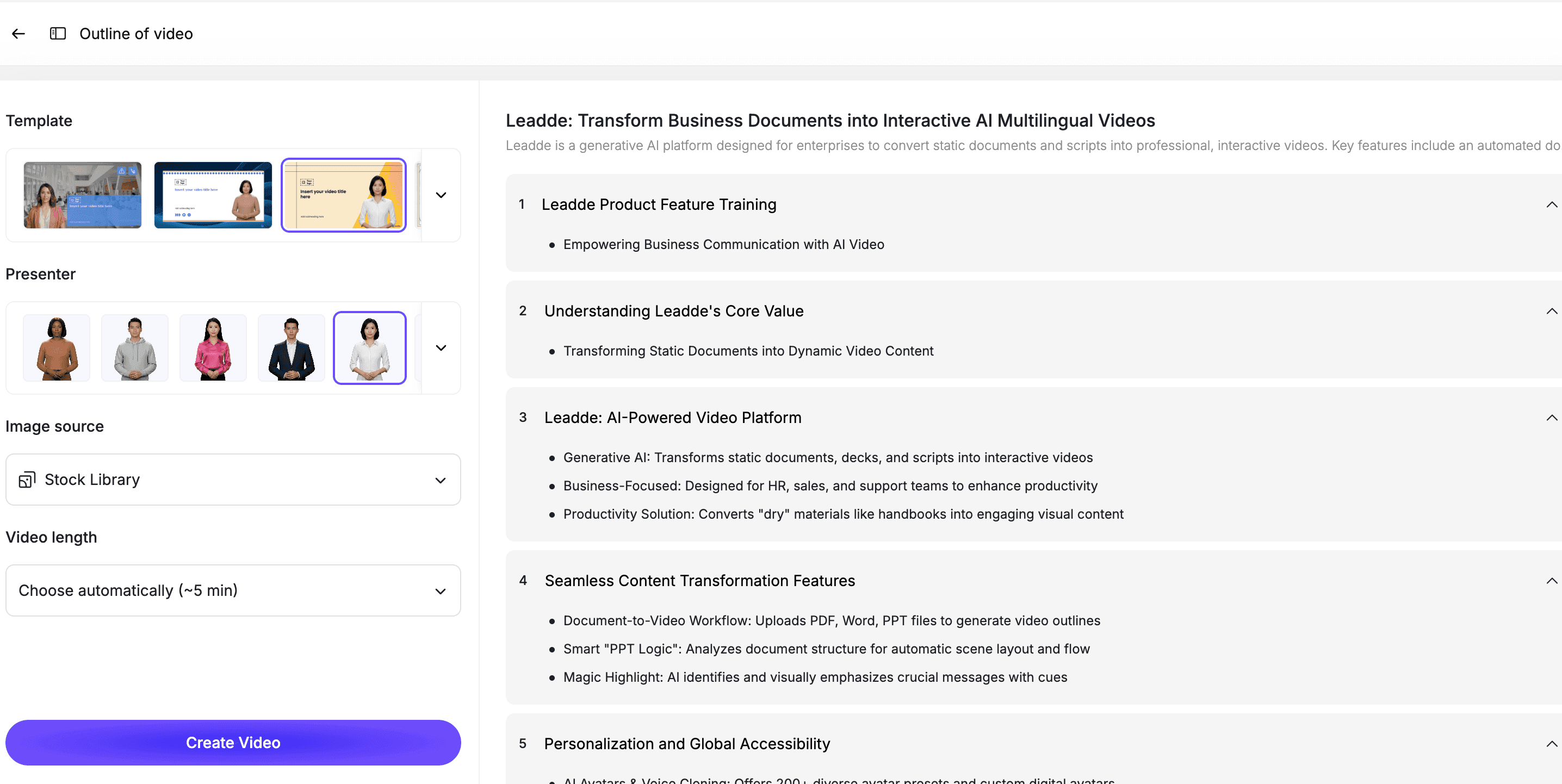
An AI presenter can help guide the viewer through the problem, solution, workflow, and CTA.
Step 6: Review for Clarity
Before publishing, review the script and video.
Check for:
- Unclear audience
- Weak hook
- Too many features
- Too much jargon
- Missing product value
- No clear workflow
- No specific CTA
- Vague claims
- Outdated product messaging
A good SaaS explainer should make the product easier to understand in less time.
Best Practices for SaaS Explainer Video Scripts
Start with the Problem
Do not start with your dashboard.
Start with the user's problem, then introduce the product as the solution.
Keep the Script Short
Most SaaS explainer videos should be 60 to 120 seconds.
If the product is complex, create multiple short videos instead of one long explainer.
Use Customer Language
Avoid internal product jargon.
Use the words your customers use in sales calls, support tickets, search queries, and reviews.
Explain One Workflow
A strong explainer usually focuses on one workflow or one value proposition.
Do not list every feature.
End with a Clear CTA
Tell the viewer what to do next.
Examples:
- Try the product
- Book a demo
- Watch the product demo
- Start with a template
- Upload your first file
- Talk to sales
How Leadde Helps Create SaaS Explainer Videos
Leadde helps SaaS teams turn scripts, product notes, positioning, and documentation into editable AI explainer videos.
With Leadde, teams can:
- Turn SaaS explainer scripts into video scenes
- Add AI presenters
- Edit scripts before publishing
- Add captions and visual highlights
- Create product-led explainer videos
- Build sales and onboarding explainers
- Create multilingual explainer videos
- Update videos when product messaging changes
Start with AI SaaS Explainer Video Maker if you are creating a SaaS-specific explainer. Use Script to Video if your script is already written, or Explainer Video Maker for broader explainer content.
If you already have a SaaS explainer script ready, you can also try Leadde directly and start building your first AI explainer video.
Common Mistakes to Avoid
Mistake 1: Making the Script Too Generic
A generic script sounds like every other SaaS video.
Be specific about the audience, problem, workflow, and outcome.
Mistake 2: Explaining Too Many Features
An explainer video is not a feature list.
Pick the features that support one clear message.
Mistake 3: Starting with the Product Too Early
The viewer needs a reason to care.
Name the problem before showing the product.
Mistake 4: Using Internal Jargon
Your team may understand your feature names, but prospects may not.
Use plain language.
Mistake 5: Forgetting the CTA
A SaaS explainer should lead to a next step.
Make the CTA clear and specific.
FAQ
What is a SaaS explainer video script?
A SaaS explainer video script is the written narration and structure for a video that explains a software product, the problem it solves, the workflow it supports, and the next step viewers should take.
What should a SaaS explainer video script include?
A strong SaaS explainer script should include a hook, target audience, problem, product introduction, workflow, outcome, use cases, and a clear call to action.
How long should a SaaS explainer video be?
Most SaaS explainer videos should be 60 to 120 seconds. Complex products can use a series of shorter videos instead of one long explainer.
What is the difference between a SaaS explainer video and a product demo?
A SaaS explainer video focuses on the problem, product concept, and value proposition. A product demo shows how the product works in more detail.
Can AI create a SaaS explainer video from a script?
Yes. AI can turn a SaaS explainer script into a video by breaking the script into scenes, adding narration or an AI presenter, creating captions, and producing an editable video draft.
What are good SaaS explainer video examples?
Good examples include homepage explainers, problem-solution videos, product-led explainers, feature explainers, sales enablement explainers, onboarding explainers, and AI product explainers.
Can SaaS explainer videos be updated later?
Yes, if they are created in an editable workflow. Your team should be able to update scripts, scenes, product visuals, captions, and presenters when product messaging changes.
Conclusion
A SaaS explainer video needs a clear script before it needs polished visuals.
The best scripts start with the viewer's problem, introduce the product simply, show one workflow, explain the outcome, and end with a clear CTA. They avoid jargon, feature overload, and vague claims.
Start with one explainer goal, choose the right template, customize the script, turn it into scenes, add visual context, include an AI presenter or voiceover, and review the final video for clarity.
Use Leadde's AI SaaS Explainer Video Maker to turn your SaaS explainer script into an editable AI video.





