
20 SaaS Product Demo Video Examples That Convert
A SaaS product demo video should do more than show your interface.
The best demos help viewers understand the problem, see the product in context, follow one clear workflow, and know what to do next. They do not overwhelm people with every feature. They show the path from pain to outcome.
That is why examples are useful.
If you are creating a SaaS product demo video for your homepage, sales team, onboarding flow, product launch, or customer education library, the format matters. A short homepage demo needs a different structure from a technical feature walkthrough. A sales demo needs a different story from an in-app onboarding video.
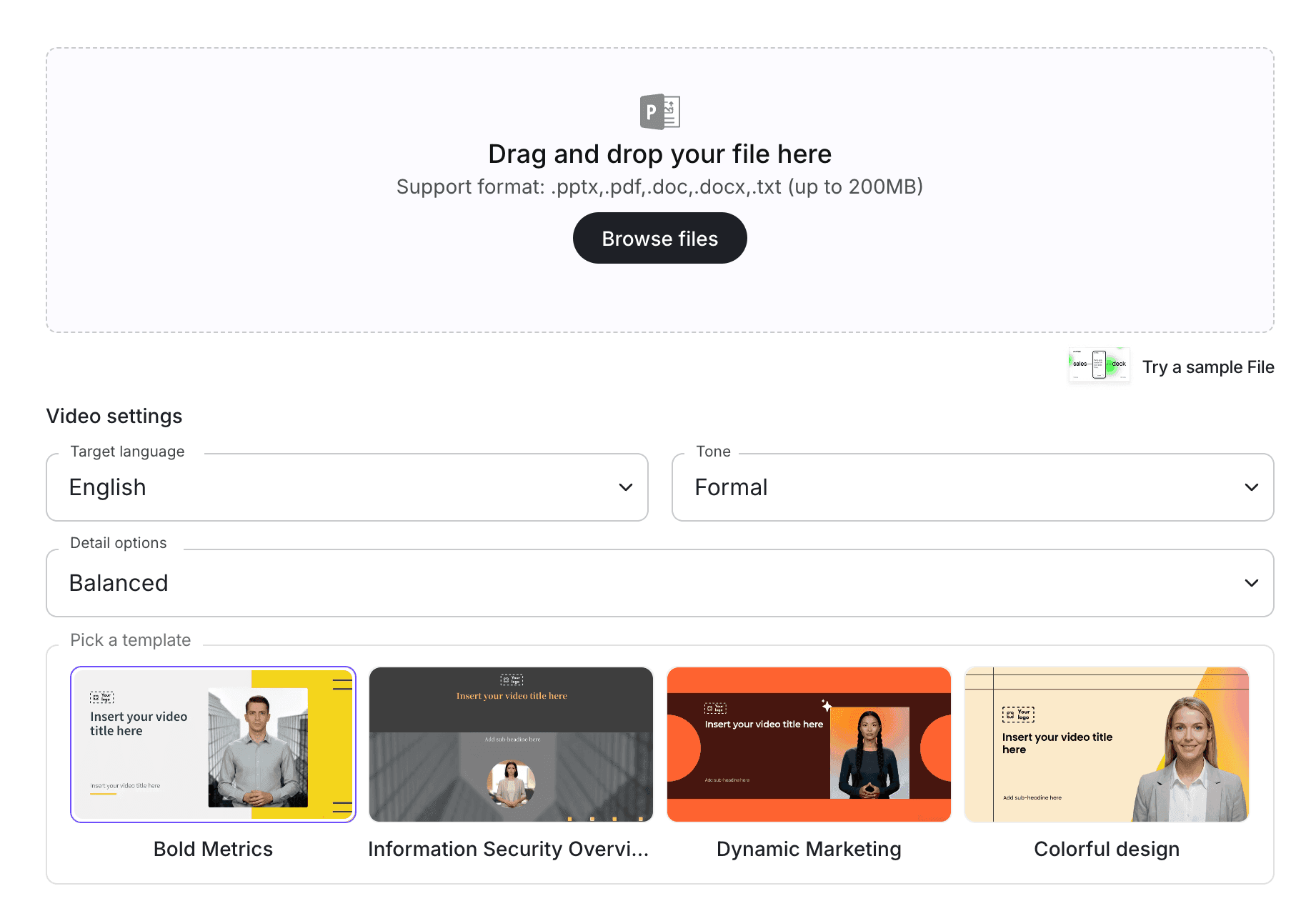
If your team already has product notes, demo scripts, sales messaging, or feature documentation, Leadde's AI Product Demo Video Maker helps turn them into editable, avatar-led product demo videos. You can also use Script to Video if your demo script is already written.
What Makes a SaaS Product Demo Video Convert?
A product demo video converts when it makes the product easier to understand and gives the viewer a reason to take the next step.
That does not mean every demo needs to be aggressive or sales-heavy. In SaaS, conversion often comes from clarity.
A strong SaaS demo video usually does five things:
- Names a real user problem
- Shows one clear workflow
- Connects features to business outcomes
- Uses simple language instead of internal jargon
- Ends with a clear call to action
Weak demos usually do the opposite. They start with the dashboard, list too many features, use vague claims, and assume the viewer already understands why the product matters.
If you need the script structure first, use Leadde's SaaS demo video script template. If you are comparing creation tools, see the guide to the best SaaS product demo software.
20 SaaS Product Demo Video Examples
Here are 20 practical SaaS product demo video examples your team can create.
| Example | Best For | Main Goal |
|---|---|---|
| Homepage product demo | Website visitors | Explain the product quickly |
| Sales demo video | Prospects | Connect product workflow to business value |
| Feature walkthrough | Existing users | Teach one feature clearly |
| Onboarding demo | New users | Help users complete first setup |
| Product launch demo | Customers and prospects | Show what changed and why it matters |
| Use-case demo | Specific buyer persona | Show one job to be done |
| Before-and-after demo | Conversion pages | Show the difference your product creates |
| Workflow automation demo | Operations and productivity tools | Explain time savings and process improvement |
| Dashboard demo | Analytics and reporting tools | Show how users find insights |
| AI feature demo | AI SaaS products | Explain what the AI does and how to use it |
| Integration demo | Platform and workflow tools | Show how tools connect |
| Template demo | PLG products | Help users start from a template |
| Mobile app demo | Mobile SaaS products | Show the app experience |
| Security or admin demo | Enterprise buyers | Show control, permissions, and governance |
| Customer success demo | Existing accounts | Teach advanced workflows |
| Comparison demo | Competitive pages | Show why your workflow is better |
| Vertical-specific demo | Industry landing pages | Adapt the demo to one market |
| Multilingual demo | Global teams | Show localized product education |
| AI avatar demo | Marketing and sales teams | Add a guided presenter layer |
| Support deflection demo | Help centers | Reduce repeated support questions |
Example 1: Homepage Product Demo Video
A homepage product demo video should explain what your SaaS does in under two minutes.
It should not show every feature. It should give visitors enough clarity to keep exploring.
A good homepage demo usually covers:
- Who the product is for
- What problem it solves
- How the workflow works
- What outcome users get
- What to do next
Sample Structure
- Name the problem.
- Introduce the product.
- Show the main workflow.
- Explain the outcome.
- End with a CTA.
Best CTA
"Try it now" or "Book a demo."
Example 2: SaaS Sales Demo Video
A sales demo video is built for prospects who already have some interest.
It should connect the product to a specific business problem.
For example, instead of saying "Here is our dashboard," the demo might say:
"Here is how your sales team can identify stalled accounts, prioritize follow-ups, and send the right message before the deal goes cold."
A strong sales demo video should include:
- The prospect's pain point
- The workflow that solves it
- The business outcome
- A clear next step
For sales-specific creation workflows, use AI Sales Demo Video Maker.
Example 3: Feature Walkthrough Video
A feature walkthrough video teaches one feature.
This is useful for product education, release notes, onboarding, help centers, and customer success.
The key is focus. Do not turn one feature video into a full product tour.
A good feature walkthrough should explain:
- What the feature does
- When to use it
- How to start
- What steps to follow
- What result to expect
- What to do next
This format works well for SaaS teams that ship frequent product updates.
Example 4: New User Onboarding Demo
An onboarding demo helps new users complete their first meaningful action.
For PLG SaaS products, this can directly affect activation.
A good onboarding demo should show:
- Where to start
- Which setup steps matter
- What a successful setup looks like
- Where to get help
- What to do after setup
Do not overload this video with advanced features. The goal is to help the user get started, not make them an expert.
Example 5: Product Launch Demo
A product launch demo explains what changed and why users should care.
It should be short, clear, and use-case driven.
A strong launch demo includes:
- What is new
- Why it matters
- Who should use it
- How it works
- Where users can find it
- What to try first
For SaaS release content, see Leadde's guide on AI video for SaaS feature release updates.
Example 6: Use-Case Demo Video
A use-case demo shows how one audience solves one problem.
This often works better than a generic product demo because the viewer can recognize themselves.
Examples:
- For sales teams: "How to create personalized follow-up videos"
- For HR teams: "How to turn onboarding docs into training videos"
- For product teams: "How to explain a new feature with an AI video"
- For customer success: "How to create customer education videos"
A use-case demo should be specific. The more specific it is, the easier it is for the viewer to understand the value.
Example 7: Before-and-After Demo
A before-and-after demo shows the old workflow next to the new workflow.
This format is useful when your product saves time, reduces manual work, improves quality, or removes a painful process.
A simple structure:
| Before | After |
|---|---|
| Manual script writing | AI-assisted script draft |
| Repeated live demos | Reusable demo video |
| Static help docs | Guided video walkthroughs |
| Long production timeline | Editable AI video workflow |
This format works well on landing pages and paid campaign pages because the value is easy to see.
Example 8: Workflow Automation Demo
Workflow automation demos are useful for SaaS products that connect steps, tools, or teams.
The video should show the workflow from trigger to result.
For example:
- A request comes in.
- The system routes it.
- The user reviews it.
- The next step is automated.
- The result is tracked.
The viewer should leave knowing exactly how the workflow changes their daily work.
Example 9: Dashboard Demo Video
Dashboard demos are common for analytics, reporting, finance, marketing, sales, and operations tools.
The mistake is showing too many charts.
A better dashboard demo focuses on the decision the user can make.
For example:
- "Find which campaigns are underperforming."
- "Identify accounts at risk."
- "Track training completion by department."
- "See which product features drive activation."
A dashboard demo should connect data to action.
Example 10: AI Feature Demo
AI SaaS products need extra clarity because users may not understand what the AI actually does.
An AI feature demo should explain:
- What input the user provides
- What the AI generates or recommends
- What the user can edit
- What happens next
- Where human review fits
This is important because buyers want speed, but they also want control.
If your demo uses an AI presenter, AI Avatar Generator can help create a guided video without filming.
Example 11: Integration Demo Video
Integration demos are useful for platforms that connect with CRM, LMS, analytics, support, marketing, finance, or collaboration tools.
A good integration demo should show:
- Why the integration matters
- What data or workflow connects
- How setup works
- What the user sees after connecting
- What problem the integration solves
Do not spend the whole video on settings. Show the outcome of the integration.
Example 12: Template Demo Video
Template demos are useful when your SaaS product helps users start faster.
Examples:
- Video templates
- Email templates
- Workflow templates
- Dashboard templates
- Proposal templates
- Training templates
- Landing page templates
A strong template demo should show the template, customize it, and publish or use the final result.
This format works especially well for product-led growth because it helps users act quickly.
Example 13: Mobile App Demo Video
If your SaaS has a mobile experience, create a dedicated mobile demo.
Do not reuse the desktop demo and assume it explains the mobile workflow.
A mobile app demo should show:
- The mobile use case
- The first action
- Key gestures or screens
- Notifications or updates
- What users can do on the go
This is useful for field teams, healthcare, education, events, sales, and operations tools.
Example 14: Security or Admin Demo
Enterprise buyers often care about controls, permissions, data access, governance, and team management.
A security or admin demo can show:
- User roles
- Permissions
- Access settings
- Approval workflows
- Audit logs
- Team management
- Security controls
This video should be clear and professional. Do not make it too playful. The goal is trust.
Example 15: Customer Success Demo
Customer success teams can use demo videos to teach existing users advanced workflows.
These videos are not always about acquisition. They can improve activation, adoption, retention, and expansion.
A customer success demo might show:
- How to set up a best-practice workflow
- How to use an advanced feature
- How to troubleshoot a common issue
- How to prepare for a quarterly review
- How to get more value from the product
This content can also reduce support tickets.
Example 16: Competitive Comparison Demo
A comparison demo shows how your workflow differs from another approach.
This does not need to attack competitors. It can compare:
- Manual workflow vs automated workflow
- Static docs vs video training
- Traditional production vs AI video creation
- Generic tools vs use-case-specific workflows
A strong comparison demo focuses on workflow differences and outcomes.
For explainer-style positioning, see Leadde's SaaS explainer video creator.
Example 17: Vertical-Specific Product Demo
A vertical-specific demo adapts the same product to one industry or role.
Examples:
- SaaS demo for healthcare teams
- SaaS demo for financial services
- SaaS demo for education teams
- SaaS demo for HR teams
- SaaS demo for sales teams
- SaaS demo for product marketers
This works because different buyers care about different outcomes.
A healthcare buyer may care about compliance and patient education. A sales buyer may care about enablement and speed. An education buyer may care about learning outcomes.
Example 18: Multilingual Product Demo
If your product serves global teams, create multilingual demo videos.
A multilingual demo can show:
- Localized narration
- Translated captions
- Region-specific examples
- Different voice or presenter options
- Consistent product messaging across markets
This is useful for SaaS companies selling into multiple countries or supporting distributed teams.
For broader multilingual demo workflows, see Leadde's guide on multi-language demo automation platforms.
Example 19: AI Avatar Product Demo
An AI avatar demo uses a presenter to guide the viewer through the product.
This can work well when the product needs explanation, not just screen recording.
A presenter can:
- Introduce the use case
- Explain what is happening on screen
- Connect features to benefits
- Make the demo feel more personal
- Help teams create videos without filming
For avatar-based product demos, see Leadde's guide on creating custom AI avatars for product demo videos.
Example 20: Support Deflection Demo
A support deflection demo answers a common question before the customer contacts support.
Examples:
- How to reset a setting
- How to invite a teammate
- How to export a report
- How to set up a workflow
- How to fix a common error
- How to use a new feature
These videos work well in help centers, onboarding emails, and in-app education.
A strong support demo should be short, direct, and easy to follow.
How to Create SaaS Product Demo Videos with AI
The best SaaS demo videos follow a repeatable workflow.
The goal is not to create one perfect video. The goal is to create a system your team can reuse for homepage demos, sales demos, onboarding, launches, and customer education.
Step 1: Choose One Demo Goal
Start with one goal.
Examples:
- Explain the product
- Show a workflow
- Launch a feature
- Help a user complete setup
- Educate a prospect
- Reduce support questions
- Support a sales conversation
If one video tries to do everything, it usually does nothing well.
Step 2: Pick the Right Demo Format
Choose the format that matches the goal.
| Goal | Best Demo Format |
|---|---|
| Explain the product quickly | Homepage demo |
| Support sales conversations | Sales demo |
| Teach one feature | Feature walkthrough |
| Help users activate | Onboarding demo |
| Announce a release | Product launch demo |
| Educate existing users | Customer success demo |
| Compare workflows | Before-and-after demo |
The format should shape the script, length, CTA, and visuals.
Step 3: Write or Generate the Script
A demo video needs a clear script before it needs fancy visuals.
If you need a starting point, use Leadde's SaaS demo video script template.
A good script should include:
- The viewer's problem
- The target audience
- The product workflow
- The result
- A clear next step
If you already have a script, use Script to Video to turn it into video scenes.
Step 4: Add Product Screens and Visual Context
A product demo needs enough UI to feel real, but not so much that it becomes confusing.
Use:
- Product screenshots
- Short screen recordings
- Workflow cards
- Feature callouts
- Captions
- Before-and-after visuals
- Simple diagrams
Keep the product view focused on the workflow the script is explaining.
Step 5: Add an AI Presenter or Voiceover
Some demos work well with only voiceover. Others benefit from an AI presenter.
With an AI avatar generator, SaaS teams can create presenter-led demos without filming a new spokesperson every time the product changes.
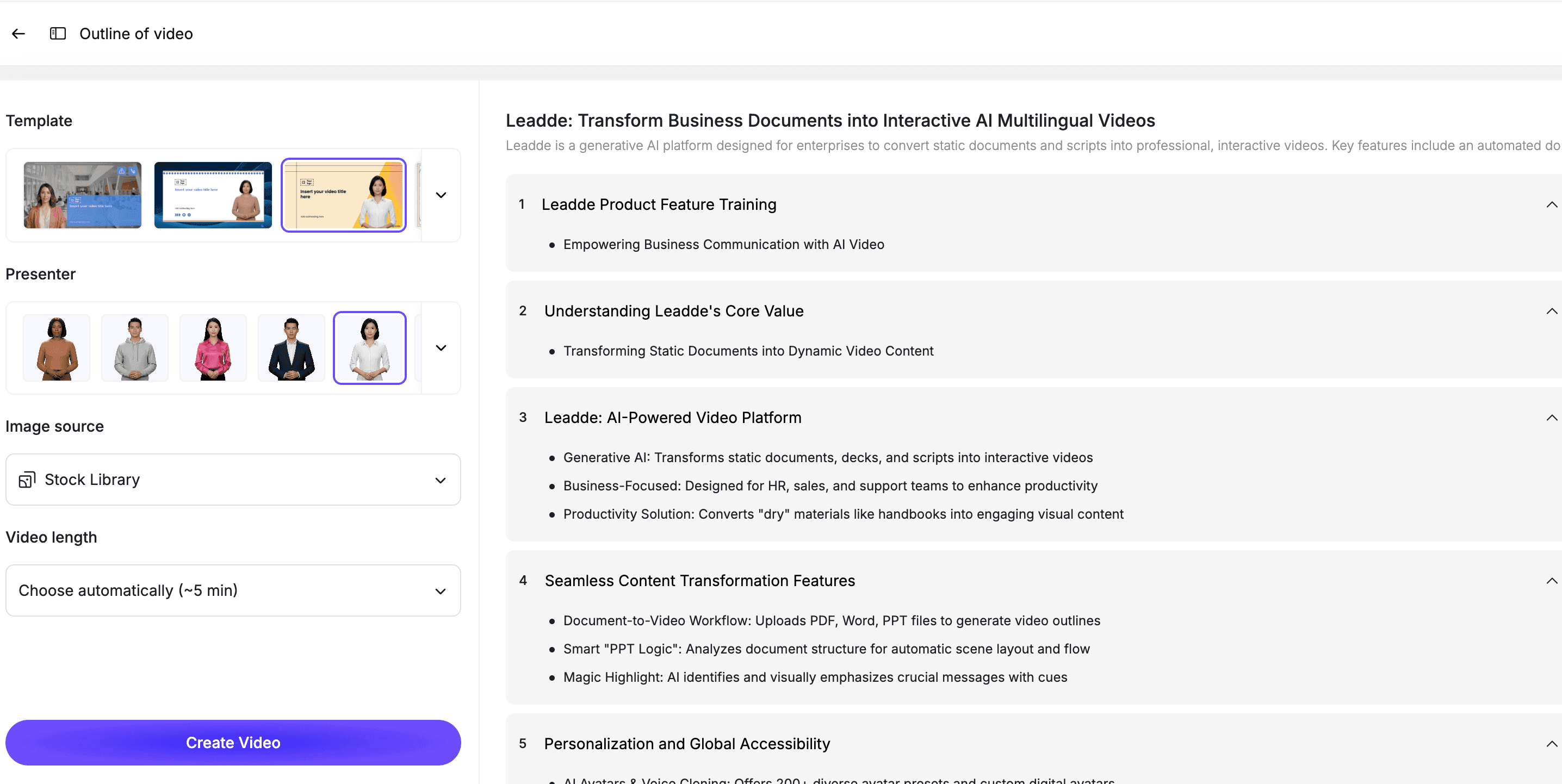
An AI presenter is useful when you want the demo to feel guided, polished, or more human than a screen recording alone.
Step 6: Review the Demo Before Publishing
Before publishing, review the video for clarity.
Check for:
- Too many features
- Weak opening hook
- Unclear audience
- Missing business outcome
- Outdated product UI
- Too much jargon
- No clear CTA
- Visuals that move too fast
- Claims that are too vague
A strong demo should make the product easier to understand in less time.
Best Practices for SaaS Product Demo Videos
Show One Workflow at a Time
A focused demo is usually stronger than a full product tour.
If you need to explain multiple workflows, create multiple short videos.
Start with the User's Problem
Do not start with a menu or dashboard.
Start with the problem the viewer recognizes, then show the product workflow that solves it.
Keep the Video Short
Most SaaS product demo videos should be 60 to 180 seconds.
If the topic is complex, use a series of short demos instead of one long video.
Use Real Customer Language
Avoid internal feature names unless customers already know them.
Use language from sales calls, support tickets, search queries, and customer interviews.
End with One Clear CTA
Every demo should tell the viewer what to do next.
Examples:
- Try the product
- Book a demo
- Watch the next video
- Start from a template
- Upload your first file
- Talk to sales
How Leadde Helps Create SaaS Product Demo Videos
Leadde helps SaaS teams turn product scripts, feature notes, sales messaging, product docs, and demo flows into editable AI videos.
With Leadde, teams can:
- Create product demo videos from scripts
- Add AI presenters
- Break demos into short scenes
- Add captions and visual highlights
- Create sales demo videos
- Build product launch videos
- Create multilingual demo videos
- Update demos when product messaging changes
Start with AI Product Demo Video Maker for product walkthroughs. Use AI Sales Demo Video Maker for sales enablement videos, or Script to Video if your script is already written.
If you already have a product demo script or feature notes ready, you can also try Leadde directly and start building your first AI product demo video.
Common Mistakes to Avoid
Mistake 1: Showing Every Feature
A demo video is not a product manual.
Show the features that support one clear workflow or outcome.
Mistake 2: Starting with the Dashboard
The viewer needs context before the interface.
Explain the problem first, then show the product.
Mistake 3: Making the Demo Too Long
Long demos lose attention.
If the product is complex, create a video series.
Mistake 4: Using Generic Claims
Avoid vague lines like "save time" or "boost productivity" without showing how.
Make the outcome concrete.
Mistake 5: Forgetting the CTA
The demo should lead somewhere.
Tell the viewer what to do next.
FAQ
What is a SaaS product demo video?
A SaaS product demo video is a video that shows how a software product works, explains a specific workflow, connects features to outcomes, and helps viewers decide what to do next.
What are good SaaS product demo video examples?
Good examples include homepage product demos, sales demo videos, feature walkthroughs, onboarding demos, product launch videos, use-case demos, dashboard demos, integration demos, and customer success demos.
How long should a SaaS product demo video be?
Most SaaS product demo videos should be 60 to 180 seconds. Complex products can use several shorter videos instead of one long demo.
What should a SaaS demo video include?
A strong SaaS demo video should include a user problem, target audience, product workflow, visual proof, outcome, and clear call to action.
Can AI create SaaS product demo videos?
Yes. AI can help create SaaS product demo videos by turning scripts, product notes, feature docs, and demo flows into scenes, narration, captions, and editable video drafts.
What is the difference between a product demo and an explainer video?
A product demo shows how the product works. An explainer video focuses more on the problem, concept, and value proposition. Some SaaS videos combine both formats.
Can SaaS demo videos be updated later?
Yes, if they are created in an editable workflow. Your team should be able to update scripts, scenes, product visuals, captions, and presenters when the product changes.
Conclusion
SaaS product demo videos work best when they are focused, specific, and tied to a real user problem.
The best examples do not show every feature. They show one useful workflow, explain why it matters, and guide the viewer toward a next step.
Start with one demo goal, choose the right format, write a clear script, add product visuals, include an AI presenter or voiceover if helpful, review the demo for clarity, and keep the final video editable.
Use Leadde's AI Product Demo Video Maker to turn product scripts, feature notes, and demo flows into editable SaaS product demo videos.





