
How to Keep Healthcare Training Videos Updated When Policies Change

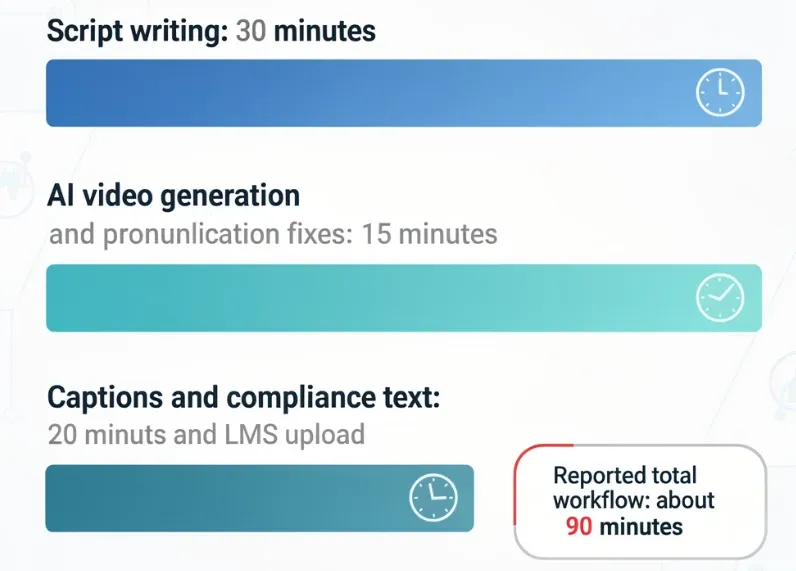
Healthcare training videos stay updated when they are built from approved source documents, split into short modular segments, versioned like compliance assets, and regenerated only where the policy or workflow changed. In my healthcare training research, the most effective update workflows used 3–5 minute modules, 2-minute “what changed” walkthroughs, and editable scripts instead of full video reshoots. One medical call center workflow reduced a 6-minute protocol video from about one week of production to about 90 minutes by updating the script, fixing medical pronunciation, adding captions, and uploading the revised module to the LMS.
The goal is simple: do not treat healthcare training videos as finished media files. Treat them as living training assets connected to the latest SOP, policy, clinical guideline, HIPAA procedure, EHR workflow, or call center protocol.
With Leadde, healthcare teams can upload updated PDFs, SOPs, PowerPoint decks, or policy documents, generate revised scripts and video drafts with AI, and quickly regenerate training videos when workflows change.

Why Healthcare Training Videos Become Outdated When Policies Change
Healthcare training videos become outdated because policies, systems, and clinical workflows change faster than traditional video production can keep up.
In my research across healthcare training, aged care, compliance, onboarding, and medical call center workflows, the same issue appeared repeatedly: teams already had PDFs, SOPs, PowerPoint decks, shared folders, and long videos, but staff still struggled to remember what changed or find the right instruction at the right time. Long PDFs and 40-minute videos were especially weak for retention because they expected busy staff to absorb too much at once.
The risk is higher in healthcare than in many other industries. An outdated training video can reinforce the wrong intake workflow, old patient privacy language, obsolete EHR steps, or a retired escalation protocol. HHS states that regulated entities must train workforce members on security policies and procedures under the HIPAA Security Rule, which makes training currency and documentation especially important for privacy and security topics.
The core problem is usually not video quality. It is content governance. If the video is disconnected from the policy source, no one knows when it becomes outdated.
Build a Source-Driven System to Keep Healthcare Training Videos Updated
The best way to keep healthcare training videos updated is to make the approved source document the single source of truth.
That source may be a HIPAA policy, SOP, nursing protocol, equipment manual, clinical guideline, call center script, onboarding manual, or EHR workflow. The video should explain the source document, but it should never replace it. Teams can easily operationalize this by choosing to create healthcare training videos from existing documents to ensure alignment between text and visual media.
A reliable update system includes:
| Asset | Purpose |
|---|---|
| Approved source document | Official policy, SOP, or workflow |
| Version date | Shows whether the video is current |
| Editable script | Lets teams update content before regenerating video |
| Modular video segment | Prevents full reshoots for small changes |
| Reviewer record | Shows clinical, compliance, or operations approval |
| LMS assignment | Tracks who received the update |
| Quiz or knowledge check | Confirms understanding |
| Archived version | Preserves old training records |
Every healthcare training video should include metadata: source document name, source version, video version, last reviewed date, reviewer role, target audience, owner, next review date, and change log.
For example:
Based on: Patient Identity Verification Policy v3.2
Audience: Front desk and medical call center staff
Last reviewed: June 2026
Owner: Privacy Office
Replaces: v3.1 training module
This turns training video updates into a controlled process instead of an emergency production task.
Use AI Tools to Update Healthcare Training Videos Without Re-Recording
AI tools are especially useful for healthcare training video updates because they reduce the manual work between “the policy changed” and “the updated video is ready for review.”
The strongest AI-assisted workflow is not fully automatic publishing. It is:
AI draft, human review, controlled release.
AI can help with:
- Comparing the old and new policy
- Summarizing what changed
- Identifying affected video modules
- Drafting a “before vs after” script
- Rewriting dense policy language into plain training language
- Generating captions
- Creating multilingual versions
- Regenerating narration without booking a voiceover session
- Replacing only the affected video scene
- Creating scenario-based quiz questions
For example, an AI doc-to-video platform can take an updated SOP, generate an outline, draft a new script, create scenes, add narration, and regenerate the revised module. Leadde’s solutions for healthcare describe support for nursing protocols, equipment manuals, patient education materials, public health guidelines, and internal training documents in Word, PDF, PowerPoint, and text formats.
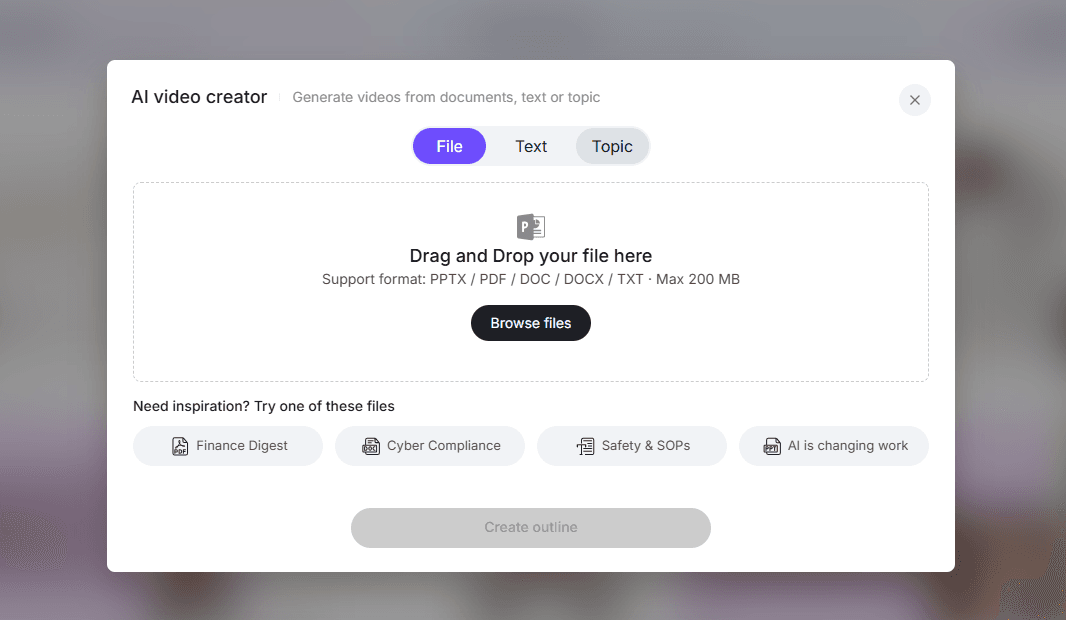
Leadde’s powerpoint-to-video tooling also supports file inputs such as .pptx, while its specialized pdf-to-video tool converts static documents into training videos. Utilizing these targeted tools allows teams to turn static medical PDFs and PowerPoints to videos seamlessly.
The advantage of AI is not just faster first-time production. The bigger advantage is faster revision. When a policy changes, teams can update the script and regenerate the affected section instead of rerecording the whole video.
Case Study: Medical Call Center Training Video Updated in 90 Minutes
Medical call centers are one of the clearest use cases for updateable healthcare training videos because scripts, escalation rules, identity verification language, and privacy-sensitive responses change often.
In one medical call center workflow from my research, the production process looked like this:
- Write the script in Google Docs: 30 minutes
- Generate the AI avatar video and fix medical pronunciation: 15 minutes
- Add captions and compliance text: 20 minutes
- Export and upload to LMS: 10 minutes
The final result was a 6-minute training module produced in about 90 minutes. Previously, the same type of module took about a week. The biggest operational benefit was that when protocols changed, the team could update the script and rerender the video instead of booking a full reshoot.
This case shows why updated healthcare training videos should start with editable scripts, not cameras. The old model depends on scheduling, recording, editing, captioning, and republishing. The AI-assisted model depends on updating the script, reviewing pronunciation and compliance text, regenerating the module, and reassigning it in the LMS.
For medical call centers, this is especially useful for:
- Patient identity verification
- Appointment changes
- Billing questions
- Insurance explanations
- Escalation protocols
- Privacy-sensitive phone conversations
- New call scripts
- Short refresher training
The practical lesson: keep every call center training video script modular and easy to regenerate.
Case Study: Healthcare Compliance Video Updates Without Full Reshoots
Healthcare compliance training videos are often expensive to update because they involve policy owners, legal review, compliance review, and sometimes clinical stakeholders.
In one compliance training workflow I studied, a “quick” video became a six-week process:
- Recording took 2 weeks
- Legal review took 1 week
- Outdated information was found
- Reshooting sections took another 1–2 weeks
- The full cycle reached about 6 weeks
The better workflow was not to shoot faster. It was to separate content from presentation.
Instead of rebuilding the full course, the team kept the source document as the authority, updated the script, and regenerated only the affected section. Utilizing a dedicated sop video maker simplifies this process, making it easy to create healthcare compliance training videos from SOPs. In one HIPAA-related example, knowing how to make HIPAA training videos for healthcare staff meant the team could update a 4-minute segment instead of recreating a full 25-minute course.
This is the right model for healthcare compliance training because most updates are localized. If the disclosure example changes, update that scenario. If the incident reporting workflow changes, update that module. If password rules change, update the cybersecurity segment. Do not rebuild the whole compliance course unless the learning objective or policy structure changed.
A strong healthcare compliance update video should include:
- What changed
- Why it changed
- Who is affected
- The old workflow vs the new workflow
- One realistic scenario
- One knowledge check
- A link to the current policy
This approach also creates a clearer audit trail because the training version is tied to the policy version.
Case Study: Updating EHR and Healthcare Software Training Videos
Healthcare software and EHR training videos become outdated quickly because interfaces change.
A button moves. A field is renamed. A menu changes. A billing workflow adds a required step. A patient portal gets a new screen. When the video still shows the old workflow, staff lose confidence in the training library.
In my research on new hire tutorials and software training, one common pain point was manual screenshot documentation. One workflow involved spending about 5 hours per week taking screenshots and pasting them into training documents for simple tasks. By introducing an AI onboarding video maker, medical facilities can easily update software walkthroughs for new staff. Tools mentioned across these workflows included Scribe, Trace, Camtasia, Captivate, SnagIt, and other screen or step-guide tools.
The best EHR update workflow is modular:
- Keep the explanation separate from the screen walkthrough.
- Keep screenshots and screen recordings as replaceable assets.
- Write scripts around actions, not fragile screen positions.
- Pair the video with a step-by-step job aid.
- Replace only the affected screen segment when the interface changes.
For example, avoid saying:
Click the blue button in the top right corner.
Say:
Select “Submit incident report” from the action menu.
The second script survives interface changes better.
AI tools act as the best AI medical video maker platforms by generating updated narration, captions, summaries, and quiz questions, but screen-based training still needs accurate screenshots, recordings, or interface captures.
What to Include in a Healthcare Policy Change Training Video
A healthcare policy change training video should not explain the entire policy again. It should train the change.
Use this structure:
- What changed
Start with the exact policy, SOP, or workflow change. - Why it changed
Explain the reason in operational language. - Who is affected
Name the roles: nurses, front desk, billing, call center, EHR users, managers, or new hires. - Before vs after
Show the old process and the new process side by side. - What to do now
Give the updated steps. - Common mistakes
Explain what staff may still do incorrectly. - Scenario question
Test application, not memorization. - Source link
Link to the current SOP or policy.
In my healthcare training research, teams consistently preferred short, task-based training over broad refreshers. The most practical pattern was 3–5 minute modules, 2-minute “what changed” walkthroughs, job aids, click-through screenshots, and scenario questions instead of long PDFs or full course rebuilds.
CDC’s plain language guidance supports this approach: put the most important message first, organize information around the audience, break content into logical chunks, and choose words carefully.
Pair Updated Healthcare Training Videos with Job Aids and Knowledge Checks
A video alone is rarely enough for healthcare policy updates.
Staff usually need three things:
- A short explanation of the change
- A quick reference they can use during work
- A way to prove they understood the update
A strong update package includes:
| Asset | Purpose |
|---|---|
| 2–5 minute video | Explains the change |
| One-page checklist | Supports the task during work |
| Scenario quiz | Confirms understanding |
| SOP link | Provides the official source |
| LMS record | Tracks completion |
| Version note | Shows what changed |
| Manager huddle prompt | Reinforces the behavior |
In my research, one practical compliance model replaced passive video viewing with scenario-based questions delivered through tools such as Teams or Slack. If the employee answered correctly, completion could be recorded; if not, they received a micro-correction and retest. This creates stronger evidence than simple video views.
This is especially useful for HIPAA, incident reporting, patient communication, EHR documentation, and call center escalation.
Metrics for Updated Healthcare Training Videos
To know whether updated healthcare training videos are working, do not measure only views.
Track:
- Completion rate
- Quiz pass rate
- Repeat attempts
- Time from policy change to training update
- Time from update release to staff completion
- Post-training error rate
- Manager audit findings
- Support questions after release
- Version compliance
- Number of outdated videos retired
The most important operational metric is often time to update. If a policy changes today, how long does it take to publish the revised training module?
AI tools improve this metric by shortening the slowest parts of production: outline creation, script drafting, narration, captioning, localization, and video regeneration. Human reviewers still control approval, but the production cycle becomes much faster.
Common Mistakes When Updating Healthcare Training Videos
The first mistake is rerecording the entire video for every small change. If one HIPAA example changes, update that segment. Do not rebuild the whole course.
The second mistake is keeping the video separate from the source policy. Every training video should map back to a policy or SOP version.
The third mistake is updating the video but not the job aid. Staff may rely on the checklist more often than the video.
The fourth mistake is using AI without human review. AI can draft, summarize, translate, and regenerate, but clinical, compliance, legal, and operational owners should approve the final version.
The fifth mistake is measuring views instead of understanding. Use scenarios, quizzes, manager audits, or supervisor sign-offs for critical workflows.
The sixth mistake is assigning every update to every employee. Use role-based assignment so staff receive only the updates that affect their work.
Conclusion: Design Healthcare Training Videos for Change
The best way to keep healthcare training videos updated when policies change is to design them for change from the beginning.
Use approved policies and SOPs as the source of truth. Write modular scripts. Create short updateable video segments. Add before/after explanations. Pair videos with job aids and knowledge checks. Track versions, reviewers, assignments, and completion.
AI tools make this process much faster by helping teams compare policy versions, draft update scripts, generate captions, create multilingual versions, and regenerate only the affected video segments. The result is a faster, safer workflow: change the source, update the script, review the content, regenerate the module, publish the new version, and track understanding.
Healthcare staff do not need a full course rebuild every time a policy changes. They need a short, accurate, role-specific update that explains what changed, what to do now, and how to apply the new workflow in context.





