How to Turn Changing Medical Call Center Scripts into Training Videos Fast
Medical call centers can turn changing scripts into training videos fast by treating scripts, protocols, and escalation rules as source documents, then converting them into short, modular, AI-assisted video updates. In my healthcare training research, the strongest workflow produced a 6-minute medical call center training module in about 90 minutes instead of roughly one week by writing the script in 30 minutes, generating the AI video and fixing medical pronunciation in 15 minutes, adding captions and compliance text in 20 minutes, and exporting the module to an LMS in 10 minutes.
The main problem is not that call centers lack training content. They already have scripts, call flows, SOPs, HIPAA-safe language, escalation protocols, payer guidance, appointment policies, and patient communication rules.
The real problem is that those materials change faster than traditional training videos can be updated.
When scripts change but training does not, agents may keep using outdated language, miss new verification steps, escalate calls incorrectly, or give inconsistent answers to patients. The solution is a fast script-to-video workflow that is modular, reviewable, and easy to regenerate whenever the protocol changes.
With Leadde, medical call centers can upload updated scripts, SOPs, PowerPoint decks, or protocol documents and quickly turn them into narrated, captioned, AI-assisted training videos that are easier to revise when scripts change.

Why Medical Call Center Training Falls Behind When Scripts Change
Medical call center training often falls behind because scripts are living documents, but training videos are usually treated as finished media files.
In my research across healthcare training, aged care, compliance, onboarding, and medical call center workflows, the same pattern appeared repeatedly: teams had PDFs, shared folders, call scripts, long videos, SOPs, and slide decks, but agents still struggled to know which version was current. Training content existed, but it was too slow to update and too hard to apply during real calls.
Many training managers look for a specialized best AI medical video maker to help solve this agility problem. The most common pain points were:
- Call scripts change frequently.
- Protocol updates need quick retraining.
- HIPAA-safe language must stay accurate.
- Escalation rules need fast rollout.
- Agents need scenarios, not just policy text.
- Long videos are hard to rewatch.
- Training teams do not want to rerecord every time a script changes.
One pattern was especially clear: long PDFs and 40-minute training videos are a poor fit for fast-moving operational training. The more practical approach is to split content into 3–5 minute modules and use 2-minute “what changed” walkthroughs when only part of the workflow changes. This is why learning leaders prefer to create healthcare training videos from existing documents rather than filming from scratch.
For a medical call center, that might mean short modules such as:
- How to verify patient identity by phone
- How to handle appointment rescheduling
- How to respond to billing questions
- When to escalate a symptom-related call
- What to say when a caller requests PHI
- What changed in the latest script version
This keeps training closer to the real call experience.
The Fastest Workflow to Turn Medical Call Center Scripts into Training Videos

The fastest workflow is to separate the script, video, review process, and publishing system.
A practical script-to-video workflow looks like this:
- Start with the approved call script or protocol.
- Identify what changed.
- Convert the script into a short training outline.
- Rewrite it as a realistic call scenario.
- Generate the video draft using specialized automation like a doc-to-video tool.
- Review for HIPAA-safe language, tone, pronunciation, and accuracy.
- Add captions, compliance text, and knowledge checks.
- Publish to the LMS or call center knowledge base.
- Archive the old version.
- Reassign only the affected agents.
This workflow is faster because it avoids the traditional production cycle of scheduling a presenter, recording a new video, editing from scratch, recreating captions, and replacing the whole course.
In the clearest case from my research, the workflow looked like this:
| Step | Time |
|---|---|
| Write script in Google Docs | 30 minutes |
| Generate AI video and fix medical pronunciation | 15 minutes |
| Add captions and compliance text | 20 minutes |
| Export and upload to LMS | 10 minutes |
| Reported full workflow | About 90 minutes |
| Previous workflow | About 1 week |
The key insight is simple: the team did not start with a camera. They started with the script.
That matters because call center training is language-heavy. If the script can be edited, reviewed, and regenerated quickly, the video can keep pace with changing protocols.
How to Convert Call Scripts into Scenario-Based Training Videos
The best medical call center training videos do not simply read the script aloud. They show agents how to use the script in context.
A strong scenario-based video should include:
- The call situation
- The patient or caller request
- The required verification step
- The correct agent response
- The escalation rule
- The compliance risk
- The common mistake
- A short knowledge check
For example, a basic script might say:
Verify the caller’s identity before sharing appointment details.
A better training video turns that rule into a real scenario:
A caller says they are the patient’s spouse and asks to confirm an upcoming appointment. They know the patient’s name but cannot confirm the required second identifier. What should the agent say?
Then the video models the correct response:
“For privacy reasons, I need to verify one more piece of information before I can continue.”
This is stronger than telling agents to “follow the policy” because it gives them the exact moment where the policy applies.
In my training research, teams consistently preferred scenario-based questions and practical examples over passive video viewing. This matters for call centers because agents need to make fast decisions while speaking with patients, family members, caregivers, insurers, or internal clinical teams.
How AI Helps Update Medical Call Center Training Videos Faster
AI tools are useful for medical call center training because they reduce the manual work between “the script changed” and “the updated video is ready for review.”
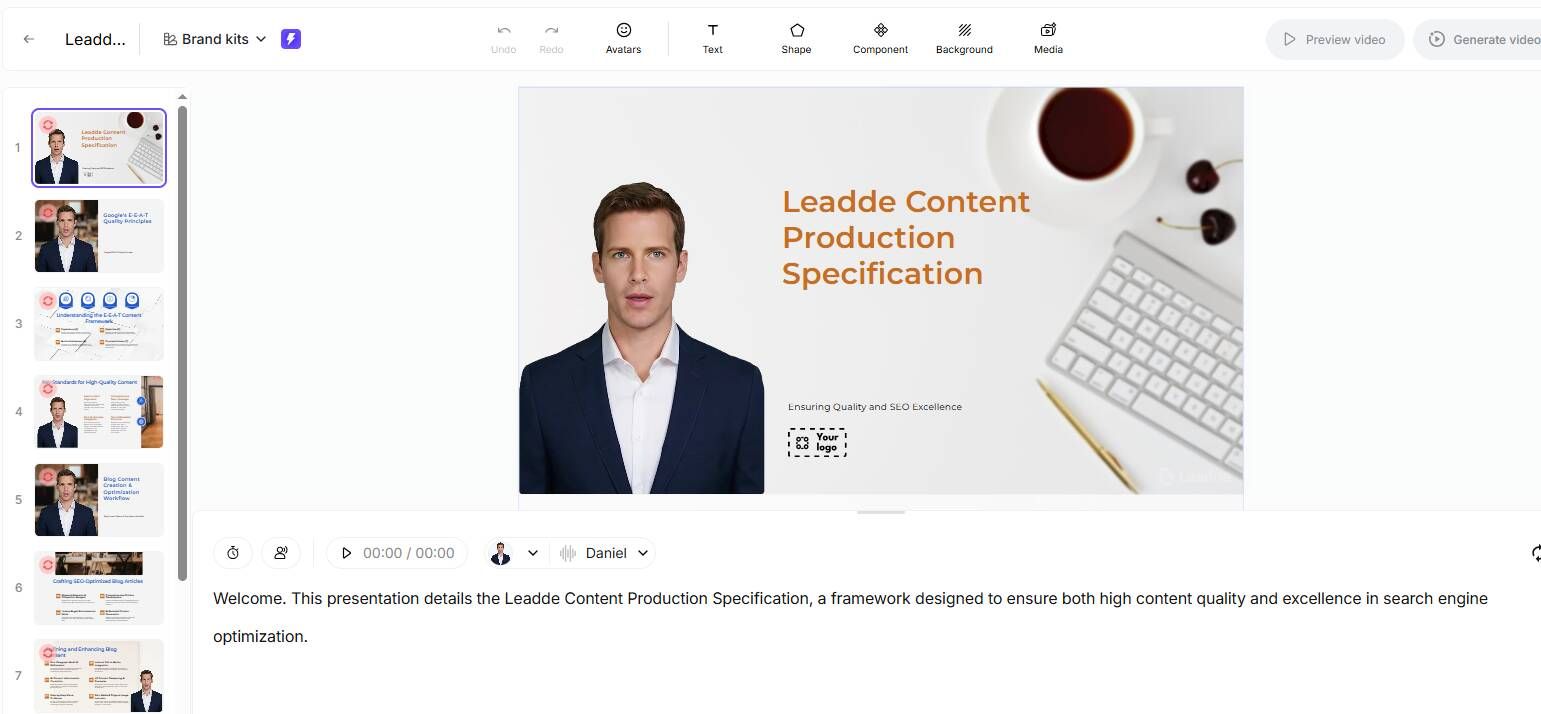
AI can help with:
- Turning call scripts into video outlines
- Summarizing what changed between script versions
- Drafting agent-caller scenarios
- Rewriting policy language into conversational training language
- Generating narration
- Creating captions
- Producing multilingual versions
- Fixing or reviewing medical pronunciation
- Regenerating updated video modules
- Creating quiz questions based on the new script
The best workflow is not “AI publishes training automatically.” The safer workflow is:
AI drafts, humans review, teams publish.
That distinction matters in healthcare. AI can speed up video creation, but compliance, privacy, clinical, and call center leaders should still review the content before it goes live.
For example, an AI-assisted workflow for a new escalation protocol might look like this:
- Upload the updated call script.
- Generate a summary of what changed.
- Create a 3–5 minute training outline.
- Draft a realistic call scenario.
- Generate the video draft.
- Review HIPAA-safe language and escalation rules.
- Add captions and a knowledge check.
- Publish the approved video.
- Assign it to affected agents.
This is where AI has the biggest advantage: not just first-time video creation, but knowing how to keep healthcare training videos updated efficiently when scripts and protocols change.
Case Study: A 6-Minute Medical Call Center Training Video in 90 Minutes
One of the most useful case patterns from my research came from a medical call center training workflow that used AI video generation to accelerate script-based training.
The team needed to create a short module from an updated protocol. The workflow was:
- 30 minutes to write the script
- 15 minutes to generate the AI video and fix medical pronunciation
- 20 minutes to add captions and compliance text
- 10 minutes to export and upload to the LMS
The final video was 6 minutes long and took about 90 minutes to produce. Previously, a similar training module took about one week.
The before-and-after difference was clear:
| Workflow | Before | After |
|---|---|---|
| Production time | About 1 week | About 90 minutes |
| Final module length | 6 minutes | 6 minutes |
| Update method | Reshoot and edit | Update script and regenerate |
| Best use case | Large formal training | Fast protocol updates |
The main benefit was not simply faster production. It was reducing the risk of agents using outdated guidance while waiting for a training update.
This case is especially relevant for:
- Identity verification scripts
- Appointment scheduling rules
- Billing response changes
- Patient portal support scripts
- Medication refill routing
- Urgent symptom escalation
- Insurance or payer communication
- HIPAA-safe caller responses
When the protocol changes, the video can change with it.
How to Keep Medical Call Center Training Videos Updated Without Re-Recording
The best way to keep medical call center training videos updated is to design them as modular assets from the beginning.
Each video should map to one script, protocol, or call scenario. Each script should be editable. Each video should have a version number. Each update should be reviewed and archived.
A practical update system includes:
| Asset | Purpose |
|---|---|
| Approved call script | Source of truth |
| Script version | Shows which language is current |
| Video script | Training version of the call flow |
| Video module | Published learning asset |
| Reviewer record | Confirms compliance or operations approval |
| LMS assignment | Tracks which agents received the update |
| Knowledge check | Confirms understanding |
| Archive | Stores old versions |
For example:
Source: Appointment Rescheduling Script v4.1
Video: Appointment Rescheduling Training v4.1
Audience: Medical call center agents
Reviewer: Call center operations and privacy office
Last reviewed: June 2026
Replaces: v4.0 training module
This prevents a common training failure: the script changes, but the old video remains live.
The update process should be simple:
- Script changes.
- Training owner identifies the affected video.
- Script is updated.
- Compliance or operations reviews it.
- Video is regenerated.
- Captions and quiz are updated.
- Old video is archived.
- Agents receive the new module.
That is much faster than full reshooting.
What to Include in a Medical Call Center Training Video
A good medical call center training video should be built around the call moment, not just the policy.
Include these elements:
| Element | Purpose |
|---|---|
| What changed | Shows the new script, protocol, or escalation rule |
| Why it changed | Explains the operational or compliance reason |
| Who is affected | Defines the agent group or team |
| Correct call flow | Shows the new steps in order |
| Wrong response | Shows the common mistake |
| Right response | Gives agents usable language |
| Scenario question | Tests application |
| Source link | Connects the video to the approved script |
For example:
Agents must now verify two patient identifiers before confirming appointment details by phone.
A useful video should then show:
- What the old workflow was
- What the new workflow is
- What the agent should say
- What the agent should not say
- When to escalate the call
- Where to find the current script
This turns a static script into applied training.
How to Handle HIPAA-Safe Language in Call Center Training Videos
Medical call center agents often work at the front line of privacy-sensitive conversations. That makes HIPAA-safe language a major training concern.
Training videos should help agents understand:
- What counts as PHI
- When information can be shared
- When identity must be verified
- What to say when verification fails
- How to respond to family members or caregivers
- When to escalate to a supervisor
- How to document the call
Do not train agents with vague instructions like:
Be careful with patient information.
Train them with specific language:
“I’m not able to share that information until I complete the required verification process.”
For HIPAA-related training, the official policy should remain the source of truth. The video should explain how to apply the policy during a real call.
A strong HIPAA-safe call center training video should include a privacy scenario, a wrong-answer example, a correct response, an escalation path, a knowledge check, and a link to the current privacy policy.
How to Update Medical Call Center Training When Systems and Screens Change
Not all medical call center training is script-based. Some training depends on software workflows, EHR screens, CRM systems, scheduling tools, billing platforms, or patient portals.
These videos become outdated when:
- A screen changes
- A button moves
- A field is renamed
- A required step is added
- A menu changes
- A workflow is redesigned
In my research on software training and new hire tutorials, one workflow involved spending about 5 hours per week manually taking screenshots and pasting them into training documents. That kind of manual maintenance becomes expensive when systems change often. To scale onboarding efficiently, companies utilize platforms like an ai onboarding video maker to build and maintain visual walk-throughs rapidly.
The better approach is to create modular software training:
- Keep the call script separate from the screen walkthrough.
- Keep screenshots and recordings as replaceable assets.
- Avoid fragile instructions like “click the blue button in the top right.”
- Use action-based language like “select Submit incident report.”
- Update only the affected screen segment when the interface changes.
- Pair the video with an updated step-by-step guide.
AI can help by updating narration, captions, summaries, and quizzes. But screen-based training still needs accurate screenshots or recordings.
Common Mistakes in Medical Call Center Training Videos
The first mistake is turning every script into a long video. Agents do not need a 30-minute course for every small script update. Use short, focused modules.
The second mistake is rerecording the entire video when only one part of the script changed. Update the script segment and regenerate the affected module.
The third mistake is using generic compliance language instead of real call scenarios. Agents need to hear what to say. If your baseline compliance updates live in structured documentation, you can build healthcare compliance training videos from sops with automation, ensuring exact alignment with regulatory rules.
The fourth mistake is measuring video views instead of understanding. Use scenario-based questions to confirm agents can apply the updated script.
The fifth mistake is publishing videos without version control. Every video should map back to the current script or protocol version.
The sixth mistake is using AI without review. AI can draft and regenerate quickly, but call center operations, compliance, privacy, or clinical stakeholders should approve the final version.
The seventh mistake is ignoring pronunciation and captions. Medical terms, drug names, department names, and policy language should be checked carefully before publishing. Converting raw assets with a dedicated medical pdfs power points to videos workflow makes it simpler to update individual words or text tracks on the fly.
Metrics to Track for Medical Call Center Training Videos
To know whether script-to-video training is working, track more than completions.
Useful metrics include:
- Time from script change to video update
- Time from video release to agent completion
- Completion rate
- Scenario quiz pass rate
- Repeat attempts
- Number of outdated modules retired
- Agent questions after release
- Supervisor coaching notes
- Call quality findings
- Compliance exceptions
- Escalation accuracy
- Script adherence
The most important metric for changing scripts is often time to update.
If the script changes today, how quickly can the training team publish a revised module?
In the case study above, the workflow moved from about one week to about 90 minutes for a 6-minute training video. That is the kind of operational improvement that matters when agents need current guidance quickly.
Conclusion: Turn Changing Scripts into Fast, Updateable Training Videos
Medical call center scripts change because healthcare workflows change. Appointment policies change. HIPAA-safe language is updated. Escalation rules evolve. EHR and scheduling systems change. Patient communication standards improve.
Training has to keep up.
The best way to turn changing medical call center scripts into training videos fast is to build a modular, script-driven workflow. Keep the approved script as the source of truth. Convert it into realistic scenarios. Create short video modules. Add captions, compliance text, job aids, and knowledge checks. Track versions and completion. When the script changes, update the script and regenerate the affected video instead of rerecording everything.
The strongest case from my research showed a 6-minute medical call center training module produced in about 90 minutes instead of roughly one week. That improvement came from a simple shift: treating the script as the engine of the video.
For medical call centers, that is the real opportunity: not just faster video production, but faster alignment between changing protocols and what agents actually say on the next patient call.