
AI Motion Graphics Generator
From script to visual storytelling, instantly

Onboarding walkthrough
Turn compliance documents, safety protocols, or regulatory guidelines into structured certification videos. Let an AI avatar walk employees through each requirement clearly — reducing legal risk and keeping teams audit-ready.

Cleanroom protocols
Explains the behavior guidelines and operational requirements for cleanrooms, ensuring employees adhere to standards and improve work efficiency and safety.

AR-700 operation training
Introduces the operation process and safety guidelines of the AR-700 precision assembly robot, helping employees master proper operating techniques.

Marketing insights
Trusted by the world's leading brands







What Is an AI Motion Graphics Generator?
An AI motion graphics generator turns ideas and source content into animated visual explanations. With Leadde Motion, you can enter a prompt, paste text, or upload a PDF, Word document, or slide deck. AI identifies the core concept, structures it into a visual explainer flow, and creates scenes with motion graphics, animation, on-screen highlights, and an optional AI presenter.

Why Use Leadde's AI Motion Graphics Generator?
Structure Ideas for Animation
Leadde Motion analyzes your topic or uploaded material and turns complex information into a progressive visual explainer flow, breaking ideas into clear steps designed to work as animation.
Create Motion Graphics Automatically
Choose motion graphics templates that fit your subject, including visual approaches suited to scientific diagrams, technical concepts, and business frameworks. Leadde handles the visual structuring instead of requiring a blank animation timeline.
Add an AI Presenter
Select an AI avatar to guide viewers through the explanation. Combine a presenter with animated visuals to make technical, educational, research, and business concepts easier to follow.
Generate Synchronized Animation
Leadde renders the explainer with smooth motion, synchronized animations, and on-screen highlights so visual elements appear alongside the concepts being explained.

Who Is the AI Motion Graphics Generator For?
Teachers and Educators
Create animated explanations for lessons, scientific concepts, theories, diagrams, and course material without manually producing every visual sequence.
Product and Technical Teams
Turn product documentation, system architecture, workflows, and technical concepts into visual explainer videos that demonstrate how something works step by step.
Researchers and Consultants
Translate complex findings, frameworks, and theories into shareable animated videos that help non-specialist audiences understand the main ideas.
Content and Training Teams
Use Leadde as a motion graphics maker for educational content, training materials, concept explainers, and other videos that need structured visual storytelling.
How to Create Motion Graphics with AI
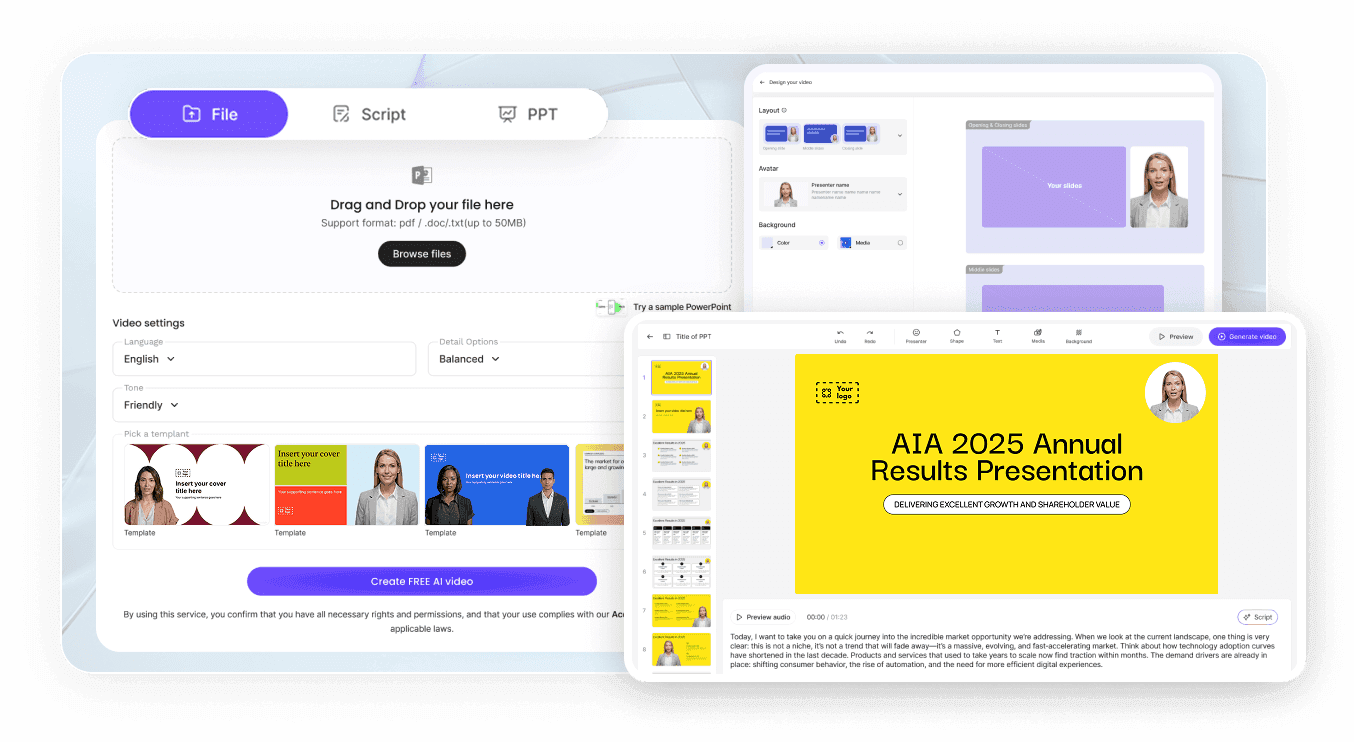
Step 1: Add Your Topic or Content
Describe what you want to explain, paste your notes or script, or upload a PDF, Word document, or slide deck for Leadde Motion to analyze.
Step 2: Generate the Visual Explainer
AI identifies the core concept and structures the material into a clear animated script with progressive scenes and an easy-to-follow visual flow.
Step 3: Choose a Style and Create
Select an AI avatar and motion graphics template that fits your topic. Leadde then creates the video with animated visuals, synchronized motion, and on-screen highlights.
AI Motion Graphics Generator Use Cases
Flow Diagram Animation
Explain processes, systems, relationships, and step-by-step concepts through progressive visual flows. Leadde Motion structures complex material into connected stages designed to be communicated visually through animation.
Animated Graphs and Data
Turn data-driven concepts into clearer visual explanations. Leadde includes dedicated Graph Animation and Data Animation solution categories for explaining trends, values, comparisons, and other quantitative information.
Scientific Diagram Animation
Visualize scientific and technical concepts using motion graphics designed around diagrams and progressive explanations. Leadde Motion supports subjects including biology, physics, chemistry, engineering, mechanics, and other complex topics.
Business Framework Animation
Transform strategies, processes, models, and business frameworks into animated explainers. Use structured scenes and visual movement to communicate relationships that may be difficult to explain with static slides.
Geography and Location Concepts
Create animated visual explanations for geography and location-based topics. Leadde includes a dedicated Geography Video solution for communicating spatial and geographic concepts through visual storytelling.
Product and Technical Explainers
Convert product documentation or technical architecture into videos that visually demonstrate how a system, feature, or concept works instead of relying on long blocks of text.
Create Motion Graphics Videos with AI

Math Animation
Geometry, graphs, and data brought to life with clean math visualization for algebra through calculus.

Cell Animation
Visualize cell structure, organelles, and the cell cycle — animated diagrams covering plant cell and animal cell biology.

Graph Animation
Plot and animate functions, slopes, and transformations — a function video for algebra and calculus lessons.

Data Animation
Bring probability and statistics to life — animated bar races, distributions, and data visualization for any dataset.

Geography Video
Solar systems, volcanoes, and earthquakes — Earth and space science visualization in motion.

Biology Animation
From cells and mitosis to evolution — animated biology videos covering the full life-science syllabus.

Physics Animation
Waves, electricity, atoms, and motion — animated physics for mechanics, energy, and quantum lessons.

Chemistry Animation
States of matter, chemical reactions, and the periodic table — animated chemistry concepts.
Frequently asked questions
An AI motion graphics generator creates animated visual content from an idea, prompt, script, or source document. Leadde Motion analyzes the concept, structures it into an animated explainer flow, and creates motion graphics, visual sequences, synchronized animation, and on-screen highlights.
Yes. Leadde Motion works as a motion graphics maker and motion graphics creator for people who want to turn complex information into animated explainer videos without manually building every scene in traditional video editing or animation software.
You can start with a prompt or paste your own content. The Leadde Motion page also supports uploading PDFs, Word documents, and slide decks, allowing existing research notes, course material, product documentation, and concept outlines to become animated explainers.
Yes. Leadde includes Graph Animation and Data Animation among its Motion animation solutions. These capabilities are designed for visually explaining data, trends, relationships, and quantitative concepts through animation.
Leadde Motion is designed to turn complex concepts into structured visual flows and progressive animated steps. This makes it suitable for process and flow diagram animation style explanations, especially when showing how systems, frameworks, or sequences connect.
Create Your Motion Graphics with AI
Turn complex ideas, documents, and concepts into clear animated explainer videos with structured visual flows and motion graphics.
