
AI Presentation Narrator

Create the Best Narrated Presentation Videos

Onboarding walkthrough
Turn compliance documents, safety protocols, or regulatory guidelines into structured certification videos. Let an AI avatar walk employees through each requirement clearly — reducing legal risk and keeping teams audit-ready.

Cleanroom protocols
Explains the behavior guidelines and operational requirements for cleanrooms, ensuring employees adhere to standards and improve work efficiency and safety.

AR-700 operation training
Introduces the operation process and safety guidelines of the AR-700 precision assembly robot, helping employees master proper operating techniques.

Marketing insights
Trusted by the world's leading brands







What Is an AI Presentation Narrator?
An AI presentation narrator turns presentation content into spoken narration and a narrated video. Upload your PowerPoint to Leadde, and AI can analyze the slide structure, transform bullet points into natural narration, organize content into video scenes, and add AI voice, subtitles, visuals, or an Avatar.
It gives you more than basic PowerPoint text to speech by adapting presentation content for video delivery.

Why Use Leadde's AI Presentation Narrator?
Turn PowerPoint Slides Into AI Narration
Leadde reads the content and structure of your presentation, then converts slide text and bullet points into narration designed to be spoken rather than simply read on screen.
Add AI Voice Over to Your Presentation
Create a presentation voice over with AI voices, or add an AI Avatar to present the content. You can also hide the Avatar when you want a voice-over-only presentation video.
Text to Speech for PowerPoint Presentations
Use Leadde as text to speech for PowerPoint while keeping the narration connected to the structure of your slides. AI can generate spoken scripts, subtitles, scenes, and visual layouts from the source presentation.
Create Presentation Voice Overs in Multiple Languages
Create multilingual presentation narration with Leadde's AI voice capabilities. The platform supports 88 languages, 175 dialects, and 100+ AI voices for localized presentation videos.

Who Is AI Presentation Narrator For?
Teachers and Educators
Turn lecture slides, lesson presentations, and classroom materials into narrated educational videos that explain presentation content beyond the text shown on each slide.
Training and L&D Teams
Convert training decks, policies, process presentations, and onboarding materials into consistent narrated videos for employee learning and internal knowledge sharing.
Businesses and Sales Teams
Add voiceover to pitch decks, company presentations, product information, and sales materials so presentations can be shared as narrated videos.
Course and Content Creators
Transform presentation-based lessons and educational content into video without manually recording a voice track for every slide.
How to Create PowerPoint Narration with AI
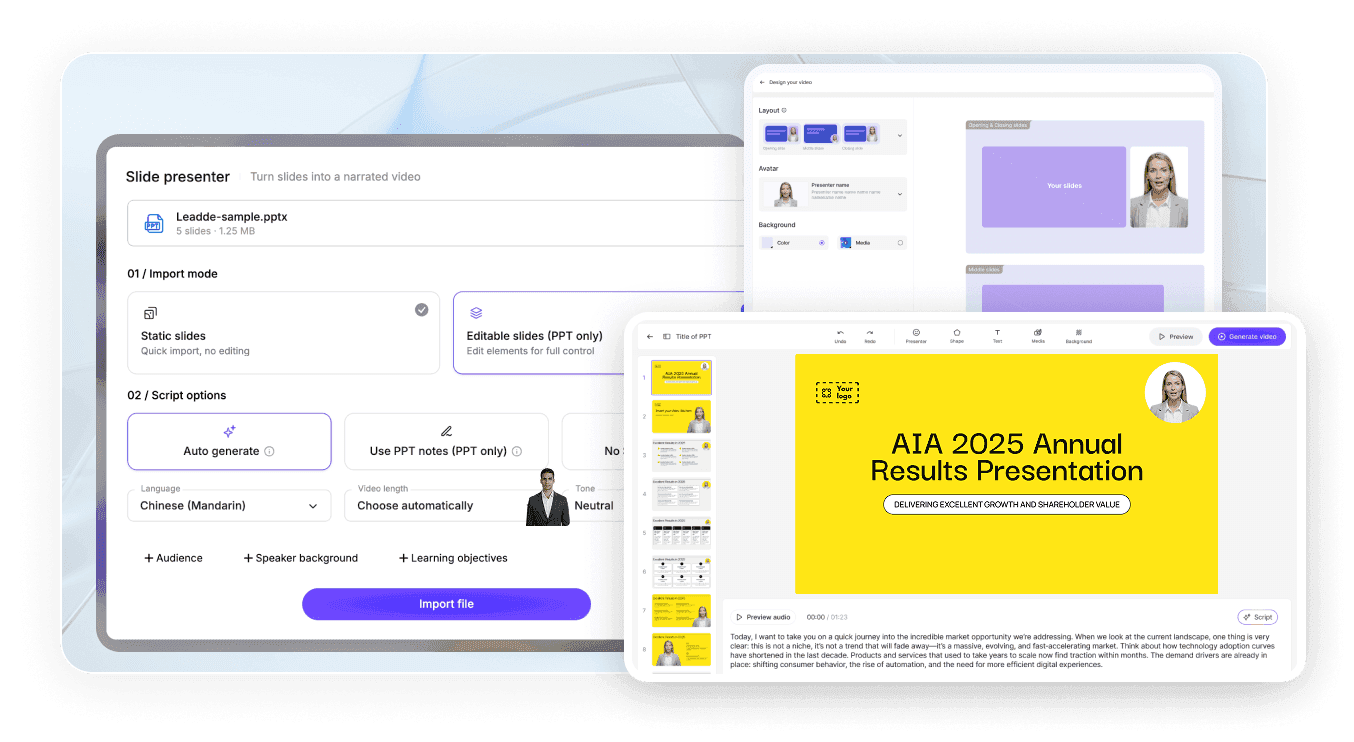
Step 1: Upload Your PowerPoint
Add your presentation to Leadde. The platform can extract the content and structure of the slides instead of treating the file as a simple screen recording.
Step 2: Let AI Create the Narration
Leadde analyzes the presentation and generates an outline, spoken narration, scenes, visual layouts, subtitles, and highlights based on the source content.
Step 3: Choose a Voice and Generate Your Video
Select an AI voice or Avatar, review the script and presentation scenes, make any needed edits, and generate your narrated presentation video.
AI Presentation Narrator Use Cases
PowerPoint Lecture Narration
Turn lecture slides into narrated lesson videos with spoken explanations, subtitles, visuals, and optional AI presenters.
Employee Training Presentations
Convert internal training decks into reusable narrated videos for onboarding, policies, compliance topics, processes, and ongoing learning.
Sales Deck Voice Overs
Add an AI voiceover for PowerPoint sales decks, proposals, and product presentations so viewers can follow the message without a live presenter.
Product Presentation Videos
Transform product slides and feature presentations into structured explainer or walkthrough videos with narration and visual emphasis.
SOP and Process Training
Turn process presentations and operational materials into narrated training videos with scene-by-scene explanations and highlighted information.
Multilingual Presentation Narration
Create localized versions of presentation videos with AI narration for teams, learners, or customers who need content in different languages.
Frequently asked questions
Leadde can read PowerPoint content and turn it into a narrated video. It analyzes the presentation structure, creates spoken narration from the source material, organizes the content into scenes, and can add AI voice, subtitles, visuals, highlights, or an AI Avatar.
Yes. Leadde can create an automatic voice over for PowerPoint by generating narration from your presentation content and applying an AI voice. You can also review and edit the generated narration before creating the final video.
With Leadde, PowerPoint narration text to speech goes beyond reading slide text word for word. AI can analyze slide content, turn bullet points into more natural spoken narration, and use that narration as the voice track for a structured presentation video.
Yes. Leadde allows you to hide the Avatar layer and create a voice-over-only video. This is useful when you want text to speech for PowerPoint with narration, subtitles, and presentation visuals but do not need an on-screen presenter.
Upload your PowerPoint to Leadde, let AI analyze the slides and create the narration, then choose an AI voice for the presentation. You can review the script and scenes before generating the narrated video.
Yes. Leadde supports multilingual AI narration. The current product information lists 88 languages, 175 dialects, and 100+ AI voices, making it possible to create localized narrated presentation videos for different audiences.
Create Your Presentation Voice Over with AI
Turn your PowerPoint content into structured narration and a professional narrated video with Leadde.
