
Patient Education Video Maker


Care instructions patients actually understand.

Onboarding walkthrough
Turn compliance documents, safety protocols, or regulatory guidelines into structured certification videos. Let an AI avatar walk employees through each requirement clearly — reducing legal risk and keeping teams audit-ready.

Cleanroom protocols
Explains the behavior guidelines and operational requirements for cleanrooms, ensuring employees adhere to standards and improve work efficiency and safety.

AR-700 operation training
Introduces the operation process and safety guidelines of the AR-700 precision assembly robot, helping employees master proper operating techniques.

Marketing insights
Trusted by the world's leading brands







Why Choose Leadde for Patient Education Videos?
Care Instructions, Made Clear
Upload discharge notes, medication guides, or condition explainers (up to 200 MB). Leadde's AI Video Creator turns them into friendly, easy-to-follow videos patients can watch at their own pace.
A Warm, Trustworthy Presenter
Choose from 200+ lifelike avatars and a Friendly narrative tone, so health information feels personal and reassuring rather than clinical and overwhelming.
Every Patient's Language
Generate the same explainer in 88 languages and 175 dialects with captions in 9 styles, helping patients with different language needs understand their care.
Patients Can Ask Questions
Share via a hosted link and let patients ask follow-up questions in the interactive Q&A panel, getting instant answers based on your guidance.
How to Make a Patient Education Video with Leadde
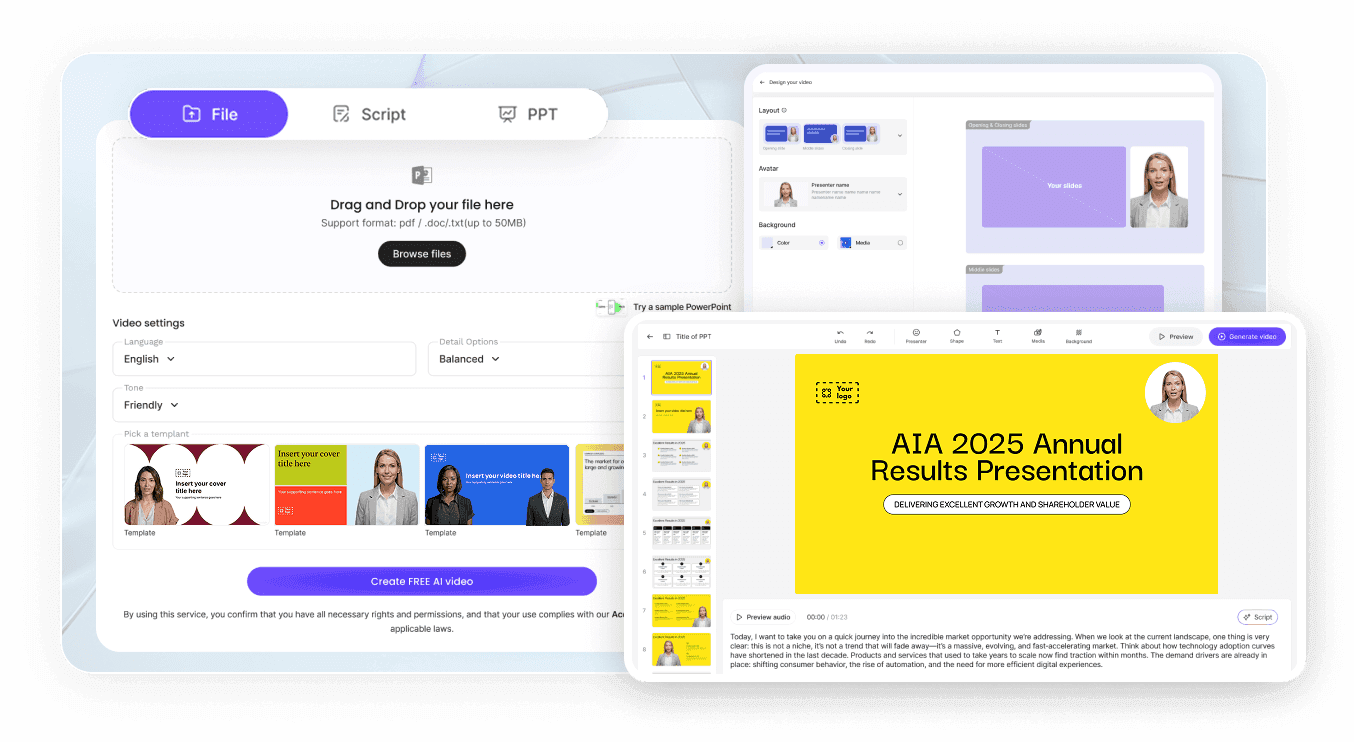
Step 1: Upload Your Care Material
Open the AI Video Creator and upload your discharge, medication, or condition document (up to 200 MB), or paste the text.
Step 2: Pick a Friendly Avatar and Language
Choose a warm avatar presenter, set a Friendly tone, and select the patient's language so the explainer feels approachable.
Step 3: Share for Anytime Viewing
Export HD MP4 or share a password-protected link patients can watch at home and replay as often as they need.
Patient Education Video Scenarios & Examples
Condition Explainers
Help patients understand a new diagnosis with a clear, jargon-free video they can revisit after the appointment.
Pre-Op and Post-Op Care
Turn surgical prep and recovery instructions into step-by-step videos that reduce anxiety and missed steps.
Medication Guidance
Explain dosage, timing, and side effects in a short video that improves adherence and cuts repeat calls.
Discharge Instructions
Convert discharge paperwork into a friendly walkthrough patients and caregivers can follow at home.
Chronic Disease Management
Build a series on managing conditions like diabetes or hypertension, localized for every patient group.
Preventive Care & Screenings
Encourage check-ups and vaccinations with approachable explainer videos for waiting rooms and patient portals.
Frequently Asked Questions
It turns care instructions and condition information into clear, friendly videos. Leadde's AI Video Creator writes the script and adds an avatar presenter so patients understand and remember.
Yes. Leadde supports 88 languages and 175 dialects, so you can produce the same explainer for every patient population from one source document.
Yes. On a shared video, patients can use the interactive Q&A panel to ask follow-ups and get instant answers based on your content.
Upload .pdf, .pptx, .doc, .docx, or .txt up to 200 MB, or paste text, then generate the patient education video in the AI Video Creator.
Files are processed securely and videos can be shared via password-protected links. Leadde supports SOC 2, ISO 42001, and GDPR practices.
Create Patient Education Videos Free
