
How to Create Pre-Op Instruction Videos for Patients

To create pre-op instruction videos for patients, turn approved surgical instructions into short, plain-language videos that explain what patients must do before surgery.
A strong pre-op video should cover arrival time, fasting rules, medication instructions, hygiene steps, what to bring, what to avoid, transportation, anesthesia preparation, warning signs, and who to call.
The best workflow is simple. Start with approved clinical documents, remove PHI, use AI to draft a patient-friendly script and storyboard, review everything with the surgical or anesthesia team, add captions and teach-back prompts, then publish the video through a secure patient portal, SMS link, QR code, or pre-op packet.
Pre-op videos should not replace instructions from the surgeon, anesthesiologist, nurse, or facility. They should make those instructions easier to understand and easier to remember.
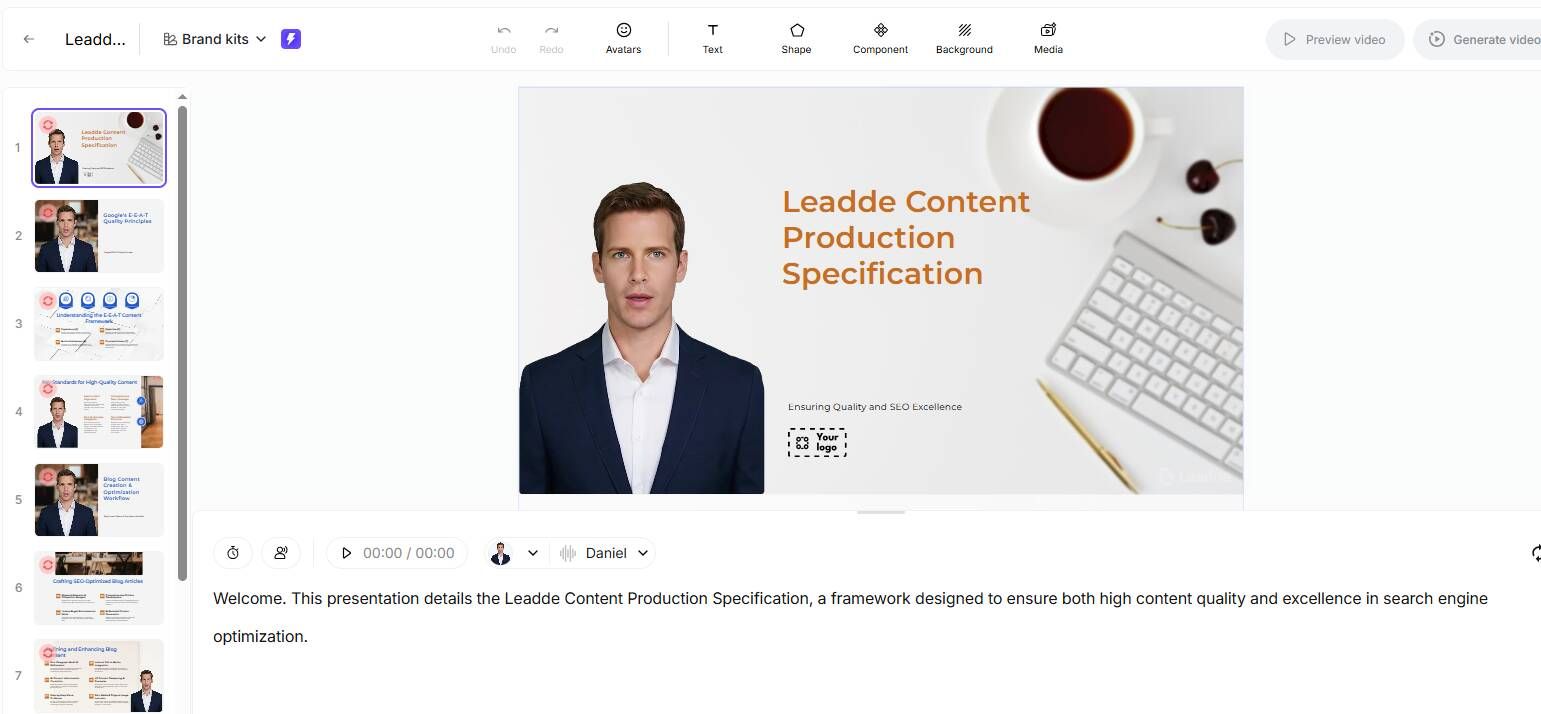
AI video tools like Leadde.ai can support this workflow by helping healthcare teams turn approved pre-op PDFs, PowerPoints, and instruction packets into clear patient education videos with captions, review steps, and easy content updates.

Why Pre-Op Instruction Videos Help Patients Prepare
Pre-op instructions are often given when patients are anxious, distracted, or overwhelmed.
They may receive a packet, a phone call, an email, and portal messages. But they may still forget when to stop eating, which medications to take, whether they need a driver, or what to do if symptoms change before surgery.
In our healthcare video workflow research, written instructions often contained the right information. The problem was that patients and caregivers struggled to absorb and act on it.
Short videos help because they make instructions repeatable. Patients and caregivers can watch the same message again at home.
AHRQ recommends teach-back to confirm understanding by asking patients or caregivers to explain what they need to know or do in their own words. This is especially useful for pre-op education because preparation errors can delay or cancel surgery.
What to Include in a Pre-Op Instruction Video
A pre-op instruction video should focus on the actions patients must take before surgery.
Do not turn the full surgical packet into one long narration. Keep the video focused on the few steps that matter most.
A complete pre-op video usually includes:
- What procedure or visit the video prepares the patient for
- When and where to arrive
- What to eat or drink, and when to stop
- Which medications to take, stop, or ask about
- Hygiene or skin preparation steps
- What to bring
- What not to bring
- Transportation and caregiver requirements
- What to expect before anesthesia
- When to call the care team before surgery
Fasting instructions need special care. The American Society of Anesthesiologists has guidance on clear liquid intake before elective procedures, but local facility rules and patient-specific risks may differ.
A pre-op video should always reflect the approved instructions from the patient’s actual surgical team.
Use direct language.
Instead of saying, “Maintain NPO status after midnight unless otherwise instructed,” say, “Do not eat or drink after the time listed in your instructions. If your care team told you to take a medicine, take it only with the amount of water they approved.”
Use Plain Language for Patient Education Videos
Pre-op videos should be written for patients and caregivers, not clinicians.
Use short sentences. Use common words. Put the action first.
Avoid jargon like NPO, anticoagulant, pre-anesthesia evaluation, ambulatory surgery center, and prophylaxis unless you explain it.
For example:
“Clear liquids are drinks you can see through, such as water or apple juice. Do not drink milk, smoothies, or juice with pulp unless your care team says it is allowed.”
Every organization should use its own approved wording. AI can help simplify language, but clinical review should confirm accuracy.
Use AI to Create Pre-Op Instruction Videos Faster
AI is useful in pre-op video production because it can turn dense medical instructions into a clear first draft.
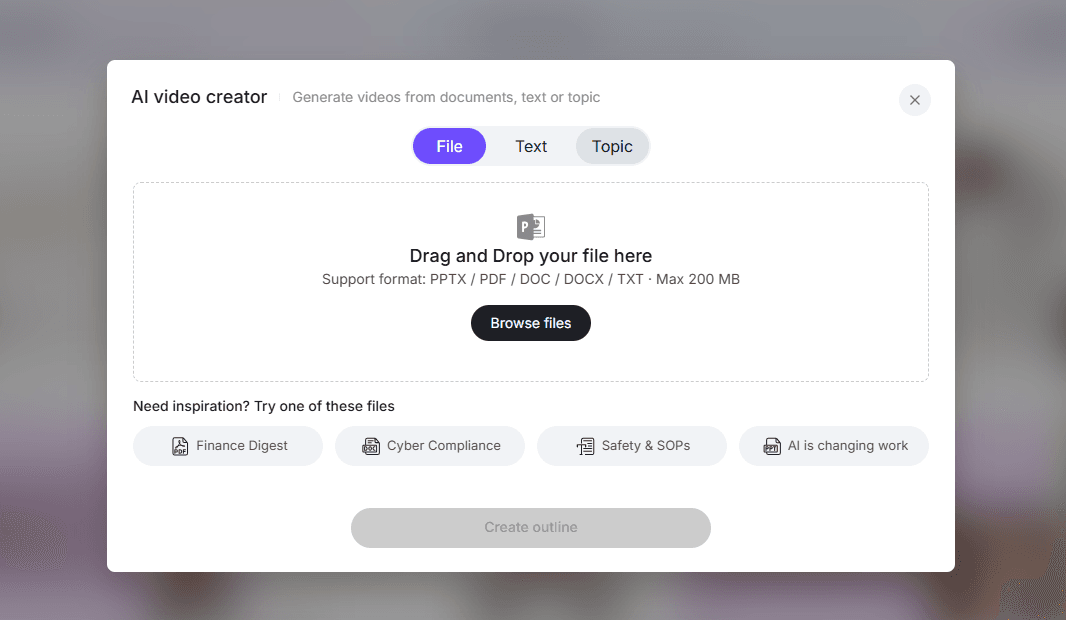
It can also create storyboards, captions, voiceover scripts, visual ideas, checklists, and multilingual versions.
A safe AI workflow looks like this:
- Start with approved pre-op instructions.
- Remove patient names, dates of birth, MRNs, and other PHI.
- Extract the key patient actions.
- Rewrite instructions in plain language.
- Break the content into short modules.
- Draft a video script and storyboard.
- Add visual cues, captions, and teach-back prompts.
- Have the surgical, anesthesia, or nursing team review the video.
- Publish only the approved version.
- Track the source document and review date.
This matches what we found in practical healthcare AI workflows. AI works best when it restructures existing approved information into a more usable format.
In one clinical workflow we analyzed, AI saved 20–30 minutes per day for a clinician seeing 14–16 clinic patients. Another admission-note workflow saved 10–20 minutes per note.
A separate clinic workflow saved at least one hour of charting after a half-day clinic.
The lesson is clear. AI can reduce production time, but it should not replace clinical judgment.
Break Pre-Op Instructions into Short Video Modules
One long pre-op video is usually harder to use than a short playlist.
Patients may only need to rewatch one section. A caregiver may only need arrival and transportation instructions.
A good structure is:
- What to Do Before Surgery: 60–90 seconds
- Eating, Drinking, and Medications: 2–4 minutes
- Skin Prep, Hygiene, and What to Bring: 2–4 minutes
- Arrival, Check-In, and Anesthesia Prep: 2–3 minutes
- When to Call Before Surgery: 60–90 seconds
In our training and patient education research, short 2–5 minute modules worked better than long videos. They are easier to rewatch, update, and translate.
Add Teach-Back and Patient Checklists
A pre-op video should not end with “Thank you for watching.”
It should end with a simple understanding check.
Use teach-back prompts like:
- “Tell us when you need to stop eating and drinking.”
- “Show us which medicines you will take the morning of surgery.”
- “Tell us who will drive you home.”
- “Explain what you will do if you develop a fever before surgery.”
- “Tell us what time you need to arrive.”
Add a short checklist at the end of the video.
Example:
- I know when to stop eating.
- I know what I can drink.
- I know which medicines to ask about.
- I know when to arrive.
- I have a responsible adult to take me home.
- I know who to call if something changes.
This turns the video into a preparation tool, not just an explanation.
Keep Pre-Op Videos PHI-Safe
Pre-op instruction videos should usually be general education assets.
They should not include patient names, medical record numbers, birth dates, personal surgical dates, addresses, phone numbers, or unredacted EHR screenshots.
Use templates such as:
- “How to Prepare for Outpatient Surgery”
- “What to Do the Night Before Surgery”
- “What to Expect on the Day of Your Procedure”
- “How to Use Pre-Surgery Skin Cleanser”
Use simulated patients, generic examples, and approved templates.
If personalized instructions are needed, keep them in the secure patient portal, EHR, or clinician-approved communication channel.
Case Study: Turning a Pre-Op Packet into a Video Playlist
In one workflow analysis, a surgical team used a long pre-op packet with fasting rules, medication guidance, arrival instructions, skin prep steps, transportation rules, and warning signs.
The packet was clinically complete. But patients still called with repeated questions.
The most common questions were practical:
“Can I drink water?”
“Which medicine do I take?”
“Do I need someone to drive me?”
“What time should I arrive?”
“What if I feel sick the day before surgery?”
The team converted the packet into short video modules.
AI helped extract key actions and draft scripts at a patient-friendly level. It also suggested captions, checklist screens, and scene-by-scene visuals.
The clinical team reviewed the final scripts. The videos were then shared through the portal and linked with a QR code in the printed packet.
Before the workflow, patients received several pages of instructions and had to find the right section themselves.
After the workflow, patients could watch a short video on the exact task they needed. Caregivers could also rewatch the same instructions at home.
The strongest result was more consistent education. Every patient heard the same approved instructions, in the same order, with the same warning signs and call instructions.
Case Study: Why Medical Accuracy Matters
Pre-op videos often need visuals. But medical visuals must be accurate.
In one medical visualization project we studied, a team explored AI tools for a 20-second medical procedure video. A traditional medical animation company quoted about $20,000.
AI tools were tested as a lower-cost option. But a complex thoracic spine fusion animation produced visuals that were more entertaining than clinically useful.
The practical workaround was to break the animation into 4–5 second clips and review each segment with anatomy-aware human oversight.
This matters for pre-op education.
AI-generated visuals are useful for simple ideas like checklists, bags, calendars, phone calls, fasting timelines, medication reminders, and facility directions.
They are riskier for anatomy, procedure steps, anesthesia claims, or surgical technique.
Use AI for speed, structure, captions, narration, and simple visuals. Use clinical experts for medical accuracy.
Keep Pre-Op Instruction Videos Updated
Pre-op videos become risky when they are outdated. It is critical to keep healthcare training videos updated because fasting rules, arrival locations, phone numbers, visitor policies, medication instructions, anesthesia workflows, and check-in processes can change.
Every video should have:
- A source document
- A clinical owner
- A reviewer
- A version number
- A review date
- A change log
- A retirement process for outdated videos
AI can compare an old pre-op instruction document with a new one. It can identify changed sections and draft an updated video script.
Human review is still required. But the update process becomes much faster.
Pre-Op Instruction Video Checklist
Before publishing, check these areas.
Clinical accuracy: based on approved instructions, reviewed by the right clinical team, no unsupported claims, and clear instructions on when to call.
Patient understanding: plain language, short sentences, key actions only, captions, teach-back prompts, and checklist.
Privacy: no unnecessary PHI, no real patient images without approval, no unredacted EHR screenshots, and simulated examples only.
Usability: mobile-friendly, easy to rewatch, short enough to finish, clear audio, large on-screen text, and available before the day of surgery.
Maintenance: source document linked, review date assigned, owner responsible for updates, and old versions archived.
Conclusion: Pre-Op Videos Should Help Patients Know Exactly What to Do
The best pre-op instruction videos are short, clear, reviewed, and easy to rewatch.
They help patients understand what to do before surgery, what to avoid, when to arrive, which questions to ask, and when to call the care team.
AI can turn approved PDFs, PowerPoints, and pre-op packets into scripts, storyboards, captions, checklists, and multilingual drafts.
But healthcare video production still needs human oversight.
Use AI to speed up the workflow. Use clinicians to protect accuracy. Use teach-back to confirm understanding.
That is how pre-op instruction videos become useful, safe, and trusted by patients.





