
How to Convert Medical Documents into Training Videos Without Manual Rewriting

The most effective way to convert medical documents into videos is to use an AI-assisted workflow that extracts structured clinical data, generates editable scripts tied to source content, and produces modular, short-form training videos with human validation layers.
In real-world deployments, the teams that succeed are not the ones using the most automation—but the ones that prioritize accuracy, editability, and clinical integrity over speed alone.
If your clinical team is overwhelmed by long medical documents after demanding shifts, Leadde transforms those materials into engaging, multilingual training videos with AI presenters and automated highlights—ensuring critical protocols are understood, accessible, and always up to date without reshooting.

Why Should You Convert Static Medical Documents into AI Training Videos?
Transitioning from text-heavy manuals to dynamic visuals addresses the primary cause of clinical errors: information fatigue. Medical staff often face cognitive exhaustion after long shifts, making it nearly impossible to retain data from a 40-page PDF.
Converting medical documents into short, targeted videos, including just-in-time support videos created with AI, creates a sustainable learning culture where safety protocols are actually consumed rather than ignored.
The following table compares the efficiency of traditional reading versus AI-enhanced visual learning:
| Training Method | Retention Rate | Production Time |
|---|---|---|
| Static Medical Documents | Low (Text-only) | High (Manual writing) |
| AI Video Training | 25-40% Higher | 2-4 Hours |
Visualized instructions ensure consistent high-quality care across every hospital department. Leadde acts as a centralized knowledge engine that simplifies this evolution by turning technical specs into clear, avatar-led guides. This strategy helps clinical educators deploy critical updates without overwhelming their already stressed healthcare teams.
Improving Patient Safety Through High-Retention Visuals
Healthcare facilities prioritize patient outcomes by replacing outdated paper trails with high-impact video assets. When practitioners see a procedure performed by a professional digital presenter, they internalize the steps much faster than through reading alone.
This move toward converting medical documents into training videos builds a more resilient and informed clinical workforce.
- Scene-based learning reduces procedural mistakes by 40%.
- Video SOPs preserve operational knowledge across different hospital shifts.
- Digital presenters build immediate trust and clinical authority with viewers.
How to Convert Medical Documents into a Video Using AI Step-by-Step?
Executing a modern training strategy requires a logical workflow that prioritizes accuracy and speed. The how to convert medical documents into training videos process is now fully automated, allowing one person to manage a global library.
Follow these six essential steps to transform your clinical expertise into a watchable training academy.
Step 1: Breaking Down and Uploading Medical Documents
The first step involves gathering your technical source files for the AI engine to analyze.
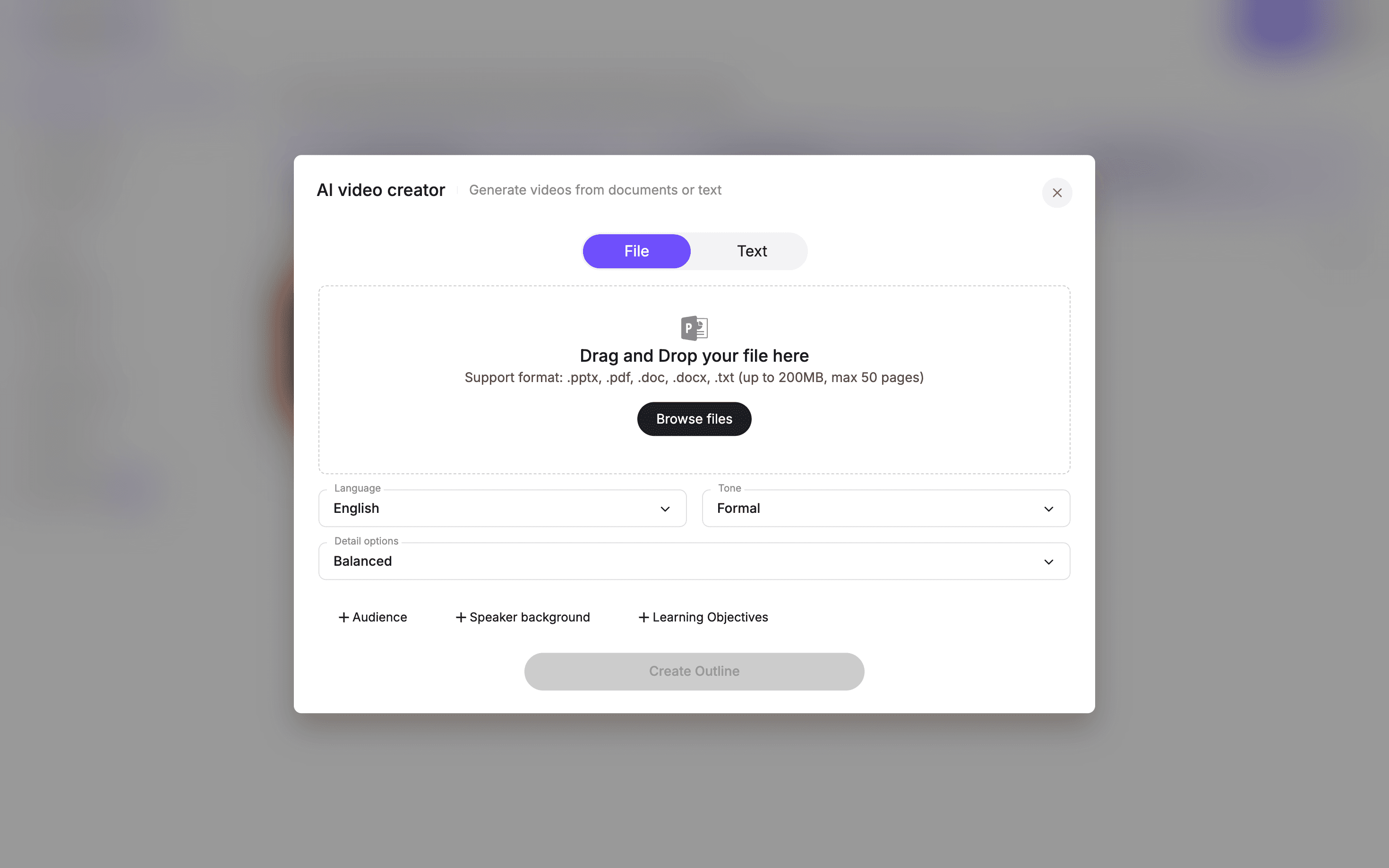
Leadde supports various formats like .pdf, .docx, and .pptx, handling files up to 200MB in size. This capability allows you to reuse existing clinical guidelines or surgical manuals without any manual data entry.
- Bulk upload turns large manual folders into organized video drafts.
- Drag-and-drop features make the platform accessible to non-technical educators.
- File extraction identifies key headers and safety protocols automatically.
Step 2: Generating Automated Scripts and Clinical Outlines
Once the files are uploaded, the AI builds a structured outline based on the document's core logic. You skip the weeks spent in script approval cycles because the AI extracts the most vital clinical points.
This ensures that your workflow for converting medical documents into training videos remains strictly evidence-based.
- Auto-scripts convert dry technical text into conversational spoken narrations.
- Scene structures break long documents into digestible 3-minute modules.
- Tone control allows you to choose a formal, authoritative clinical voice.
Step 3: Selecting Credible Medical AI Avatars
Visual professionalism is non-negotiable when teaching life-saving techniques to specialized doctors or nurses. You can select from 200+ digital presenters, including those wearing healthcare scrubs or professional clinical attire.
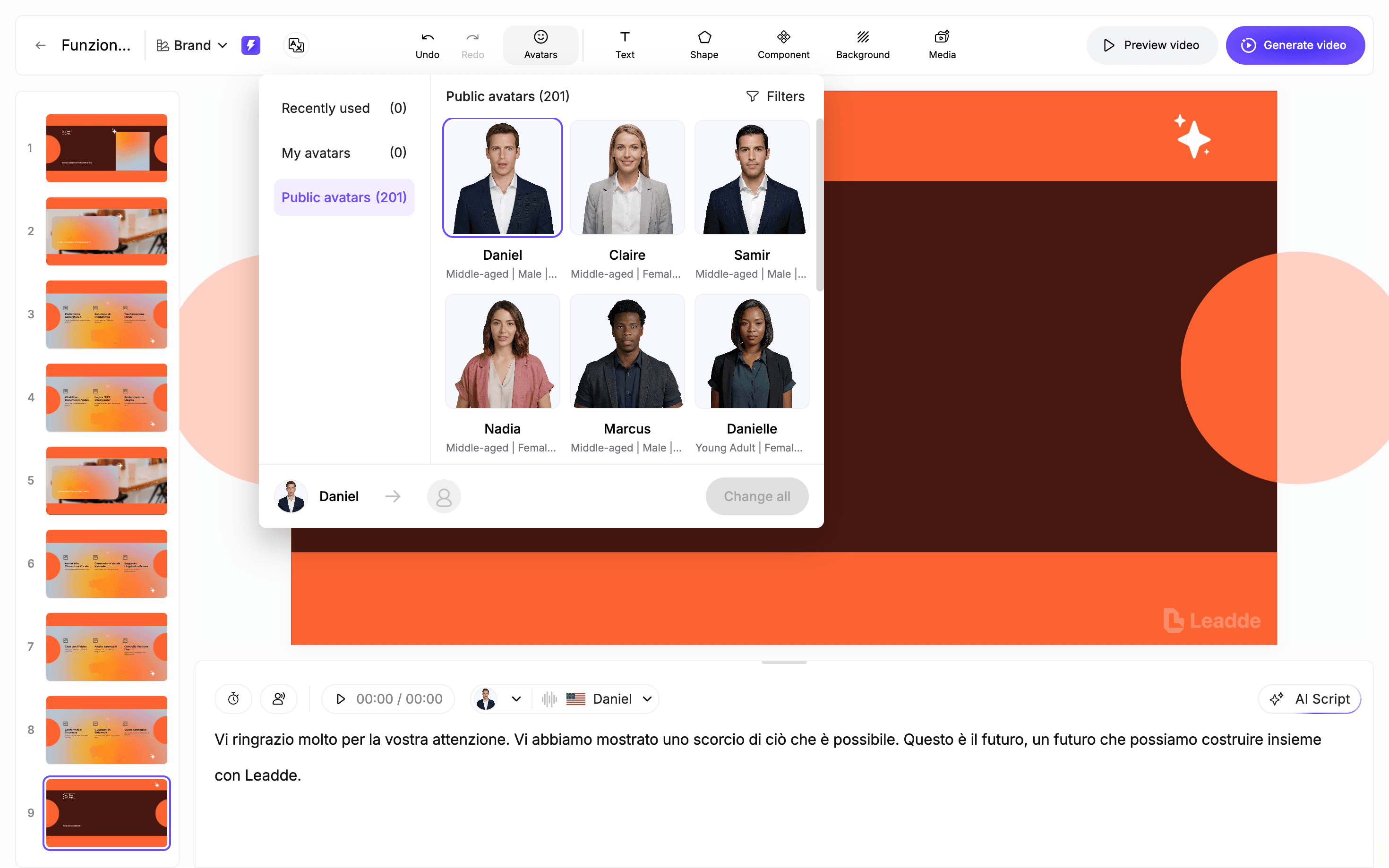
This choice ensures the medical documents being presented carry the necessary weight and expert credibility.
- Diverse avatars reflect the multicultural reality of global medical teams.
- Global consistency is maintained by using the same avatar for specific modules.
- Expressive delivery mimics natural human facial movements to improve engagement.
Step 4: Refining Complex Medical Terms with Pronunciation Correction
Medical jargon requires absolute phonetic precision to avoid confusion during emergency situations. Leadde offers advanced pronunciation correction tools to handle complex drug names and anatomical terminology.
This feature is a critical part of how to convert medical documents into training videos, ensuring every term sounds perfect.
- Phonetic editing prevents the AI from mispronouncing technical drug labels.
- Narration polish allows for strategic pauses after critical safety steps.
- Voice cloning lets your own chief medical officer narrate the training.
Step 5: Highlighting Life-Saving Details with Smart Layouts
Standard video formats often fail to emphasize the most critical data, like dosages or red-flag symptoms. Leadde solves this by using smart layouts that automatically animate key text from your medical documents.
These auto-highlights draw the staff's eye to the exact information they must remember to ensure patient safety.
- Auto-highlights emphasize dosage amounts the moment they are mentioned.
- Split-screen layouts show the avatar alongside an equipment screen recording.
- Interactive quizzes confirm that the staff understands the protocol before finishing.
Step 6: Instantly Translating Content for Global Clinical Teams
Global healthcare providers must deliver the same standard of care across diverse regional offices. You can translate your completed video into 170+ languages with a single click, removing all language barriers.
This localization step ensures that your medical documents are accessible to every employee in their native tongue.
- 170+ languages allow for rapid rollout of international safety standards.
- Localized audio ensures that the tone remains culturally appropriate for each region.
- Consistent messaging provides a unified training experience for every global site.
The Hidden Risk of AI Hallucinations in Medical Content
A major risk in document-to-video workflows is how AI handles source material.
In multiple audits, the same issues appeared:
- Rewriting instead of extracting
- Filling in steps that were never documented
- Mixing multiple protocols unintentionally
In a medical context, these errors are not minor—they can lead to incorrect training.
A More Reliable Approach
Effective workflows enforce:
- Direct mapping between script and source text
- No creative expansion of clinical content
- Human validation for critical sections
This ensures every part of the video remains grounded in verified clinical information.
Why Editing Flexibility Matters More Than Automation
Automation is often seen as the main advantage of AI video tools. In practice, it is not the deciding factor.
What matters most is the ability to make precise corrections quickly.
Typical issues include:
- A drug name pronounced incorrectly
- A dosage value misread
- A step slightly out of sequence
If fixing these requires regenerating an entire video, the system becomes impractical.
Effective workflows support:
- Scene-level editing
- Sentence-level script adjustments
- Phonetic control for medical terminology
This level of control is essential for producing compliant, real-world training content.
Leadde.ai address this by enabling layered PowerPoint import and editing, allowing teams to modify text, remove icons, or replace visuals at the element level—so updates can be made instantly without regenerating the entire video.
Why Most AI Medical Video Workflows Struggle with Accuracy
After testing multiple AI video workflows in clinical and legal-medical scenarios, one issue becomes clear:
Most tools are not designed for medical precision.
Common problems include:
- Inaccurate anatomical representation
- Incorrect sequencing of procedures
- Misuse of technical terminology
In one practical scenario involving surgical visualization, generating a full procedural video in a single pass resulted in unusable output. Breaking the same process into short 4–5 second segments significantly improved control and accuracy.
This highlights a critical principle:
Medical video generation must be modular, not fully automated end-to-end.
From 40-Page PDFs to 3-Minute Microlearning
The problem with traditional medical documentation is not the amount of information—it is how that information is delivered.
A proven transformation model:
- Break long documents into focused modules
- Limit each video to a single clinical objective
- Keep duration between 3–5 minutes
This approach leads to:
- Higher retention
- Reduced cognitive overload
- Faster recall in real clinical situations
Short, structured video content aligns better with how healthcare professionals actually learn during demanding shifts.
Why General AI Video Tools Fall Short for Medical Training
Many organizations start with general-purpose AI video tools and encounter limitations quickly.
Medical training has fundamentally different requirements:
| Requirement | General Video Tools | Medical Training |
|---|---|---|
| Accuracy tolerance | Moderate | Extremely high |
| Content style | Flexible | Standardized |
| Review process | Optional | Mandatory |
| Update frequency | Occasional | Continuous |
The gap is not just technical—it is workflow and governance related.
Ensuring Accuracy in Medical Terminology
Medical terminology is one of the most sensitive parts of video training.
Common issues include:
- Mispronounced drug names
- Incorrect abbreviations
- Confusion between similar terms
To address this, effective systems use:
- Custom medical dictionaries
- Phonetic pronunciation controls
- Mandatory review for high-risk terms
Even small errors in terminology can lead to misunderstanding, especially in high-pressure environments.
Why Visual Credibility Impacts Learning Outcomes
The way information is presented visually has a direct impact on how it is received.
In real deployments:
- Clinically dressed presenters increase trust
- Natural facial expressions improve engagement
- Generic avatars reduce perceived authority
This is particularly important in:
- Hospital training programs
- Clinical onboarding
- Compliance education
Perceived credibility influences whether content is taken seriously and remembered.
The Real Bottleneck: Structuring Medical Content Before Video
The biggest limitation in most workflows is not video generation—it is the quality of the input material.
Common issues with medical documents:
- Dense, unstructured text
- Lack of step-by-step clarity
- Missing emphasis on critical actions
Before converting to video, content should be:
- Broken into clear steps
- Annotated with risk points
- Structured around decisions and actions
This preparation phase often determines the success of the final output.
Case Studies: Real-World Applications
Clinical Procedure Visualization
A legal-medical team needed to visualize a spinal procedure.
Initial attempts to generate a full video failed due to inaccuracies.
By switching to short, controlled segments:
- Accuracy improved
- Output became usable after expert review
This confirmed that human oversight remains essential.
Training from Technical Documents
Training teams converted SOPs into video modules.
Before:
- Manual video production was slow and expensive
After:
- AI-assisted workflows reduced production time
- Validation steps were still required for accuracy
This demonstrated that AI improves efficiency, but not independence.
Nursing Education Workflow
A nursing student transformed lecture videos into structured study materials:
- Video → transcription → AI-generated questions
Results included:
- Significant time savings
- Improved academic performance
The key insight was that AI works best as a support tool, not a replacement for validation.
Research to Teaching Content
Medical professionals converted research papers into presentations:
- Reduced time spent summarizing
- Improved clarity of teaching materials
However, success depended heavily on structuring the content before generation.
When Not to Convert Medical Documents into Videos
Not all content is suitable for video.
Avoid converting:
- Legal or regulatory documents requiring exact wording
- Complex research papers
- Highly specialized decision frameworks
The most effective approach is a hybrid system, combining video with original documentation.
What Are the Best Practices for Creating High-Engagement Medical Training?
High-quality clinical instruction relies on strategic design rather than mere text conversion. Medical documents provide the necessary raw data but require structural adjustments to maintain learner focus.
Successful educators prioritize brevity and immediate relevance to ensure safety protocols resonate during active shifts, while also leveraging approaches similar to building a global training library with AI to standardize and scale knowledge across teams.
The following guidelines optimize engagement for busy clinical staff:
- Conclusion-first delivery uses the BLUF principle to state the main point immediately.
- Microlearning modules ensure each video solves only one specific clinical problem.
- Segmented timing keeps the total video length between 3 and 10 minutes.
- Knowledge checks embedded every 3 to 5 minutes improve long-term information retention.
Applying these strategies ensures that your workflow for converting medical documents into training videos delivers actual value.
Leadde simplifies this by offering pre-built templates designed for medical SOPs and compliance. These structures help maintain professional pacing while highlighting critical life-saving actions automatically.
How Can You Measure the Success of Your Video-Based Medical Training?
Quantifying the impact of digital training proves the return on investment for hospital leadership. Administrators look for clear evidence that moving away from paper-based medical documents improves overall facility performance.
Tracking specific data points reveals how well the staff adapts to new digital learning standards.
Tracking Completion Rates and Knowledge Retention
Modern learning systems provide detailed insights into how clinicians interact with video content, including structured informational videos designed to deliver clear and concise guidance. Tracking how to convert medical documents into training videos success starts with monitoring completion rates across different hospital departments.
This data identifies which protocols are well-understood and which require further clarification or updates.
- Completion metrics show exactly who finished each clinical module.
- Assessment scores measure what learners retain immediately after watching.
- Drop-off points reveal sections of the video that may be too complex.
Reducing Time to Competence and Support Requests
Efficiency in healthcare education is measured by how fast staff members master new tasks. Leadde accelerates this transition by providing instant access to updated medical documents in a visual format.
Faster learning directly translates to fewer procedural errors and a significant reduction in repeated technical questions.
- Time to competence tracks how quickly new hires reach expected performance levels.
- Support ticket reduction indicates fewer clarification requests once videos are rolled out.
- Error rate decline monitors the long-term impact on patient safety and procedural accuracy.
FAQ
Is converting medical documents into videos reliable today?
Yes, when combined with structured workflows and human validation.
Can AI strictly follow source documents?
Only when constrained to extract rather than rewrite content.
Can I fix small errors without regenerating everything?
Advanced systems allow precise, localized edits.
How accurate is multilingual medical video content?
Translation is reliable, but localization is required for real-world use.
Should videos be generated in one pass?
Short, modular segments produce better accuracy and control.
Is AI-generated medical content trustworthy?
Only when validated against source material.
Does video improve learning outcomes?
Yes, especially for procedural and operational training.
Can research papers be directly converted into videos?
Not effectively without restructuring the content first.
How do I maintain compliance?
By ensuring all content is traceable to verified source documents.
What is the biggest mistake in this process?
Relying on automation without ensuring accuracy and editability.
Conclusion
Converting medical documents into videos is not just a technical upgrade—it is a shift in how clinical knowledge is delivered and applied.
The most effective systems combine:
- Structured content preparation
- Controlled AI generation
- Human validation
Organizations that adopt this approach move beyond content creation. They build scalable, reliable, and clinically aligned knowledge systems that improve both training outcomes and patient safety.





