How to Make Corporate Communication Videos Fast (Save 80% Costs)

To make a corporate communication video in 2026, organizations are moving away from traditional filming and relying on AI-powered text-to-video platforms. The standard process involves three simple steps: first, upload your existing business documents (such as PPTs, PDFs, or Word files) into an AI video generator; second, select a digital AI avatar and an appropriate voice profile to act as the presenter; and third, allow the system to automatically generate the script, synchronize the audio, and apply visual layouts. This streamlined workflow eliminates the need for cameras, actors, and professional editing software, making high-quality internal communication scalable and accessible for any team.
Struggling with high costs and camera anxiety when creating internal content? Traditional methods drain your budget and patience. With Leadde, you can automatically turn any document into a professional business video in minutes. It's super fast, saving over 80% of production costs and 90% of content creation time.

What Are Corporate Communication Videos and Why Do They Matter Now?
The Shift from Text-Heavy Emails to "Video-First" Internal Comms
The modern workplace is changing rapidly. As of 2026, text-heavy emails and static PDF manuals are no longer effective for keeping employees engaged. Organizations are actively adopting a "video-first" approach.
Videos are proven to increase information retention. Whether it is for employee onboarding and compliance training, or C-suite announcements, a corporate communication video delivers the message with tone, context, and clarity that text simply cannot match. It ensures everyone is on the same page, regardless of their time zone.
Overcoming Common Roadblocks: Camera Shyness and Overloaded Video Teams
Despite the clear benefits, many companies struggle to produce enough video content. Why? The two biggest hurdles are camera shyness and resource bottlenecks.
Most employees and managers feel uncomfortable speaking in front of a camera. Furthermore, internal video teams are often overloaded with requests, causing severe delays. This bottleneck prevents HR and training departments from updating their Standard Operating Procedures (SOPs) or training materials at the speed business demands.
The 2026 Paradigm Shift: Traditional Production vs. AI Automation
The Hidden Costs of the "Old Way" (Filming, Editing, and Reshoots)
The traditional video production workflow is slow and expensive. The "old way" requires a multi-step process: writing a script, hiring talent, renting studio space, filming, and spending weeks on post-production editing.
When a company policy changes, updating a traditional video means bringing everyone back to the studio for a costly reshoot. This inflexibility makes traditional video production unsustainable for fast-moving corporate environments.
The New Era of AI Video Generators and Document-to-Video (Doc-to-Video)
By 2026, AI automation has completely revolutionized corporate communications. Platforms like Leadde have introduced Document-to-Video (Doc-to-Video) technology.
Instead of starting from scratch, you can now upload your existing business assets. The AI automatically parses the text, generates a script, and creates a ready-to-publish video featuring lifelike AI avatars. This shift means zero cameras, zero actors, and zero studio time, fundamentally changing how businesses communicate internally.
Step-by-Step: How to Make High-Quality Corporate Videos Instantly
Step 1: Upload Existing Assets (PPT, PDF, Word) or Text Scrips
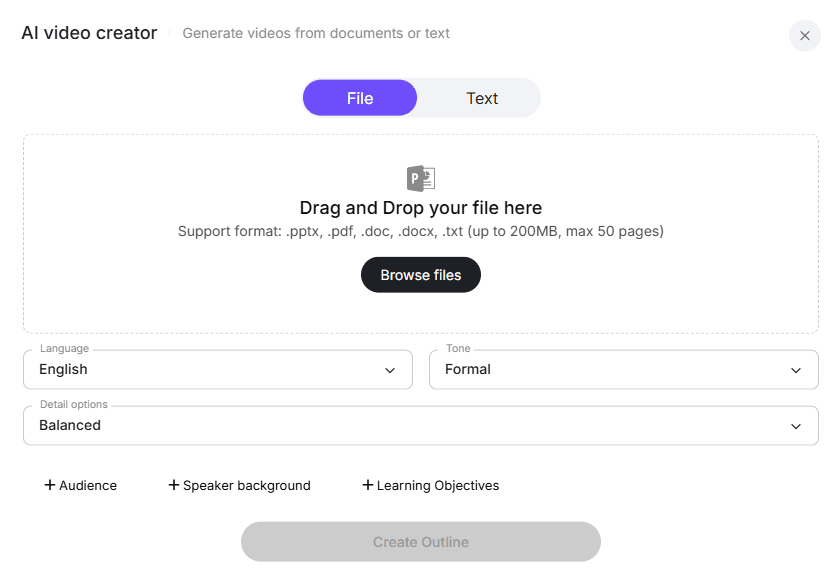
The fastest way to create a corporate video is to leverage what you already have. Using Leadde, you begin by importing your content to transform documents into AI videos.
- File Mode: Simply drag and drop your .pptx, .pdf, .doc, or .txt files directly into the platform (up to 200MB).
- Text Mode: Paste your script or raw text.
Before generating, you can quickly define the output language, the tone (e.g., Formal or Casual), and the level of detail required for your target audience.
Step 2: Select Your AI Avatar and Presentation Style
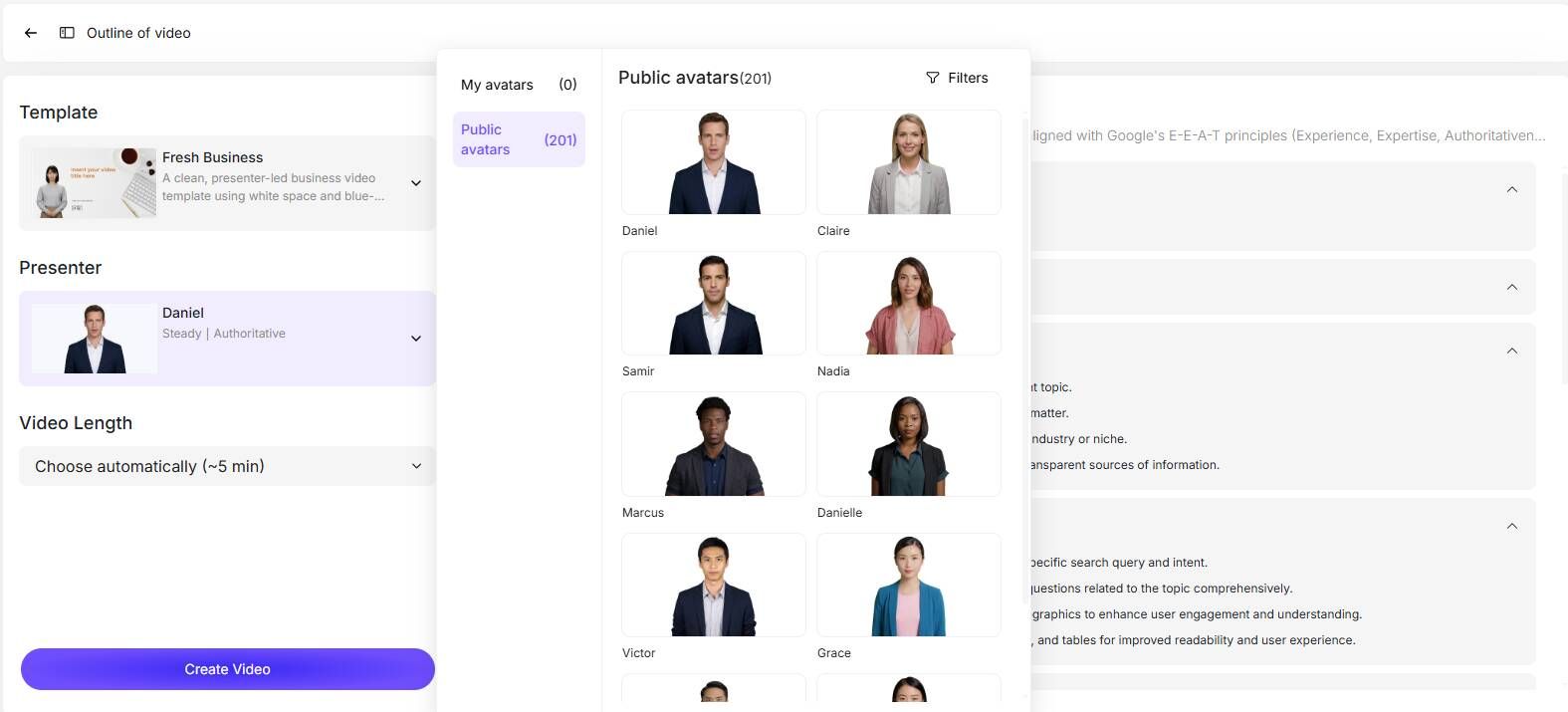
Once your content is uploaded, the next step is choosing the visual identity of your video. You no longer need to find a willing employee to present.
Leadde provides a diverse library of over 200 AI avatars. You can select a presenter whose style matches your company's culture—whether you need a professional corporate look or a more relaxed, approachable guide. You also select a video template (like "Fresh Business") to set the overall visual branding.
Step 3: Auto-Generate Scripts and Refine the Flow
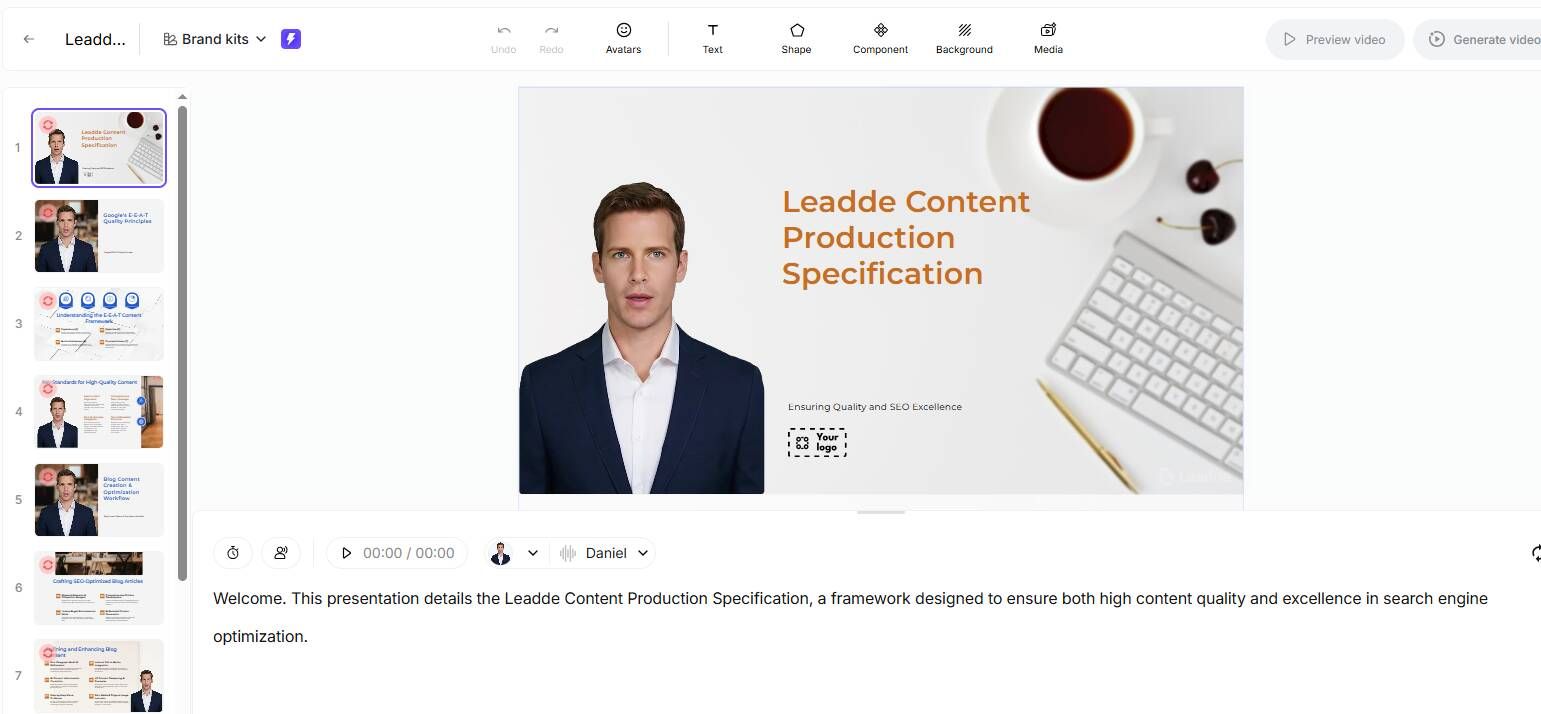
After selecting your template and avatar, the AI takes over the heavy lifting. The platform automatically generates a structured outline, breaks your document into logical scenes, and creates a precise voice-over script.
Auto Layout: The AI matches visual assets to the spoken words.
Layered Editing: If you uploaded a PowerPoint, you can edit individual text and icon layers directly within the video editor to ensure perfect accuracy.
Step 4: Finalize, Translate, and Export Your Video
The final step is review and distribution. You can adjust the video length (typically 5 to 20 minutes for internal comms) and ensure the pacing is correct.
If your company operates globally, you can seamlessly translate the draft into multiple languages with a single click before hitting the export button. Your professional video is now ready to be shared with the team.
Scaling Globally: Multilingual Localization and Interactive Features
Hyper-Localization: Translating Content into 90+ Languages Seamlessly
Global companies face a unique challenge: ensuring every employee receives the same training, regardless of their native language. Hiring local voice actors for every region is prohibitively expensive.
Leadde solves this with large-scale multilingual localization. The platform supports over 92 languages. You can instantly translate your video, including on-screen text and voice-overs, ensuring your corporate message is perfectly understood in Tokyo, Paris, and New York simultaneously.
The "Chat with Video" Trend: Turning Passive Viewing into Interactive Learning
In 2026, corporate communication is no longer a one-way street. The most significant advancement is interactive video.
Leadde introduces the "Chat with Video" feature. Viewers can type questions directly into the video player and receive contextual, real-time answers based on the video's content. This turns standard SOPs and compliance videos into interactive knowledge assets, dramatically improving employee understanding and engagement.
Corporate Video Platform Showdown: Leadde vs. Synthesia vs. HeyGen
| Feature Dimension | Leadde (Leader) | Synthesia | HeyGen |
|---|---|---|---|
| Convert Document to Video with AI | |||
| Maintains business branding. Supports auto layout and auto highlight. |
|
Based on fixed, non-editable templates. Visuals are monotonous; images and videos cannot change dynamically with content. No auto layout or auto highlight.
|
Not supported
| | Create Avatar from Photo |
Supported
|
Not supported
|
Supported
| | Voice Cloning Languages |
170+ languages with accents
|
140+ languages
|
~40+ languages (relatively fewer)
| | Starter Plan Pricing |
$19/month, unlimited videos
|
$29/month, 10 minutes per month
|
$29/month, unlimited videos
| | Interactivity |
✅ Video chat + Chat-enabled interactive avatars
|
❌ Standard one-way video output
|
❌ Standard AI video output
| | Free Plan Allowance |
10 minutes/month + 80 credits + 80+ languages
|
About 3 minutes/month (basic)
|
Free plan with limited video trials
| | Ideal Use Cases |
Individual creators, enterprise training, internal enablement, knowledge conversion, automatic document-to-video
|
Enterprise multilingual training, cross-region communication, LMS integration
|
Marketing videos, short-form content, individual creators
|
Comparing Core Features: Interactivity, Avatars, and Document Handling
When choosing an AI video maker for corporate communications, not all tools are created equal.
Leadde: Leads the market in enterprise utility. It excels in converting documents (PPT/PDF) to video while maintaining brand layouts. It is the only platform featuring "Chat with Video" interactivity.
Synthesia: Strong for multilingual training but relies on fixed, non-editable templates. It lacks automatic layout features and dynamic document handling.
HeyGen: Great for marketing and individual creators, but it does not support document-to-video conversion, making it less ideal for heavy corporate internal comms.
Pricing and ROI: How to Cut Video Production Costs by 80%
Budget is a primary concern for any internal communication strategy.
Synthesia: Starts at $29/month for only 10 minutes of video.
HeyGen: Starts at $29/month.
Leadde: Offers a highly competitive Starter Plan at $19/month for unlimited videos.
By eliminating studio rentals, actors, and manual editing, organizations using Leadde report up to an 80% reduction in video production costs and a 90% reduction in content creation time.
Best Practices for Distribution and Measuring Internal Engagement
Where to Publish: LMS, Internal Portals, and Town Halls
Creating the video is only half the battle; distributing it effectively is crucial.
For maximum reach, embed your videos directly into your company’s Learning Management System (LMS) to create walkthrough videos for structured training. For quick updates, share video links via internal portals (like SharePoint or Slack/Teams). You can also play AI-generated executive summaries during global virtual Town Halls to ensure consistent messaging.
Tracking the Right Metrics for Corporate Video Success
To prove the ROI of your corporate communications, you must track engagement.
Look beyond simple view counts. Focus on metrics like completion rates (how many employees watched to the end) and interaction rates (how many questions were asked via the "Chat with Video" feature). These data points will help you refine your scripts and improve future internal messaging.
Conclusion: Build Your Video Strategy for 2026
As of 2026, relying on expensive, slow traditional video production is no longer viable for internal messaging. To communicate effectively across a global workforce, businesses must adopt AI-driven solutions. By utilizing Document-to-Video technology, platforms like Leadde allow you to transform static PDFs and PPTs into engaging, multilingual videos in minutes.
With features like 92-language localization, 200+ AI avatars, and interactive "Chat with Video" capabilities, you can eliminate camera shyness, slash production costs by 80%, and significantly boost employee engagement. Start scaling your corporate communication video strategy today and ensure your team is always informed, aligned, and ready to execute.