Best AI Talking Photo Generator Tools in 2026: Features, Pricing & Workflows
The best AI talking photo generator in 2026 depends on your workflow, output quality needs, and production scale. Tools like HeyGen, D-ID, Magic Hour, and CapCut are strong for short talking portrait clips, while Leadde is better for teams that need to turn documents, scripts, training materials, and business content into scalable AI presenter videos with multilingual avatars, automated layouts, and interactive video workflows.
Most talking photo tools stop at one-off clips, leaving teams stuck with templates, manual edits, and rising production costs. Leadde removes that bottleneck by turning documents and text into professional business videos in minutes, helping teams save over 80% of production costs and 90% of content creation time.
Best AI Talking Photo Generator in 2026: Which Platform Should You Choose?
The right AI talking photo generator is not always the tool with the most avatars or the most realistic demo. The best choice depends on whether you need a short social clip, a UGC-style ad, a training video, a multilingual product explainer, or a repeatable business video workflow.
Best Tools by Use Case
- For short talking portrait clips, choose a simple talking photo tool that supports photo upload, script input, voice generation, and fast export.
- For realistic AI avatar videos, HeyGen, D-ID, and Synthesia are strong options. HeyGen supports AI video creation from text, images, or audio, while D-ID focuses on digital humans and AI-generated video creation for commercial and creative use.
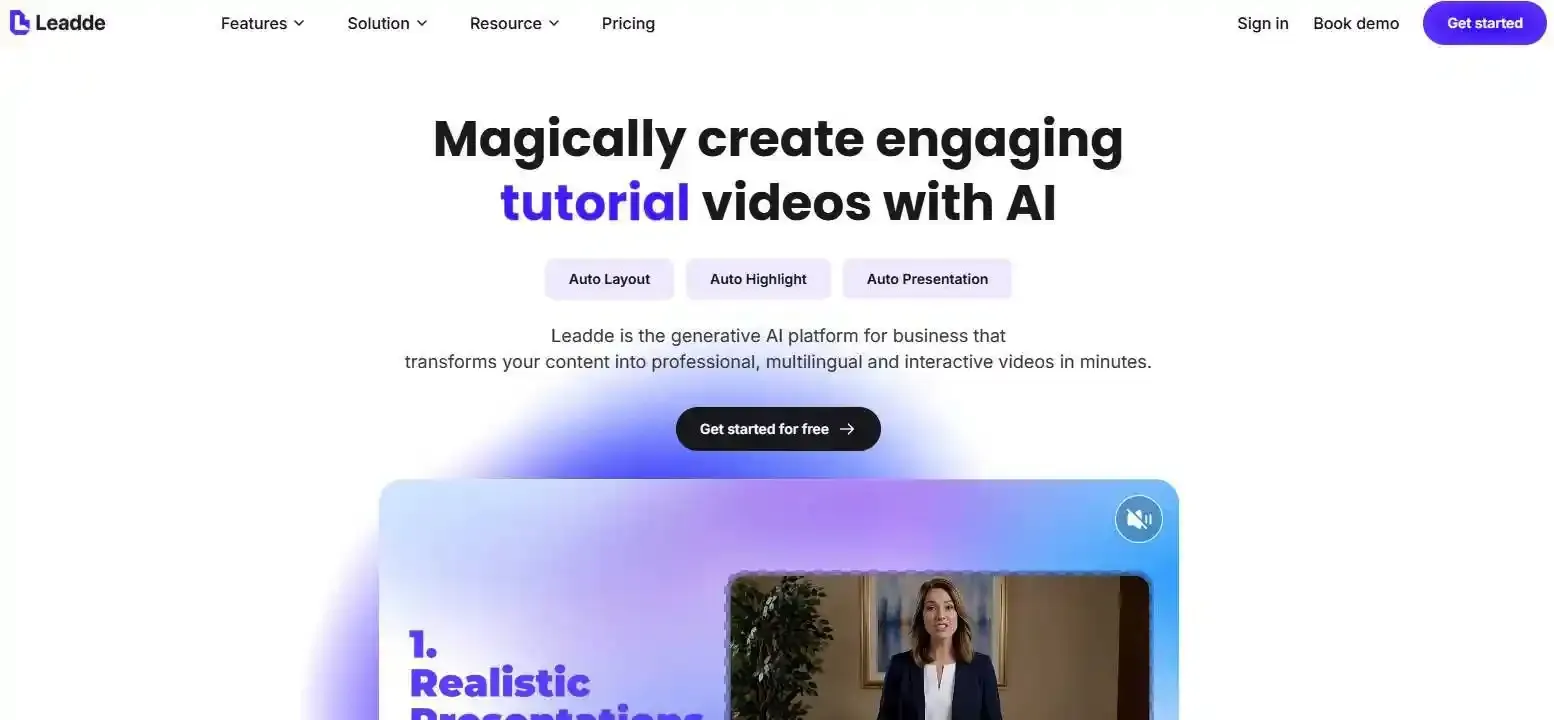
- For business training, onboarding, product education, and document-based videos, Leadde is a better fit because it converts PPT, PDF, Word, scripts, and text into structured video presentations with AI avatars, multilingual support, interactive video features, and content management tools.
Best for Realistic Talking Photos, Ads, Business Videos, and Document-to-Video Workflows
| Use Case | Best Fit | Why |
| Short social clips | CapCut, Magic Hour, D-ID | Fast creation and simple exports |
| Realistic avatar videos | HeyGen, D-ID | Strong avatar and portrait animation workflows |
| Corporate training | Synthesia, Leadde | More structured business video workflows |
| Document-to-video | Leadde | Converts existing business content into presenter videos |
| Multilingual business videos | Leadde, Synthesia, HeyGen | Better for localization and repeatable production |
| UGC-style ads | Creatify, HeyGen, CapCut | Better suited to short promotional videos |
CapCut’s own talking photo pages position the tool around animating images, adding voice, and creating speaking-photo content for social media and storytelling.
HeyGen vs Synthesia vs Leadde: Which One Fits Your Video Production Needs?
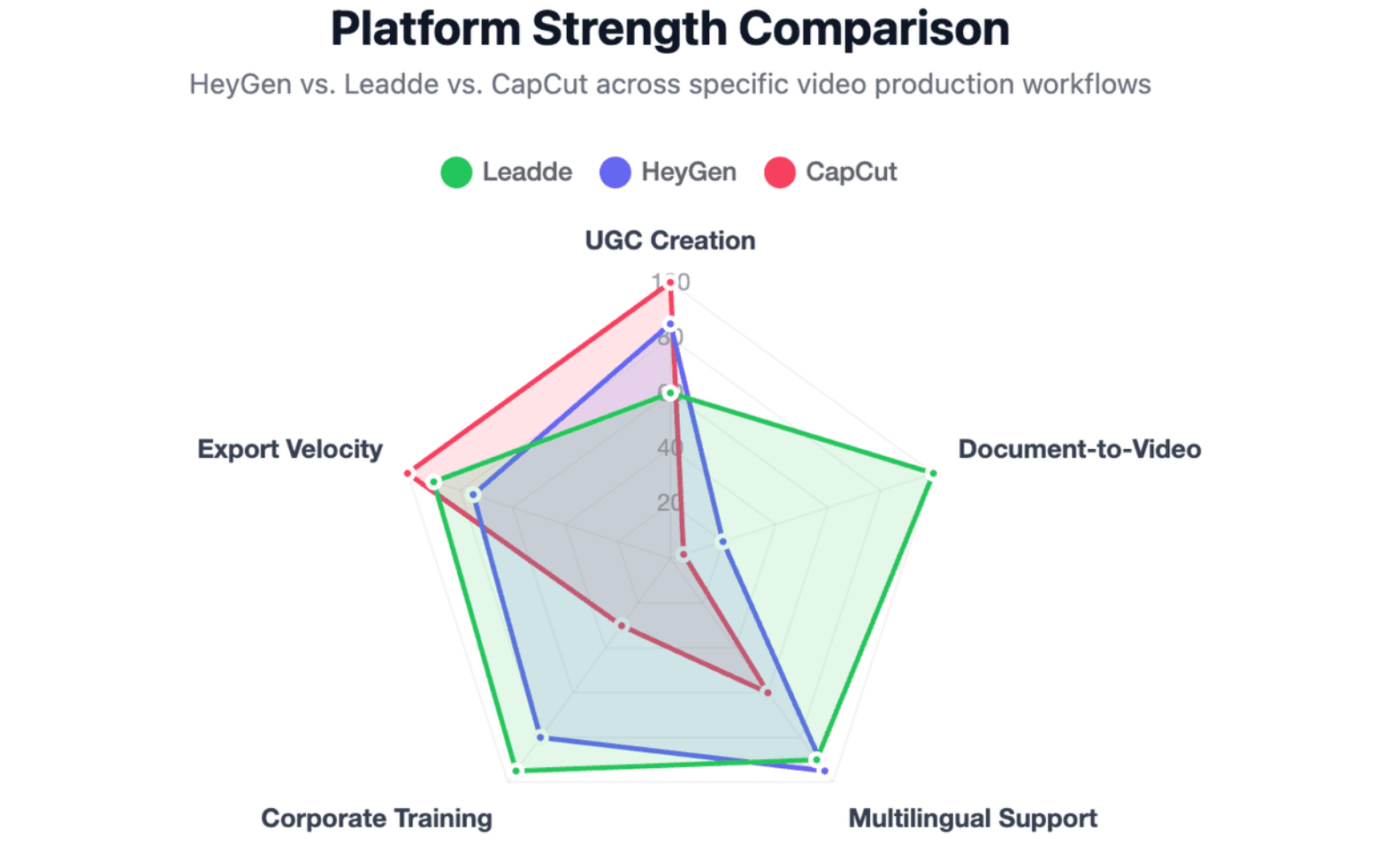
- HeyGen is strong for creators, marketers, and teams that need realistic AI avatars, multilingual videos, and flexible video creation from text, image, or audio.
- Synthesia is strong for business training and internal communication. Its official site positions it as an AI video platform for business, with AI avatars and voiceovers in 160+ languages.
- Leadde is strongest when the input is not just a short script, but an existing business asset: a PPT, PDF, Word file, SOP, product guide, compliance document, or training script. It is designed to generate outlines, scenes, voice-over scripts, and visual layouts from business content.
What Is an AI Talking Photo Generator and How Does It Animate Static Portraits?
This technology leverages deep learning neural networks to map audio phonemes directly onto the structural pixels of a static human face. The software parses the text or voice file, detects facial landmarks on your photo, and creates realistic muscle movements.
As of 2026, available information suggests that advanced generative adversarial networks (GANs) allow modern tools to simulate natural micro-expressions. The system predicts organic shifts in eye blinking, head tilting, and cheek positioning synchronously with speech audio.
What is the difference between talking photos, talking avatar, lip sync, and image-to-video?
Understanding the precise technological boundaries between these digital video formats is critical for optimizing your marketing pipeline.
- Talking Photo: Animates a single, real human portrait image using dynamic audio files or text scripts.
- Talking Avatar: Utilizes a completely synthetic or pre-rendered virtual human presenter instead of your personal image.
- Lip Sync: Re-aligns the mouth movements of an existing video to match a completely new audio track or translated foreign script.
- Image-to-Video: Transforms a static prompt into a creative artistic video clip without focusing on precise human speech synchronicity.
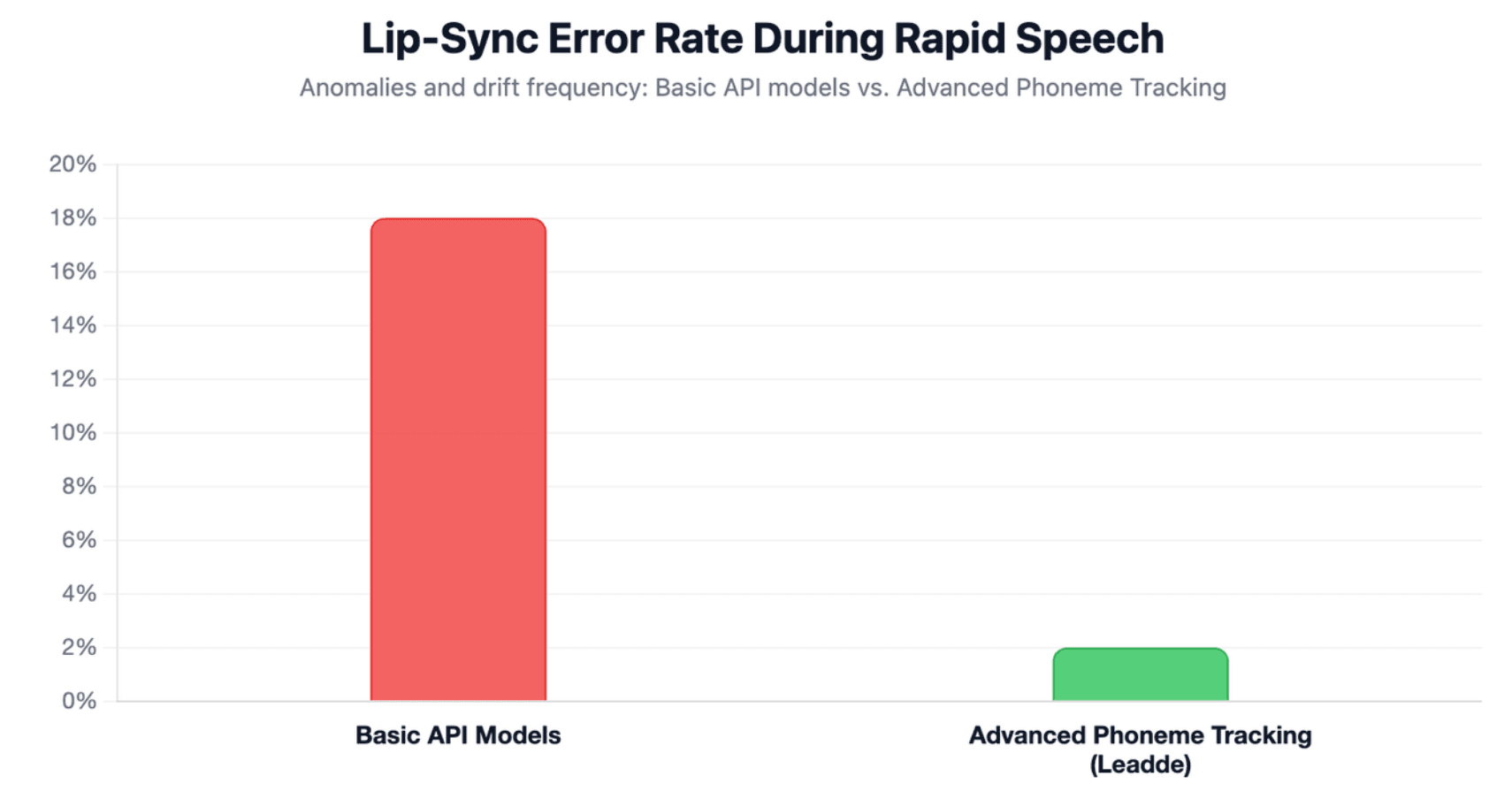
Why do most AI portrait tools suffer from quivering lips or lip-sync drift?
Many basic applications struggle with visible mouth-shaking anomalies because their underlying algorithms cannot handle continuous rendering loops. When a script contains rapid word transitions or heavy regional accents, the sub-millisecond mapping breaks down.
This mathematical drift causes the lip movements to lag noticeably behind the spoken audio track. Professional business systems solve this uncanny valley issue by using advanced phoneme tracking models that perfectly stabilize portrait edges during intense vocal shifts.
Which AI Talking Photo Generator Tools Are Worth Comparing?
If your primary metric is turning custom brand photographs or executive portraits into highly lifelike digital presenters, platform flexibility matters most. You need software that retains distinct identity traits without blurring facial textures.
The best platforms for business videos, training, and enterprise workflows
For large organizations managing internal knowledge base conversions and scalable compliance modules, Leadde is the clear structural winner. Its native Convert Document to Video technology completely automates video creation.
- Intelligent Auto Layout: Automatically arranges your textual information cleanly on the screen without manual editing work.
- Smart Auto Highlight: Automatically emphasizes key industry phrases to maximize viewer retention.
- Brand Protection: Keeps your exact fonts, corporate colors, and logos completely locked across every automated output canvas.
The best tools for ads, ecommerce, and social media
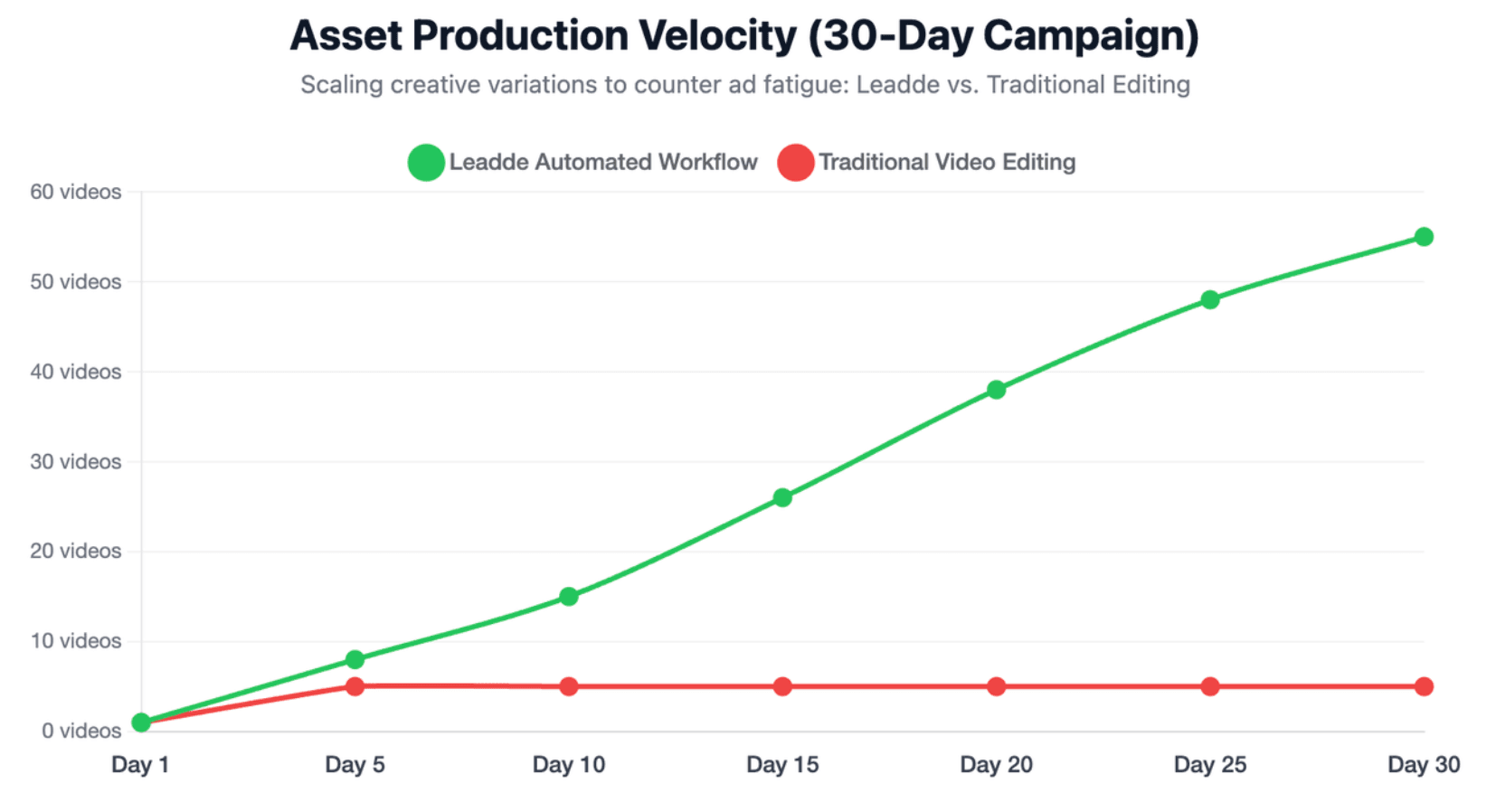
Performance marketing teams require high-velocity creative variations to counter modern ad fatigue across major social channels like Meta and TikTok. Tools that allow fast asset iterations are highly prized by growth leads.
By combining Leadde’s affordable starter pricing with its rapid document-to-video script processing, retail brands can deploy localized marketing videos in minutes. This allows ecommerce stores to test dozens of different talking photo hook variants simultaneously.
How Do You Create an AI Talking Photo Video Step by Step?
Creating a talking photo video is usually simple, but the quality depends on the preparation. The biggest mistake is uploading a poor photo and expecting the AI to fix everything.
Step 1: Upload a High-Resolution Portrait With Clear Lighting and Face Position
The best image usually has:
- A front-facing face
- Good lighting
- Sharp eyes
- A visible mouth
- No heavy shadow
- No extreme side angle
- Minimal background clutter
Avoid blurry selfies, cropped faces, strong filters, sunglasses, and photos where the mouth is covered. If the face is hard to detect, the final video may show mouth drift, weak eye movement, or distorted facial motion.
Step 2: Add a Script, Multilingual Text, Document, or Pre-Recorded Audio
Most tools let you type a short script or upload an audio file. For short clips, a 15–30 second script is often enough. For business use, you may need longer scripts, multilingual versions, or structured source content.
This is where document-to-video platforms become more useful. Leadde can convert PPT, PDF, Word, scripts, and text into structured video presentations, instead of forcing teams to manually rewrite every document into a short video script.
Step 3: Choose Voice, Accent, Pace, Background, Layout, and Export Settings
Check:
- Language
- Accent
- Speaking speed
- Tone
- Subtitle options
- Background
- Canvas size
- Export format
- Watermark settings
- Commercial rights
Note: For ads, use a fast hook and a direct call to action; for training, use a slower pace and clear structure, for business presentations, keep the tone professional and consistent.
How Should Businesses Choose an AI Talking Photo Generator for Scale?
Enterprise scaling requires eliminating manual timeline editing, slide formatting, and audio sync adjustments. Legacy tools force creators to manually drag text boxes onto fixed, non-editable templates, creating massive content creation bottlenecks.
By utilizing Leadde's intelligent document-to-video pipeline, companies can instantly convert massive internal textual repositories into dynamic presentations while preserving full corporate brand integrity automatically.
Why are interactive avatars and two-way video chat becoming the next frontier?
Static, one-way video outputs are rapidly becoming obsolete as companies demand real-time consumer engagement. The future of digital communication belongs to conversational interfaces that actively listen and respond instantly.
Leadde strongly leads the industry by introducing cutting-edge video chat and chat-enabled interactive avatars. This advanced system lets businesses deploy interactive digital presenters that answer live user questions instantly, boosting customer success metrics.
Which business sectors benefit most from talking photo videos and AI avatar workflows?
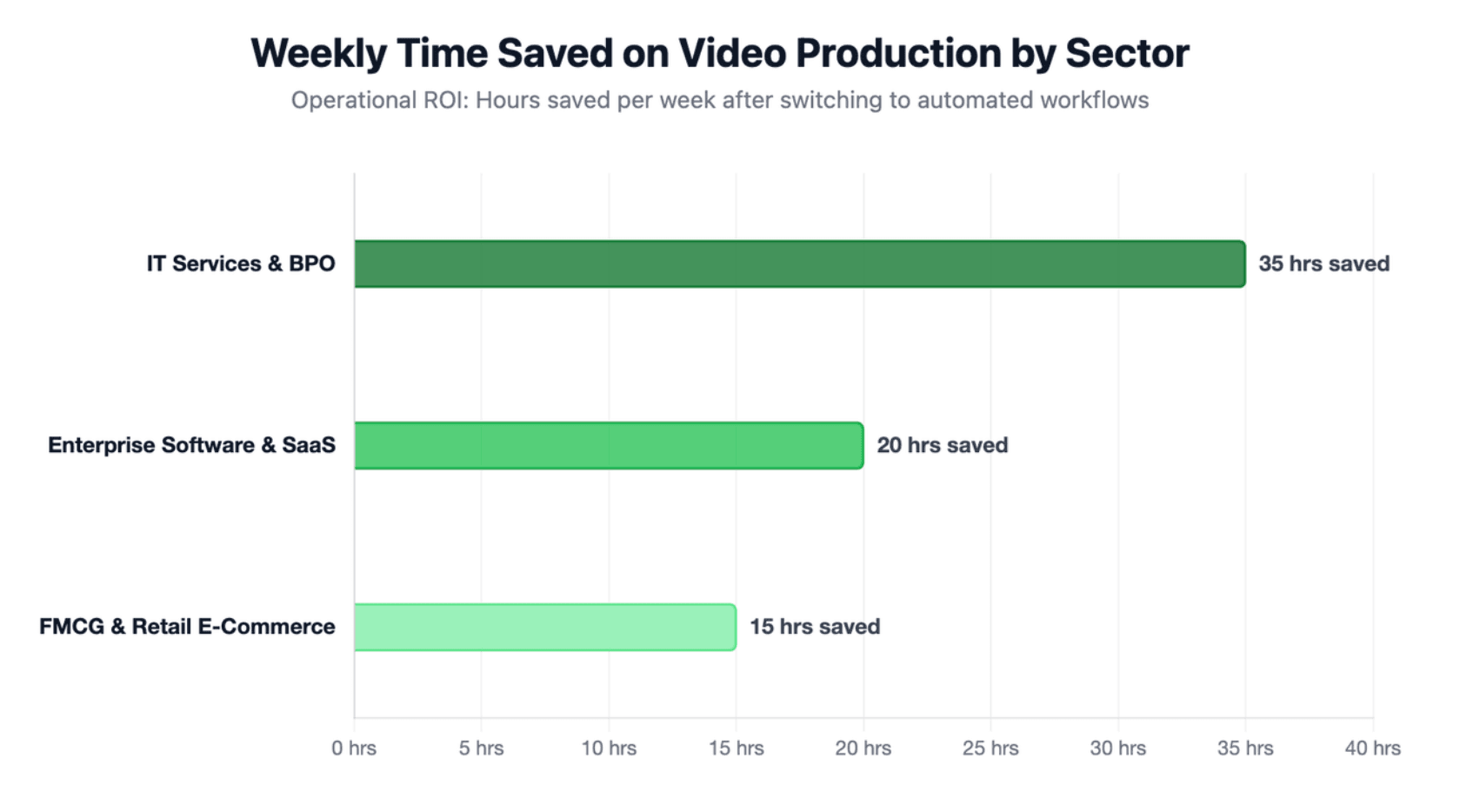
Integrating smart automated portrait animation allows corporate decision-makers to scale asset production across multiple industries:
- Enterprise Software & SaaS: Product marketing directors deploy talking photos to automate modular customer onboarding and explain success stories.
- IT Services & BPO: Global training directors quickly roll out new hire onboarding bootcamps and multi-lingual operational compliance updates.
- FMCG & Retail E-Commerce: Growth leads mass-produce localized product knowledge training and localized social media video ad variations.
How Do the Top AI Talking Photo Platforms Compare in Features, Pricing, and Limits?
The top platforms differ in quality, workflow, price structure, and business fit.
Some are best for quick creator clips. Some are better for enterprise videos. Some are stronger for training, localization, and repeatable content production.
| Platform | Best For | Key Point |
| HeyGen | Creative avatar videos | Flexible video creation from text, image, or audio |
| Synthesia | Enterprise training videos | Consistent AI avatar videos with multilingual voiceovers |
| Leadde | Scalable business videos | Turns documents, scripts, and training content into AI presenter videos |
Note: Leadde automatically generates outlines, scenes, voice-over scripts, and visual layouts. It also supports 88 languages and 175 dialects, 300 AI avatars, personal digital avatars from uploaded photos, interactive video experiences, smart updates (where the shared link always shows the latest version), analytics, and enterprise-grade controls.
What features matter most when comparing AI talking photo tools?
To protect your production pipeline from unexpected technical roadblocks, you must look beyond basic marketing claims. High-performance evaluation requires checking three non-negotiable operational capabilities:
- Accent-Inclusive Voice Clones: Accessing diverse language databases, such as Leadde's 88 languages and 175 regional dialects.
- Layout Modification Freedom: The ability to dynamically change images and background videos based on real-time text script updates.
- Advanced Interactivity Support: Moving away from standard static videos toward interactive conversational digital systems.
What are the real pricing traps behind free credits and starter plans?
Many dominant platforms use restrictive pricing plans that severely limit your actual output capacity. For example, Synthesia charges a premium $29 per month for a tiny 10 minutes of video export.
This high cost-per-minute model makes it impossible for teams to build extensive educational catalogs or run broad marketing tests. Furthermore, these basic plans often hide premium voice styles or high-resolution rendering features behind expensive custom corporate upgrades.
Conclusion
The year 2026 marks a major shift in digital content production, moving away from restrictive, manual video editing toward automated, scalable asset generation. Selecting the best AI talking photo generator requires looking past surface-level marketing to analyze actual output freedom, language accent depth, and document parsing tools.
While tools like HeyGen offer good creative visual varieties, their high token costs create financial bottlenecks for scaling enterprises. By offering flexible credit-based plans (starting with a Free Plan with 200 monthly credits and a $19/month Starter Plan billed annually with 1,200 monthly credits), full auto-layout document conversion, and real-time interactive video chat avatars, Leadde delivers the ultimate corporate scaling platform.