
AI Medical Education Video Maker


Any course file, clear and memorable.
Onboarding walkthrough
Turn compliance documents, safety protocols, or regulatory guidelines into structured certification videos. Let an AI avatar walk employees through each requirement clearly — reducing legal risk and keeping teams audit-ready.

Cleanroom protocols
Explains the behavior guidelines and operational requirements for cleanrooms, ensuring employees adhere to standards and improve work efficiency and safety.

AR-700 operation training
Introduces the operation process and safety guidelines of the AR-700 precision assembly robot, helping employees master proper operating techniques.

Marketing insights
Trusted by the world's leading brands







Why Choose Leadde for Medical Education Videos?
Any Course File, a Video in Minutes
Upload anatomy slides, physiology PDFs, or lecture notes (.pdf, .pptx, .doc, .docx, .txt up to 200 MB). Leadde's AI Video Creator builds a structured teaching video automatically — set the level of detail from Summary to Comprehensive.
Auto-Generated Scripts and Highlights
Leadde analyzes the source to write a clear, structured narration with key terms highlighted on screen. Choose an Explanatory or Formal narrative style and a training objective so the video matches your curriculum.
Lifelike Multilingual Presenters
Pick from 200+ built-in avatars or clone your own with Photo Avatar. The Expressive IV Engine adds natural expressions, while 88 languages and 175 dialects make lessons accessible to international medical students.
Built for Comprehension
Add captions in 9 styles, organize source material in the Knowledge Base, and let students ask follow-up questions through the interactive Q&A panel on the shared video.
How to Make a Medical Education Video with Leadde
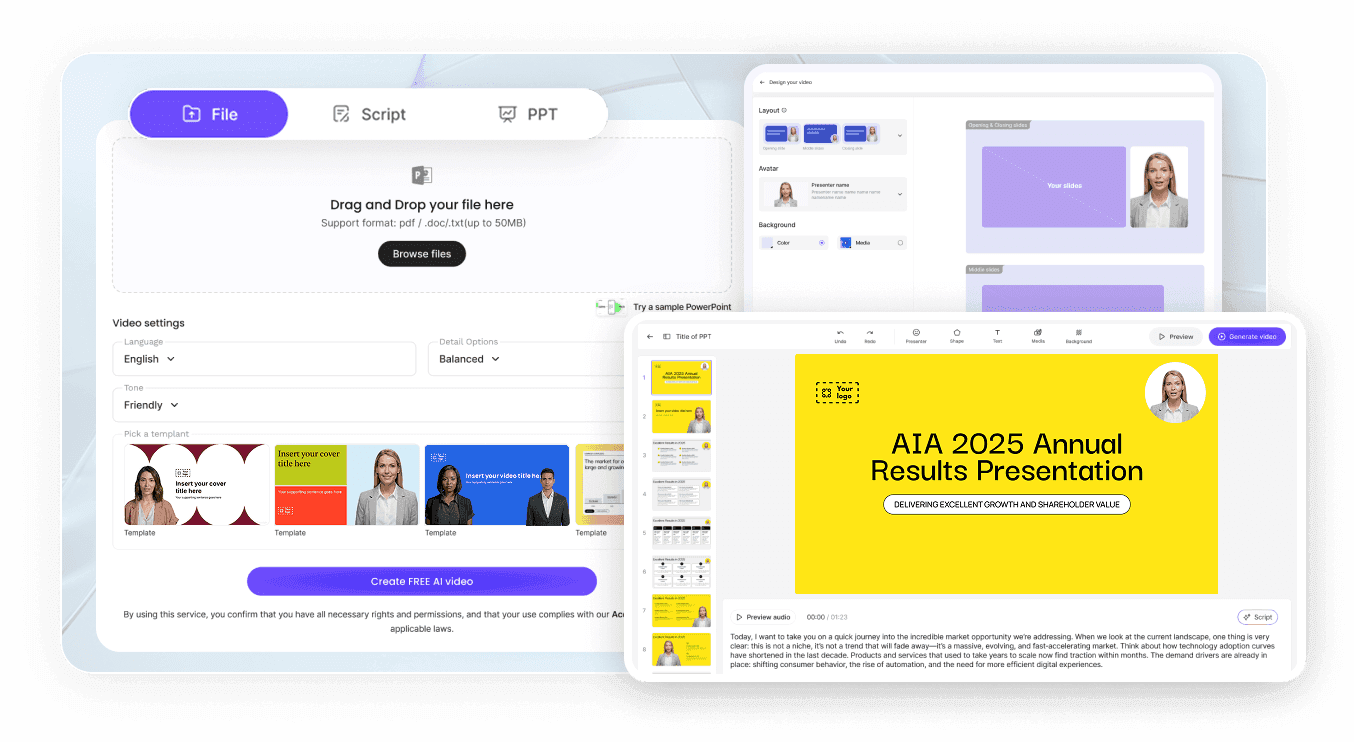
Step 1: Upload Your Course Material
Open the AI Video Creator and upload your anatomy, physiology, or pathology file (up to 200 MB), or paste your lecture text to start.
Step 2: Set Language, Detail, and Avatar
Choose the target language, narrative style, and level of detail, then select an avatar to present. Refine the auto-generated outline until it fits your syllabus.
Step 3: Generate and Share
Preview, generate, and export HD MP4 in 16:9, 1:1, or 9:16 — or share a password-protected link so students can watch and ask questions anytime.
Medical Education Video Scenarios & Examples
Anatomy Lessons
Turn labeled anatomy slides into narrated walkthroughs so students can replay each body system at their own pace.
Physiology Concepts
Convert dense physiology PDFs into step-by-step explainers with animated highlights on every key mechanism.
Clinical Case Studies
Transform written case reports into structured video case studies that guide students through diagnosis and reasoning.
Exam and Board Prep
Summarize study guides into focused review videos with on-screen highlights for high-yield facts.
Flipped Classroom
Assign pre-class concept videos so in-person time can focus on discussion and clinical application.
CME and Faculty Updates
Repackage continuing medical education slides into concise, multilingual updates for busy clinicians.
Frequently Asked Questions
It turns teaching documents — anatomy slides, physiology PDFs, lecture notes — into narrated explainer videos automatically. Leadde's AI Video Creator writes the script, builds the layout, and adds an avatar presenter.
Leadde's AI extracts the key points, structures the content, and optimizes the flow for easier understanding. You can upload files up to 200 MB and set the level of detail from Summary to Comprehensive.
Yes. Leadde supports 88 languages and 175 dialects. Choose a target language and the script, narration, and captions are generated for that audience.
Yes. On a shared video, students can ask questions in the interactive Q&A panel and receive instant answers drawn from your content.
Yes. Leadde's Free Plan lets you upload a file and generate a medical education video preview — no credit card required.
Create Your First Medical Education Video Free
